Table of contents
- What is antivirus software?
- 1. Definition and core functions of antivirus software
- 2. Detection and protection techniques of antivirus software
- What is anti-spyware software?
- 1. How anti-spyware apps work
- 2. The role of anti-spyware in privacy protection
- What’s the difference between antivirus and anti-spyware?
- Conclusion
What is antivirus software?
Antivirus software is your first line of defense against digital attacks. Its main job is to identify and neutralize malware (any software developed to cause harm).
1. Definition and core functions of antivirus software
An antivirus runs in the background, scanning every file you open, every attachment you download, and every USB drive you plug in. The moment it detects a threat, it stops the code from executing.
- It stops ransomware. Ransomware scrambles your files with military-grade encryption and demands payment. Antivirus spots the encryption process kicking in and kills the program before you lose your photos and documents.
- It blocks worms and trojans. Worms copy themselves to other computers on your network. Trojans open backdoors into your system. Antivirus identifies these and deletes them so hackers can't remotely control your device.
- It prevents system corruption. Some malware exists purely to destroy data, deleting critical system files or corrupting your hard drive to make your computer unusable. Antivirus locks these files down so malicious code can’t touch them.
Note
While people use the terms interchangeably, there is a technical difference between malware and viruses. A virus is just one type of threat, but modern antivirus tools fight a much wider array of attackers.
2. Detection and protection techniques of antivirus software
Antivirus software layers several detection methods to catch threats. It analyzes code inside your files and watches how programs behave while they run.
Some of the main methods of detection include:
- Signature detection. Security companies have databases of code signatures from known viruses. When you download a file, your antivirus scans it against this database. A match triggers an immediate block. Fast and accurate for known threats, but it can’t catch a brand-new virus on its own.
- Heuristic analysis. To stop threats without a signature yet, antivirus apps watch for suspicious patterns and commands. If a word processor includes instructions to delete your system folders or record your keystrokes, it flags the program as malicious.
- Behavioral monitoring. Heuristics examine code before it runs. Behavioral monitoring watches programs while they’re active. If an app tries to encrypt your documents or tamper with your operating system registry, antivirus steps in and stops it.
These features often come down to the difference between free virus protection vs paid software. Paid versions typically include more advanced behavioral monitoring and sandboxing, as well as sealed environments for safely testing suspicious files.
What is anti-spyware software?
Anti-spyware programs detect and remove surveillance software from your device. The difference between antivirus and anti-spyware is that an antivirus stops malware, while anti-spyware targets hidden applications that steal your personal data.
Here’s what that means in more detail.
1. How anti-spyware apps work
Anti-spyware focuses on behavioral monitoring and heuristics to detect unauthorized surveillance. It assumes that the threat is already running and looks for the mechanisms programs use to capture your data.
Here’s how:
- It monitors your system. Spyware hooks into your system to do its job. A keylogger attaches itself to your keyboard driver to read your typing. Anti-spyware scans active processes to find software latched onto input channels without a legitimate reason.
- It detects data transfers. Anti-spyware watches your network traffic for suspicious connections, working with your firewall to catch anything unusual. If a background process tries to upload an encrypted file to an unknown server, it blocks the connection and flags the program.
- It identifies potentially unwanted programs (PUPs). Plenty of spyware tools market themselves as employee monitoring or parental control software, slipping past antivirus filters. Anti-spyware companies keep lists of these apps and flag them so you can check whether you installed them yourself or someone planted them.
- It scans for persistence mechanisms. Spyware needs to launch every time you turn on your computer. It does this by modifying your system registry or startup folders. If a program tries to add itself to your startup list without permission, anti-spyware blocks the change before the spyware can establish a permanent foothold.
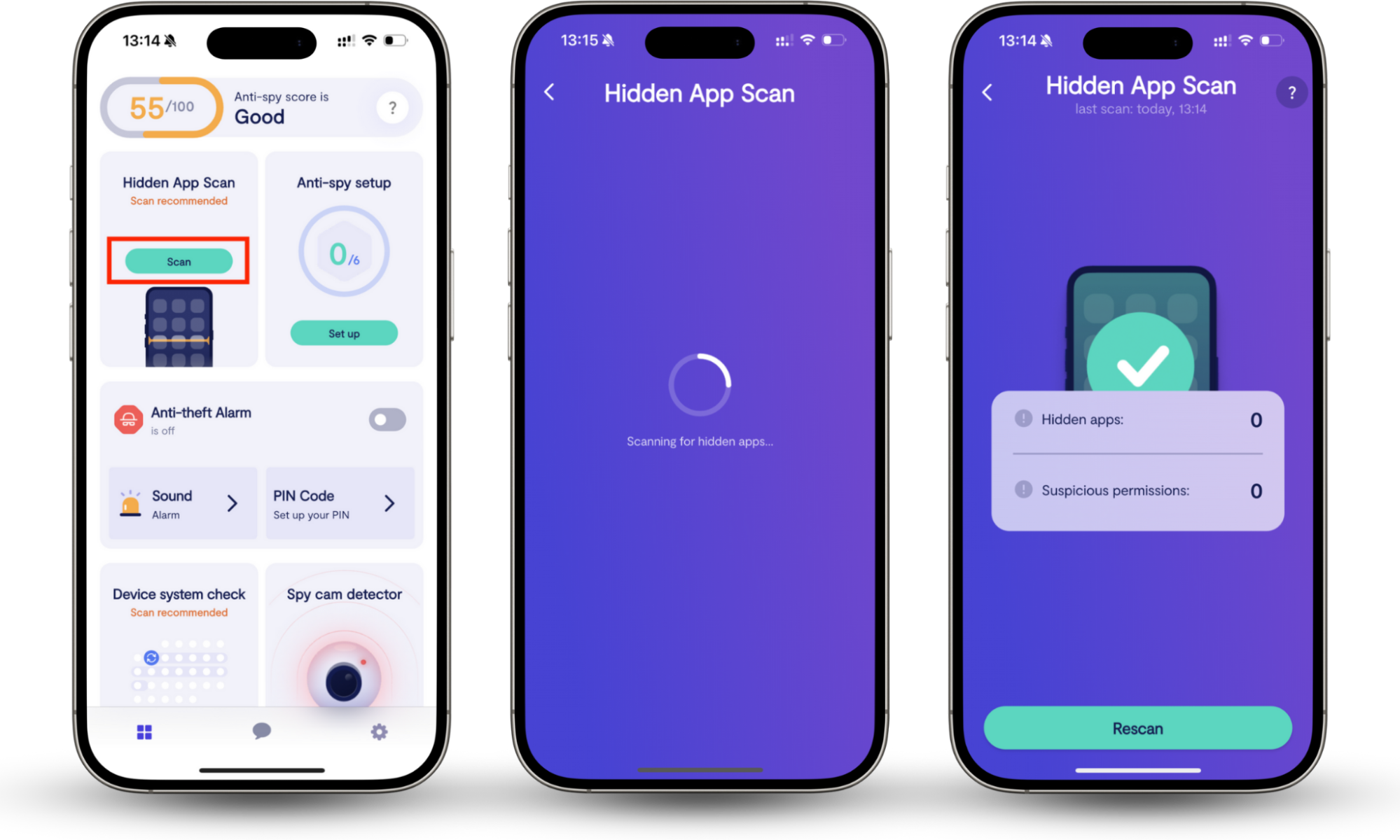
For example, Clario Anti Spy scans your device for hidden apps, spyware, and apps that have intrusive permissions.
Here’s how to run the Hidden app scan:
- Open Clario Anti Spy and sign in.
- Under Hidden app scan, press the Scan button to start the scan.
- If found, Clario Anti Spy will show you how to restore your privacy in mere moments.
2. The role of anti-spyware in privacy protection
Running antispyware keeps you protected from serious threats, like:
- Identity theft. Cybercriminals use spyware to build a profile on you, then use your details to apply for loans, medical insurance, or worse, all in your name.
- Financial fraud. Keyloggers and banking trojans record your login details the moment you type them. Once a scammer has your bank credentials, they can drain your accounts or make purchases without your knowledge.
- Account takeovers. Spyware captures your passwords. Attackers can lock you out of your email and social media accounts, then use those accounts to scam your contacts.
- Stalking and harassment. Stalkerware tracks your location, messages, and calls in real time. It’s often installed by someone the victim knows, which is why it’s so hard to spot without the right tools.
Here’s a real example. A user noticed fast battery drain on their phone and feared someone was spying on them. They reached out to our support agent, Elara, who walked them through Clario's Anti-spy setup. Within minutes, they had locked down calls, messages, app permissions, and social media, and had their peace of mind back.
Find out how to know if someone is spying on your computer, so you can act fast.
What’s the difference between antivirus and anti-spyware?
They sound similar, but they solve two very different problems. Here’s how they stack up.
| Antivirus | Anti-Spyware | |
| Targets | Ransomware, worms, viruses | Keyloggers, trackers, stalkerware |
| The attacker wants to | Hijack, spread, or destroy your files | Steal your data without you knowing |
| How it catches threats | Stops unauthorized code from running | Stops unauthorized data from leaving your device |
| If it fails | The attacker locks, corrupts, or deletes your files | The attacker exposes your passwords, identity, and bank details |
One protects your machine. The other protects your life. You need both.
Conclusion
Antivirus protects your machine from damage. Anti-spyware protects your personal data from being stolen. Rely on just one, and you’re leaving a gap in your defenses.
The good news? You don’t have to figure this out on your own. Clario Anti Spy does the hard work for you, scanning your device, flagging hidden apps, and cutting off spyware before it gets a chance to steal your data.
To secure your devices, run Clario’s Anti-spy setup. It takes a few minutes and shows you how to set up your phone to make it much harder for spyware to get its hooks in.