Table of contents
- Why does website shopping safety matter?
- Fundamental checks before you shop online
- 1. Secure connection: HTTPS and padlock icon
- 2. Domain authenticity: avoid domains with typos and look-alike URLs
- Evaluating a website's professionalism and transparency
- Check the reputation and social proof of an online shop
- Use of external safety tools and resources for safe online shopping
- When might a shopping website be a scam?
- Conclusion
Online shopping fraud cost Americans over $10 billion in 2023, according to the FTC, and fake shopping sites are one of the fastest-growing scam types. One wrong click can hand your payment details straight to a cybercriminal.
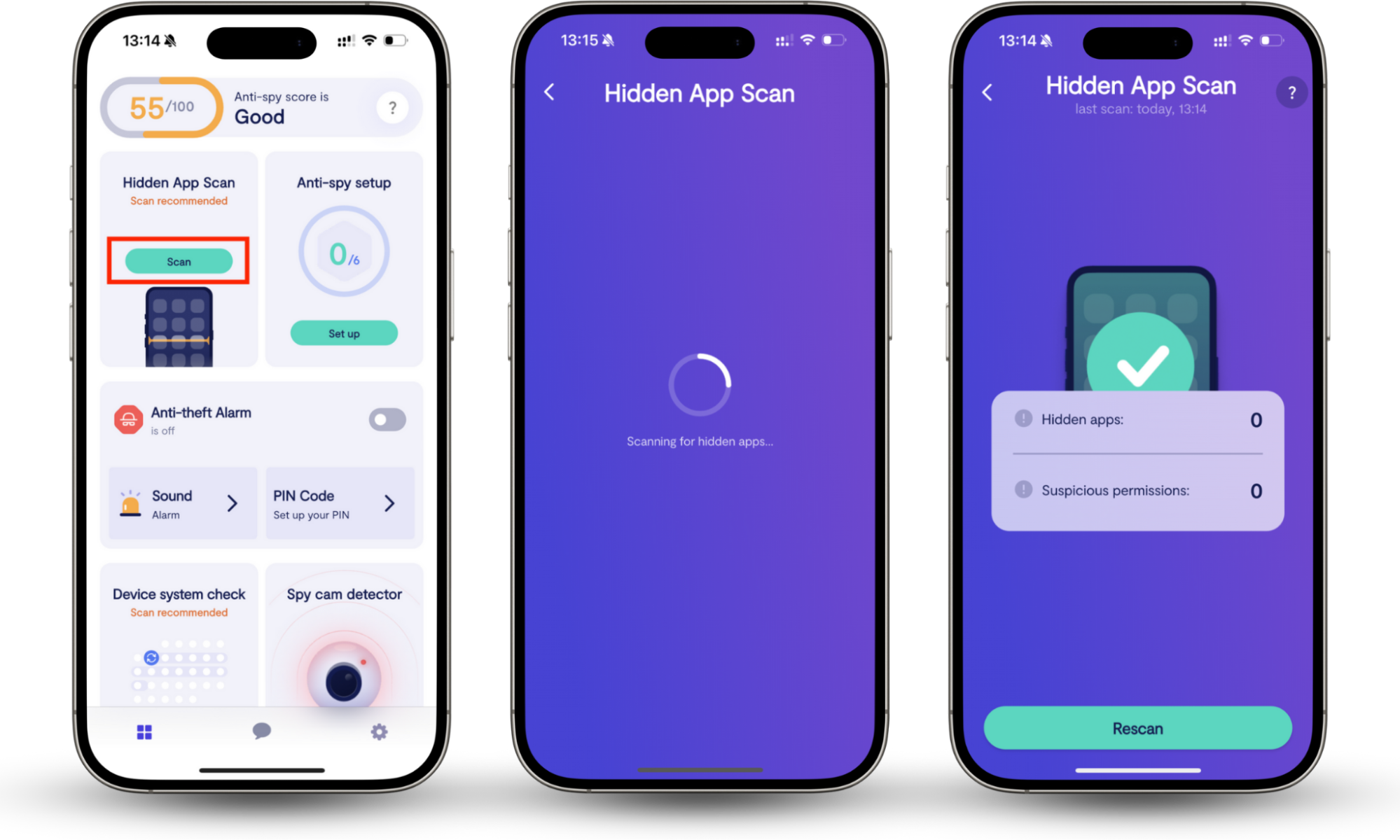
Even on sites that look safe, your device can fall victim to hidden trackers, spyware, or stalkerware that record your payment details and browsing activity. Clario Anti Spy is developed by Clario Tech and designed to detect and remove spy threats from your device. Its Anti-spy setup scans your device for monitoring software, checks whether your microphone and camera are being accessed without your knowledge, and alerts you to suspicious activity in real time. Running a scan before and after you shop on unfamiliar sites is a practical, proactive habit.
Why does website shopping safety matter?
Website shopping safety matters because fake online stores steal your payment details, personal data, and money. Fraudulent sites can lead to identity theft, unauthorized charges, or malware-laden downloads. According to the FBI’s IC3, non-delivery and non-payment fraud rank among the top reported cybercrime categories in the US every year.
Fake shopping websites aren't just a minor inconvenience. They're a genuine threat to your finances and identity. When you enter payment details on a fraudulent site, that information goes straight to cybercriminals who use it for identity theft, unauthorized purchases, or selling on the dark web.
Beyond financial loss, fake stores often ship counterfeit goods, nothing at all, or malware-laden downloads disguised as order confirmations. According to the FBI's Internet Crime Complaint Center (IC3), non-delivery and non-payment fraud are consistently among the top reported cybercrime categories in the US. Knowing how to identify fake shopping websites before you buy is one of the simplest and most effective ways to protect yourself online.
Online shopping scams don’t just happen on fake websites. Even legitimate-looking stores can expose your data if your device is already compromised.
Tip
Before you enter your payment details, it’s worth checking whether your phone is actually safe.
Clario Anti Spy helps you detect hidden threats that could monitor your activity while you browse or shop online. It gives you visibility into what’s happening on your device—something most users never check.
Here’s how to secure your device before shopping online:
- Download Clario Anti Spy and sign in.
- Open Hidden app scan and run a full device scan.
- Review any apps flagged as suspicious or unfamiliar.
Now that your device is secure, let’s look at how to identify whether a shopping website itself is legit.
Fundamental checks before you shop online
To verify a shopping website is safe before you buy, always check for HTTPS in the address bar, look for a padlock icon, examine the full domain name for typos or suspicious additions, and compare it against the brand’s official site. These fundamental checks take under a minute and catch most fraudulent sites.
Before you enter any personal or payment information on an online store, run through these two baseline checks. They take less than a minute and catch most fraudulent sites.
To check if a shopping website is safe, start with these fundamentals:
- Look at the URL in your browser's address bar.
- Confirm the address begins with https:// (not http://).
- Check for a padlock icon to the left of the URL.
- Read the full domain name carefully for typos or unusual additions.
- Compare the domain to the brand's official website if you arrived via an ad or email link.
1. Secure connection: HTTPS and padlock icon
A secure connection means the site uses HTTPS encryption to protect data between your browser and the server. Look for “https://” and a padlock icon in the address bar before entering any personal or payment details. A padlock confirms encryption is active, but it does not verify the site’s legitimacy, because scammers can obtain SSL certificates too.
The S in HTTPS stands for secure. It means the connection between your browser and the website is encrypted. Any legitimate online store that accepts payments must use HTTPS. If you see “http://” without the S, leave immediately.
The padlock icon confirms the site has a valid SSL/TLS certificate. However, a padlock alone doesn't mean a site is trustworthy. It only means the connection is encrypted. Scammers can and do obtain SSL certificates for fake sites. The padlock is a necessary, not a sufficient, condition.
Watch for these warning signs:
- A padlock with a warning triangle indicates a certificate issue.
- A crossed-out padlock: the connection is not secure.
- No padlock at all on a checkout page: never enter payment details here.
2. Domain authenticity: avoid domains with typos and look-alike URLs
Domain authenticity means confirming the site’s URL exactly matches the real brand: no added words, hyphens, or unusual extensions. Fraudulent sites use typosquatting and domain spoofing to mimic trusted stores. Always check the full domain in the address bar, not just the logo, and use a Whois tool to verify the site’s registration age.
One of the most common tactics fraudulent shopping sites use is registering domains that look almost identical to well-known stores. These are called typosquatting or domain spoofing: think amazon-deals-m.com, bestbuy-deals.net, or nike-official-store.com.
Always check the full domain, not just the logo or page design. A site can be copied pixel-for-pixel, but the domain will always give it away. Use a domain-age checker like Whois Lookup to see when the site was registered. If a major retailer has a domain that's two months old, that's a serious red flag.
Quick domain checks:
- The domain matches the brand name exactly (no added words like official, deals, or store).
- The extension is appropriate (.com, .co.uk. Be cautious with unusual TLDs like .xyz or .shop for unknown brands).
- The domain is more than a year old.
Evaluating a website's professionalism and transparency
A legitimate online store looks polished and professional. It provides complete contact details, a clearly written return policy, standard payment options, and a detailed privacy policy. Poor grammar, blurry images, inconsistent fonts, or vague policies are warning signs that a site may be fake or untrustworthy.
Once you've cleared the technical checks, look at the site itself. Legitimate online stores invest in their web presence, and it shows.
Signs of a trustworthy store:
- Contact information is complete. A physical address, phone number, and email are listed and functional. Scam sites usually provide only a contact form or nothing at all.
- Return and refund policy is clearly written. If you can't find a policy, or if it reads as vague and unprofessional, treat that as a warning sign.
- Grammar and design are polished. Fake stores are often built quickly and cheaply: look for typos, blurry images, inconsistent fonts, or layouts that feel off.
- Payment options are standard. Legit stores accept major credit cards and established services like PayPal. Be very cautious if a site insists on wire transfers, cryptocurrency, or gift cards only.
- Privacy policy exists and is detailed. A real business explains how it handles your data. A one-sentence policy or a missing page is a major concern.
Check the reputation and social proof of an online shop
To check an online shop’s reputation, search for the store name plus "reviews" or "scam" on Google, and browse third-party sites like Trustpilot, Sitejabber, and the BBB. Look for specific, detailed reviews: generic five-star ratings with no content are a common sign of fake feedback. Verify that the shop has active, real social media profiles.
Even if a site looks legitimate at first glance, its reputation elsewhere on the internet will tell you more than any on-page design element.
Here's how to verify a shop's reputation:
- Search for the store name + reviews on Google and check third-party sites like Trustpilot, Sitejabber, or the Better Business Bureau (BBB).
- Look for reviews that mention specific products and experiences: generic five-star reviews with no details are often fake.
- Check for complaints or scam reports on consumer protection sites.
- Search for the store name + 'scam' or 'legit' to surface community warnings.
- See if the store has active, real social media profiles, not just placeholder pages.
You should also know that popular platforms have their own legitimacy questions. For example, many shoppers wonder if Etsy is legit or question newer marketplaces. The platform itself may be genuine, but individual sellers within it may not be.
Similarly, if you're wondering whether Temu is a legit site, the answer requires understanding what the platform is and the risks it carries, which is a different question from whether the site is a straightforward fraud.
Use of external safety tools and resources for safe online shopping
Free external tools let you quickly verify whether a shopping website is safe before you enter any personal details. Google Safe Browsing, URLVoid, Scamadviser, Whois Lookup, and VirusTotal all check different aspects of a site’s trustworthiness: from malware flags and security database hits to domain registration history and trust scores.
You don't have to rely on your own eyes alone. Several free and reliable external tools can quickly tell you whether a shopping website is safe to use.
- Google Safe Browsing. Transparency Report (transparencyreport.google.com). Paste any URL to check if Google has flagged it as dangerous.
- URLVoid (urlvoid.com) checks a site against dozens of security databases simultaneously.
- Whois Lookup (whois.domaintools.com) reveals who registered a domain, when, and where.
- Scamadviser (scamadviser.com) gives a trust score and highlights common scam signals.
- VirusTotal (virustotal.com) scans URLs and files for malware.
If you use mobile apps to shop, it's worth checking whether those apps are trustworthy, too. Our guide on how to check if an app is real or fake walks through the signs of a fake shopping app in detail.
When might a shopping website be a scam?
Some red flags aren't always obvious at first, but once you know what to look for, they're hard to miss. Here are the clearest warning signs that a shopping website might be a scam:
- Prices are unrealistically low. If a brand-new iPhone is listed at $89, that's not a deal, it's a trap.
- There's no secure checkout. If the payment page doesn't have HTTPS, never proceed.
- The website was recently created. Domain registration dates under six months old are suspicious for stores claiming to be established businesses.
- Customer reviews are absent, all five stars, or posted on the same day. Genuine review patterns look organic and varied.
- Contact details don't work. Send a test email or try calling before purchasing. If nothing comes back, that's a major red flag.
- The site pushes urgent purchase pressure. Fake countdown timers, only-1-left warnings, and flash-sale pressure tactics are manipulation tactics.
- Your browser or security software warns you. Never override a browser warning on a shopping site.
- Payment is requested via wire transfer, cryptocurrency, or gift card. Legitimate retailers don't ask for these.
Note
If you've already entered your details on a suspicious site, act immediately: contact your bank to freeze your card, change your passwords for any accounts that share those credentials, and run a spyware scan on your device.
Conclusion
Knowing how to check if a shopping website is legit comes down to a handful of consistent habits: verify the HTTPS connection, scrutinize the domain, research the store's reputation independently, and use free external tools when you're unsure. The more unfamiliar a site is, the more checks you should run before buying.
Fake online stores are increasingly sophisticated, but so are the tools available to spot them. Add Clario Anti Spy to your routine to make sure your device isn't leaking your data to anyone watching in the background.