Table of contents
- What is Android System Intelligence
- Android System Intelligence privacy and data processing
- Is Android System Intelligence spy app
- How to control or disable Android System Intelligence
- Conclusion
What is Android System Intelligence
Android System Intelligence is a core system app that enables on-device machine learning to help your phone learn from your usage patterns and offer helpful shortcuts.
It powers features like Live Caption (providing subtitles for audio), Smart Reply (suggesting responses in messages), and Now Playing (identifying songs nearby). It also helps with screen attention, so that your screen always stays on while you look at it.
Android System Intelligence privacy and data processing
Many users worry because they see Android System Intelligence accessing their location, microphone, or text messages. Although these permissions may seem intrusive, the app requires them to function properly.
As mentioned, Android System Intelligence uses the Private Compute Core. This is a secure environment on your phone that isolates sensitive data from the rest of the operating system and the internet. What else does Android System Intelligence offer:
- Local processing: When the app analyzes your screen to find a phone number you want to copy, it does this entirely on your device.
- No cloud uploads: The app will never upload your text messages or voice recordings to the cloud for analysis.
- Network access: While the app has network permissions, it uses them primarily to download updated recognition models (like new song databases for Now Playing), rather than uploading your personal data.
Since these new apps are so confusing, it’s more important than ever to find out how to know if your phone is being tracked.
Is Android System Intelligence spy app
Android System Intelligence is not a spy app.
A spy app (also known as stalkerware) hides on a device, collects sensitive data without consent, and sends it to a third party. Android System Intelligence does the opposite:
- It’s transparent: You can see it in your apps list and view every permission it holds.
- It’s verified: Google has signed that app, and it’s a critical part of the Android ecosystem.
- It protects data: Its architecture specifically prevents data from leaving your device through the Private Compute Core.
The confusion arises because the app runs in the background, uses battery power, and has AI features. This is normal behavior for a service like this. However, it does beg the question: Is AI spying on us?
If you are concerned about actual threats on your phone, use Clario Anti Spy to check for malicious software:
- Open Clario Anti Spy and select Scan under the Hidden app scan feature.
- Clario will run a full scan of your mobile device. This looks for signs of spying apps, like spyware and parental control apps that someone may have secretly installed.
- Review the results. The tool analyses all requested app permissions, helping you to detect suspicious ones that don’t belong.
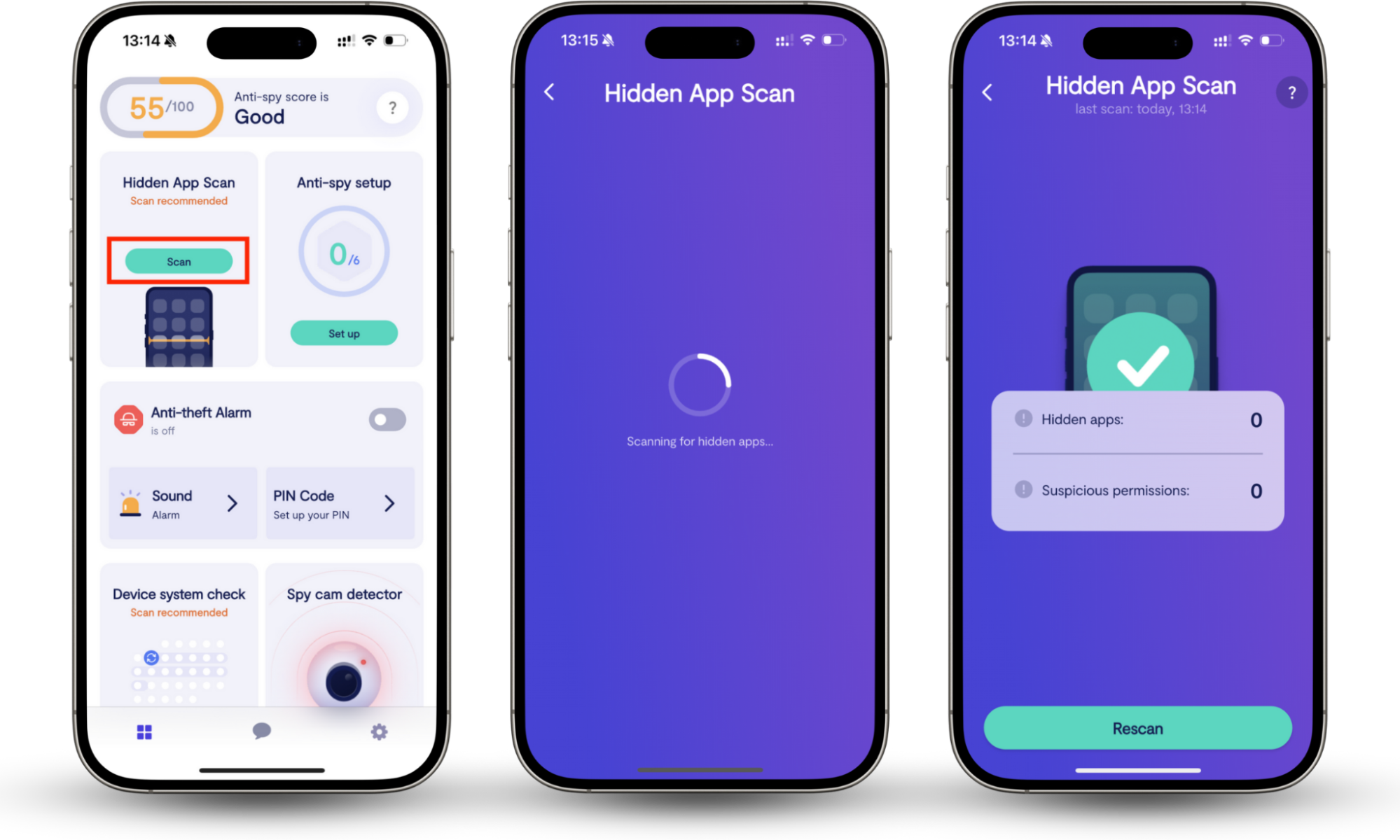
Here’s how it works in practice.
Our support agent, Fane, recently assisted a client who suspected his wife was tracking his location and calls. After running a Hidden app scan, they discovered several unauthorized apps hiding on the device. Fane guided the client through removing these threats and revoking location permissions, successfully stopping the surveillance and restoring the client’s privacy.
This is just one example of why it’s so important to learn how to detect spyware on Android phones.
How to control or disable Android System Intelligence
If you’re still uncomfortable with the Android System intelligence service, or if it’s draining too much battery, you can restrict or disable it.
Note
Disabling Android System Intelligence will break features like Live Caption notifications, Smart Reply, and improved copy-and-paste.
To clear the app’s data:
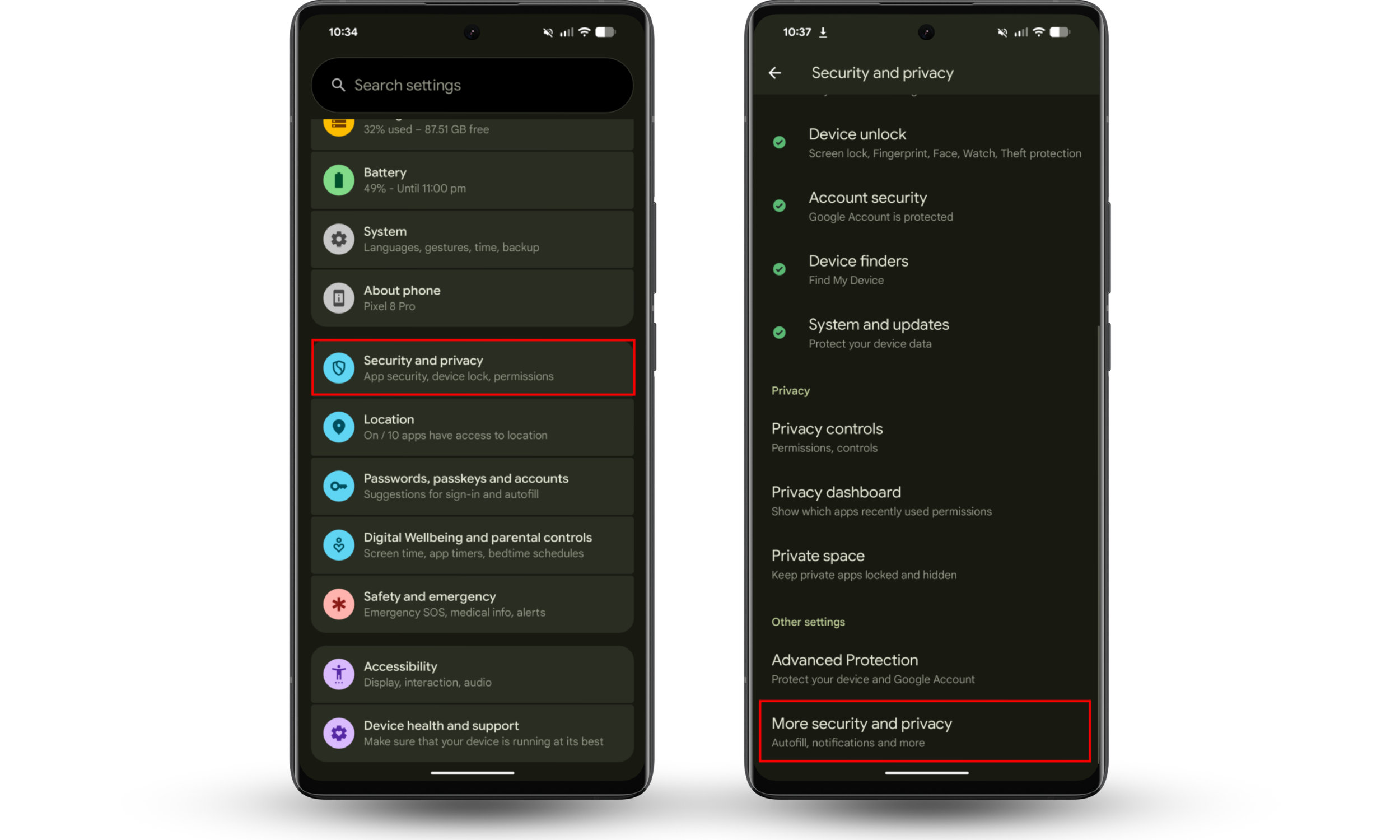
- Open Settings and tap Security and privacy (on some Android devices, depending on system updates, this may be Privacy or Privacy and security).
- Tap More security and privacy.
- Select Android System Intelligence.
- Tap Clear data to remove the learning history. You could also toggle off Customize the experience using your Google Account data to gain more privacy.
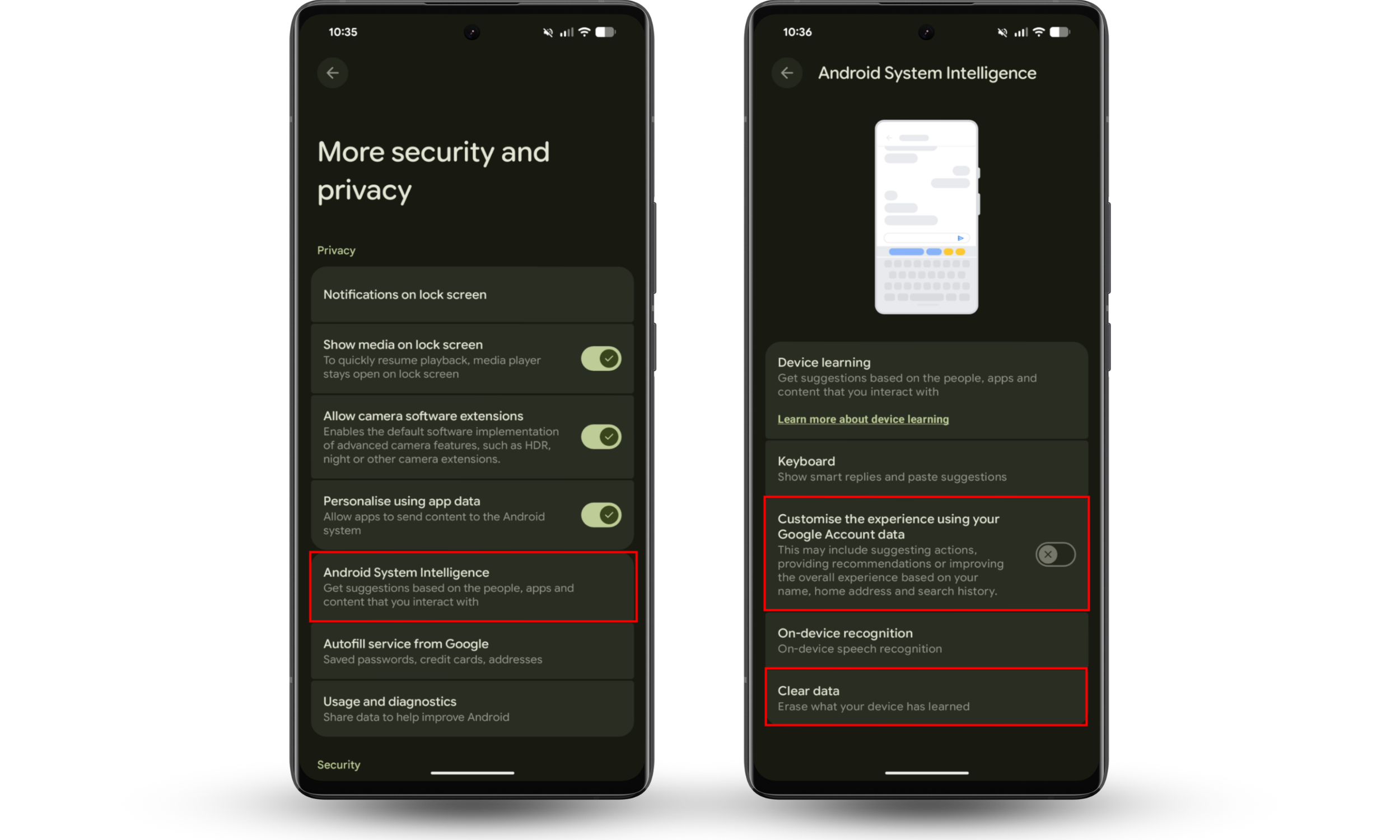
This won’t remove Android System Intelligence, but it will remove everything it’s learned about your phone and how you use it.
To completely disable Android System Intelligence:
- Open Settings and move to Apps.
- Tap See all apps and find Android System Intelligence.
- Select the app, then choose Disable and confirm.
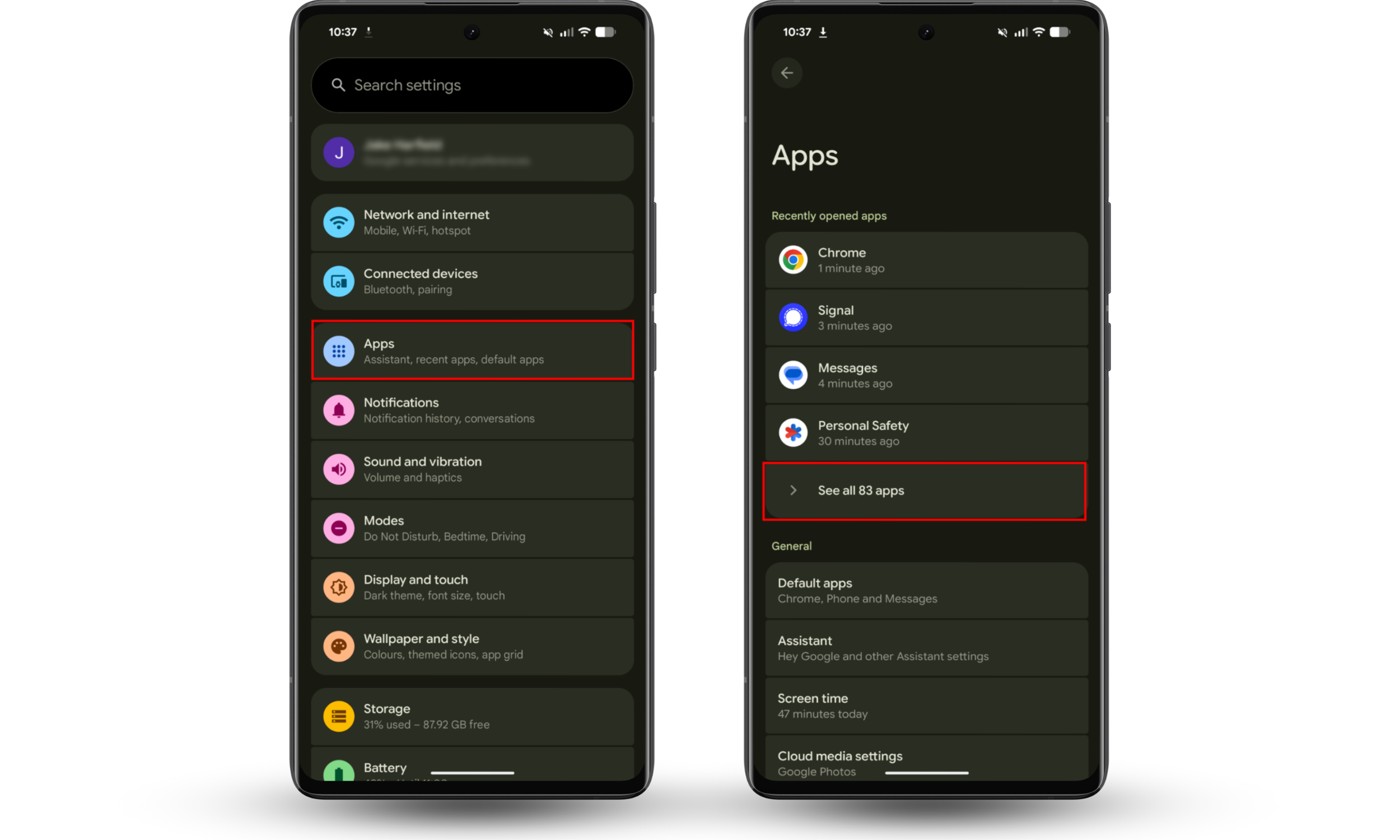
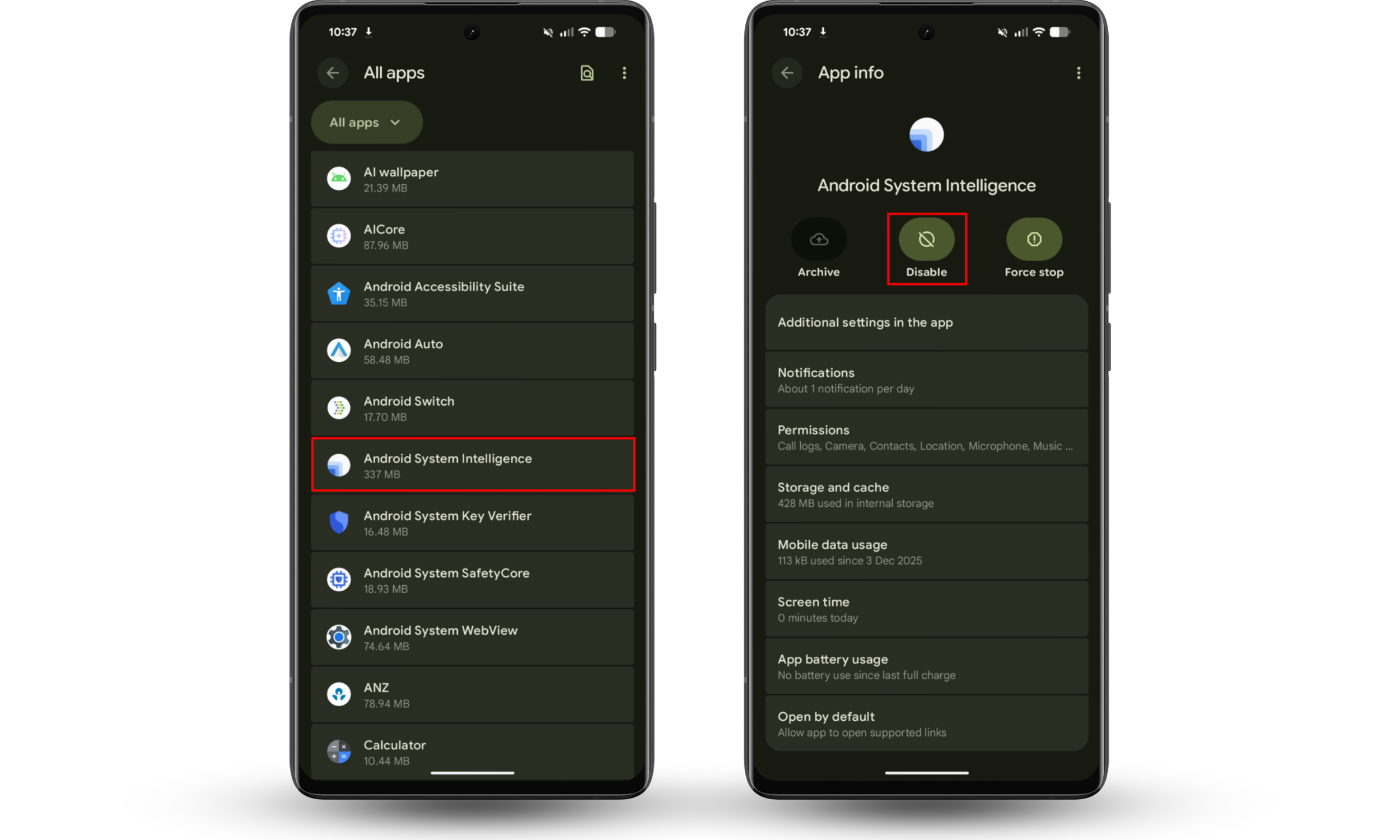
Your phone will continue to work, but it’ll lose all of the smart personalization features listed above.
Conclusion
Android System Intelligence is not spyware. It’s a verified and safe system component that Google uses to provide smart on-device features, and it processes your data locally to respect your privacy.
While you can disable it to save resources, doing so significantly reduces the smart functionality of your Android device.
If you’re worried that your phone has been targeted with real spyware, scan it with Clario Anti Spy’s Hidden app scan and you’ll see any suspicious apps.