Table of contents
- What is GoGuardian?
- GoGuardian: what does it do?
- 1. Collecting data
- 2. Deep monitoring
- 3. Flagging harmful content
- 4. Continuous surveillance
- 5. Data security risks
- 6. Privacy violations
- 7. Potential for abuse
- Is GoGuardian actually spyware?
- What data does GoGuardian collect?
- What can GoGuardian see?
- Is GoGuardian illegal?
- How to protect privacy if you have GoGuardian?
- Conclusion
What is GoGuardian?
GoGuardian is a student monitoring and classroom management tool. Schools often install it on laptops and tablets issued to students. It blocks potentially-harmful web content, and allows teachers to see what their students are doing online, and even close tabs remotely.
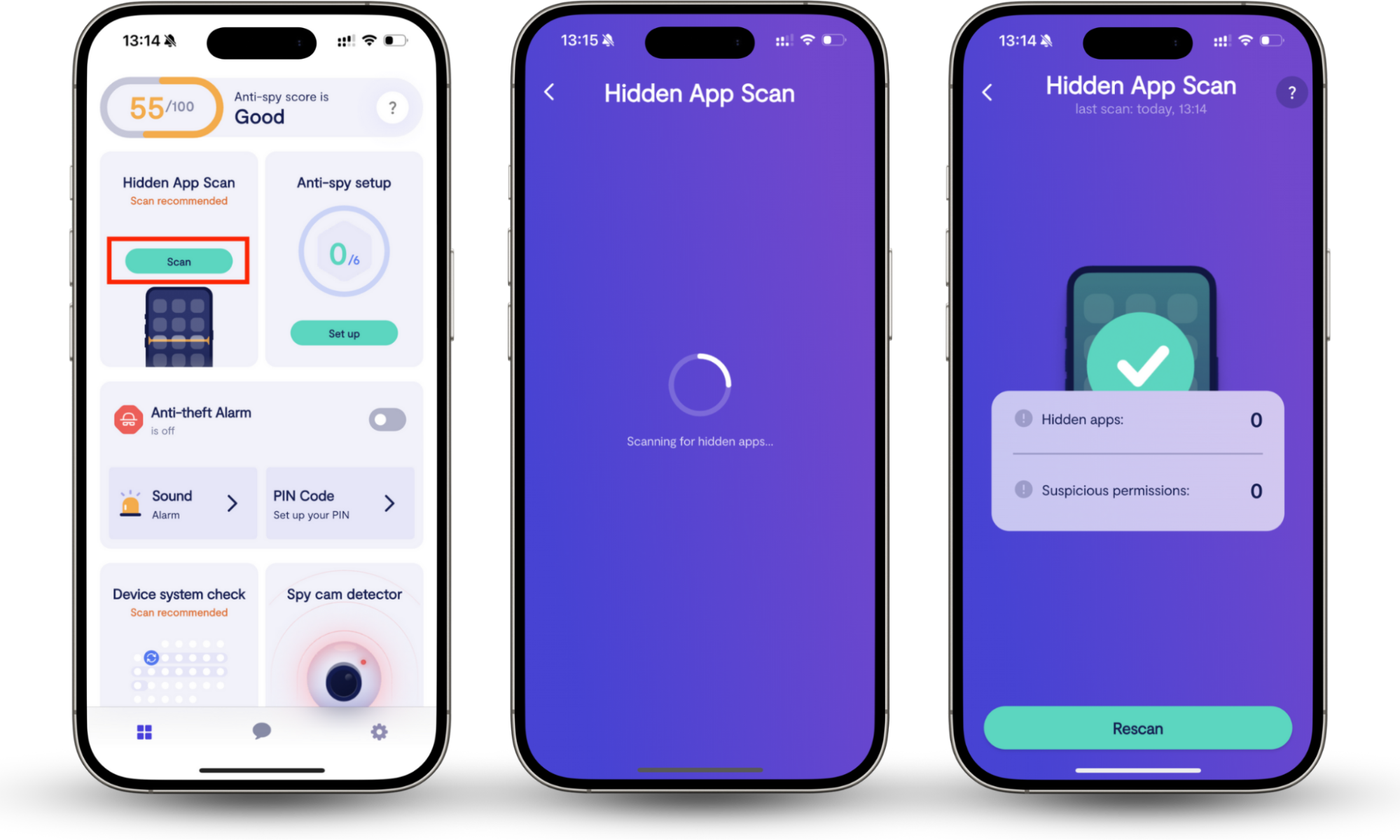
There shouldn’t be any deception involved; your school should tell you if GoGuardian is installed on the tech they’ve given you. However, if you’re worried that someone else has installed monitoring software on your phone or tablet, you can use Clario Anti Spy’s Hidden App Scan to find out.
The Hidden App Scan looks for apps that might be discreetly monitoring you. It checks your permissions for anything suspicious, too, so you can see which applications have access to certain features, like your camera and microphone.
A customer recently contacted us because they were concerned about monitoring apps. The Clario experts explained how to run a Hidden App Scan, and it revealed that a gaming app was constantly running in the background, accessing their location and messages. After changing the app’s permissions, the customer’s phone was back to normal, and they felt safe again.
How to scan your devices for hidden spyware:
- Download Clario Anti Spy and subscribe.
- Open the app, and, under Hidden App Scan, tap Scan.
GoGuardian: what does it do?
As a student monitoring tool, GoGuardian collects data about students and watches their online activity. It alerts teachers when students try to access potentially-harmful websites, and it allows faculty to block content, track children’s locations, scan their emails and documents, and even remotely manage their devices.
As you can see, GoGuardian is invasive. This tech collects a lot of information about users, so it’s not surprising that some people think GoGuardian is bad. Let’s look at different aspects of GoGuardian in more detail and talk about why it could be dangerous.
1. Collecting data
GoGuardian has access to a lot of student information. Firstly, it knows all about your classes and teachers, your student ID, and other personal details like your date of birth. Then, it collects data about what you do online, it tracks your internet searches, your browsing history, and even your location.
2. Deep monitoring
GoGuardian monitors pretty much everything you’re doing online. It watches the webpages you visit, tracks your search history, and even gathers data about your location. It also checks your documents and emails for mentions of suicide, self-harm, and violence.
3. Flagging harmful content
GoGuardian alerts schools if students view content that could be harmful. These might be websites that talk about self-harm or suicide, gun violence, or drugs.
However, GoGuardian doesn’t always get it right. It sometimes flags websites that should be approved. It may stop you from visiting sites that talk about LGBTQ+ issues, therapy and counseling, or sexual health. Some people have even been blocked from news sites, college application pages, or information they need for their work.
4. Continuous surveillance
GoGuardian watches you constantly. It monitors your web searches, your browsing history, your emails, and even takes screenshots and sends them to your teacher. It can be set up to monitor your activity 24/7, not just during the school day.
5. Data security risks
The company behind GoGuardian claims that your data is all encrypted and de-identified. However, they could link that data back to you and sell your personal information, including your search history, usernames, and passwords.
6. Privacy violations
Lots of people say that GoGuardian is bad because it’s too intrusive. When it monitors your search history and shares that information, it could be giving away private information about your life. For example, if you regularly search for LGBTQ+ topics, this could expose you to your teachers.
If your school uses GoGuardian, the school computers spy on you. Your teachers can see what’s on your screen at any time.
7. Potential for abuse
When your teachers see your online activity, they might learn all kinds of information about your private life. They might find out what politicians you support, details about your sexual orientation or gender, or anything else that’s personal and you don’t want to share. Some teachers might treat you differently because of this, or even report you to your parents or law enforcement.
Is GoGuardian actually spyware?
Technically, GoGuardian isn’t spyware. It’s legitimate monitoring software that schools use to help with classroom management. Students should know if it’s installed on their devices. However, it does look a bit like spyware. For example, it monitors students and shares information about their activities with other people.
Spyware apps are usually installed secretly, unlike legit monitoring software. Spyware is also usually hidden, whereas GoGuardian is a visible web browser extension.
When someone installs spyware on your phone, tablet, or computer, they’re usually doing it to steal from you. Maybe they want to get into your bank account, or they want your social media passwords. In contrast, your school is tracking you with GoGuardian so they can learn about any problems and help you stay safe.
Even though GoGuardian isn’t spyware, it’s still invading your privacy.
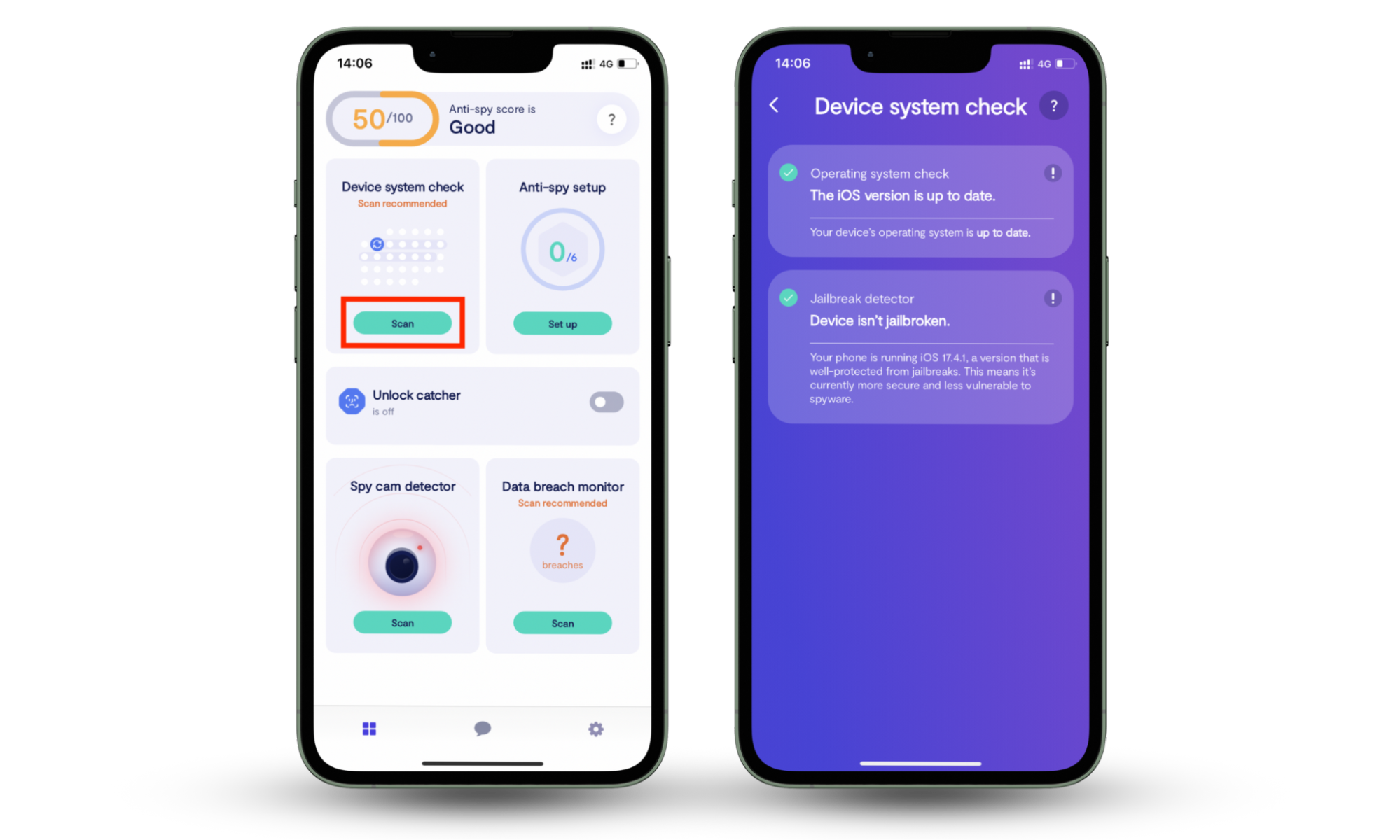
If you have an iPhone or iPad, you might think that you’re safe from spyware. After all, Apple’s built-in security protections mean that apps can’t usually access information about other software on the device, a feature called sandboxing. However, did you know that jailbroken phones don’t have this security protection?
Do you know if your device is jailbroken? Clario Anti Spy’s Device system check can scan your phone or tablet and alert you to signs of a jailbreak. It’ll also tell you if there are any system updates available; these often include critical security updates.
How to check if your device is jailbroken:
- Download Clario Anti Spy and set up a subscription.
- Under Device system check, tap Scan.
What data does GoGuardian collect?
GoGuardian collects a lot of information about you and your activity, including your location, your browsing and search history, and the content of your emails and documents. It has access to data about your device and login details, too, such as your IP address, the operating system you use, and your student ID and name.
All of this data is available to your school. However, the company behind GoGuardian has access to it too. They use it for product development, although they claim to de-identify personal information.
What can GoGuardian see?
The GoGuardian browser extensions can see pretty much anything you do on Google Chrome. It can see your search and browsing history, check what tabs you have open, and look at what you’re typing. It’s not limited to browser data, though; GoGuardian can also see your emails and documents, and even your location.
It shares this information with your school’s faculty. Teachers can see screenshots of your laptop or tablet, get alerts when you try to access certain websites, and even have the option to take control of your device to close tabs for you.
Is GoGuardian illegal?
GoGuardian isn’t illegal. It might track what you’re doing, but only for your safety, and on school-issued devices. It might be invasive, but it’s FERPA and COPPA compliant, and you or your family probably agreed to monitoring at the start of the school year.
It’s usually illegal to put spyware on someone’s phone, computer, or tablet without their consent. However, GoGuardian is usually installed on school-owned devices. When they gave you your laptop or tablet, you or your parents probably had to agree to certain tracking features.
Note
Did you know that your school is required to have internet filters that block harmful content? The Children’s Internet Protection Act says that public schools must protect you from accessing dangerous content online. GoGuardian’s web filters help schools stay compliant with this law.
How to protect privacy if you have GoGuardian?
If GoGuardian is installed on your school-issued device, assume that your school is watching everything you do on it. Turn off your camera or microphone, and use incognito mode if possible. Don’t log in to private accounts on your school-issued devices; where you can, use your personal phone, tablet, or computer.
GoGuardian can’t see what you’re doing in incognito mode on Chrome. That’s because browser extensions don’t load in incognito mode. However, your school might have decided to disable incognito mode on their devices, so there’s a high chance this workaround won’t help you.
It’s best to avoid using any laptop or tablet that has GoGuardian installed. Instead, use your own devices if you can, so your teachers can’t see your social media accounts, online banking details, and other private information.
Even if your school doesn’t use GoGuardian, follow these guidelines to protect your online privacy:
- Don’t share your passwords with anyone
- Use unique passwords for every online account
- Check your phone for spyware regularly
- Avoid using public Wi-Fi where possible
Conclusion
GoGuardian isn’t spyware, but it is a very invasive monitoring tool. If your school uses GoGuardian, your teachers can see your browsing history, your web searches, and even take screenshots of your laptop.
It’s not illegal for schools to use GoGuardian. If your school is monitoring you on their devices, protect yourself by using your personal devices where possible. Worried about someone spying on you? Scan your phone with Clario Anti Spy’s Device system check to look for security vulnerabilities, and the Hidden App Scan to find hidden monitoring software.