Table of contents
- What is Private Compute Services
- How Private Compute Services works
- What data Private Compute Services handles
- Why people think Private Compute Services is spyware
- Is Private Compute Services safe to keep enabled
- How to check what Private Compute Services does on your device
- Conclusion
What is Private Compute Services
Private Compute Services (PCS) is a built-in Android system app. It comes pre-installed on your phone, and it’s designed to protect your privacy when your phone is using some AI services. It works as a secure communication channel so that your personal data isn’t shared online with cloud services. For example, it helps Smart Reply suggest responses in your messaging apps, without sharing the content of your message with online services.
Private Compute Services helps your data stay private while you’re using services like:
- Now Playing, which identifies music playing nearby
- Live Caption, which adds closed captions to media
- Smart Reply, which suggests responses in messaging apps
Unlike spyware, PCS doesn’t monitor your activity for malicious purposes or steal your information. In fact, it keeps your information securely on your phone and processes it locally, rather than sending it elsewhere.
It’s a hidden app; it doesn’t usually show up on your home screen or in the App Drawer. However, you might see it if you look through the list of apps in Settings.
Even though Private Compute Services isn’t spyware, other hidden apps on your phone might be malicious. Some hidden apps lurk on your device to monitor you. They might track your location, share your call log or the contents of your messages, or even activate your microphone and camera so that someone can stalk you.
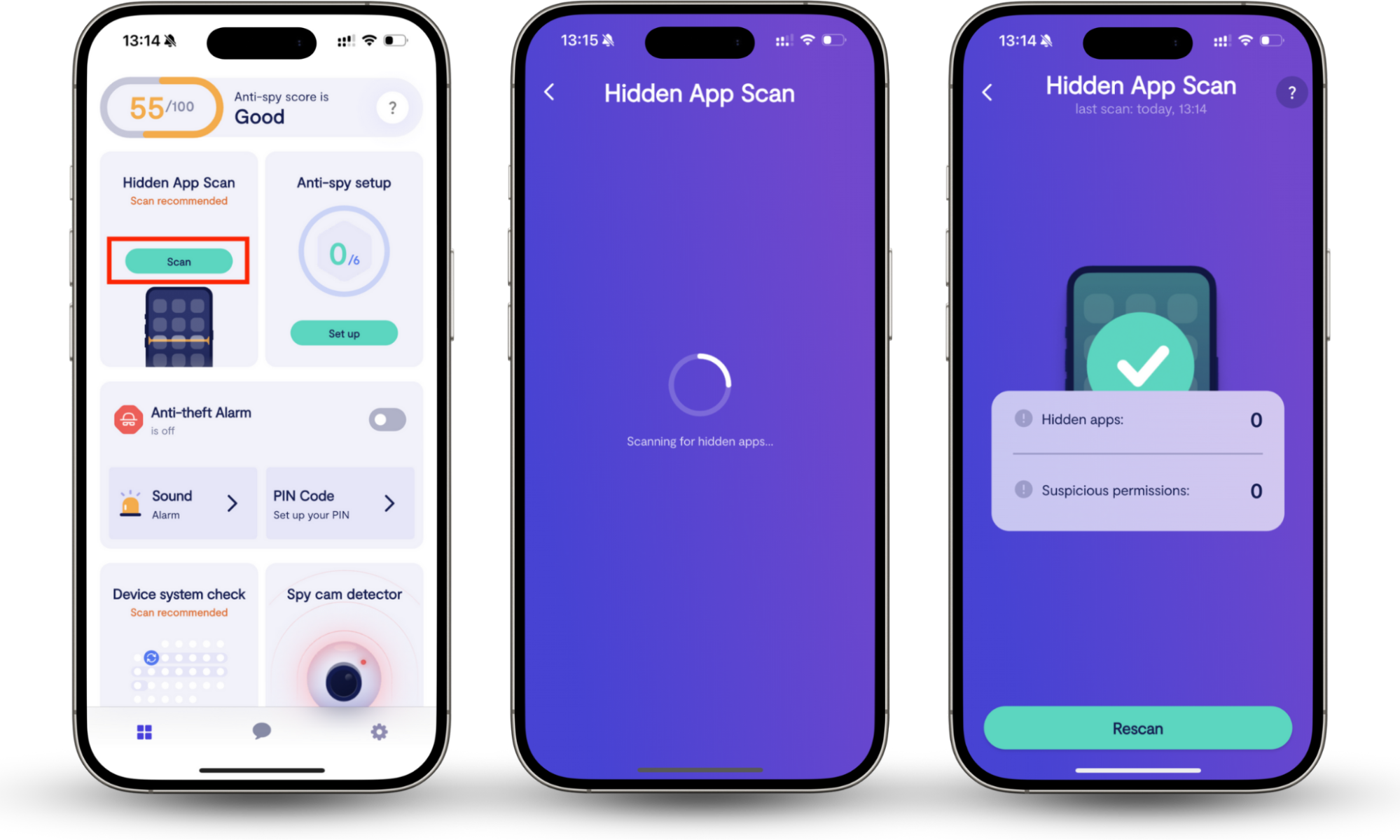
Clario Anti Spy’s Hidden app scan can help you find hidden apps on your phone. It also looks for apps that have requested suspicious permissions—for example, a flashlight app that wants access to your call log, or a game that wants to access your contacts and location at all times.
If you’re worried about hidden apps on your phone, you aren’t alone. Recently, a customer contacted the Clario team with concerns about his phone. He was afraid that someone had installed a hidden app without his knowledge, and wanted to know how to check his phone—and remove any malicious software. The Clario team explained how to run a Hidden app scan, and our customer found several suspicious apps.
How to check your Android phone for malicious hidden apps:
- Download Clario Anti Spy and set up a subscription.
- Under Hidden app scan, tap Scan.
How Private Compute Services works
Your Android phone has a feature called Private Compute Core (PCC). This is a secure environment where your sensitive data is processed, so your phone can use AI features like Now Playing and Smart Reply.
The Private Compute Core and Private Compute Services work together with Android System Intelligence (ASI). Is Android System Intelligence spyware? No, don’t worry. ASI is another built-in feature within the PCC that powers smart features like Now Playing and Smart Reply.
To keep your data safe, the PCC doesn’t have access to the internet. However, for ASI to work properly, your phone may need to download updates to databases or machine learning models—for example, a new music database for the Now Playing feature. Private Compute Services provides a secure bridge to online services, enabling the Private Compute Core to access updated information without compromising your private data.
You don’t have to do anything for PCS to work. It’ll just happen in the background.
What data Private Compute Services handles
Private Compute Services handles some personal or identifying data on your phone. This might include microphone or camera input, message content, and your GPS location. It might also use performance data, like crash logs. PCS also downloads machine learning models and databases from Google, so that your phone can use smart services.
PCS doesn’t share your personal information online. It processes your data on your phone.
It may send some information back to Google to improve services. This process, where lots of devices help to improve smart services, is called Federated Learning. However, when PCS sends data back to Google, this information is anonymized and encrypted.
Why people think Private Compute Services is spyware
Some users might think that Private Compute Services is spyware because it’s an unfamiliar app. After all, if you see new software on your phone that you didn’t download, it’s natural to be concerned.
Spyware is often hidden on your phone, and Private Compute Services is a hidden app, which can make users suspicious. It doesn’t appear on your home screen or in the App Drawer; you’ll probably only find it when you look through the list of your apps in Settings.
However, Private Compute Services isn’t spyware. As we’ve explained, it’s an Android system app. If you’re worried about malicious apps on your phone, though, find out how to detect spyware on Android.
If you’re worried about spyware on your phone, look out for the following signs:
- Unfamiliar apps. Although PCS is safe, other unfamiliar apps may not be.
- Fast battery drain
- Unexpectedly high mobile data usage
- Overheating for no apparent reason
- Slow performance or freezing
- Random restarts
If you notice these signs, there could be spyware on your phone. Find out more about what spyware is and what it does.
Is Private Compute Services safe to keep enabled
You should keep Private Compute Services enabled. It’s a secure feature designed by Google that helps ensure your data remains private while still allowing you to use smart features on your phone, like suggested replies. It doesn’t put your security at risk. If you disable Private Compute Services, some AI features on your phone might not work properly.
You can’t uninstall Private Compute Services, but you can disable it or force it to stop. This won’t break your phone, but it might mean that you can’t access features like Live Caption, Smart Replies, or Now Playing.
How to check what Private Compute Services does on your device
Private Compute Services is focused on privacy and working securely, so you can’t always see exactly what it does. To get an idea of what Private Compute Services does on your device, you can look at its page on the App Store for general information. You can also check the App info in your Settings app to see how much data and battery power it uses, which permissions it requests, and how much storage space it takes up on your phone.
How to find Private Compute Services on your phone:
- Go to Settings > Apps.
- Scroll down to find Private Compute Services.
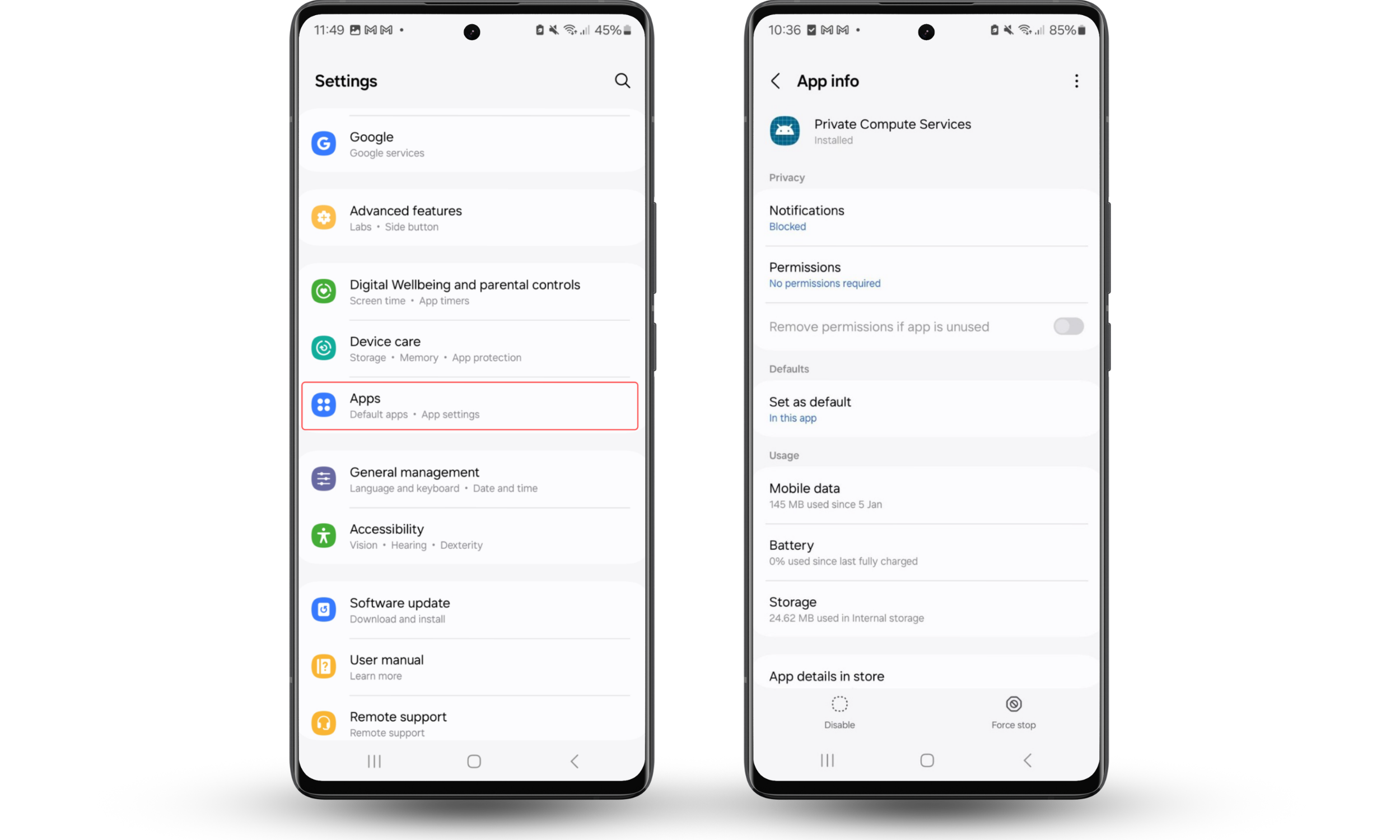
When I look at Private Compute Services’ info on my phone, I can see that it hasn’t been very active. It hasn’t used any battery power since I last charged my phone, and it’s used around 145mb of mobile data in the last month. However, if the numbers look different for you, don’t worry, it could just mean that you use more AI-related features than I do!
Conclusion
Private Compute Services isn’t spyware; it’s a legitimate tool designed to protect your privacy. It works with Android System Intelligence to let you use smart features on your phone, while still keeping your personal data private.
You can safely keep PCS installed on your device. However, some hidden apps are malicious and might be stealing your data, spying on you, or harming your phone. To find potentially harmful hidden apps on your phone, check it with Clario Anti Spy’s Hidden app scan.