Table of contents
- What is passwordless authentication?
- How passwordless authentication works step by step
- Perks of going passwordless
- But, wait, what’s wrong with passwords?
- Passwords hinder user experience
- Passwords can put user security at risk
- Passwordless authentication: What the future holds?
- Conclusion
Passwordless authentication has become increasingly popular among security conscious digital natives in recent times.
‘Wait, passwordless?’
It’s okay if you want to double check this. Yes it’s true. In fact, authentication without a password is not just possible, but can offer you enhanced security.
Without further ado, let’s dive right in and learn what is it that makes passwordless security so unique.
What is passwordless authentication?
Passwordless authentication is a method of verifying a user’s identity without requiring a password or any memorized secret. Instead, it uses secure alternatives such as biometric data (fingerprints or facial recognition) or possession-based verification like a registered device or one-time login link. This reduces reliance on weak or reused passwords and strengthens overall account security.
In one of our previous articles, where we talked about two-factor authentication, we defined what authentication is.
It can consist of up to three different factors:
- Something you know: Passwords, PINs, or security questions
- Something you have: A smartphone, hardware token, or OTP device
- Something you are: Biometrics like fingerprints, facial recognition, or voice patterns
Further, we’ll explain what each of those means.
At a very basic level, passwordless is a way of working out if a user’s identity is authentic without the use of passwords or any other memorable secret, aka something you know.
But how do you verify your identity then? Well, there are at least two alternative ways:
- Possession factor, aka something you have
This method implies you use something you possess to verify your identity. It can be a registered mobile device, a hardware token or a one-time password (OTP).
- Inherent factor, aka something you are
This method requires you to provide your biometric signature, like your fingerprint, voice or retina scan, face ID, etc.
Different types of passwordless authentication exist. In fact, verification is possible through:
- Multi-factor authentication. This is a combination of several authentication factors (something you know, something you have, something you are) which a person uses to verify their identity.
- SMS. This is usually a unique OTP valid for up to 60 seconds. The code is sent to a user’s mobile device, then used to log them in.
- Email. This is a magic link (or in some cases an OTP) delivered to a user via email. A magic link includes a unique token created specifically for each user. Whenever a person clicks the link, the service will identify the token and let them in.
- Biometrics. Like we’ve already mentioned, this is authentication via a fingerprint scan, facial recognition or any other biometric method.
How passwordless authentication works step by step
Passwordless authentication verifies a user’s identity without requiring a password by using secure tokens, devices, or biometric data. Instead of matching a typed password, the system confirms that the user has access to a trusted device or unique identifier. This process reduces the risk of stolen credentials and makes login faster and more secure.
Here’s how passwordless authentication typically works:
- User enters their identifier. The user starts by entering an email address, phone number, or username linked to their account.
- System generates a secure authentication request. The service creates a one-time code, magic link, or cryptographic challenge tied to that specific login attempt.
- Verification is sent to a trusted factor. The request is sent to something the user owns or is, such as:
- A registered mobile device
- An email inbox (magic link)
- A biometric prompt (fingerprint or face scan)
- User completes authentication. The user confirms their identity by clicking the link, entering the code, or using biometrics.
- System validates the response. The server checks the token or biometric match. If valid, access is granted without requiring a password.
Perks of going passwordless
Passwordless authentication improves both security and user experience by removing the need to create, remember, and manage passwords. It reduces the risk of data breaches caused by weak or reused credentials while enabling faster, more convenient logins through biometrics, devices, or secure links. For businesses, it can also lower operational costs related to password management.
Now you know the wide range of authentication methods passwordless can offer, we’re ready to talk about passwordless benefits. They are:
- Better user experience. This one is rather obvious. Of course, logging in to an online account without a password takes less time than entering those 16 characters with title-case letters and numbers. With only an email or a mobile phone, it’s way easier to sign up.
Example: Instead of typing a long, complex password, a user can unlock their banking app instantly using Face ID or a fingerprint. This reduces login time to seconds and removes the frustration of forgotten or mistyped passwords.
- Multi-layer security. Passwords are not as secure as they are thought to be. Especially considering we live in the 21st century and spend so much time online or using our devices. But we use the same password for up to ten different accounts. And face data breaches day in and day out. Passwords are a major vulnerability these days and we can no longer rely on them alone.
Example: When logging into an account using a one-time passcode sent to a registered device, even if a hacker knows the user’s email, they cannot access the account without the physical device. This adds an extra layer of protection compared to passwords alone.
- IT management costs. Believe it or not, managing passwords is now quite a luxury. In order to provide a secure infrastructure, each operating business needs to set up and manage password reset and expiration processes, detect breached passwords, implement secure password complexity policies, etc. So to reduce operation costs, a decision to give up on passwords could be made.
Example: A company that switches to passwordless login no longer needs to handle frequent password reset requests. This reduces helpdesk workload, lowers support costs, and minimizes downtime for employees who would otherwise be locked out of their accounts.
But, wait, what’s wrong with passwords?
Passwords are increasingly considered a weak point in cybersecurity because they are often reused, easy to guess, or vulnerable to phishing attacks. As the number of online accounts grows, managing secure and unique passwords becomes difficult, leading many users to adopt unsafe habits that increase the risk of account compromise.
It’s difficult to believe, but passwords are on their way out. Let’s take a deeper look at why this is happening.
Passwords hinder user experience
You can always create a crazy password idea you’ll never forget. But what if you had to come up with 150 of them?
Why? Well, this is the number of online accounts an average US internet user has to remember a password for. And of course, this number is only expected to grow.
Adding to this hassle is how password security recommendations vary from one app to another. Ending up with multiple variations of one single password for up to 10 online accounts, it’s unsurprising 50% of users feel annoyed or hassled by having to use them.
Passwords can put user security at risk
Sad but true. Though passwords should be secure by design, they are not always so. And here’s why.
- Identity theft. In fact, they often lead to identity theft. 81% of hacking-related breaches happened due to the use of old, weak or stolen passwords.
- Man-in-the-middle attacks (MitM). No one can be 100% protected from these, unless they use multi-factor authentication. Because MitM attacks work like this: bad actors take advantage of users by mimicking their login screen, then encouraging them to enter their passcode. That’s how the name of your pet used as a password gets leaked. Oops.
- Credential stuffing. Considering the fact many people tend to use the same passwords for multiple accounts, it should be obvious that bad actors succeed in credential stuffing attacks. Just remember the major data breaches, like those of Yahoo! or Marriott International - 383 million (!) people were affected in the latter. Once such breaches happen, cybercriminals buy stolen credentials and apply large volumes of those to other accounts en masse. This results in cybercriminals having a far larger volume of online services and apps they can instantly access.
Passwords often become a risk when they are reused or exposed in data breaches—something many users aren’t even aware of. That’s why it’s important to know if your credentials have already been compromised.
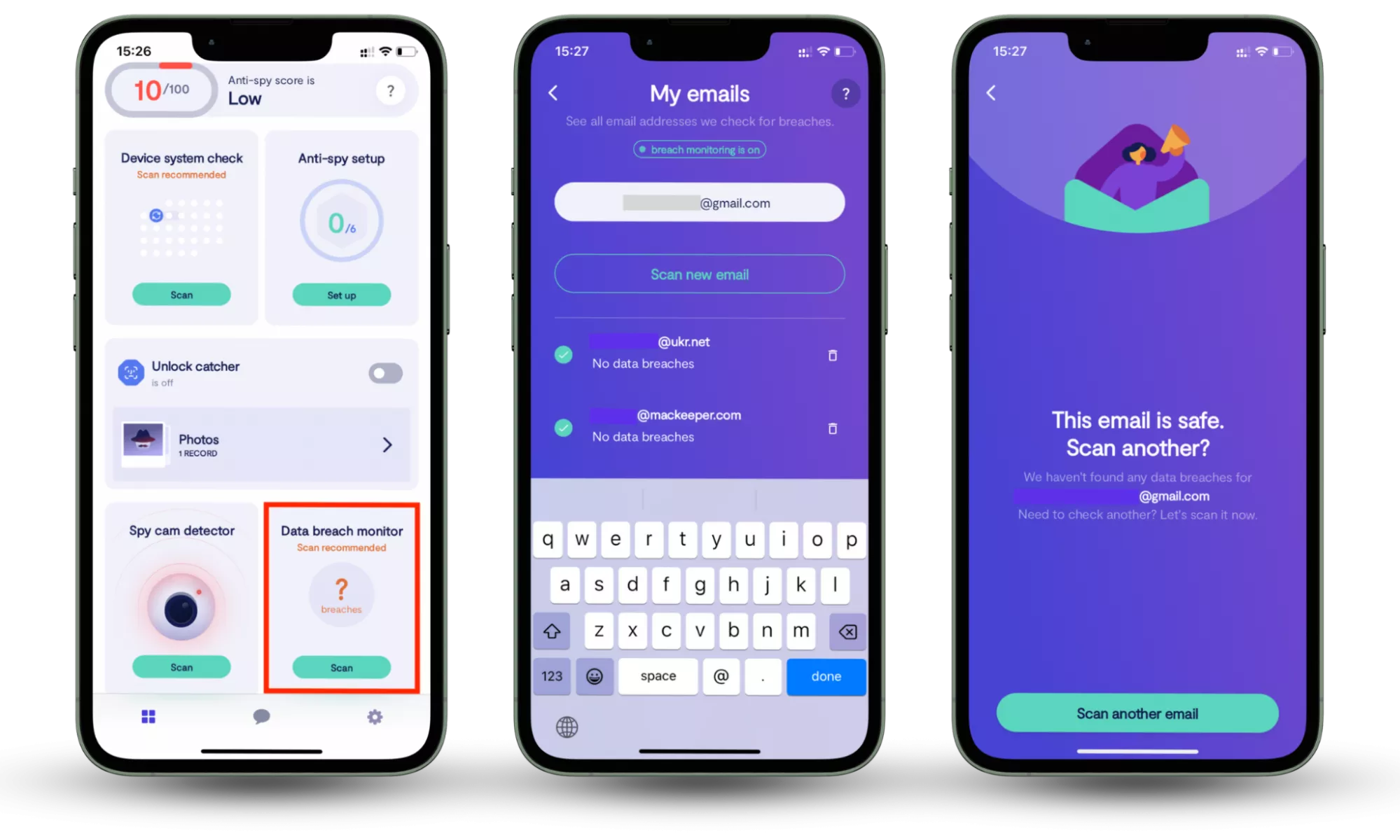
Clario Anti Spy’s Data breach monitor helps you stay ahead of these threats by scanning your email for known data breaches and alerting you if your information has been exposed. With continuous 24/7 monitoring, you can quickly take action to secure affected accounts and reduce the risk of unauthorized access.
How to check whether your information is compromised:
- Download Clario Anti Spy.
- Open the app, and, under Data breach monitor, tap Scan.
- Enter your email address.
- When the scan is complete, follow the on-screen guidance to review any data breaches.
- Repeat the process for any other email addresses.
Passwordless authentication: What the future holds?
Passwordless authentication is rapidly evolving and is expected to play a key role in the future of digital security. While it offers clear advantages over traditional passwords, it is not immune to threats such as phishing or device-based attacks. Ongoing improvements in authentication technologies aim to balance stronger security with user convenience.
Now you know authentication without a password can even be more secure than one with it, it’s time to face the sad truth: it is still not perfect.
Fraud attacks are possible even without the use of passwords. As even authentication via SMS has been reportedly targeted many times.
In addition, there’s still no protection from RAT-in-the-Browser (RitB) attacks, especially with passwords reused multiple times for different accounts. Fraudsters can easily create a normal-looking fake browser page where you’ll input your one-time password - with no sign it’s been compromised.
Speaking of devices you can use for authentication, this is not perfect either. Because to a certain extent, the information you share can also be captured, replicated, and reused.
What could be an effective solution is multi-factor authentication and behavioral biometrics. The latter relies on a certain behavioral pattern unique for each user (a move of the mouse, the typical way a user types, the unique angle they hold their phones at, etc.). But research still needs to be done to test out the convenience and security of this method. Only time will tell if this is the perfect form of authentication we’ve all been waiting for...
Conclusion
Passwordless authentication is quickly becoming a more secure and convenient alternative to traditional passwords. By relying on biometrics, trusted devices, and one-time verification methods, it reduces common risks like password reuse, phishing, and credential theft. While it’s not completely immune to threats, it represents a major step forward in how we protect our digital identities.
At the same time, many security risks still originate from exposed credentials in data breaches—often without users realizing it. Using tools like Clario Anti Spy’s Data breach monitor can help you stay informed by alerting you if your accounts have been compromised, so you can take action before attackers do.
As online threats continue to evolve, combining passwordless authentication with proactive monitoring gives you stronger, more reliable protection across your digital life.
Read more: