Table of contents
- Bots classification
- Good bots
- Bad bots
- What are botnets
- Botnets vs viruses vs worms
- How are botnets created?
- Examples of botnet attacks
- DDoS attacks
- Ad fraud
- Data theft
- How modern botnets have evolved
- Signs your device is infected with bot malware
- How to remove botnet malware from my computer
- How to protect yourself from botnets
- 1. Don’t fall for phishing emails
- 2. Be careful what you download
- 3. Don’t ignore updates
- 4. Use anti-malware software that protects you against trojans
- Conclusion
You’ve probably heard of botnets, but do you really know what they are and if they’re something you even need to worry about?
In this post, we’ll take a look at how botnets work, how they could potentially affect you, and how to protect your device from botnet malware.
Yes, we said malware because bot viruses are usually the source of them. And what’s the best way to protect yourself from malware? Correct, an antivirus. So make sure to keep yours on at all times. And if you don’t have one or you aren’t satisfied with your current anti-malware software, why not try Clario?
Clario Anti Spy can protect you against malware, botnet attacks, malicious ads, sketchy websites, and more. So go ahead and give Clario Anti Spy a go.
Bots classification
To understand what a botnet is, let’s start with a bot first.
A bot (internet shorthand for "robot") is any type of application or script capable of performing automated tasks on command. Yes, bots are specifically designed to perform repetitive tasks at a faster rate than human beings can manage.
Since bots are essentially just programmed scripts, they can be deployed to do pretty much anything. All without asking questions and having doubts about the nature of the work they’re doing. But while they tend to get a pretty bad rep, there are actually loads of useful, well-intentioned bots out there.
Good bots
Chances are, you’ve come across this article by googling “what is a botnet?” What you might not realize is that you found your way here with a little helping hand from the mighty Googlebot (otherwise known as a crawler bot).
There are plenty more good bots out there. Trader bots that crawl the web looking for deals on something you’re interested in buying online, data bots that feed you up-to-date information on the news and weather, like Siri. AI-assisted customer service chatbots running on reputable websites are just a few examples.
These friendly bots make our jobs and lives easier, more enjoyable, and more productive. But there’s also a yin to their yang.
Bad bots
There are more destructive kinds of bots too – bot accounts on social media networks used for spam purposes, to propagate fake news, and influence national elections, for instance.
And there are the really bad guys, who live to wreak havoc by triggering scam campaigns designed to steal your personal and financial information, denial of service (DDoS) attacks to cripple websites, and many more.
Now that you’re familiar with the basic concepts, let’s get down to the reason that made you click – botnets.
What are botnets
A botnet (a portmanteau of “robot” and “network”) is a collection of network-connected computers (or bots) remotely managed as one entity, either by an individual, or a small or larger cybercriminal group. Each device is infected with the same piece of malware and hijacked to do the grunt work involved in whatever clandestine scheme the cybercriminal commander has planned.
The motivation behind creating a botnet is often purely financial. Once the cybercriminal has established a large network of infected devices – known as “zombie networks” – they can then sell access to these networks to other fraudsters looking to attack businesses and regular people just like you and me.
PCs, Macs, smartphones – even your smart home devices, like your thermostat or home security camera, can all be taken over and co-opted into a botnet without you noticing. Juniper Research estimates that the number of IoT devices will reach 83 billion by 2024, which means many more zombies for botnet units.
More recent industry estimates suggest the number of connected IoT devices will exceed 29–32 billion globally by 2030, significantly expanding the attack surface for botnet operators—especially through poorly secured consumer devices such as routers, cameras, and smart home systems.
Botnets vs viruses vs worms
While botnets rely on malware to infect devices, not all malware forms botnets. Viruses typically spread by infecting files, worms self-propagate across networks, and botnets consist of multiple infected devices remotely controlled as a single network. What makes botnets especially dangerous is their ability to coordinate large-scale attacks using thousands—or even millions—of compromised machines.
The key differences between viruses, worms, and botnets become clearer when you compare how they spread, what they’re designed to do, and the risks they pose.
| Threat type | How it spreads | Primary purpose | Why it’s dangerous |
| Virus | Attaches to legitimate files and spreads when files are shared or executed | Infect individual systems | Can corrupt data and spread quietly through shared files |
| Worm | Self-propagates across networks without user interaction | Rapid infection of multiple systems | Spreads extremely fast and consumes network resources |
| Botnet | Infects devices via malware, exploits, or weak credentials | Remote control of many devices as one network | Enables large-scale attacks like DDoS, spam, and data theft |
How are botnets created?
Botnets are created to conduct various malicious activities on a larger scale than they could otherwise manage, the details of which we’ll delve into a little later. Nefarious threat actors (a person or entity responsible for an event or incident that can impact the safety or security of another entity) have been aggressively developing ever more complex techniques to attack and take over your devices in the last few years.
Let’s say you open an email and download a file that looks safe but is actually a trojan virus. Or, you accidentally download a trojan through an infected mobile app.
Cybercriminals use these same trojan horses to breach your computer among others. They then take over your computer and organize all of the infected machines into a network of bots.
Pro tip
Many modern botnets no longer rely solely on traditional malware downloads. Instead, attackers often exploit default passwords, exposed remote access ports, and unpatched firmware, especially on routers and smart devices. This means a device can become part of a botnet without the user clicking a malicious link or downloading a file, simply by remaining improperly secured.
If you don’t have anti-malware software capable of alerting you to these kinds of threats, it’s surprisingly easy to fall victim to these trojans and unwittingly become part of a botnet.
Examples of botnet attacks
Botnets have been deployed to perform a whole slew of cyberattacks and illegal activities on the internet, including:
DDoS attacks
These are unleashed to inundate websites with enough heavy traffic to overwhelm and take them down. Some well-known examples of DDoS attacks include:
- 3eve
- Mariposa
- Mirai
Also, the first quarter of 2021 brought us two new botnets cybercriminals used to carry out DDoS attacks. FreakOut malware is one, affecting Linux devices, and the second is the new Matryosh botnet designed to attack Android devices with the ADB (Android Debug Bridge) debug interface.
Ad fraud
Ad fraud happens when cybercriminals use a botnet to generate fake clicks and impressions on online ads to drive a profit for the operators. Methbot is a particularly famous instance of a botnet used to game the automated ad-bidding market.
Data theft
The very first botnets were designed to roll out phishing and spam attacks on a large scale. Today, botnets are still used to send large volumes of phishing scams in an effort to steal individuals’ personal information and defraud them.
One prolific example of this was the CutWail botnet. Emotet is another that’s been making headlines.
Now, you should understand we’re not trying to scare you with all this botnet talk. Our only goal is to show you that this kind of threat exists and how to know you’ve fallen victim.
How modern botnets have evolved
Modern botnets are no longer limited to infected PCs or spam campaigns. Today’s botnet malware increasingly targets IoT devices, home routers, cloud servers, and mobile devices, often spreading automatically by scanning for exposed services and weak credentials. Many cybercriminal groups now operate botnets as a service (BaaS), renting attack capabilities to others. Advanced botnets also use encryption, fileless malware techniques, and decentralized command-and-control systems, making them harder to detect and shut down.
Signs your device is infected with bot malware
While there are often no outward warning signs your devices are part of a horde of zombie bots, you can experience the detrimental effects in other ways, like:
- A much slower computer. Botnets are masters of draining your computer’s resources.
- Huge internet bills. If your bill is suddenly unusually large, a botnet (or some other form of malware) could be to blame.
- Constant ads. If you’re constantly seeing ads, despite the use of ad blockers, it’s a red flag that your Android or iOS device is part of a “zombie network.”
These are all annoying consequences, but botnets can negatively impact you in more severe ways.
Other warning signs may include unusual outbound network traffic, frequent router reboots, overheating devices, or security settings being changed without your knowledge. In some cases, botnet malware operates quietly in the background, making performance issues the only noticeable symptom
Take stealing your personal information and/or hacking into your financial accounts, for instance. Just because you’re in a botnet doesn’t mean you’re not targeted by the bad guys. If anything, they already know just how vulnerable you are and will have zero qualms about tapping your computer for whatever sensitive data they can use to sell and turn a profit.
If you do think your device has become a part of a botnet, here are your next steps.
How to remove botnet malware from my computer
If you suspect your computer may be involved in a botnet, start with the following security checklist:
- Disconnect the device from the internet to stop any ongoing communication with botnet command-and-control servers.
- Update your operating system and all installed software to patch vulnerabilities that botnet malware often exploits.
- Run a full system scan using trusted security software to identify suspicious processes, unauthorized system changes, or malware infections.
- Review startup programs and browser extensions, and remove anything unfamiliar or no longer needed.
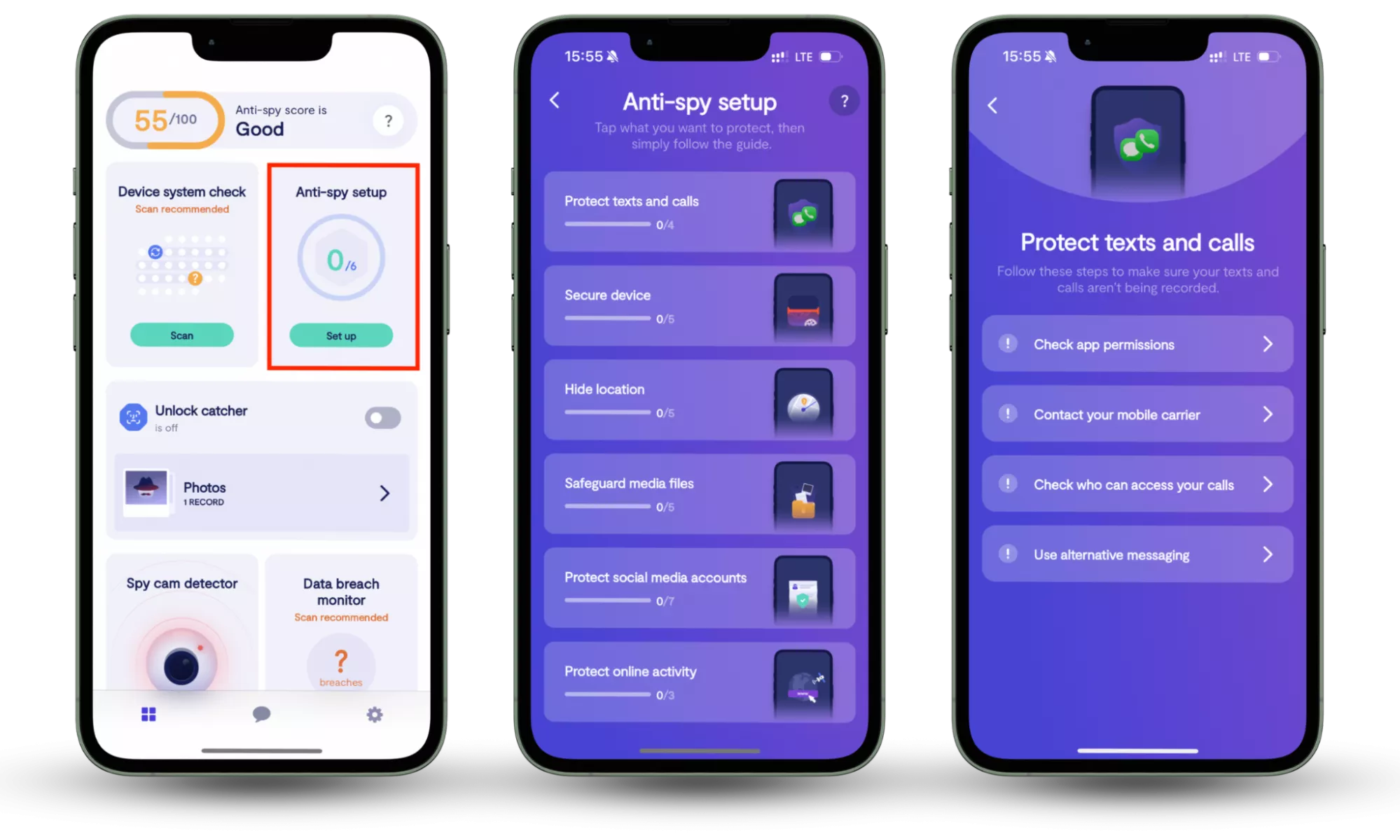
If you’re using a smartphone, protection works a little differently. Tools like Clario Anti Spy focus on mobile-specific risks through features such as Anti-spy setup, which guides users through essential privacy and security settings to reduce exposure to spyware and unauthorized monitoring.
Here is how to use Clario Anti Spy’s Anti-Spy setup feature:
- Download Clario Anti Spy, create an account, and sign in.
- Under the Anti-Spy setup section, select Set up.
- Follow the step-by-step guidance to strengthen privacy settings, reduce exposure to spyware, and improve protection against mobile-focused malware and digital threats.
How to protect yourself from botnets
While there is no way to magically protect yourself from botnet operators, you can increase your odds of avoiding being part of one by following the same common-sense strategies you should be taking to avoid all computer viruses.
1. Don’t fall for phishing emails
We've previously covered how to avoid phishing scams, so we won't go into detail here. In short, be careful when you receive an email that feels sketchy, comes from an unknown sender, or asks for personal information or credentials.
2. Be careful what you download
Because botnets are so destructive, and it’s so difficult to detect whether you’re in one, it’s important to exercise caution when file-sharing or downloading applications from unknown sites. And please stick to the apps available within your official app store.
In a nutshell, ensure anything you download from the internet is verified and from a legitimate source.
Insight
Mobile botnets increasingly spread through side-loaded apps, modified APK files, and fake system utilities disguised as performance boosters or security tools. In some cases, even legitimate apps can turn malicious after an update if a developer account is compromised.
3. Don’t ignore updates
Always (we repeat, always) keep your operating system up to date. Botnets love nothing better than taking advantage of unpatched vulnerabilities – capitalizing on these is exactly how they can easily spread from one device on a network to another.
Beyond operating system updates, it’s also essential to keep router firmware, browser extensions, and IoT device software up to date. Many large-scale botnet infections originate from outdated routers that remain vulnerable for years after security flaws are publicly disclosed.
4. Use anti-malware software that protects you against trojans
Getting cybersecurity software is the best way to avoid and eliminate botnets. But how do you select a good antivirus? Here’s a checklist:
- Reliable anti-malware software should check all newly downloaded files to ensure you’re not a botnet victim
- Well-designed cybersecurity software runs regular checks on the system and detects previously unknown threats
- Good anti-malware protection has to be user-friendly and simple to install. In other words, you shouldn’t need professional assistance to install and configure it
- The best cybersecurity solutions have a broad array of functions and come with additional features like a VPN or ad blocker
Conclusion
Botnets may operate quietly in the background, but their impact can be serious—from draining device resources to enabling large-scale cyberattacks. Understanding how botnets work, recognizing early warning signs, and taking practical steps to secure both computers and mobile devices are essential parts of staying safe in today’s connected world. On smartphones, tools like Clario Anti-Spy help reduce exposure to spyware by guiding users through key privacy and security settings, making mobile protection easier and more accessible.
We truly hope our tips on botnet-proofing your digital experience were helpful and that you do have a powerful antivirus to protect you. But that’s not all. If you want to stay informed on the latest online threats, check out Clario’s blog and learn how to protect your personal digital security.
Read more: