Table of contents
- Is WhatsApp scamming app?
- Do scammers use WhatsApp?
- List of WhatsApp scams to watch for
- 1. Impersonation (“Hi mom/dad”, friend with new number)
- 2. Verification code and account takeover
- 3. Phishing links and fake websites
- 4. Fake jobs and recruitment offers
- 5. Investment and crypto scams
- 6. Lottery, giveaway, gift card, and coupon scams
- 7. Fake WhatsApp upgrades or apps
- 8. Tech support and “WhatsApp/Meta Agent” scams
- 9. Screen-sharing and remote access scams
- Why do scammers use WhatsApp?
- How to identify scammers on WhatsApp?
- How to avoid WhatsApp scams?
- What to do if you fall for WhatsApp scam?
- Conclusion
Is WhatsApp scamming app?
No, WhatsApp is not a scamming app. It's a legitimate messaging platform owned by Meta (also the company behind Facebook) and used by billions of people. WhatsApp does not run scams or promote them. However, it does have a reputation for being used by scammers. They rely on it to carry out social engineering and phishing attacks. Most of these scams work because messages feel personal and trustworthy, and that makes people more likely to let their guard down.
Do scammers use WhatsApp?
Yes, WhatsApp is used for scams. Fraudsters rely heavily on exploiting human trust. Unlike emails or public social media posts, WhatsApp messages feel personal and urgent, which lowers people's guard. Scammers only need a phone number to reach you, and they often pretend to be someone you know or trust. That combination makes it easy to pressure people into acting quickly without stopping to think things through.
Tightening the security and privacy settings on your phone, social media, and online accounts can go a long way to avoiding these scams. Clario Anti Spy makes this easy with its Anti-spy setup, which walks you through all the most important areas you need to focus on.
Here's how to run an Anti-spy setup with Clario Anti Spy:
- Download Clario Anti Spy and subscribe to create an account.
- Tap Setup under Anti-spy setup.
- Work through each category—Protect social media accounts, Protect online activity, Secure device, etc.—to improve your privacy and security.
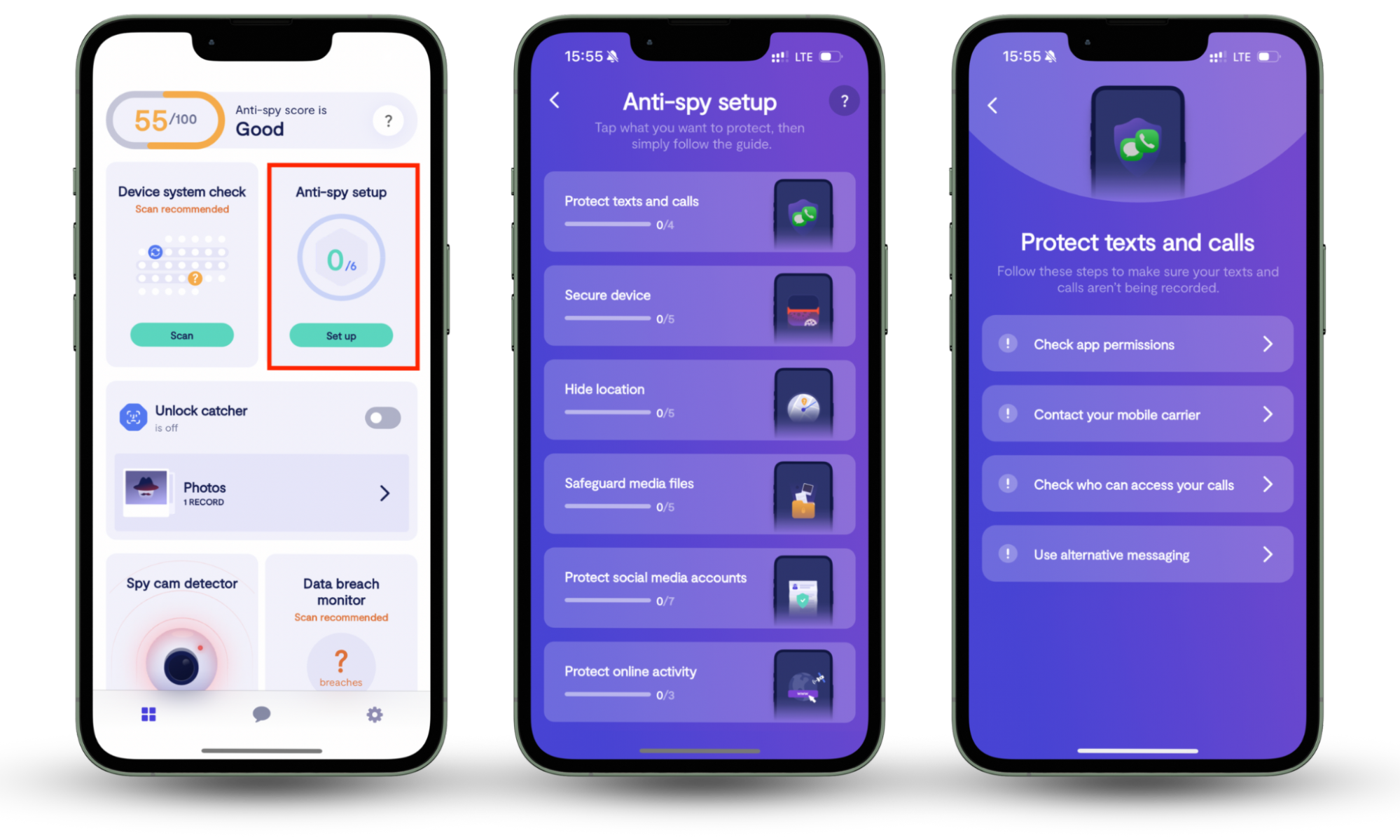
Clario Anti Spy also comes with 24/7 live support. You can tap the Messages icon to start a conversation at any time. Clario's security experts help with a wide range of issues, and here's what one of them shared about helping a customer secure their device and WhatsApp account:
"Recently, a customer had a gut feeling that something wasn’t right. Their phone had been acting strange — draining fast, messages marked as read, and a general sense that someone might be watching. They reached out to us, and during the security check, we went deeper than just the surface.
We examined their VPN and Device Management profiles. There was an unknown configuration profile silently running in the background. It wasn’t something C had set up.
Besides this, when checking WhatsApp login sessions, we located an active login from a device they didn’t recognize. Thanks to our check, the customer was able to remove the suspicious profiles, log out of all WhatsApp sessions, and secure their account. Now they finally have peace of mind."
List of WhatsApp scams to watch for
Most WhatsApp scams fall into a few broad patterns. In almost every case, scammers are after one of three things: your money, access to your account, or your personal information. To get there, they use tactics that create urgency, fear, or excitement. This pushes you into reacting quickly instead of taking a moment to think things through.
1. Impersonation (“Hi mom/dad”, friend with new number)
Impersonation scams happen when a scammer pretends to be a family member or close friend. It usually starts with something simple and believable, like "Hi mom, I've got a new number" or "Hey, I can't access my old phone right now." Once you reply, the scammer keeps the conversation casual to build trust.
After that, they introduce urgency. They might say they need help paying an unexpected bill, covering a medical expense, or sending money through gift cards or peer-to-peer payment services because they can't access their bank account. Since the message looks like its coming from someone you know, many people send money without stopping to double-check first.
2. Verification code and account takeover
Can someone hack your WhatsApp? Yes, and this is often done with a verification code scam. It usually starts with a message claiming that a verification code was sent to your phone by mistake. The scammer might say they entered the wrong number or that they're trying to "recover" their account and need the code you just received.
If you share that code, the scammer can log into your WhatsApp account and lock you out. From there, they begin scamming your contacts while pretending to be you. Because the messages come from your real account, friends and family are much more likely to trust them.
3. Phishing links and fake websites
Some WhatsApp scams use links that take you to fake websites designed to look completely legitimate. These pages often claim you need to log in to verify your account, confirm a payment, or check an important message. In some cases, you may be asked to download a file or install an app first.
The real goal is to steal your login details or personal information, or to install malware on your device. These sites imitate well-known brands or popular services so everything looks trustworthy at first glance.
4. Fake jobs and recruitment offers
You've probably seen messages like this already. In these scams, bad actors pose as recruiters and offer high-paying jobs that sound almost too good to be true. The role promises easy work, little or no experience, flexible hours, and fast payouts. Communication usually stays entirely on WhatsApp, and the "recruiter" avoids sharing an official company email address, website, or a real job listing you can verify.
Eventually, they ask you to pay an onboarding fee, buy equipment, or share sensitive details like ID documents or bank information. Once the data or money or data is sent, the job disappears, along with the scammer.
5. Investment and crypto scams
Investment scams promise guaranteed or unusually high returns with little or no risk. Scammers back up their claims with fake testimonials, edited screenshots, or WhatsApp group chats filled with bot accounts posing as successful investors.
To create pressure, scammers rush victims to deposit money so they don't "miss out" on the opportunity. Once the funds are sent, the scammer may disappear completely or return with excuses such as extra fees, taxes, or withdrawal issues to try to extract even more money.
Some of these scams require payment in cryptocurrency. Because crypto transactions are hard to trace and impossible to reverse, once the money is sent, it's gone for good.
6. Lottery, giveaway, gift card, and coupon scams
These scams start with a message claiming you've won a lottery, giveaway, or special coupon. To "claim" the prize, the scammer asks for a small processing fee or requests your personal and payment details. The whole setup is meant to trick you into handing over money or sensitive information that could later be misused.
7. Fake WhatsApp upgrades or apps
Some scams promote fake WhatsApp upgrades, premium features, or modified apps like "WhatsApp Gold". These messages include a link that claims to unlock extra features or improve security. Tap it, and you end up downloading a fake app that spies on you or steals your login details.
It's also worth remembering that WhatsApp updates are only released through your phone's official app stores. If an update shows up in a chat, it's almost certainly a scam.
8. Tech support and “WhatsApp/Meta Agent” scams
In this scam, attackers pretend to be WhatsApp or Meta support agents and claim there's a problem with your account. They would warn that your account will be suspended or disabled unless you act immediately, which creates a sense of panic.
Once you respond, they ask for verification codes, passwords, or other sensitive information. WhatsApp does not contact users through direct messages to request this kind of information, so messages like this should always be treated as scams.
9. Screen-sharing and remote access scams
This scam usually starts with a video call. You're asked to share your screen to "verify" something or fix a supposed issue. Because WhatsApp has built-in screen sharing, the request can seem normal and harmless.
Once screen sharing is turned on, scammers can see one-time passwords and sensitive notifications in real time. That can quickly lead to a full WhatsApp account takeover and may also compromise other sensitive accounts, such as online banking or email.
Any request to share your screen with a stranger on WhatsApp should be treated as a major red flag, even if the request sounds urgent or comes from someone claiming to be support.
Why do scammers use WhatsApp?
WhatsApp is attractive to scammers because all they really need is a phone number to get started. Since almost everyone uses WhatsApp, just about anyone can be targeted. Messages on the platform also feel private and personal, and that naturally increases trust. Not to mention that real-time chatting makes it easier to create urgency and prompt people to respond quickly.
How to identify scammers on WhatsApp?
WhatsApp fraudsters follow familiar patterns, and once you know what to look for, they're much easier to spot. Scammers usually rely on rushing you, confusing you, or catching you off guard before you have time to think.
Some common red flags to watch for include:
- Messages from unknown numbers, especially ones that jump straight into a request
- Urgent or emotional pressure, such as emergencies, threats, or "last chance" offers
- Requests for money, gift cards, or crypto payments
- Poor grammar or awkward wording, although some scams are now well written
- Suspicious links asking you to log in, verify details, or download files
- Requests for verification codes, passwords, or personal information
How to avoid WhatsApp scams?
Avoiding WhatsApp scams mostly comes down to slowing down and double-checking before you act. Scammers rely on quick reactions, so even taking a short pause to think things through can save you a lot of trouble.
Some practical tips to avoid scams on WhatsApp include:
- Never share verification codes with anyone, no matter how convincing they seem.
- Always verify money requests through another channel, even if the message claims to be from someone you know.
- Avoid clicking unknown or unexpected links, even if they look official.
- Tighten your privacy settings so fewer people can see your profile photo, status, and last seen.
- Enable two-step verification on your WhatsApp account for an extra layer of protection.
Staying cautious and a little skeptical is your best defense. If something feels off, trust your gut and take a moment to verify before responding. WhatsApp is also used for many other types of scams, including romance scams, so it's worth keeping your guard up at all times.
What to do if you fall for WhatsApp scam?
If you think you've been scammed on WhatsApp, it's important to act quickly. The sooner you respond, the better your chances of limiting the damage.
Here's what you should do if you fall for a WhatsApp scam:
- Secure your WhatsApp account by logging out of all devices and enabling two-step verification.
- Check your list of linked devices to see if someone can see your WhatsApp messages from another phone.
- Change passwords for your email, WhatsApp, and other sensitive accounts.
- Contact your bank immediately if you shared financial details or sent money.
- Warn your contacts so the scam doesn't spread using your account.
- Make sure your WhatsApp hasn't been cloned—check our guide on how to know if your WhatsApp has been cloned for instructions.
- Report the scam to WhatsApp so they can investigate and take action.
If you fell into a fake WhatsApp upgrade or a screen-sharing scam, there's also a chance spyware was installed on your phone. In that case, use Clario Anti Spy's Hidden App Scan feature to root out anything harmful.
Here's how to run a Hidden App Scan with Clario Anti Spy:
- Open Clario Anti Spy.
- Tap Scan under Hidden App Scan.
- Wait for the scan results and follow the on-screen instructions to remove any suspicious apps.
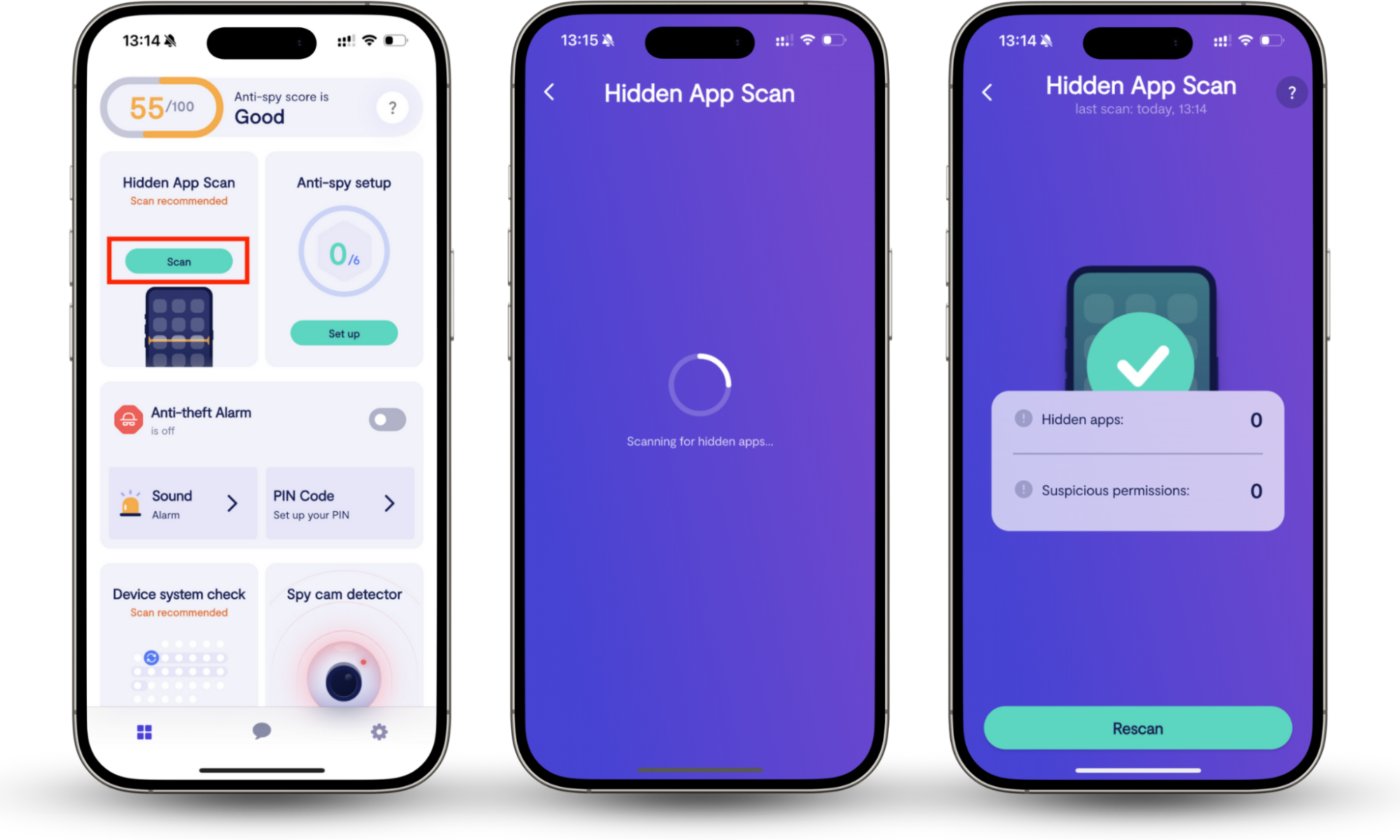
After that, keep a close eye on your accounts for unusual activity. Monitoring bank statements, emails, and login alerts can help you catch any follow-up attempts early.
Conclusion
Scams on WhatsApp are common largely because the platform is so widely used and trusted. While WhatsApp itself isn't a scam, scammers are very good at manipulating people through it. By understanding how these scams work, recognizing the warning signs, and practicing basic security habits, you can greatly reduce your risk of falling for them. Clario Anti Spy features like the Anti-spy scan can also make it easier to enhance the privacy of your phone and online accounts.