Table of contents
- Spear phishing attack examples
- CEO phishing
- AI spear phishing
- Smishing and vishing
- How to identify spear phishing
- What is a spear phishing email?
- Phishing versus spear phishing
- Spear phishing and whaling
- How do spear phishing attacks work?
- Spear phishing prevention
- Parting Thoughts
Spear phishing is the illegal act of obtaining sensitive information by impersonating a legit entity via online communications. Unlike phishing, where messages are sent indiscriminately, spear phishing messages are tailored to a specific group or individual.
In practice, spear phishing usually involves email, text messages, or phone calls that reference real details about the victim—such as their job role, recent activity, or trusted contacts—to appear credible and bypass suspicion.
Spear phishing has become increasingly popular among scammers for several consecutive years, making the digital landscape progressively more dangerous. In 2020 alone, spear phishers hacked the Twitter accounts of Bill Gates, Joe Biden, and other high-profile politicians and influencers.
In recent industry reports, phishing attacks continue to dominate the threat landscape: security research shows that deceptive emails like phishing and social-engineering attempts now account for a significant share of cyber incidents, with some analyses finding phishing involved in over 80 % of attacks and responsible for 16 % of all breaches in 2024.
Pro tip:
Relying on common sense and intuition is not enough to overcome spear phishing threats. To boost your resistance to spear phishing attacks, use Clario Anti Spy. The app comes with real-time anti-phishing and anti-malware protection to ensure your online safety. For an added layer of security, the app features 24/7 data breach monitoring. Protect your digital life now with Clario Anti Spy!
Now that you know the spear phishing definition, let’s look more closely at the risks associated with this online scam and the best ways to detect them.
Spear phishing attack examples
The following examples of spear phishing bring this digital threat into focus and illustrate how it works.
CEO phishing
This type of spear phishing targets company employees by impersonating Chief Executive Officers (CEOs) through organizational communication channels. The fraudulent messages, typically in the form of emails, usually request Human Resources (HR) or Finance departments reveal sensitive company information or transfer money.
The cybercriminals pretend to be CEOs because of the authority associated with the title. After all, employees rarely question their decisions. To run the scam, spear phishers use an email address with a slightly misspelled CEO’s name. They also try to fool targeted employees by using a reply-to address that differs from the sender’s address.
Common warning signs of CEO phishing attempts include the following:
- A sudden request for secrecy or urgency, such as asking to act “immediately” or “confidentially”
- An unusual payment request, especially involving gift cards, wire transfers, or cryptocurrency
- Instructions to bypass normal approval or reporting procedures
- A request to continue the conversation outside official company channels
AI spear phishing
Artificial Intelligence (AI) can be helpful in a lot of ways, but sometimes, it can also be trained to carry out evil deeds. In the case of AI spear phishing, hackers use AI to crawl the internet to find useful information about someone they want to impersonate. It can be a senior member of a company or an online influencer.
AI-powered software then studies this person’s social media pages, professional and social messages, to mimic their language, communication style and tone of voice. After this, the software then crafts and sends emails to targets with an effectiveness and speed unmatched by humans.
AI makes spear phishing more dangerous because it allows attackers to scale highly personalized scams with minimal effort.
- AI tools can generate convincing messages in seconds, allowing attackers to target many victims at once
- Machine-generated emails closely match the writing style, tone, and vocabulary of real individuals, making scams harder to detect
Smishing and vishing
Smishing and vishing are types of phishing that rely on phones to carry out an attack. In the case of smishing, cybercriminals send text messages. The victims of vishing are usually scammed via a phone call.
Smishing is effective because even tech-illiterate targets usually know about online security risks, but aren’t wary of text messages. Therefore, many victims of smishing willingly reveal login credentials, financial data, and other sensitive information via these texts.
Vishing scammers often impersonate bank employees and inform their targets about a supposed account breach. Once the victim takes the bait, the cybercriminals request account login details to secure their money. Needless to say, the account details are later used to empty the victim’s bank account.
These attacks are effective because people tend to trust phone-based communication more than email.
- Text messages often bypass email spam filters and appear more urgent or personal
- Phone calls create pressure to respond quickly, making it harder for victims to pause and verify the caller
- Attackers exploit authority and fear, such as pretending to be banks or service providers
How to identify spear phishing
So, what does a spear phishing attack look like? Is there a way to recognize the bait?
Email is the preferred medium of spear phishers. Now, let’s try to differentiate a legitimate message from a spear phishing email.
What is a spear phishing email?
What does a spear phishing email look like? The scary thing is hackers can effectively imitate the communication style of whoever they want to impersonate. But with some caution and attention, you can tell a spear phishing email from a legit one. Before clicking links or opening attachments, review the email using the following checks:
- Urgency. A sense of urgency or pressure to act quickly, such as warnings about account suspension, missed payments, or time-sensitive requests
- Misspelled sender’s name. Pay attention to the sender’s name because hackers may have made a simple spelling mistake.
- Misspelled email address. The hackers may simply switch one letter for another or swap letters with numbers. For example, using 1 for the letter l.
- A request for sensitive information. The email may be asking for company details such as financial records or corporate credit card numbers.
- A suspicious attachment. It can be a fake invoice or a misleading bank statement.
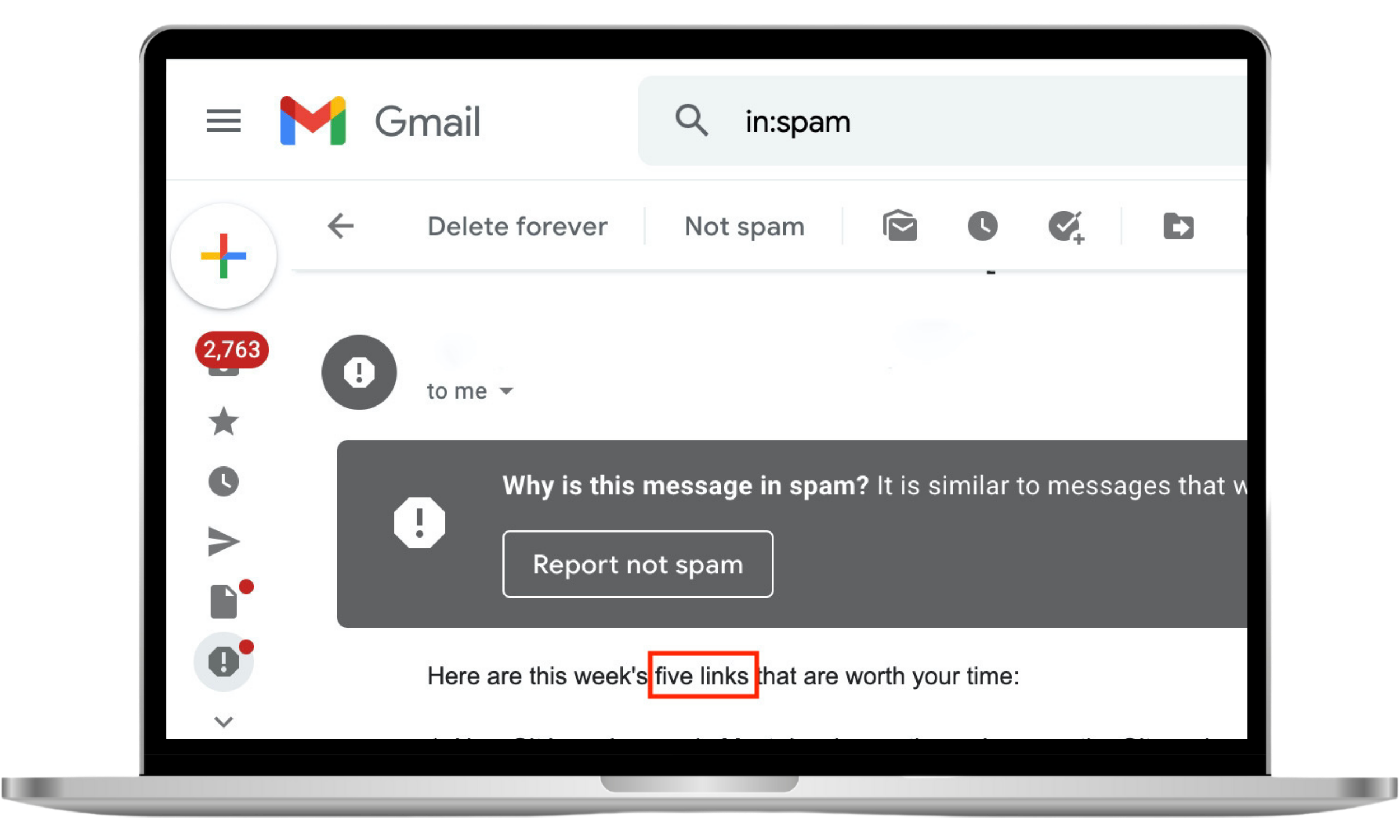
- A warning label. Email service providers like Gmail usually send notifications about potentially harmful attachments and fraudulent messages. Always err on the side of caution as it may be a spear phishing attempt.
Phishing versus spear phishing
Though both online scams share similar methods and mediums, phishing and spear phishing are still different. While phishing uses a scattered approach to choosing victims, spear phishing attacks are launched with a specific target in mind. Because of the need to research potential victims, spear phishing attacks take longer for scammers to execute.
Expert's note
In short, phishing relies on sending generic messages at scale, while spear phishing depends on personalization and prior research to deceive specific targets.
Spear phishing and whaling
Although spear phishing attacks often target wealthy individuals and profitable organizations, some cybercriminals take it even further and engage in whaling. As the name suggests, whaling is a type of spear phishing focused mainly on the highest-profile targets.
To draw a clear distinction between phishing vs. spear phishing and whaling attacks, let’s look at examples of each.
A phishing attack might involve a money transfer request directed at a wide audience. A similar spear phishing attack would be much more subtle and tailored for a specific message recipient. And a whaling attack would be even more sophisticated, and targeted at a large company’s CEO or senior managerial personnel.
How do spear phishing attacks work?
Let’s learn how spear phishing works so you can defend yourself effectively against this treacherous form of online crime.
- Gathering email addresses. Cybercriminals start by collecting the email addresses of potential targets. To this end, they use any publicly available information or access private databases.
- Social engineering. Cybercriminals study the impersonated people researching their writing styles and psychological profiles.
- Detecting antivirus software. Cybercriminals determine the type of antivirus used by their target. It allows them to bypass the email filtering functionality of the antivirus to deliver a malicious message.
- Exit information filtering. When the target replies to a message, their response can be blocked by the company’s security infrastructure. To evade the obstacle, cybercriminals create tunnel-like pathways for messages to go through.
- Processing the phished data. After successfully baiting their victim, cybercriminals harvest and process their data. Sometimes, they install malicious software on the victim’s device to facilitate further spying and additional attacks.
Spear phishing prevention
Given how rife spear phishing is, it should come as no surprise that its victims are not only the owners of Fortune 500 companies. Members of the general public are also habitually targeted by cybercriminals looking to enrich themselves at their expense.
To stay safe, consider the following spear phishing protection tips:
- Don’t post your official email address on public websites. Better yet, don’t overshare your personal details on social media.
- Trust your instincts. If you feel suspicious but need to contact the person who sent you the email, call or text them.
- Don’t open emails labeled as dangerous by your email service provider. Most importantly, do not click links or open attachments in these messages.
- Attend cybersecurity training courses or workshops. Make sure you request them if your company doesn’t offer such educational opportunities already.
- Ensure your company has a data breach protocol that phishing victims can follow. It’s essential to map out different scenarios and crisis intervention strategies to minimize the harm done by the attack.
- Carefully look at all emails you receive before responding.
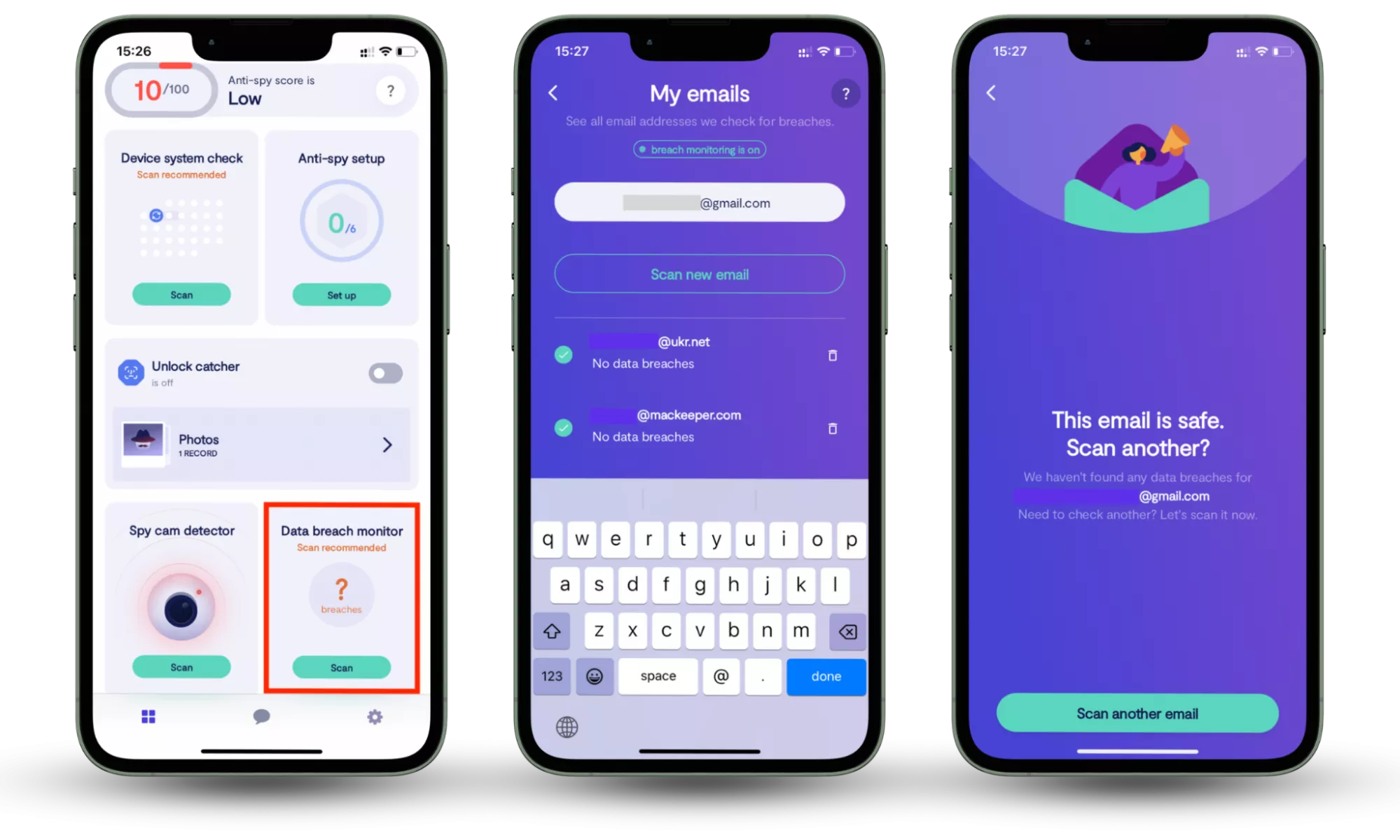
Since spear phishing attacks often rely on leaked account data, tools like Clario Anti Spy’s Data breach monitor can help by alerting you when your email addresses appear in known data breaches, allowing you to secure exposed accounts before they are targeted.
How to check whether your information is compromised:
- Download Clario Anti Spy and subscribe.
- Open the app, and, under Data breach monitor, tap Scan.
- Enter your email address.
- When the scan is complete, follow the on-screen guidance to review any data breaches.
- Repeat the process for any other email addresses.
Parting Thoughts
The frequency, intensity and sophistication of spear phishing attacks rise by the day. With the recent launch of AI-enabled spear phishing attacks, it’s rare for online users to be able to stay safe without upgrading their digital security.
Clario Anti Spy helps reduce this risk through its Data breach monitor, which scans the user’s email addresses for known data leaks and alerts them if their information has been exposed online. By identifying compromised accounts early, users can secure affected services before stolen data is exploited in targeted phishing attacks.
Read more: