Table of contents
- What is adware?
- 1. What is the main purpose of adware?
- 2. Adware behavior
- 3. Symptoms of adware
- What is spyware?
- 1. What is purpose of spyware
- 2. Spyware behavior
- 3. Symptoms of spyware
- What is difference between spyware and adware
- Conclusion
What is adware?
Adware is software that slips onto your device, usually by being bundled with free apps, and bombards you with ads to make money for its creators. It’s not always outright harmful, but it can open the door to worse threats by tracking your habits, sending you to malicious websites, and targeting you with scam content.
1. What is the main purpose of adware?
The primary goal of adware is to generate revenue for its developers through online advertisements. It tracks your browsing habits and interests to show targeted ads, like pop-ups or banners, making money each time you view or click on them. That’s why it’s crucial to remove adware as quickly as possible.
2. Adware behavior
The core aim of adware is to generate profit through advertising. It monitors your online behavior and delivers targeted ads, earning revenue from clicks, views, or impressions. While some adware operates legally (like in free apps with opt-in ads), dangerous versions can install without your knowledge and lead to data leaks or further infections.
3. Symptoms of adware
If adware has infected your device, you’ll see frequent pop-up ads appearing on your home page and in your apps. The most common place to see ads is in your web browser, but they’ll appear in places you aren’t used to.
Here’s what to look out for:
- Unexpected pop-ups appear in random places. You see full-screen ads or banners on websites that don’t usually have them, or even on your home screen when no apps are open.
- Your browser redirects you to strange websites. Your browser forces you to visit unfamiliar websites or advertising pages instead of the URL you typed in.
- Sluggish or reduced performance. Your device freezes, crashes, or runs significantly slower than usual because the adware is using up your processor to load graphics and videos.
- You see new toolbars and extensions. You notice search bars, plugins, or extensions in your browser that you did not download or install yourself.
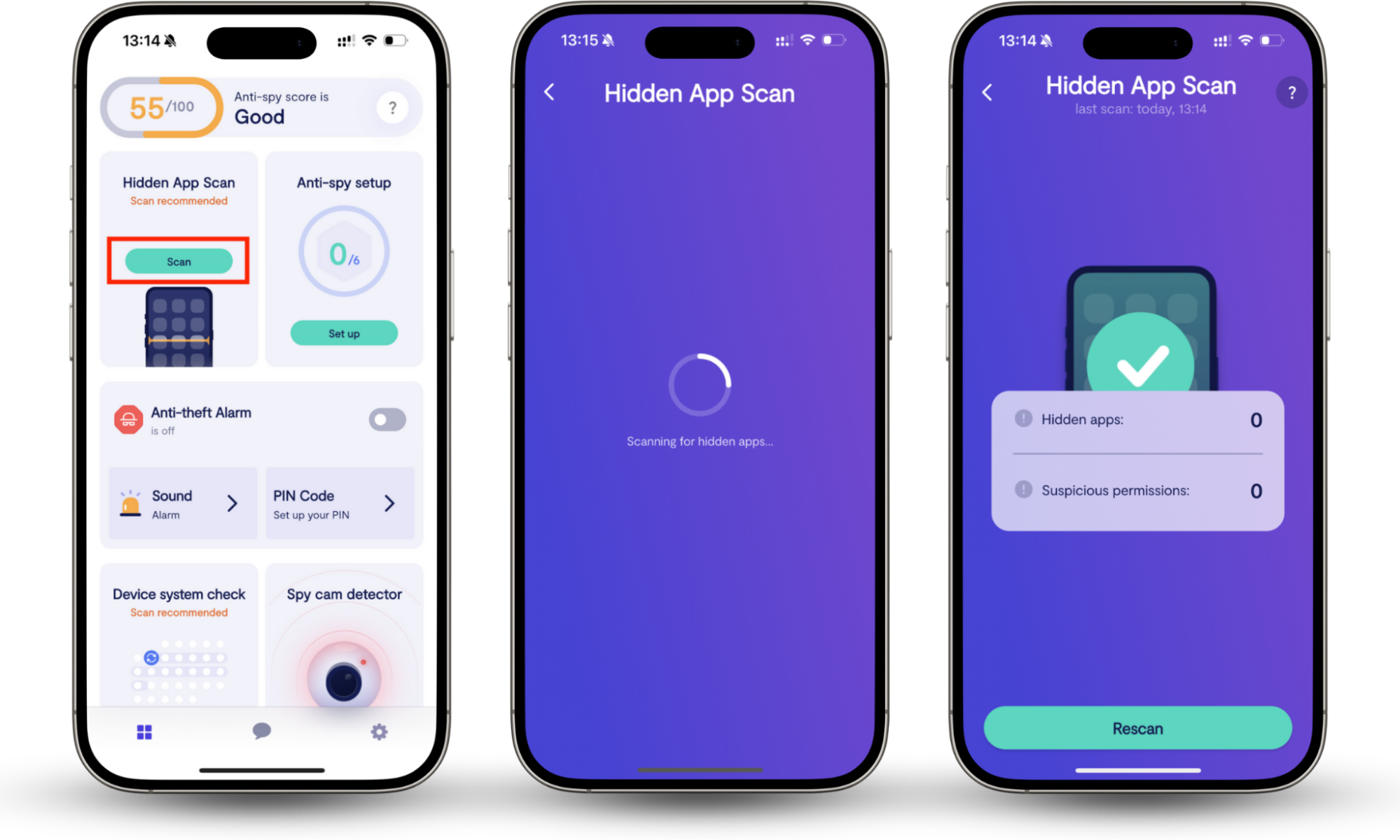
If you see any of these red flags, it’s time to scan your device for malware. With Clario Anti Spy’s Hidden app scan, you can quickly uncover dangerous apps hiding in your phone. Here’s how:
- Download Clario Anti Spy, create an account, and sign in to the app.
- Locate the Hidden app scan section and press Scan.
- Wait for Clario Anti Spy to check your device. It’ll display a list of suspicious apps, if it finds anything noteworthy. If it does find adware or spyware, follow the instructions on-screen to remove it as quickly as possible.
What is spyware?
What is spyware? Spyware is a different type of illegal program that infiltrates your device, helping criminals monitor your activities. Spyware is, by definition, always dangerous, and it can lead to serious crimes like identity theft if you don’t catch it early.
1. What is purpose of spyware
Spyware’s primary purpose is to gather your personal and financial information for malicious use. Attackers might try to steal your identity, commit financial fraud, or simply sell your data on the dark web.
2. Spyware behavior
Unlike adware, which is obvious, spyware relies on stealth. It installs itself silently and hides deep in your system files, so you don’t know it’s there. Once active, it runs continuously in the background and can record your keystrokes, capture screenshots, access your microphone, or track your GPS location, all while uploading this data to the attacker’s server.
3. Symptoms of spyware
Because spyware tries to stay hidden, it is harder to detect than adware, but it still leaves traces. Keep your eye out for:
- Rapid battery drain. Spyware runs 24/7, draining your battery much faster than normal.
- Constant overheating. Your device feels hot to the touch even when you aren’t using resource-heavy apps, suggesting that hidden software is working hard in the background.
- Spikes in data usage. You notice a sudden increase in your mobile data consumption because the spyware is constantly uploading your photos, messages, and files to a remote server.
- Strange background noise. In some cases, you may hear clicking sounds, static, or distant voices during phone calls, which can indicate call recording or tapping.
Spyware symptoms are always subtle, which makes it hard to notice. One of our support agents, Karen, recently helped a user who noticed something unusual on their device.
The user kept seeing a small phone logo flashing in the corner of their screen, which made them worried that someone was listening in on their calls. Karen explained that this symbol appears when an app accesses the device’s microphone or camera, and suggested that they run a Hidden app scan to find the cause.
The customer followed the steps and reviewed their phone’s permissions. Fortunately, the scan found nothing suspicious, and the user was relieved to verify their safety and regain peace of mind.
If you’re worried that your device is infected, check our list of apps that spy on you.
What is difference between spyware and adware
Some people mistakenly believe that spyware is also known as adware, but the two are distinct. While both adware and spyware are malicious software designed to exploit you, they have very different goals.
Here are the main differences between spyware vs adware compared:
| Adware | Spyware |
| The goal is revenue. It wants you to click ads so the creator gets paid. | The goal is data theft. It wants to steal your passwords, banking details, and identity. |
| Visibility is high. It displays constant pop-ups, banners, and browser redirects. You know it’s there. | It’s invisible. It runs silently in the background. You often won’t know you have it until your data is stolen. |
| It’s based on deceptive consent. You often agree to install it by accident when clicking through terms for free software bundles. | You give no consent. It installs via cyber attacks and exploits, phishing links, or drive-by downloads without you ever agreeing. |
| It affects performance. It slows down your device, compromises your security, and clutters your screen. | It impacts security. It drains battery and data, but the real damage is financial loss and privacy breaches. |
| It’s moderately hard to uninstall. You can sometimes uninstall it via settings, though it often leaves leftover files. | It’s very difficult to remove. It hides deep in system files and usually requires dedicated anti-spyware tools to be removed. |
Which is worse? Spyware is significantly more dangerous. Adware ruins your browsing experience, but spyware can ruin your life by draining your bank account or blackmailing you. However, you should not ignore adware either—it often creates security holes that allow spyware to enter your device later, and standard antivirus tools might miss it.
Conclusion
Adware makes your phone frustrating to use, but spyware turns it into a surveillance tool for hackers and scammers. Since the most dangerous malware evades being detected, it can run on your device for months without leaving a trace. To ensure your personal information remains safe, use Clario Anti Spy’s Hidden app scan to find and remove any threats running in the background.