Table of contents
- What is FlexiSpy?
- Can FlexiSpy be detected on iPhone?
- Key Indicators of FlexiSpy Installation
- Jailbreaking is required
- Unusual battery drain
- Increased data usage
- Erratic performance
- Background noise during calls
- How to check if FlexiSpy is on your iPhone
- 1. Check for installed programs
- 2. Use a spyware scan
- 3. Inspect for a jailbreak
- 4. Verifying configuration profiles
- 5. Check your App Store purchase history
- 6. View app privacy report
- 7. Use iPhone Safety Check
- How to get FlexiSpy off your iPhone
- 1. Use antispyware to remove FlexiSpy
- 2. Update your iPhone
- 3. Perform a system restore from an iPhone backup
- 4. Make a factory reset
- Conclusion
- FAQ
- 1. Can FlexiSpy be installed remotely?
- 2. How do I find hidden spy apps on my iPhone?
- 3. Is FlexiSpy visible?
- 4. Can someone spy on my iPhone without me knowing?
What is FlexiSpy?
FlexiSpy is a type of surveillance software that is used to spy on almost any computer or smartphone. It has the ability to track a person’s location, monitor installed applications, read messages in any app, access cameras to take photos and videos, and much more. This is why many users search for ways to check if FlexiSpy is on your phone.
In total, FlexiSpy offers more than 70 features for spying on unsuspecting users, and prices start at less than $50 a month. Its creators claim FlexiSpy is for parental control and employee monitoring, but in reality, it’s spyware that anyone can purchase to invade the privacy of whomever they choose.
Can FlexiSpy be detected on iPhone?
FlexiSpy’s developers have gone to great lengths to ensure the software is difficult to detect. Its built-in hidden mode means you won’t see FlexiSpy on your iPhone’s home screen or in the App Library.
However, you can still find FlexiSpy on your phone using specific signs and tools before it sends more data back to a stalker. This way, you can remove spyware from your iPhone before it can send more information back to a stalker.
Key Indicators of FlexiSpy Installation
FlexiSpy runs constantly in the background. It can cause a strain on your phone’s resources. You may notice that your battery drains more quickly than usual, your data usage increases, or that your phone overheats, restarts, or runs slowly. If someone is monitoring your calls, you might even hear strange sounds when you’re talking to people on the phone.
You might notice this unusual behaviour from your phone before you even suspect that you’re being monitored. It’s important to know what to look for, so that you can take action quickly. So, let’s take a look at some of the signs that FlexiSpy is installed on your phone.
Jailbreaking is required
Your iPhone has a range of security features that should keep it safe from spy apps like FlexiSpy. By default, iOS only allows you to download and install pre-vetted software from the App Store, and it checks an app’s integrity every time you launch it. FlexiSpy isn’t available in the App Store, so it can only be installed on an iPhone that has been jailbroken.
If your phone isn’t jailbroken, you don’t need to worry about FlexiSpy. However, if you’ve jailbroken your iPhone, someone else could have installed FlexiSpy to monitor you.
Unusual battery drain
If FlexiSpy is installed on your phone, it remains active, allowing it to monitor you constantly. This can drain your battery faster than usual.
You probably know how long your battery usually lasts, so you’ll notice if it runs out more quickly. I know that I only usually need to charge my phone overnight—if the battery drains more quickly than that, I’d want to find out why. Fortunately, you can check which apps have used the most battery power in the Settings app of your iPhone.
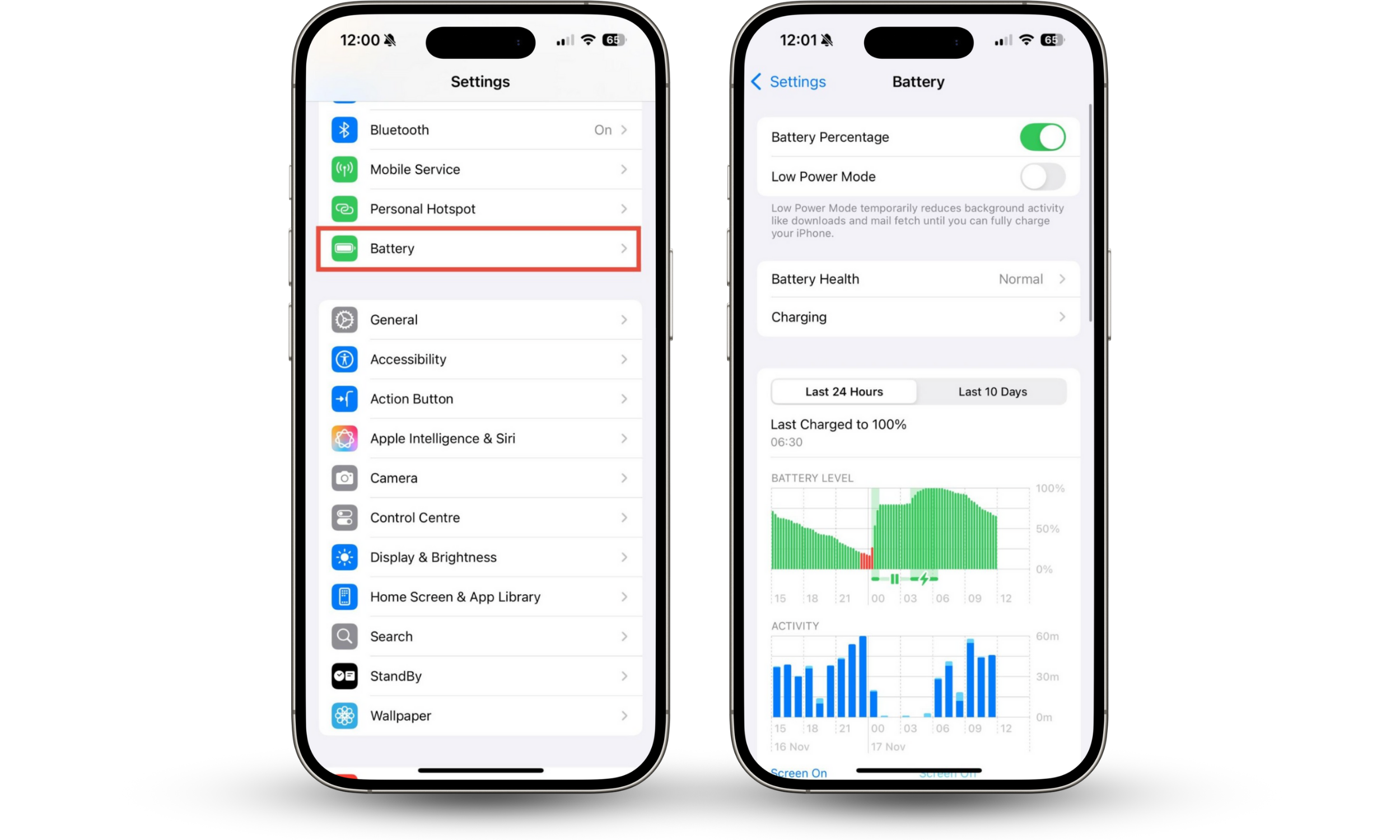
How to check for unusual battery drain on your phone:
- Go to Settings > Battery.
- Review the data to identify any suspicious patterns. Do you recognize all of the apps that have used battery power? If you look at the last 10 days’ worth of battery usage, has anything changed?
Increased data usage
FlexiSpy can also make your phone use more data. It needs an internet connection to report back on your activity. If you notice spikes in your mobile data usage, FlexiSpy or another monitoring app could be the culprit.
You may first notice increased data usage when you get a message from your cell provider, especially if you have a low data cap. However, you can also check how much data your phone has used in the Settings app.
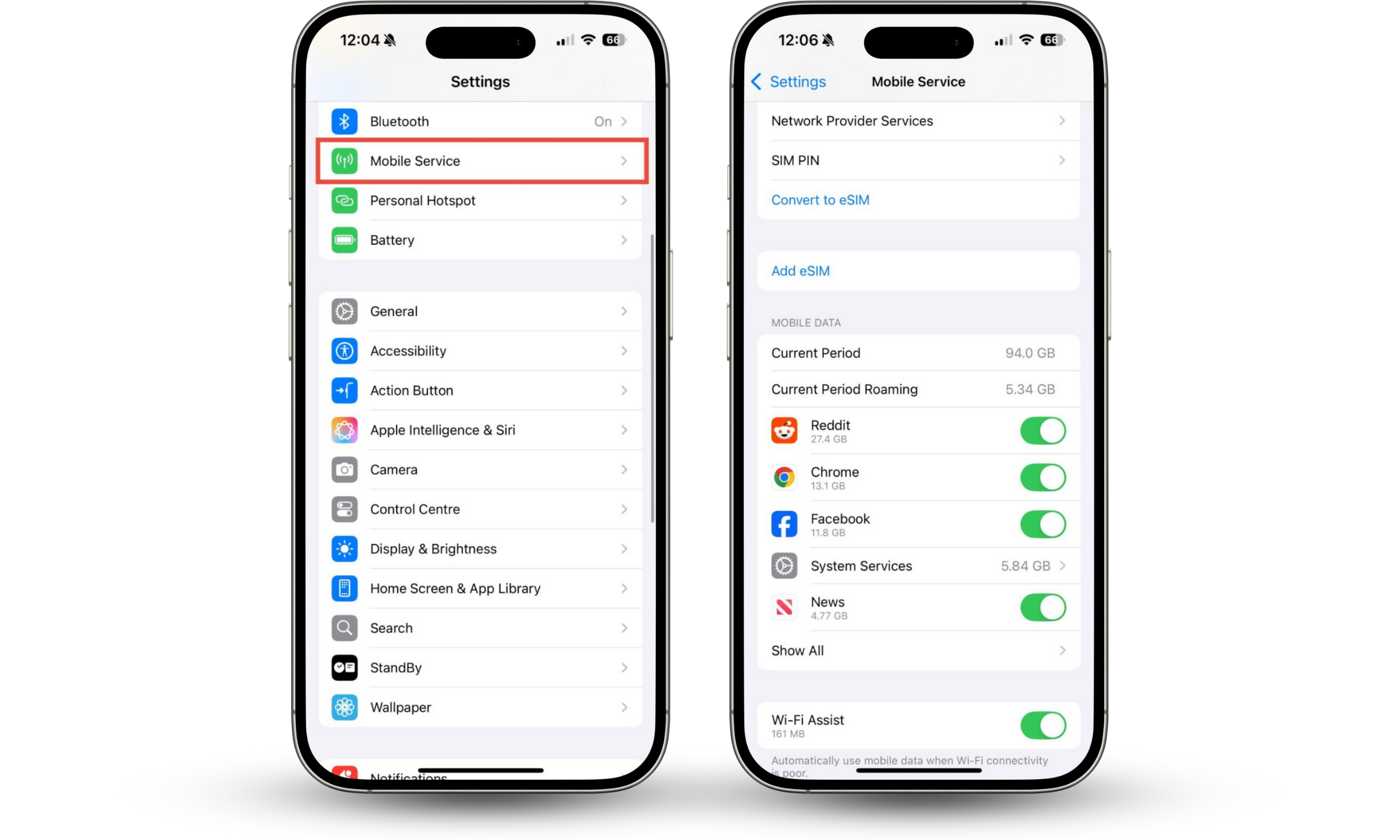
How to check for increased data usage on your iPhone:
- Go to Settings > Mobile Service or Settings > Cellular, depending on your location.
- Scroll down to Mobile Data. Do you recognize all of the apps that have used your phone’s data?
Expert tip
FlexiSpy might also use your WiFi connection. If you’re always connected to WiFi, you might not notice spikes in data usage.
Some FlexiSpy victims may experience a significant increase in data usage, while others hardly notice any difference. This is because FlexiSpy can report on different types of activity.
If someone is monitoring your call logs, chats, or browsing history, this information will be sent as small text files. However, if someone is using FlexiSpy to record your calls or capture images and video, you’ll see a bigger increase in data usage.
Erratic performance
Does your phone freeze unexpectedly, heat up, or restart for no reason? These could all be signs that FlexiSpy is installed on your device.
As I’ve mentioned, FlexiSpy is always running on your phone. In addition to affecting your battery life and data usage, this may also cause other performance issues on your phone. So, keep an eye out for signs like your phone running unexpectedly slowly, freezing, or otherwise behaving erratically.
Background noise during calls
If you hear unusual echoes, static interference, clicking sounds, or other conversations while you’re on a call, it could be a sign that FlexiSpy is monitoring you.
FlexiSpy can record both incoming and outgoing calls, as well as Messenger and WhatsApp calls. It does this by accessing your microphone and audio, and this can cause strange noises during calls.
How to check if FlexiSpy is on your iPhone
If you’re worried you may be a victim of FlexiSpy monitoring, you’re probably wondering how to know if someone is spying on your phone. Even though FlexiSpy tries to stay hidden, there are several ways to check if FlexiSpy is on your phone, including:
- Check for installed programs
- Use a spyware scan
- Inspect for a jailbreak
- Verify configuration profiles
- Check your App Store purchase history
- View app privacy report
- Use iPhone Security Check
1. Check for installed programs
Most spyware applications, including FlexiSpy, use tricks to hide themselves on your device. They will have innocent names and icons so that they don’t look suspicious when you stumble across them in your App Library, or they won’t appear at all. However, it’s not too difficult to identify hidden apps on iPhones.
All you need to do is go through all the folders in your App Library on your iPhone and look for any installed software you don’t recognize. Even if it seems innocent, anything you didn’t install yourself is potentially dangerous, and it’s best to remove it as quickly as possible.
At this point, you might be wondering, are all apps on the App Store safe? Well, all the software you see in the App Store is tested and approved by Apple to ensure that it complies with the company’s strict rules for developers. However, while this keeps apps like FlexiSpy out of the App Store, there are approved apps that like to collect more data than they really need, so it’s a good idea to check their privacy policies.
2. Use a spyware scan
Most of the time, you can’t run spyware or antivirus scans on an iPhone. After all, Apple’s ecosystem is usually so secure that you don’t need to. By default, security settings on iOS don’t let apps scan other apps.
However, if your iPhone has been jailbroken, you might need to run a spyware scan.
Although it’s possible to use a code to check if your iPhone is being monitored, this is often unreliable, and more sophisticated spyware can hide itself from these checks.
3. Inspect for a jailbreak
Tools like FlexiSpy only work on jailbroken iPhones.
Jailbreaking is when someone bypasses some of Apple’s security processes on an iPhone. This is often done because someone wants to install unauthorized apps, or because they want to get around some of Apple’s other security restrictions. However, Apple’s security processes are there for a reason–and a jailbroken phone is vulnerable to threats like spyware and viruses.
You may have jailbroken your iPhone yourself, or you might suspect someone else has done it. Perhaps you bought a used iPhone that was already jailbroken, or you think that a partner or someone with access to your phone has jailbroken it.
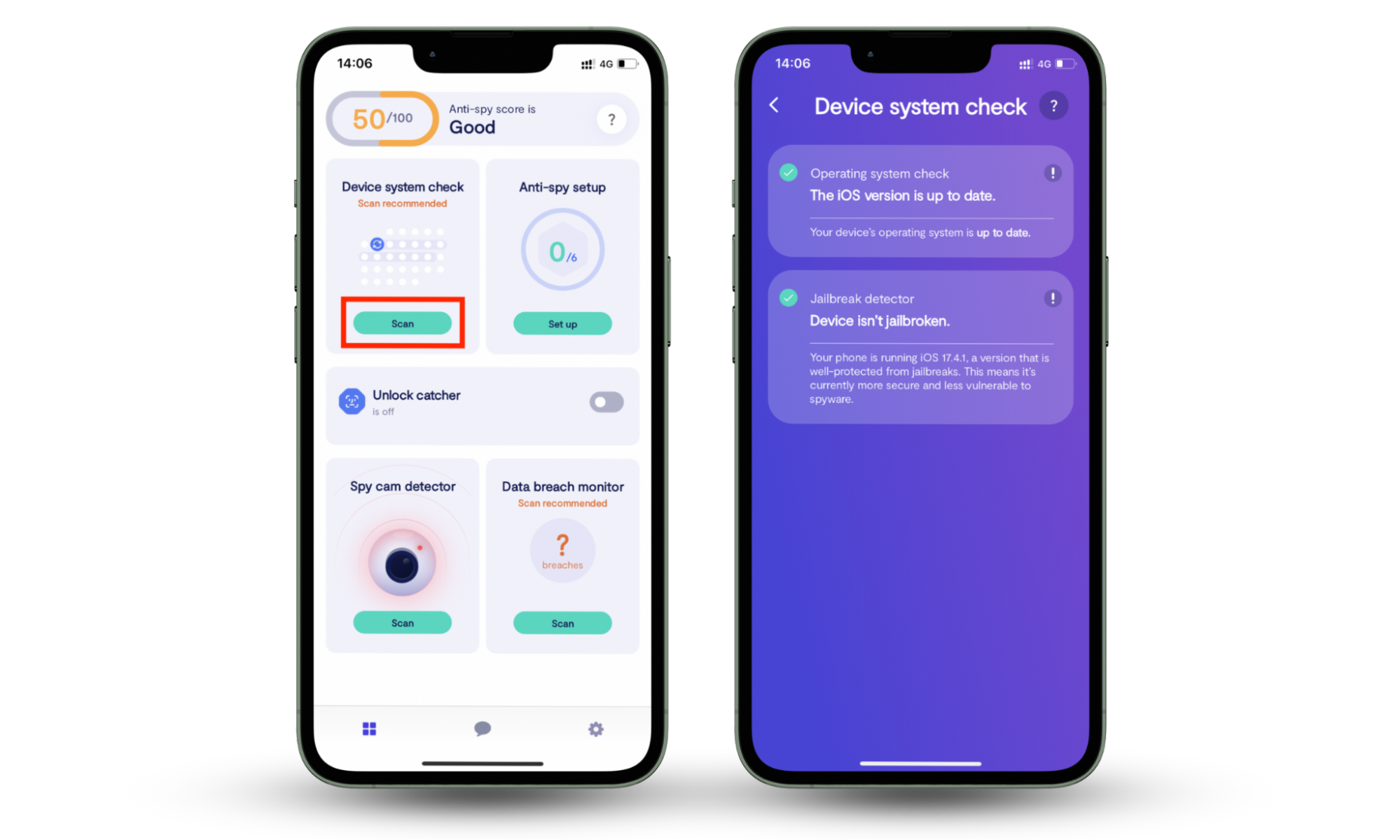
If you think that your iPhone is jailbroken, you can run a check with Clario Anti Spy. Clario Anti Spy’s Device System Check will scan your iPhone for signs of a jailbreak—and also let you know if your iOS version is up to date.
How to check if your iPhone is jailbroken:
- Download Clario Anti Spy and sign up or log in.
- In the app, tap on Scan under Device System Check.
- When the scan is complete, check the results to see if your phone is jailbroken.
4. Verifying configuration profiles
Configuration profiles can enable users to remotely manage certain functions on your iPhone, including settings and app installation. The person who installed the configuration profile might also be able to see your location and some other data about how you use your phone.
If your iPhone was issued by your employer or your school, it might have a legitimate configuration profile installed. This allows your IT administrator to ensure you’re not installing forbidden apps and enables them to wipe your device if you leave the organization.
In most cases, though, your iPhone shouldn’t have any configuration profiles installed—especially if it’s a personal phone. If someone installs a configuration profile on your phone, they can make changes to your settings or install apps without your knowledge.
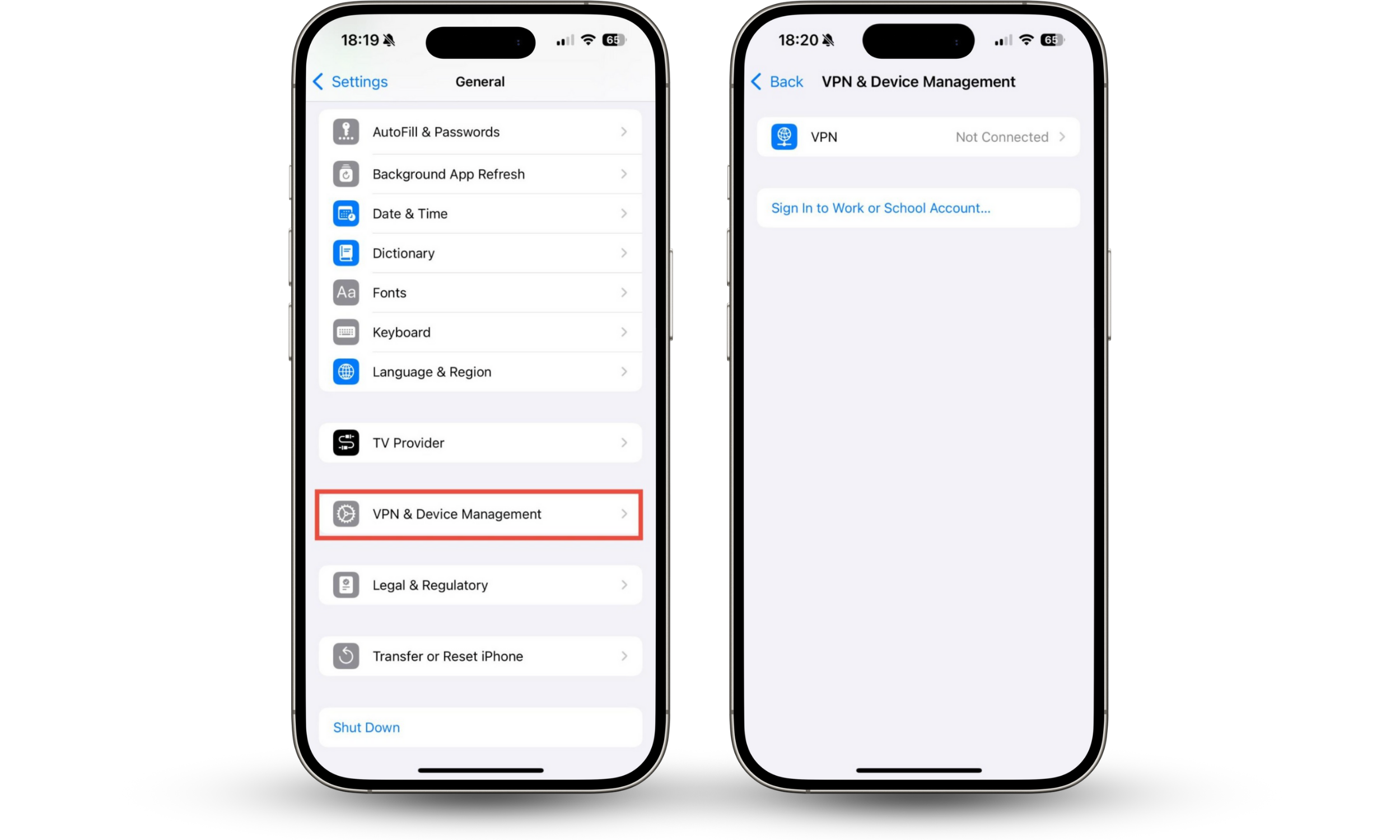
How to check for configuration profiles on your iPhone:
- Go to Settings > General > VPN & Device Management.
- See a profile you don’t recognize? If you see something unexpected, tap on it and delete it.
5. Check your App Store purchase history
You can’t buy FlexiSpy in the App Store. However, if someone wants to monitor you, they might purchase another type of spy software for your phone. If they’ve purchased this using your Apple ID, even on another device, it will appear in your App Store purchase history.
If someone is spying on your phone with FlexiSpy or another monitoring app, you should check your App Store purchase history for another reason, too. A stalker might have access to your Apple Account password, or your financial details—so they can make purchases using your account.
It’s always a good idea to keep an eye on your App Store purchase history. Even if you don’t suspect that someone is spying on you, checking your purchase history can help you spot fraudulent transactions, helping you catch a compromised credit card or bank account quickly.
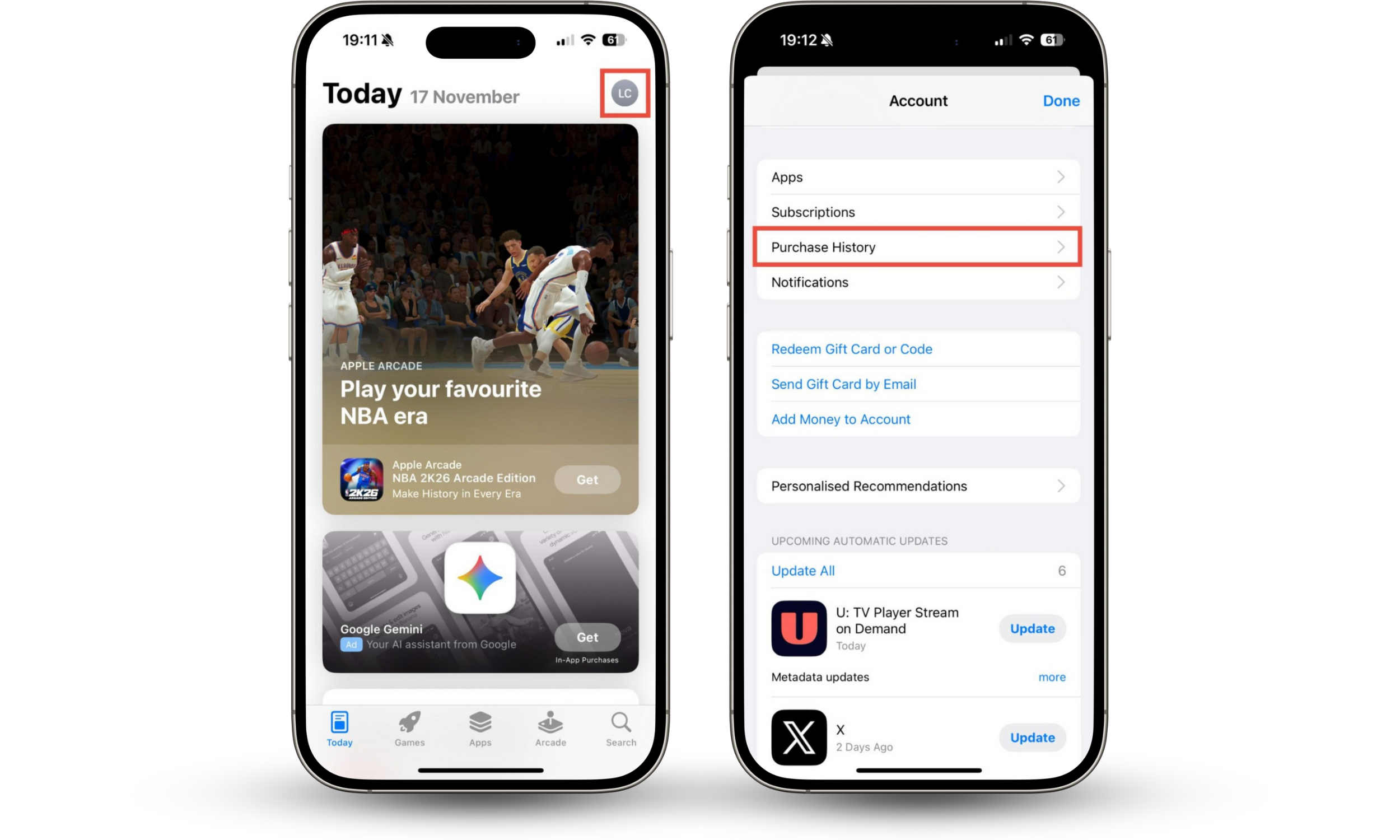
How to check your App Store purchase history:
- Open the App Store and tap your user icon in the top right corner.
- Tap Purchase History. Look through your recent purchase history to see if you recognize all of the entries.
6. View app privacy report
FlexiSpy might need access to your camera, microphone, call log, location, and other data. When you install and open any new software on your phone, it may ask for permission to access these features. However, if someone else installed FlexiSpy on your phone, you might not know that it’s using your camera, location, or microphone.
Fortunately, the iOS App Privacy Report lets you check which apps have accessed your location, contacts, microphone, camera, and other features on your phone. When I checked, I found that Weather had accessed my location, Google Photos had accessed my photos, and Mail had accessed my contacts—no surprises there!
How to view your App Privacy Report:
- Go to Settings > Privacy & Security.
- Tap App Privacy Report. If you haven’t already enabled this feature, tap Turn On App Privacy Report.
- Tap Show All under Data & Sensor Access to check which apps have accessed features of your phone.

7. Use iPhone Safety Check
If you’re worried about which apps and people can access your information, you can also use Apple’s built-in Safety Check feature. This gives you another way to check which apps can access your location, camera, microphone, Bluetooth connectivity, and other features on your iPhone.
If FlexiSpy or other monitoring apps are installed on your phone, they’ll need access to some of your data. The iOS Safety Check lists all of the people and apps that can access your information, so that you can remove permissions quickly and easily.
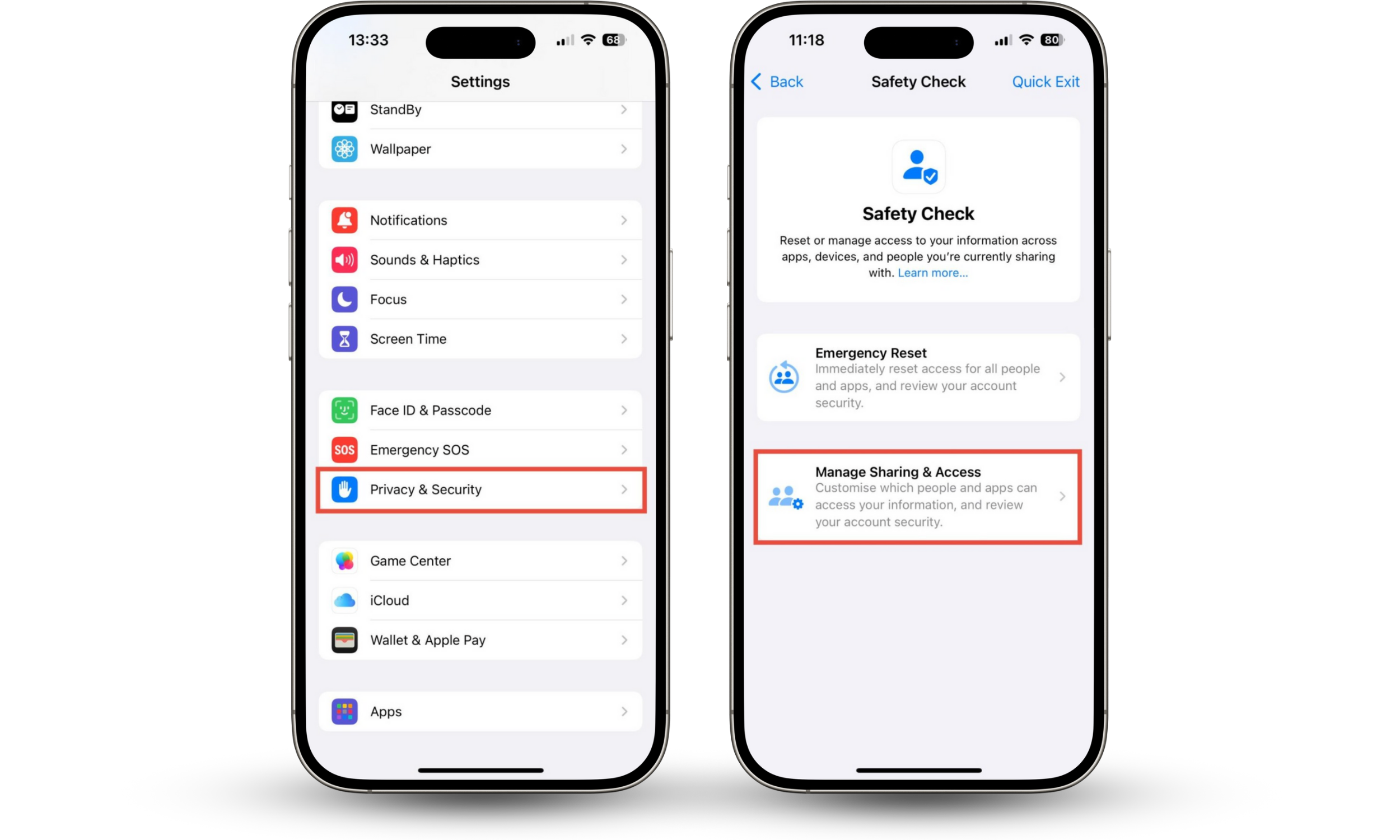
How to use the iPhone Safety Check:
- Go to Settings > Privacy & Security > Safety Check.
- Tap Manage Sharing & Access and follow the on-screen instructions to review and edit which apps and people can access your information.
How to get FlexiSpy off your iPhone
If you’ve detected FlexiSpy or any other spyware on your iPhone, you must remove it immediately. It will not only affect the performance of your device, but it will be sending your personal data back to whoever is stalking you. Here are four proven ways to find and remove FlexiSpy on your phone effectively:
- Use antispyware to remove FlexiSpy
- Update your iPhone
- Perform a system restore from an iPhone backup
- Make a factory reset
1. Use antispyware to remove FlexiSpy
If antispyware apps have alerted you to FlexiSpy's presence on your iPhone, they may also be able to help you remove it.
However, if you have a jailbroken iPhone, remember to take precautions when installing new apps—after all, you’re at more risk of security threats.
How to download apps safely:
- Only download software from reputable sources–such as a developer’s website or the App Store.
- Read reviews before you download any software, and check whether other users have had any issues.
- Remove the jailbreak from your iPhone, if possible, before downloading any new apps. This way, Apple’s built-in security protections will help keep your phone safe.
2. Update your iPhone
By updating your iPhone with the latest iOS release, you automatically remove any jailbreak, which disables FlexiSpy and similar surveillance software that relies on the ability to circumvent Apple’s security protections.
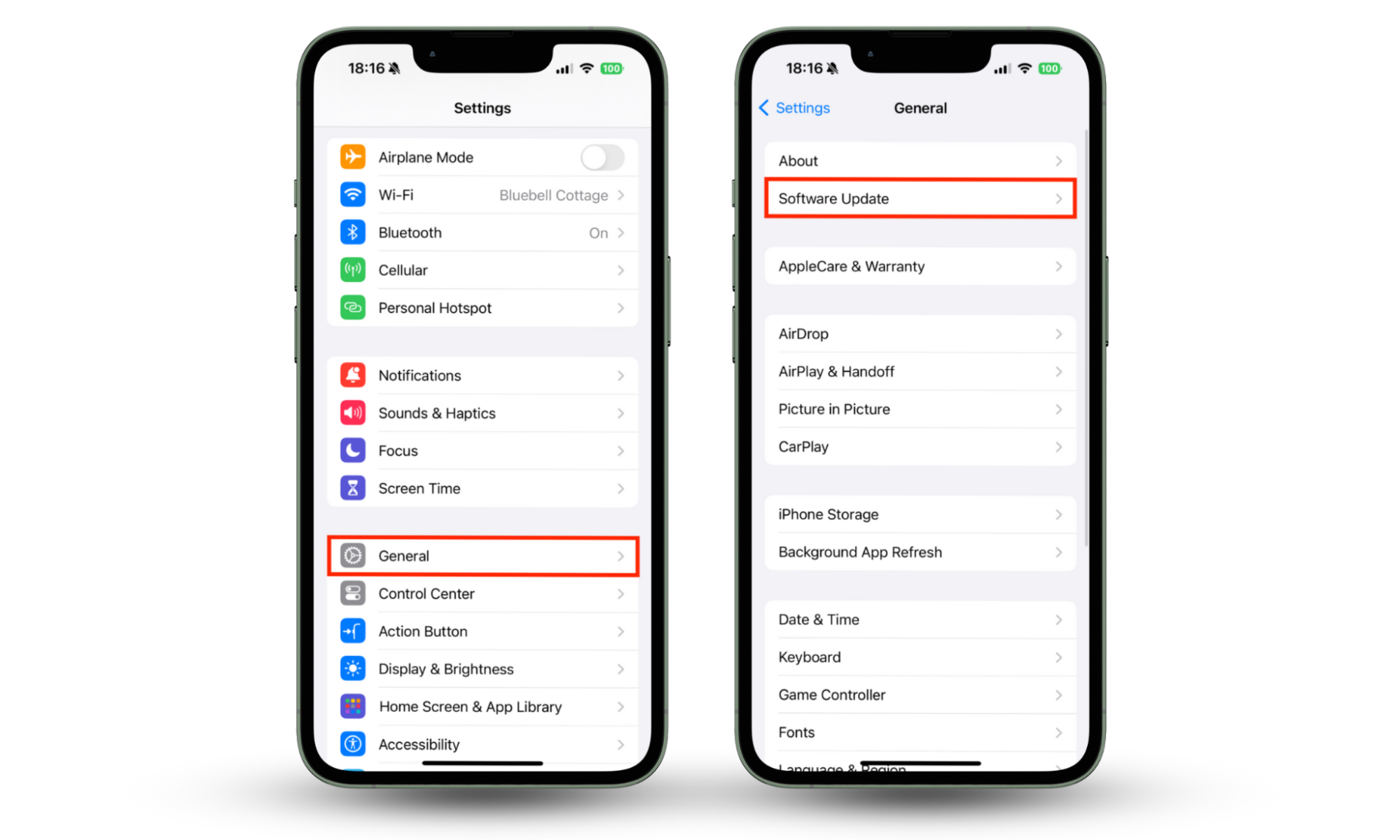
Here’s how to update your device:
- Open the Settings app on your iPhone, then tap General.
- Tap Software Update.
- If an update is available, you’ll see it here. Tap Download and Install to continue.
3. Perform a system restore from an iPhone backup
If you’re already running the latest iOS release and an update isn’t available, you can perform a system reset and restore an iPhone backup. This also removes any jailbreak and clears unauthorized apps from your device while saving your data.
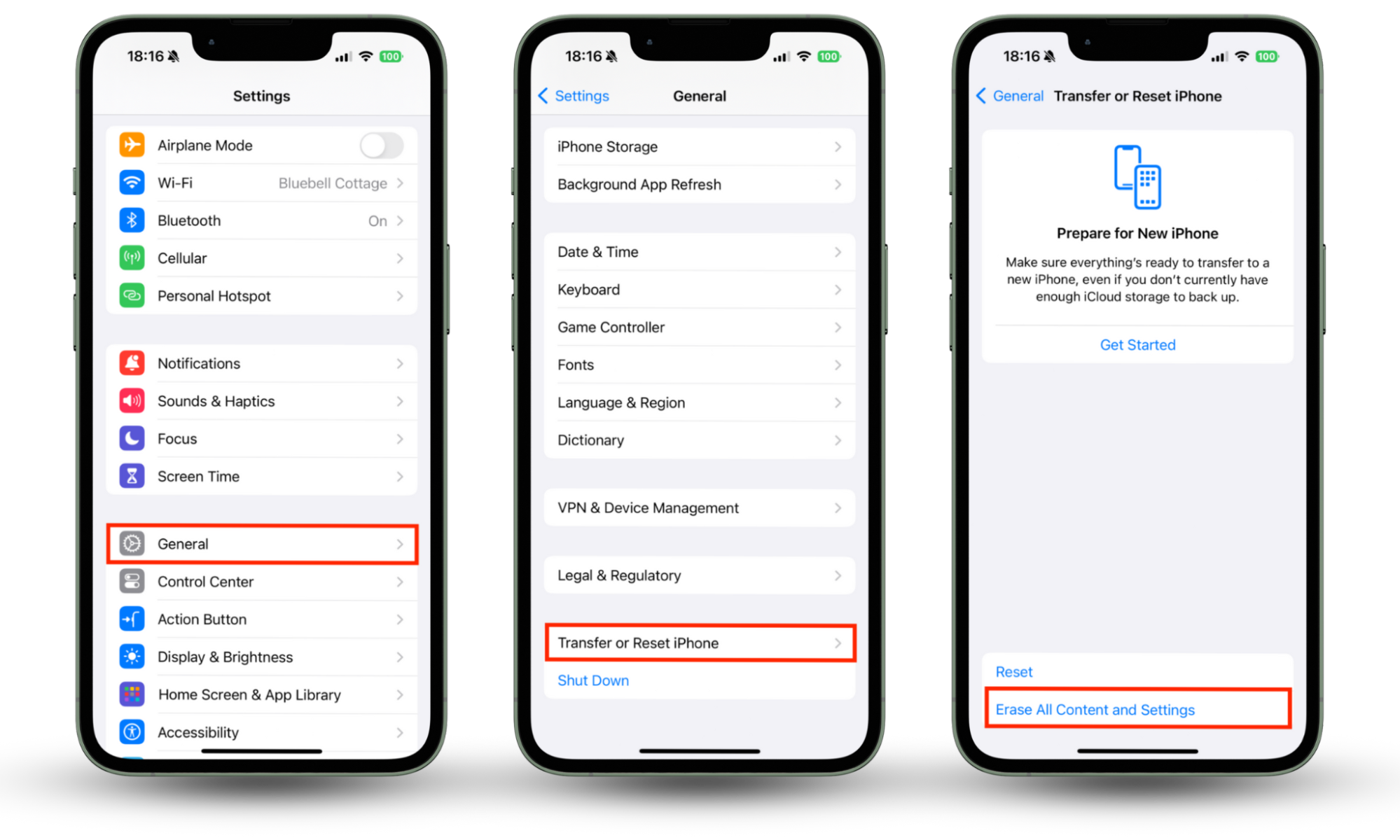
To system reset and restore an iPhone backup, simply follow these steps:
- Open the Settings app, then tap General.
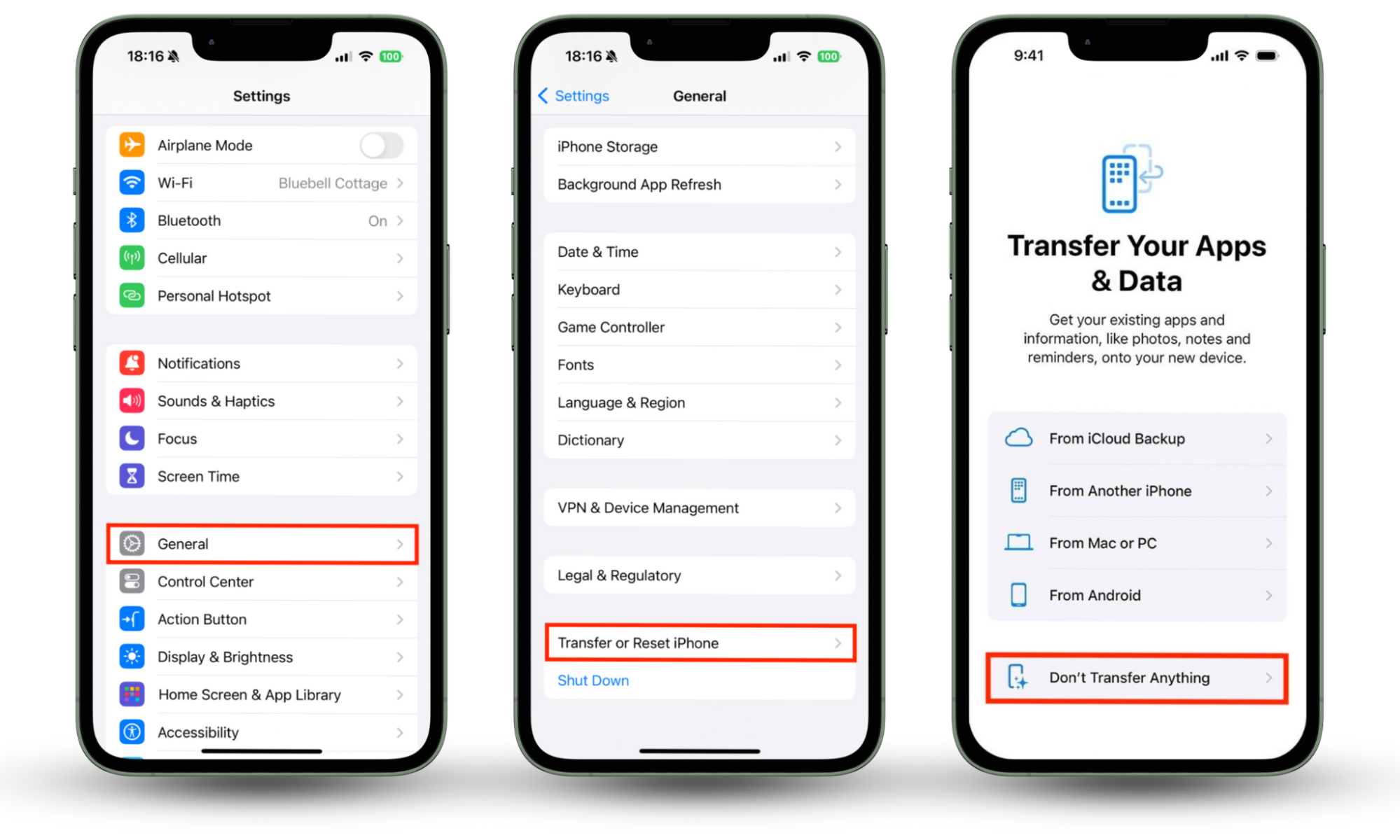
- Select Transfer or Reset iPhone, then choose Erase All Content and Settings.
- Follow the steps on the screen and enter your iCloud password when prompted.
- Once the process is complete, your iPhone will restart, and you’ll see the setup screen. Follow the steps until you get to the Transfer Your Apps & Data screen, then choose where to restore your backup.
4. Make a factory reset
If you would prefer not to carry over any data from a previous iPhone backup and you want to start with a fresh iOS install, all you have to do is erase your device as we outlined above, with a slight difference:
- Open the Settings app, then select General.
- Select Transfer or Reset iPhone, then tap Erase All Content and Settings.
- Follow the steps on the screen and enter your iCloud password when prompted.
- When your iPhone restarts, you will be greeted by the setup process. Follow the steps on the screen until you see the Transfer Your Apps & Data screen. Choose the option that says Don’t Transfer Apps & Data to start with a fresh copy of iOS.
Pro Tip:
Before factory resetting your iPhone, go to Settings > Apple ID > iCloud > Backup and create a clean backup. This ensures your photos and data are saved—without copying back spyware like FlexiSpy during restoration.
Conclusion
Spyware like FlexiSpy is a serious threat to iPhone users. That’s why it’s important to regularly check if FlexiSpy is on your phone or if your device is jailbroken using tools like Clario Anti Spy’s Device System Check. Clario Anti Spy also offers protections to prevent stalkers from listening to your calls, reading your SMS messages, and stealing personal information.
FAQ
1. Can FlexiSpy be installed remotely?
It’s not possible to install FlexiSpy remotely on an iPhone. An attacker needs access to your device to jailbreak it and install the FlexiSpy software.
2. How do I find hidden spy apps on my iPhone?
Go through all the folders in your App Library and remove any apps you don’t recognize.
3. Is FlexiSpy visible?
FlexiSpy may be visible, but the software allows attackers to install it without leaving an obvious trace. In this instance, you can only find it with an antispyware tool.
4. Can someone spy on my iPhone without me knowing?
Yes, once someone has installed spyware on your iPhone, they can listen to your calls, see your photos and other personal content, watch you through your camera, and more without you knowing.