Table of contents
- What does “Cloned WhatsApp” mean
- Key warning signs your WhatsApp might be cloned
- 1. Unknown devices linked to your account
- 2. Unexpected logouts or re-verification requests
- 3. Messages or chats you didn’t send, or chats marked read without your action
- 4. Unusual profile changes or strange activity
- 5. Strange behavior: battery drain, data spikes, app performance issues
- 6. Contacts reporting suspicious messages from your account
- How to check if someone is logged into your WhatsApp
- What to do if your WhatsApp is cloned
- 1. Log out of all unknown devices
- 2. Enable/update two-step verification (2FA)
- 3. Change passwords and secure your SIM or phone
- 4. Update WhatsApp to latest version and scan device for malware
- 5. Notify contacts and report to WhatsApp/Support
- 6. Re-register your WhatsApp account
- How to prevent WhatsApp cloning
- Conclusion
What does “Cloned WhatsApp” mean
A cloned WhatsApp means that our account, and therefore our phone number, is active across different devices. That’s either because we’re using WhatsApp’s official device linking feature to log into one account on a tablet or computer as well as our phone, or because someone else is accessing our account without permission. While the former is a genuine and authorized way to clone a WhatsApp account, the latter is a breach of security that we should deal with immediately.
When users worry that someone else is monitoring their WhatsApp account, they’ll often ask us, can your phone be cloned without you knowing? Although this is certainly possible, it’s not so easy for cybercriminals to gain access to a victim’s WhatsApp without their knowledge, as WhatsApp makes it fairly easy to see if your WhatsApp is cloned. However, we need to be aware of the signs.
Key warning signs your WhatsApp might be cloned
When you want to check if your WhatsApp is cloned, there are some key things you should look out for, such as missed notifications for new messages, the presence of messages you don’t remember sending, missing contacts or conversations, unexpected logouts, and unfamiliar devices in the linked devices section. You may also receive random account verification codes. If your phone suddenly seems hot all the time or you experience battery drain, this is a sign that spyware is installed on your device.
Here are all the signs that we suggest you look for when you want to know if your WhatsApp is cloned:
- Unknown devices linked to your account: Another device is signed into your WhatsApp account using the official linking feature.
- Unexpected logouts or re-verification requests: You find yourself randomly logged out of WhatsApp, or you receive text messages with new account verification codes.
- Messages or chats you didn’t send, or chats marked read without your action: You have conversations that appear to have been opened even though you didn’t open them.
- Unusual profile changes or strange activity: Your profile picture or status changes unexpectedly, or someone tells you you’re appearing online when you’re not.
- Strange behaviour: battery drain, data spikes, app performance issues: Your phone isn’t functioning normally due to a malware or spyware infection.
- Contacts reporting suspicious messages from your account: People tell you they received messages from you that you didn’t send.
1. Unknown devices linked to your account
A common question we get from users is whether someone can spy on their WhatsApp. The answer is yes, and the easiest way for them to do it is to use WhatsApp’s device linking feature to sign into your account on another device. If you find that you have unknown devices linked to your account, someone else is using WhatsApp with your phone number and is also receiving all your messages.
2. Unexpected logouts or re-verification requests
Unlike some platforms, WhatsApp doesn’t ask users to sign in again periodically. Once your account is set up on your phone, you shouldn’t have to re-verify it until you switch to another device. So if you find yourself logged out unexpectedly, or you receive WhatsApp login codes via SMS that you didn’t ask for, this is a telltale sign that someone else is trying to access your account.
3. Messages or chats you didn’t send, or chats marked read without your action
When you’re wondering how to know if someone has cloned your phone, we recommend looking for messages or chats that you didn’t send. This indicates that someone else has access to your account and is sending messages from your number, pretending to be you.
You may also find that chats or conversations are opened or marked as read, even though you haven’t read them yourself. The only way this can happen is if someone else is reading your messages first.
4. Unusual profile changes or strange activity
If you notice that your WhatsApp avatar, status, or your profile’s “About” section randomly changes, you shouldn’t assume this is a bug or that WhatsApp is just acting strangely. Whenever things like this happen, we’ve found it’s almost always because a hacker has access to the account and is making these edits.
5. Strange behavior: battery drain, data spikes, app performance issues
It’s important to remember that when you’re trying to determine if someone is spying on your WhatsApp, it’s not just the app itself you should pay close attention to. If cybercriminals are using malware or spyware to read your messages, you’re likely to experience strange behaviour from your smartphone, including battery drain, data spikes, and app performance issues.
This is because spyware infections typically run in the background at all times, hogging system resources like CPU power and memory, and eating up energy. In addition, they’re constantly collecting new data and sending it back to whoever set up the spyware, which uses up your cellular data when you’re not on Wi-Fi.
6. Contacts reporting suspicious messages from your account
We often don’t know we’re victims of account cloning until someone tells us they’re receiving suspicious messages from us. These messages are typically sent by hackers who hope that our contacts will assume they’re genuine. After all, why wouldn’t your friend open a link that they think you sent? This is a common method of distributing viruses, and a popular way to obtain sensitive information from people who trust us.
How to check if someone is logged into your WhatsApp
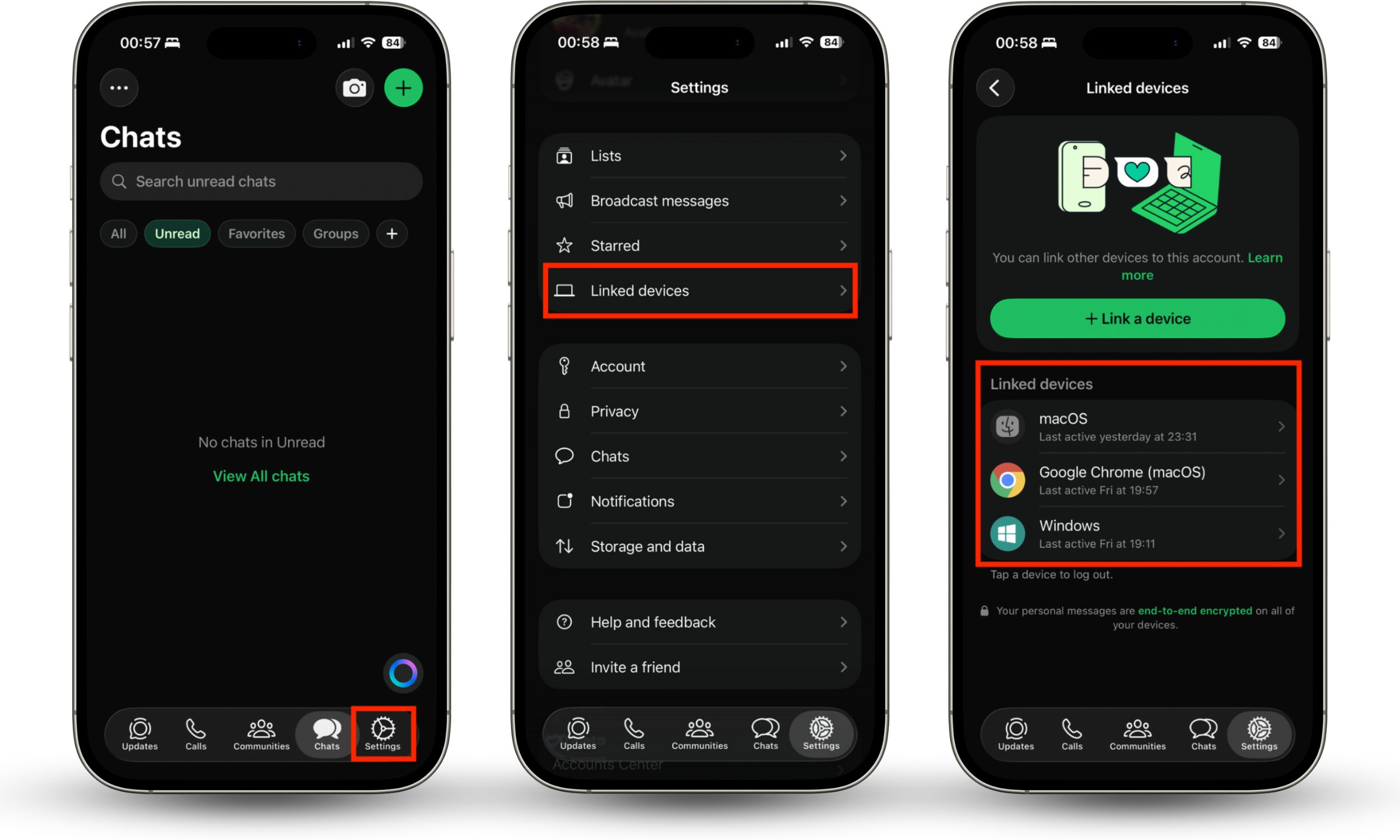
The quickest and most reliable way to check if your WhatsApp is cloned on Android and iPhone is to look at the devices linked to your account. Try this:
- In WhatsApp, select the Settings tab.
- Tap Linked devices.
- Check all the devices in the list and confirm they’re yours.
If you were wondering whether someone can read your text messages from another phone, you now know that it’s possible on WhatsApp without the use of any specialized software. But even if someone does gain access to your WhatsApp, it doesn’t mean your account is compromised for good.
What to do if your WhatsApp is cloned
When you find that your WhatsApp is cloned, it’s crucial to take action immediately to regain control of your account and to minimize the amount of information a hacker can steal. The first step is to log back into WhatsApp if you’ve been logged out, then remove unknown devices from your account. Here’s the full list of suggested steps for restoring your WhatsApp:
- Log out from all unknown devices: Remove any devices you don’t recognize from your WhatsApp account.
- Enable/update two-step verification (2FA): Add an additional layer of protection to stop hackers from stealing messages.
- Change passwords and secure your SIM or phone: Create a new PIN and increase your phone’s protection to prevent future hacks.
- Update WhatsApp to the latest version and scan your device for malware: Install the latest version
- Notify contacts and report to WhatsApp/Support: Inform people that your WhatsApp has been cloned and report the breach.
- Re-register your WhatsApp account: Delete the app, reinstall it, then sign in again.
1. Log out of all unknown devices
We’ve shown you how you can see if your WhatsApp is cloned by checking the Linked devices section in WhatsApp’s Settings menu on Android and iPhone. If you identify any unknown devices, here’s how to remove them:
- In Settings > Linked devices within WhatsApp, select a device you don’t recognize.
- Tap Log out to unlink it.
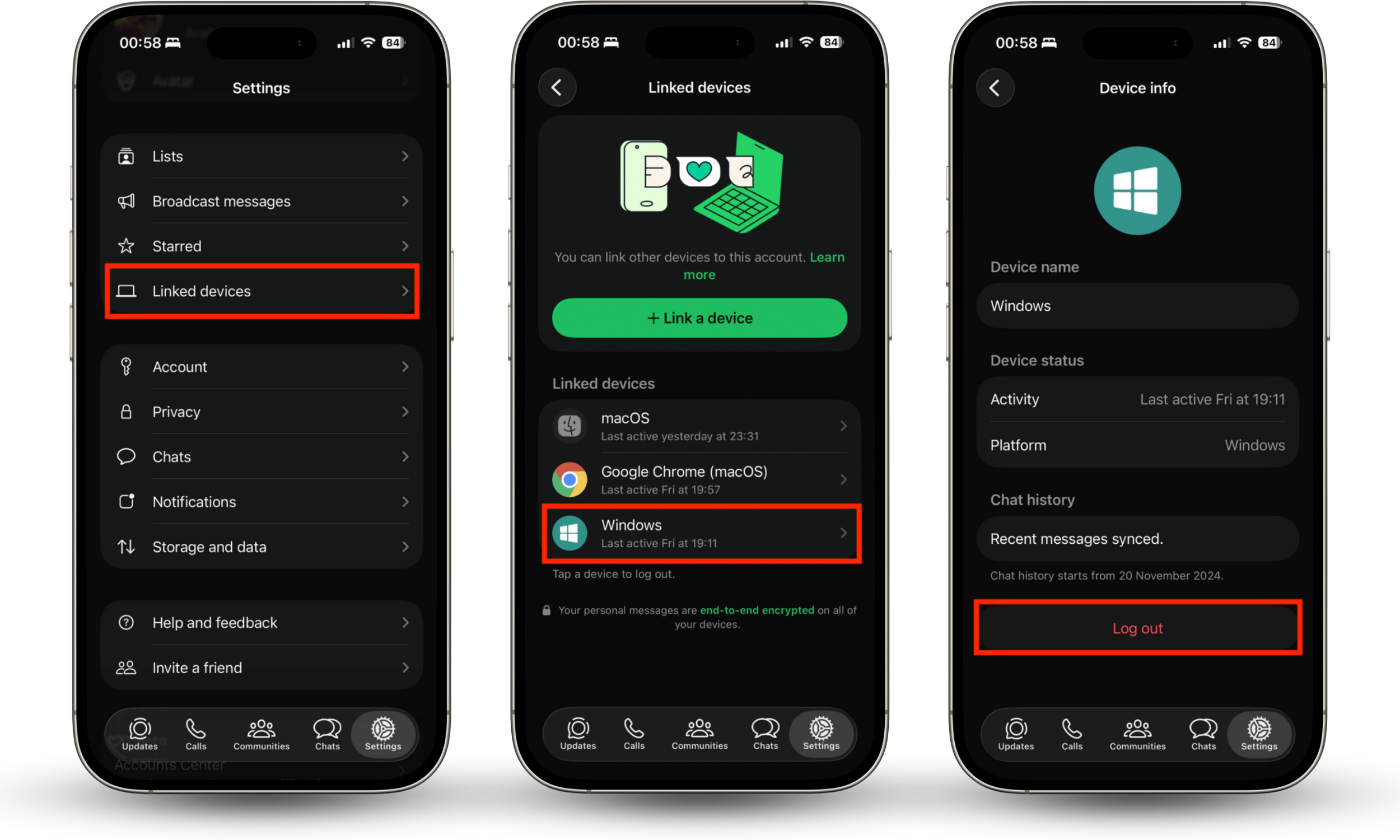
This immediately stops the device in question from having access to your account. The next time the app is opened there, it will show the login screen.
2. Enable/update two-step verification (2FA)
Two-step verification or two-factor authentication (2FA) prevents someone else from logging into your WhatsApp without a PIN code. We recommend that all users enable this to improve their privacy and security. Here’s how:
- In WhatsApp, go to Settings > Account.
- Tap Two-step verification.
- Select Turn on, then follow the steps to create a six-digit PIN.
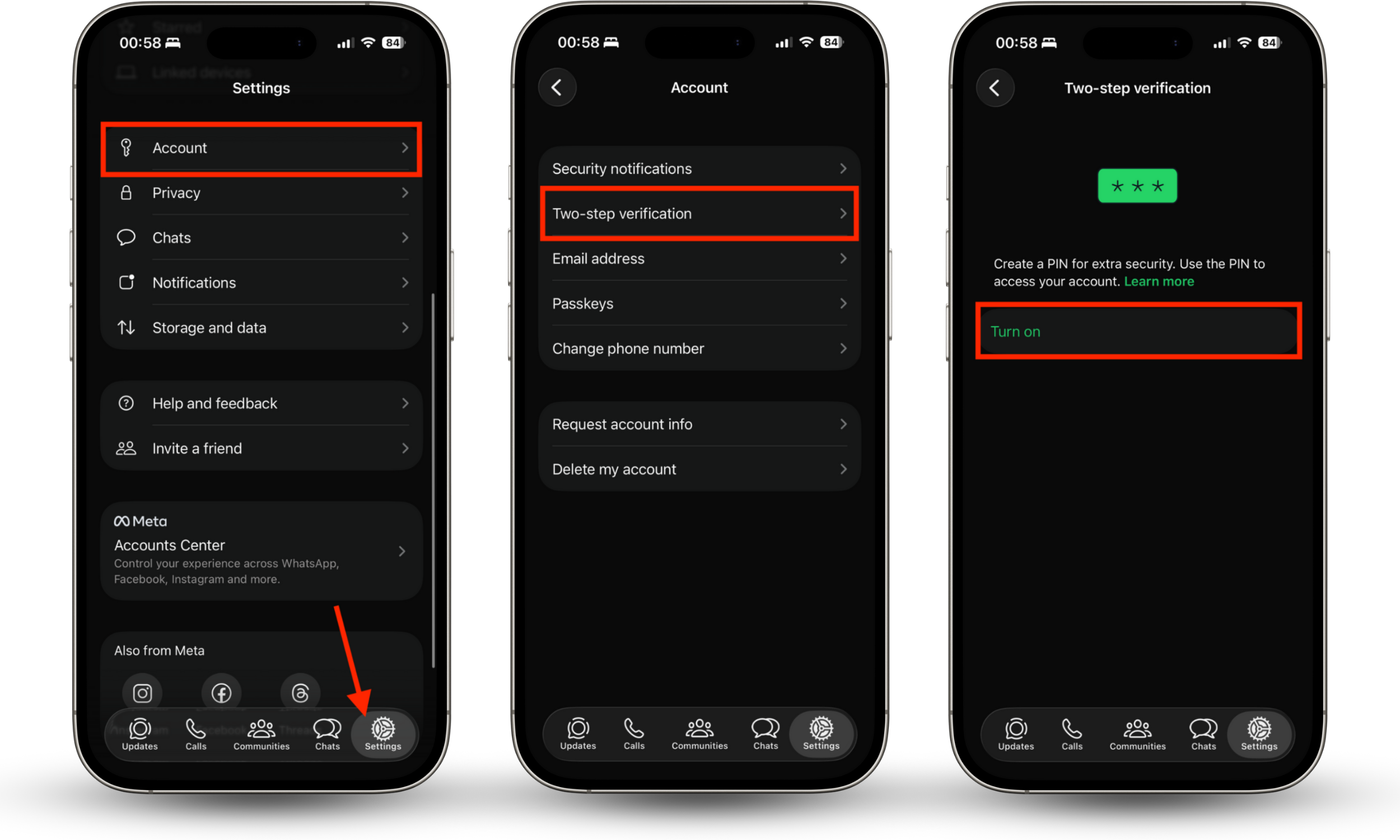
WhatsApp will now ask you for this code when you log in on other devices, giving you an extra layer of account protection.
3. Change passwords and secure your SIM or phone
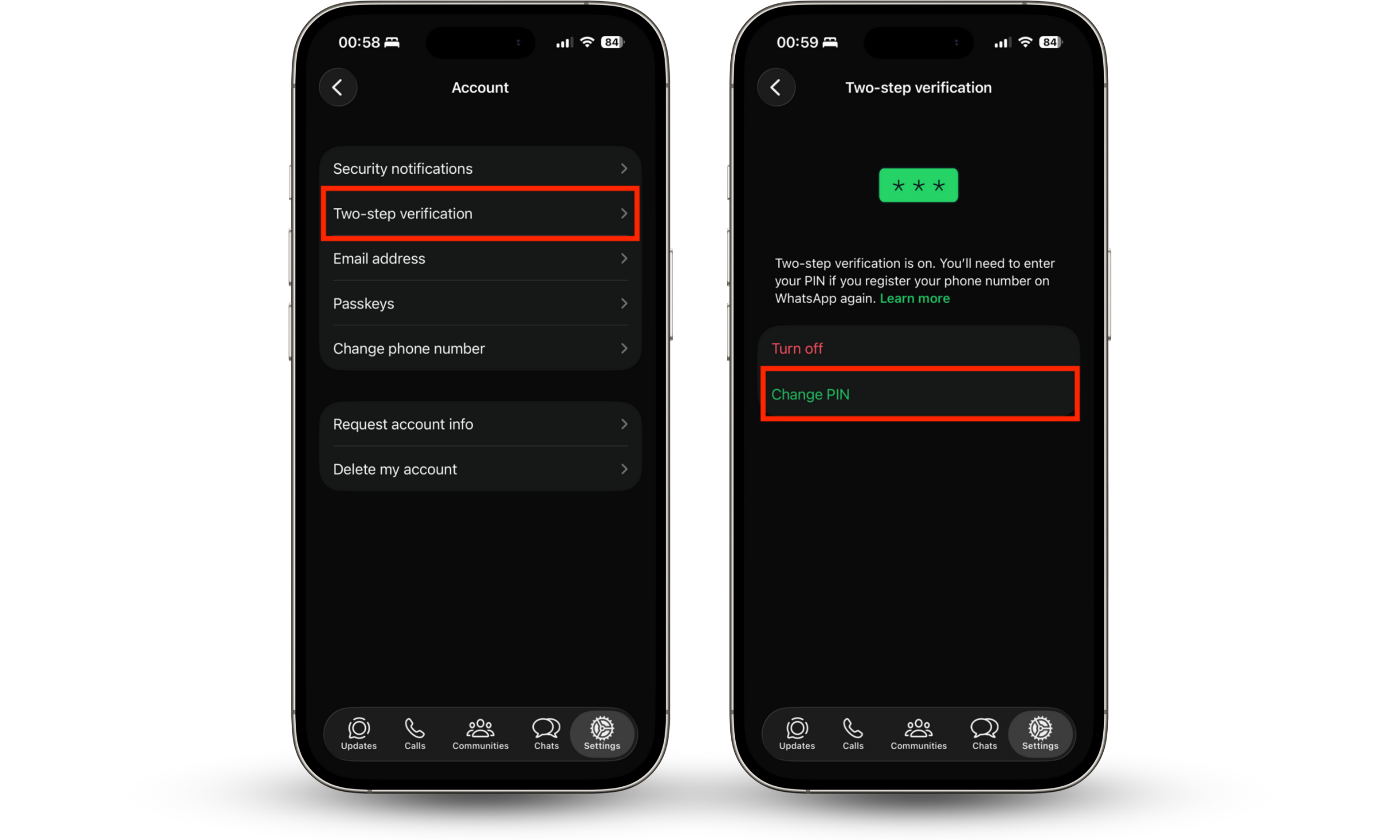
If you already have two-step verification on for WhatsApp and someone still has access to your account, I suggest changing your PIN immediately by following these steps:
- Go to Settings > Account > Two-step verification in WhatsApp.
- Select Change PIN and follow the steps to create a new one.
It’s also a good idea to change the passcode or password on your phone to block unauthorized access, and we recommend stepping up your protection by using Clario Anti Spy’s Device system check and Anti-spy setup for Android and iOS. Developed by Clario Tech, these features help you avoid device hacks and unauthorized software, and show you how to make the most of your phone’s security features.
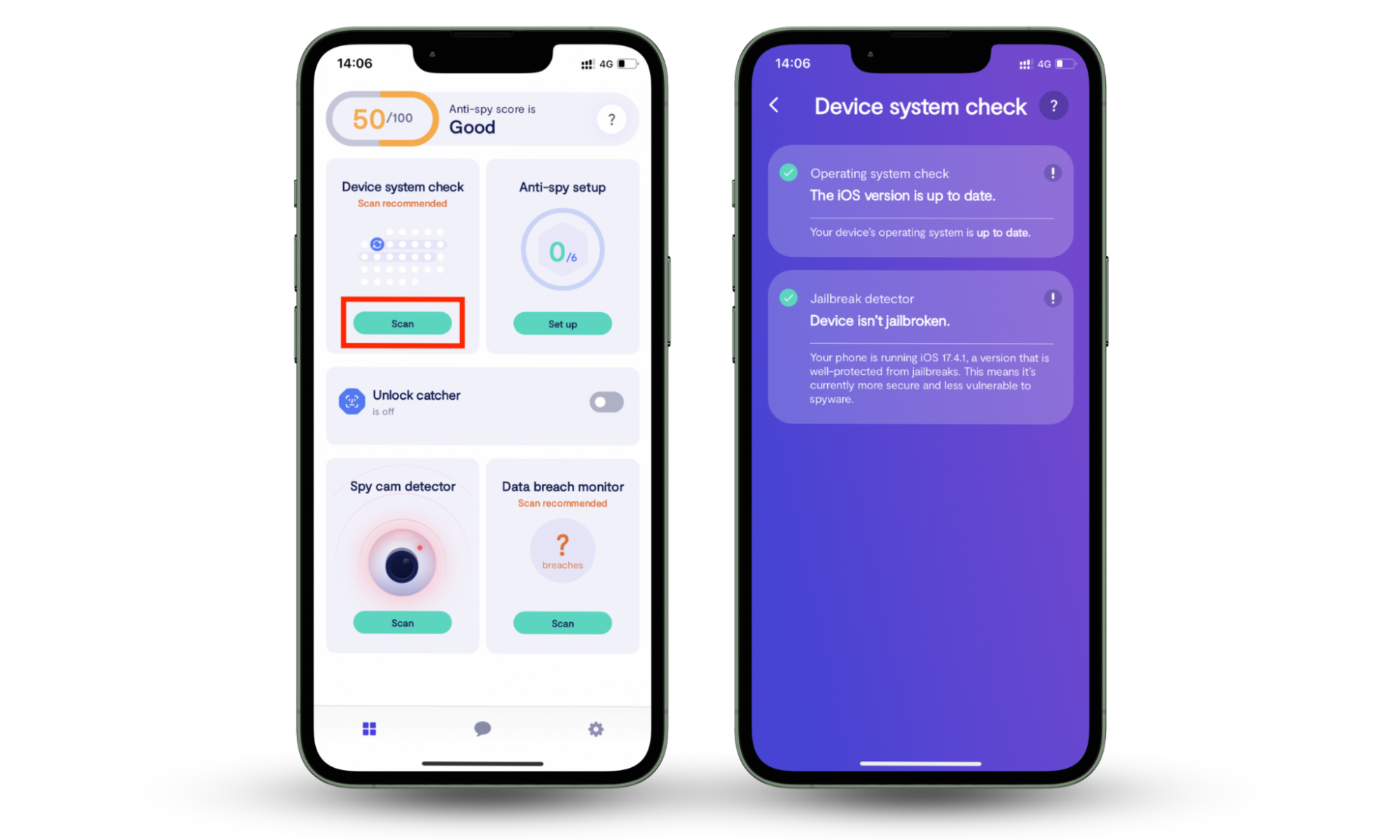
Here’s how to use Device system check on iPhone:
- Install Clario Anti Spy.
- Under Device system check, tap Scan.
- Make sure your iPhone is free from jailbreaks and that you’re running the latest iOS release.
- If your iPhone isn’t up to date, update it as soon as possible. If it’s jailbroken, you’ll need to reset it and install a fresh copy of iOS to remove the jailbreak and any unauthorized apps.
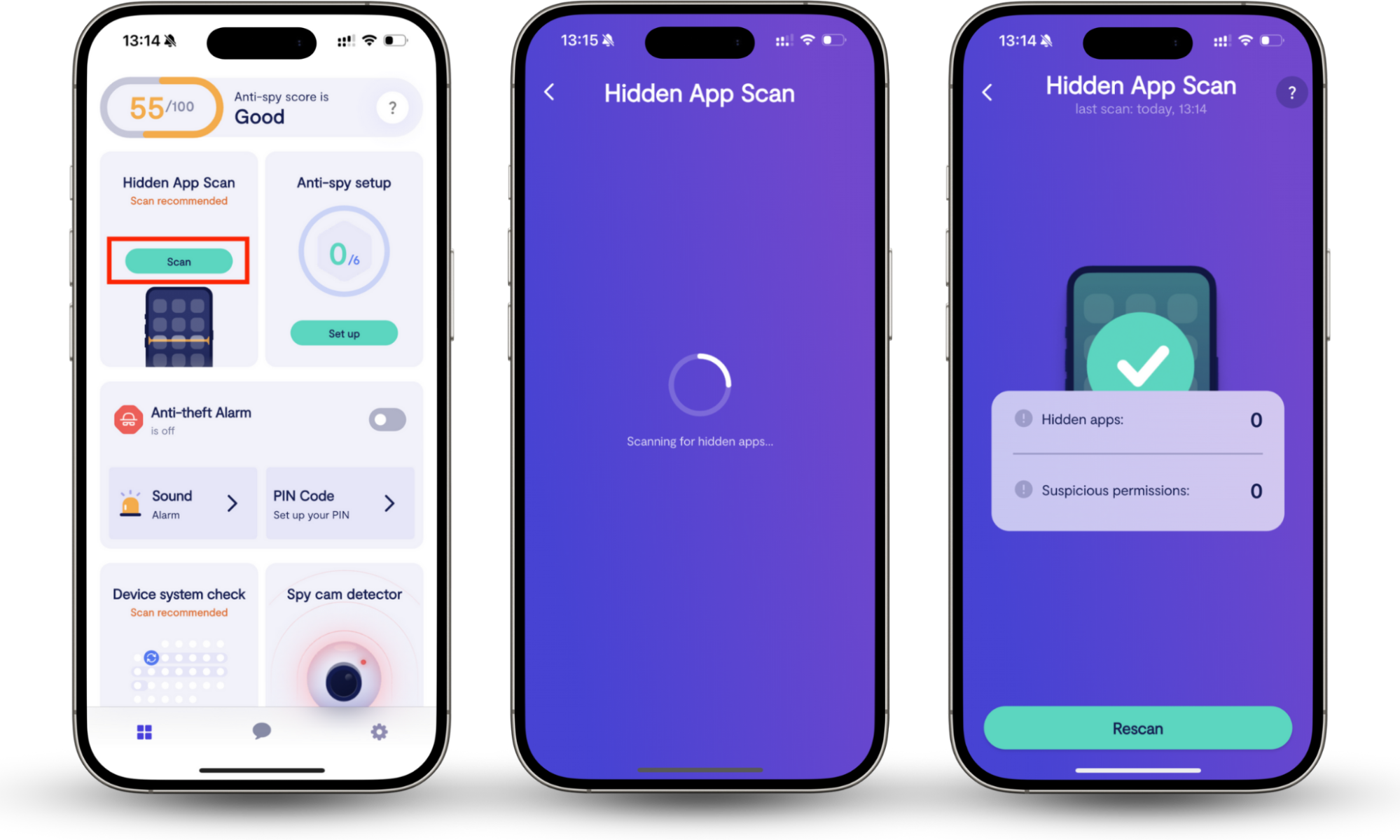
Here’s how to use Hidden apps scan on Android and iOS:
- After installing Clario Anti Spy, tap the Scan button under Hidden apps scan.
- Follow the steps shown to detect suspicious and harmful apps.
4. Update WhatsApp to latest version and scan device for malware
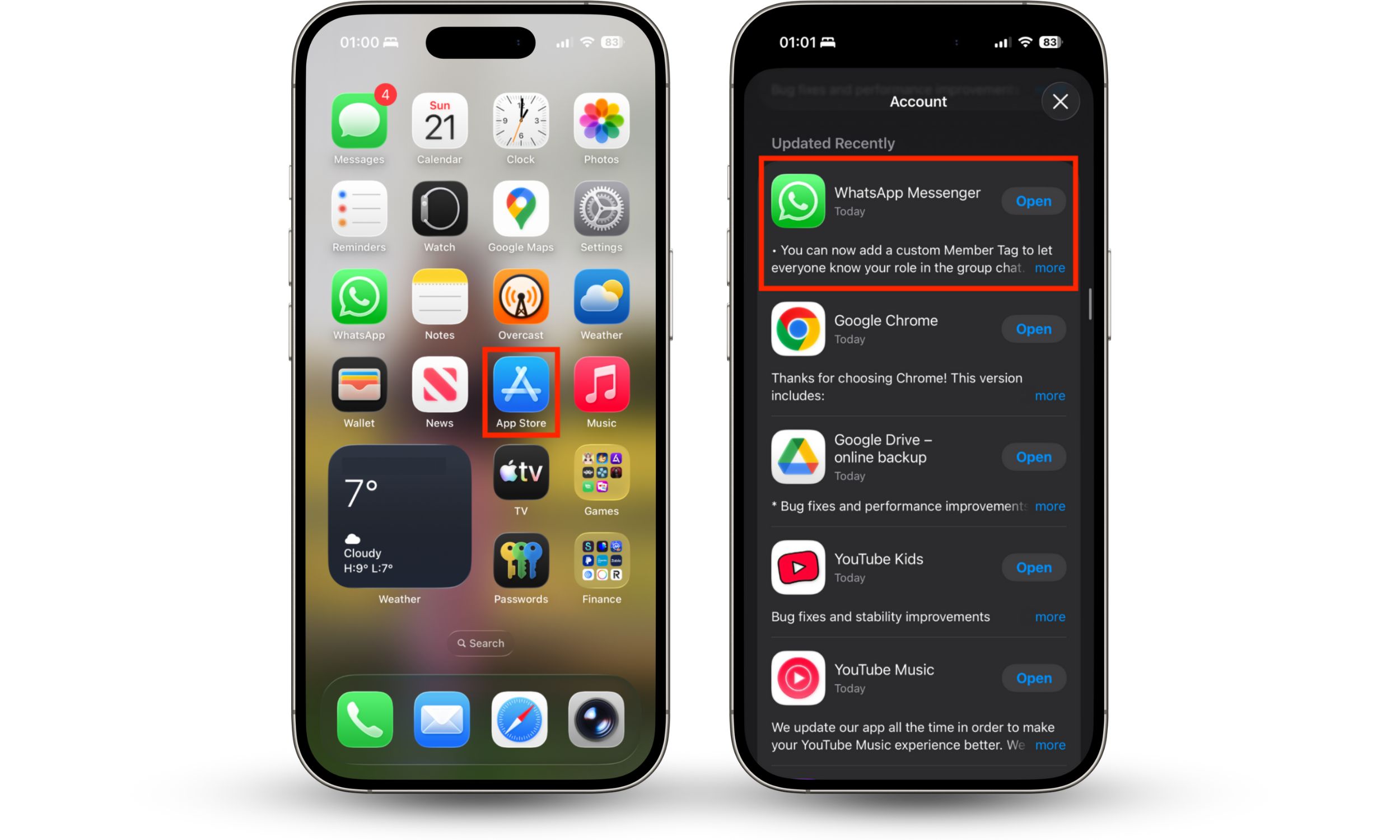
To minimize the chances of someone hacking your WhatsApp account via vulnerabilities within the app, it’s important to keep it up to date to ensure you always have the latest bug fixes and security patches installed. Here’s how to get new updates:
- Open the App Store or Google Play on your phone.
- Go to the Account section, and if a new WhatsApp version is available, install it.
We also recommend scanning your device for malware, especially if you use Android (Apple doesn’t allow malware scanners on iOS), as this will help prevent future breaches to your WhatsApp and other accounts. Download a trusted antivirus app and perform a full scan to detect and remove any existing infections.
5. Notify contacts and report to WhatsApp/Support
When your WhatsApp is cloned, there’s a possibility that hackers will use it to scam your friends or trick them into downloading malicious apps. Notify your contacts that if they received any suspicious messages from you, they should ignore and delete them, particularly if they contain links and attachments.
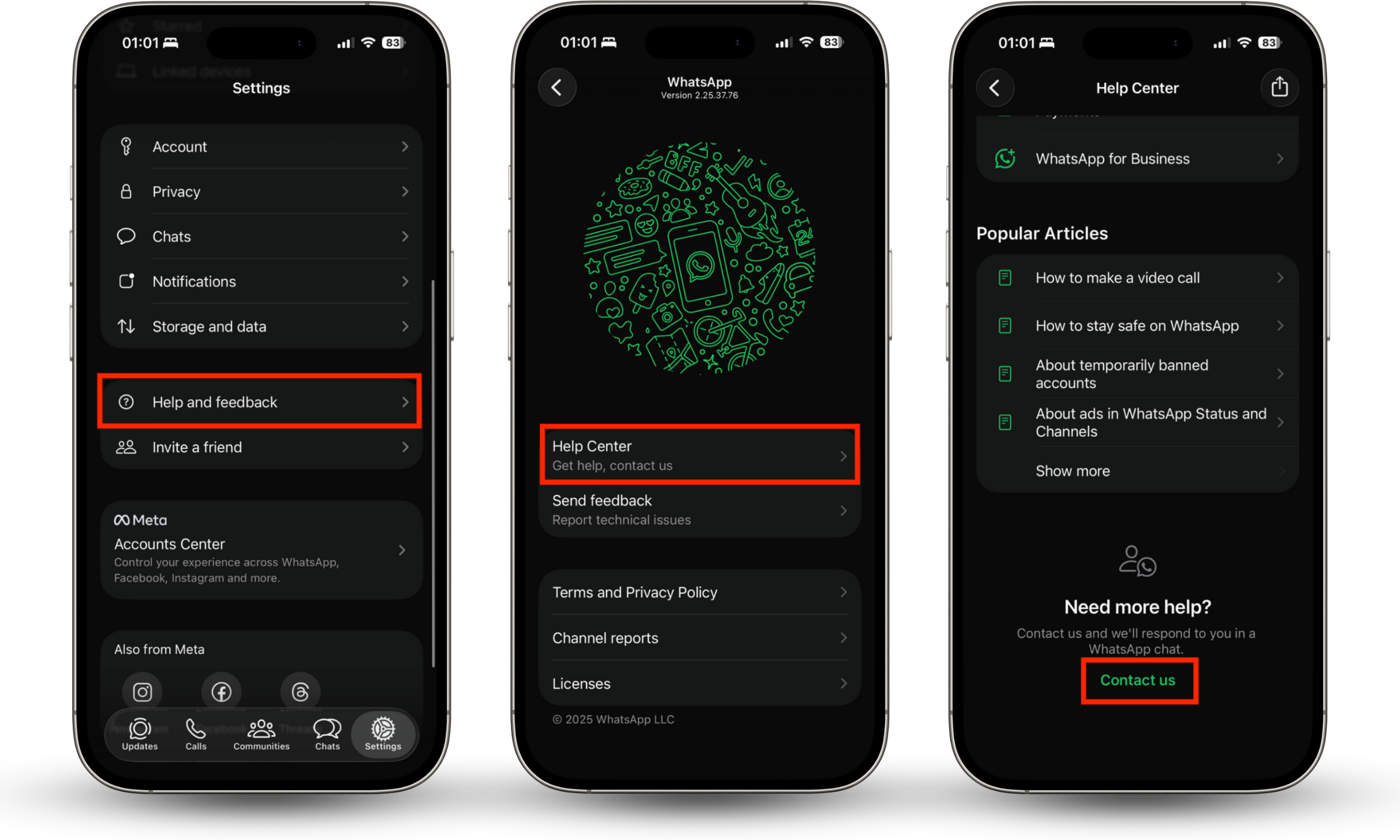
It’s also helpful to report any cybersecurity breaches that you experience. To do this within WhatsApp, follow these steps:
- Go to Settings, then select Help and feedback.
- Tap Help Center.
- At the bottom of the screen, select Contact us, then choose Start chat.
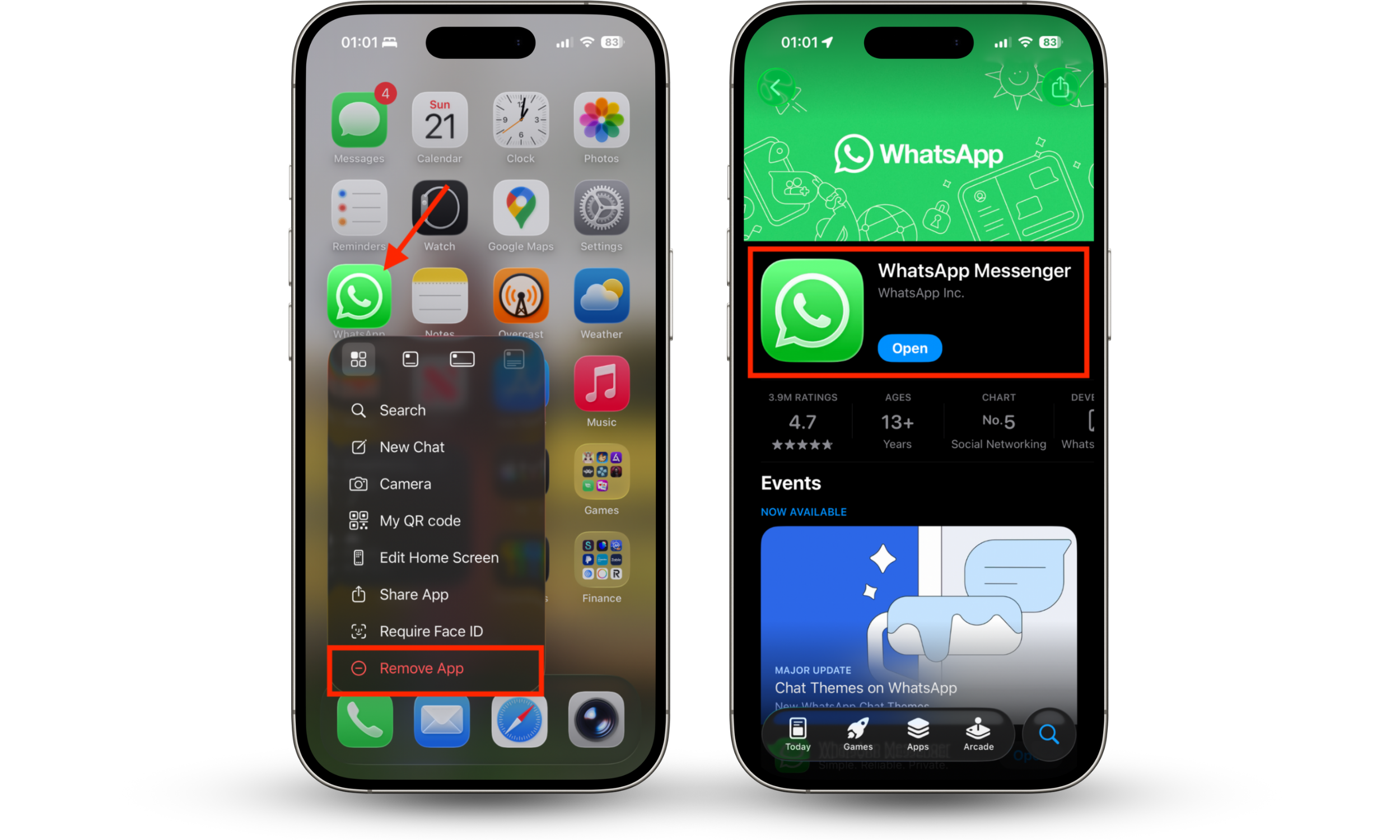
6. Re-register your WhatsApp account
If you have issues regaining access to WhatsApp after suffering a security breach, you can re-register your account inside the app like so:
- Tap and hold the WhatsApp icon on your phone, then Remove it.
- Once the app has finished uninstalling, go to the App Store on iOS or Google Play on Android and redownload WhatsApp.
- Enter your phone number and follow the steps to re-register your account and sign back in.
How to prevent WhatsApp cloning
Some of the most effective steps you can take to prevent WhatsApp cloning include enabling two-step verification, keeping the app up to date, and not allowing other people to use your phone. This will prevent someone else from linking another device to your account by scanning a QR code. If anyone gains access to your account, they will be locked out soon if they don’t have your 2FA code.
We also advise users to ensure they’re taking advantage of the security features built into Android and iOS, and to bolster their protection using third-party tools, such as a malware scanner, if they suspect someone is actively targeting their account.
Conclusion
When you want to know if your WhatsApp account has been cloned, there are certain signs to look out for, such as the presence of linked devices you don’t recognize, random logouts or verification requests, and unusual device behavior, like increased battery drain and poor performance. After identifying an account breach, enable two-step verification, remove any unknown devices, and change your PIN code.
We also recommend using Clario Anti Spy from Clario Tech. Its Device system check helps make sure your iPhone is up to date and free from potentially dangerous jailbreaks, while Hidden apps scan detects hidden spy apps and software with suspicious permissions.