Table of contents
- What is Config APK?
- What does Config APK do?
- Privacy and security considerations of Config APK
- Can you disable or remove Config APK?
- Is Config APK safe?
What is Config APK?
Configuration Android Package Kit, or Config APK, is a utility app that handles the installation of apps during your phone’s initial setup (especially on Samsung devices). When you first boot up a device or insert a SIM card, Config APK identifies your mobile carrier and region.
It then automatically downloads and installs device software that your carrier requires for that device. Because it is a system process rather than a user-facing app, it runs entirely in the background and doesn’t have an interface you can open.
This confusion is common with system files. For example, many users also ask if Android System Intelligence is spyware.
What does Config APK do?
Config APK acts as an automated delivery system for pre-loaded software. During the first few minutes of using a new phone, it executes a script that populates your app drawer with applications mandated by your mobile carrier or device manufacturer.
This tool bypasses the Google Play Store to install programs directly to your system partition. It is the reason why specific streaming apps, games, or carrier tools appear on your device without you ever downloading them. Unlike tracking software or spyware, Config APK typically finishes its job after the initial setup and remains dormant unless you wipe the phone and start over.
Privacy and security considerations of Config APK
Many security experts criticize Config APK because it operates outside of the user’s control. While it isn’t a virus or spyware, its ability to modify your device without express permission creates several privacy concerns, like:
- Silent software installation. Config APK automatically downloads and installs third-party applications. This forces you to host software you didn’t ask for, removing your right to control what runs on your own hardware.
- Bloatware privacy risks. The tool itself is safe, but the apps it installs are often what’s known as “bloatware” with poor security standards. These apps may track your activity, collect personal data, or serve ads, exposing you to privacy risks you never agreed to.
- Malware disguise. Because Config APK has a generic system name, hackers often disguise malicious files with similar titles. If you see multiple instances of this process or if it asks for unusual permissions, it could be malware hiding in plain sight.
- Background resource usage. This service runs quietly in the background to check for updates or carrier changes on your network. While usually minimal, this constant activity can drain your battery and consume mobile data without you realizing it.
Most of these issues are relatively minor, but the potential for hidden malware is a real risk. To ensure that you don’t have any viruses lurking and pretending to be system files, you should use Clario Anti Spy’s Hidden app scan. It’ll uncover anything that shouldn’t be there, so you can take steps to remove it.
To use the Hidden app scan:
- Open Clario Anti Spy and create an account.
- Look for Hidden app scan and press the Scan button.
- Wait for Clario Anti Spy to have looked through your device’s files, and take action if it discovers any suspicious apps.
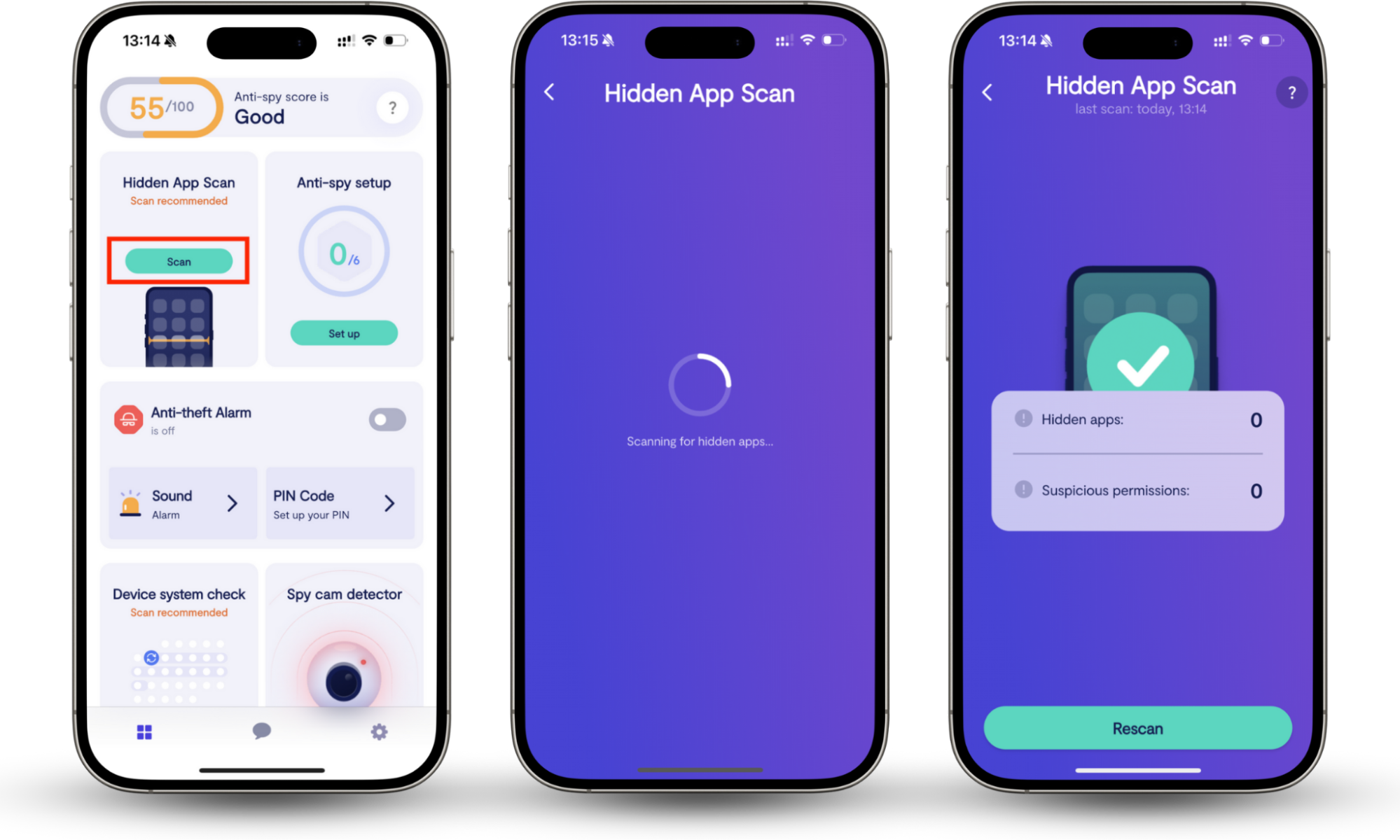
While you wait for the results, it’s worth checking our list of apps that spy on you so you know which common threats to watch out for.
Here’s a clear example of how this helps.
A recent customer noticed her phone overheating and suspected her partner knew details about her private calls. She ran a scan with Clario Anti Spy to find hidden apps on her Android, and discovered a suspicious background app she never installed.
Our support agent Karen, who was helping her through the process, advised her to remove the app immediately, change her passwords, and enable two-factor authentication, so she could finally regain control of her privacy.
Can you disable or remove Config APK?
In most cases, you cannot uninstall or disable Config APK. Because it’s a system application, the Disable and Uninstall buttons are typically greyed out in your app settings.
While it’s technically possible to force-remove it using advanced developer tools like the Android Debug Bridge (ADB), this is not recommended for the average user. Deleting this file can break your phone’s ability to configure itself after a factory reset or update.
Should you remove it? Since Config APK is a tiny file (often around 20KB) and usually stops running after your phone is set up, removing it offers little benefit. It doesn’t hog battery life or storage.
If you’re trying to declutter your phone, it’s safer to focus on disabling the actual bloatware apps (like carrier games or news apps) that Config APK installed, rather than the installer itself.
Is Config APK safe?
Config APK is safe to have on your phone. It isn’t spyware or a virus, even if it forces bloatware onto your device. It rarely runs after the initial setup, and you probably won’t ever notice it again.
However, ignoring background files can be dangerous. If a virus mimics the Config APK name to hide in plain sight, you could be at risk of losing your personal information. To ensure your device is truly clean, use Clario Anti Spy’s Hidden app scan to uncover suspicious apps.