Table of contents
- Is there any illegal content on Discord?
- Discord security risks for kids
- Are there parental controls on Discord?
- Discord privacy issues: How to improve your child's safety on Discord
- 1. Talk to them about the rules that apply to online communication
- 2. Encourage your teens to use the Discord privacy settings
- 3. Explain the importance of blocking users
- 4. Use a VPN
- Is Your Child's Discord Account Secure? Take the Test!
- Conclusion
- FAQ
- 1. What are the dangers of Discord?
- 2. How safe is Discord?
- 3. What is the age restriction for using Discord?
- 4. Is Discord safe to download?
In recent years, Discord has become one of the most popular free audio/video calling and chat services.
Primarily favored by online gamers, Discord is now trying to reinvent itself as a hang-out and discussion platform for people with similar interests. Lately, we have even seen an increase in the use of Discord for business.
Considering teens being the app’s target audience, many parents often ask this pertinent question: is Discord safe? Or, is there anything to worry about if your child is using Discord?
While Discord can be used safely if adequate precautions are taken, it still comes with risks, just like every other open-chat app.
Note
Did you know that Discord has faced multiple security breaches over the years? In 2022, a massive phishing scam targeting Discord users was uncovered. To stay ahead of cybercriminals, it’s vital to adopt advanced cybersecurity solutions like Clario, which can ensure real-time protection and keep your kids’ data safe.
Is there any illegal content on Discord?
Inappropriate content is common on the majority of media platforms; unfortunately, the Discord app is no exception.
The Discord app has moderation in place for its public channels — ones that can be seen by anyone — to keep the distribution of illegal content in check; however, before moderation, it’s still possible that you or your child may notice it.
There are also private channels — ones you can see and use only if you’re invited — that aren't subject to moderation. To prevent your kids from inappropriate content, it is better to screen the type of users your kids let into their virtual spaces.
Your children are likely to be endangered by improper materials if they are in the wrong groups or have connections with people who share illegal content, such as pornography, overly violent content, materials that promote taking drugs, etc. If they only use public channels, or the ones you trust, it's safe to say that there's quite a low risk of them being exposed to any inappropriate content.
Discord security risks for kids
The answer to the question "Is Discord safe for my child?" will be the same as for any other communication app. These platforms do what they can to keep them safe, but sometimes, unwanted intruders still get through.
When using Discord, children may be exposed to:
- Improper content (texts, photos, videos)
- Cyberbullying and trolling
- Drug sales
- Human trafficking and other crimes
These safety risks are present when using literally any website or application. Even though Discord comes with different security policies, settings, and channel moderation to prevent these illegal activities, there are still some rare cases of online attackers who might target teens and young adults. They do this through Discord public servers and send Direct Messages (DMs) with illegal or abusive content.
Are there parental controls on Discord?
Discord is a widely used platform, but it's important to understand the potential risks. According to a recent survey, nearly 40% of teens report being exposed to inappropriate content while using online platforms like Discord.
You can block or delete an account, or configure the privacy settings for explicit media screening, direct messaging, and friend requests. However, there are no specific features that enable parental monitoring.
Here are some steps you can take to ensure your child’s safety:
- Set up safe direct messaging. Ensure Safe Direct Messaging is turned on to automatically filter explicit content for users under 18.
- Enable keep me safe setting. In Privacy & Safety settings, select Keep Me Safe to block explicit media in both public and private channels.
- Review privacy settings regularly. Periodically review Discord’s safety features as they get updated frequently to combat new risks.
- Monitor the servers your child joins. Encourage your child to join only well-moderated public servers or invite-only private servers to minimize exposure to inappropriate content.
- Discuss the importance of reporting inappropriate content. Teach your child how to report any inappropriate content they encounter.
As for third-party parental control applications, they may work on blocking specific websites and tracking locations but aren’t really effective at monitoring text messages.
Discord privacy issues: How to improve your child's safety on Discord
Here are a few ways you can overcome Discord privacy concerns and improve your teen’s safety on Discord.
1. Talk to them about the rules that apply to online communication
Explain that any behavior that’s inappropriate in “real-world” situations is not okay online either — the same rules apply. In terms of using Discord, these rules are:
- accepting friend requests or only communicating with people you know;
- talking to adults you know if something doesn’t seem right or you see disturbing content; and
- avoiding inappropriate language or derogatory terms in conversations.
It’s also worth discussing what content is appropriate and what should be shared online. Explain to your teen that even good online friends can be hacked and any conversations or media they share could be misused.
2. Encourage your teens to use the Discord privacy settings
The Discord app comes with a high level of privacy settings. They include:
- Keep Me Safe – to filter the type of content they can access. It’s on default for teens under 18 years of age to filter explicit videos and chats. To enable this feature, go to User Settings and select Privacy & Safety and Safe Direct Messaging.
- DM Settings – to block or enable direct messages from people who aren’t on your friend’s list and don’t use the same server. To make this happen, go to User Settings, then proceed to Privacy & Safety and Server Privacy Default.
- Friend Request Settings – to manage who can add your child as a friend. Encourage your teen to only accept friend requests from people they know and trust. To access the Friend Request settings, go to User Settings and choose Privacy & Safety and Who Can Add You As A Friend, then select Friends of Friends.
Determining who becomes your teens’ friend can be controlled on a server-to-server basis; this allows you to manage people who message your kid from larger communities.
Also, we encourage you to check out Discord’s Safety Center. It provides information on how to configure the privacy settings, as well as some useful materials for parents and caretakers on how to ensure your children’s security online and how to talk to them about it.
3. Explain the importance of blocking users
Some people will latch onto any opportunity to harass others, and these opportunities aren’t limited to social media. Communication apps like Discord also get their fair share of trolls and bullies.
Explain to your teens that if they receive mean comments or someone sends them inappropriate content and threats, the best policy is to block such users.
4. Use a VPN
Cyber attackers are everywhere trying to hijack and expose users' confidential information. Using a reliable VPN helps you protect your kids' data from cyber attackers and bullies.
Using a trusted VPN service can still help protect your child’s online privacy:
- Encrypts internet traffic: A VPN encrypts your child’s internet connection, making it much harder for cybercriminals to intercept sensitive data.
- Hides location: A VPN masks your child’s IP address, preventing intruders from tracking their physical location.
- Secures public networks: When using public Wi-Fi, a VPN can ensure your child’s data remains secure from hackers attempting to steal personal information.
Using a VPN in combination with other privacy tools like Clario Anti Spy provides an extra layer of protection for your child’s online activities.
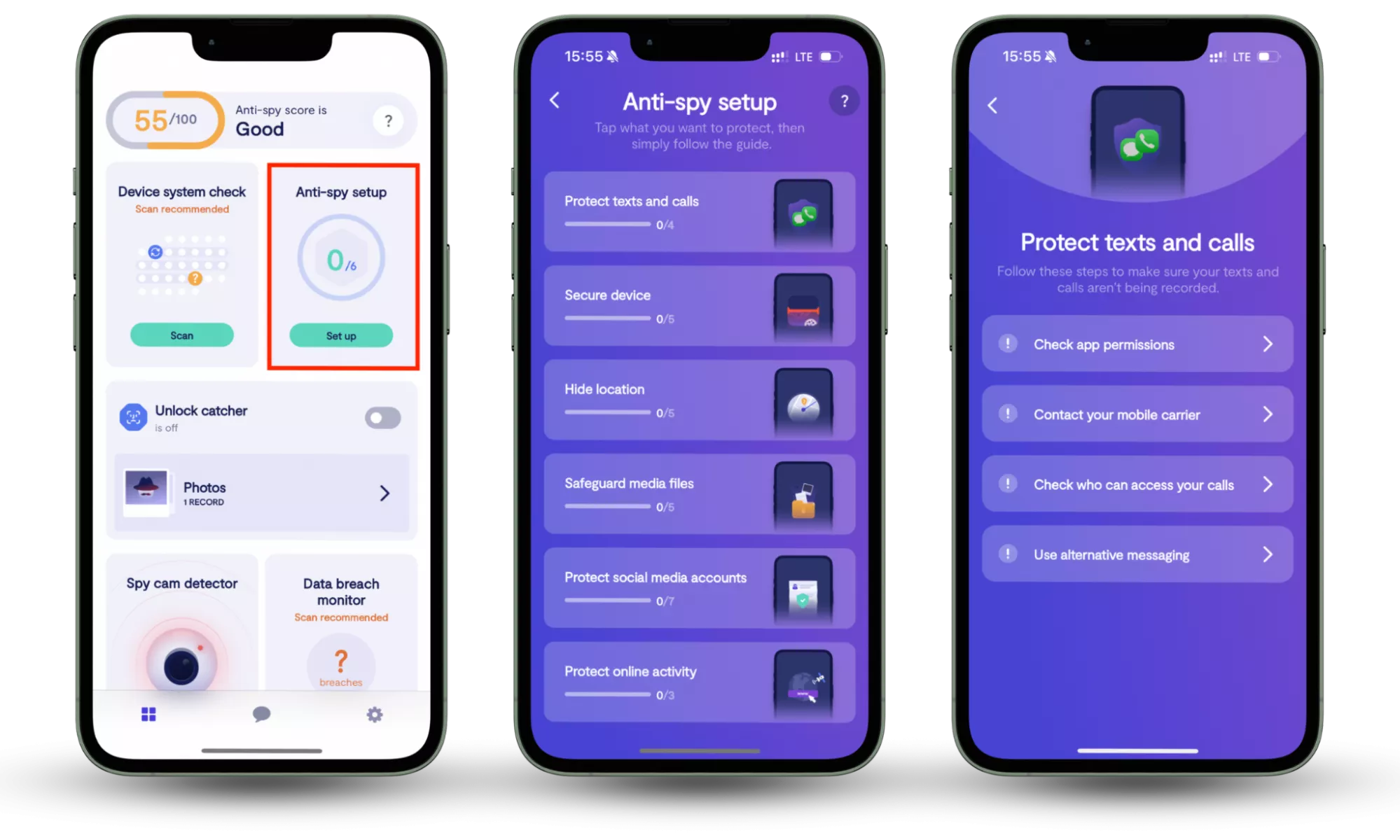
In addition to a VPN, Clario Anti Spy's Anti-spy setup offers a comprehensive layer of protection. This interactive checklist helps secure your child’s device by:
- Reviewing app permissions: It guides you through checking permissions for sensitive features like the camera, microphone, and location, ensuring they are only accessible by trusted apps.
- Disabling exploitable features: Step-by-step guides walk you through disabling settings that are often targeted by stalkers and malicious actors, preventing unwanted access to your child’s device.
Here is how to use Clario Anti Spy’s Anti-Spy setup feature:
- Download Clario Anti Spy, create an account, and sign in.
- Under the Anti-Spy setup section, select Set up.
- Follow the step-by-step guide to secure your devices and minimize your exposure to spyware, ensuring better protection against malware and other digital threats.
Check out Clario Anti Spy today to help your teens get started with adequate data protection.
Is Your Child's Discord Account Secure? Take the Test!
Evaluate your child’s Discord security by answering these questions. After each question, check off the action you've taken to ensure your child’s safety. The more “Yes” answers you have, the safer their account is!
| Question | Yes | No | What does this mean? |
| Is your child’s discord account set to private? | ✅ Yes, I’ve made my child’s account private (Only friends and friends of friends can send friend requests). | ❌ No, the account is still public. | If the account is set to private, it means your child’s interactions are limited to those they trust, reducing exposure to strangers. |
| Have you enabled safe direct messaging? | ✅ Yes, I’ve activated Safe Direct Messaging (Explicit content is automatically filtered for users under 18). | ❌ No, I haven’t set this up yet. | This feature protects your child from explicit images and harmful links that might come through DMs. |
| Is two-factor authentication (2FA) activated on your child’s account? | ✅ Yes, I’ve enabled Two-Factor Authentication (Provides an extra layer of security by requiring a code in addition to the password). | ❌ No, I haven’t activated 2FA yet. | 2FA adds an extra barrier against hackers, ensuring that only your child can access their account. |
| Have you blocked direct messages from strangers? | ✅ Yes, I’ve blocked DMs from non-friends and users from different servers. | ❌ No, DMs are still open from strangers. | Blocking DMs from strangers helps protect your child from unsolicited messages and potential predators. |
| Do you review and approve the servers your child joins? | ✅ Yes, I’ve reviewed and approved the servers they’re part of. | ❌ No, they join servers without my approval. | Joining well-moderated and trusted servers reduces exposure to harmful content and people. |
| Has your child been taught how to block and report users? | ✅ Yes, they know how to block or report any inappropriate behavior. | ❌ No, they haven’t been taught to block or report. | Teaching your child to block and report users ensures they can take action against cyberbullying, inappropriate content, or harassment. |
| Have you installed and activated a VPN for your child’s device? | ✅ Yes, I’ve activated a VPN like Clario to mask their location and protect privacy. | ❌ No, they don’t use a VPN. | A VPN protects your child from cyber-attacks by encrypting their internet connection and masking their IP address. |
| Do you regularly check and update your child’s discord privacy settings? | ✅ Yes, I review and update the settings periodically to ensure maximum safety. | ❌ No, I haven’t updated the settings in a while. | Regularly reviewing settings ensures that your child’s account remains secure and up to date with new features and safety updates. |
Results:
- 8 Checkmarks (100%): Congratulations! You’re doing a great job keeping your child’s Discord account safe. Keep up the good work!
- 6-7 Checkmarks (75-87%): Good job! Your child’s account is mostly secure, but there are a few areas that could use some attention. Consider enabling two-factor authentication and reviewing the servers your child joins.
- 4-5 Checkmarks (50-62%): There’s room for improvement. Make sure you’re actively using privacy settings and talking to your child about blocking/reporting users. Consider using a VPN and reviewing friend request settings.
- 0-3 Checkmarks (0-37%): Your child’s account might be at risk. Start by enabling privacy features like Safe Direct Messaging, setting up two-factor authentication, and reviewing who they interact with on Discord. Regularly check settings to maintain a secure environment.
Conclusion
Discord is a great platform for your teens to share their ideas, hang out for a karaoke night, join a painting class or keep in touch with their friends. However, is Discord safe to use? It’s highly dependent on how your teens use the platform and the precautions they take to ensure their own safety.
You can increase your teens’ safety by discussing the security measures every internet user should take, encouraging them to talk to you if something doesn’t feel right, and to avoid shady channels. You can also improve Discord safety by configuring the necessary privacy settings, using a VPN, and encouraging your children to block Discord users that are either abusive or share inappropriate content.
To further protect their devices, Clario Anti Spy provides an easy, step-by-step setup to secure your child’s device and prevent spyware and malware. By reviewing app permissions and disabling features often targeted by online threats, Clario helps ensure your teen’s online safety on Discord and beyond.
FAQ
1. What are the dangers of Discord?
Like every other open-chat platform, the Discord app is exposed to different cyber risks if adequate precautions are not taken. Users are at risk of data breaches and exposure to unwanted explicit content.
2. How safe is Discord?
Discord’s safety depends on the level of security measures taken by users to ensure their activities on Discord are secure. Users must employ safe practices when using Discord – that’s the only way to ensure safety on the platform.
3. What is the age restriction for using Discord?
Discord is recommended for 13-year-olds and above. While it comes with a moderation process in place, you could still come across explicit content, depending on the server you are using.
4. Is Discord safe to download?
Only if you download it from the official website. For extra safety, you can turn on VPN before accessing the website and run the installation file through malware protection software.
Read more: