Table of contents
- What is incognito mode on iPhone
- How does incognito mode work on iPhone
- Is Incognito private on iPhone
- What browsing history data is visible with incognito mode on iPhone
- How to browse safely on iPhone
- Conclusion
What is incognito mode on iPhone
Incognito is a browsing mode that stops your browser from saving your activity to its history logs and cookie cache. On an iPhone, you can go incognito by installing Google Chrome or using Safari's Private Browsing feature. It's useful if you're on a shared device, researching something personal, or just want to keep your history clean. The trade-off is that you'll need to sign into websites each time, since all cookies are erased when you close the tabs.
Unfortunately, going incognito on an iPhone doesn't mean you're anonymous online. Your internet provider, network administrator, and even websites themselves can still identify you. You're also exposed to phishing scams or data theft as usual.
This is where Clario Anti Spy can help. Its Anti-spy setup walks you step by step through the key privacy settings on your iPhone and online accounts, making it easier to tighten things up without having to dig through menus yourself.
Here's how to improve your privacy with Clario Anti Spy:
- Download Clario Anti Spy and subscribe to create an account.
- Tap Setup under Anti-spy setup.
- Tap on a category, e.g., Protect online activity, and work through the onscreen instructions.
- Repeat for the other categories to fully enhance your privacy.
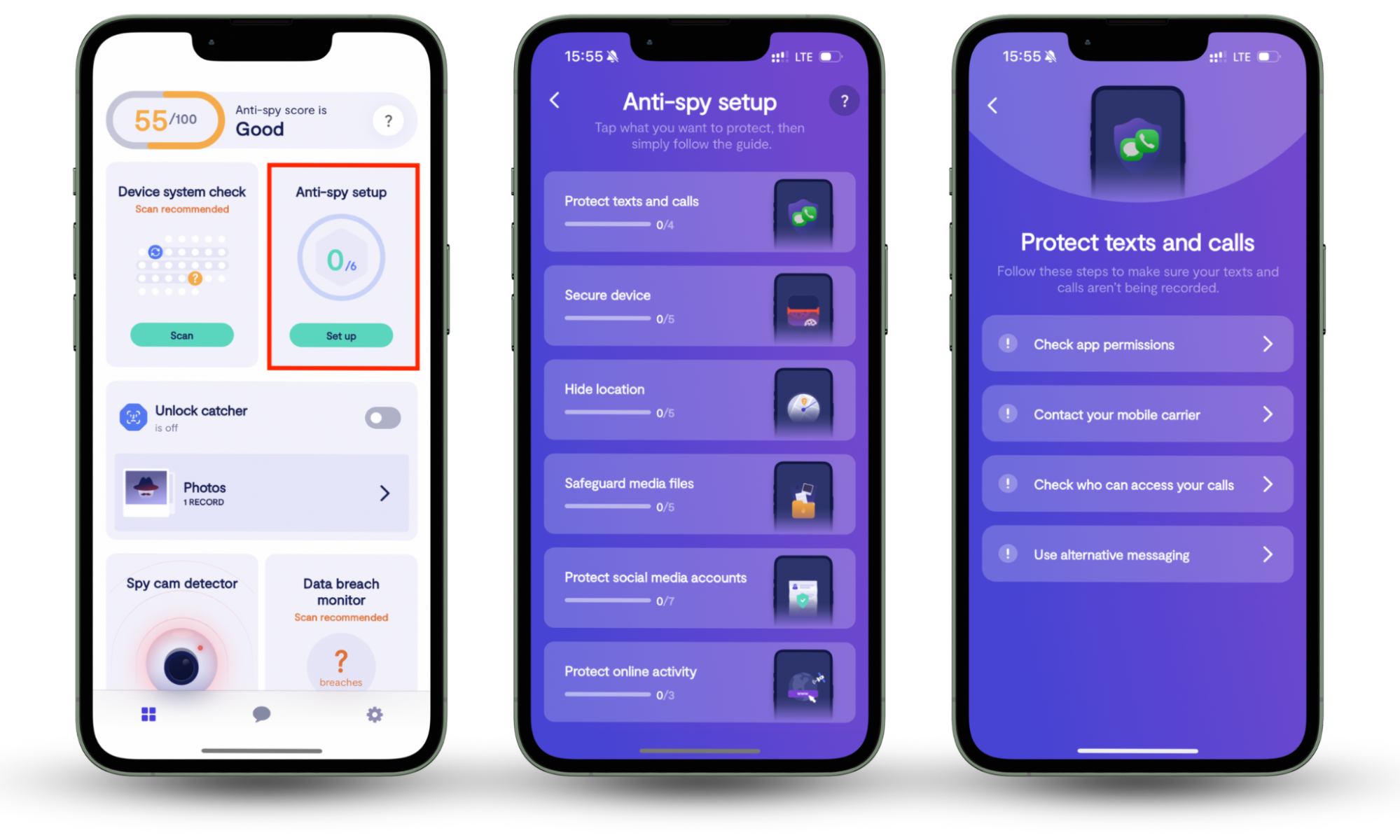
Clario Anti Spy includes several other features focused on keeping you safe. For example, Device system check helps make sure your iPhone is running the latest security updates, while Data breach monitor alerts you if your accounts show up in known data breaches. If you're worried someone may be spying on your phone, there's a Hidden app scan and Unlock catcher to deal with device tampering.
You also get 24/7 support if you're unsure about anything. Just tap the Messages icon to connect with a Clario security expert. Here's what one expert shared about how they helped a customer who had serious concerns about their privacy:
"The client recently reached out with concerns that her husband may have been secretly accessing her phone without her knowledge or consent, and she sought our assistance in discreetly verifying any unauthorized activity. Due to her current circumstances, she explained that she was unable to change the device’s password or lock screen credentials at this time.
In response, we recommended utilizing our Unlock Catcher feature—a discreet security tool that captures a photo of anyone attempting to unlock the device, providing visual evidence of unauthorized access attempts. The client expressed that this was exactly the type of solution she had been seeking and conveyed her appreciation for the timely and practical support."
How does incognito mode work on iPhone
When you go incognito, your browser isolates those tabs from the rest of your browsing activity. Cookies aren't reused, so you'll need to sign back into websites, and any new cookies created during that session are cleared once you close all private tabs. Your search history isn't saved either. If you're using Safari, Private Browsing also stops adding to the tracker count in the Privacy Report.
Keep in mind that Incognito can still leave traces of your browsing activity. For instance, anything you download won't be deleted, bookmarks you create still remain, and any new logins you save are added to the browser's password manager.
Is Incognito private on iPhone
Yes, Incognito is private from other people using the same iPhone. They won't see what you were browsing, unless you downloaded something or saved a page as a bookmark. However, it does not make you anonymous to the outside world. Your internet provider, school, or employer can still see the websites you visit. Many sites and search engines can also identify you based on your device, location, and behavioral patterns.
On desktops and some other platforms, it may also be possible to view your Incognito history using third-party software. For more details, check our guide on how to see Incognito history.
What browsing history data is visible with incognito mode on iPhone
Incognito on an iPhone doesn't make you invisible. Your IP address and the domains you visit are still visible, even when pages are encrypted with HTTPS. Internet providers, schools, employers, and Wi-Fi admins can log this activity, and websites can still recognize you using tracking techniques like device fingerprinting, browser configuration profiling, and session-based identifiers.
Incognito mode can also expose data like:
- Approximate location based on your network or region.
- Device and browser characteristics (screen size, operating system version, fonts, time zone, etc.).
- Account-based activity if you sign into websites while browsing privately.
How to browse safely on iPhone
Incognito mode helps if you want better privacy on your iPhone, but it's only one piece of the puzzle. You get much stronger protection by combining it with a few smart habits, like using a reputable VPN (virtual private network), keeping your software up-to-date, and using a privacy-oriented browser or search engine. Tightening your account and device settings with Clario Anti Spy can also take your privacy to a whole new level.
To browse safely on your iPhone:
- Use a reputable VPN to hide your real IP address and encrypt your internet traffic, especially on public or shared networks. Check our iPhone VPN settings guide for tips on how to maximize your privacy.
- Keep your iOS device and web browser up to date. New updates patch security flaws that attackers and trackers can exploit.
- Try private browsers and search engines that block trackers and limit data collection by default.
- Avoid signing in to personal accounts when you want more anonymity, since logins immediately tie activity back to you.
- Be extra cautious when using public Wi-Fi, because unsecured networks make it easier for others to intercept your data. Using cellular data or a VPN is your best option to stay safe while outside.
- Install Clario Anti Spy to scan for spyware, monitor data breaches, and receive guidance on important privacy settings.
Conclusion
Incognito mode on iPhone means that your browser stops saving your browsing history, cookies, and other site-related data locally. However, it doesn't hide your activity from websites, networks, or your internet provider, and it definitely doesn't make you anonymous. So don't forget to work on enhancing your privacy with smart browsing habits and tools like a VPN.
If you want an extra layer of protection, install Clario Anti Spy. Features like Anti-spy setup, Data breach monitor, and Unlock catcher can help keep your device and personal data more secure.