Table of contents
- What is Kaseya Agent?
- What does Kaseya Agent do on computer?
- Why do people think Kaseya Agent is spyware?
- Can Kaseya Agent be misused or abused?
- Kaseya VSA ransomware attack explained
- What are real security risks of Kaseya Agent?
- How to tell if Kaseya Agent on your device is legitimate?
- Conclusion
What is Kaseya Agent?
Kaseya Agent is lightweight software that IT providers and organizations install on computers, referred to as endpoints, that allows them to monitor, manage, and secure their devices. Software like this will also enable organizations to automate tasks and monitor computer health and performance. Once set up, systems connect through a central Kaseya server to ensure privacy and security, even when outside of the organization’s network and without a VPN.
Many users suspect Kaseya is spyware when they first encounter it, but that’s not strictly true. Although some Kaseya solutions function similarly to spyware, giving organizations insight into what’s happening on their machines and how they’re being used, they're not malicious in the way that an illegitimate spyware infection is.
What does Kaseya Agent do on computer?
There are several key functions that Kaseya Agent provides on managed systems, including:
- Remote access: Gives organizations and IT professionals the ability to connect to and remotely control a managed system to install updates and new software, and fix issues.
- System monitoring: Provides real-time data on the status of managed systems, allowing administrators to detect potential issues in computer health and performance.
- Security: In addition to applying security patches, Kaseya scans for viruses, ransomware, spyware like Pegasus and DevilsTongue, and other malicious infections. It blocks threats as soon as they’re identified and notifies administrators of the attack.
- Automation: Kaseya enables IT providers to run scripts and automate tasks, helping with patching and cleanup.
Why do people think Kaseya Agent is spyware?
People sometimes believe that Kaseya is spyware because of the high level of control it provides to IT teams, essentially allowing administrators full control over systems. Some call Kaseya Agent spyware because it has previously been abused by bad actors.
Of course, the level of access and control it provides doesn’t necessarily mean Kaseya is spyware or malicious in any way. In fact, the software is employed by many large corporations and government agencies that need to manage large fleets of computers remotely.
Can Kaseya Agent be misused or abused?
As is the case with most software, malicious actors can misuse and abuse the Kaseya Agent and the platform it runs on, known as Kaseya VSA, if they can find ways to exploit it, such as through zero-day attacks. Kaseya has already suffered a significant hack in the past, with a group of attackers infiltrating the platform to conduct a massive ransomware attack in 2021. It’s thought that around 2,000 customers were affected by the breach.
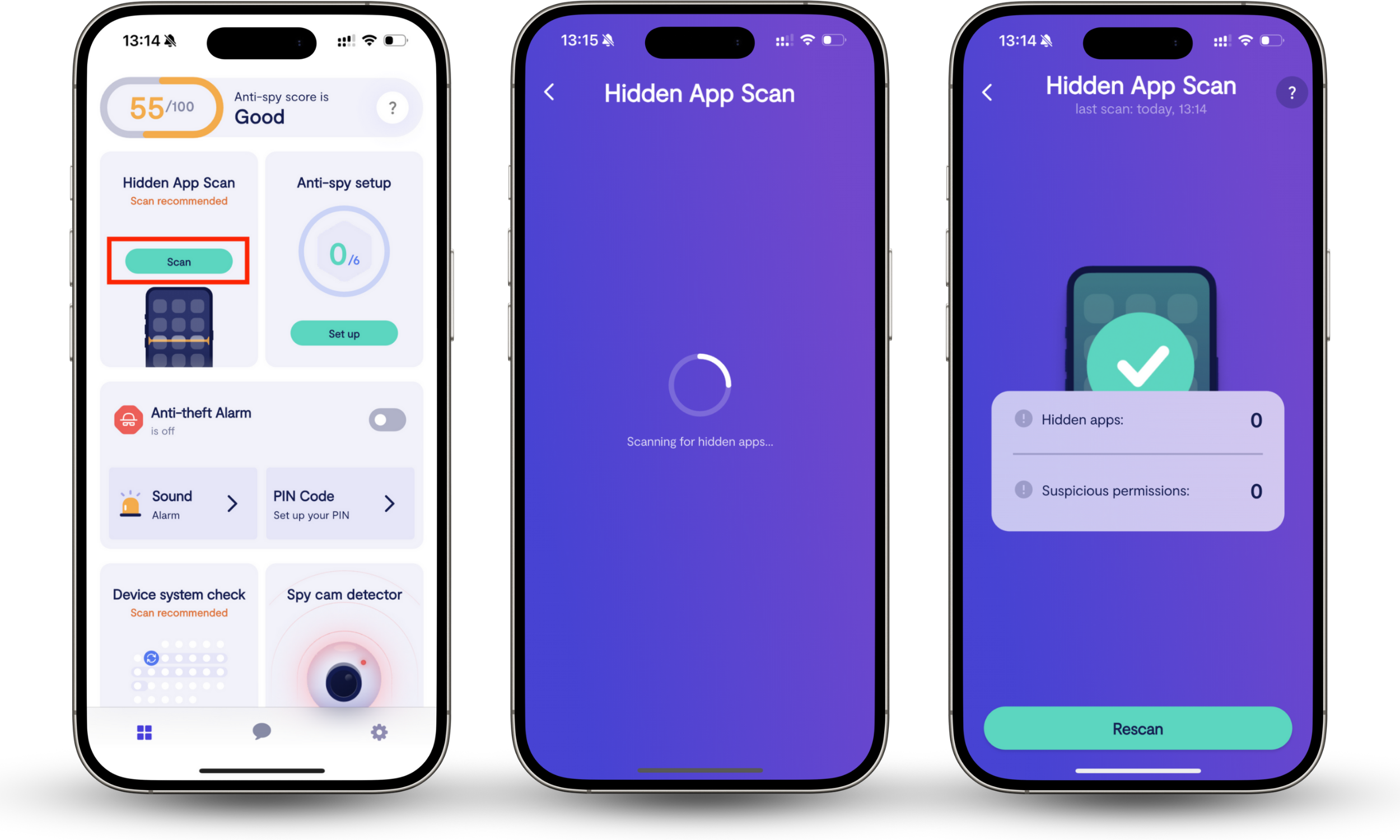
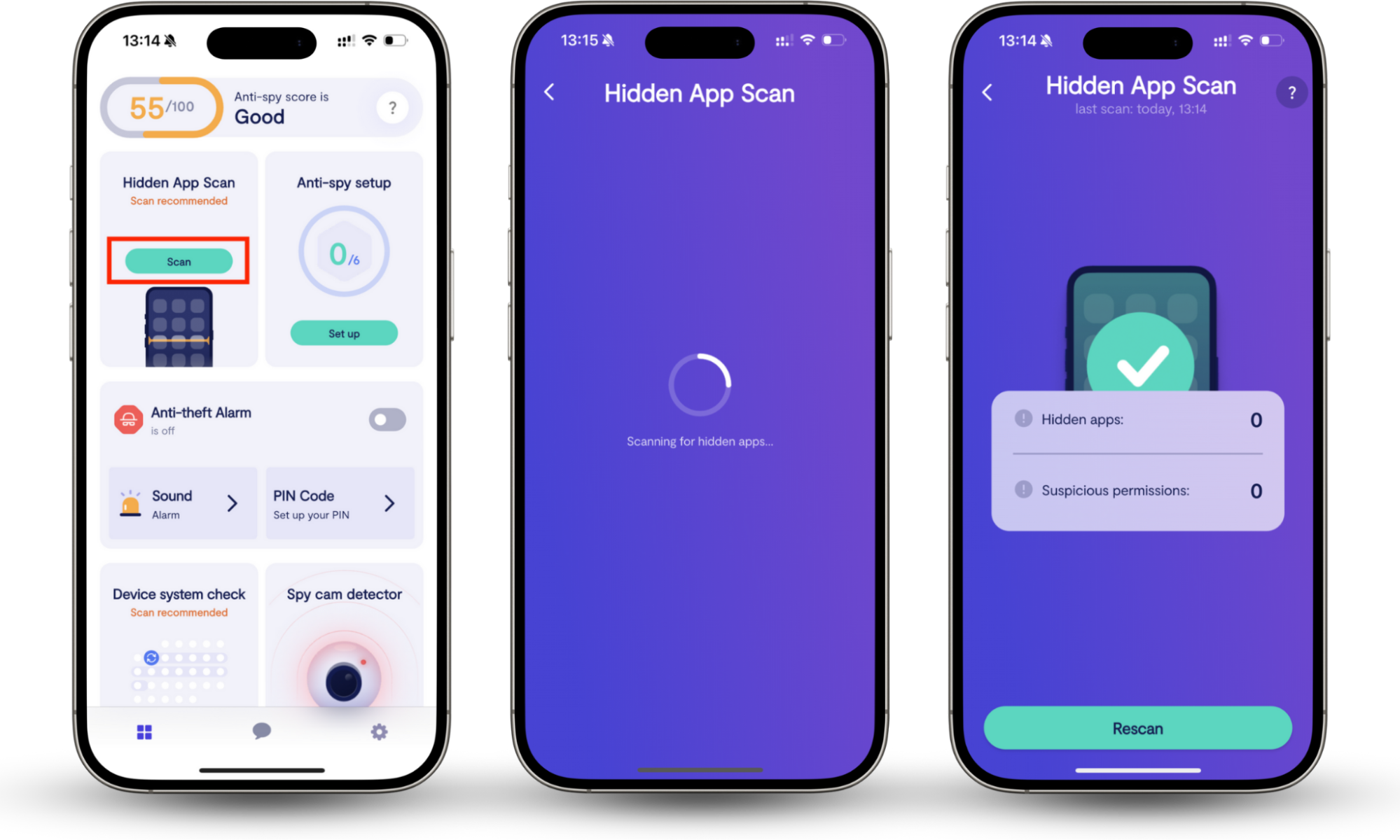
This isn’t the first time that hackers have targeted RMM software like Kaseya, and it won’t be the last. It’s important to remember that while this particular attack didn’t impact mobile devices, there are many spyware infections out there that target iPhone users. To identify potential surveillance apps on your device, you can use Clario Anti Spy’s Hidden App Scan to weed out suspicious software. Try this:
- Install Clario Anti Spy on your iPhone.
- Tap the Scan button under Hidden App Scan.
- Check if any apps are hidden on your device, or if any are using suspicious permissions—both of which could indicate the presence of malware or surveillance apps.
- If hidden apps are found and you don’t recognize them, we recommend removing them immediately or contacting your MSP or IT team if you’re using a company iPhone, before they can inflict more damage.
Kaseya VSA ransomware attack explained
The Kaseya VSA ransomware attack of 2011 was carried out by a group that calls itself REvil, which not only conducts its own ransomware attacks but also sells ransomware services to others. By exploiting a zero-day vulnerability in Kaseya VSA servers, REvil gained access to systems managed by around 50 MSPs (managed service providers), then used Kaseya’s legitimate update delivery mechanism to distribute its ransomware to as many as 1 million endpoints.
Once the ransomware was running on machines across 17 countries, the REvil group was able to encrypt the data they contained and lock it down. They then demanded $70 million worth of Bitcoin for the release of a decryptor that would allow affected companies to unlock their endpoints and regain access to their files.
When Kaseya became aware of REvil’s attack, it shut down the VSA platform to prevent the ransomware from spreading itself even further. They then worked with the FBI and third-party vendors such as Huntress and Sophos to determine exactly what had happened and resolve the issue. On July 22, 2021, around 20 days after the incident, Kaseya announced that it had obtained the decryptor required to unlock the infected endpoints. It says it purchased this from a third-party and didn’t pay REvil’s ransom.
What are real security risks of Kaseya Agent?
The biggest risks associated with Kaseya Agent stem from the high level of access it provides via its VSA server. This makes the software a prime target for hackers, and if they’re able to exploit it, as the REvil group did, it can have devastating consequences for tens of thousands of customers.
However, platforms like Kaseya don’t necessarily need to suffer an attack for the risks to materialize. A bad actor or rogue employee within an MSP that has access to platforms like Kaseya can just as easily distribute malicious software or obtain sensitive information without exploits if they had the desire to. Kaseya certainly isn’t the first of its kind to suffer a security or privacy breach.
How to tell if Kaseya Agent on your device is legitimate?
You can check if your Kaseya Agent install is legitimate by verifying its digital signature and checking its file locations and processes.
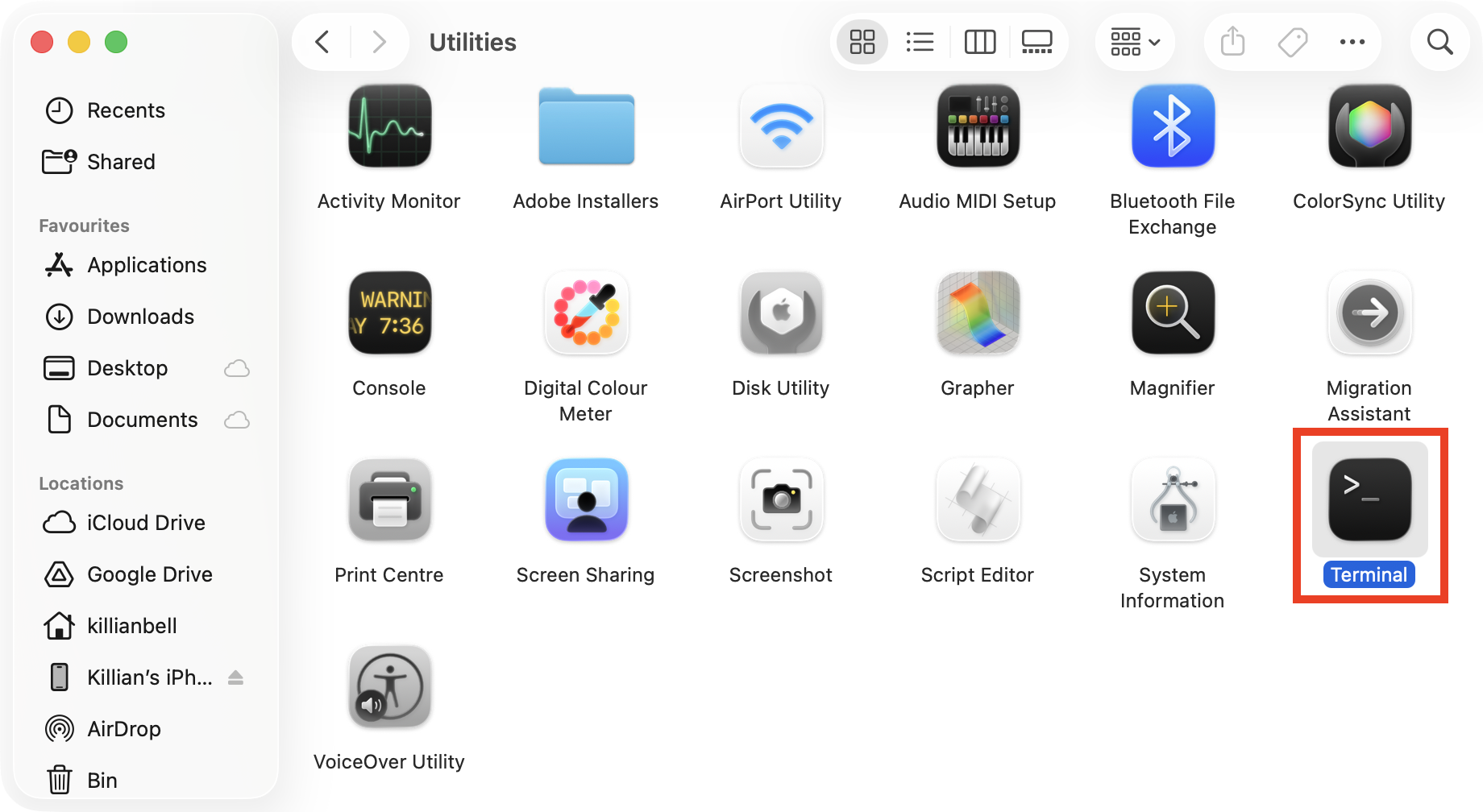
If you suspect your Kaseya Agent is spyware, you can verify it on a Mac by following these steps:
- In Finder, go to Applications > Utilities and launch Terminal.
- Enter codesign -dv --verbose=4 and press space.
- Drag the Kaseya Agent app icon from the Applications folder into the Terminal window, then press return.
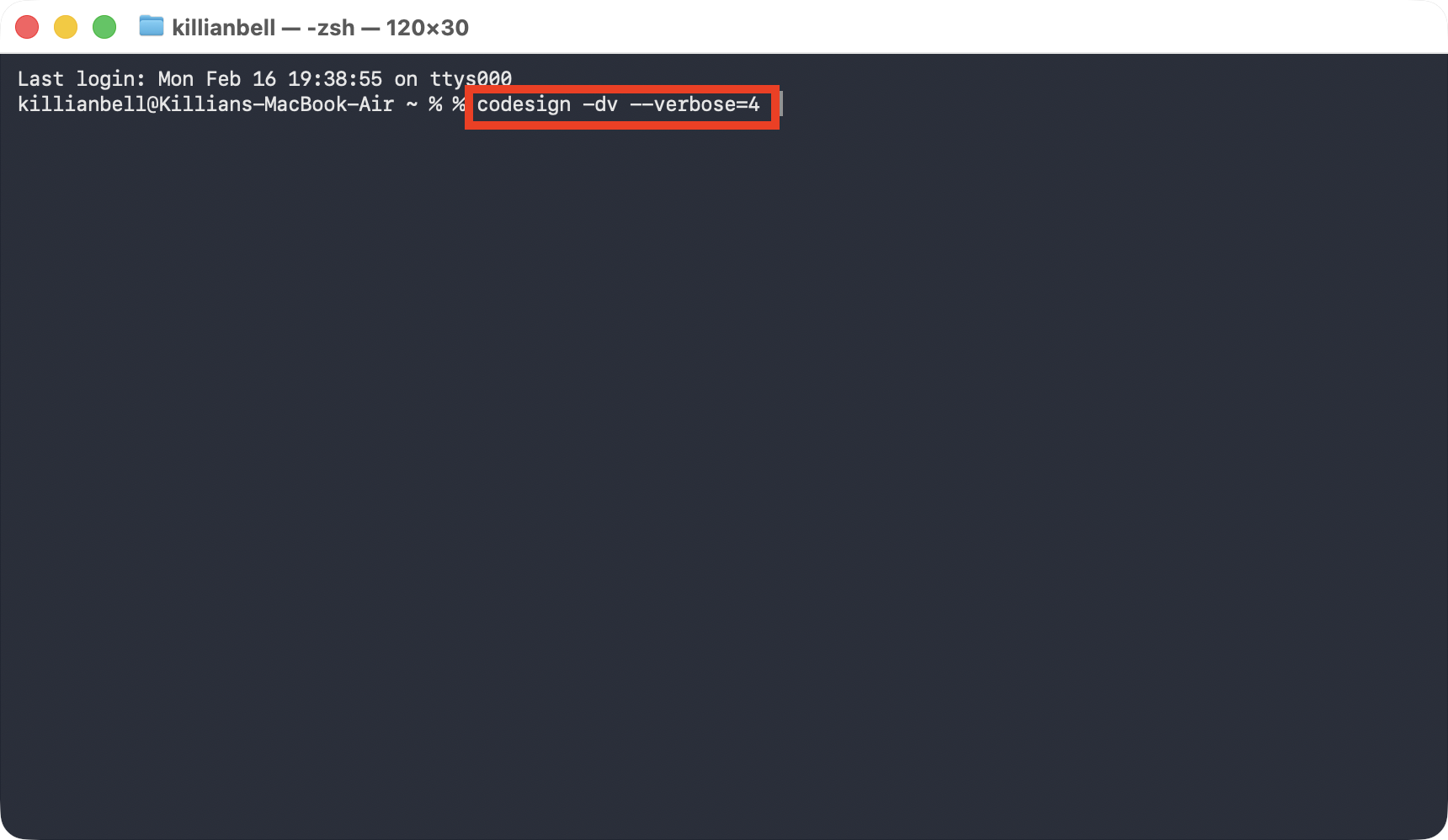
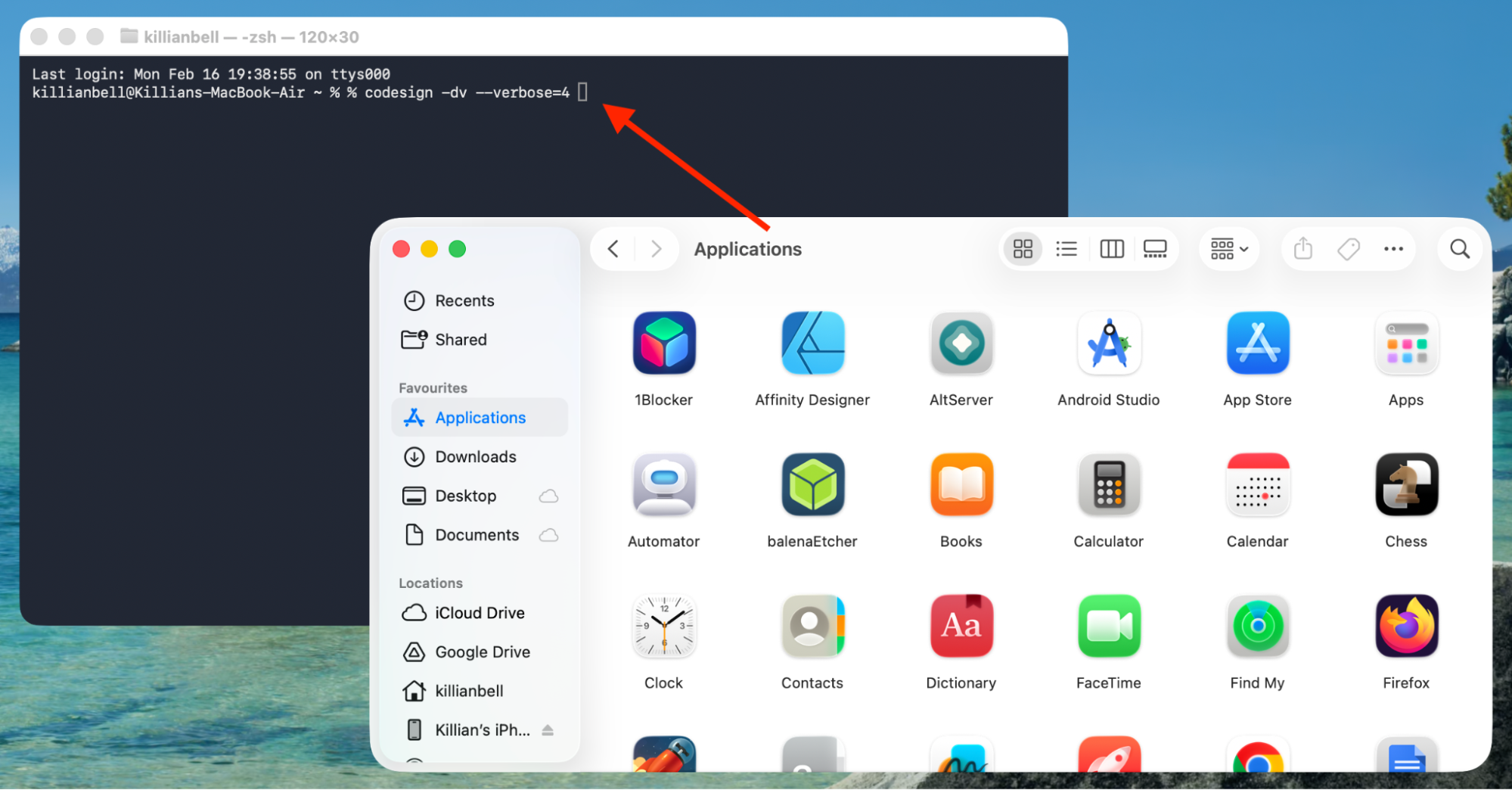
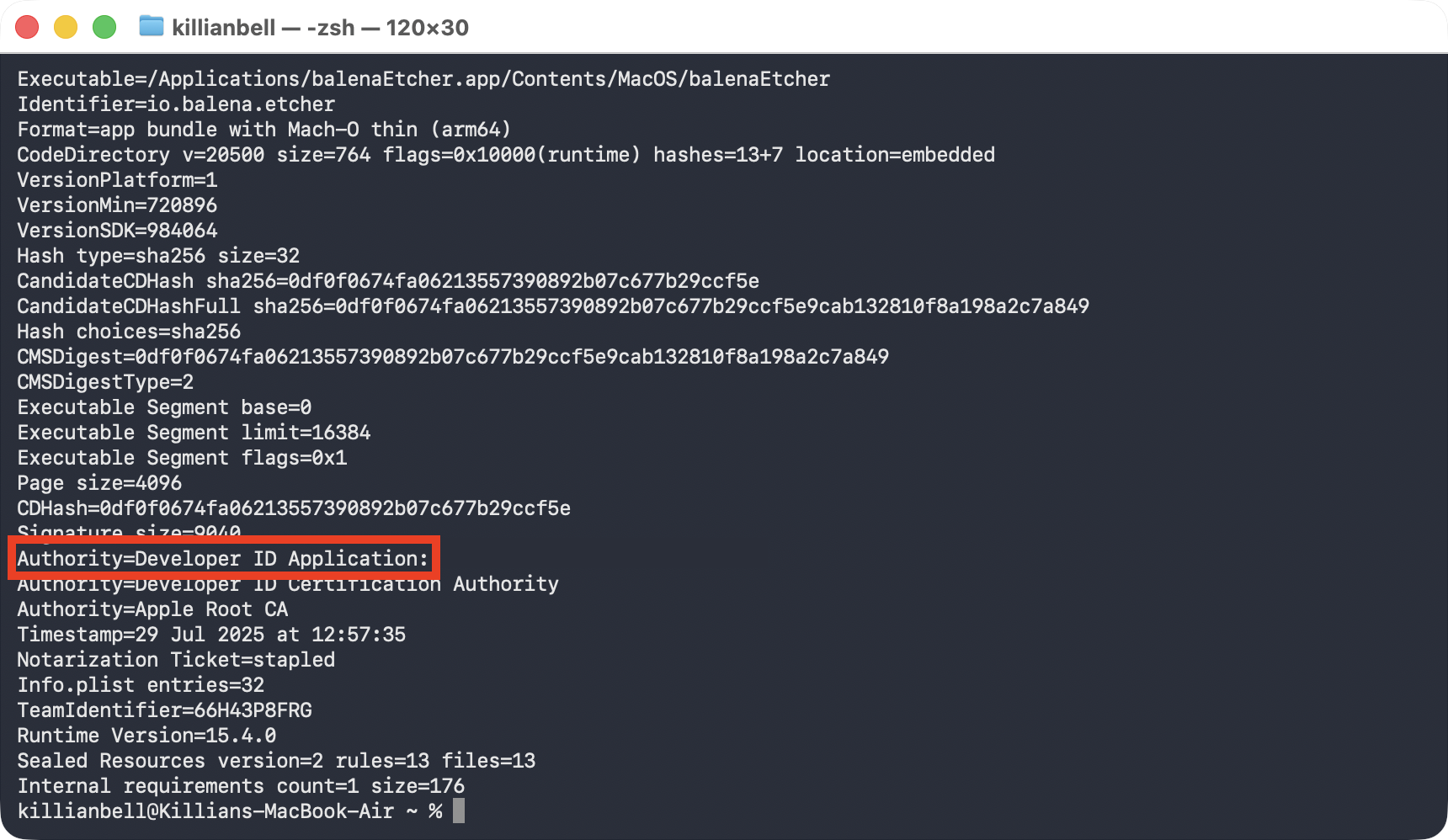
This command displays Kaseya Agent’s digital signature. Scroll to the bottom and confirm the Developer ID Application is Datto Inc., the creator of Kaseya. If another name is shown here, it indicates unofficial Kaseya Agent spyware is potentially installed, and you should notify your MSP or IT team of the situation immediately.
Conclusion
Official installations of Kaseya Agent aren’t spyware, but rather a legitimate tool that organizations and IT teams use to manage company devices. However, Kaseya has been breached by hackers in the past, and, as with all software of this kind, there’s a possibility that unofficial, malicious clones are out there. If you suspect your Kaseya is spyware on Mac, you can verify its digital signature using the process above.
And if you’re concerned about potential surveillance apps monitoring you on iPhone, we recommend installing Clario Anti Spy and using its Hidden App Scan to quickly detect software that’s disguising itself or using suspicious permissions to access your location, camera, personal data, and more.