Table of contents
- What is One UI Home on Samsung?
- Do you need One UI Home?
- Is One UI Home spyware?
- One UI Home vs spy apps
- Could there be a fake One UI Home app?
- How to tell real One UI Home from spyware?
- Package name
- Install source
- App icon
- Uninstall behavior
- Permissions
- Update behavior
- What can and cannot One UI Home do?
- What happens if you disable or change One UI Home?
- Why would someone use Samsung One UI Home?
- How to check your Samsung phone for fake One UI Home or spyware?
- Manual checks
- Use Clario Anti Spy
- Verdict: Is One UI Home a spy app?
What is One UI Home on Samsung?
One UI Home is Samsung’s default launcher for Galaxy phones and tablets. In plain terms, it’s the app that draws the interface you interact with all day: your home screen, app drawer, widgets, folders, icon grid, and many of the animations you see when you swipe. Samsung explicitly positions One UI Home as a preinstalled component that helps you launch apps and widgets from the Home screen.
A launcher is not the Android operating system itself, but it’s always on because it’s responsible for:
- Keeping your home screen responsive
- Rendering widgets and updating them
- Managing app shortcuts, folders, and layouts
- Handling gestures and transitions between screens
One UI Home is always running, which is why it can appear in the battery and memory views without indicating anything suspicious.
Do you need One UI Home?
Yes, if you want the standard Samsung experience, you need One UI Home.
You can replace One UI Home with another Android launcher app (Nova, Niagara, etc.) and set it as your default. However, on most Samsung devices, you can’t fully uninstall One UI Home because it’s part of Samsung’s software stack, and the phone needs a stable launcher fallback.
If One UI Home is crashing, it usually looks like:
- Home screen freezing
- Icons reloading
- You see the “One UI Home isn’t responding” message
That’s typically a stability/cache/theme/widget issue and not a spying pattern.
Is One UI Home spyware?
No, One UI Home is not spyware. One UI Home is a UI controller. It organizes and displays what you see (icons, widgets, pages). Spyware, on the other hand, is designed to collect what you do (messages, calls, mic audio, location) and send it to someone else.
A launcher can display content (such as notification badges), but it is not designed to behave like surveillance software. One UI Home must stay active to be useful.
One UI Home vs spy apps
Use this quick comparison when you’re deciding whether you’re seeing a normal Samsung system app or a threat.
| One UI Home (legit) | Spy apps (malicious) |
| Preinstalled by Samsung on Galaxy devices | Installed intentionally or covertly (often after a phishing link or physical access) |
| Designed to run continuously as your active interface | Try to hide icons or disguise names (spyware disguise) |
| Main purpose: home screen, widgets, app drawer, layout | Seek invasive permissions (Accessibility, Notifications, Device admin, mic/location) |
| Typically identified by package name com.sec.android.app.launcher | Purpose: monitoring, logging, exfiltrating data |
My practical rule
If you can’t explain why an app needs Accessibility or Device admin access, treat it as a security breach event.
Could there be a fake One UI Home app?
Yes, name spoofing is possible. Attackers don’t need to hack Samsung’s launcher to create panic. They can install a different app with a similar name (or a vague “Samsung Service”-style label), then rely on you seeing it in battery, data, or permission lists and assuming it’s a system app.
Note
One UI Home does have an official Play Store listing under Samsung’s package com.sec.android.app.launcher, so One UI Home in the app list is not automatically suspicious on its own. Verify if it is spyware by install source (where it came from), then package name, and lastly behavior (what permissions it has).
How to tell real One UI Home from spyware?
If you’re worried, don’t guess. In my experience, you can identify 90% of fake system app scares using just four checks: package name, install source, permissions, and whether it behaves like a launcher.
Package name
The legit One UI Home package name is typically com.sec.android.app.launcher.
Red flags:
- A different package name with a similar display label
- Random-looking package strings
- Multiple entries with near-identical names
Install source
The real One UI Home should be:
- Preinstalled by Samsung, or
- Updated via official channels (Samsung/Play Store)
Red flags:
- Installed yesterday
- Installed from an APK site or link
- A launcher installed right after a suspicious SMS/email
App icon
Normal launcher behavior:
- You don’t open One UI Home like a regular app
- It acts as your home screen itself
Red flags:
- A separate app icon that launches a System UI/One UI branded interface
- A generic gear icon claiming to be Samsung
Uninstall behavior
Legit One UI Home often:
- Can’t be fully uninstalled (may allow disabling on some models, but removal is typically restricted)
- Can be replaced by selecting a different default launcher
Red flags:
- One UI Home offers a normal uninstall button and behaves like a third-party app
- Uninstall fails unless you grant admin/accessibility permissions
Permissions
A launcher may legitimately use:
- Notification-related access (for badges)
- Storage/media access (for wallpapers, icons)
- Appear on top (for some UI overlays)
High-risk permissions (common in spyware):
- Accessibility
- Device admin
- Full notification reading and reply capabilities
- Mic/camera/location without a clear feature reason
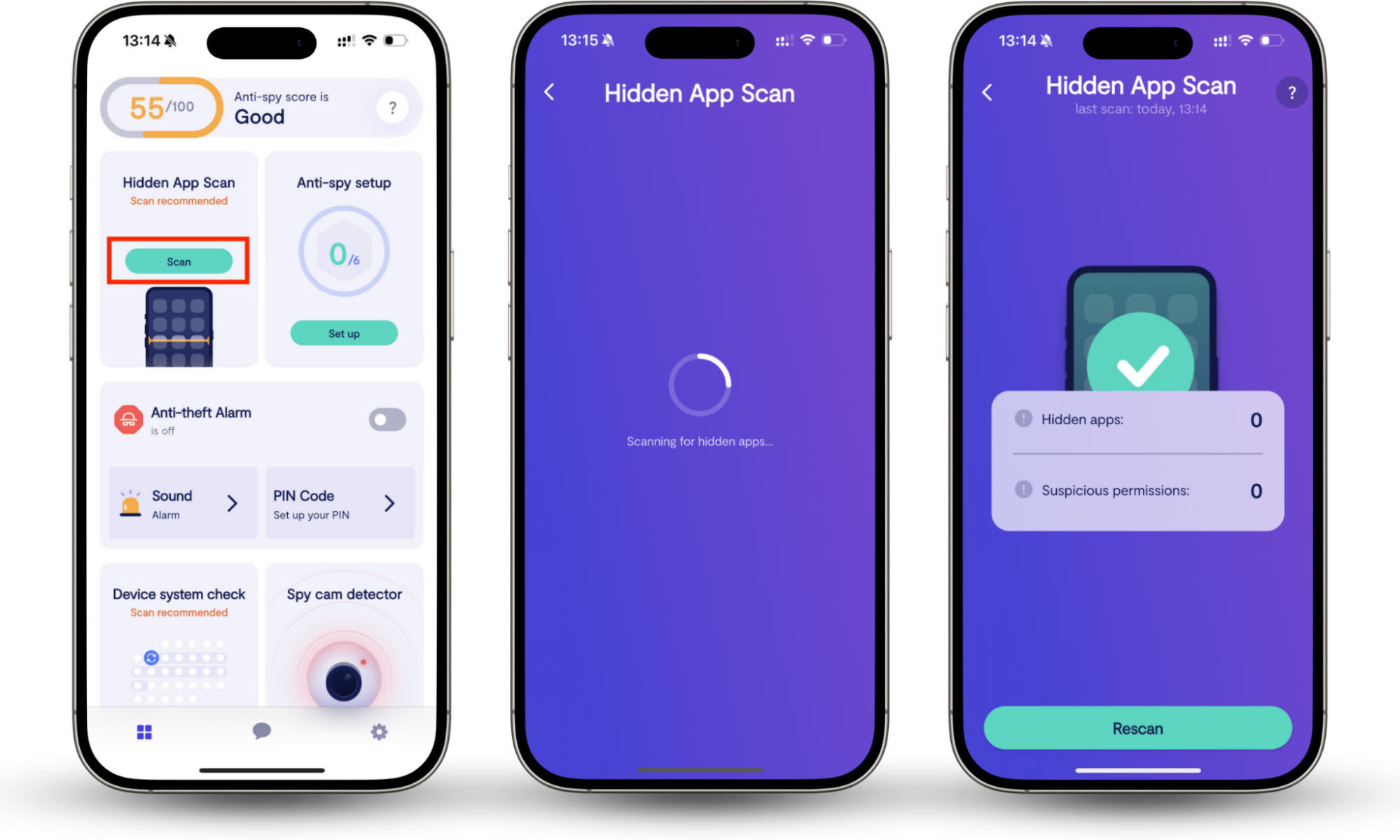
If you see Accessibility enabled for an app that isn’t an accessibility service (screen reader, assistive tool), that’s a serious warning sign. If you don’t know how to check app permissions, there’s a simpler way—use Clario Anti Spy’s Hidden app scan. It scans your phone for spy apps and suspicious apps that have permissions they are not supposed to have.
Here’s how to run the Hidden apps scan in Clario Anti Spy:
- Open Clario Anti Spy.
- Tap Hidden apps scan.
- Tap Scan.
- Review results and follow the removal guidance for suspicious apps.
Update behavior
Legit One UI Home updates are delivered as part of Samsung’s software ecosystem.
Red flags:
- A pop-up asking you to update One UI Home from a random link
- APK prompts outside your normal update flow
What can and cannot One UI Home do?
| One UI Home can | One UI Home cannot (by design) |
|
|
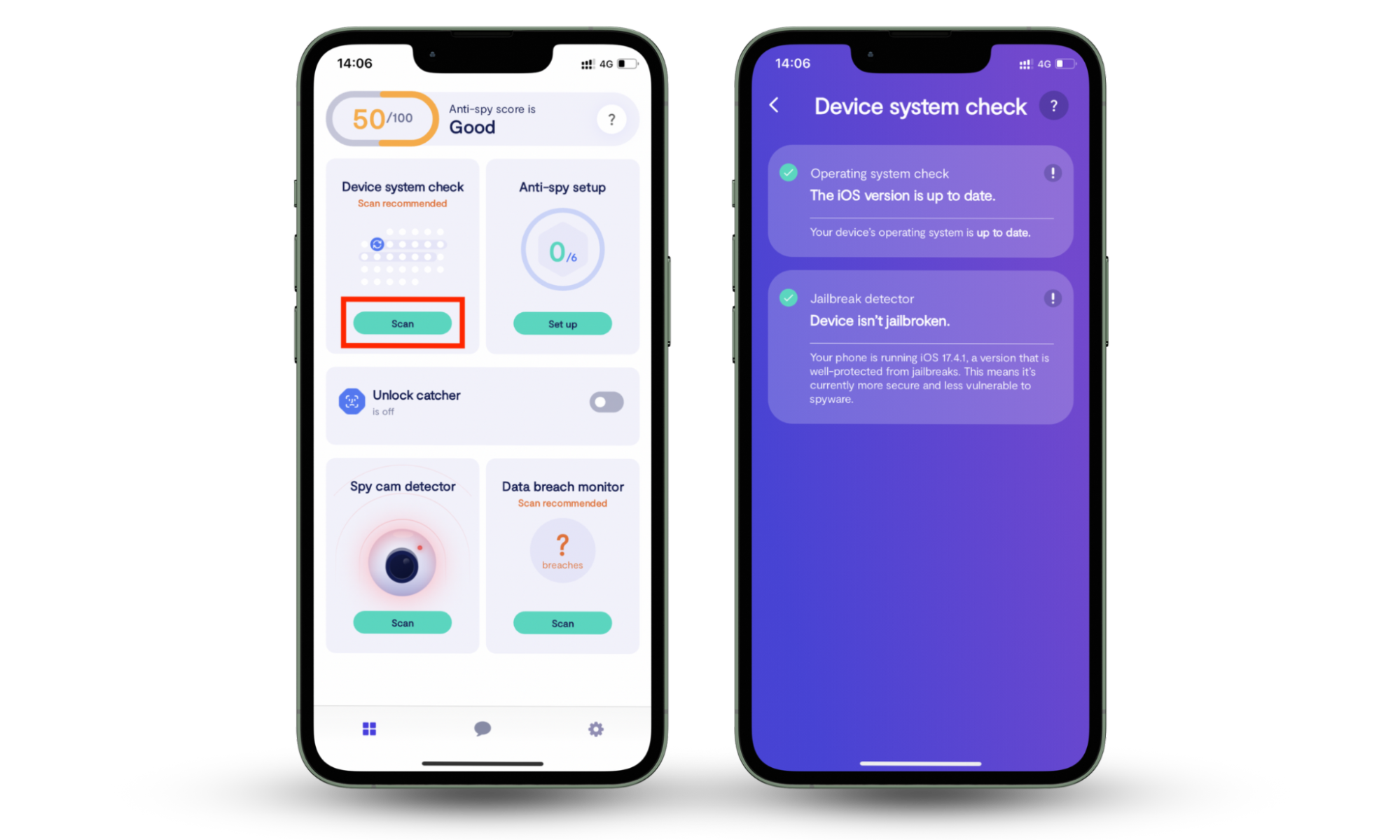
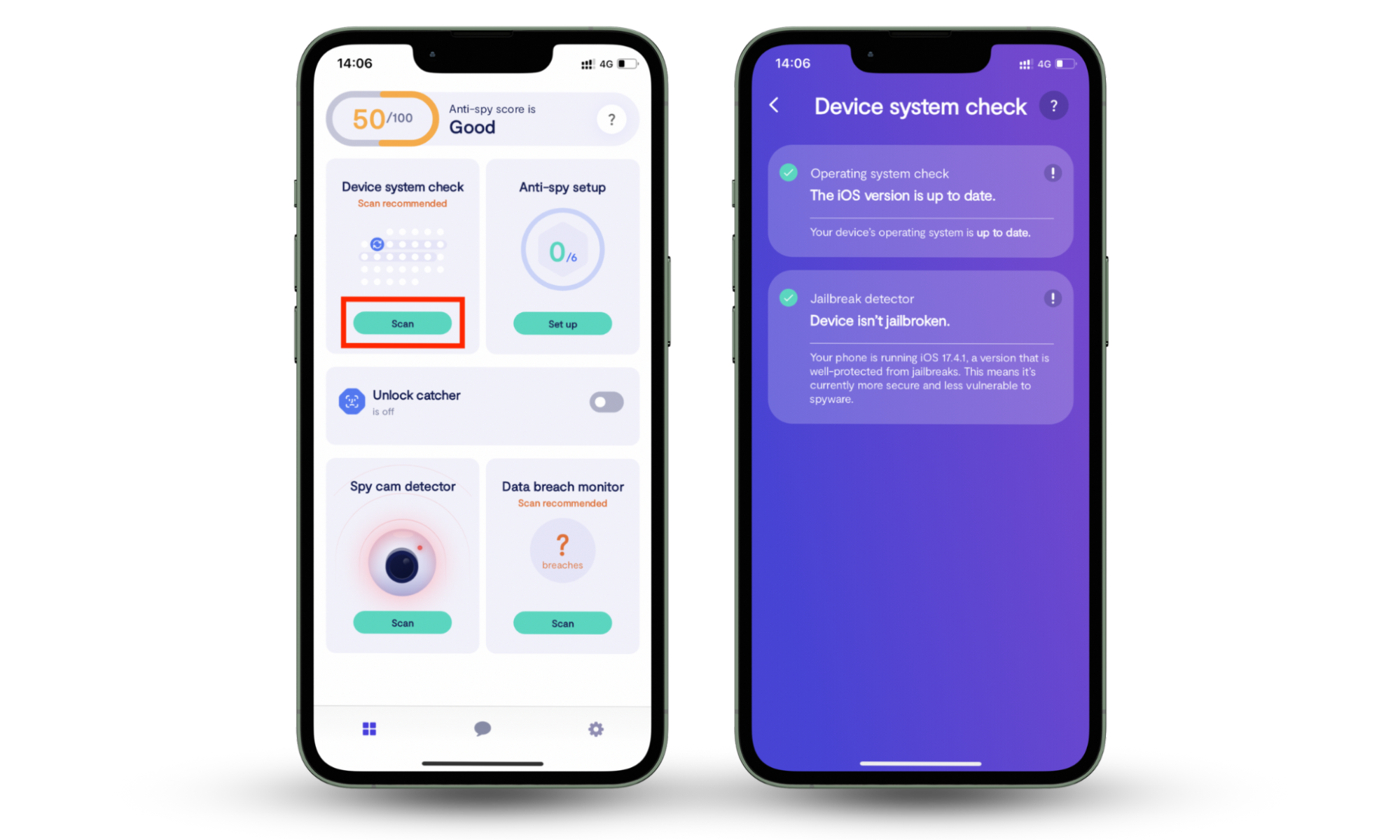
If your phone is being monitored, it’s far more likely due to a separate app abusing permissions (especially Accessibility) or a compromised device state (rooting). If you want to quickly check if your Android phone is rooted, use Anti Spy’s Device system check.
Here’s how to run the Device system check in Clario Anti Spy:
- Open Clario Anti Spy.
- Tap Device system check.
- Tap Scan.
- If integrity issues appear, follow the on-screen steps to reduce risk.
What happens if you disable or change One UI Home?
You can usually change your default launcher without harming the phone. However, after you change it, your home screen layout may reset when switching launchers, widgets might need to be re-added, or you may lose Samsung-specific home features tied to One UI.
Remember, spyware doesn’t go away just because you changed launchers. If something malicious is installed, you still need to identify and remove it.
Why would someone use Samsung One UI Home?
Because it’s the default launcher designed to match Samsung hardware and One UI design patterns. People use it for:
- Familiar Samsung navigation
- Widget and folder organization
- Smooth integration with Samsung features and themes.
How to check your Samsung phone for fake One UI Home or spyware?
Layer your verification: manual checks first, then scans.
Manual checks
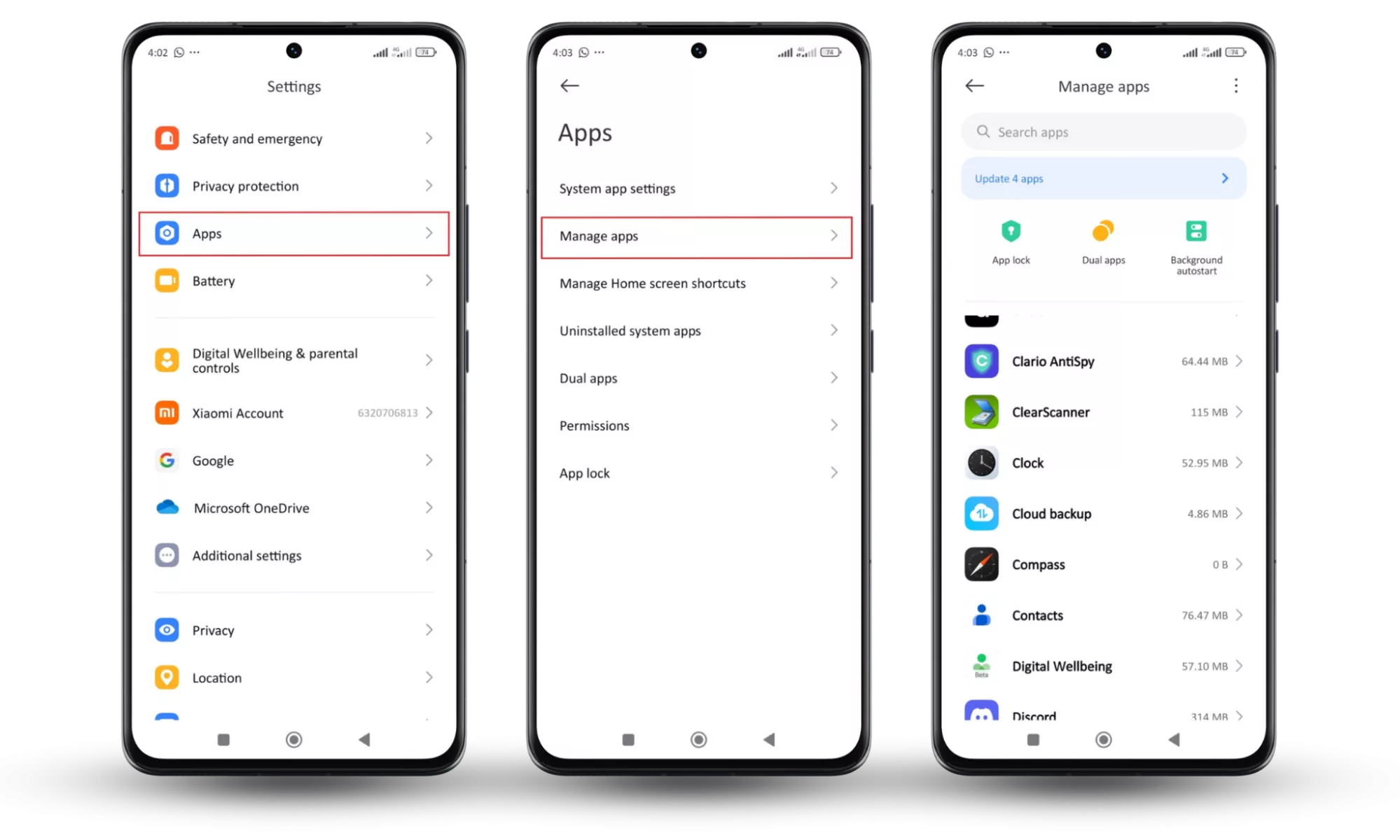
Here’s how to verify One UI Home in Android settings:
- Open Settings.
- Tap Apps > Manage apps.
- Tap One UI Home.
- Look for the package name (should match Samsung’s launcher).
- Review permissions and watch for Accessibility and other invasive access.
Use Clario Anti Spy
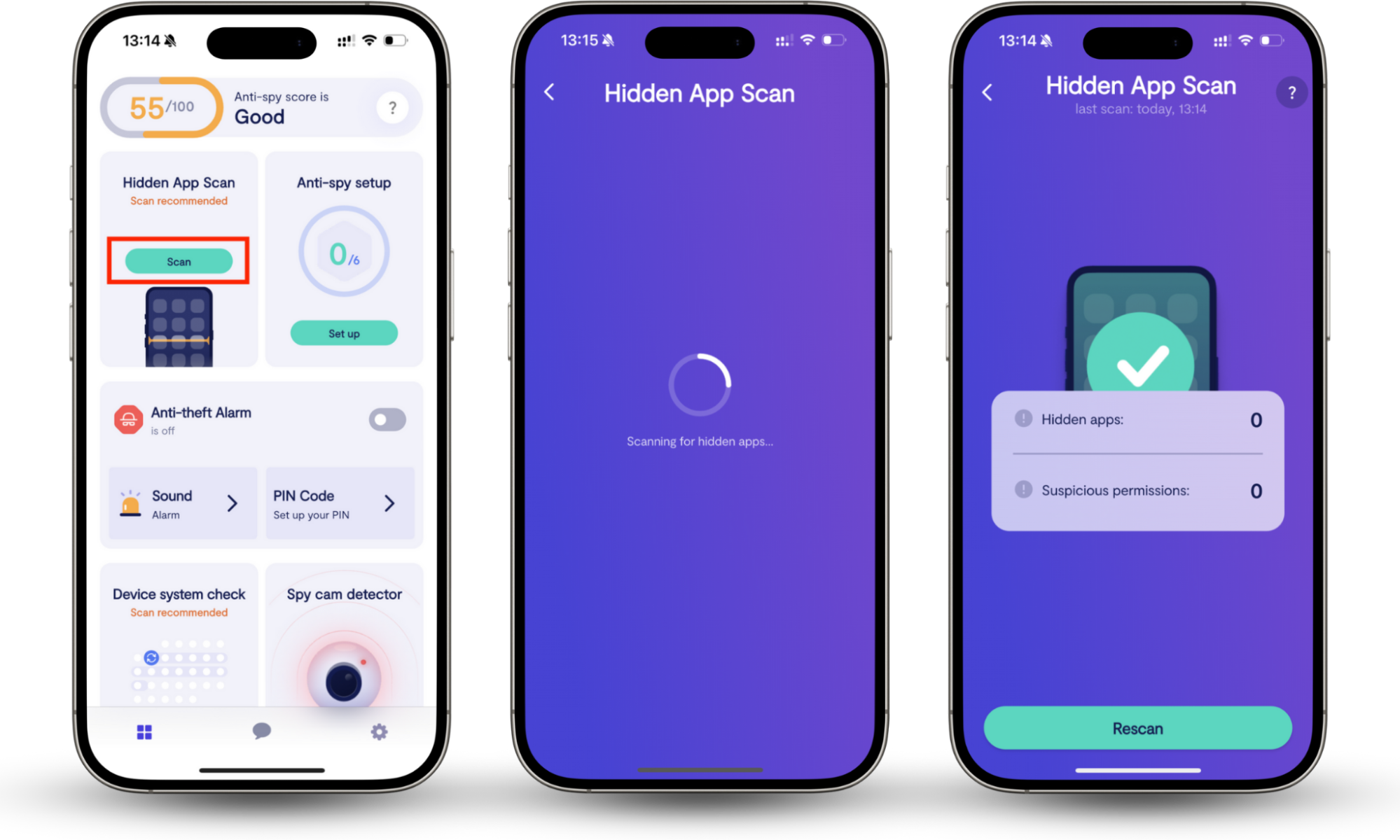
Clario Anti Spy gives you two practical checks:
- Hidden apps scan finds apps that disguise themselves or don’t show a normal icon, including spy apps that try to blend in.
- Device system check flags rooting-like integrity risks that make spyware harder to detect and easier to persist.
Verdict: Is One UI Home a spy app?
No, One UI Home is not a spy app. It’s Samsung’s official launcher that powers your home screen, widgets, and app drawer.
The real risk isn’t Samsung spying on you through One UI Home. The real risks are a fake launcher or a disguised app abusing permissions like accessibility, or someone compromising your device. If you’re unsure, verify with manual checks, then run a Hidden apps scan and a Device system check to confirm your Samsung phone is clean.