Table of contents
- What Is Opera GX?
- Is Opera GX Chinese company?
- Is Opera GX safe?
- Does Opera GX take your data?
- Why do people call Opera GX spyware?
- Opera GX safety features
- Is Opera GX spyware?
What Is Opera GX?
Opera GX is a web browser made for gamers. It comes with built-in performance controls for CPU, RAM, and network usage, plus a customizable, slick gaming-style interface. It also includes features like ad blocking and integrations with Discord, Twitch, and other social media platforms. Basically, the browser's goal is to give gamers more control over how system resources are used while browsing and fast access to gaming-related tools and communities.
On the PC and Mac, Opera GX runs on Chromium (the same engine as Google Chrome), so it supports all modern web standards. It's also available on Android and iOS, though the mobile versions are pretty much cosmetic since phones manage resources differently from desktops.
Is Opera GX Chinese company?
Opera is a Norwegian company that's majority-owned by a Chinese parent company. Most of Opera Software's shares (the company behind Opera GX) have been owned by Kunlun Tech since 2016. However, Opera operates out of Norway (where it was founded) and must comply with strict European privacy laws. The Chinese ownership raises privacy concerns, but there's no evidence that user data is being sent to China or that the Chinese government controls the browser.
Opera GX isn't spyware, but some apps definitely can be. That's where Clario Anti Spy comes in for mobile devices. Its Hidden app scan helps uncover privacy-invasive apps that spy on you or steal your data.
Here's how to run a Hidden app scan with Clario Anti Spy:
- Download Clario Anti Spy and subscribe to create an account.
- Tap Scan under Hidden App Scan.
- Let the scan finish and follow the on-screen steps to remove any privacy-invasive apps.
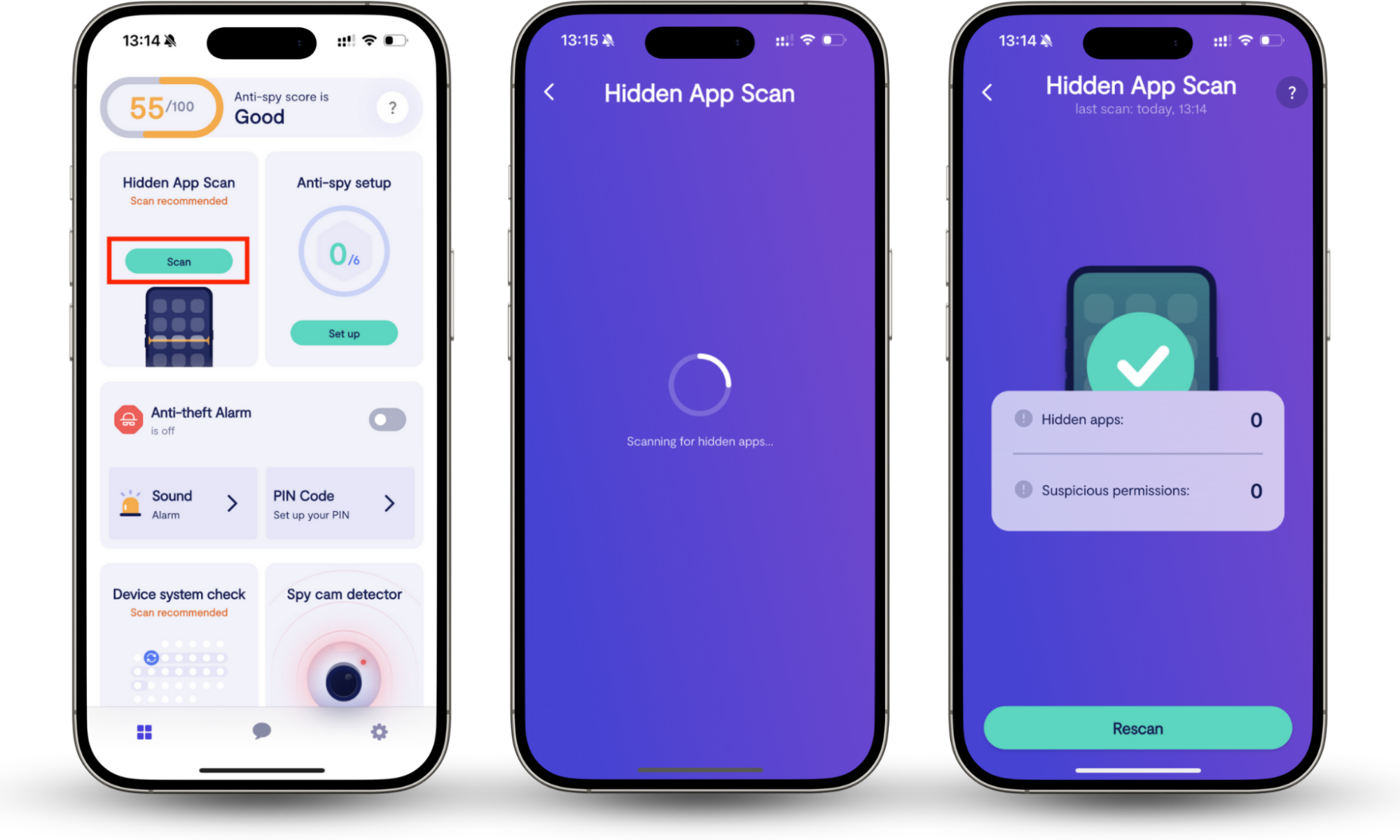
Clario Anti Spy also offers 24/7 support if you need help. Clario agents assist with all kinds of security concerns, and here's what one of them shared about a customer who suspected spyware on their phone:
"A customer reached out after noticing strange behavior on their phone: faster battery drain, weird targeted ads, and a general sense that something was off. They hadn’t installed anything new, but something just didn’t feel right.
We ran a Hidden app scan, which revealed several apps quietly requesting access to their data: location, microphone, and even contacts. A few of them, the customer didn’t even recognize.
We helped them review the results, remove suspicious apps, and secure their settings. By the end, they felt reassured and back in control, knowing exactly what was on their phone, and who had access to it."
Is Opera GX safe?
Yes, Opera GX is safe to use. Being based on the Chromium project, it gets plenty of security updates and comes with features like sandboxing and phishing detection to block malicious websites. It also includes additional privacy tools, such as ad and tracker blocking, and a free proxy-style VPN to limit tracking and hide your IP address in the browser. There's no evidence of spyware or harmful software built into the browser despite a Chinese company being the largest stakeholder.
What I think
Opera GX is great for gaming, performance control, and customization. But if you're dealing with sensitive or privacy-heavy stuff and would rather not take any chances, a privacy-focused browser like Firefox or Brave is usually the safer bet. You can also check our list of the best privacy browsers for more alternatives.
Does Opera GX take your data?
Yes, Opera GX collects some data, including usage statistics, crash reports, general interests, and basic location info (such as your country or city). This is standard for most major browsers. The data is mainly used to improve performance, fix bugs, and personalize content. There's no evidence that Opera GX sells your personal data or secretly tracks you without consent, and you can limit what's collected through the browser's privacy settings.
Why do people call Opera GX spyware?
People usually call Opera GX "malware" or "spyware" for three main reasons: its Chinese ownership, confusion about its built-in VPN, and general mistrust of how browsers collect data. Since most of Opera's shares are owned by a Chinese company, some users worry about possible government influence, even though the browser operates under European privacy laws.
The built-in "VPN" also causes a lot of confusion. It's actually a browser-based proxy and not a full VPN, which means it doesn't encrypt all your internet traffic or protect activity outside the browser. That leads some people to think Opera is being misleading about privacy.
On top of that, many privacy-focused communities are skeptical of any data collection at all, even when there's no solid evidence of spying or data misuse.
Microsoft Edge is another browser that's sometimes accused of spying on its users. Find out if that's really the case on our "Does Microsoft Edge spy on you" guide.
Opera GX safety features
Opera GX is built on the Chromium project, so it benefits from the same security features as browsers like Chrome and Edge. On top of that, it includes several built-in privacy and safety tools to help protect you while browsing, like ad blocking, tracker blocking, and phishing protection.
Opera GX safety features include:
- Ad blocker: Removes ads that can slow pages down.
- Tracker blocker: Limits how websites follow your activity across the web. Learn more about how websites track you.
- Phishing protection: Warns you about fake or dangerous sites.
- HTTPS enforcement: Pushes secure connections whenever possible.
- VPN-style proxy: Offers basic privacy by masking your browser traffic.
Pro tip
What is safe search? It's a feature that comes built into search engines like Google that provides additional protection against explicit sites and malicious content, so make sure to have it enabled.
Is Opera GX spyware?
No, Opera GX isn't a virus or spyware. It behaves like most modern browsers and only collects limited data for performance, security, and personalization. There's no evidence of hidden tracking, malicious behavior, or data theft, so it's safe for everyday use.
However, if privacy is your top priority, a browser built specifically for privacy might be a better choice. And on mobile devices, you can also use Clario Anti Spy and run a Hidden app scan to check for apps that could be secretly compromising your privacy.