Table of contents
- What is RedNote
- Is RedNote safe
- What are RedNote privacy risks?
- 1. HTTP data transfer
- 2. Data collection
- 3. Unclear terms and conditions
- 4. Security vulnerabilities
- 5. Chinese government access
- 6. Censorship and content control
- How to protect privacy on RedNote?
- 1. Use VPN
- 2. Check app permission
- 3. Use aliases or separate accounts
- 4. Be conscious about what you post
- 5. Use privacy-focused tools
- 6. Review app privacy policy
- 7. Be careful with content
- 8. Stay up to date
- Conclusion
What is RedNote
RedNote (a.k.a. Xiaohongshu or Little Red Book) is a Chinese social app where people share everyday recommendations. The Rednote app is like Instagram, TikTok, Pinterest, and Facebook Marketplace all in one. Most posts focus on things like beauty products, travel spots, food, and fashion finds. Users write reviews, upload short videos, and save tips from others. The app also allows in-app shopping, so products mentioned in posts can often be bought directly.
Is RedNote safe
RedNote is not considered safe due to several critical security issues. The Rednote app sometimes transmits sensitive user data without encryption, exposing it to interception. Additionally, Rednote has relatively aggressive user tracking and opaque data policies, which create severe privacy risks for users.
What are RedNote privacy risks?
RedNote privacy risks center on insecure data transmission and excessive device access. The Electronic Frontier Foundation confirmed that RedNote retrieves user content over unencrypted HTTP and fails to validate HTTPS certificates, exposing data to network interception properly.
RedNote’s own privacy policy also allows broad collection of device identifiers, location data, contacts, and usage activity, which increases exposure when combined with these message security flaws.
To understand the severity of these risks and determine whether Rednote can be called a spy app, you need to know what spyware is and how aggressive data harvesting can sometimes blur the line between a social app and surveillance software.
We’ll go into that below.
1. HTTP data transfer
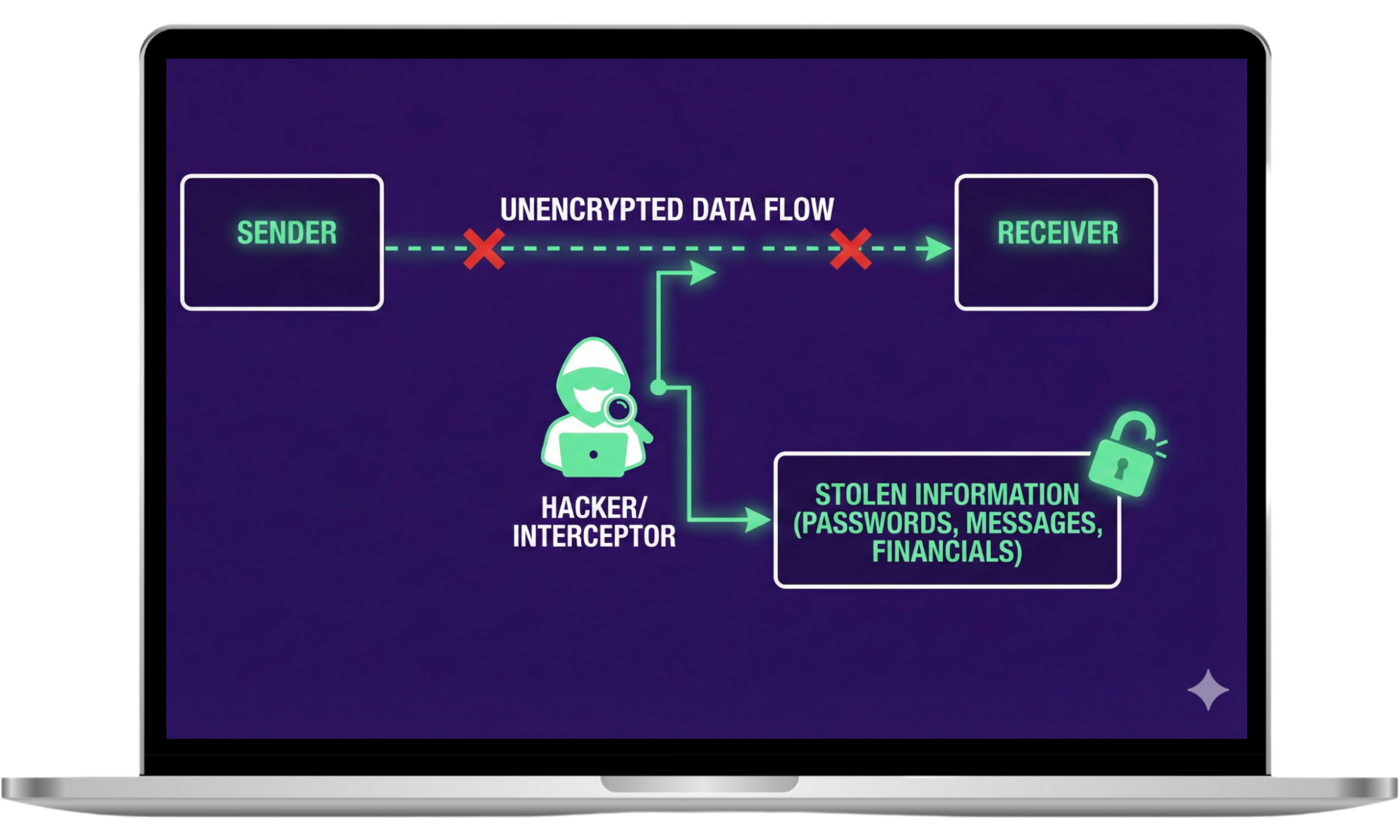
RedNote sends some user content over plain HTTP instead of encrypted HTTPS. The Electronic Frontier Foundation confirmed that this allows people on the same network, such as Wi Fi operators or ISPs, to see or tamper with that content. When data is not encrypted, anything uploaded or viewed can be exposed while it travels across the network.
2. Data collection
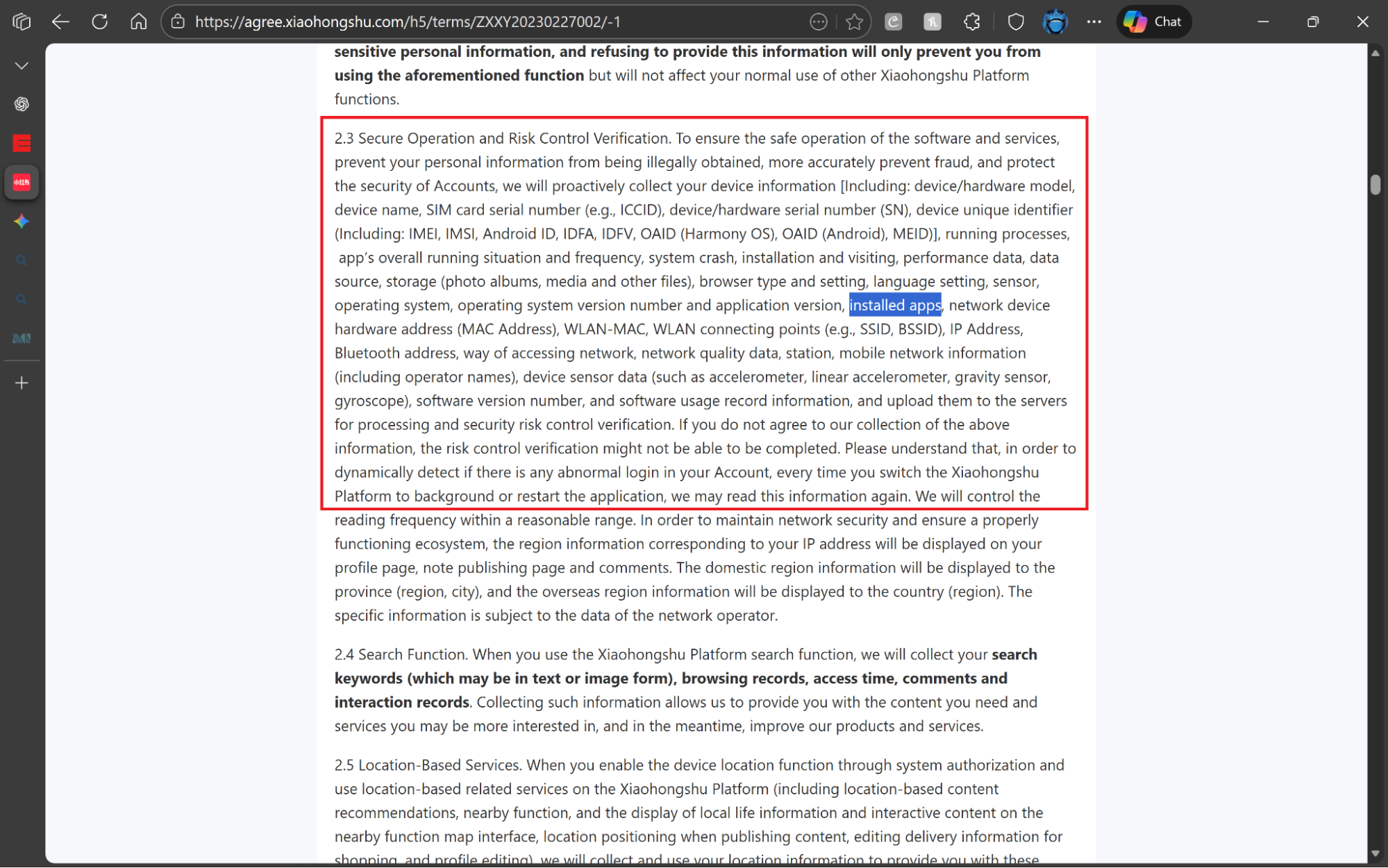
RedNote harvests a wide range of personal and device data. The Rednote privacy policy allows access to precise and background location, IMEI, IP address, MAC address, installed apps, and detailed usage activity. RedNote can also access contacts if a user enables address book syncing.
Because this data is stored in China and subject to local data access laws, and because security researchers have documented weak transport encryption, experts advise against considering RedNote safe for private communication.
3. Unclear terms and conditions
RedNote’s terms define prohibited content using broad, open-ended standards that give the platform wide discretion over enforcement. For example, “Improper Information” includes content said to harm ethnic feelings, undermine social order, or violate the Seven Baselines, a set of political and moral criteria defined by Chinese regulatory frameworks.
The terms do not explain how these standards are applied in practice or what thresholds trigger enforcement. Combined with a broad license to use and distribute user content without clear limits on duration, this makes it difficult to judge whether the RedNote app is safe for users.
4. Security vulnerabilities
Citizen Lab found that RedNote contains unresolved security issues that expose user data during normal use. These Rednote security issues include unencrypted data transmission, weak certificate validation, and file handling issues that allow network attackers to read or alter content. These vulnerabilities increase the risk of unauthorized access to user data.
5. Chinese government access
RedNote operates under Chinese law because the company is based in China. One of those laws, the National Intelligence Law, allows authorities to require companies to cooperate with intelligence work. This means that data stored on RedNote’s servers can be controlled by the government.
Since there is little public detail on how often this happens, how requests are handled, or whether users are notified, critics argue this lack of visibility makes RedNote bad for users who want control over their personal data.
6. Censorship and content control
RedNote enforces strict moderation rules in line with Chinese regulations. Content related to politics, protests, sexuality, drugs, or other sensitive topics is often removed or limited. Accounts can also be restricted under broad rules like harming social order, sometimes without clear explanations.
How to protect privacy on RedNote?
You can reduce privacy risks on RedNote by limiting app permissions, disabling contact syncing, avoiding sensitive posts, and keeping the app updated. Use a VPN on public Wi Fi and review account settings regularly to control what data the app can access and store.
1. Use VPN
A VPN helps protect your connection when using RedNote, especially on public or shared Wi Fi. It encrypts your internet traffic so others on the same network cannot see what you download or upload. Some popular VPNs for this purpose include:
2. Check app permission
Go to your settings and cut off RedNote’s access to certain important permissions. It does not need your contact list or constant location data to function. If you see it asking for background microphone access, that is a major red flag that the app isn't acting like a RedNote legit social tool.
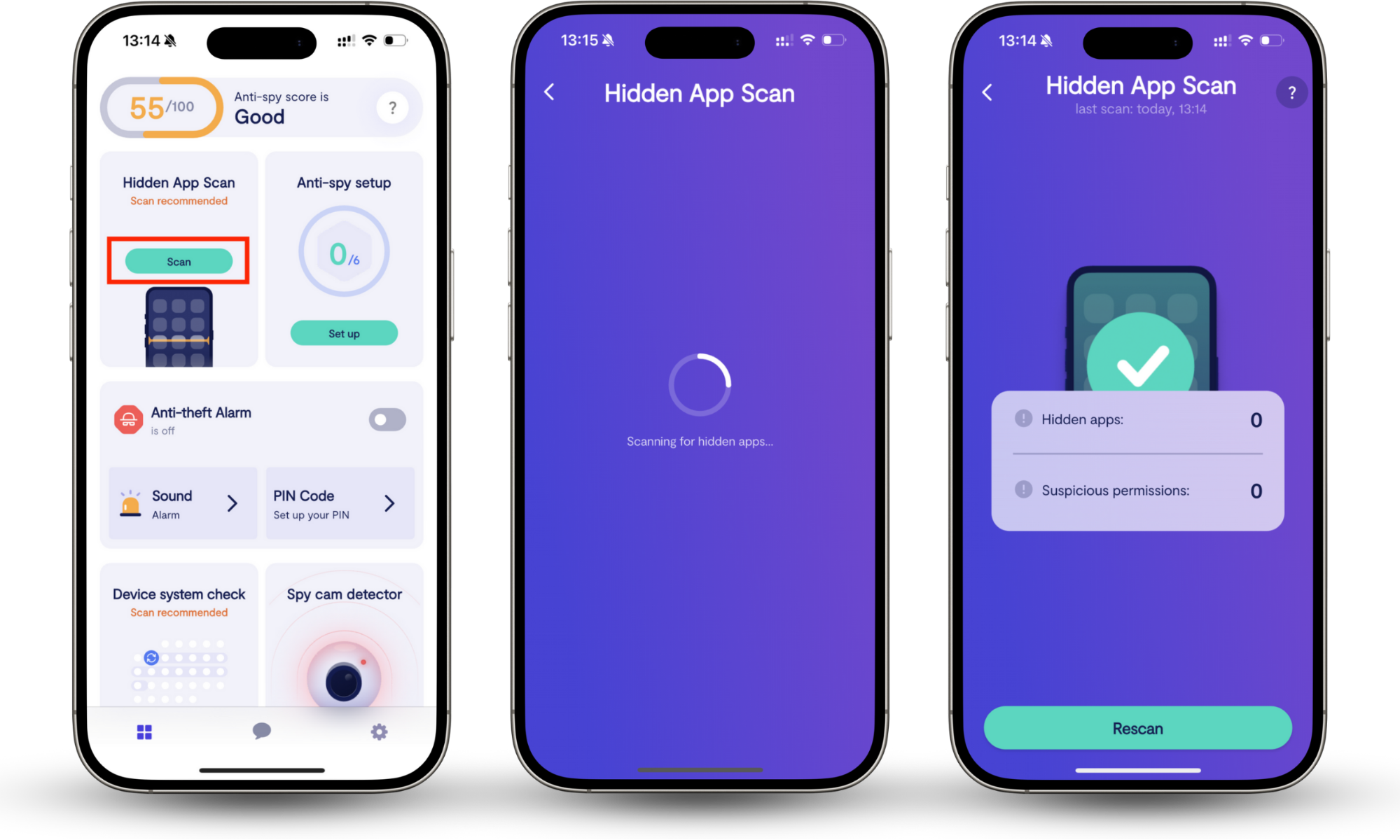
To be sure your device is clean, run a Clario Anti Spy Hidden app scan. Hidden app scan looks for apps installed on your phone that do not appear in your app list. These apps often run in the background, hide their icons, or disguise themselves as system services. Hidden app scan also checks for overreaching app permissions and warns you about them.
Here’s how to run Clario Anti Spy’s Hidden app scan on your phone:
- Download Clario Anti Spy, and create an account.
- Open the Clario Anti Spy app.
- Tap Hidden app scan.
- Allow the tool to check your phone’s system-level activity.
- Review the results and follow any removal recommendations.
Pro tip
To be doubly sure, learn how to detect spyware on Android and how to detect hidden spyware on iPhone.
3. Use aliases or separate accounts
Don't hand over your real identity. Create a dedicated "burner" email address specifically for RedNote instead of using your main personal or work account. Never link your other social profiles, like Instagram or WeChat. If a phone number is required, use a secondary SIM or a virtual number service.
Some users keep RedNote separate from their main phone account or log in with a secondary email to limit how posts, searches, and interactions can be traced back to them.
4. Be conscious about what you post
Avoid sharing exact locations, daily routines, travel plans, or identifiable details in photos and videos. Even casual posts like home interiors, receipts, or background street signs can reveal more than you intend.
5. Use privacy-focused tools
Use a privacy-first browser to reduce tracking. Enable secure DNS to block known tracking domains. Do not upload photos directly from your camera roll. Run your photos through an EXIF scrubber app first to wipe GPS coordinates and device details. Finally, use an email masking service to create a dummy address for your Rednote signup.
6. Review app privacy policy
Use the privacy policy as a reference, not just a one-time read. The privacy policy often explains data uses, ad personalization rules, and content rights more clearly than the app interface does.
7. Be careful with content
Anything you post on RedNote can be reviewed under Chinese content rules. You can avoid sharing political views, activism, protests, or sensitive social topics on Rednote, as this may get you banned. Even everyday posts can be removed if they are interpreted as violating local standards, so assume your content is visible, reviewable, and permanent.
8. Stay up to date
Check the privacy policy after updates. RedNote can change data collection, sharing terms, or permissions without notice. Reviewing changes helps you spot new access to location, contacts, or content before continuing to use the app.
Also, follow credible security researchers so you catch new Rednote vulnerabilities early, before they affect your account or device.
Conclusion
RedNote offers a jolly mix of lifestyle trends, but the cost may be your personal privacy. Between unencrypted data transfers, crazy data collection, and ambiguous legal terms, the app may be mistaken for spyware. You can try to protect yourself with a VPN and burner accounts, but you cannot fix the vulnerabilities built into the app's core code.
If you are worried that people are tapping into your unencrypted Rednote data, or other invasive software is already operating silently on your device, do not guess. Run a deep scan with Clario Anti Spy’s Hidden app scan. It identifies hidden apps and trackers that standard manual checks miss. Try it today.