Table of contents
- What is SentinelOne?
- How SentinelOne works
- SentinelOne on work devices vs. personal computers
- Key features of SentinelOne Agent
- What SentinelOne can and cannot monitor
- SentinelOne security monitoring vs. spyware: what’s the difference?
- Overview of the difference between SentinelOne security monitoring and spyware
- Is there any evidence of spyware-like behavior in SentinelOne?
- Final thoughts: Is SentinelOne spyware?
What is SentinelOne?
SentinelOne is not spyware by default. It's a cybersecurity solution that helps organizations protect their employees, devices, and data from online threats in real time. It helps identify a cyber threat and contain the affected systems and devices before it spreads. This is something that traditional antivirus software, which runs locally on the device, may either miss or delay responding to.
SentinelOne achieves this using endpoint monitoring technology to protect all devices linked to its system. This means it observes activity on protected devices to identify suspicious behavior and respond quickly. In enterprise environments, this can include remotely containing threats to prevent attacks from spreading.
And herein lies the problem. While this is a critical security feature for company-owned devices, it can feel invasive if installed on personal computers, as it can monitor device activity even when without a threat present. So, although SentinelOne is designed for cybersecurity, users may find its level of monitoring to be intrusive. Furthermore, unethical employers can misuse SentinelOne, even though spying is not the purpose of the tool.
Interesting fact
Did you know that 76% of survey respondents say they’re more concerned about cyber risks affecting their lives than they were three years ago, while 60% believe fraud is now so widespread that being scammed feels inevitable? (Harris Poll on behalf of Mastercard)
Given the growing concern over digital privacy and security risks, it’s critical to know which apps are spyware. This will help you stay alert and avoid falling victim to dangerous apps.
To take it further, it would benefit you to know how to tell if your phone has spyware. Fortunately, you don’t have to do it manually. Cybersecurity apps like Clario Anti Spy exist to simplify this process.
Though it can help find and assess potentially malicious apps (within operating system limitations), SentinelOne is primarily used on laptops rather than mobile phones. If you’re looking for solutions that detect and block spy apps on Android and iOS, we recommend using Clario Anti Spy’s Hidden app scan.
Created by cybersecurity experts, Clario Anti Spy is an excellent solution for protecting your data on iOS and Android. Its Hidden app scan checks for signs of hidden threats like spyware and stalkerware, as well as parental control apps, which bad actors can misuse to track you without your knowledge or consent.
Using Clario Anti Spy’s Hidden app scan, you can limit unauthorized access to your calls, text messages, location, contact list, and media such as photos, screenshots, and videos.
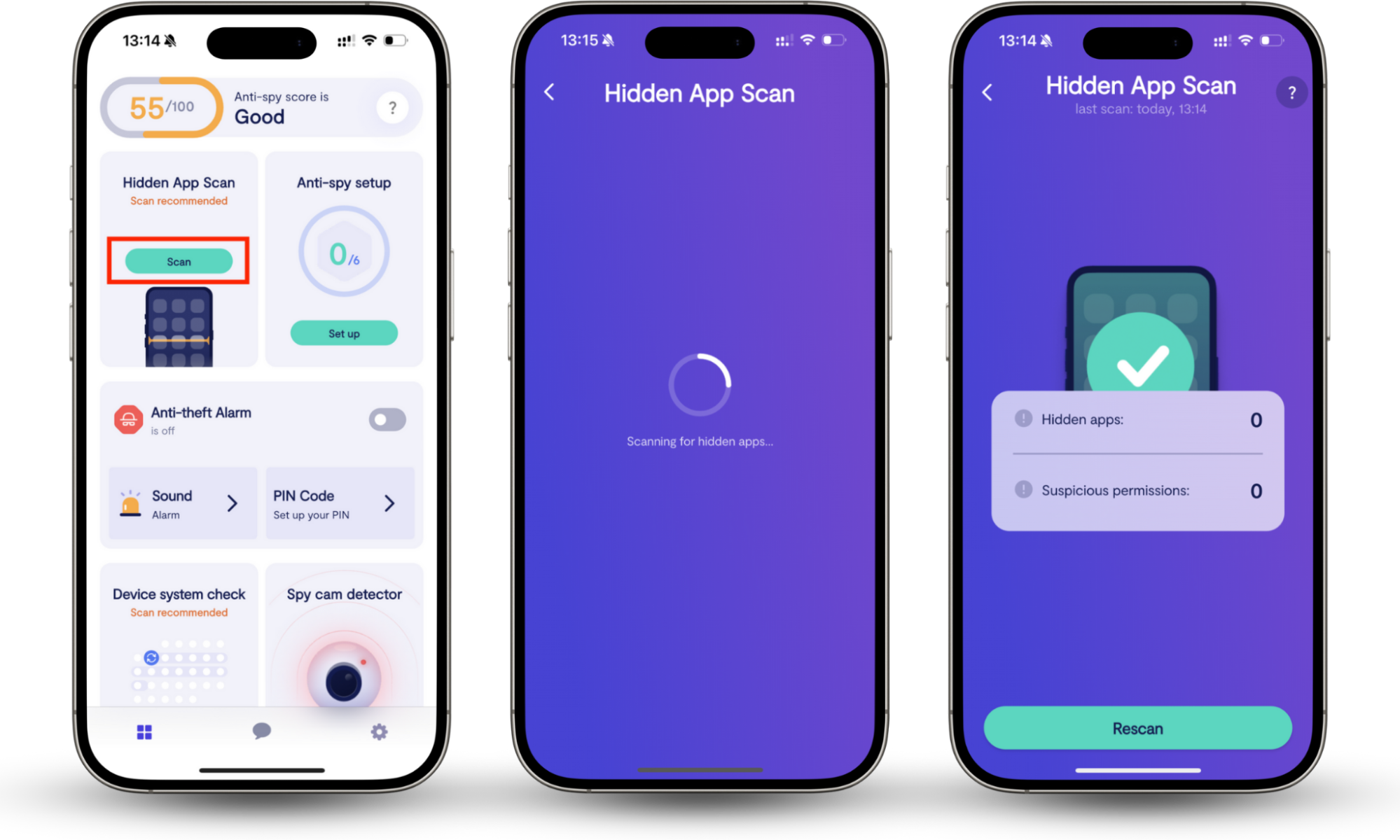
Check your phone for spying apps with Clario Anti Spy:
- Download the Clario Anti Spy app on your iOS or Android device (please note that the app isn’t available on laptops or desktop devices).
- When the app finishes downloading, proceed to the installation and setup process by following the prompts, then launch the app.
- Navigate to the Hidden app scan section and select Scan.
- Review the list of potentially suspicious apps and the permissions they have access to, and then amend app permissions to protect your privacy. For example, revoke camera or mic access for the apps you don’t feel comfortable accessing those tools.
How SentinelOne works
SentinelOne helps users strengthen their security posture by protecting endpoints, cloud workloads, and networks from modern cyber threats. It takes a more modern approach to cybersecurity, using advanced artificial intelligence (AI) and machine learning to detect and intercept online threats before they cause serious damage. This enables it to catch and respond to threats in real time, which is crucial for reducing their impact.
SentinelOne on work devices vs. personal computers
Since it focuses on enterprise-level security needs, SentinelOne is primarily designed for businesses and organizations. SentinelOne may be installed on company-owned devices and personal computers. Mobile deployment is less common and limited in scope on Android and iOS devices.
Here’s how SentinelOne works on company-owned devices vs. on personal ones:
| Company-owned devices | Personal devices | |
| Ownership | Your employer owns the device. The IT team manages and controls security settings, updates, and response actions. | You own the device and install SentinelOne yourself, or agree to your employer's requirements. However, while it’s a security tool, employers can misuse it to spy on you. |
| Monitoring scope | Your employer monitors system behavior to detect threats. They use SentinelOne to protect company data and systems. | SentinelOne is designed to monitor system-level security behavior, not the content of personal accounts, such as personal messages, photos, videos, emails, and more. |
| Response actions | IT teams can act decisively to isolate the device, remove it from the network, and contain cyber threats remotely. | Your employer is responsible for investigating and containing threats on your device. |
| Privacy | IT teams may monitor your phone to ensure adherence to security and compliance requirements. Acceptable use policies typically apply. | Users can expect a reasonable level of personal privacy, as SentinelOne is a security tool, rather than a monitoring tool for tracking account content. However, employers can use it to spy on you by remotely monitoring your device activity. |
Key features of SentinelOne Agent
Main features of SeninelOne Agent:
- Automatic response and cleanup for quick, decisive responses.
- Real-time protection guarantees 24-hour surveillance.
- AI and machine learning to detect abnormalities, outperforming conventional antivirus programs.
- Comprehensive reporting to help IT professionals proactively safeguard enterprises.
- Cross-platform protection to streamline management across Windows, macOS, and Linux devices.
What SentinelOne can and cannot monitor
SentinelOne monitors for security rather than employee behavior. As a result, it monitors network traffic, ransomware activity, cloud workloads, endpoint activity on Windows, macOS, and Linux devices, application vulnerabilities, and active directory attacks. It doesn’t check documents, conversations, emails, and other correspondence. Additionally, it doesn't monitor keystrokes, login credentials, inactive data files (unless they contain harmful code), non-agent devices (devices without SentinelOne installed), or other private user behavior unrelated to security risks.
SentinelOne security monitoring vs. spyware: what’s the difference?
Both SentinelOne and spyware analyze devices, but they fundamentally differ in their intentions, scope, and functionality. The former is a trusted enterprise security monitoring solution that openly monitors your computer for online threats.
The latter is malicious software that secretly collects your personal information (this includes usernames, passwords, medical data, browsing history and habits, financial information, and other sensitive data) and sends it to attackers or third parties without your knowledge or consent. Spyware is typically bundled with other software and can enter your computer when you grant certain apps permission to access privacy tools.
Overview of the difference between SentinelOne security monitoring and spyware
| SentinelOne | Spyware |
| Protects devices, data, and networks from malware and other threats. | Monitors or steals personal data and uses it maliciously |
| Deployed with consent | Operates without user consent |
| Subject to legal and compliance frameworks | Violates privacy laws |
| Installed with user knowledge and transparency | Installed covertly and avoids detection |
| Collects technical security data | Collects personal data |
Is there any evidence of spyware-like behavior in SentinelOne?
No, there is no evidence of SentinelOne behaving like spyware. On the contrary, SentinelOne is a legitimate security monitoring tool that flags and removes spyware. Some employees have expressed concerns about SentinelOne flagging well-known security tools. However, that behavior constitutes aggressive enterprise security monitoring, rather than SentinelOne spying on you.
Final thoughts: Is SentinelOne spyware?
If you’re here because you suspect SentinelOne may be spyware, we hope we’ve shed some light on its true purpose and put those concerns to rest. If you’re in the market for expert anti-spying protection, look no further than Clario Anti Spy’s Hidden app scan.
Trusted by privacy-minded users like you globally, Clario Anti Spy’s Hidden app scan checks your mobile phone for signs of malicious tools like spyware, parental control apps, and app permissions that leave you vulnerable to unauthorized monitoring.