Table of contents
- How to know if your ex has cloned your phone
- What to do if your ex has cloned your phone
- 1. Disconnect from internet
- 2. Contact your mobile carrier (critical step)
- 3. Change all passwords and enable two-factor authentication
- 4. Check for unfamiliar apps
- 6. Perform factory reset
- 7. Monitor financial and digital accounts
- 8. File police report
- 9. Report identity theft
- 10. Document everything down in case of legal action
- 11. Prioritize your safety if stalking or abuse is involved
- Conclusion
How to know if your ex has cloned your phone
I want to emphasize that cloning a phone is not an easy task, given the significant advancements in network security over the past few years. However, there are several ways attackers can gain unauthorized access to your Android or iOS device or clone your SIM. Someone can clone your phone by using malware, SIM swapping/cloning, or Cloud backups.
Here's a list of potential indicators that your ex has cloned your phone:
- Calls you did not make or messages you did not send
- "Read" marks on messages you did not open
- Unfamiliar or hidden apps installed on your phone
- Duplicate or an unknown device connected to your Google account or Apple ID
- The IMEI doesn't match the one on the phone's original packaging (Dial #06# to check your phone's IMEI number)
- Dropped calls or connection issues due to SIM card cloning or a SIM card swap
- Two-factor authentication codes are no longer being delivered due to SIM hijacking.
- The location in Find My iPhone or Google's Find My Device differs from your actual location
Note
In combination with the signs we listed above, fast battery drain, traffic spikes, and data usage even when your device remains inactive may also indicate phone cloning or SIM tampering.
Phone cloning exposes you to privacy risks since your device basically turns into a spy tool, letting your ex see where you are, who you talk to, and your bank details. Once an intruder swamps your SIM, they can change your 2FA settings, banking account passwords, and intercept your calls and texts. Using malicious apps, your ex can gain deep access to your phone's functions and data, as well as monitor your location and communications.
One of our recent clients grew suspicious when her partner knew too much about her chats, including who she'd messaged and details of those communications. Additionally, her phone would often overheat for no apparent reason.
To find some answers, she used our Hidden app scan to check for hidden apps. It was then that the problem surfaced: an odd app she never installed was running without her knowledge.
We advised her to remove the unfamiliar app, as there were indications of tracking activity. To fully secure her phone, we recommended the following steps:
- Update every primary login credential
- Enable two-factor authentication
- Review app permissions and disable unnecessary access
Using Hidden app scan, our client removed the threat and strengthened her device’s security, thereby regaining control over her privacy.
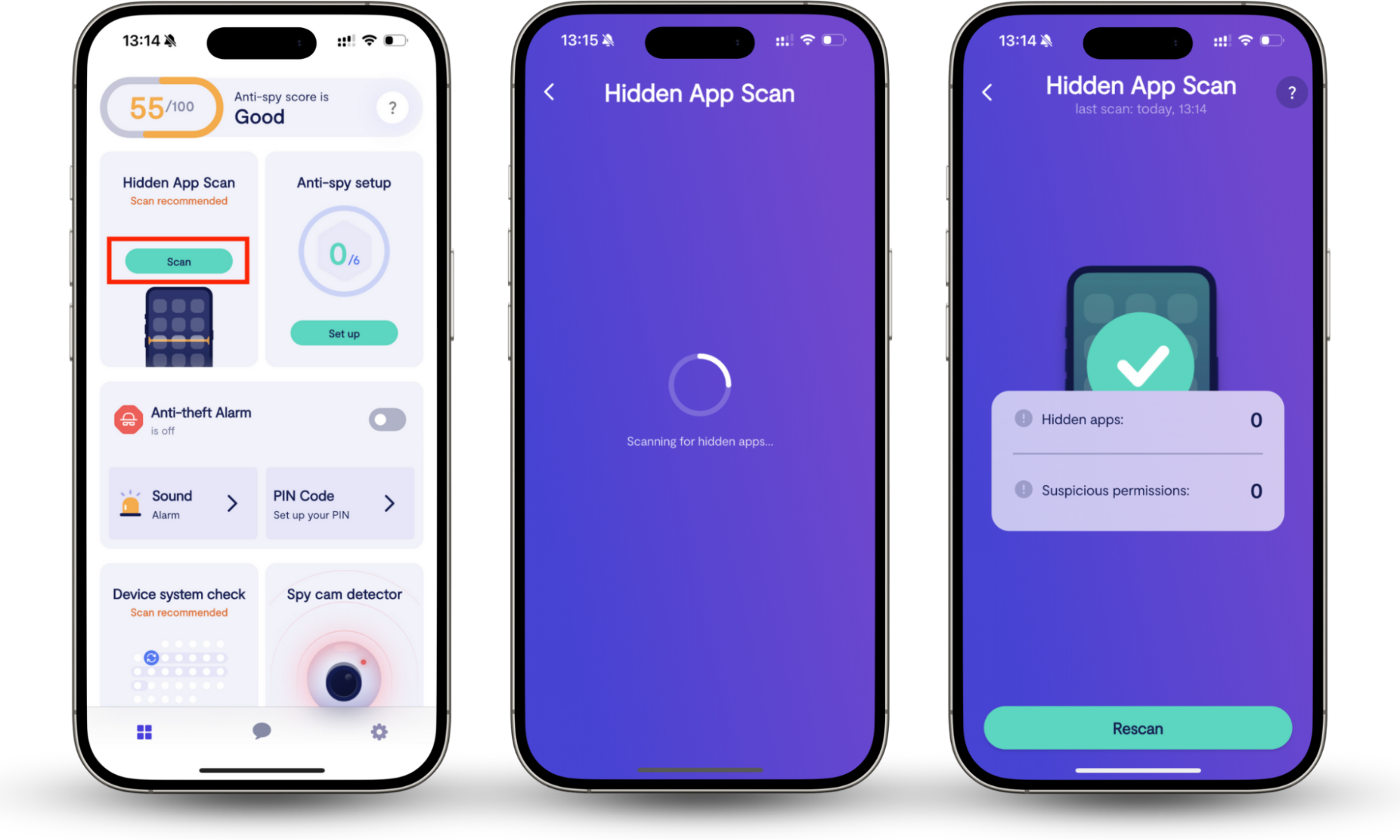
When you suspect your ex has cloned your phone using a malicious app, you need to detect and delete it asap. The problem, however, is that spyware and other malware often remain hidden or masquerade as genuine apps, making them harder to detect. This is where Clario Anti Spy’s Hidden app scan can be helpful. It scans your phone for hidden apps installed without your knowledge. It also checks all existing apps to detect suspicious permissions they might have.
Here’s how to use Clario Anti Spy's Hidden app scan:
- Download Clario Anti Spy and set up an account.
- Locate the Hidden app scan feature and tap Scan.
- Wait for the scan results.
What to do if your ex has cloned your phone
If you believe your phone has been cloned, disconnect from the internet immediately to stop data flow. Next, change your passwords and contact the carrier. Inspect your phone for any unknown apps, and gather evidence of the intrusion in case you decide to file a police report.
Let us explain each step in more detail.
1. Disconnect from internet
If you suspect your ex has cloned your phone, the first urgent step is to disconnect your device from the internet to prevent data transfer. As long as your phone has network access, your ex can steal important information (like your banking credentials), media files, etc.
Here's how to disconnect your phone from the internet:
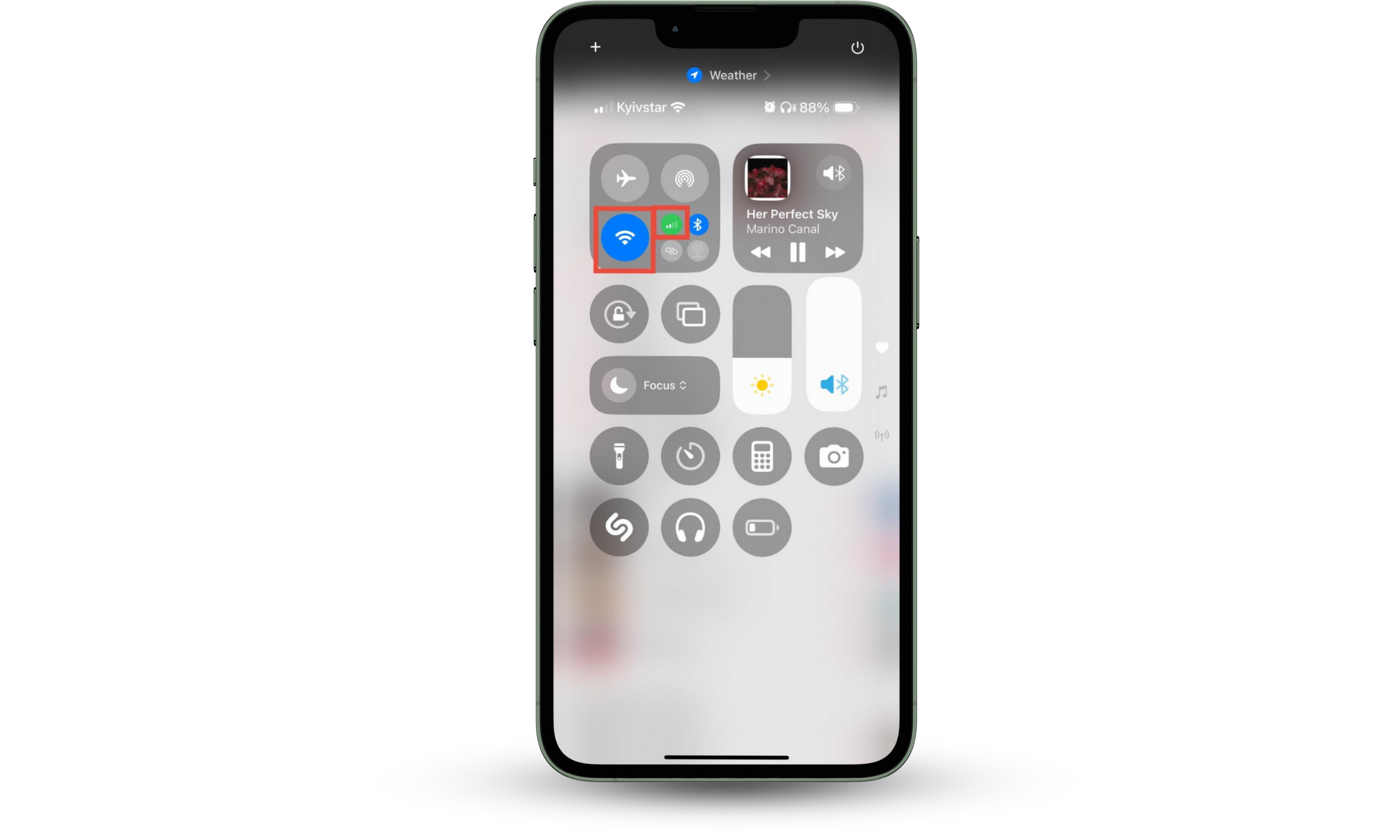
- Swipe down from the right top of your screen.
- Tap on the Wi-Fi and Cellular Data icons to disconnect your phone from the internet.
- When the icons go from blue to grey, you're disconnected.
2. Contact your mobile carrier (critical step)
Wondering if someone can clone your phone number without you knowing? Unfortunately, the answer is yes. It happens when an unauthorised person convinces your mobile carrier to transfer your phone number to a new SIM. In this case, you should contact your cellular network provider and request that they block your existing SIM immediately.
3. Change all passwords and enable two-factor authentication
Sign in from a secure, uncompromised device to change passwords for your most important accounts: your email, Apple ID, or Google account, online banking, and social networks.
Pro tip
If you suspect SIM cloning, do not use SMS for 2FA, as the attacker may receive the codes. Use an auth app like Google Authenticator or a hardware security key. To use Google Authenticator, download the app, enable two-factor authentication (2FA) in your Google security settings, and obtain a QR code. Scan it, and Google Authenticator will generate time-sensitive 6-digit codes for secure logins.
Here’s how to set up Google Authenticator for your Google account:
- Go to App Store or Google Play and download the app.
- Open Google Authenticator and tap Get started.
- Choose the Google account you want to secure and tap Add a code.

Now, you need to modify security settings in the account you want to protect with Google Authenticator. Here's what you need to do:
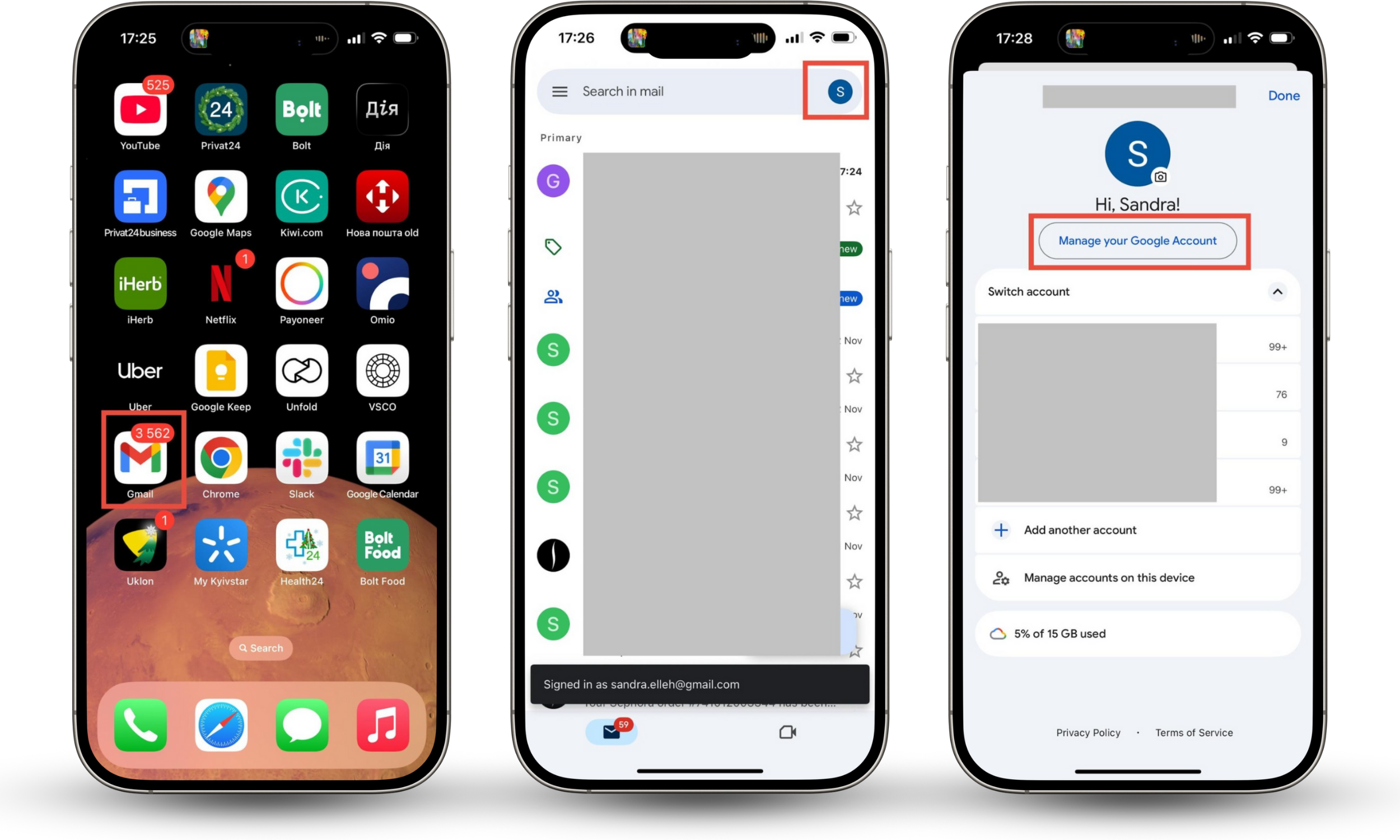
- Open the Gmail app and tap your icon in the top-right corner.
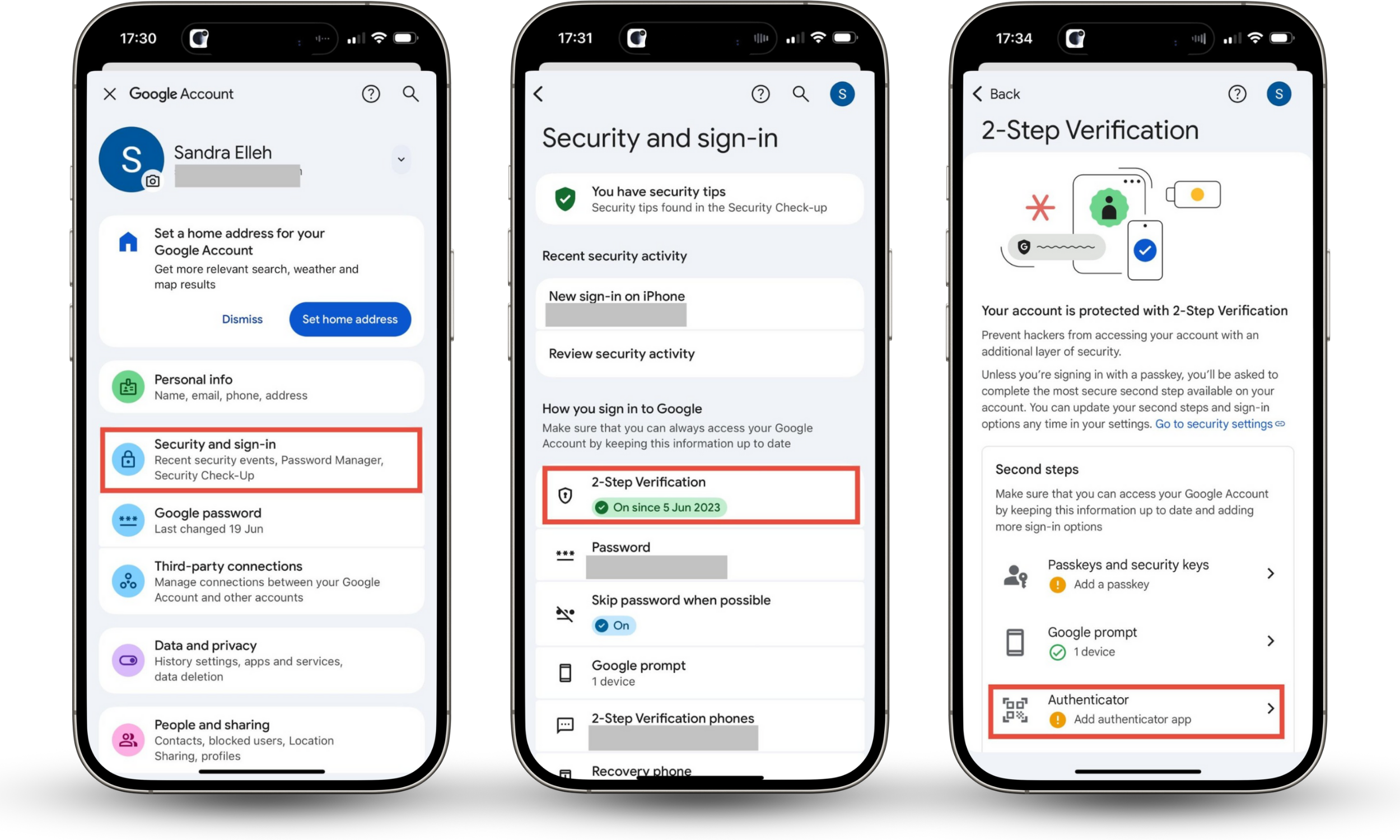
- Tap Manage your Google Account and select Security and sign-in from the list.
- Choose 2-Step Verification, then select Authenticator.
- Tap Set up authenticator, then scan the QR code.
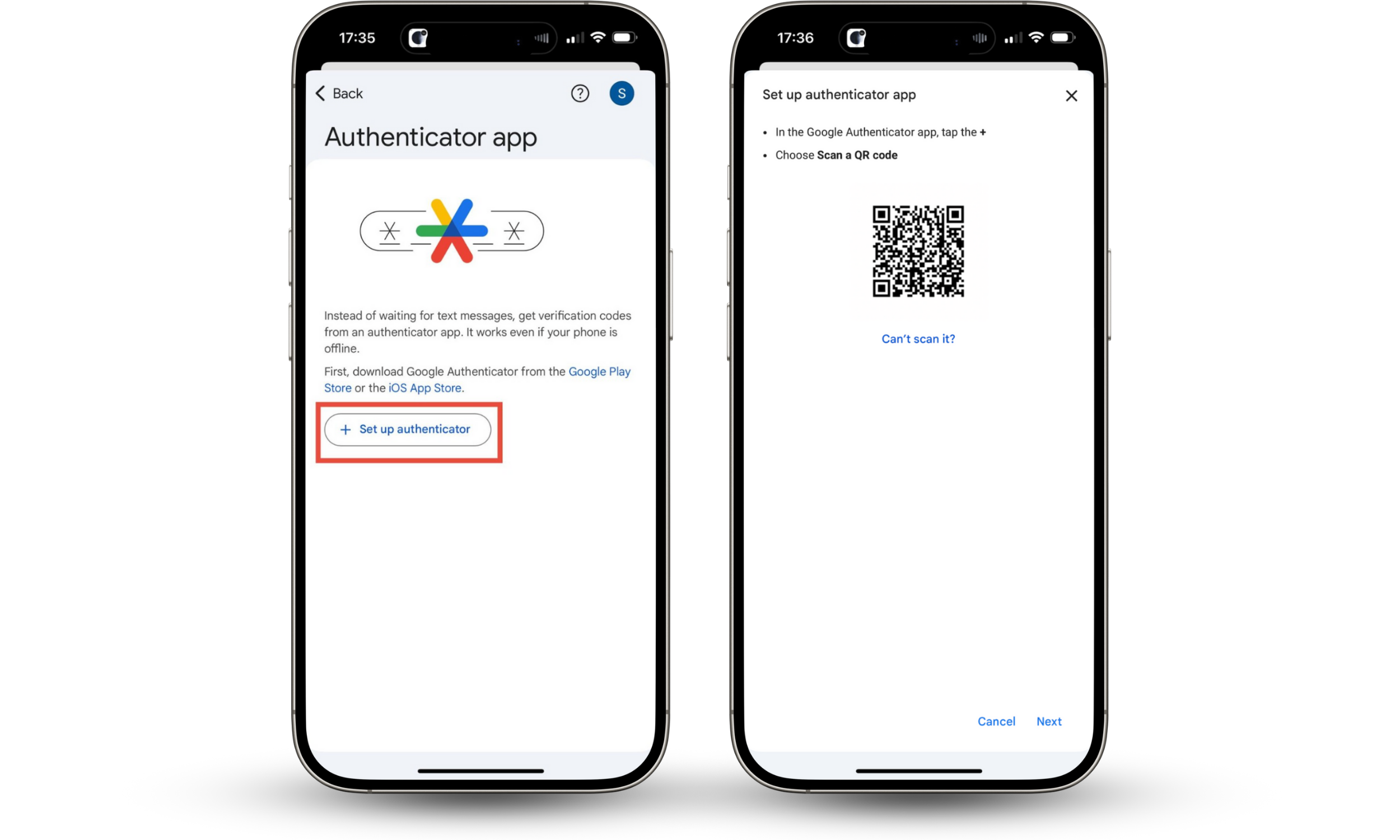
Once you've scanned the QR code using Google Authenticator, the app will generate a time-based one-time password. Enter it in your Google account.
4. Check for unfamiliar apps
Spyware is frequently disguised as a standard app, a calculator, a flashlight, or a parental control program.
Have a close look at every app on your phone:
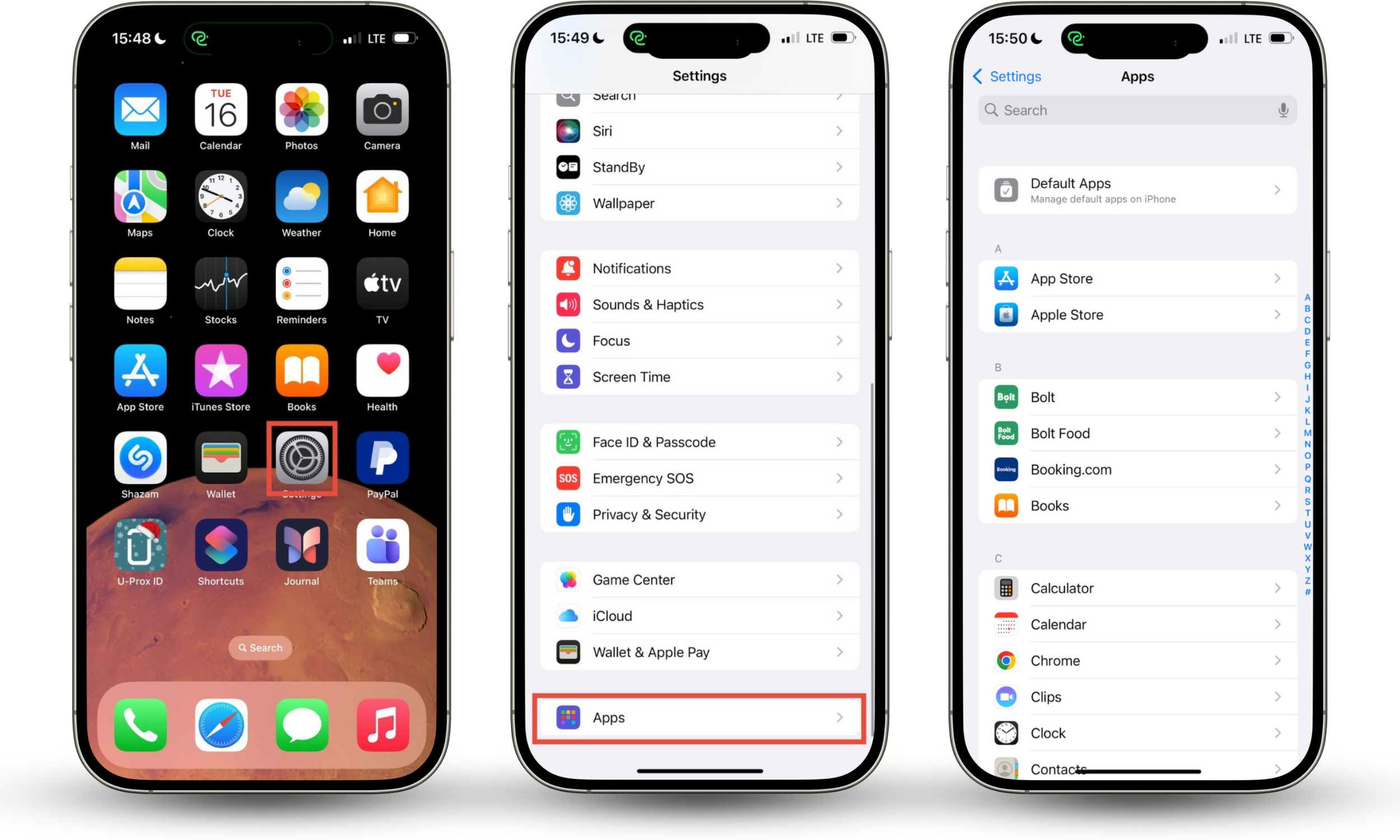
- Review your apps. On your iPhone, go to Settings > Apps and look for any apps you don't recall downloading.
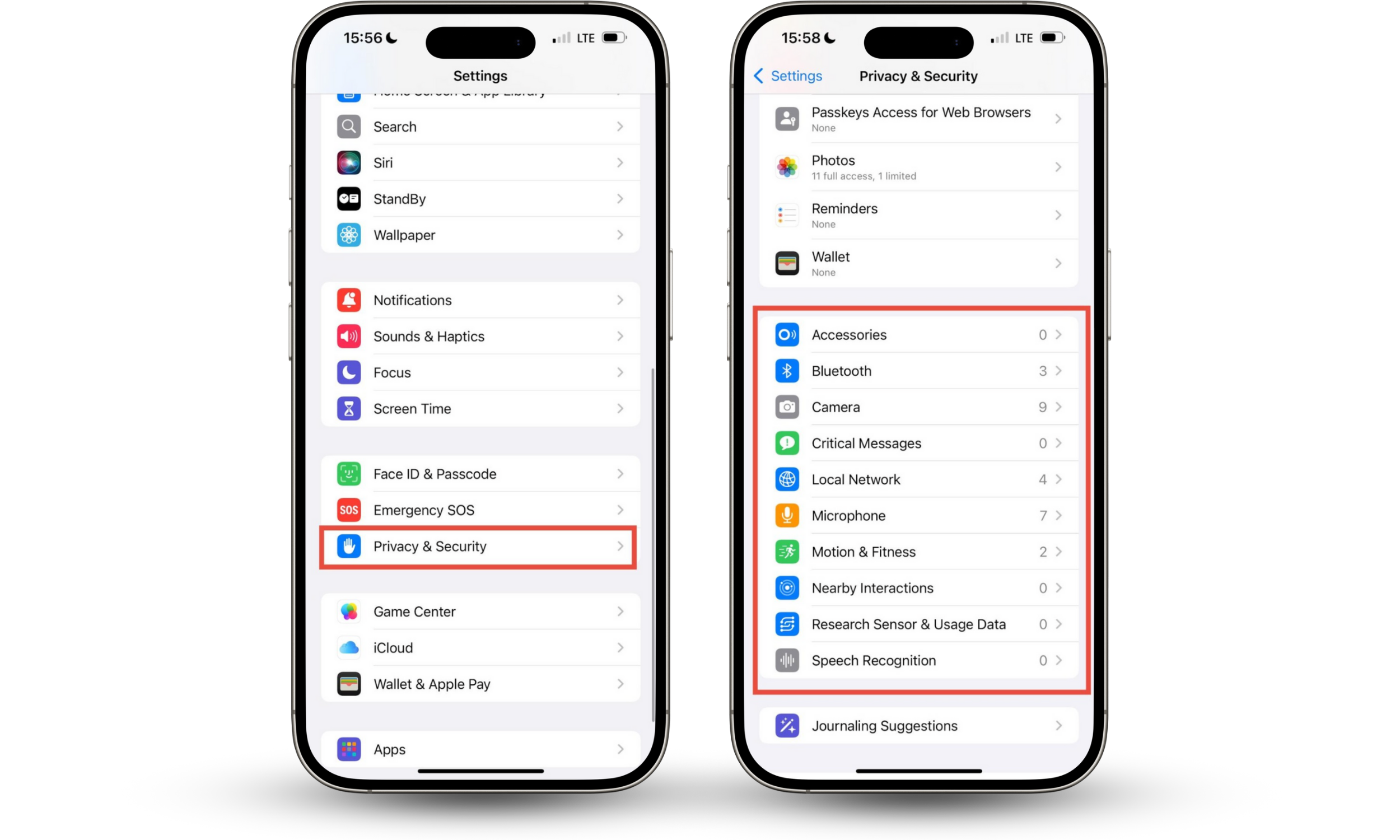
- Review permissions. Go to Settings > Privacy & Security to see which apps you've allowed to use your camera, microphone, location, and contacts. If a simple game app has the privilege to access your call logs, it's very suspicious.
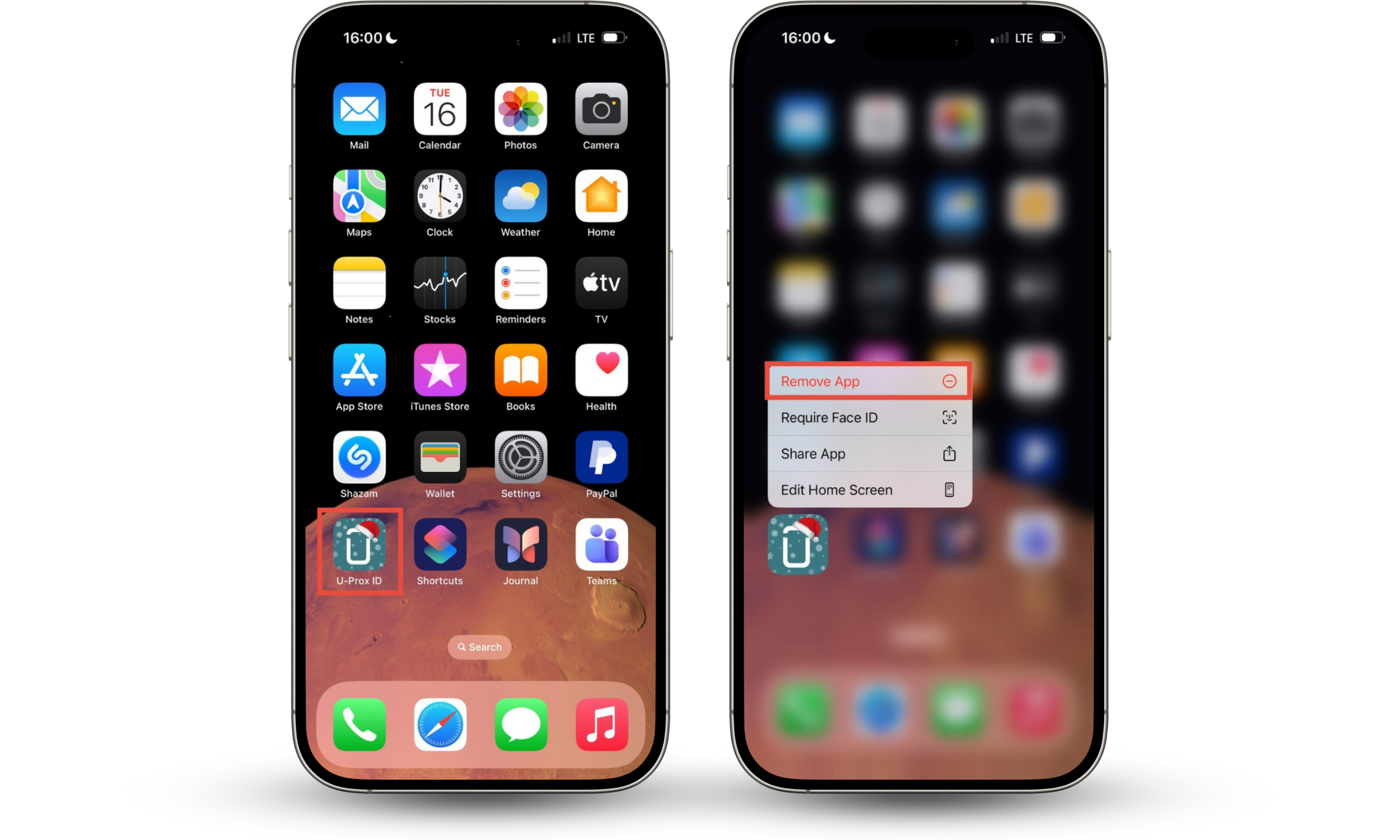
- Uninstall controversial apps. Delete any unfamiliar apps or those that appear to have excessive permissions. You can remove it from your Home Screen by tapping and holding the app icon and selecting Remove App from the menu.
5. Check IMEI and duplicate devices
Dial #06# to see your current IMEI number, which will appear on your screen. Cross-reference it with the IMEI in your phone's settings. On iPhone, go to Settings > General > About.
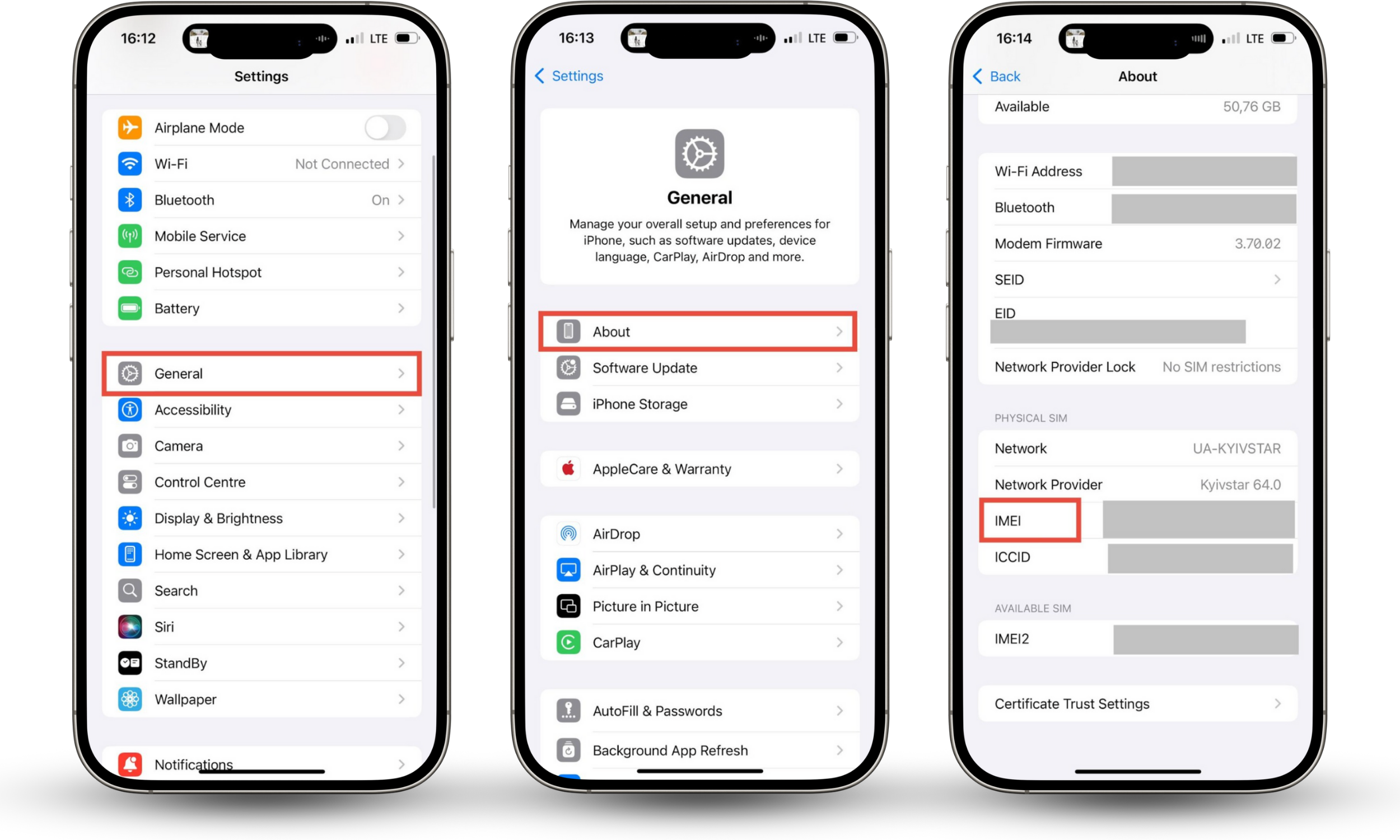
On Android, tap on Settings > About Phone. You can also find your IMEI on the original packaging of your mobile device.
To check for duplicate devices on iPhone, go to Settings > Apple ID. Check the list of devices and remove any that you don't recognize.
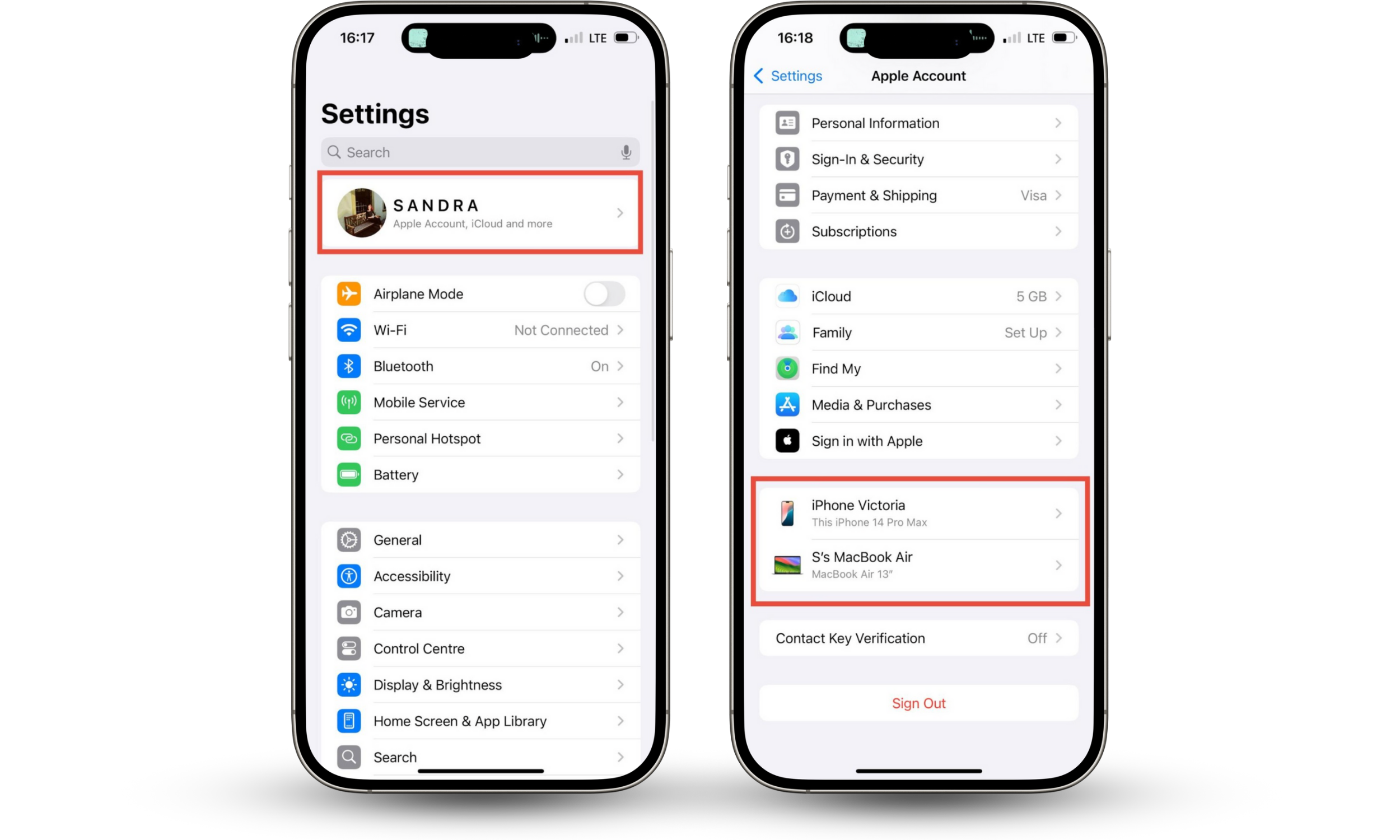
If you're using Android, go to the Google Account security page > Your devices > Manage all devices. Review the list of devices currently signed in. If you notice any unfamiliar devices, click Sign Out or Remove.
6. Perform factory reset
If none of the mentioned tips work, you can perform a factory reset. It is the best way to remove malicious software that your ex might have installed to clone your phone. On iPhone, go to Settings > General > Transfer or Reset iPhone, and choose Erase All Content and Settings.
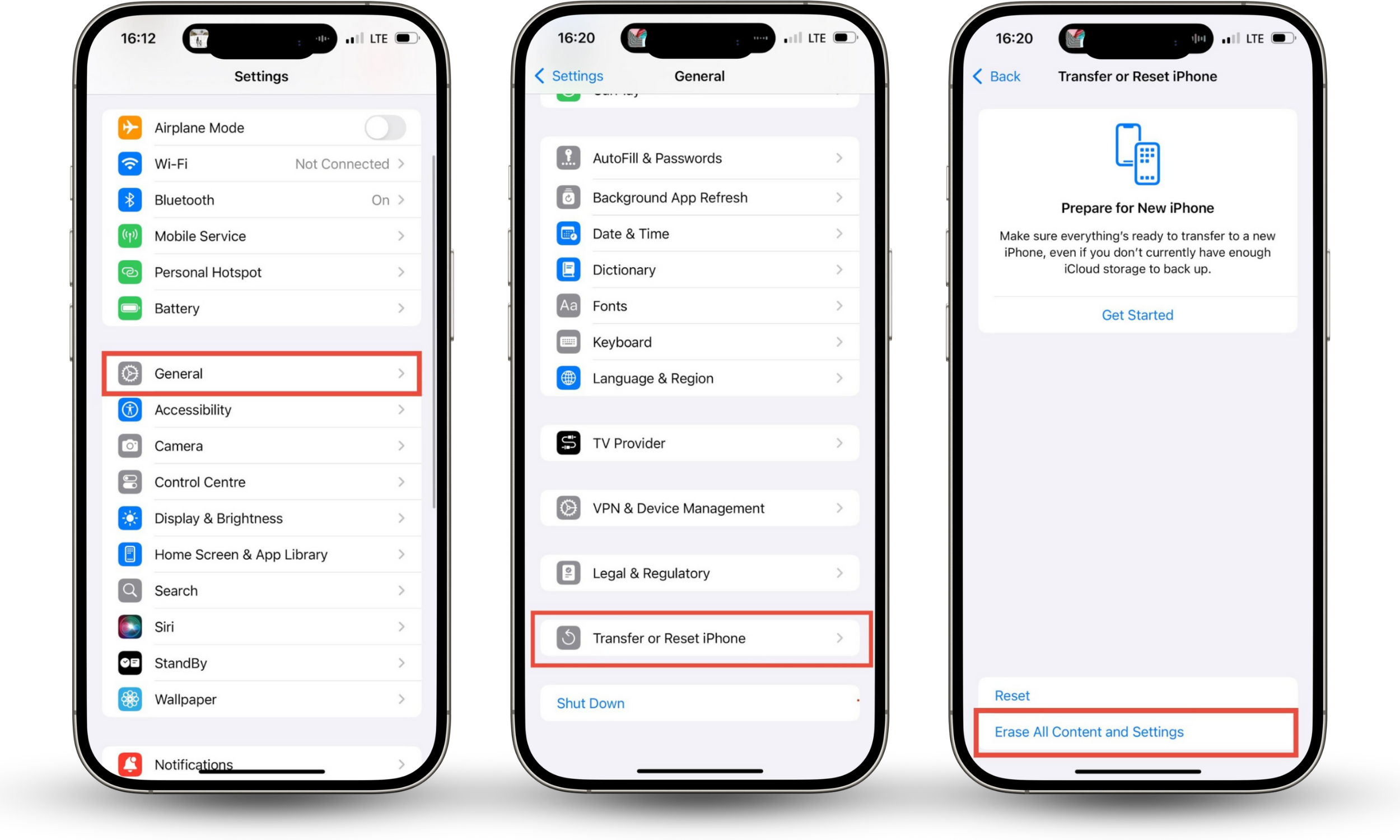
If you're an Android user, go to Settings app > System > Reset, and choose Factory data reset.
Pro tip
Make sure to back up your important data first: your photos, contacts, and other information you might need. However, you shouldn't back up apps because you may reinstall the spyware. When setting the phone up again, you should download your applications one by one from safe sources only (that is, Google Play and App Store).
7. Monitor financial and digital accounts
Review your bank account and credit card statements for any unauthorized charges. Ensure no unauthorized credit cards have been added to your Apple Pay or Google Pay accounts. If you notice anything suspicious, inform your bank so they can freeze your cards.
8. File police report
Cloning somebody's phone without their consent is considered illegal in most jurisdictions. If you have proof that your ex has cloned your phone, take the matter to the police. Present the gathered evidence, including records of strange calls, screenshots of unauthorised account activity, and your carrier records that indicate the breach. Your network provider can prove calls weren't made by you by examining location data, call patterns, and technical details.
9. Report identity theft
If your ex has used your cloned phone to steal your financial information or pretend to be you, you have been the victim of identity theft. You can report identity theft in the U.S. at IdentityTheft.gov. This site will walk you through creating a recovery plan for your identity. Contact Equifax, Experian, and TransUnion to report a possible security breach involving your financial data.
10. Document everything down in case of legal action
Before you wipe your phone or delete any messages, you need to keep the evidence of cloning. Here's what you need to do:
- Capture suspicious text chains, call logs, "read" receipts, and the list of your accounts for devices you don't recognize.
- Record the dates and times when odd things happen, such as service outages or when your battery suddenly dies.
- If you locate a physical tracking device or suspect that your hardware has been tampered with, give it to the police when you file a report.
Wondering how your ex knows your location?
They may track you via a cloned phone or a tracking device. Search your car, especially underneath it. If you locate any tracking hardware, give it to the police when you file a report.
11. Prioritize your safety if stalking or abuse is involved
Is your ex appearing in your favourite spots, next to your office or home? These are signs your ex is spying on you, and not just in a digital realm. Online stalking often escalates to physical stalking and abuse. If you are feeling unsafe, call the DV support and let them help you develop a safety plan. Connect with your friends and family for support.
Conclusion
Your ex may have cloned your phone if there are calls in your call log that you didn't make, "read" receipts on messages you haven't opened, or unauthorised transactions on your bank account. Wondering how to stop phone cloning asap? Call your carrier to block the SIM, change your passwords to prevent further breaches, and turn on two-factor authentication. Then, use Clario Anti Spy’s Hidden app scan to check whether any malicious apps have been installed on your phone without your knowledge, and to detect suspicious app permissions.
Seek help from law enforcement and support networks when you feel threatened. Stay safe!