Table of contents
- What are ring doorbells
- Ring doorbell privacy concerns
- 1. Hacker vulnerabilities
- 2. Third-party trackers
- 3. Data sharing
- 4. Employee misconduct
- Can ring doorbells be hacked
- How to protect your ring doorbell
- 1. Use strong password
- 3. Keep doorbell software up to date
- 4. Secure your network
- 5. Control device access
- 6. Don’t share login information
- 7. Avoid sharing videos on social media
- Conclusion
What are ring doorbells
Ring doorbells are smart video devices that connect to your home's Wi-Fi and let you keep an eye on your front door from anywhere. They come with built-in cameras, microphones, and motion sensors, all of which you control through a mobile app. This setup allows you to see, hear, and speak to visitors in real time. If you have a Ring subscription, your video feed will also save to the cloud for you to review later.
Ring doorbell privacy concerns
Ring doorbells raise several privacy concerns you should be mindful of. For instance, if someone manages to get into your Ring account (usually because of leaked or reused passwords), they could see your live or saved videos. The Ring app also uses third-party trackers, which raises questions about how user data is handled. And in the past, there have also been issues around employee access to videos and cooperation with law enforcement.
1. Hacker vulnerabilities
Most Ring doorbell security breaches happen because of weak or reused passwords. Bad actors use a tactic called credential stuffing, in which passwords leaked from other services are tested against Ring accounts. When this works, they may gain access to live video feed or previously recorded footage.
Ring has also had serious security vulnerabilities in the past that went beyond credential stuffing. For example, a loophole during the setup process once allowed Wi-Fi passwords to be exposed, and older versions of the Ring app made it possible for data to be intercepted on the same Wi-Fi network. These issues have since been fixed.
There are also other smart devices in your home that could be hacked into. Check our "What devices in the house that listen can be hacked into?" guide for a complete list.
2. Third-party trackers
Back in early 2020, the Electronic Frontier Foundation (EFF) reported that the Ring app was sending various types of user data to companies like Facebook, MixPanel, and AppsFlyer. This data included names and email addresses, device identifiers, and sensor information.
Once data is shared with external parties, there's no absolute guarantee of how it's handled beyond that point. Ring has updated its privacy policy since then and said the data was only being used to track app performance and understand how features are used. It also added more privacy controls for users to opt out of tracking.
3. Data sharing
A few years ago, law enforcement could ask Ring users for footage directly from users through the Neighbors app, often without a warrant. It made investigations easier, but it also triggered backlash over privacy. Ring removed this feature in early 2024, but law enforcement can still reach users through third-party platforms, and Ring can still share footage in emergency situations.
4. Employee misconduct
Between 2017 and 2019, some Ring employees and contractors had broad access to customer videos. During this time, there were confirmed cases of severe privacy violations, including an incident where a former employee spied on female customers for months.
Ring responded by locking things down—e.g., cutting access, tightening internal controls, and adding more oversight. Employees can now only view recordings in very limited cases, usually when a customer explicitly gives consent during a support request.
Can ring doorbells be hacked
Yes, Ring doorbells can be hacked. Hackers don't break into the device itself. Instead, they get access to the user's Ring account. This usually happens when someone uses weak or reused passwords that's already been exposed in a data breach somewhere else. Turning on two-factor authentication and using a strong, unique password goes a long way toward protecting your Ring doorbell and keeping your video footage private.
Your phone often acts as the control center for smart devices. If hacking attempts and unauthorized data access make you uneasy, or if you believe someone is spying on you in your home, you must make sure the privacy and security of your iPhone or Android is airtight. That's where Clario Anti Spy can help.
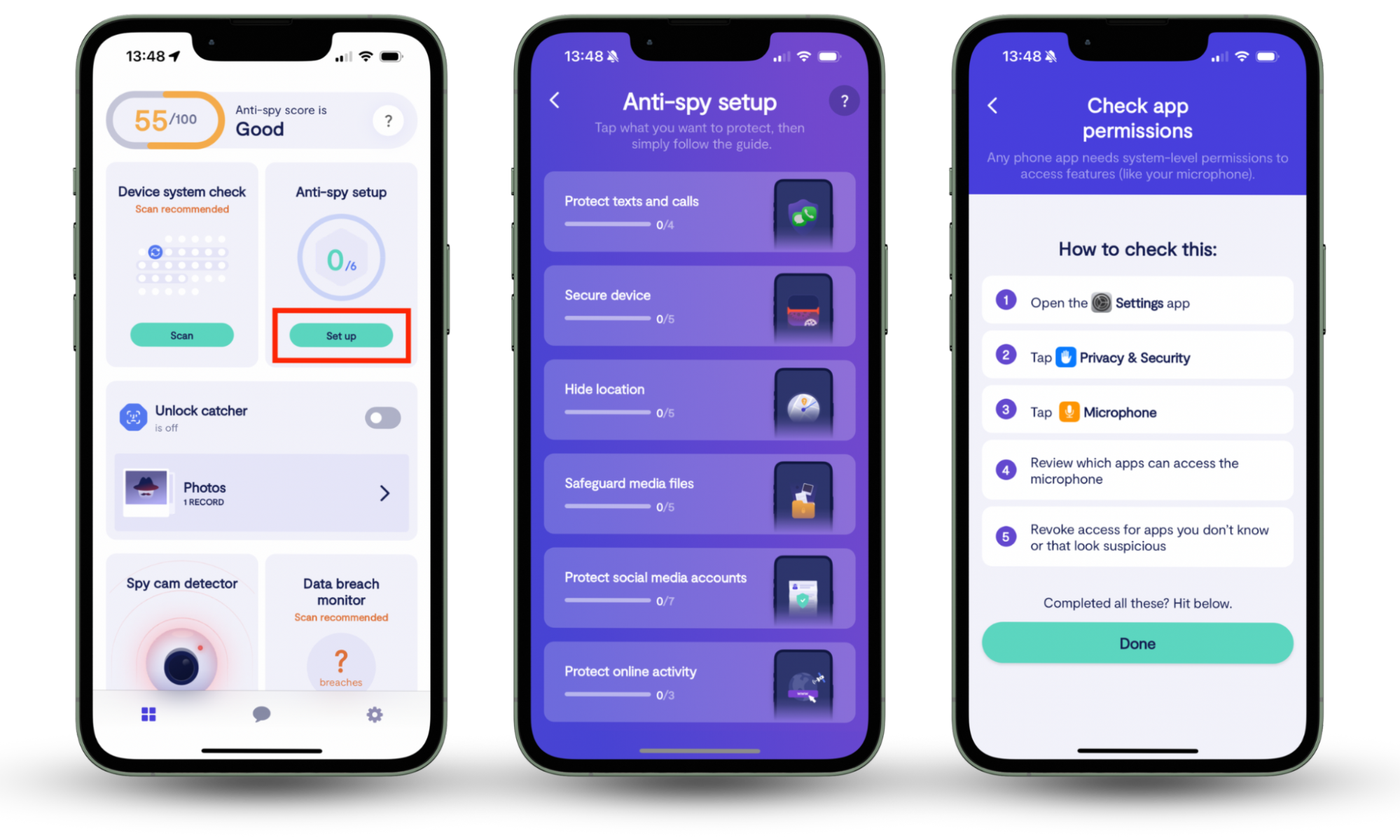
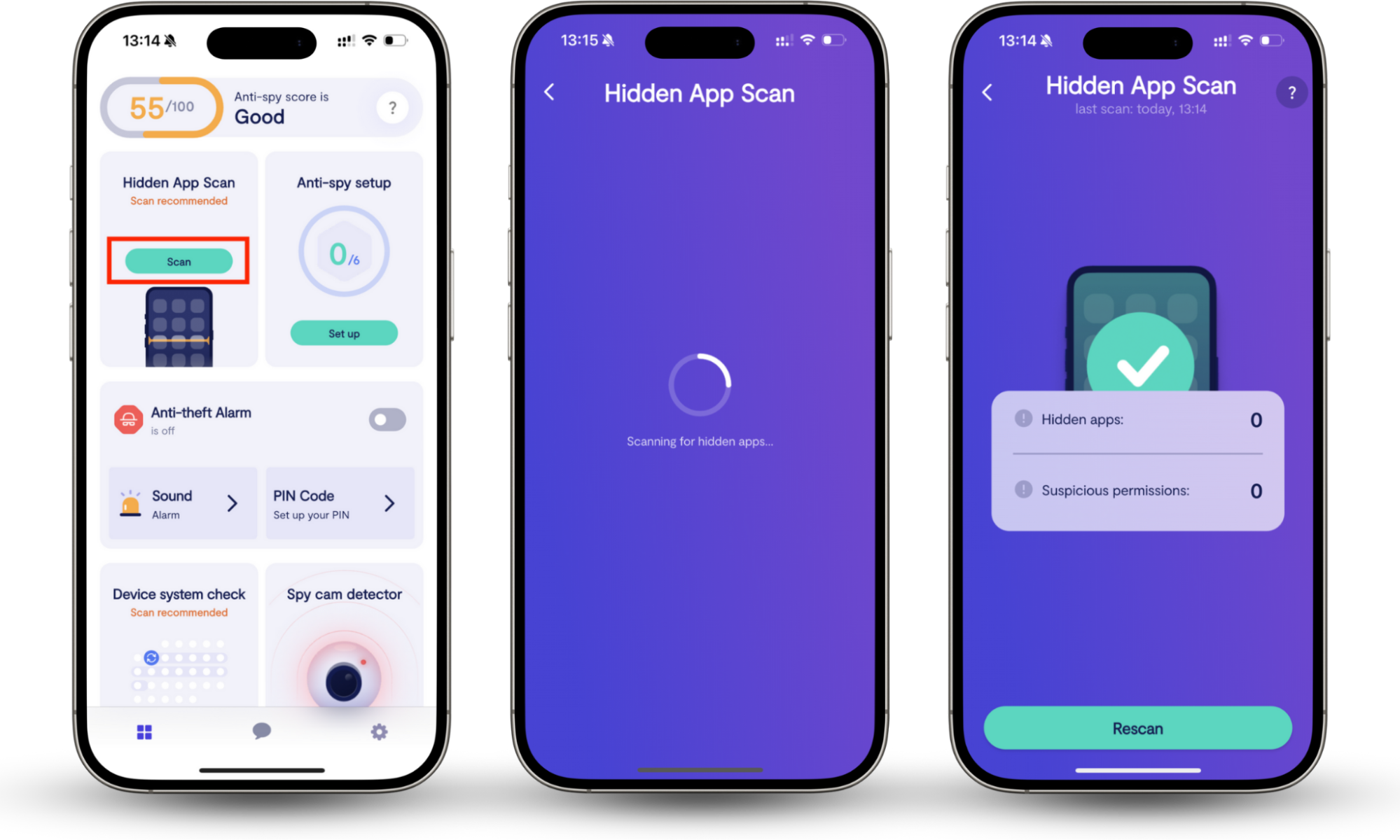
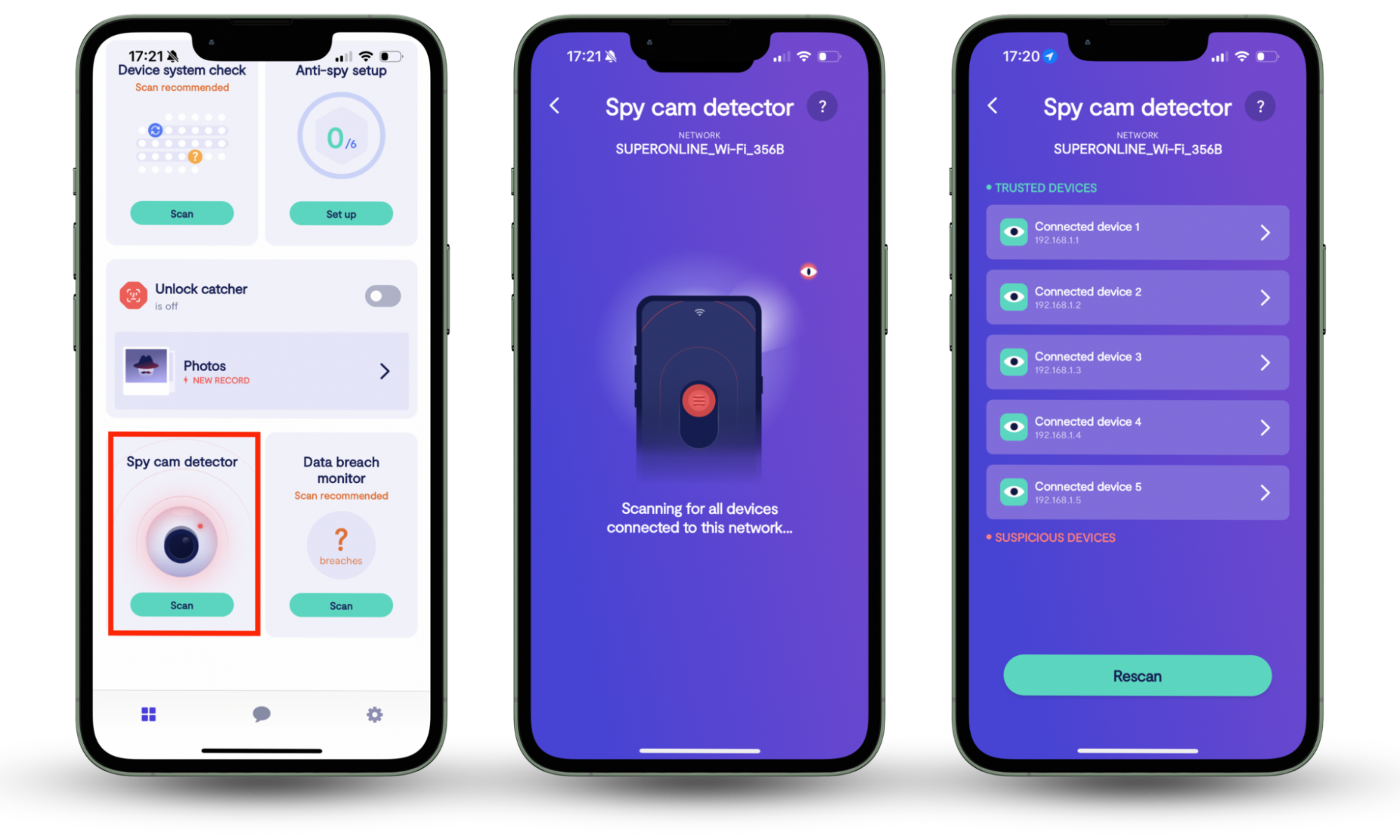
It's an anti-spyware solution that comes with tools like the Anti-spy setup and Hidden app scan to help tighten your phone's privacy. You also get a Spy cam detector and an Anti-theft alarm so you can protect yourself against spying and device theft.
Here's how to enhance your privacy with Clario Anti Spy:
- Download Clario Anti Spy and subscribe to create an account.
- Tap Set up under Anti-spy setup and work through each category—e.g., Protect online activity, Protect texts and calls, Secure device, etc.—to enhance the privacy of your phone and online accounts.
- Next, tap Scan under Hidden app scan to check for and remove privacy-invasive apps.
- Tap Scan under Spy cam detector to check for suspicious devices in your surroundings.
- Turn on the switch next to the Anti-theft alarm to protect your phone if it's moved or stolen.
Clario Anti Spy also offers 24/7 live support for all sorts of privacy and security concerns—just tap the Messages icon in the app to connect directly with a Clario expert. Here's what one expert shared about a customer who believed they might be under surveillance:
"A client contacted us feeling uneasy because he suspected that something in his garage might be watching him, but didn’t know how to check for spying devices or secure his Wi-Fi network. We introduced him to the Spy Cam Detector feature, explaining how it works to scan for any devices connected to his Wi-Fi hotspot that could be secretly recording or transmitting data.
We took time to walk him through the scan results, helping him understand the difference between Trusted and Suspicious devices so he could easily identify potential threats. We also emphasized the importance of securing his Wi-Fi network to prevent unauthorized access and keep his data safe.
After using the feature, the client found a suspicious device connected to his network. Thanks to the guidance, he was able to remove the threat and felt much more confident about safeguarding his privacy and security going forward."
How to protect your ring doorbell
There are several ways to secure Ring doorbells from hackers. Using a strong, unique password and enabling two-factor authentication alone can drastically reduce the risk of someone hacking into the device. Keeping your device software up to date, securing your Wi-Fi network, and regularly reviewing who has access to your Ring account also helps cut down your exposure to security issues.
1. Use strong password
One of the easiest ways to prevent a Ring doorbell hack is by using a strong, unique password. It should be at least 12 characters long, hard to guess, and not used by any other website or app.
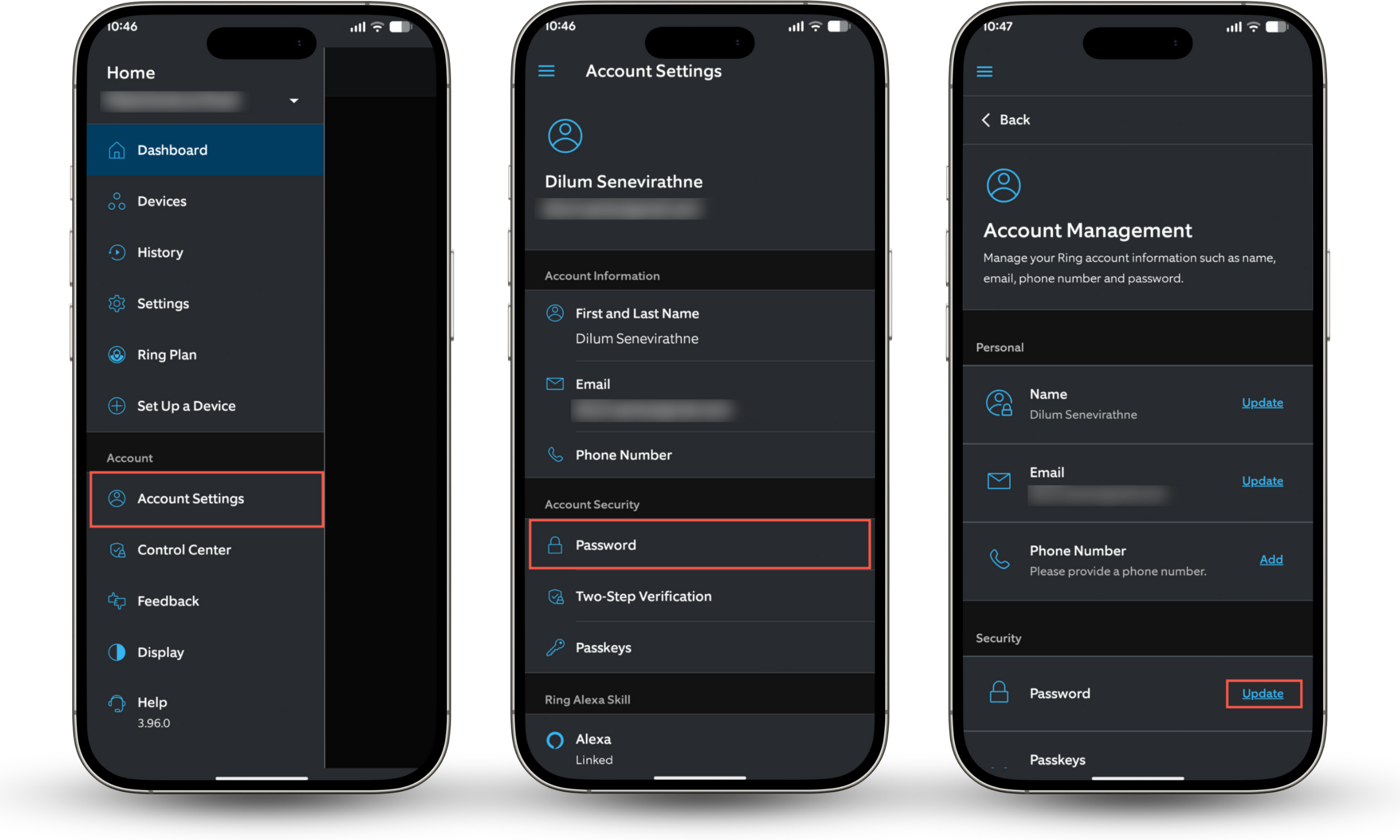
Here's how to change your password in the Ring app:
- Open the Ring app on your phone.
- Tap the icon with three stacked lines on the top left and select Account Settings.
- Tap the option labeled Password.
- Tap Update next to Password.
- Create a new, strong password and save your changes.
2. Set up two-factor authorization
Two factor authentication adds an extra layer of security to your Ring account by requiring a verification code in addition to your password. Even if someone gets hold of your login details, they won't be able to sign in without passing this authentication step.
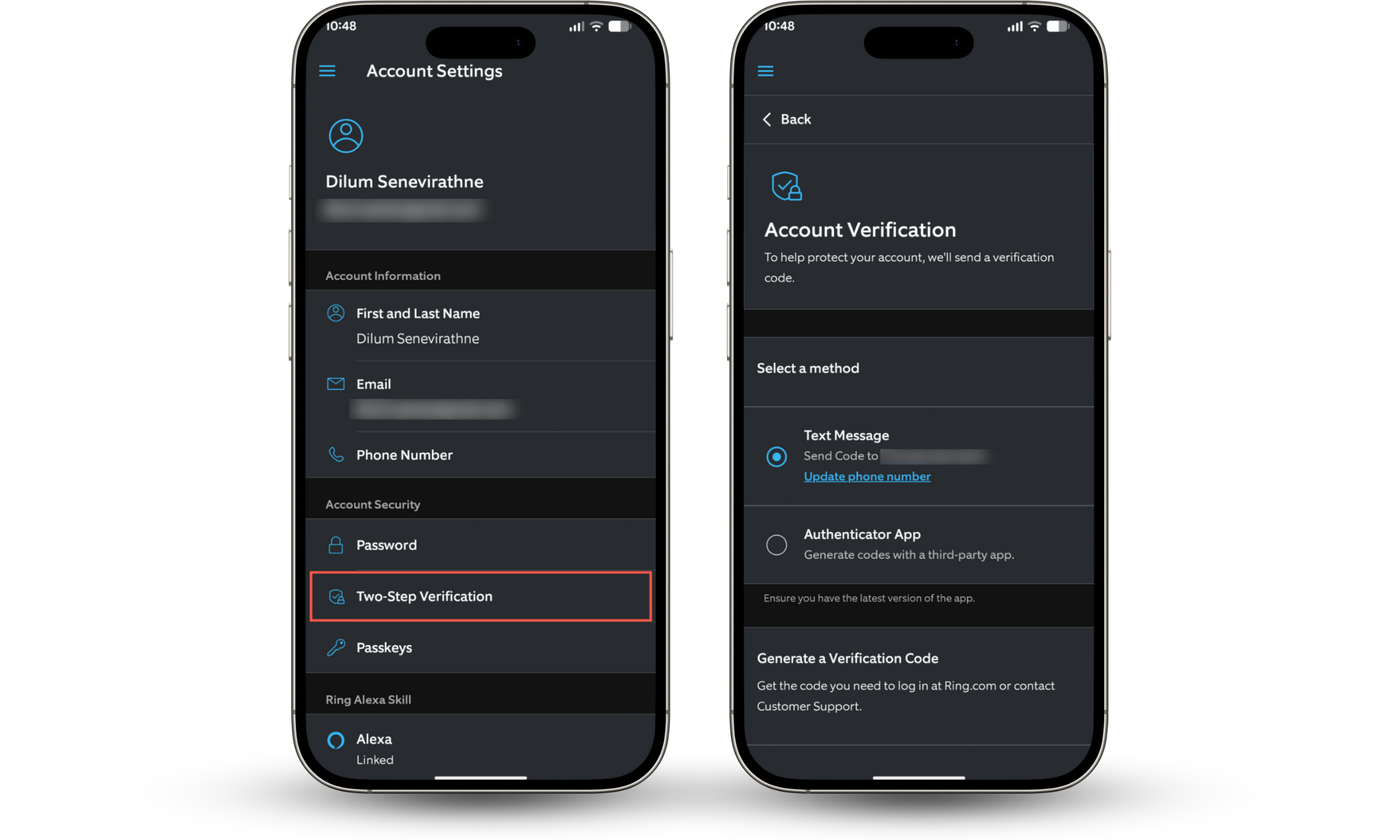
Here's how to enable two-factor authentication in the Ring app:
- Go to Account Settings and tap Two-Step Verification.
- Choose how you want to receive verification codes (SMS or authenticator app).
- Follow the on-screen instructions to finish setup.
3. Keep doorbell software up to date
Ring releases regular updates to fix bugs and security vulnerabilities for its app on iPhone and Android. That's why its important to keep the Ring mobile app up to date. To do that, open the App Store (iPhone) or Google Play Store (Android), search for Ring, and tap Update if an update is available.
Your Ring doorbell's firmware (the programming that makes the device work) updates automatically, but you can always double-check by selecting your Ring doorbell in the Ring app's Dashboard and tapping Device Health.
4. Secure your network
Your Ring doorbell relies on your home Wi-Fi, so securing your wireless network is just as important as securing your account. Using modern encryption protocols like WPA2 or WPA3 and a strong router password helps keep unwanted users out.
Here's how to secure your Wi-Fi network:
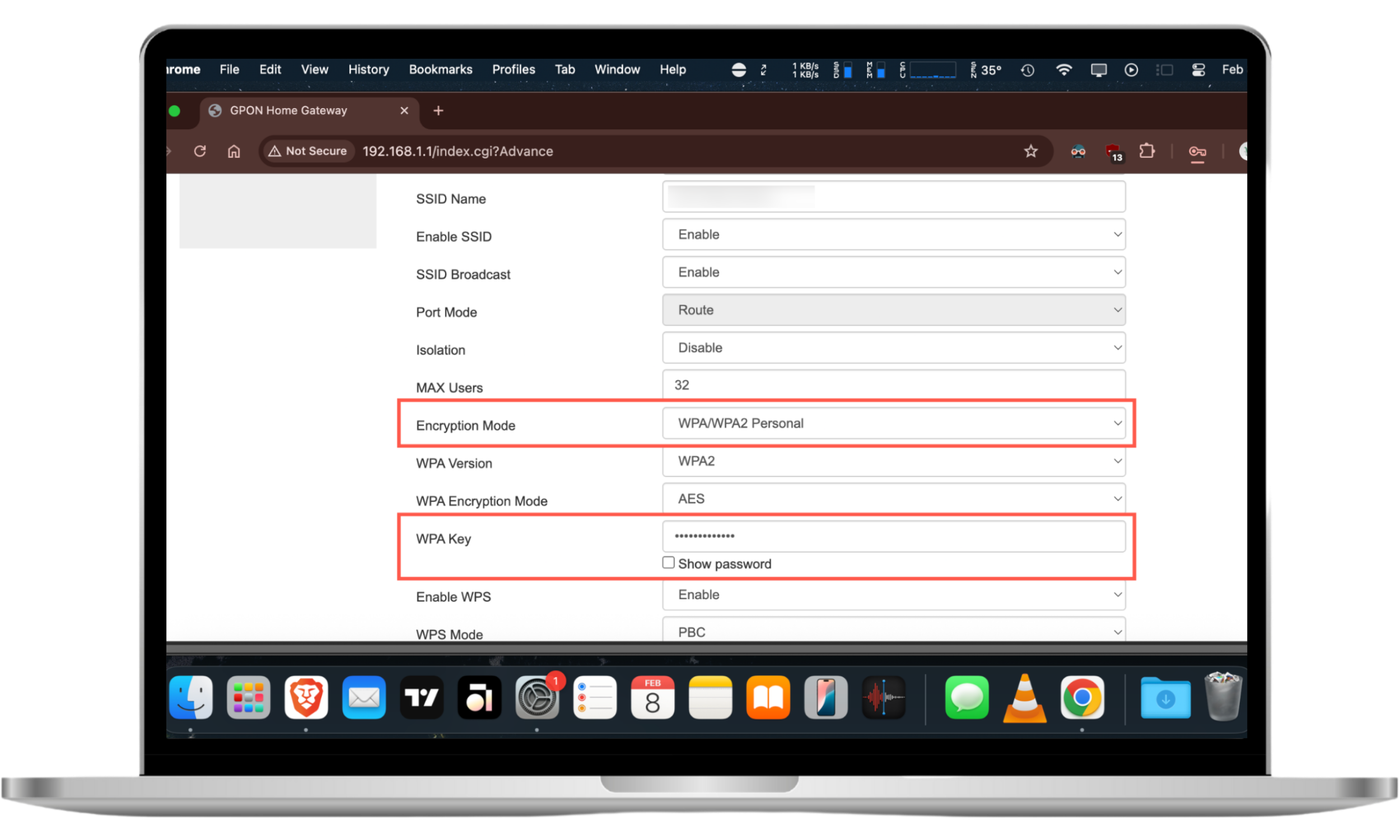
- Open a web browser, type your router's private IP (usually 192.168.1.1), and log into your router's admin panel. You can find the exact IP address and login details printed on the router itself.
- Go to the section that allows you to modify the router security—e.g., Network Security.
- Set Encryption Mode to WPA2 or WPA3.
- Add a strong password into the Password field and save your changes.
For more tips and methods to enhance the security of your Wi-Fi, check our guide on how to secure your Wi-Fi at home.
5. Control device access
It's a good idea to regularly review what devices have access to your Ring account. Old or unused devices can become a security risk, especially if those devices are running outdated versions of the Ring app, have their own vulnerabilities (learn about Lenovo security concerns), or are used by other people.
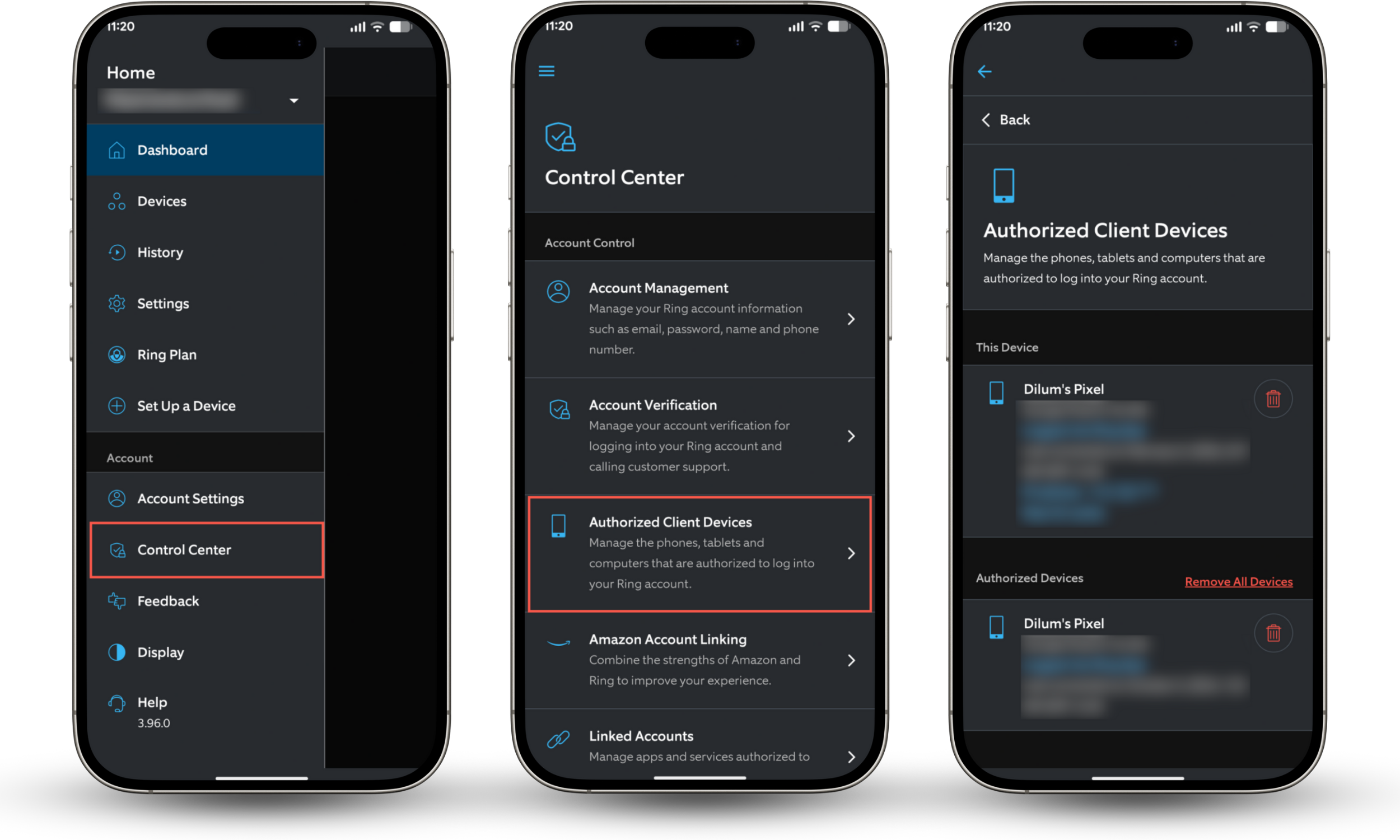
Here's how to manage device access in the Ring app:
- Open the Ring app and tap the icon with three-stacked lines on the top left .
- Go to Control Center > Authorized Client Devices.
- Under Authorized Devices, tap the Trash icon next to unwanted devices.
6. Don’t share login information
Never share your Ring login with friends, family, or installers. Shared logins increase the risk of compromising your account, especially if someone logs in on an unsecured device, saves your password, or reuses it elsewhere.
If you do need to provide access, there's a feature called Shared Users where you control what they can do and remove access anytime without changing your password. Go to Settings > User Permissions > Invite Users to invite people with limited permissions.
7. Avoid sharing videos on social media
Sharing Ring videos on social media might feel harmless. However, it can easily give away your location, daily routines, or details about your home's layout and security. Once a clip is public, you lose control over it. Others can download or repost it long after you delete the original, so it's best to keep recordings private or share them only with people you trust.
Conclusion
Ring doorbells are incredibly useful devices, but they're not risk-free. Hacking incidents linked to weak account security and the company's data-sharing practices with third-parties and law enforcement can create real privacy concerns. That's why it's important to secure your account and tighten your privacy settings to reduce these risks.
If you're also worried about your phone's security, Clario Anti Spy features like the Anti-spy setup, Hidden app scan, Spy cam detector, and Anti-theft alarm can add another layer of protection.