Table of contents
- What is Spynger
- How does Spynger work
- Is Spynger legit
- Spynger review: features, pros, and cons
- 1. Key features and functionality
- 2. Advertised pros vs reported cons
- 3. Settings and usability
- 4. Spynger compatibility with devices
- 5. Spynger pricing
- User reviews and complaints about Spynger
- 1. App performance failures
- 2. Unauthorized charges and refund issues
- 3. Misleading marketing and fake promises
- 4. Unresponsive and ineffective support team
- 5. Suspicious or fabricated positive reviews
- Is Spynger safe
- Conclusion
What is Spynger
Spynger is mobile surveillance software that allows users to covertly monitor and record activities on a targeted phone. It is marketed for parental guidance, employee supervision, and spying on a partner. Spynger is tricky because it runs in stealth mode. It runs in the background of the target device, remaining invisible to the victim. If you're curious about similar tools, check the list of apps that spy on you to understand how these apps typically operate and how to spot them.
Here's what Spynger can monitor:
- calls and text messages
- location
- social media chats
- media files
- keystrokes
- browser history
This data is compressed and encrypted, then sent to a secure web server where the user can retrieve it. The platform offers various installation methods, depending on the device, and is compatible with both Android and iOS.
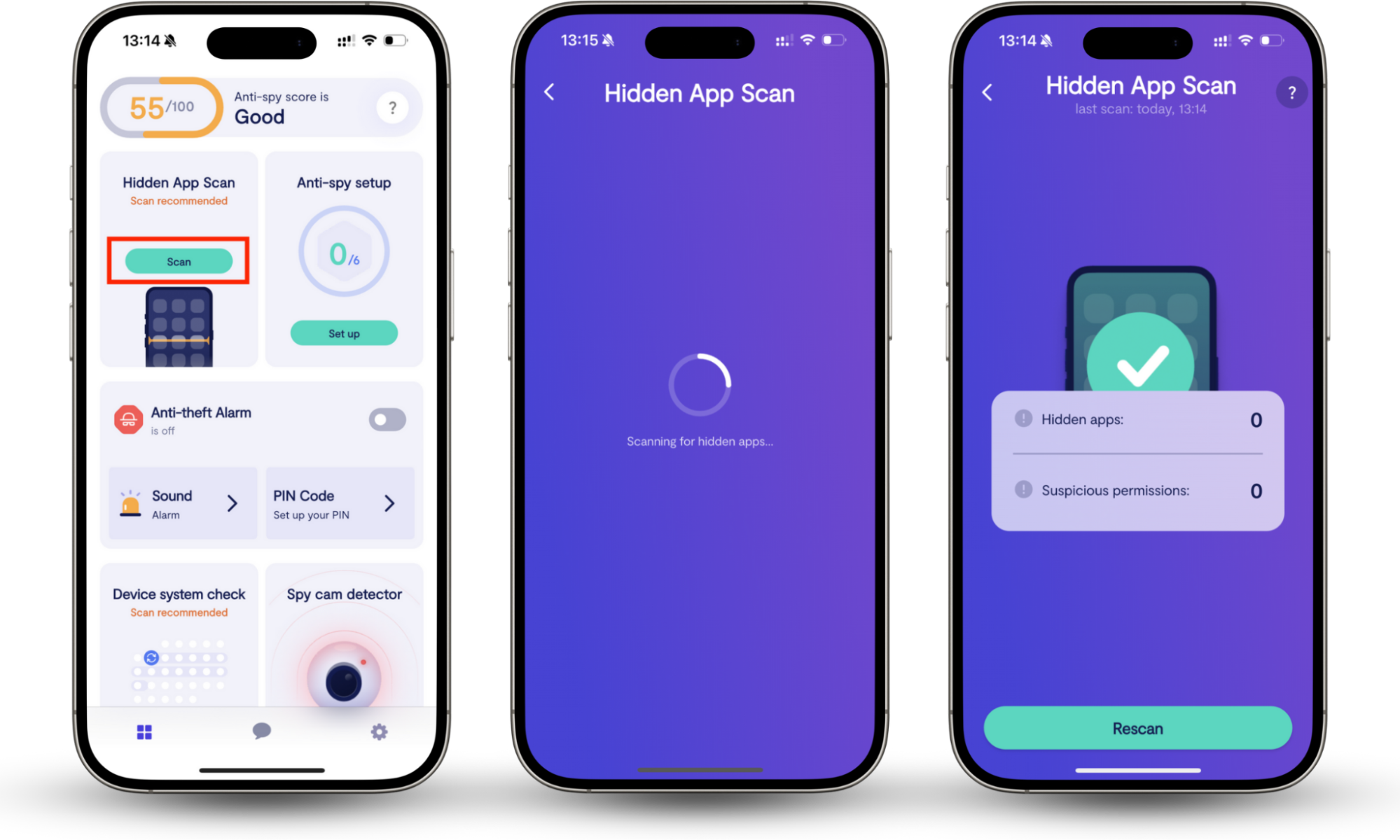
Spynger is mostly promoted as a monitoring app for those concerned about their loved one's behavior. However, at Clario Tech, we believe that your privacy is paramount. To protect users' communications and online accounts, we created Clario Anti Spy, an app designed to detect and eliminate spying software on your phone. Our Hidden app scan feature scans your device and alerts you to suspicious apps and invasive permissions that compromise your privacy. Hidden app scan works on both iOS and Android.
Here’s how to use Clario Anti Spy’s Hidden app scan:
- Download Clario Anti Spy on your mobile device.
- Create an account.
- Locate the Hidden app scan feature and tap Scan.
- Wait for the scan results.
How does Spynger work
When someone wants to spy on you using Spynger, they will have to visit the Spynger website and create an account. To set it up on an Android phone, they will have to disable Google Play Protect—a red flag commonly associated with covert tools that often appear on the stalkerware apps list. Once the person who decided to monitor you has the Spynger on your phone, they can view the harvested data from anywhere.
With an iPhone, the process changes. To spy on you, the intruders don't need to jailbreak your phone, but they do need your Apple ID and password. They can then link the Apple account to Spynger so it can read fresh iCloud backups.
Once Spynger is set up, it starts to extract data from your device, working in the background. The application transfers all collected data through secure channels to the Spynger dashboard, where the intruder can access and study the information.
Is Spynger legit
Whether Spynger is legit is really up in the air. So far, the platform reviews show little proof that it actually delivers on its promises. Users complain that Spynger has poor quality customer service, charges additional fees once users subscribe, and doesn’t work as advertised. A user in a Reddit thread also states that Spynger support convinced him to upgrade his subscription plan and stopped responding once the payment proceeded.
The law and ethics matter, too. Parents may legally watch their minor's phone, and firms may track a device they own (with the employee's consent). However, tracking an adult's phone without their permission is a serious intrusion that breaks privacy laws in most countries. So, the software operates in a grey area where its legitimacy depends on the purpose of its use.
Spynger review: features, pros, and cons
The Spynger monitoring system provides users with surveillance capabilities through its intuitive interface and discreet operation, enabling the tracking of phone calls, messages, and GPS locations. The system faces three major limitations: it does not offer free trials, users need direct access to devices, experience delays in data synchronization, and experience significant battery consumption
1. Key features and functionality
Spynger is known for being intuitive, responsive, and well-structured, making it very easy to use. Here are the main Spynger's features:
- Calls and SMS monitoring: The application tracks all SMS and phone calls made to and from the device by recording contact information, phone numbers, and call duration and timestamp data.
- GPS location tracking: The application displays real-time GPS positions on its dashboard map. Spynger’s Link Location Tracker function enables location tracking via a generated link that users send to the target device.
- Social media monitoring: The application retrieves all messages and shared content across major social platforms.
- Browser history tracking: The application tracks all website visits made by the target device, recording URL data, visit statistics, and timestamps.
- Keylogger: The keylogger function tracks all device input from users, including their messages, search queries, and their entered passwords.
- Multimedia files: The application provides access to all photos, videos, and screenshots stored on the target device via its online dashboard.
- Remote control: Some versions of the application include remote-control features that allow users to lock devices and delete their data.
2. Advertised pros vs reported cons
The advertised value of Spynger differs substantially from the actual user experience.
Here are some Spynger pros:
- A full suite of monitoring capabilities, which includes call and text tracking, social media, and GPS monitoring.
- The platform operates stealthily in the background without triggering any detection mechanisms.
- The dashboard interface offers users an intuitive and user-friendly experience, well-suited for those with limited technical expertise.
- The service delivers instant data synchronization to the dashboard interface.
- The service supports monitoring operations on both Android and iOS operating systems.
Reported Spynger cons include:
- The service lacks a free trial option, so users must purchase a subscription before even trying out the app.
- Users need to access the device physically to start Android installation.
- Users experience delayed real-time data updates, which impact location tracking, chat monitoring, and access to multimedia files.
- The application causes substantial performance degradation on target devices, resulting in battery drain that users being spied on can detect.
- The monitoring features operate with restricted capabilities on iPhone devices because Apple implements security protocols that limit Sprynger's functionality.
- The application lacks clear guidelines about its legal and ethical practices, making it difficult for users to locate trustworthy reviews from other customers.
- Users experience difficulty contacting customer support and canceling their subscriptions.
3. Settings and usability
The user interface of Spynger stands out as one of its most attractive features. Its dashboard presents an organized structure that lets users access different monitored data sections through a simple interface.
The installation process for Spynger, though, creates difficulties for users. Note that users must provide targeted iCloud credentials or Wi-Fi network information to install the app on iOS devices without jailbreaking. Users also need to disable Google Play Protect on targeted Android devices, so they need to physically access the device.
Note
When you have the Google Play Protect feature on, you don't have to wonder what spyware apps look like on Android, how to find them, or how to delete them. Google Play Protect does that for you. It's a default security feature that scans for spying apps and other malware, so it's best to keep it on.
4. Spynger compatibility with devices
The developers of Spynger created their application to work with the most popular modern smartphones. The complete set of features, including call recording and social media tracking functions, normally works on Android devices. The application also supports iOS devices through its no-jailbreak installation process.
5. Spynger pricing
Spynger offers multiple plans, typically priced between $39 and $ 69/month. The app doesn't offer a free trial period, but it provides a good alternative. Its short-term subscription offer is a monthly plan available for $1.59/day, giving you full access to all monitoring features.
Note
Many users have reported some additional charges after checkout and recurring charges even after account cancellation. So it is best to double-check the billing terms and conditions before subscribing.
6. Privacy and legal considerations
The legal status of Spynger usage depends heavily on user consent and their location. Most countries prohibit users from installing monitoring software on adult-owned phones without the phone owner's explicit permission. Users who want to use Sprynger but wonder if spyware is illegal should study the laws of their state before downloading the app. Otherwise, they may face legal consequences for unauthorized surveillance, which could result in financial penalties and even imprisonment.
User reviews and complaints about Spynger
Users have filed numerous complaints about Spynger, including issues with application performance, billing problems, feature discrepancies, support concerns, and fake positive reviews. Many users have reported that the app stops working or fails to provide the necessary information after the setup process is complete. This is fatal because the entire value of the software hinges on its ability to retrieve information from the victim's device and send it to the user's dashboard.
1. App performance failures
The core marketed functionality of Spynger is monitoring devices in stealth mode. However, users report that it does not work as described or stops working altogether. According to feedback, after the setup process, the app fails to retrieve and show data from monitored devices to the user dashboards. Instead, it showed year-old data. Basically, the software fails in its core purpose.
Users have reported other performance problems with the application:
- Data syncing delays: Users experience extended delays when Spynger attempts to update location data, chat messages, and multimedia content. The application's delayed data updates make it ineffective for users who need immediate monitoring capabilities.
- Inaccurate location tracking: Users experience significant location errors when tracking devices, as the system shows incorrect locations that randomly jump between points rather than a continuous path.
- Heavy device impact: The most common problem users face with Spynger is that it causes their target devices to consume excessive battery power. This, by the way, can reveal the presence of monitoring software to targeted users.
2. Unauthorized charges and refund issues
Multiple users have experienced problems with the Spynger billing system, as the company charged them without authorization, made it difficult to cancel subscriptions, and refused to provide refunds even when the service was not working. Some users have been charged more than the subscription package costs. They discover these billing errors after their payments have been processed, which triggers disputes with the company.
Also, users describe the subscription cancellation process as being deliberately complicated to follow. Those who tried to cancel their subscription and request a refund were either ignored by Spynger’s support or received only a partial refund. Some claim they canceled their subscriptions, but continue to receive charges.
3. Misleading marketing and fake promises
A wide gap exists between the features marketed on Spynger's website and what the product delivers. The marketing materials present the product as an all-encompassing monitoring solution, but users experience a different reality where essential features do not work properly. Users frequently end up disappointed because the software fails to deliver its advertised ability to monitor an account remotely.
The absence of a free trial became a major drawback as users can’t check the app functionality before purchase. The sales process leads users to payment pages without showing any proof that the advertised features actually work. Once a user pays for a subscription and finds that the app malfunctions, it is almost impossible to receive a refund.
4. Unresponsive and ineffective support team
The support team at Spynger faces constant scrutiny because it either fails to respond to customer inquiries or provides unhelpful assistance. There is even one comment left by a Sprynger user on Truspilot that claims the support demanded $19.99 for "technical assistance."
Users who try to reach support through email claim to receive no response from the company. The support team responds to customer inquiries through automated chatbots, which generate unhelpful and repetitive responses. Users are also frustrated because the company does not provide a direct phone number for human support, which contributes to its extremely poor online ratings.
5. Suspicious or fabricated positive reviews
The Spynger application has some positive reviews. However, users doubt their authenticity because they believe these reviews stem from company manipulation or fake content to deceive potential buyers.
The massive number of detailed negative complaints on Trustpilot and consumer forums creates an unusual contrast with the brief and nonspecific positive reviews that exist on the Spynger website. The company faces additional damage to its reputation because users believe the company actively works to manipulate public opinion, rather than addressing its product and service problems.
Is Spynger safe
Spynger may not be safe to use because it allows users to monitor other users without their consent, which is illegal in most countries. The security of personal data is at risk when users share their information with this company because its operations lack transparency. Additionally, users have filed numerous complaints about being misled into a subscription upgrade, only to discover later that the app doesn't function as promised.
Conclusion
Spynger is an invasive spying software that can compromise your digital privacy. Potential intruders can install this app on your device without your consent to see your personal information, messages, and location data, and even monitor your calls.
While it may sound scary, you can protect yourself from spying apps like Spynger. First, keep your iPhone password-protected. Since the intruder needs physical access to your device to install Spynger, they won't be able to accomplish that if your iPhone is Face ID-protected. Secondly, use a reliable anti-spy app. Clario Anti Spy’s Hidden app scan will scan your phone for suspicious apps and invasive permissions, helping you eliminate them. This way, you can ensure the integrity of your privacy and data. Stay safe!