Table of contents
- DDoS attack definition
- What happens during a DDoS attack?
- Common motivations behind DDoS attacks
- How a DDoS attack typically works
- DDoS attack vs DoS attack
- DoS vs DDoS: Key differences
- How to identify a DDoS attack
- Network hosting issues
- Website Slowdown
- Traffic spikes
- How to prevent DDoS attacks
- Use quality hosting providers
- Implement zero downtime techniques
- Improve network infrastructure
- Invest in anti-malware software
- Types of DDoS Attacks
- What to do during a DDoS attack
- 1. Confirm that a DDoS attack is occurring
- 2. Contact your hosting provider or mitigation service
- 3. Enable available mitigation controls
- 4. Monitor traffic and system performance
- 5. Communicate with customers and stakeholders
- 6. Document the incident
- Reduce the risks of DDoS attacks
With such a competitive online landscape, hackers are increasingly finding new ways to disrupt websites, including Distributed Denial of Service (DDoS) attacks. But, what is a DDoS attack, and what could it mean to you?
DDoS attack definition
A Distributed Denial of Service (DDoS) attack is a cyberattack that attempts to make a website, application, server, or network unavailable by overwhelming it with large volumes of traffic or malicious requests from multiple devices. Unlike normal traffic spikes caused by legitimate visitors, DDoS attacks are designed to exhaust system resources, disrupt services, and prevent legitimate users from accessing online content or functionality.
Important to know
Not all DDoS attacks rely on extremely high traffic volumes. Some attackers deliberately target resource-intensive website features, allowing relatively small amounts of malicious traffic to disrupt services if critical system resources become exhausted.
What happens during a DDoS attack?
During a Distributed Denial of Service (DDoS) attack, an attacker uses multiple internet-connected devices to flood a target website, application, server, or network with malicious traffic or requests. The goal is to exhaust available resources such as bandwidth, processing power, or connection capacity, making services slow, unreliable, or completely unavailable to legitimate users.
While there are several types of DDoS attacks, they have the same goal: to incapacitate a system. To do this, hackers either disable a system to prevent making use of a critical service or purposely create damage. In some cases, this is done through remotely controlled groups of computers, which simultaneously target its victims, usually websites.
Under the Computer Fraud and Abuse Act (CFAA), DDoS attacks can be considered a federal crime. In some cases, DDoS attacks could be commissioned by competitors who want a leg up or even disgruntled ex-employees.
DDoS attacks could also be used to takedown institutions such as government websites or banks as a form of protest against policies and laws. In fact, DDoS attacks are often a preferred method used by hacktivists to make their point.
For example, hackers can use DDoS methods to disable sites that could be potentially dangerous, life-threatening, or have questionable ethical standpoints. In any case, DDoS attacks can affect your website's ability to publish content on time, serve your customers, and represent your brand in the online space.
With this, it's best to not only identify DDoS attacks when they are ongoing, the types of DDoS attacks, and how to keep them from happening to you.
Common motivations behind DDoS attacks
While attribution can be challenging, DDoS attacks are commonly associated with:
- Financial extortion, where attackers demand payment to stop an attack.
- Business disruption, intended to interrupt services or damage customer trust.
- Ideological or political protest, often associated with hacktivist groups.
- Diversion tactics, where attackers use a DDoS attack to distract security teams from other malicious activities.
- Personal retaliation, including attacks launched by disgruntled individuals against organizations.
How a DDoS attack typically works
Although specific tactics vary, most Distributed Denial of Service (DDoS) attacks follow a similar process in which compromised devices are coordinated to overwhelm a target's resources and disrupt access for legitimate users.
- Devices become compromised. Attackers infect computers, servers, Internet of Things (IoT) devices, or other internet-connected systems with malware.
- A botnet is created. The compromised devices are grouped into a remotely controlled network known as a botnet.
- The attacker selects a target. A website, online service, API, network, or application is chosen as the attack target.
- Malicious traffic is launched simultaneously. The botnet sends large volumes of requests or data packets toward the target at the same time.
- System resources become overwhelmed. Bandwidth, CPU, memory, or connection limits are exhausted as the target struggles to process incoming traffic.
- Legitimate users experience disruption. Visitors may encounter slow loading times, failed transactions, connection errors, or complete service outages.
Security note
DDoS attacks can vary significantly in size and complexity. Some attacks generate enormous traffic volumes, while others use carefully crafted requests that consume server resources without producing obvious traffic spikes. Because of this, attack volume alone should not be used to determine the severity of a DDoS incident.
DDoS attack vs DoS attack
Although both Denial of Service (DoS) and Distributed Denial of Service (DDoS) attacks are designed to disrupt access to systems and services, the scale and complexity of the attacks differ significantly. Similar to DDoS, Denial of Service (DoS) attacks also have the goal of overwhelming a system. Although, the key difference is that DDoS utilizes resources from multiple sources and DoS attacks only come from one source and are frequently more targeted.
Because of this, DDoS attacks are typically faster, more elaborate, and target more complex systems using bots and malware. Comparatively, it is much harder to find the origin of a DDoS attack because of its nature. For this reason, DDoS attacks are typically more dangerous and difficult to stop.
On the other hand, DoS is more common for single, targeted devices. For example, consoles or computers can be overwhelmed through their network and IP address. In some cases, a DoS attack can even be done with a simple script.
DoS vs DDoS: Key differences
| Factor | DoS Attack | DDoS Attack |
| Traffic source | Single device or connection | Multiple devices acting together |
| Attack scale | Usually smaller and more targeted | Often larger and more disruptive |
| Detection difficulty | Generally easier to identify | More difficult due to distributed sources |
| Mitigation complexity | Often resolved by blocking a source | Usually requires layered mitigation strategies |
| Use of botnets | Rare | Common |
| Impact on services | May affect a specific device or service | Can affect entire websites, applications, or networks |
| Traffic volume | Lower overall volume | Potentially very high volume |
| Source attribution | Easier to trace | Often difficult to trace |
Important to know
A high traffic volume alone does not automatically indicate a DDoS attack. Legitimate events such as marketing campaigns, viral content, product launches, or news coverage can also generate sudden traffic increases. Security teams typically analyze traffic patterns, request behavior, and source distribution before determining whether malicious activity is involved.
How to identify a DDoS attack
A DDoS attack can often be identified by sudden website slowdowns, service outages, unexplained traffic spikes, or unusual patterns of incoming requests. While these symptoms do not always confirm an attack, multiple warning signs occurring at the same time may indicate that a website, application, or network is being overwhelmed by malicious traffic.
If you wonder if your website or system is in trouble, here are some possible ways you can tell if a DDoS attack is ongoing:
- Network hosting issues
- Website slowdown
- Traffic spikes
Important to know
No single indicator can confirm a DDoS attack on its own. Similar symptoms may also be caused by hosting issues, software failures, configuration errors, infrastructure maintenance, or legitimate traffic surges. Reviewing traffic logs and monitoring data can help determine the root cause more accurately.
Network hosting issues
Network hosting errors can look very similar to the symptoms of a DDoS attack. Website outages, DNS misconfigurations, expired SSL/TLS certificates, server maintenance, software updates, database failures, and cloud service disruptions can all cause websites to become unavailable or return error messages.
For websites affected by a DDoS attack, one of the key signs is network hosting errors. For example, when loading your website, it may return with an error and fail to load the website completely.
Unfortunately, it can be difficult to tell whether you are experiencing a true DDoS attack or a standard hosting error. In addition, it may be possible that you don't notice something is wrong with your website until a prospective customer complaint arrives.
Website Slowdown
One of the most obvious ways that a website is experiencing a DDoS attack is the website loading speed. Not only can poor website speed impact superficial things like image quality or fonts, but it can also impact critical website features as well such as search and payment.
For websites that use content management software with the same hosting, employees may also notice incidents such as files not saving, general slowness, and so on.
Visitors may report:
- Pages taking significantly longer than usual to load
- Checkout or payment pages timing out
- Login attempts repeatedly failing
- Search functions returning incomplete results
- Images, videos, or interactive elements loading slowly
- Error messages appearing intermittently rather than continuously
Traffic spikes
Before you can flag anomalous traffic, you must first know what your website's standard network usage is. Aside from knowing the usual number of visitors, it's also important to take note of the countries of origin, channels which drive traffic to your site, and the usual types of devices used to view your site.
If there are any questionable traffic sources and experiences, it may be a sign that your website is experiencing a DDoS attack. For example, a questionable traffic source can be high-volume requests from a single IP address coming from an unusual location with no probable cause.
Not every traffic spike indicates malicious activity. Marketing campaigns, viral social media posts, product launches, media coverage, and seasonal events can all generate sudden increases in website visitors. The key difference is that legitimate traffic usually follows recognizable patterns, while DDoS traffic often appears abnormal or inconsistent with typical user behavior.
Questions to ask when investigating a traffic spike:
- Did a recent marketing campaign, product release, or media mention drive new visitors?
- Are visitors arriving from countries where the business normally operates?
- Are users interacting with multiple pages or repeatedly requesting the same resource?
- Is website traffic increasing alongside conversions, inquiries, or sales?
- Do server logs show automated or repetitive request patterns?
Important to know
Some modern DDoS attacks are designed to imitate legitimate user behavior, making them harder to detect through traffic volume alone. Reviewing traffic sources, request patterns, and server logs often provides a more accurate picture than focusing solely on visitor numbers.
How to prevent DDoS attacks
Preventing DDoS attacks typically requires a layered approach that combines reliable hosting, traffic monitoring, network redundancy, capacity planning, and security controls. While no organization can eliminate all DDoS risk, proactive preparation can reduce the likelihood of service disruption and improve response times when attacks occur.
While it can be impossible to prevent all types of DDoS attacks, there are things you can do to help prevent DDoS attacks or catch them quickly:
- Use quality hosting providers
- Implement zero downtime techniques
- Improve network infrastructure
- Invest in anti-malware software
Use quality hosting providers
Although it's possible to host your website cheaply, it's not always recommended. While many small online publishers usually try to keep costs low, investing in high-quality hosting can prepare your website to scale.
In most cases, cheap hosting sites will not include features to protect your website against DDoS and other types of cyberattacks. For this reason, it may be worth adding a few extra dollars a month to your website's long-term security.
Implement zero downtime techniques
By preparing for possible breaches in the future, your teams can aim for zero downtime. Zero downtime ensures that a website is never down through the process of redundancy.
A type of deployment technique, zero downtime makes use of scheduled deployment methods, geographically distributed databases, and so on, to make sure a website never goes offline.
Organizations that prioritize availability often use multiple redundancy measures to reduce the impact of outages and service disruptions. Depending on infrastructure requirements and budget, these measures may include:
- Failover servers, which automatically take over when a primary server becomes unavailable.
- Multi-region deployments, which distribute applications across multiple geographic locations.
- Redundant DNS providers, which help maintain domain resolution if one provider experiences issues.
- Load-balanced environments, which spread traffic across multiple servers instead of relying on a single system.
- Database replication, which keeps copies of critical data synchronized across multiple locations.
- Automated traffic rerouting, which directs users to healthy infrastructure when problems are detected.
With this, you can effectively lessen the overall impact a DDoS attack can have on your company’s sales or brand.
Improve network infrastructure
With DDoS attacks often targeting bandwidth, increasing network infrastructure can help prevent overload. By allotting bandwidth above the expected, normal consumption, you can make sure that your network can handle possible traffic spikes.
One way that you can improve your network is by load balancing. With load balancing, network traffic is distributed across a multitude of servers, which prevents any single server from reaching its full capacity.
In an event of a traffic spike, you can buy yourself more time before the attack can impact the real user experience on your website.
Invest in anti-malware software
As with many things, prevention is typically better than a cure. For this reason, investing in software like Clario Anti Spy that includes a Hidden App Scan that checks mobile devices for spyware, monitoring tools, and other suspicious applications that may be running without a user's knowledge. The scan also reviews app permissions to help identify software requesting unnecessary access to sensitive data and device functions.
If you are concerned about actual threats on your phone, use Clario Anti Spy to check for suspicious permissions:
- Open Clario Anti Spy and select Scan under the Hidden app scan feature.
- Clario will run a full scan of your mobile device. This looks for signs of spying apps, like spyware and parental control apps that someone may have secretly installed.
- Review the results. The tool analyses all requested app permissions, helping you to detect suspicious ones that don’t belong.
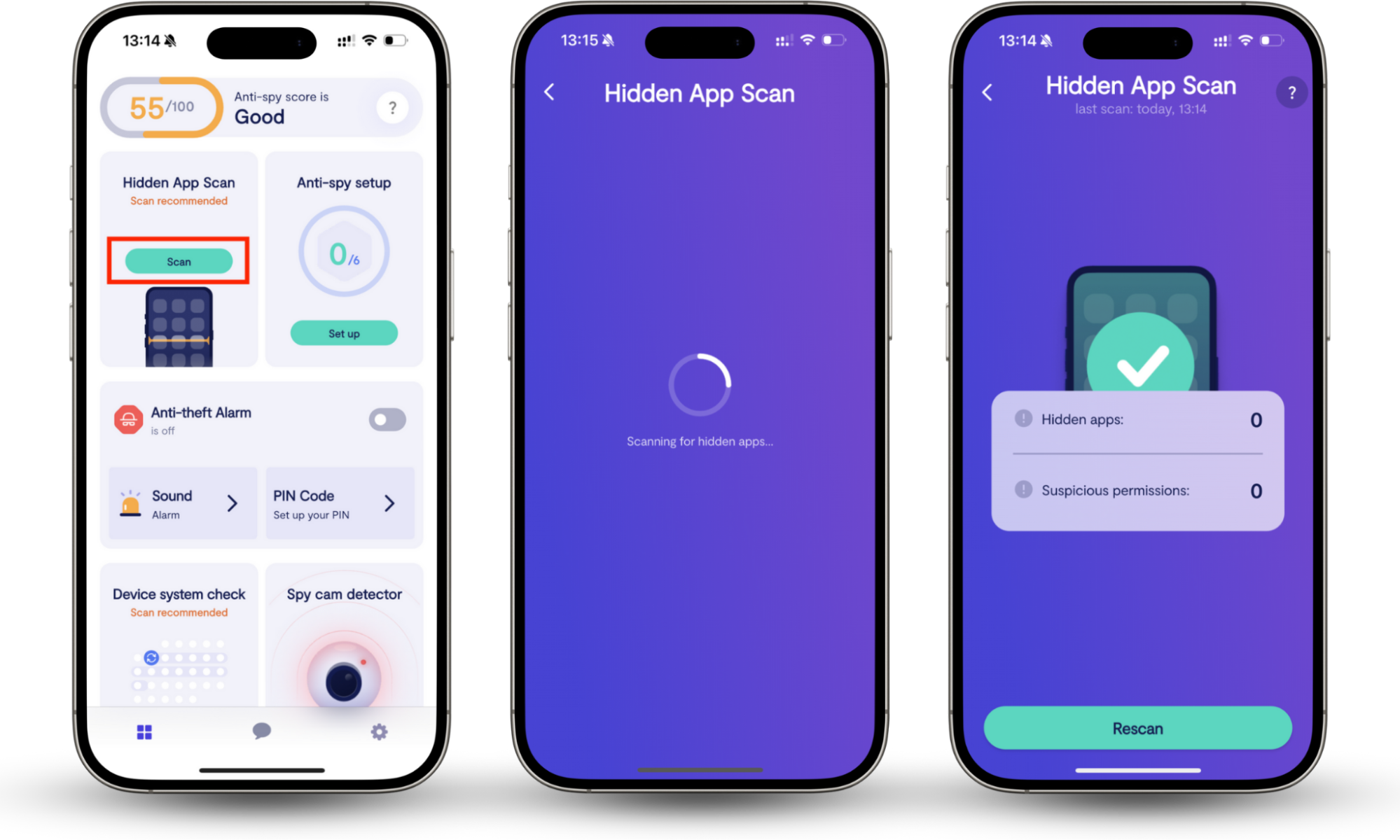
By regularly checking for hidden threats and unauthorized applications, users can reduce the risk of device compromise and improve their overall security posture.
Types of DDoS Attacks
DDoS attacks can target different parts of a system depending on the attacker's objective. Some attacks focus on consuming network bandwidth, others target network protocols, and some overwhelm specific website features or applications. Understanding these categories can help organizations identify threats and choose appropriate mitigation strategies.
While there are endless types of DDoS, here are some of the common ones that you should watch out for:
- Internet Control Message Protocol (ICMP) Flood. Also known as a ping flood, an ICMP Flood attack overwhelms a target with large volumes of Internet Control Message Protocol (ICMP) echo requests. The goal is to consume available bandwidth and processing resources until legitimate traffic can no longer be handled efficiently.
- SYN (Synchronize) Flood. A SYN Flood exploits the TCP handshake process by sending large numbers of connection requests without completing them. This leaves the server waiting for responses that never arrive, gradually exhausting available connection resources.
- Ping of Death. A Ping of Death attack sends malformed or oversized data packets designed to trigger errors, crashes, or instability in vulnerable systems. While modern systems are generally protected against classic Ping of Death attacks, the technique remains an important example of protocol abuse.
- Slowloris. Slowloris is an application-layer attack that keeps multiple HTTP connections open for as long as possible by sending partial requests very slowly. This can tie up server resources and prevent legitimate users from establishing new connections.
- Network Time Protocol (NTP) Amplification. NTP Amplification attacks exploit publicly accessible Network Time Protocol (NTP) servers to generate significantly larger responses than the original request. Attackers use this amplification effect to increase traffic volume directed at a target.
- HTTP (Hypertext Transfer Protocol) Flood. An HTTP Flood attack overwhelms a website or application by sending large numbers of seemingly legitimate HTTP or HTTPS requests. Because these requests can resemble normal user activity, they are often more difficult to identify than traditional traffic floods.
- Zero-Day DDoS Attacks. Zero-day DDoS attacks take advantage of previously unknown vulnerabilities, misconfigurations, or attack techniques that defenders may not yet recognize or have protections against. Organizations may have limited mitigation options until the vulnerability becomes understood and patches or defensive measures are developed.
What to do during a DDoS attack
Responding quickly to a DDoS attack can help reduce downtime and minimize disruption for customers. While the exact response will depend on the type and scale of the attack, most organizations benefit from having a clear incident response process that prioritizes service availability, traffic analysis, and communication.
1. Confirm that a DDoS attack is occurring
Before taking action, verify that the disruption is being caused by malicious traffic rather than a hosting issue, software failure, DNS problem, or routine maintenance activity.
Review:
- Traffic analytics
- Server logs
- Bandwidth usage
- Error rates
- Hosting provider status pages
2. Contact your hosting provider or mitigation service
Many hosting providers and security vendors have tools designed to identify and mitigate DDoS attacks. Notify them as soon as unusual traffic patterns or service disruptions are detected.
They may be able to:
- Filter malicious traffic
- Apply rate limits
- Activate mitigation services
- Adjust routing rules
- Scale infrastructure resources
3. Enable available mitigation controls
If your organization uses DDoS protection tools, activate them immediately.
Examples include:
- Web Application Firewalls (WAFs)
- Rate limiting
- Traffic filtering
- Content Delivery Networks (CDNs)
- Load balancing controls
4. Monitor traffic and system performance
Continue monitoring key metrics throughout the incident to understand how the attack is affecting services.
Track:
- Traffic volume
- Server response times
- CPU and memory utilization
- Error rates
- Geographic traffic distribution
5. Communicate with customers and stakeholders
If services are affected, provide timely updates through official communication channels. Transparent communication can help reduce customer frustration and prevent confusion during prolonged outages.
6. Document the incident
Once the attack has been contained, document:
- Attack timelines
- Affected systems
- Response actions taken
- Recovery procedures
- Lessons learned
This information can help improve future incident response planning and security controls.
Reduce the risks of DDoS attacks
Unfortunately, DDoS attacks will likely remain a critical part of hackers' arsenal for years to come. For this reason, it's best to focus on the different ways to prevent it from happening and act quickly when it does.
If you don't have the energy to monitor your website 24/7, it may be helpful to invest in apps like Clario Anti Spy with its Hidden app scan, which can help reduce the risk of DDoS attacks by keeping malware away from your device.