Table of contents
- What is malware?
- Types of malware
- Viruses
- Worms
- Trojans
- Hybrids and exotic forms
- Ransomware
- Fileless malware
- Adware
- Malvertising
- Malware-as-a-Service
- Spyware
- How to avoid malware
- Use Clario Anti Spy for extra protection
- FAQ
- How to check your computer for malware?
- Can my iPhone get malware?
- How dangerous is malware?
- What to do if you get a malware?
- Conclusion
Malware can wreak havoc on your computer or smartphone, exposing sensitive personal information or precious business data. According to the latest reports from the Verizon Data Breach Investigations, 40% of all breaches were caused by malware in 2024, with ransomware attacks seeing a 25% increase compared to 2023.
Definition
Malware is a constant threat to both your personal and professional digital safety. It can expose sensitive data, compromise your devices, and cause irreversible damage to your files and systems. But don't worry – understanding malware and taking simple precautions can help protect you.
It can take different forms, ranging from traditional viruses and worms to increasingly popular hybrids and malvertising. Luckily, you can protect your devices by installing robust antivirus software and honing safe online habits.
What is malware?
Malware refers to any malicious software intentionally designed to harm a network, server, or computer. Malware is not a synonym for virus. By definition, a virus is a form of malware, but not all malware is a virus. This blanket term covers worms, trojans, and viruses.
Malware is different to other types of software due to its intended use. Cybercriminals often use malware to steal personal data, send spam, remotely control a system, or spy on a restricted network. The malicious software is usually activated by the victims with a click of a link or file download.
Types of malware
The definition of malware is not complete without a rundown of the common malware types to look out for and avoid. Learning about the different types of malicious software gives you a better understanding of how they spread and more knowledge to help keep yourself secure.
Emerging trends in malware
Malware is constantly evolving, and some forms might be emerging or gaining traction. New threats such as AI-driven Malware and Malware Targeting IoT Devices have recently emerged, making it crucial to stay informed about evolving cyber threats.
Viruses
Often used interchangeably with malware, the word virus has become the layman’s term for malicious software. But it’s technically different. A virus is a specific type of malware that inserts its code into legitimate programs and files. They are typically distributed via infected emails, flash drives, and websites.
Victims often activate them by opening an infected file or application. Once activated, viruses can corrupt or delete files, disable system functions, and damage hard drives.
Worms
Computer worms self-replicate. They multiply, burrow, and spread across devices connected by a network. The worst part is how worms can spread without end-user action. Their presence can go undetected until they reach a point where they’re using up significant network bandwidth or server resources.
Trojans
Aptly called a trojan horse, this type of malware disguises itself as harmless software, only to later provide access to other malware. Ironically, this malicious software often masquerades as security software. Currently the most prolific type of malware, trojans are usually injected into a system using email or infected websites. They can remain undetected until activation.
Hybrids and exotic forms
Most forms of malware are a hybrid of traditional malicious programs, often combining worms and trojans. Occasionally, a virus is added to the mix. Malware typically appears as an innocuous program (a trojan) but functions as a worm once executed.
Ransomware
With the aim of extorting money from the victim, ransomware encrypts data, shuts down a network, or holds a system hostage. It sometimes compromises data such as your personal, financial, and medical records or simply blocks access to a computer.
Sometimes called scareware, ransomware has crippled companies, police departments, and hospitals. In some instances, it has even threatened to disrupt entire cities.
Fileless malware
Instead of directly using files or a file system, fileless malware exploits the existing tools in benign programs and systems. These malware attacks may come in the form of spying or injecting viruses and may utilize APIs, registry keys, or scheduled tasks.
Adware
Often masquerading as a legitimate advertisement, adware directs compromised end-users to ads linked to malicious sites. They sometimes redirect the browser to look-alike web pages with unwanted product promotions.
Malvertising
Unlike adware, malvertising uses legitimate ads or ad networks to inject malware into users’ computers. A paid ad on a legitimate website may covertly include a code redirecting users to a malicious website. Malvertising attacks may also directly install unwanted software on computers or devices.
Sometimes, cybercriminals can infiltrate legitimate ad networks that deliver ads to popular websites like the London Stock Exchange, Spotify, and New York Times.
Malware-as-a-Service
Malware-as-a-Service (MaaS) refers to cybercriminals offering malware for rent to other malicious actors. This model has created a booming underground marketplace for cyberattacks, making it easier for people without technical expertise to carry out attacks.
Spyware
Hackers use spyware to track keywords, obtain sensitive information like passwords and login details, and gain access to personal data and private networks. This type of malware is often used to spy on the computer activities of loved ones. In more nefarious attacks, it’s used to steal data and intellectual property.
Spyware is relatively easy to remove. Still, it remains a grave concern, mostly because it brings to light the vulnerabilities that forebode a more damaging malware attack.
Pro tip
Ensure your antivirus software includes real-time protection against advanced threats, such as fileless malware and ransomware, which may evade traditional scans. Clario Anti Spy goes a step further by offering an Anti-Spy setup that guides you through a checklist of essential privacy settings, helping you reduce your exposure to spyware and other malicious threats, offering an easy and effective way to secure your devices.
How to avoid malware
Now you have a basic understanding of how malware spreads, you’re equipped to prevent infections in your system. You can start with the following important habits:
- Install a reputable antivirus software
- Use strong passwords and never share them online
- Refrain from connecting to unsafe networks
- Log off websites once you’re done
Hackers employ ‘social engineering’ or psychological manipulations to exploit people’s day-to-day habits and trick them into clicking malicious links and attachments. To protect your personal data and avoid malware, you must be wary of any unexpected or unsolicited contact. Sometimes emails claim to be from respected agencies or individuals, but a closer look will reveal they’re not using an official email domain.
You should also remember to keep both your antivirus software and operating system up-to-date. Using the latest system or software means you’re taking advantage of any new ways developers have introduced to fend off malware attacks. Make a habit of running a scan on your antivirus software every week or two.
Use Clario Anti Spy for extra protection
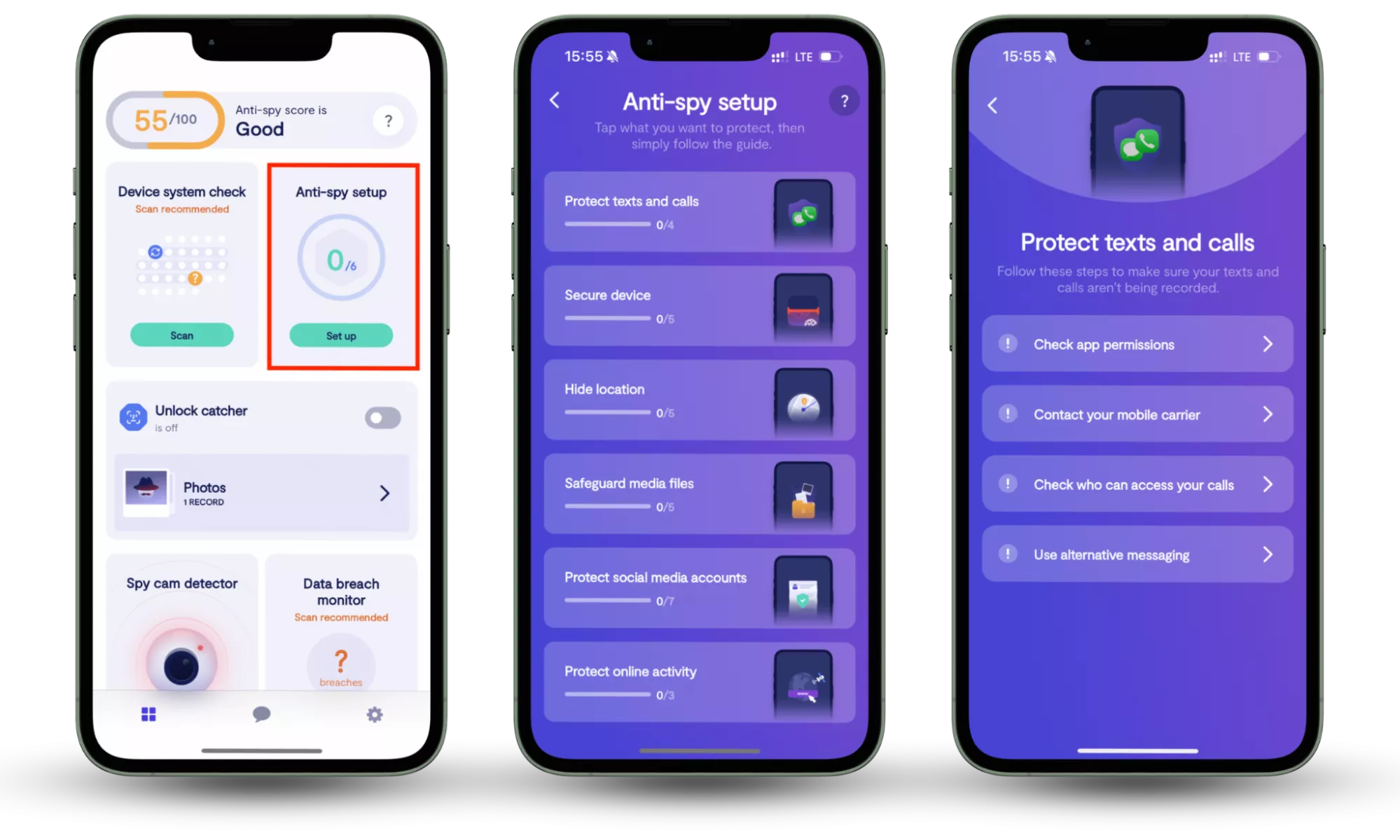
In addition to basic prevention methods, consider using Clario Anti Spy for extra protection. Clario Anti Spy’s Anti-Spy setup feature guides you through a checklist of essential privacy settings, helping reduce your exposure to spyware and other malicious threats. By applying these settings, you ensure that your device is better protected against unauthorized surveillance, ensuring your personal information remains secure.
Here is how to use Clario Anti Spy’s Anti-Spy setup feature:
- Download Clario Anti Spy, create an account, and sign in.
- Under the Anti-Spy setup section, select Set up.
- Follow the step-by-step guide to secure your devices and minimize your exposure to spyware, ensuring better protection against malware and other digital threats.
FAQ
How to check your computer for malware?
You know what malware can do to damage your system, so don’t hesitate to detect and remove it. For starters, it’s best to rid your computer of temporary files. This will help you catch unwanted viruses and get rid of the baggage that can slow down subsequent scans.
The most critical step in detecting malware is to find a trustworthy antivirus to scour your system for possible threats. And Clario Anti Spy is up for the job. The software runs deep system scans and provides real-time anti-malware protection. It is constantly running in the background, working quietly as it keeps an eye out for sneaky viruses, dormant trojans, and other malicious software.
The best part is how Clario refrains from bombarding you with security jargon. It also keeps you in touch with security experts who can help you navigate complex issues 24/7.
Can my iPhone get malware?
Although rare, iPhone malware does exist. Your phone is especially vulnerable when it’s jailbroken, which opens up your device to application sources other than the App Store. Devoid of the usual restrictions, a jailbroken iPhone is as vulnerable as any Android device.
But even without jailbreaking your iPhone, you may still be exposed to security threats like identity theft, unsafe Wi-Fi networks, and phishing. This is why installing security software is always a sound idea.
How dangerous is malware?
The extent of the damage caused by an attack depends on the type of malware used and the device it targets. It also depends on whether the malicious software is infecting a corporate network or a home computer. While some damage is barely noticeable to the user, sometimes it can result in severe financial and reputational consequences.
For example, a Trojan virus targeting a corporate network may cause a minor spike in communications traffic–a fairly harmless consequence. In other cases, the attack could result in the loss of critical data or the complete breakdown of a network.
For home users, malware infection could lead to the loss of relatively unimportant or replaceable data. In more serious cases, malware attacks could divulge sensitive information like financial or health records and bank account access.
What to do if you get a malware?
If you have been subject to a malware attack, don’t panic: you can take steps to mitigate the damage. Here’s what you should do as soon as you become aware of a breach:
1. Disconnect
Firstly, disconnect all networks and connections to the internet to prevent further data leakage and stop continued access to your operating system. If using a computer, switch off the internet immediately. If it’s a mobile device, switch to airplane mode.
2. Contact the IT department (if at work)
If a malware attack takes place while you’re working, tell your IT department immediately, so they’re able to take action. Some attacks can spread beyond your device to a whole network.
3. Scan your device
Using anti-malware software (which you should hopefully have installed), scan your device for viruses and attacks to ensure the breach can’t continue.
4. Back up important files and documents
For especially sensitive data, there’s a 3-2-1 backup rule: have three copies, two of which are on external media (such as external hard drives) with one offsite.
5. Change passwords
You should be changing passwords and sensitive information regularly, but this is especially important after a cyberattack. Even if you’ve had your computer repaired and were lucky enough to retain your work and sensitive information, remember there might still be someone out there with your password.
6. Reinstall your operating system
This may or may not be necessary, depending on the severity of an attack. But you should be able to reinstall systems relatively easily – many are available online, and some are provided on disks or drives when you purchase your computer.
Malware is an unwelcome price to pay for living in the digital age. But with proper precautions – and the right antivirus security – you should be able to browse, work, and network with peace of mind.
Conclusion
In conclusion, while malware and spyware remain persistent threats to your digital safety, taking proactive steps to secure your devices can make all the difference. By adopting strong security habits and using tools like Clario Anti Spy, you can easily safeguard your personal and business data. The Anti-Spy setup feature simplifies the process, offering a straightforward way to reduce your exposure to harmful threats, ensuring peace of mind in an increasingly digital world.
Read more: