Table of contents
- What is a VPN?
- What does a VPN do?
- Reroutes your traffic through a private server
- Encrypts your data on the fly
- Prevents your connection from resetting to a non-secure one
- Why do I need a VPN?
- 1. Prevent hacking
- 2. Block malware, adware, and trackers
- 3. Access the office intranet from home
- 4. Stay safe on public Wi-Fi
- 5. Bypass censorship
- 6. Get access to better deals online
- 7. Unlock content on streaming services
- 8. Be safe when using torrents
- 9. Prevent throttling by your ISP
- 10. Protect your identity while gaming
- VPN alternatives
- What’s more?
- Can you be tracked if you use a VPN?
- Are VPNs legal?
- What does a VPN hide?
- What to do if my VPN is blocked?
- How to change VPN location?
- Ready to get started with VPN?
What is a VPN?
A virtual private network, or VPN, is essentially a “tunnel” created between your device and a dedicated server to ensure your data is kept secure on its way to and from any internet resources you access. These servers shield your identity, keeping you protected and anonymous by encrypting your traffic and masking your IP address.
Definition
A VPN (Virtual Private Network) is a security tool that encrypts your internet connection and routes it through a remote server. This hides your IP address, protects your data from interception, and helps maintain privacy when browsing online, especially on unsecured networks like public Wi-Fi.
In simple terms, a VPN is used to protect your internet connection, hide your real IP address, and prevent third parties such as internet providers, hackers, or advertisers from monitoring your activity. It is commonly used for privacy, security on public networks, and accessing region-restricted content.
Note
64% of VPN users worry about how their personal data is used
What does a VPN do?
A VPN protects your internet activity by encrypting your data, masking your IP address, and routing your connection through a secure remote server. This helps prevent tracking, secures sensitive information, and allows you to access content as if you were in a different location.
VPN services come in different shapes and sizes. These days, you can even get one for your smartphone or buy a VPN-enabled router for your home and protect all of your devices at once.
A VPN typically performs the following functions:
- Encrypts your internet traffic
- Hides your real IP address
- Routes data through a secure server
- Protects connections on public Wi-Fi
- Helps bypass location-based restrictions
Here are the main things a VPN can do.
Reroutes your traffic through a private server
When you connect to the internet through a service provider (be it from home or on a public bus), your identity and browsing behavior can be exposed. VPN software creates a private connection to a specially configured server (or a cluster of servers). This now acts as a new starting point for all of your activity online.
So if anyone were to try and track you down, they would see the VPN server’s IP address instead of yours as the origin of your data packets. Feeling safer already, right?
Encrypts your data on the fly
Another feature to make a VPN worth its salt is data encryption. Any information you exchange with the VPN servers is locked with a special key so no one - not even your ISP (Internet Service Provider) - has access to it. This means they can’t log or share it with third parties for advertising or any other purposes.
And even if your data was intercepted by some evil genius, they would have to spend years and years deciphering it due to the complexity of the 256-bit encryption used by most VPN services. You might have nothing to hide, but it sure feels good to take control of your privacy like this.
Prevents your connection from resetting to a non-secure one
One more important gimmick reputable VPN companies use is a kill switch. If your device is suddenly disconnected from a remote VPN server (perhaps due to a failure on their side or an overprotective firewall on yours), it will default to the ISP settings, leaving your data exposed.
If security is your priority, it’s best to kill the internet connection altogether until a safe one can be restored. This is precisely what an automatic kill switch does.
A VPN can protect your privacy, but it won't be effective if you neglect the security settings on your devices. That's where Clario Anti Spy can make a difference. This anti-spyware solution helps safeguard your iOS or Android device by notifying you about pending system updates, hidden jailbreaks/device rooting, and data breaches. It also comes with an Anti-spy setup that shows you what you need to do to keep your phone secure.
Here's how to run an Anti-spy setup in Clario Anti Spy:
- Download Clario Anti Spy and subscribe to create an account.
- Tap Set up under Anti-spy setup.
- Pick a category—e.g., Protect online activity—and work through the security suggestions.
- Repeat for all of the other categories within the Anti-spy setup screen.
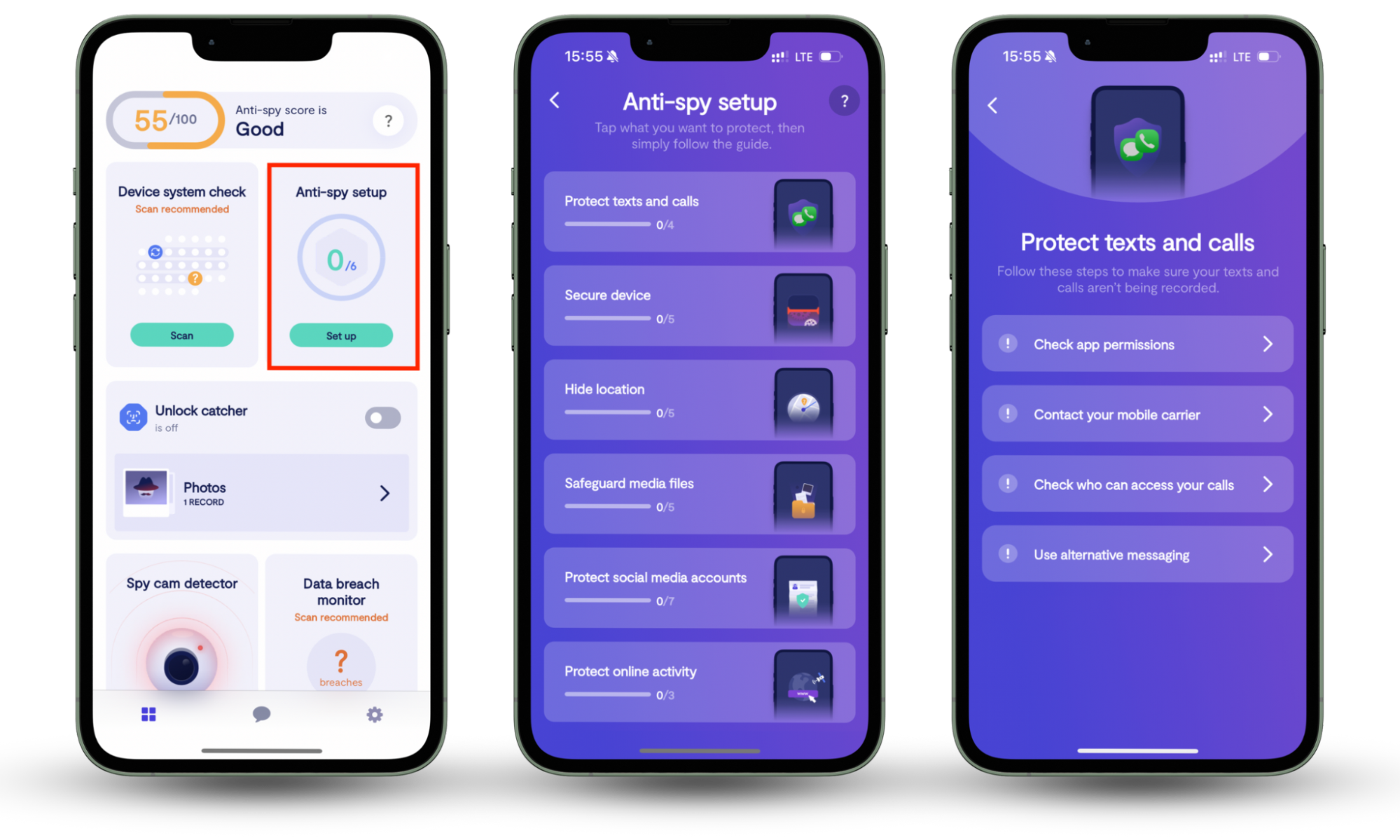
If you're using an Android, Clario Anti Spy allows you to scan for malicious apps that could be spying on you or stealing your data. It also comes with a feature called Virtual location that you can activate to hide your location, even if you don't have a VPN.
Now the benefits of VPN are quite evident, let’s go over some of the more common use cases.
Why do I need a VPN?
You need a VPN if you want to improve your online privacy, secure your connection on public networks, reduce tracking by websites and internet providers, or access content restricted by location. It is especially useful for protecting sensitive data and maintaining control over your online identity.
You should definitely use a VPN if you want to:
- Prevent hacking
- Block malware, adware, and trackers
- Access the office intranet from home
- Stay safe on public Wi-Fi
- Bypass censorship
- Get access to better deals online
- Unlock content on streaming services
- Be safe when using torrents
- Prevent bandwidth throttling by your ISP
- Protect your identity while gaming
1. Prevent hacking
If you’ve been hacked before, then you’ll know the value of having effective online security in place. Using a VPN will ensure every data packet a computer sends to a VPN server is encapsulated (placed inside another packet) and encrypted.
2. Block malware, adware, and trackers
It’s always worth doing your research and finding a VPN to suit your specific needs. So if you want to block malware, adware or any other kind of tracker, make sure you check the subscription plan details for anti-malware options. This way, intrusive ads won’t annoy you anymore, meaning you can enjoy a much cleaner and clearer web experience.
3. Access the office intranet from home
With more of us working from home than ever before, logging onto an office’s local network remotely is a necessity but can be a challenge due to security systems. However, setting up VPN remote access on a corporate laptop means a company’s confidential information can travel safely through a virtual tunnel.
4. Stay safe on public Wi-Fi
If you rely on public Wi-Fi to get online, then you’re often putting you and your details at risk because of its security vulnerabilities. Installing a VPN can be an effective way of shoring up your online protection so Wi-Fi networks are totally safe to use.
5. Bypass censorship
Our media is increasingly tumultuous, full of disinformation and ‘fake news’. In this environment, it’s often worth getting information from different sources to ensure you get a balanced perspective and access to the full facts behind a story. Using a VPN to amend details of where you are can help bypass any restrictions due to location. Invest in one and get closer to the truth.
6. Get access to better deals online
We all deserve a break. But, if you haven’t kept your browsing history private, anyone looking for cheap flights for a holiday may be stopped by website trackers reading their behavior. It means prices might be slightly higher, making a preferred destination harder to reach due to the expense. However, as soon as a VPN is on, then you become an anonymous stranger, a new client worthy of a discount offer.
7. Unlock content on streaming services
Many of us are addicted to binge-watching favorite shows on Netflix. But what happens when you travel to a different country where the show isn’t on the menu? If you have a VPN, then you’ll be able to change your location in the settings - and - voila! - you’ll never miss out on a favorite show again, no matter where you might be.
8. Be safe when using torrents
Torrents are a popular way of accessing content among many online users. The best way to stay safe when using them and keeping an internet connection private is via a VPN. This will stop your ISP from discerning any torrent-related activity.
9. Prevent throttling by your ISP
Sometimes, down- and upload speeds can be on the slow side due to a service provider. Among some, intentional throttling - or slowing down a user’s connection - is commonly practiced. Especially with such network-intensive applications like torrents or gaming.
10. Protect your identity while gaming
If you’re an avid online gamer, then you might have been using a VPN service for years to keep your IP address and internet activity from prying eyes. If you haven’t, then the question of: “Do I need a VPN?” could be answered if you feel vulnerable from being swatted while enjoying a streaming session. Invest in a VPN and keep your identity secure.
Important to know
A VPN does not make you completely anonymous online. It protects your data in transit and hides your IP address, but it does not prevent tracking through cookies, logged-in accounts, or malicious software on your device.
VPN alternatives
In case you aren’t sold on the whole VPN idea, there are other circumvention tools you can use. In a nutshell, most of them are either variations of the VPN technology or heavily based on it. The three best options are:
- VPN: Encrypts traffic and hides IP address
- Proxy: Hides IP but usually does not encrypt data
- Tor: Routes traffic through multiple nodes for anonymity but can be significantly slower
These alternatives differ from VPNs in how they handle encryption, anonymity, and speed. Choosing between them depends on whether you prioritize privacy, performance, or anonymity.
What’s more?
Finally, we’d like to go over some topics people are often confused by.
Can you be tracked if you use a VPN?
Yes, you can still be tracked while using a VPN. A VPN does add an extra layer of protection, but you can still be tracked. While a VPN hides your IP address, tracking can still occur through cookies, browser fingerprinting, logged-in accounts, or malware on your device.
You might have shared personal information on social media, or malware could have been installed on your computer.
While a VPN makes it extremely difficult for a data breach to occur, the best thing you can do is to use a combination of cybersecurity measures.
Are VPNs legal?
VPNs are legal in most countries, but their use may be restricted or regulated in certain regions. Legality often depends not just on using a VPN, but on what activities are performed while connected. For example, in China, where the internet is heavily controlled by the state, VPN providers require a government license to operate legally.
Before you turn to a VPN service, ask yourself this: “Am I going to use it for something that is legal on its own?” If the answer is “no”, then you should stop right there.
What does a VPN hide?
A VPN hides your real IP address and encrypts your internet traffic, making it difficult for third parties to monitor your activity. However, it does not hide your identity from websites you log into or prevent tracking through other methods.
What to do if my VPN is blocked?
If your VPN is blocked, try switching to a different server, changing the VPN protocol, or enabling obfuscation features if available. These methods can help bypass restrictions that detect and block VPN traffic.
Also, it depends on who blocked your VPN traffic and why. First, do a legality check. If blocking is initiated by your government, your employer, or your school, make sure you are not breaking any laws or agreements by using a VPN. If you’re safe there, try changing servers and protocols your VPN software provides.
Most applications offer the choice of OpenVPN, and many have obfuscated (Stealth VPN) servers available. This is a complex solution, capable of tricking the most advanced VPN blocking measures.
How to change VPN location?
It should be fairly simple, provided you’ve paid for the right product. To change your VPN location, select a server in a different country within your VPN app and connect to it. This will assign you a new IP address associated with that region. This will influence your network speed and might unlock streaming content or give you access to otherwise restricted resources.
Ready to get started with VPN?
Because, well, you might need one. And when you do, be sure to give Clario VPN a try. Stay safe!
A VPN offers many benefits, especially when it comes to protecting your privacy. But again, it's only as effective as the security on your devices. Install Clario Anti Spy and run an Anti-spy setup to protect your iPhone or Android from online tracking, spyware, and monitoring tools.