Table of contents
- What is a VPN?
- How to change the Netflix region with a VPN
- How to change the Netflix region without a VPN
- Do I need a US payment method to watch US Netflix?
- How to watch Netflix abroad
- Is changing the Netflix country illegal?
- Conclusion
It’s no secret that US Netflix has the best and most diverse array of content around.
But if you’re somewhere in Europe or Asia, you won’t be able to enjoy it even though you pay a monthly subscription. The good news is that there’s now no need to travel overseas in order to watch your favorite show. Read on to find out how you can change your Netflix region safely from the comfort of home.
- What is a VPN?
- How to change the Netflix region with a VPN
- How to change the Netflix region without a VPN
- Do I need a US payment method to watch US Netflix?
- How to watch Netflix abroad
- Is changing the Netflix country illegal?
What is a VPN?
Definition
A VPN (Virtual Private Network) is a tool that encrypts your internet connection and routes it through a server in another location, masking your real IP address and making it appear as if you’re browsing from a different country.
Originally invented to allow people to securely connect to business networks from different regions, a VPN (Virtual Private Network) creates an encrypted tunnel between your device and the internet. This gives you numerous benefits:
- You’re anonymous on the web — your IP and location are invisible.
- You are much less vulnerable to cybercrime, including identity theft threats and financial breaches.
- Since a VPN masks your location, you can access geo-blocked content. This means that you can watch the US version of Netflix, even if you’re in France.
Pro tip
Using a VPN doesn’t permanently change your Netflix account or billing country. It only affects which content library you see while the VPN connection is active. Once you disconnect, Netflix automatically reverts to your local catalog.
How to change the Netflix region with a VPN
The first step to accessing the best of Netflix with a VPN is to choose a provider. But here’s the catch: not every VPN can bypass the streaming giant’s restrictions.
Using a VPN to change your Netflix region is a straightforward process that works by changing your IP-based location. While exact steps can vary slightly depending on the VPN provider and device you use, the overall setup follows the same basic sequence across most platforms. Here's how to install a VPN and use it to change your Netflix region:
- Choose a VPN provider that supports streaming and works on your device.
- Download and install the VPN app from the provider’s official website or app store.
- Open the VPN app and sign in or create an account.
- Close the Netflix app or sign out of Netflix in your browser before connecting.
- Connect to a VPN server in the country whose Netflix catalog you want to access.
- Reopen Netflix and sign back in.
- Browse or search to confirm the Netflix region has changed.
In addition to VPNs, some privacy tools let you mask your device’s GPS location. For example, Clario Anti Spy’s Virtual Location feature allows you to replace your phone’s real GPS coordinates with a false location by choosing any spot on the map. This helps prevent apps, websites, and third-party trackers from accessing your true physical location.
To use Clario Anti Spy’s Virtual location tool on your Android phone, do this:
- Download Clario Anti Spy on your Android device, get a subscription, and set up your account.
- Once you’re inside the app, tap Set up under Virtual location.
- Now follow the on-screen prompts to reset your location, choosing your preferred one on the map.
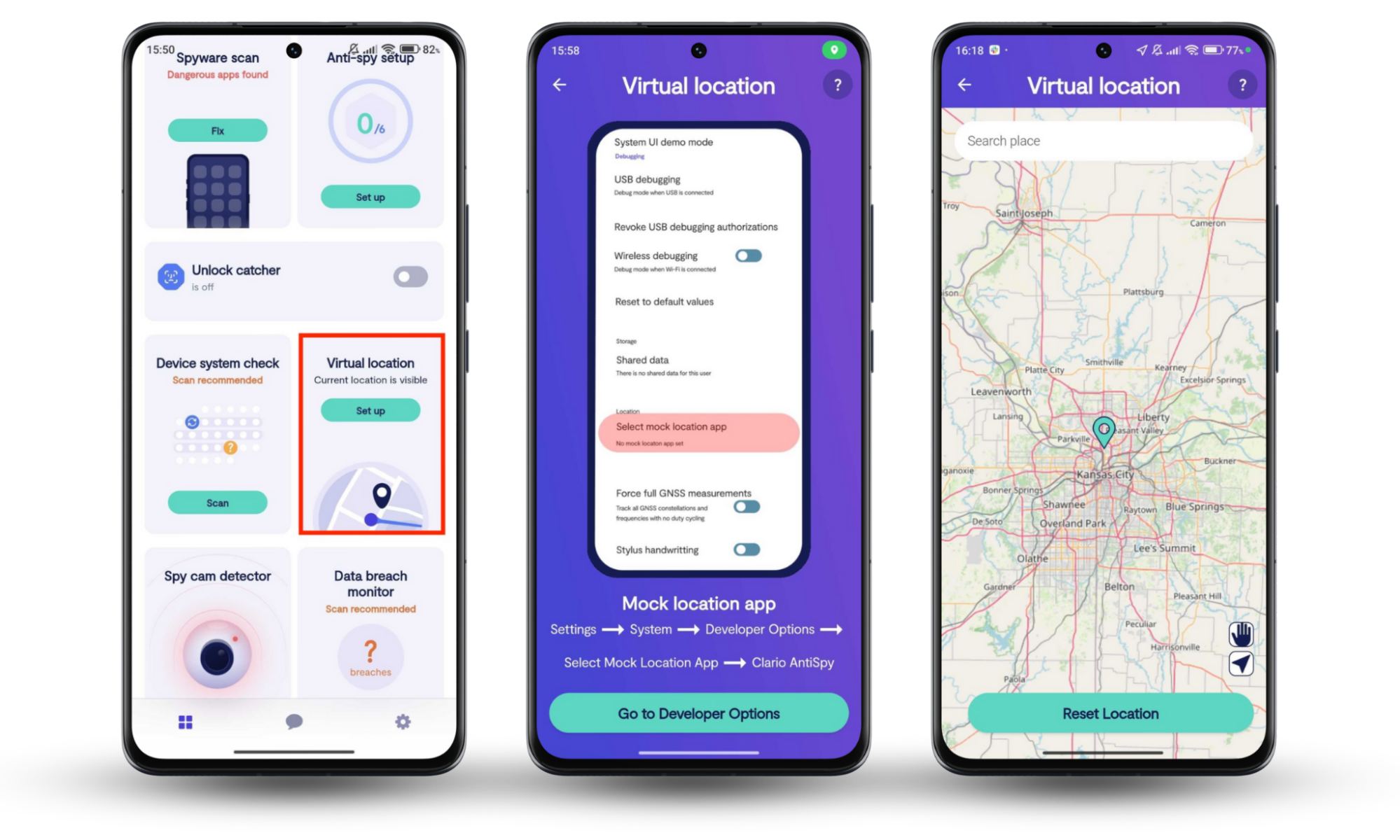
Virtual location tools work at the GPS level and don’t change your IP address. Because Netflix primarily relies on IP-based location detection, virtual location masking may not change the Netflix catalog you see. However, it can still reduce location tracking and improve privacy when using streaming apps on mobile devices.
How to change the Netflix region without a VPN
A VPN isn’t the only way to access geographically limited content on Netflix. You can also change the Netflix region using a proxy. Just like a VPN, proxy servers allow you to change your IP address and use the internet as if you’re surfing from a different location. You get to browse the web anonymously and avoid geo-restrictions.
If you change the country on Netflix with a proxy, you won’t have to install any apps. All you need to do is to make a few clicks in your device settings. Here’s how:
- Click the Apple menu and open System Settings.
- Select Network from the sidebar.
- Choose your active connection (Wi-Fi or Ethernet).
- Click Details.
- Open the DNS section.
- Click the + button under DNS Servers.
- Enter the DNS proxy address provided by your DNS service.
- Click OK, then Apply to save changes.
- Restart your browser or the Netflix app before testing access.
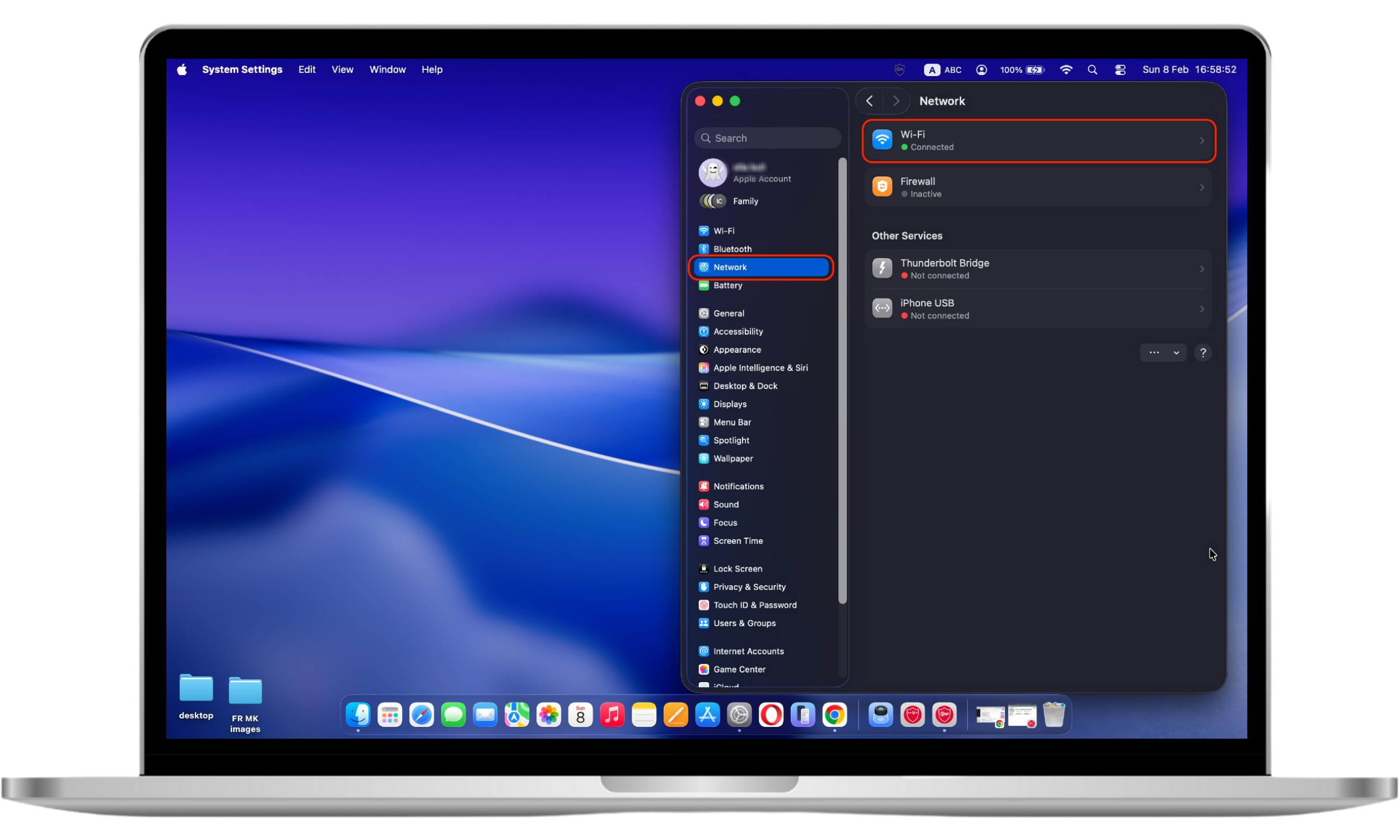
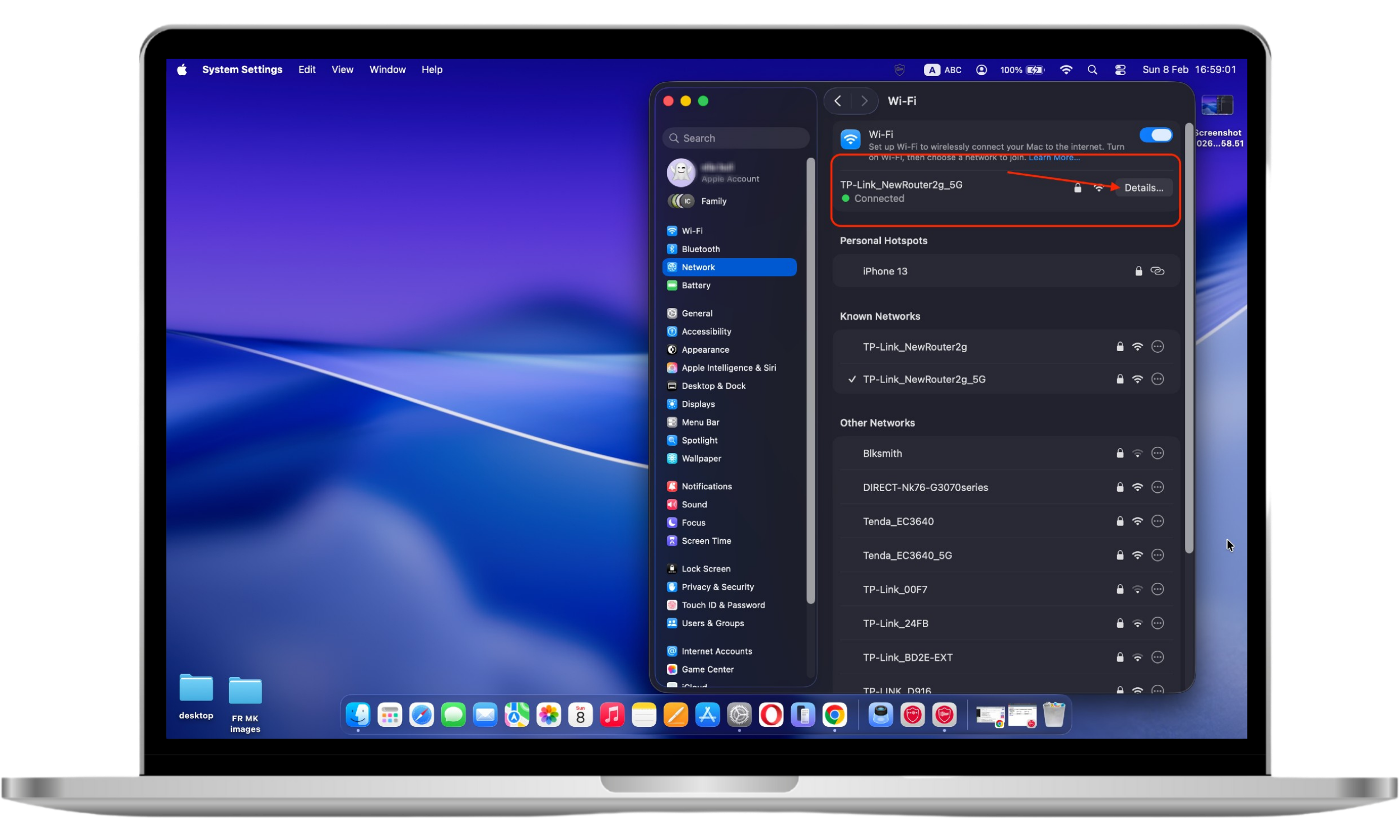
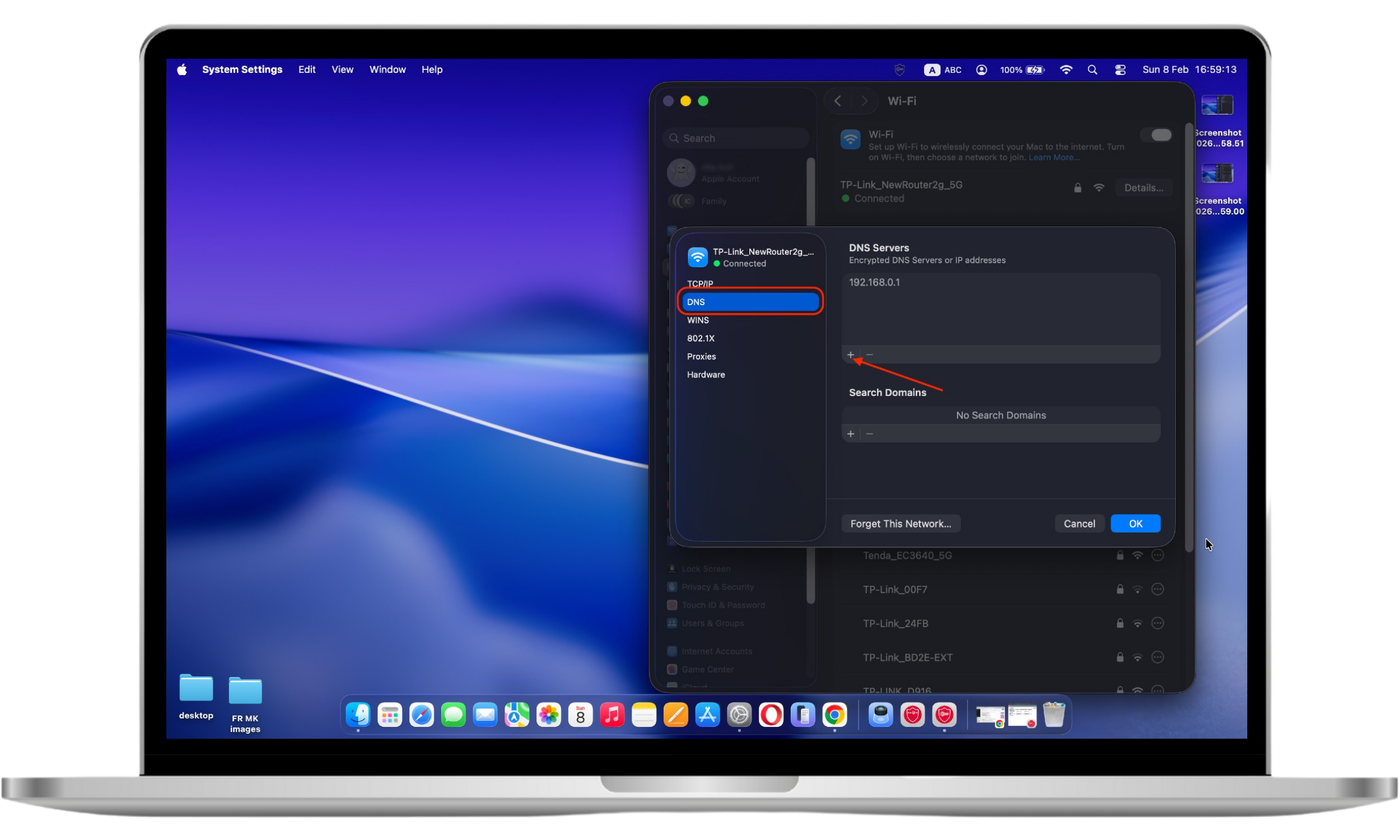
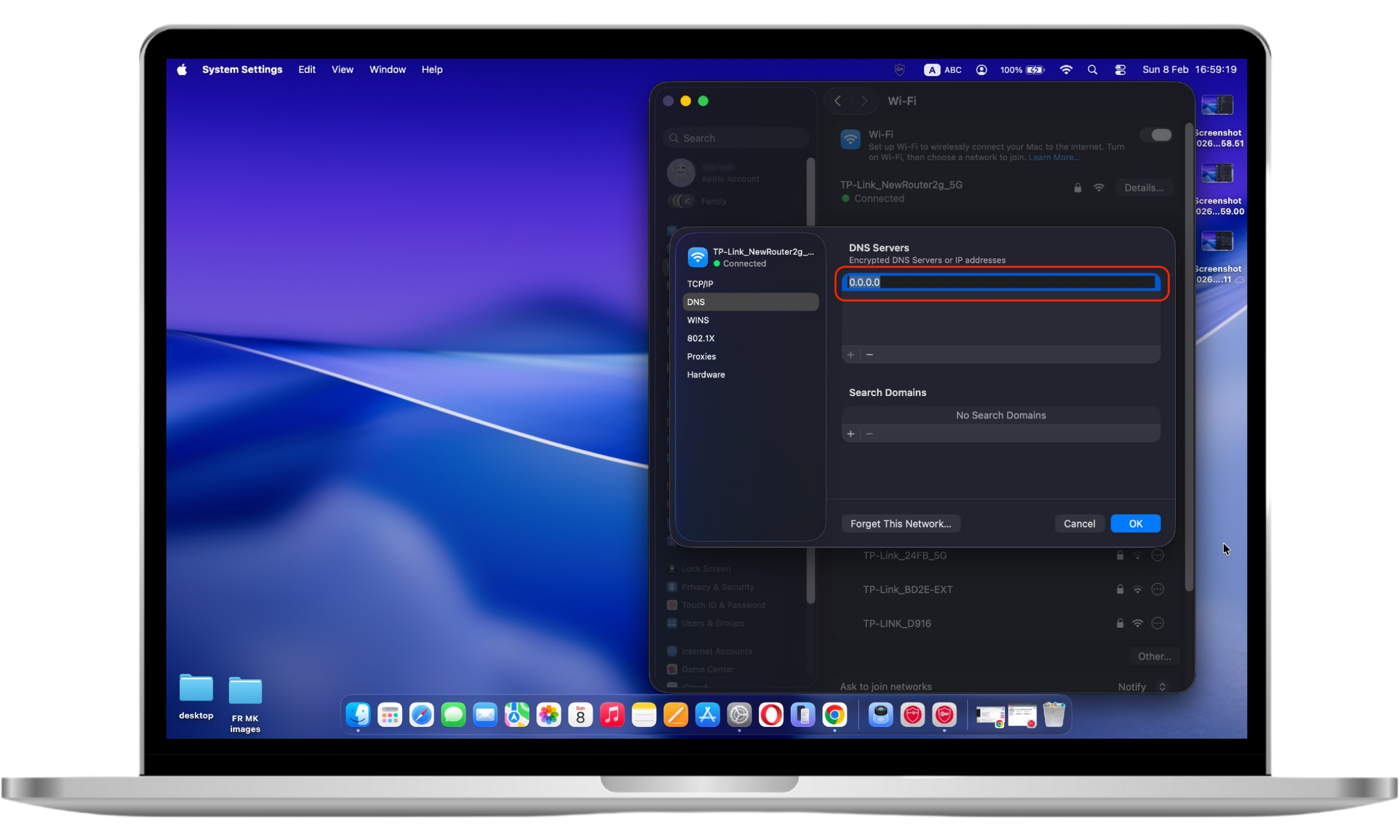
Now you can watch Netflix shows exclusively offered in another country.
A word of warning — unlike VPNs, proxy servers do not encrypt your network traffic. They can still store your browsing history and sensitive information. You may unwittingly allow the bad guys to infiltrate your system and steal your data.
Do I need a US payment method to watch US Netflix?
Unlike Spotify, Netflix's payment method is not restricted by country. Which means, you don’t need an American credit card to watch American Netflix, nor do you need a UK card to watch UK Netflix, and so on. No matter where your account has been registered, you can access the desired country's Netflix content just by switching your VPN location.
How to watch Netflix abroad
Netflix is available in more than 190 countries. Unless you’re traveling or moving to a location where their service is not offered (such as China, Syria, North Korea, and Crimea), you won’t have any problem watching Netflix from other countries. All you need is your device and a stable internet connection.
But since every country has its own catalog of movies and TV shows, you may not be able to access the content you usually watch at home. Luckily, you can bypass the geo-restrictions by using a VPN or a DNS proxy. Simply follow the instructions provided above.
Is changing the Netflix country illegal?
No, changing your Netflix location is legal. At least, in most countries. After all, you’re merely accessing Netflix’s international catalog, not infringing on any copyright. However, by masking your location to access restricted content, you are violating the terms and conditions of the streaming giant. Since Netflix is bound by the licensing agreement they’ve made with third-party content providers, it reserves the right to block traffic from IP addresses associated with proxies or VPNs.
Fortunately, Netflix can’t detect all VPNs. As long as you go with a trusted provider, you won’t encounter any issues. Steer clear of free VPNs. Remember the adage — when a product is free, you are the product.
In any case, there’s no need to worry — Netflix doesn’t ban you if you are flagged as trying to use a VPN. You simply get a message saying that they suspect you are using a VPN and you won’t be able to watch certain movies or TV shows.
Conclusion
Using a VPN is not the only way to access Netflix content that’s unavailable in your region. You may also use a DNS proxy to alter how Netflix detects your location. However, most DNS proxies are easily detected by Netflix and don’t encrypt your traffic, which can expose your data and increase the risk of cybertheft.
A VPN remains the safest and most reliable option for changing Netflix regions, though not all providers are equally effective. To strengthen your privacy further, tools like Clario Anti Spy can also help by masking your phone’s real GPS location, reducing location tracking while you stream your favorite shows.