Table of contents
- What does rooting actually do?
- Can a phone get rooted without you knowing?
- How did my Android get rooted?
- Could malware root my phone?
- Signs your phone might be rooted
- Why is rooting your phone risky?
- What to do if your phone is rooted?
- How to check if your phone is rooted?
- Can you unroot a phone?
- Is my phone just rooted or hacked?
- Verdict: How did my phone get rooted?
What does rooting actually do?
Root changes Android’s security layer and can make spyware harder to remove. On Android, root means superuser access, administrator-level control over parts of the system that ordinary apps can’t touch.
Typically, Android protects core areas like the system partition and restricts what apps can do. That’s a big reason Android is relatively resilient: apps run in a sandbox and need your permission to access sensitive features.
A rooted Android phone has had some of those restrictions removed or bypassed. That can happen in different ways:
- Bootloader unlocked: it lets the device load non-standard system images.
- System partition modified: core files changed, replaced, or patched.
- Root management installed: tools like Magisk manage superuser requests.
- Device integrity weakened: security checks (such as Google Play integrity checks) may fail.
Important nuance
Rooting isn’t automatically malware. Some people root for developer testing, automation, or custom ROMs. The real risk is that rooting makes a deeper, stealthier compromise possible, especially if you didn’t intend it.
Can a phone get rooted without you knowing?
Yes, but it’s uncommon and usually not mystical. In my experience, in most cases, phone rooting without your knowledge happens when:
- Someone had physical access and enabled a modification (repair shop, partner, roommate, second-hand seller).
- The phone was already rooted when you bought it (refurbished or unofficial seller).
- It’s a false positive detection (some apps flag root when developer options, VPNs, work profiles, or specific system settings are present).
- It’s a real exploit (rare, but possible) that led to privilege escalation.
True over-the-air rooting by malware is possible, but it’s not the most common explanation. Most spyware doesn’t need full root; it often relies on permissions, like Accessibility, or device admin tricks to monitor you without rooting.
How did my Android get rooted?
These are the most realistic causes of rooting, ordered from most common to least common:
- Someone unlocked the bootloader. This is step one for many rooting workflows. It’s deliberate and usually wipes the phone as part of the process on many devices.
- Someone installed a root tool (Magisk, Super, etc.). Magisk is the most common modern root framework. If Magisk or its components are present on your phone, root may be active even if you didn’t mean to keep it.
- Someone flashed a custom ROM or unofficial firmware. Custom ROMs sometimes come rooted or use patched boot images. This often happens on older devices when trying to install newer Android versions.
- You bought a second-hand or refurbished phone. Some devices are sold pre-rooted (sometimes openly, sometimes not).
- A repair shop or service modified the device. It’s not always malicious: some shops do questionable tweaks for diagnostics or unlocking. But unauthorized modification is still a risk.
- A cleaner/optimizer app used risky privileges. Most don’t root your phone, but some encourage enabling high-risk permissions and can be bundled with other shady components.
- Enterprise or developer testing. Less common for consumer users, but if the phone came from a dev environment, root may be left behind.
If you suspect your device has been modified, combine these checks with the signs section below and consider reviewing signs your phone is being monitored to spot behavior that often shows up alongside deeper compromise.
Could malware root my phone?
Yes, but it’s not the default path for most attackers. To root an Android device, malware typically needs a privilege escalation exploit (abusing a vulnerability in Android, a chipset driver, or a vendor component). That’s harder to pull off than permission-based spyware and increases the chance of detection.
Also, many devices have protections like verified boot and integrity checks that make persistent system-level modifications more difficult.
If malware did root the phone after all, it often aims for persistence, meaning it survives reboots and sometimes survives a factory reset if the firmware has been altered.
So, rooting can be caused by malware, but many root warnings are either misdiagnoses or leftover modifications from previous owners/repairs. The next right step is confirmation.
Signs your phone might be rooted
This is where people get misled, so I’ll keep it tight and practical. A single symptom isn’t proof. Look for clusters.
Common signs of a rooted phone:
- A reputable root checker (like Clario Anti Spy’s Device system check) confirms root status multiple times.
- You see Magisk, SuperSU, or similar root management components.
- Banking, streaming, or security apps refuse to run due to integrity checks.
- OTA (over-the-air) system updates fail repeatedly.
- You see a boot warning like bootloader unlocked.
- You find system apps with suspicious permissions you don’t recognize.
If your concern is spyware specifically and not just root, pair a root checker with a spyware-focused check, like Clario Anri Spy’s Hidden apps check. Also, check out our guide on how to check for spyware on Android, because many spy apps operate without root by abusing permissions.
Why is rooting your phone risky?
Rooting weakens your system protections and makes it easier for malware and spyware to be downloaded onto your phone. It also prevents your phone from updating its OS, increasing the risk of older vulnerabilities being exploited. Essentially, your personal data is at a much higher risk of being stolen and used maliciously.
What to do if your phone is rooted?
This section is designed to be doable even if you’re not technical. Follow it in order and don’t skip straight to factory reset as your only move.
- Confirm root status using at least two methods (manual and with Clario Anti Spy’s Device system check).
- Back up important data (photos, contacts, files).
- Remove unknown admin and Accessibility access for suspicious apps along with the apps you do not recognize.
- If the root is confirmed and unwanted, restore the official firmware and re-lock the bootloader when possible.
- Change passwords for key accounts, especially if compromise is suspected.
One key point people miss
A factory reset doesn’t always remove root, especially if the modification lives in boot images or firmware. Reset is still useful, but it’s not a silver bullet fix.
How to check if your phone is rooted?
To check if your phone is rooted, manually check the list of your apps and look for Magisk, SuperSU, KingRoot, or any other apps you do not recognize. If you find such, remove them. Then check for any suspicious app permissions. If you find anything out of the ordinary, check the app’s Install sources. Unless it’s been downloaded from a reputable source, delete.
Or you can choose an easy solution and use Clario Anti Spy. Clario Anti Spy runs a device integrity check and flags signs of rooting or jailbreak-style modifications.
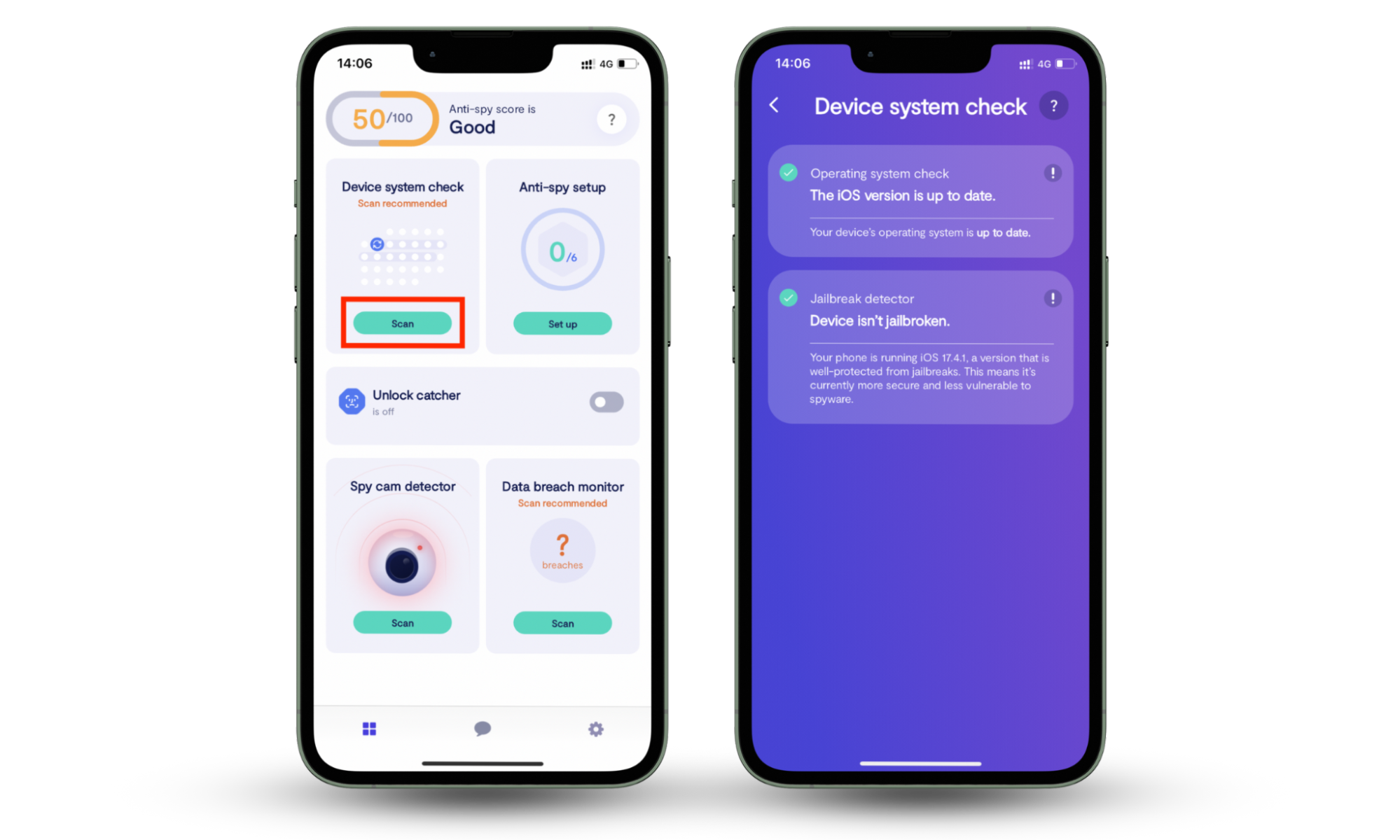
Here’s how to check if your phone is rooted with Clario’s Device system check:
- Open Clario Anti Spy.
- Tap Device system check.
- Tap Scan.
- Review the results and follow the in-app instructions if anything is flagged.
If you find a suspicious app and you’re unsure whether it’s spyware, this guide on what apps can spy on your phone helps you double-check the usual suspects and the permission patterns that matter.
Rooting and spyware often appear together, but spyware doesn’t always require root access. That’s why a hidden-app check is a smart add-on.
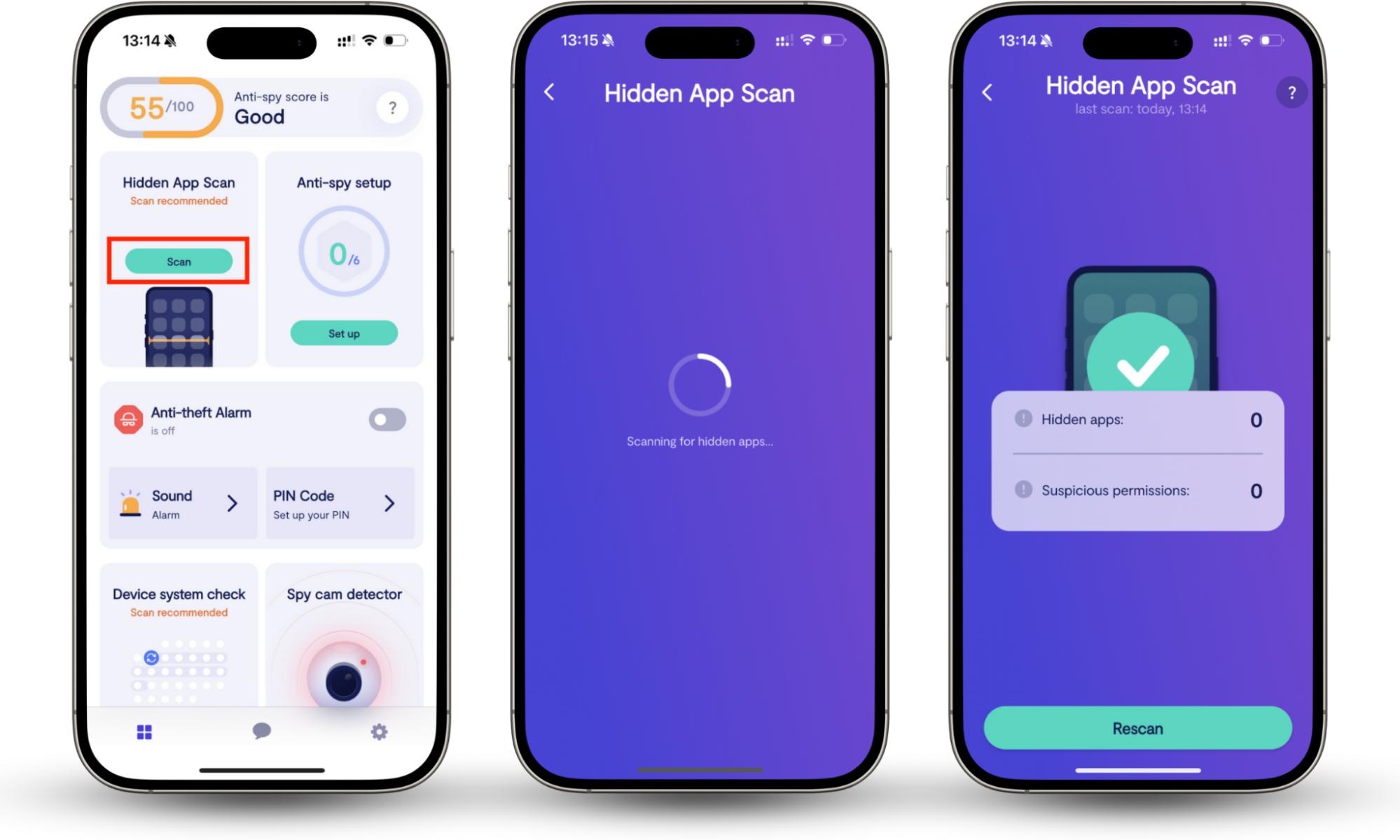
Here’s how to scan for hidden or disguised apps with Clario Anti Spy’s Hidden apps scan:
- Open Clario Anti Spy.
- Tap Hidden apps scan.
- Tap Scan.
- Review flagged apps and remove anything you don’t recognize or don’t need.
If you need a deeper removal workflow, use our guide on how to remove hidden apps on Android in parallel with your integrity checks.
Can you unroot a phone?
In most cases, yes, but unroot means different things depending on how the root was done.
What usually works:
- Restore official firmware.
- Remove root framework (e.g., uninstall Magisk properly, restore stock boot image).
- Re-lock the bootloader (only after stock firmware is restored).
What people think works but often doesn’t:
- Factory reset alone. It may remove apps and settings, but not system-level modifications.
If the phone was intentionally rooted long ago, you can often safely restore it to stock. If you suspect malicious firmware or shady repair modification, consider professional help or replace the device if it’s old and no longer receives security patches.
Is my phone just rooted or hacked?
When your phone is rooted, it means the phone’s system protections were structurally modified to allow superuser access. When you’ve been hacked, someone got unauthorized access to your accounts/data or installed spyware.
Your phone can be hacked without being rooted, and rooted without being hacked. However, if we’re talking about someone close to you, like a spouse or an ex, who you think wants to hack into your phone to spy on you, they will often have to both root your phone (iOS) and install a spy app (usually a parental control app).
The practical clue
Rooting usually shows up as integrity failures, bootloader warnings, or root framework artifacts. Hacking shows up as account takeovers, unknown logins, and spyware-style permissions.
Verdict: How did my phone get rooted?
A phone typically gets rooted because someone intentionally modified it: unlocked the bootloader, installed a root tool, flashed custom firmware, or bought/repaired a device that wasn’t stock.
Malware-based rooting exists, but it’s less common than permission-based spyware and misdiagnosed alerts. If you’re unsure, verify device integrity first. Clario Anti Spy’s Device system check helps quickly confirm signs of rooting, so you can take the right next step instead of guessing.