Table of contents
- What does it mean when your phone is linked to another device
- Signs your phone may be linked to another device
- 1. Unauthorized access
- 2. Surveillance or spying
- 3. Strange behavior
- 4. Data and battery usage
- 5. Data theft
- 6. Device slowdown
- How to check if my phone is connected to another device
- 1. Check Bluetooth and Wi-Fi connections
- 2. Review app permissions
- 3. Review connected devices in Google Account (Android)
- 4. Check connected devices in Apple ID (iPhone)
- 5. Check remote control apps
- 6. Look for suspicious applications
- 7. Check your data usage
- 8. Run security scan
- What to do if you find unauthorized pairing on your phone
- Conclusion
What does it mean when your phone is linked to another device
Your phone might be linked to another device via Bluetooth, Wi-Fi, remote access apps, or your Google or Apple Account. This means that your phone can easily share data with other devices, although the files and information available will vary depending on the device and how it’s connected to your phone. Most of the time, this is useful—perhaps you’re using a Bluetooth speaker or want to transfer files to your own computer. However, hackers can also connect to your phone to steal your information, distribute malicious files, or spy on you.
Hackers might be able to access different information, depending on how they connect to your phone.
- If someone connects to your phone via Bluetooth, depending on their device, they might be able to make and receive phone calls, and access your files—including sensitive images or personal information.
- Someone connected to the same Wi-Fi network as you might be able to intercept data that you’re sending and receiving online.
- If they use remote access applications, such as TeamViewer, AnyDesk, or Airdroid, they can access everything on your phone, including apps and saved passwords.
- People accessing your Apple Account might even be able to clone your phone remotely, using synced cloud backups.
Signs your phone may be linked to another device
There are signs that help you tell if your phone is linked to another device. You might notice that someone is using your online accounts, see unexpected apps, or realize that your phone is behaving oddly. It might run slowly, heat up, or drain its battery faster than usual. Your data usage might be unusually high, and you might even notice that files are missing from your device.
1. Unauthorized access
If someone else is connected to your phone, they might access your files and online accounts. You might see unusual activity in your online accounts—perhaps there are unknown emails in your sent items, posts you didn’t make on your social media accounts, or even unexpected bank transactions.
You might also get login notifications that you don’t expect. For example, if someone accesses your Google or Apple Account from a new location or device, Google or Apple will send you a notification.
2. Surveillance or spying
You might notice signs that someone is spying on you. Perhaps someone in your life knows things that you haven’t told them—they might have been looking at your phone. Maybe your phone’s camera or microphone are unexpectedly active. You might even notice spy programs on your phone or apps you don’t remember downloading.
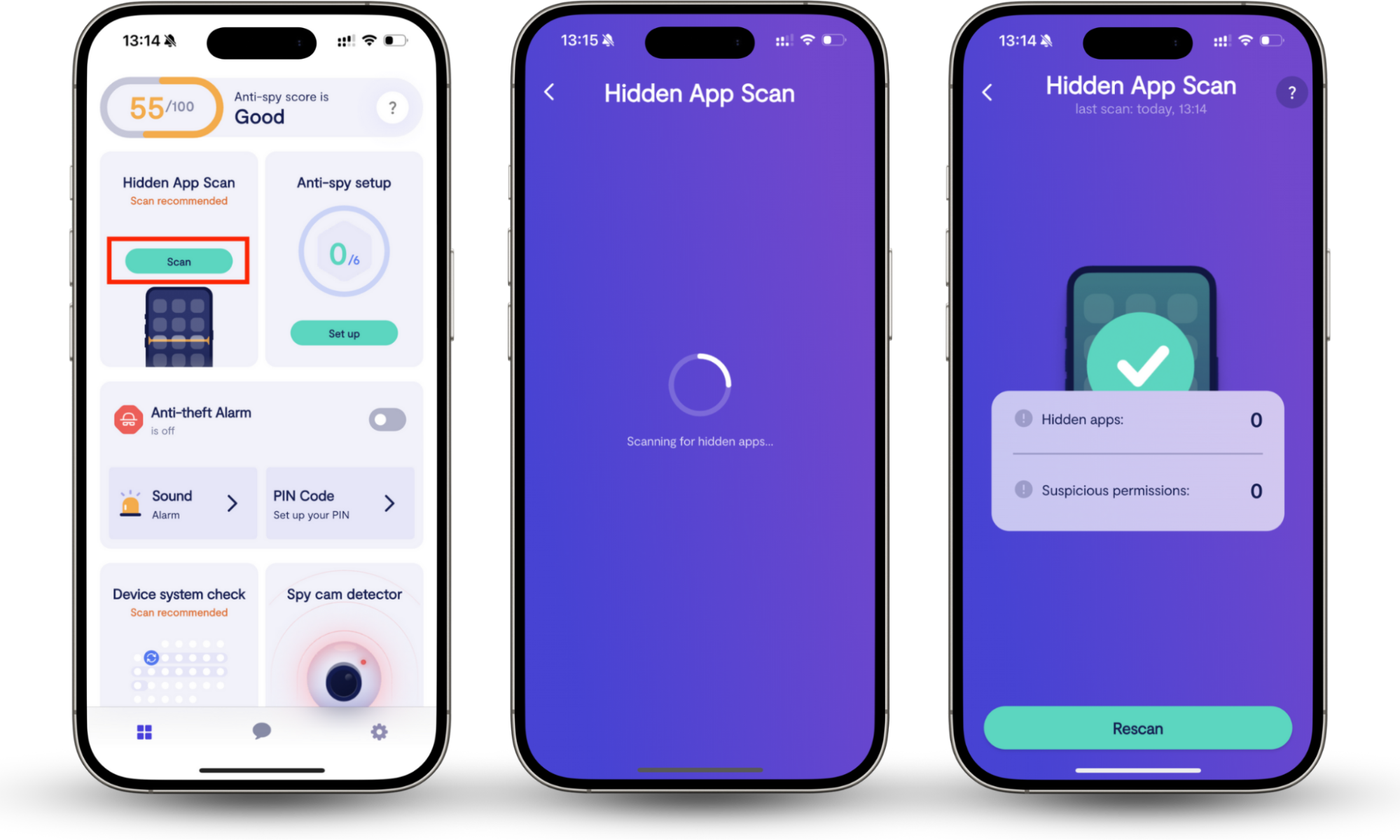
Spy apps are designed to be hidden. Fortunately, Clario Anti Spy’s Hidden app scan can detect suspicious software. Whether there’s an app that’s entirely hidden from view, or one with suspicious permissions, the Hidden app scan can find it.
Recently, the Clario support team spoke with a customer who was suspecting her partner was spying on her. One of the Clario experts explained how to run a Hidden app scan, and they did find a suspicious app running in the background. This happens in controlling relationships very often. If you suspect someone might be spying on you, run the Hidden app scan yourself.
How to look for hidden apps on your phone with Hidden app scan:
- Download Clario Anti Spy and subscribe.
- Under Hidden app scan, tap Scan.
- When the scan is complete, review hidden apps and suspicious permissions.
If you’ve recently been through a breakup, and you’re worried that your ex is monitoring you? Learn how to tell if your ex is tracking your phone on the Clario Anti Spy blog.
3. Strange behavior
You might notice that applications open on their own, you get unusual notifications, or messages are marked as read when you know you haven’t opened them. These signs could all indicate that your phone is compromised—a hacker might have access to it.
4. Data and battery usage
You might also notice that you’re using more data than you usually do. If someone is constantly connected to your phone, it uses up your device’s resources. This means that your battery and data usage will be higher than usual.
We’ll talk about how to check your data usage later in the article. For now, let’s look at how to check which apps are using the most of your battery power.
Expert tip
Fast battery drain doesn’t always mean that someone else is accessing your device. Your battery might start to drain more quickly as your phone gets older. However, if your phone is new or the fast battery drain has started suddenly, it could be a sign that someone else has remote access to your device.
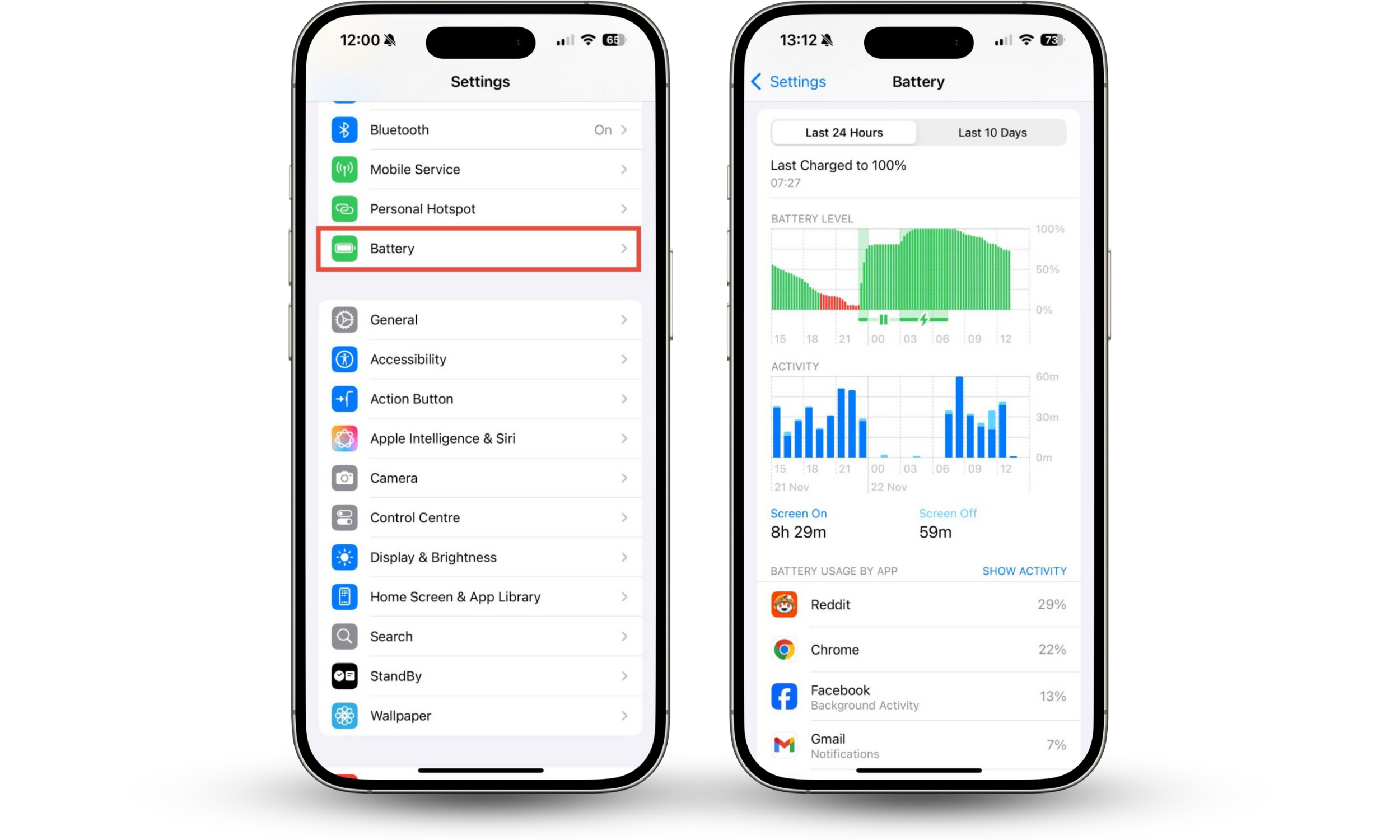
How to check battery usage on iPhone:
- Go to Settings > Battery.
- Scroll down to Battery usage by app. Do you recognize all of these apps?
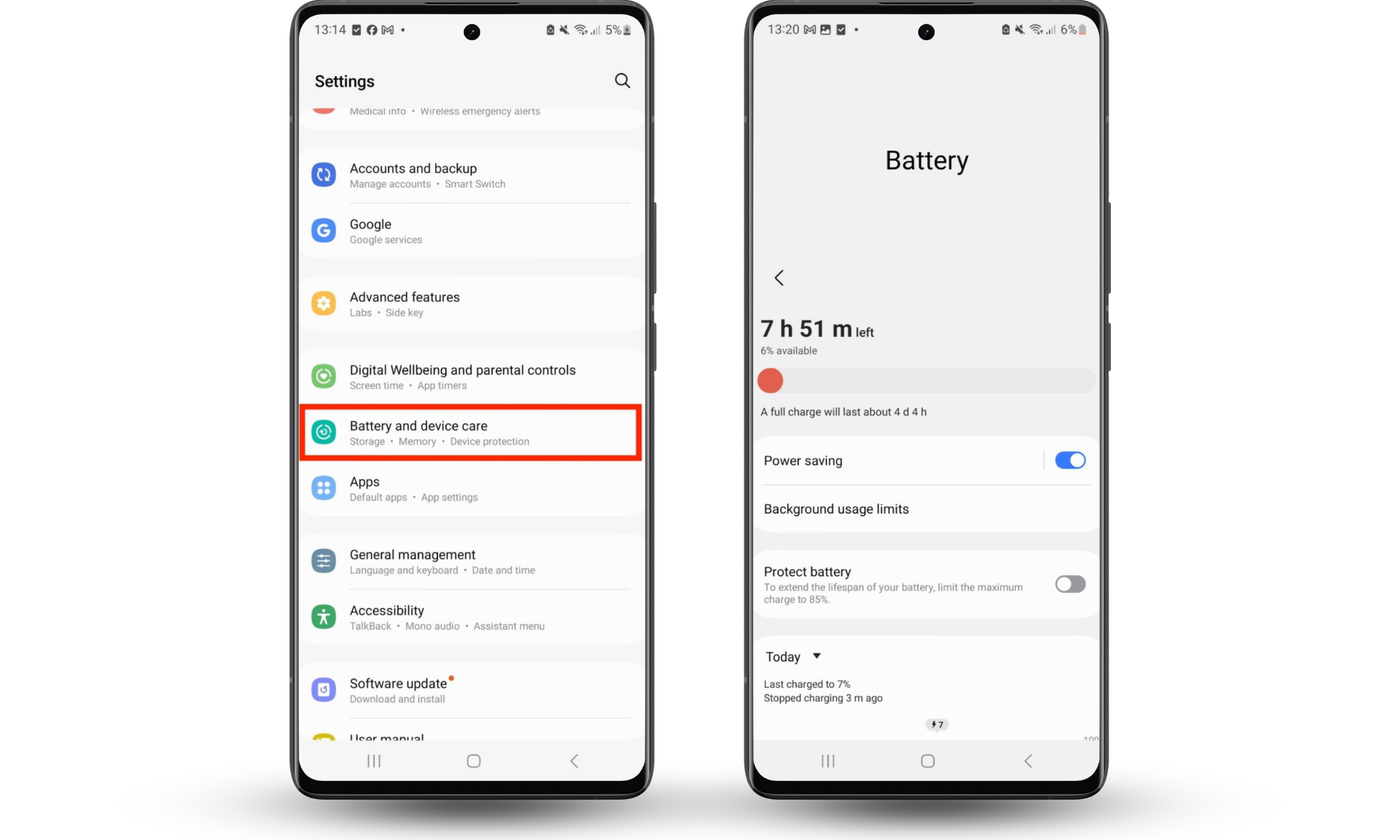
How to check battery usage on Android:
- Go to Settings > Battery and device care.
- Tap Battery. Do you recognize all of the apps mentioned?
Expert tip
If you’re currently charging your Android phone, or have just charged it, you may not be able to see battery usage by app.
5. Data theft
If someone has access to your phone, they can read your emails, copy files, and learn your usernames and passwords. This means they can steal your data very easily.
Data theft is a key indicator of whether your phone is connected to another device. Signs of someone stealing your data might include:
- Unexpected password resets or login notifications
- Missing or edited files and messages
- An increase in spam calls, text messages, or emails
- Emails or messages that threaten to reveal personal or sensitive information
6. Device slowdown
When your phone is connected to another device, it might run more slowly than usual—especially if it’s using a remote access app. Having another app running constantly can use a significant amount of your phone’s CPU, causing your phone to run more slowly than usual.
Expert tip
There are lots of other reasons that your phone might be running slowly or freezing. Perhaps your phone is old, running low on storage space, or your battery is low.
How to check if my phone is connected to another device
To check if your phone is linked to another device, review your Bluetooth and Wi-Fi connections, check your app permissions, and examine any connected devices in your Google and Apple Accounts. Look for suspicious apps, check your data usage, and scan for malware.
If these processes sound complicated, don’t worry. I’ll explain them in more detail, so you can tell if your phone is paired to another phone or device.
1. Check Bluetooth and Wi-Fi connections
Both Bluetooth and Wi-Fi connections can be exploited by hackers. To check for unknown devices paired to your phone via Bluetooth, you can look in your Bluetooth settings. To find suspicious devices on your Wi-Fi network, run a scan with Clario Anti Spy’s Spy cam detector.
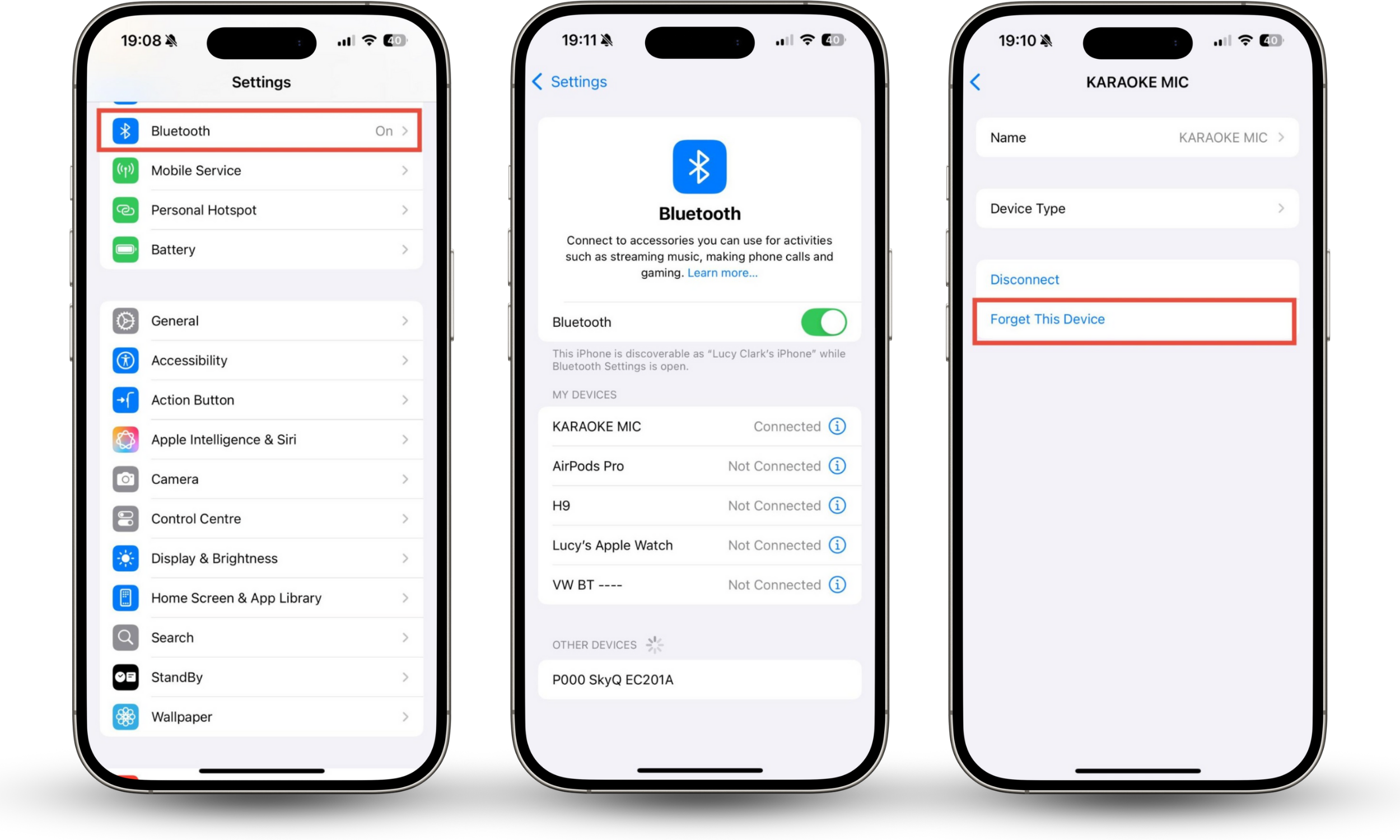
How to check your iPhone Bluetooth and Wi-Fi connections:
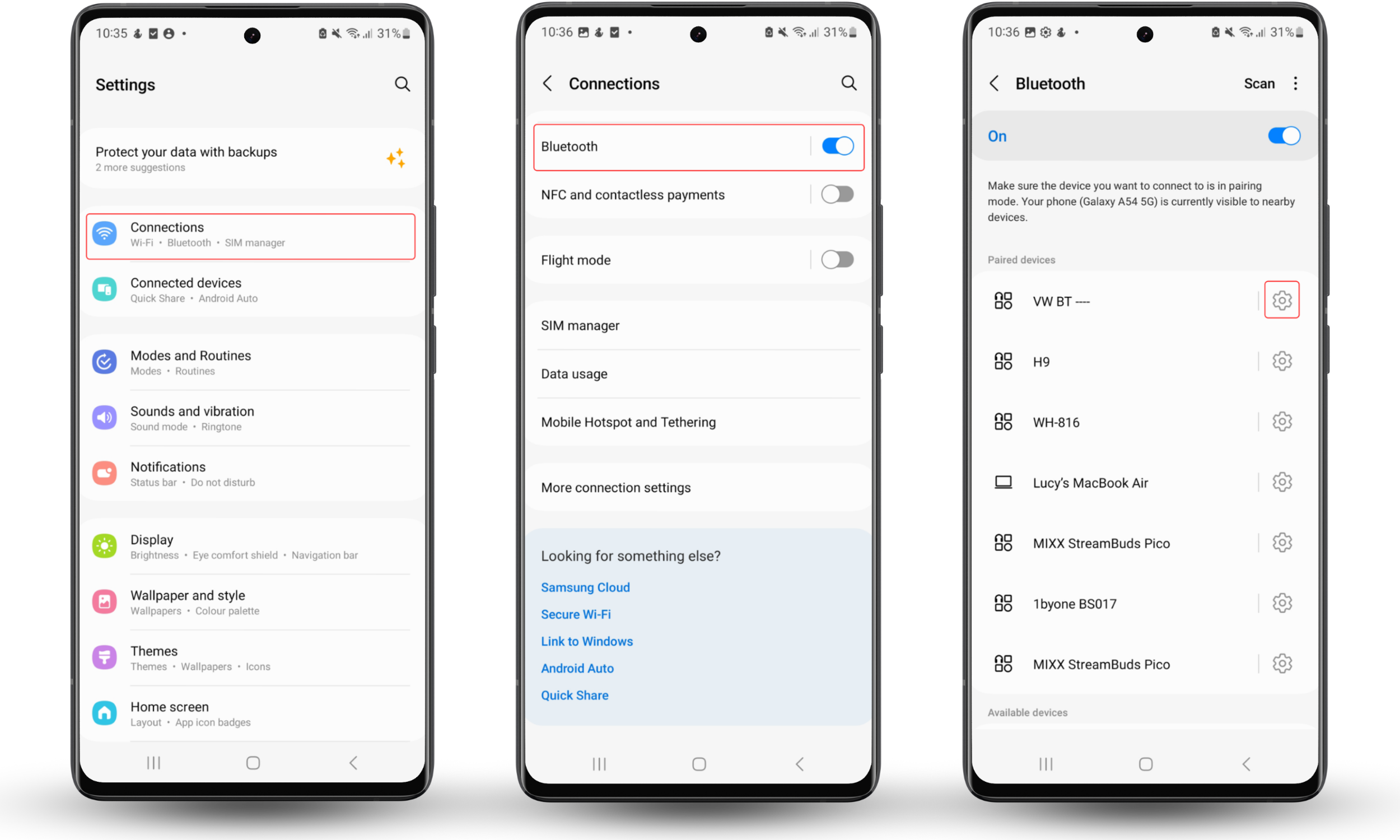
- Go to Settings > Bluetooth.
- If you see anything unfamiliar, tap the i symbol and select Forget This Device.
How to check your Android Bluetooth connections:
- Go to Settings > Connections.
- Tap Bluetooth.
- Check the paired devices. If you don’t recognize one, tap the cog icon and choose Unpair.
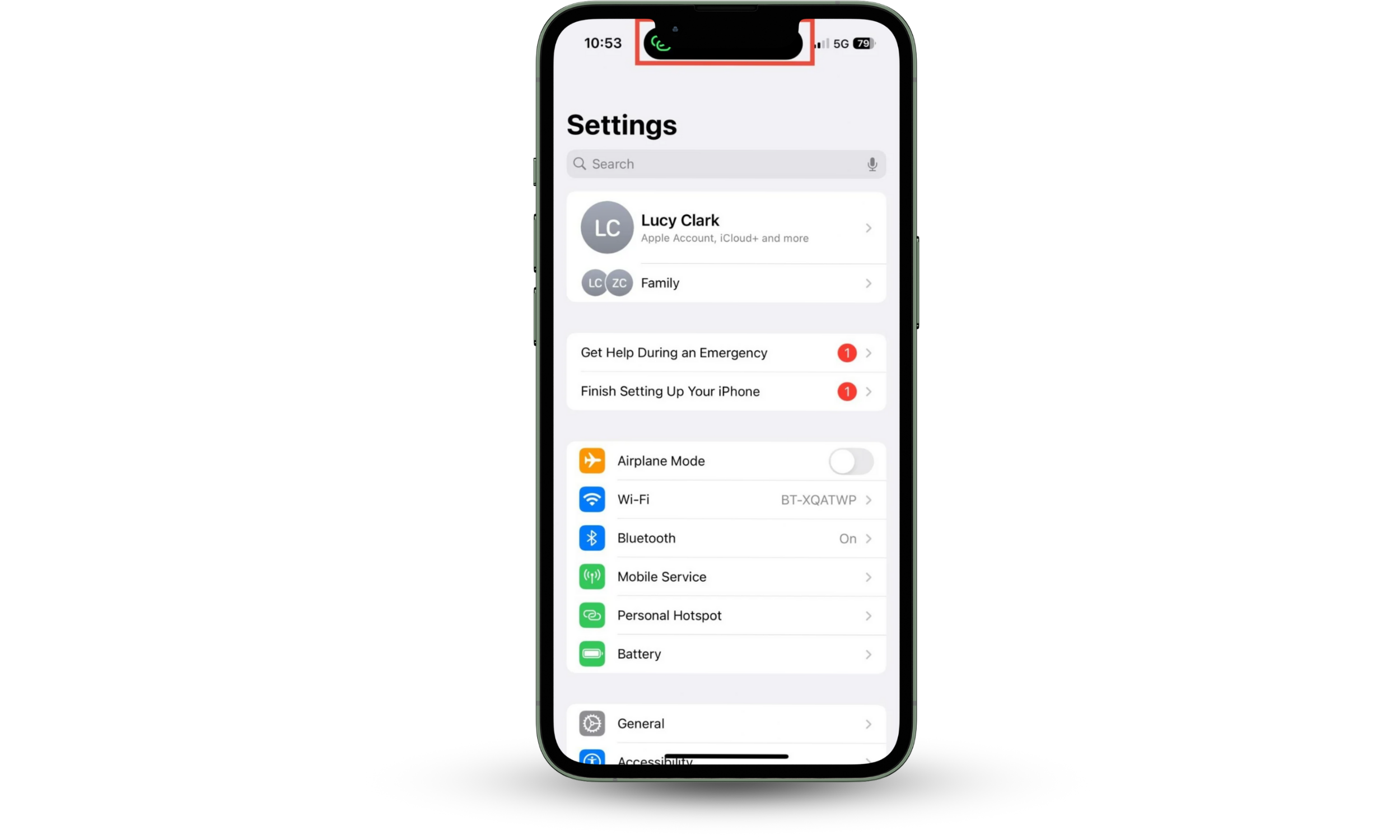
If someone is connected to your iPhone’s Wi-Fi hotspot, you’ll notice a hotspot symbol at the top of your screen. If you see this unexpectedly, check your settings.
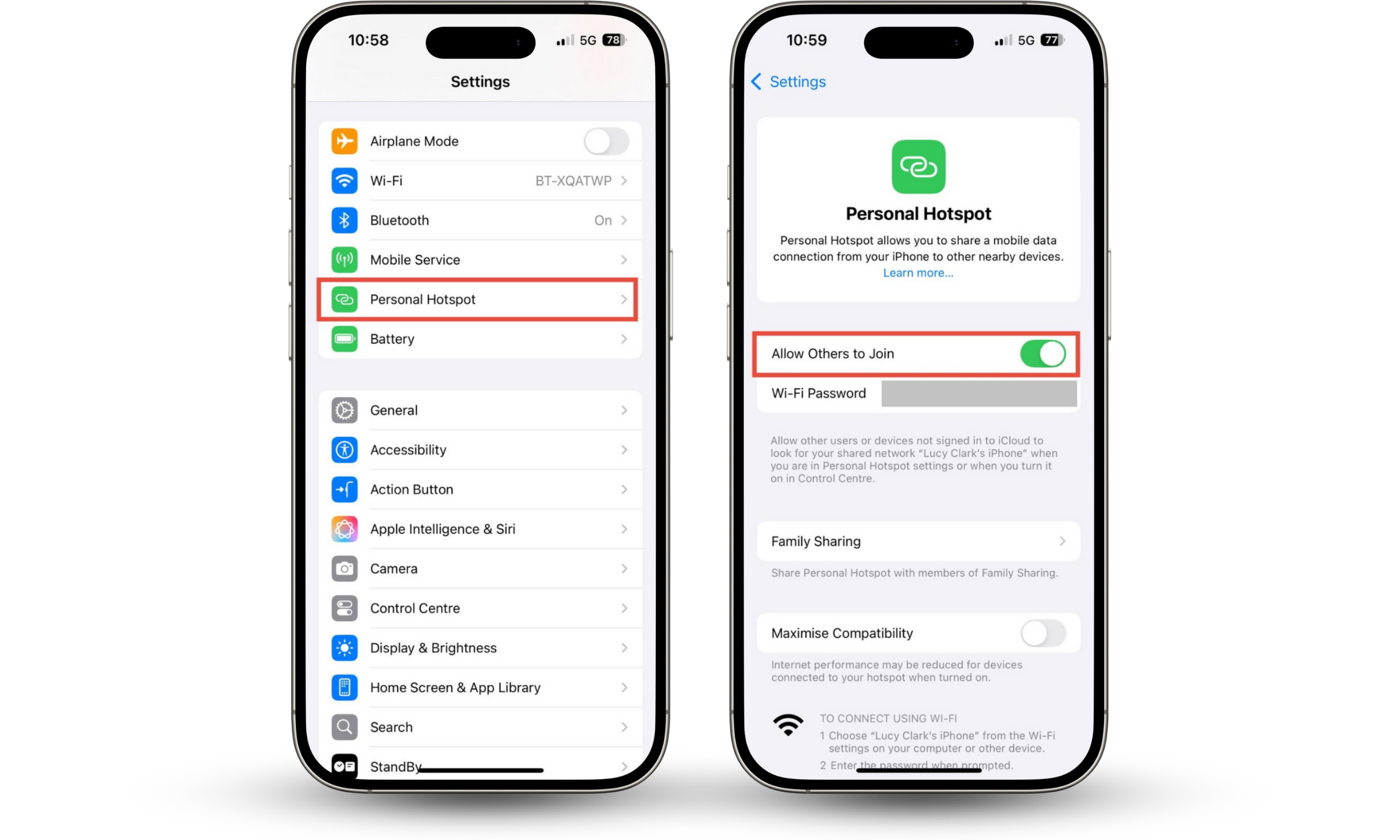
How to check your hotspot settings:
- Go to Settings > Personal Hotspot.
- Worried about unauthorized devices connecting? Disable the Allow Others to Join setting.
Hackers might also be able to steal information from your phone if they connect to your Wi-Fi network. Cybercriminals can intercept data that you send and receive if they’re on the same Wi-Fi network as you. This is a particular risk when using public Wi-Fi, but if multiple people have access to your home, someone could still attempt to intercept your information.
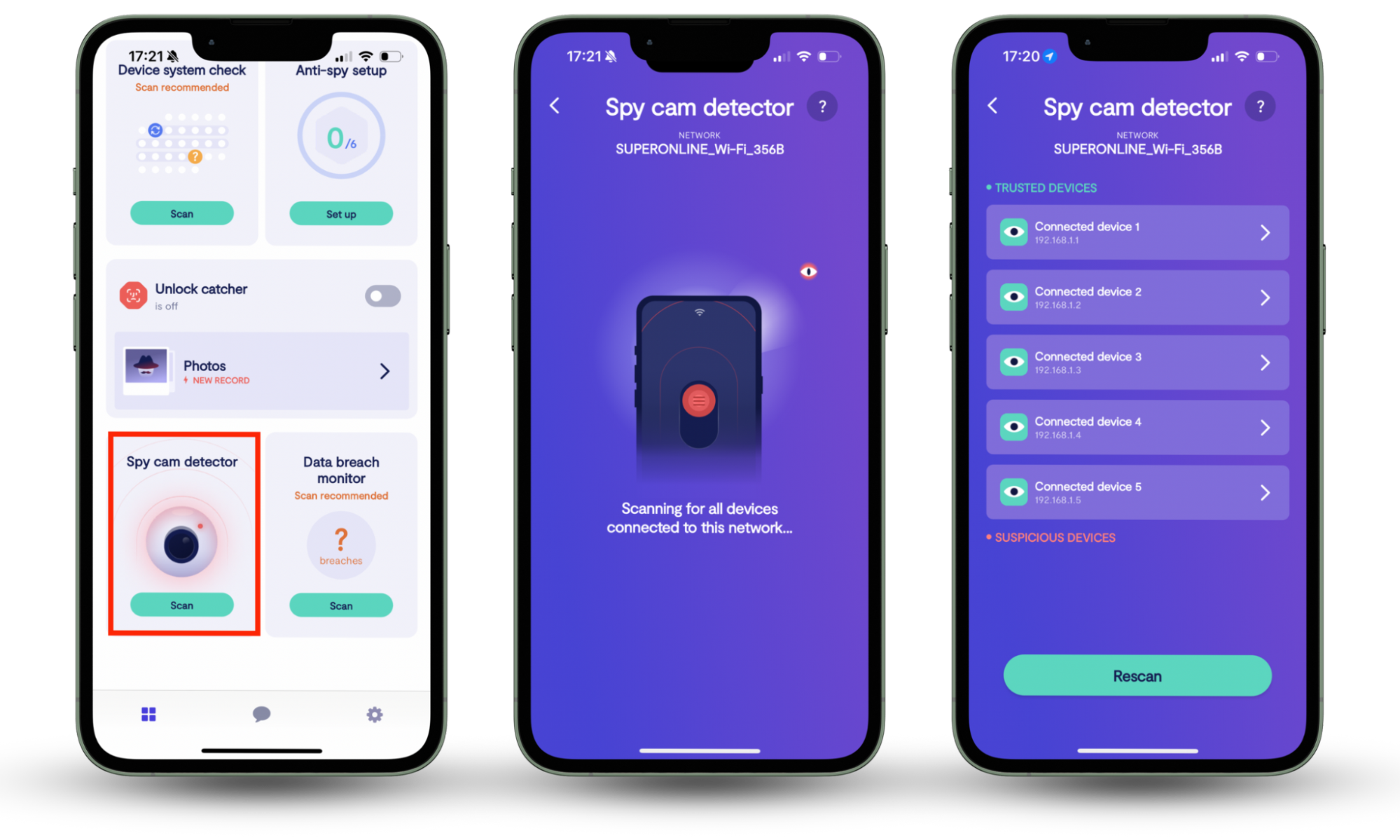
Worried that someone is connected to your home Wi-Fi network? Clario Anti Spy’s Spy cam detector can help you—not only does it detect spy cameras, but it can also alert you to other devices on your network.
How to check who’s connected to your Wi-Fi:
- Download Clario Anti Spy and subscribe.
- Under Spy cam detector, tap Scan.
2. Review app permissions
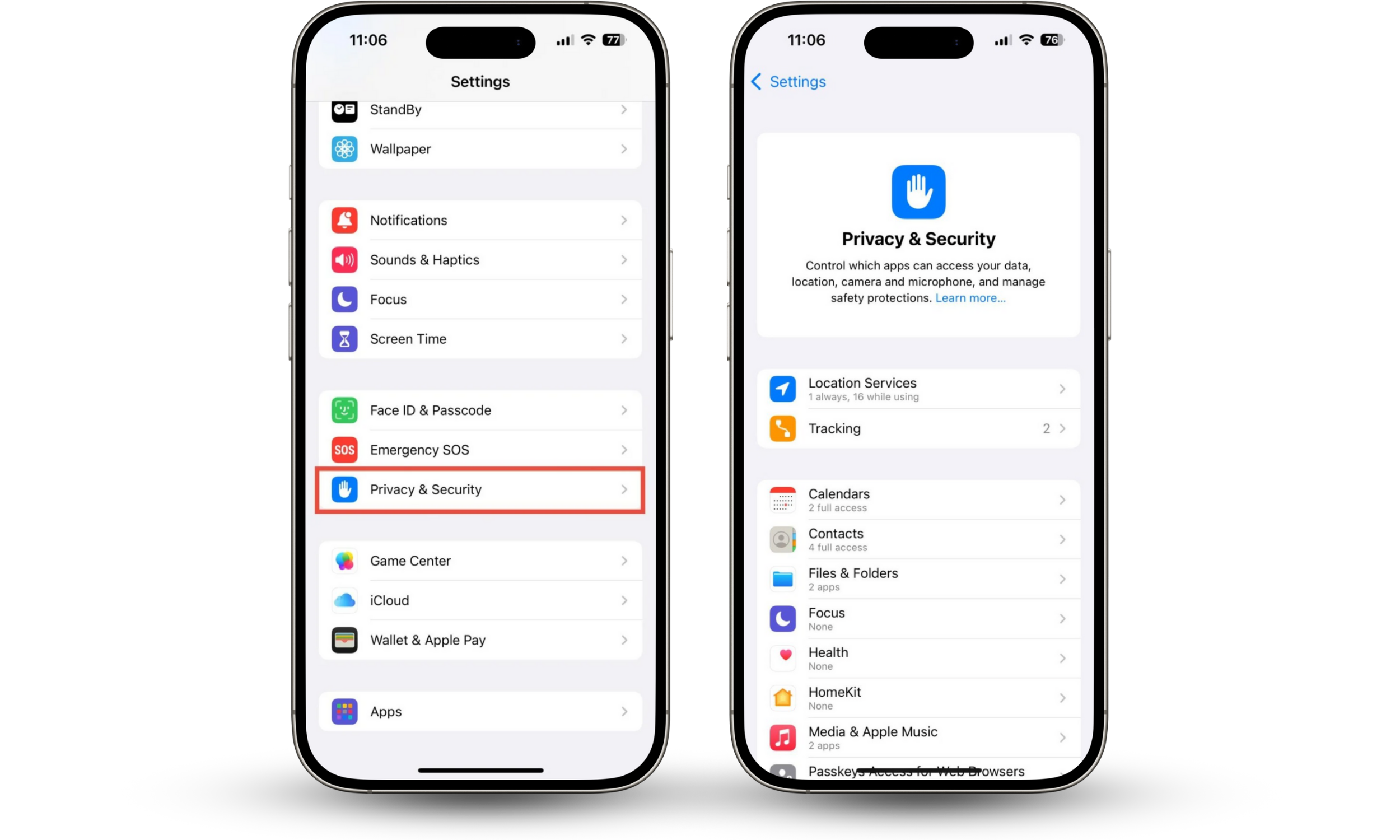
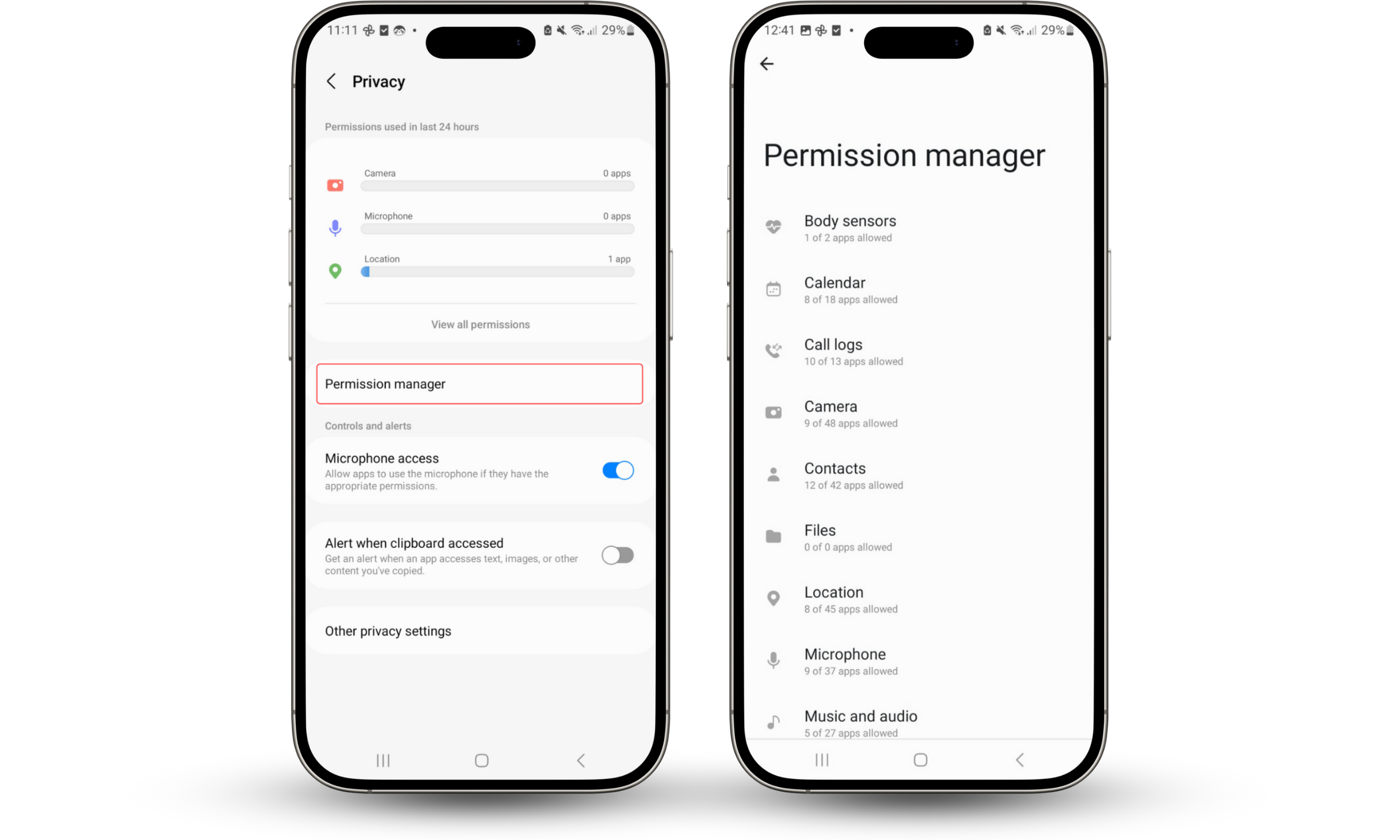
Reviewing app permissions can help you tell if your phone is linked to another device. Look for apps with unnecessary Bluetooth or local network access, and revoke suspicious permissions.
How to review app permissions on iOS:
- Go to Settings > Privacy & Security.
- Check individual permissions, and change them if necessary.
Worried that someone will use your iPhone’s location to spy on you? Learn how to make iPhone untrackable.
How to review app permissions on Android:
- Go to Security and privacy > Privacy > Permission manager.
- Check each permission individually, especially Nearby devices.
3. Review connected devices in Google Account (Android)
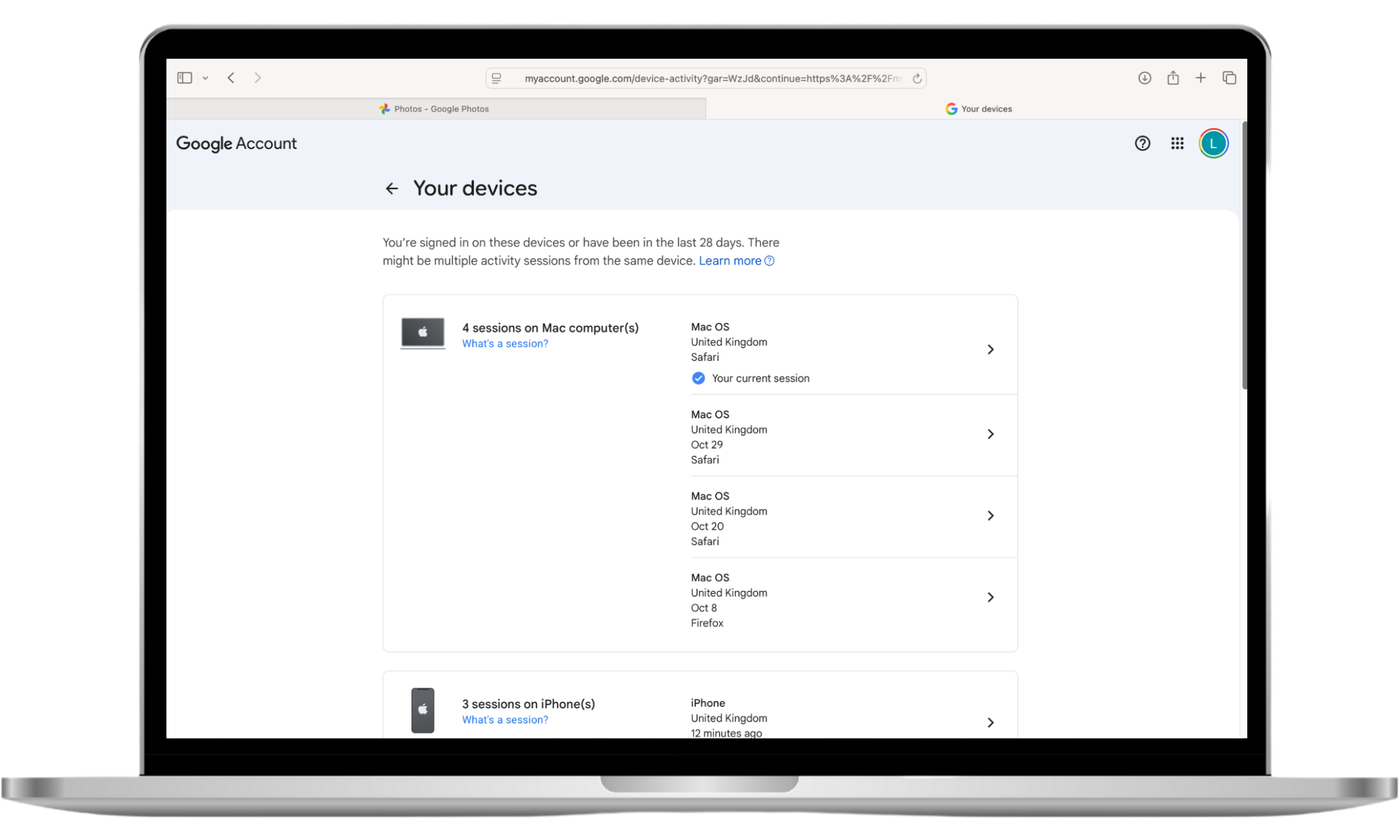
Check which devices have accessed your Google Account to tell if your phone is linked to another device that way. Google shows you every session that’s active for your account.
You may see a number of active sessions in your Google Account. Don’t worry—this doesn’t necessarily mean that someone else has access to your account. When I checked my active devices, I found three sessions listed, all from my iPhone, across different apps and browsers.
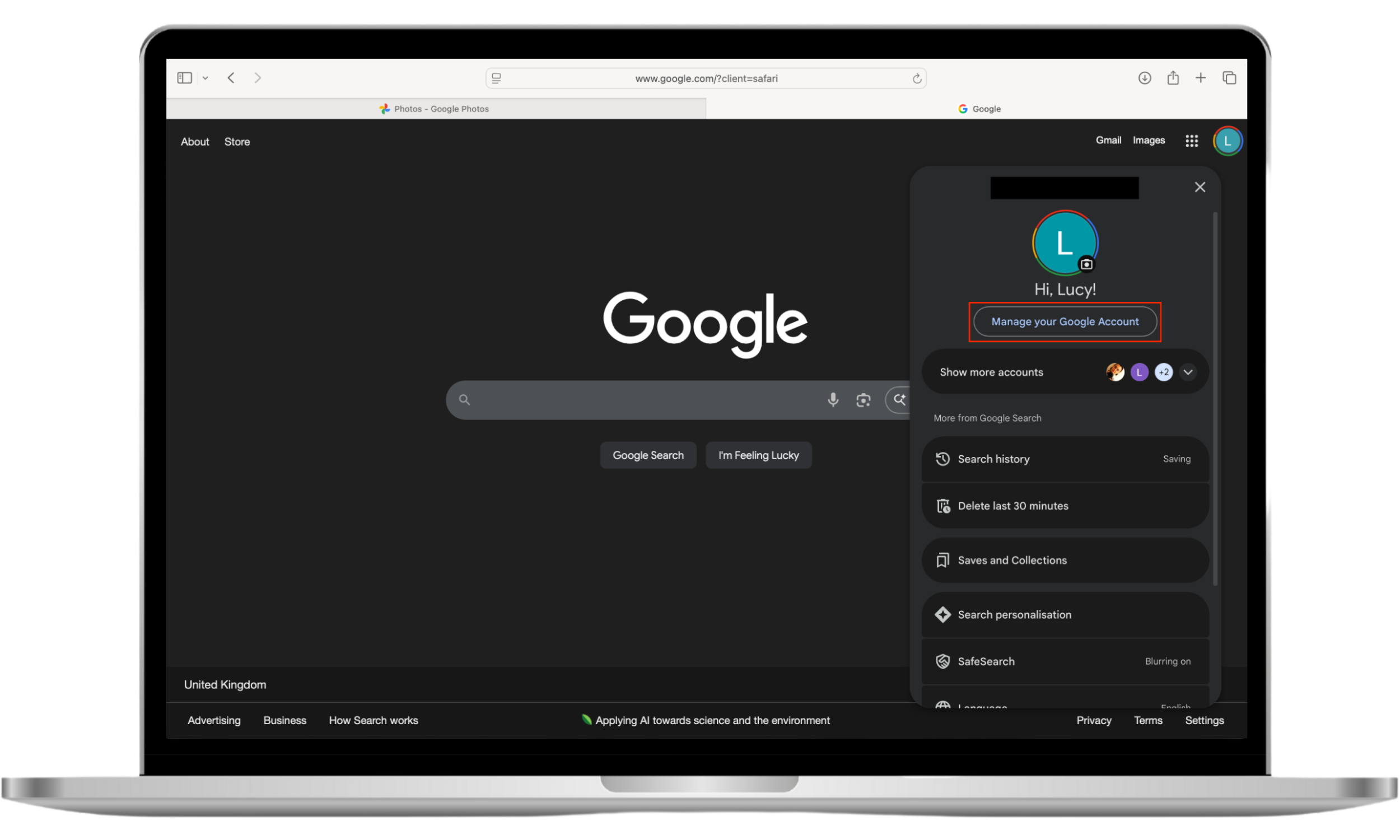
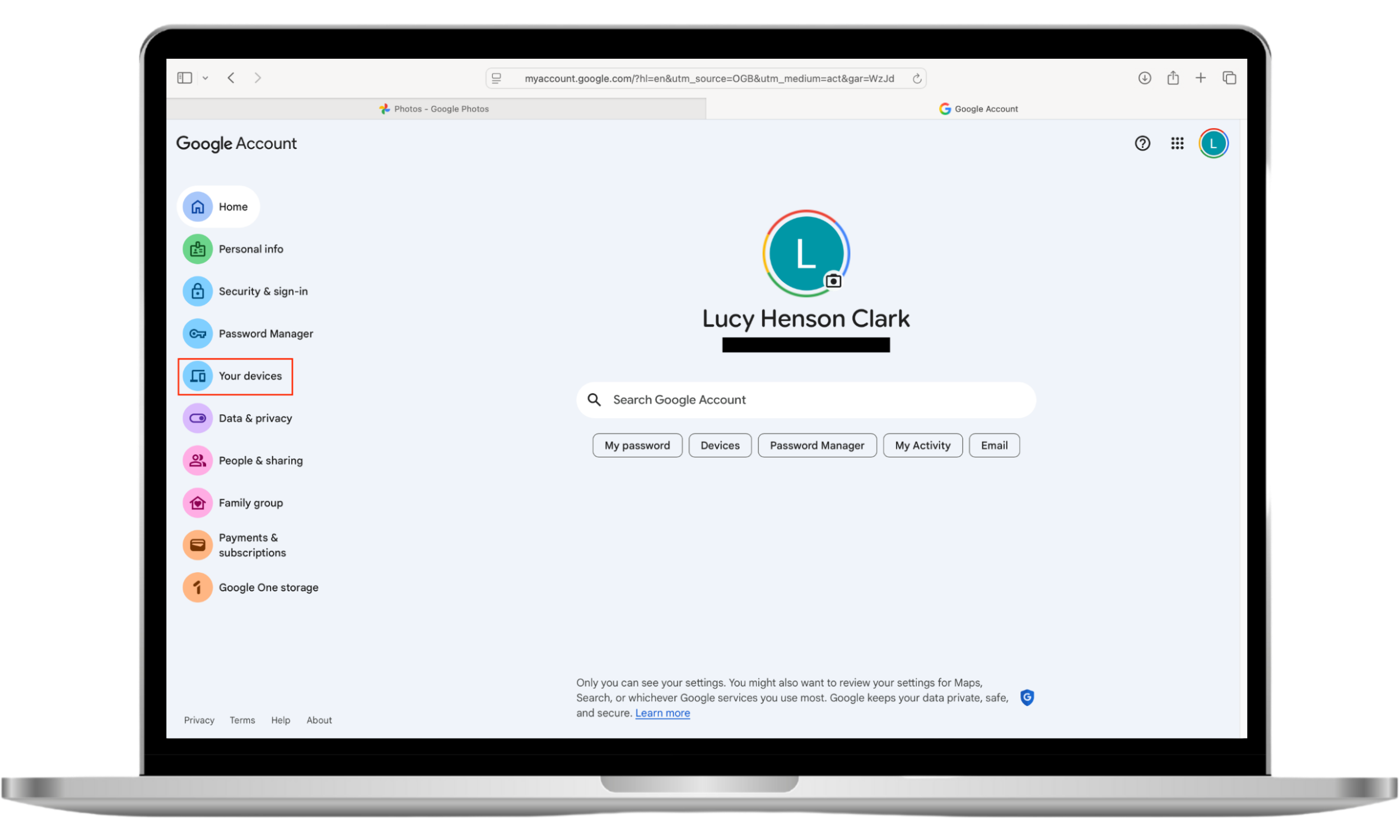
How to check connected devices on your Google Account:
- Go to www.google.com, click on your profile, and choose Manage your Google Account.
- Choose Your devices from the sidebar.
- Don’t recognize a device? Select it and choose Sign out.
4. Check connected devices in Apple ID (iPhone)
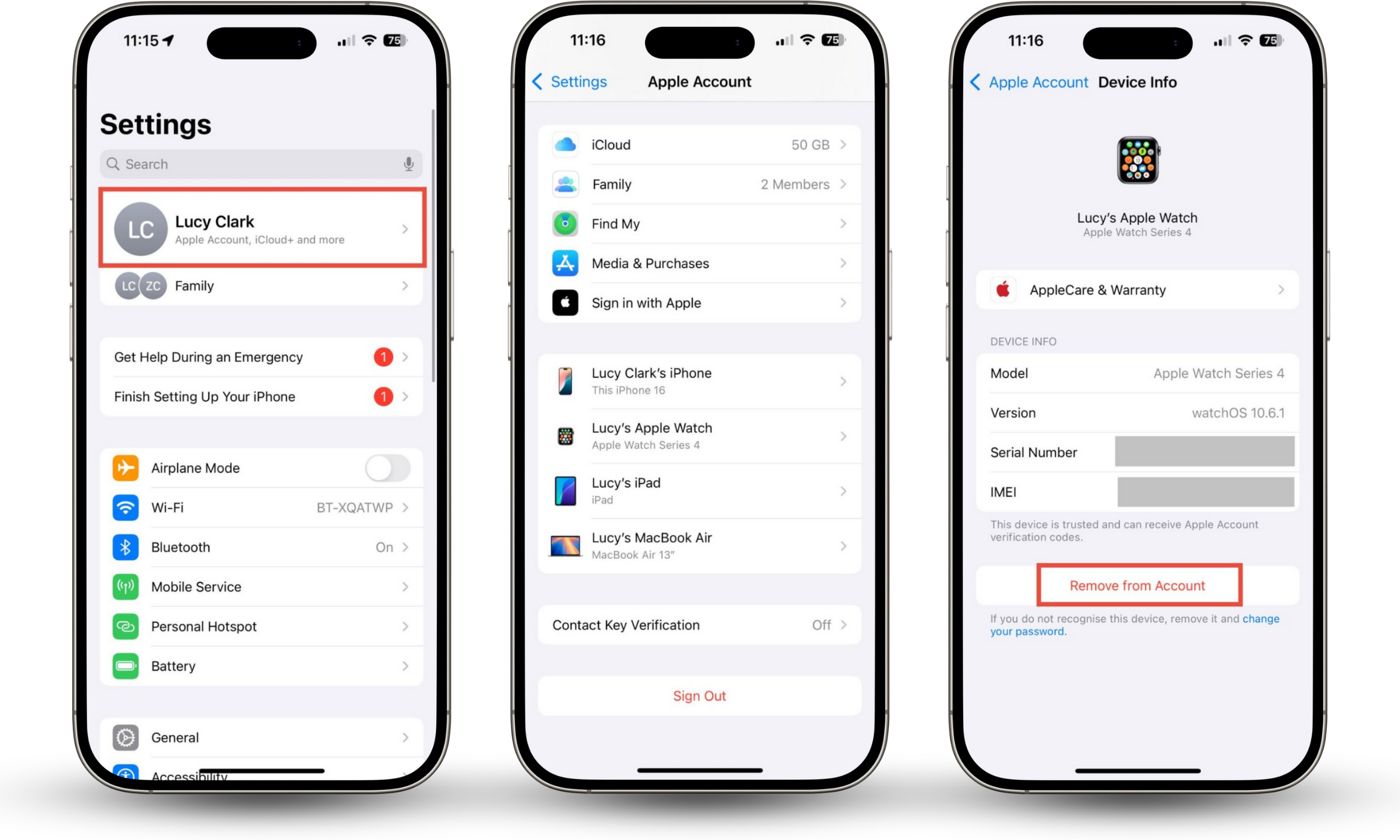
If you have an iPhone, you can check which devices are connected to your Apple Account. You should recognize all of the devices.
When I check connected devices, I see my iPhone, MacBook, iPad, and Apple Watch. Other devices in my home, like my partner’s phone, aren’t showing up because they’re not logged in to my Apple Account. So, if I ever noticed a new device in the list, I’d know that someone had fraudulently accessed my Apple Account.
How to check connected devices on your Apple Account:
- On your iPhone, go to Settings > Apple Account.
- Scroll to the bottom of the screen to see linked devices.
- Don’t recognize a device? Tap it and choose Remove from Account.
5. Check remote control apps
Remote access apps can be useful—for example, you might need them to let your IT support team connect to your phone and help you. However, hackers can also use them to steal your data.
To check if your phone is linked to another device via remote control software, look for apps like:
- AirDroid
- AirMirror
- AnyDesk
- AnyViewer
- TeamViewer
- Vysor
If these are active on your phone and you didn’t install them, this could indicate that someone is connected to your phone from another device.
If you use an iPhone, you’re at less risk from security breaches like this. This is because Apple’s security settings prevent apps from accessing information about other software—a process called sandboxing. However, if your device is jailbroken, you’re not protected.
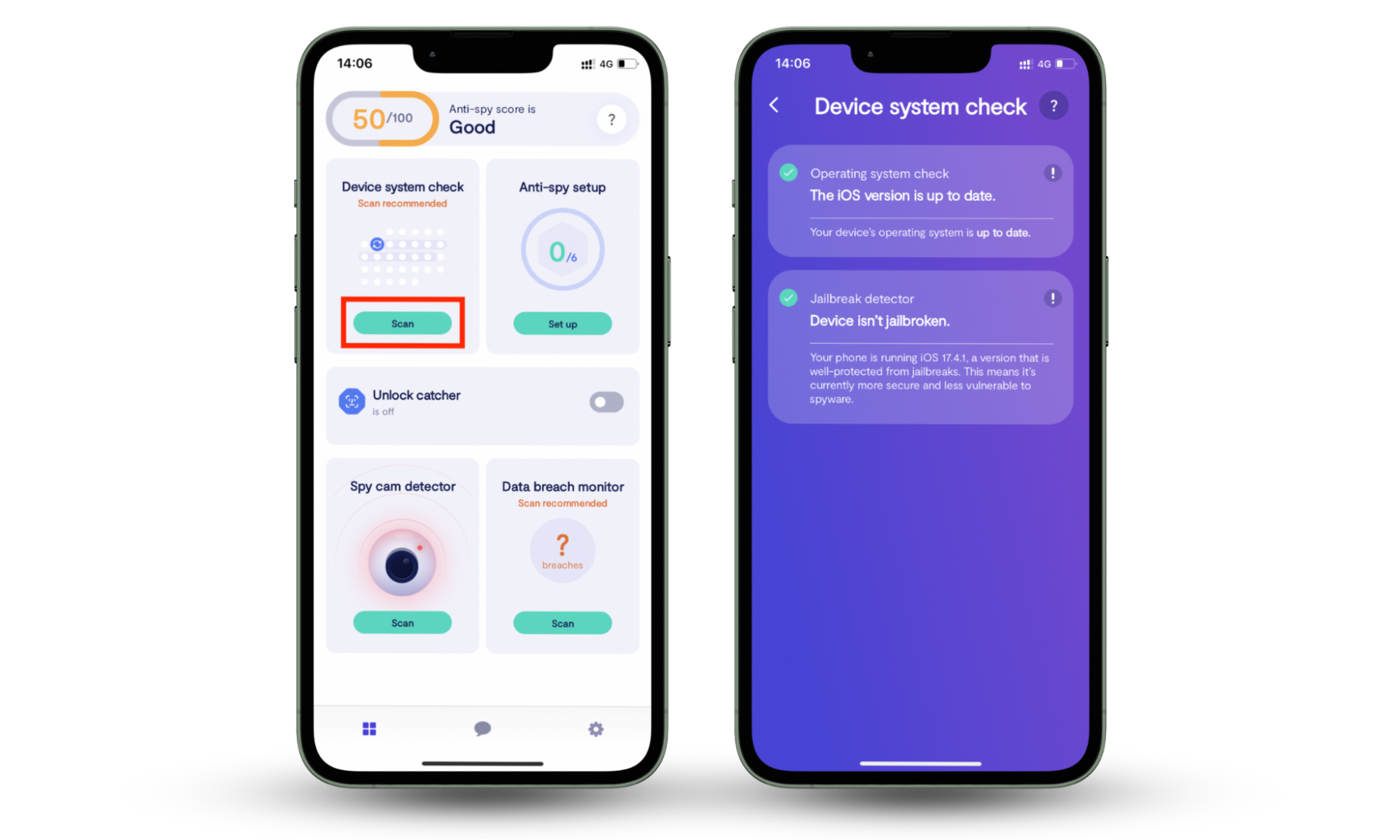
If you’ve bought a used iPhone, or someone else has access to your phone, you might not know whether it’s jailbroken. Fortunately, Clario Anti Spy’s Device system check can help you find out quickly.
How to check if your iPhone is jailbroken:
- Download Clario Anti Spy and subscribe.
- Under Device system check, tap Scan.
If you have an Android, you’re not protected by sandboxing, though. Learn how to check remote access apps on Android.
6. Look for suspicious applications
We’ve already talked about how to know if your phone is linked to another device via remote access apps. However, other apps can also be used to spy on you or steal data.
Look through your apps. Do you recognize them all? If you see something unfamiliar, research to verify whether it’s safe.
Remember, you can also use Clario Anti Spy’s Hidden app scan to check for suspicious software on your phone.
7. Check your data usage
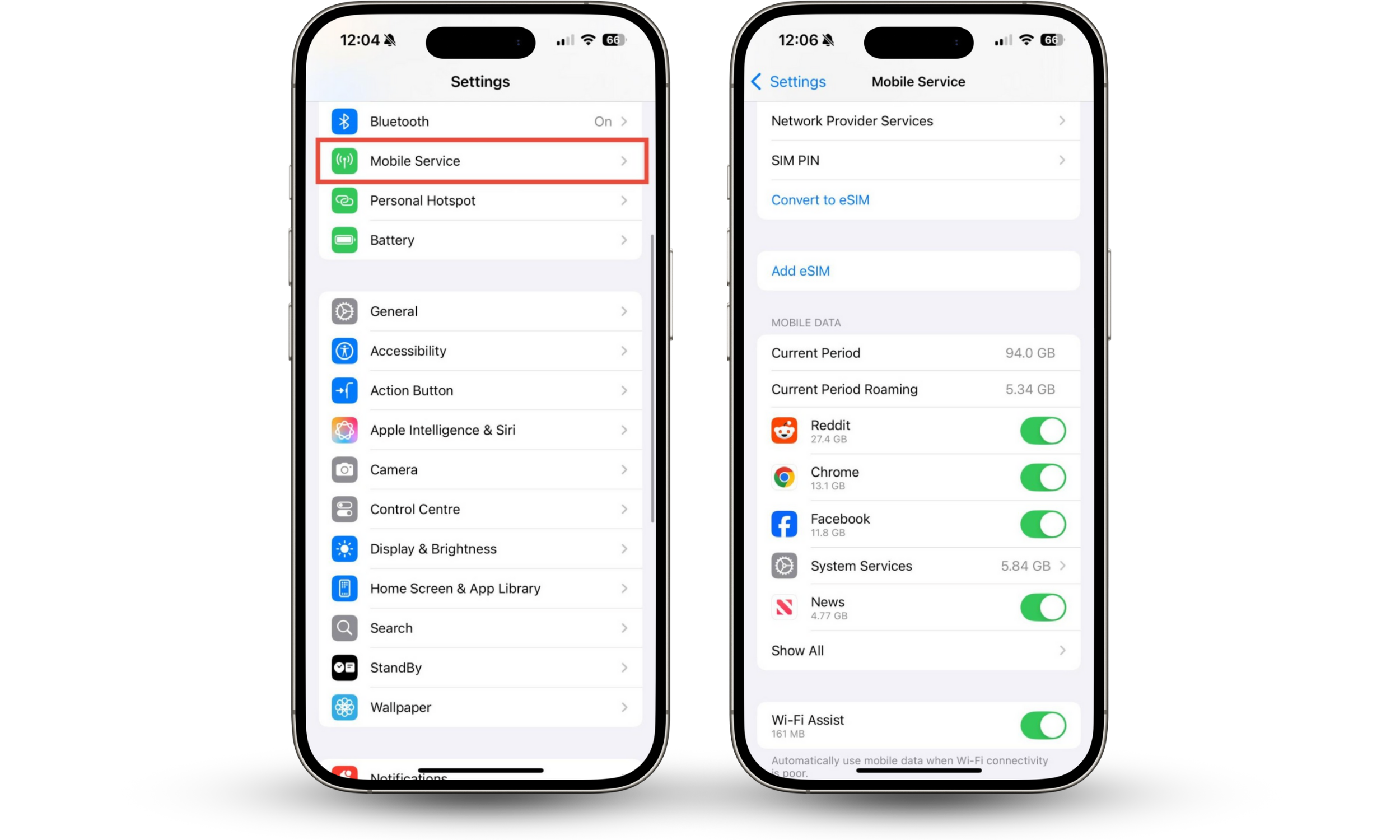
You might receive a message from your cell provider saying that you’ve used more data than usual—or you might not notice until your bill arrives. You can also check data usage on your phone itself.
How to check your data usage on iPhone:
- Go to Settings > Cellular or Mobile Service.
- Scroll to Mobile Data.
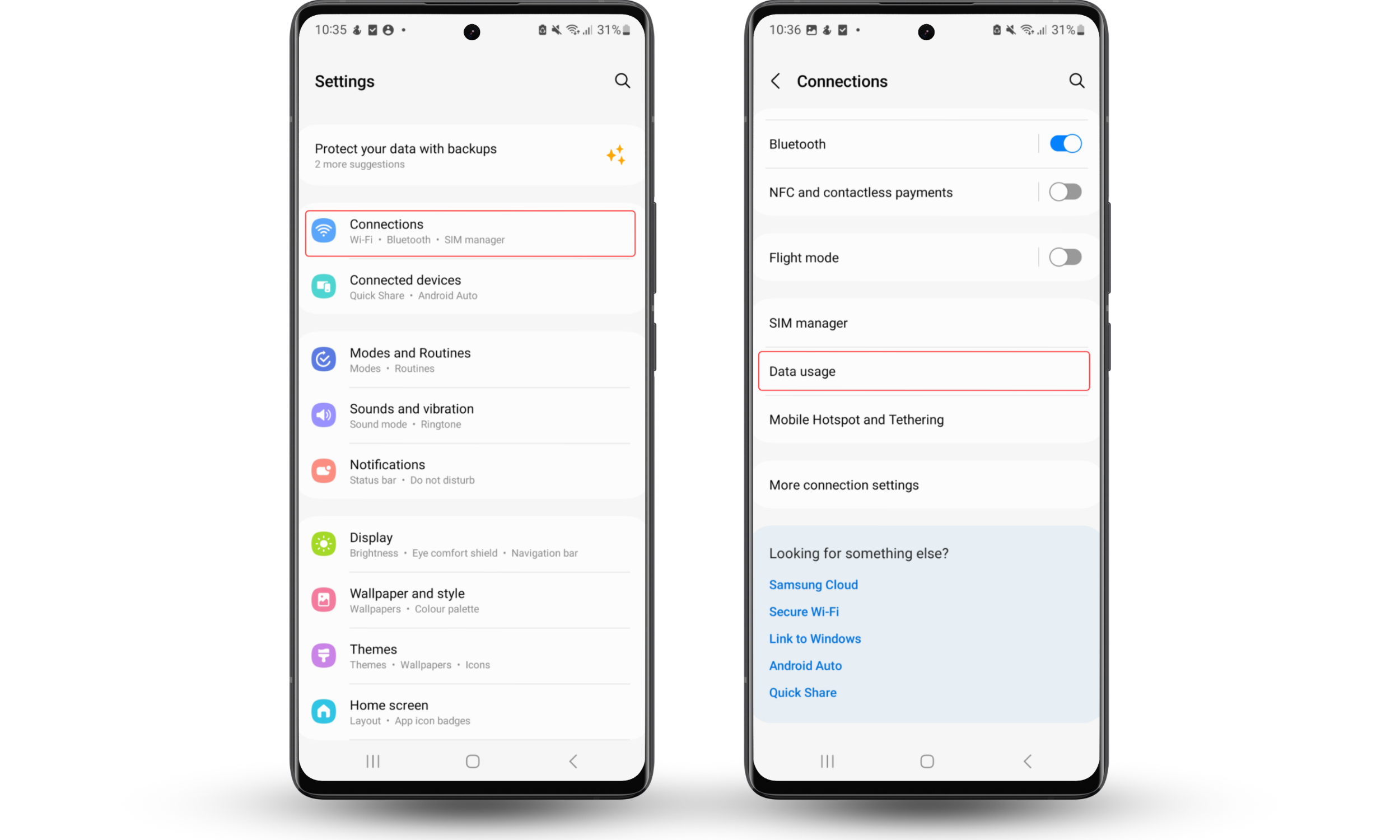
How to check your Android data usage:
- Go to Settings > Connections.
- Choose Data usage.
8. Run security scan
Worried about someone having unauthorized access to your phone? You should run a security scan. Your phone might be compromised by malware, allowing someone dangerous to connect to it. If you notice your phone behaving oddly, find out how to check your phone for spyware.
What to do if you find unauthorized pairing on your phone
If your phone is connected to another device without your permission, unpair it immediately.
Firstly, disable Bluetooth on your phone. This breaks the connection between your phone and the unknown device.
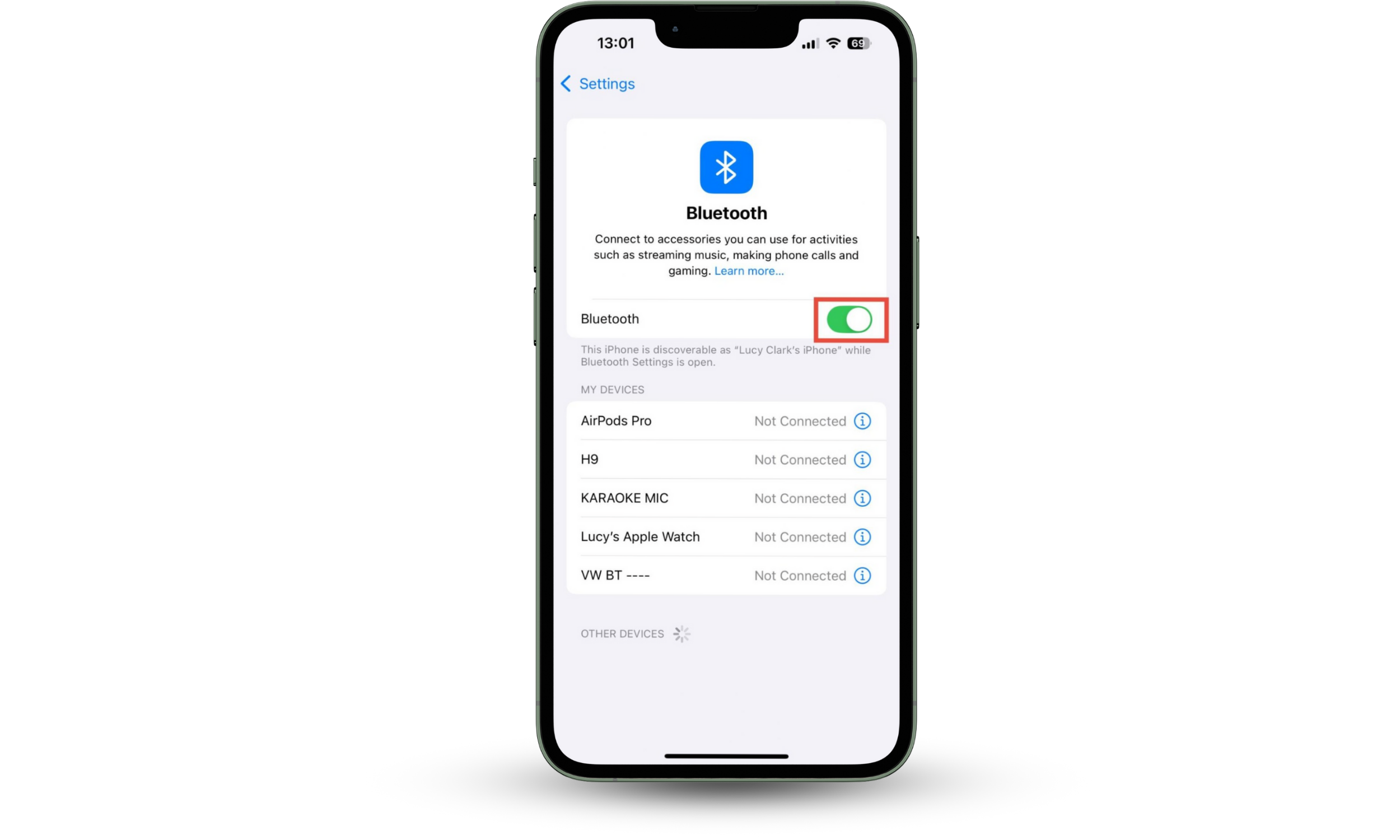
How to disable Bluetooth on iPhone:
- Go to Settings > Bluetooth.
- Toggle the slider to disable Bluetooth.
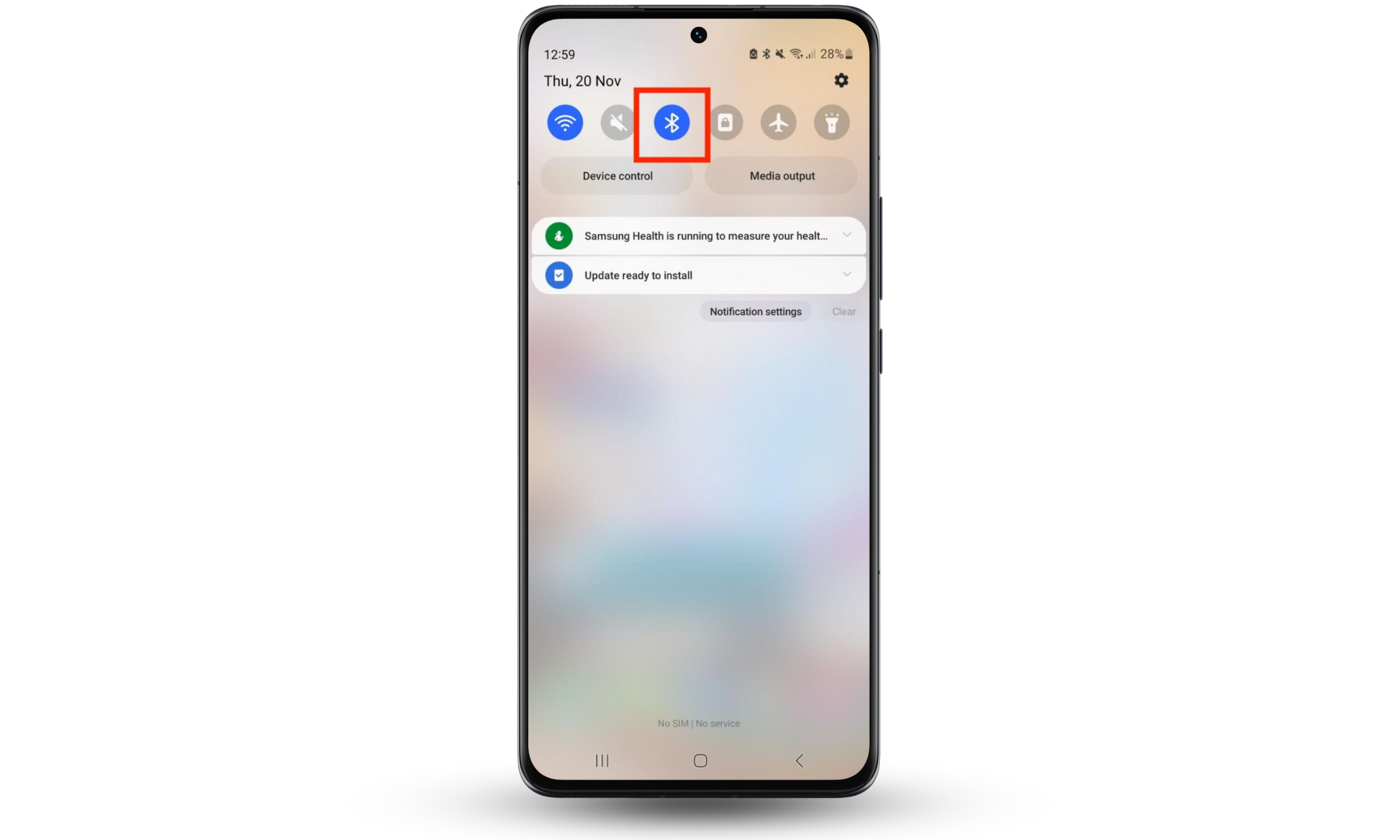
How to disable Bluetooth on Android:
- Open Quick Settings by dragging down from the top of the screen.
- Tap the Bluetooth icon to disable it.
Then, unpair the device. This will stop it from automatically connecting next time you enable Bluetooth.
Conclusion
You should know how to check if your phone is connected to another device. If someone has unauthorized access to your phone, they could steal financial information and private files, and even make calls or send messages impersonating you.
If you notice unauthorized connections to your phone, unpair them immediately. Uninstall remote access apps, and remove unknown devices from your Google and Apple Accounts.
To tell if your phone is linked to another device, check Bluetooth connections, review app permissions, and look at devices connected to your Apple and Google Accounts. Check for remote access apps, as well as other potentially malicious software. Clario Anti Spy’s Hidden app scan can help, checking for suspicious apps and permissions with just a few taps.