Table of contents
- Why phone security matters
- How hackers can get access to your phone
- How do you secure your phone from hackers
- 1. Use strong lock-screen security
- 2. Keep OS and apps updated
- 3. Download apps only from trusted sources
- 4. Review app permissions regularly
- 5. Enable two-factor authentication (2FA) everywhere possible
- 6. Use VPN and avoid untrusted networks
- 7. Disable unused wireless features
- 8. Use security / anti-malware apps
- 9. Recognize and avoid phishing attacks
- 10. Back up your phone regularly
- 11. Turn on Find My iPhone or Find My Device
- 12. Use password manager
- 13. Limit sensitive data stored on your phone
- Conclusion
Can phones really be hacked?
Phones are rarely “hacked” like in the dramatic movie scenes. Instead, attackers gain access through phishing, stolen credentials, data leaks, malicious apps, or installing spy software through brief physical access to the device.
Why phone security matters
When your phone is hacked, you most likely will not notice anything. Well, unless it’s ransomware. That’s why protecting your phone isn’t just about stopping viruses, but also about blocking access paths and spotting hidden changes before data loss.
If you fail to secure your phone, bad actors can gain access to your accounts, not just the device, and install malicious apps to access your camera, microphone, or location. Phishing can hijack authentication and lock you out of your accounts.
How hackers can get access to your phone
Hackers gain access to phones through phishing attacks, unsecured Wi-Fi connections, social engineering, malicious apps, or even SIM-swapping. Below, you see how hacking into a phone actually happens.
The most common and easiest ways your phone can be hacked are:
- Account takeover (most dangerous). If attackers access your email, Apple ID, or Google account, they can change passwords, sync data, and hijack authentication, ultimately gaining full control over your finances and data.
- Phishing and smishing. Fake delivery messages, security alerts, or login warnings trick users into entering credentials or approving access. Phishing is typically used to steal your credit card details or other sensitive personal data.
Less common but less serious:
- Spyware. If someone has your unlocked phone for a few minutes, they can install monitoring apps, change settings, or disable built-in protections. This is common in toxic relationship scenarios, less so in hacker attacks.
- Unsecured public Wi-Fi. Open Wi-Fi networks are often fake and designed to intercept traffic or redirect users to fake login pages. These pages are replicas of legit websites that require your credit card information or log-in via a Google account. This is how malicious actors can steal your data when you connect to an unsecured Wi-Fi network at the airport without using a VPN.
- SIM-swapping. Attackers transfer your phone number to a SIM they control to intercept verification codes. This requires personal data and approval from a carrier, so it’s often more targeted than random.
Rare but still possible:
- System-level compromise. Most frequently, users root their phones themselves to override OS restrictions, opening themselves up to malware and other cyber threats.
- Zero-click exploits. These attacks require no user action and target unpatched vulnerabilities. They’re uncommon and typically used against high-value targets, like politicians or celebrities.
Signs your phone is hacked
Unusually fast battery drain, data usage spikes, phone flickering, weird sounds during calls, phone heating up when idle, messages you did not send or calls you did not make, sluggish performance, and apps you do not remember installing.
How do you secure your phone from hackers
To secure your phone from hackers, start by guarding physical access, keeping software current, locking down accounts with MFA, and limiting permissions for each app. Most phone hacking relies on user action, misused permissions, or account compromise. This is why the steps below focus on prevention, early detection, and reducing damage if access is gained.
1. Use strong lock-screen security
Installing spyware and changing security settings almost always requires physical access. A strong lock screen is your first line of defense against someone who wants to spy on you. 0000 is not a reliable passcode.
Ways to set up a strong lock-screen security:
- Set a 6-digit PIN or alphanumeric passcode and avoid using patterns.
- Enable biometric authentication (Face ID, fingerprint).
- Set auto-lock to 30 seconds or less.
- Disable lock-screen previews for messages and emails.
- Require a passcode immediately after restart.
2. Keep OS and apps updated
Updates patch vulnerabilities known to hackers. Delaying updates leaves open doors that can be exploited with no user interaction.
How to keep OS and apps updated:
- Enable automatic OS updates.
- Enable automatic app updates in the App Store.
- Restart your phone after major updates.
- Remove apps that no longer receive updates.
- Avoid using phones that no longer get security patches.
Beware
If your phone is five years old or more, the manufacturer or OS provider may stop issuing security updates. Older devices may also lack enough storage to install critical updates, as they often shipped with limited built-in memory. When updates are no longer available, upgrading your hardware becomes the safest way to stay secure.
3. Download apps only from trusted sources
Malicious apps often appear legitimate, making it difficult to determine if an app is malicious. However, there is a rule of thumb to avoid installing spyware: only download apps from the App Store or Google Play. Apps installed outside trusted stores bypass important security checks and are harder to detect later.
How to avoid installing malicious apps:
- Install apps only from official app stores, such as the App Store and Google Play.
- Avoid sideloading unless essential.
- Check the developer name, not just the app name.
- Review app permissions before installing.
- Uninstall apps you don’t recognize or use.
4. Review app permissions regularly
Many apps remain installed long after you stopped using them, quietly retaining access to sensitive features. Review app permissions periodically and revoke access to the camera, microphone, location, contacts, or files unless it’s essential.
Tip
On Android, pay special attention to accessibility permissions, which can enable deep monitoring, allowing the app extensive control and visibility over your device's activity. On iPhone, review background activity and tracking permissions. Limiting permissions reduces what attackers can exploit, even if an app turns malicious or is compromised later.
Here’s how to check app permissions on an Android:
- Open Settings > Privacy.
- Select Permission Manager. On some phones, you may need to tap the three dots menu at the top right first.
- Select each permission to see which apps have access to it.
How to see app permissions on an iPhone:
- Open Settings, then Privacy & Security.
- Choose a category of information, like Camera, Microphone, Calendars, Motion & Fitness, Reminders, etc.
- Scroll through and turn off access for any app that doesn’t need that category of permissions.
5. Enable two-factor authentication (2FA) everywhere possible
Account compromise is one of the most common ways hackers gain access to phones. Enable two-factor authentication on email, Apple ID, Google account, banking apps, and cloud storage. Use authenticator apps or hardware keys over SMS codes, which can be intercepted during SIM-swapping attacks. 2FA prevents attackers from accessing accounts even if passwords are stolen through phishing or data leaks, stopping many phone-related breaches before they start.
Here’s how to set up 2FA for your Google account using the Google Authenticator app:
- Go to App Store or Google Play and download the Google Authenticator app.
- Open it and tap Get started.
- Select the Google account you want to secure and tap 'Add a code'.
- Open the Gmail app and tap your icon in the top-right corner.
- Tap Manage your Google Account and select Security and sign-in from the list.
- Choose 2-Step Verification, then select Authenticator.
- Tap Set up authenticator, then scan the QR code.
Now, the app will generate a one-time passcode for you to sign into your Google account. No one will be able to sign in from a new device without these codes.
6. Use VPN and avoid untrusted networks
Public Wi-Fi networks can expose your traffic or redirect you to fake login pages. Avoid logging into sensitive accounts on unfamiliar networks, especially in public places like cafés, airports, or hotels. Use a VPN if necessary. A VPN encrypts your connection and reduces the risk of interception, but it doesn’t prevent your phone from being hacked through phishing or spyware. Treat VPN as a privacy tool, not a security solution. Better yet, use mobile data instead of public Wi-Fi for logging into your account or conducting financial transactions.
7. Disable unused wireless features
Wireless features aren’t dangerous by default, but unnecessary exposure increases risk. Focus on smart configuration rather than turning everything off, as unmanaged auto-connect settings pose a more realistic risk than wireless technology itself.
What to do:
- Turn off Bluetooth when not in use.
- Disable Wi-Fi auto-connect.
- Turn off device discoverability (Airdrop on iOS).
- Review connected devices regularly.
8. Use security / anti-malware apps
Built-in protections don’t always detect spyware or hidden monitoring apps, especially those abusing legitimate permissions. Reputable security apps can scan for hidden threats, suspicious behavior, and system changes, such as rooting or jailbreaking. This is especially useful if you suspect monitoring, unusual battery drain, or unauthorized access. Security apps add a detection layer that complements OS protections rather than replacing them.
Tools like Clario Anti Spy add a dedicated detection layer. Its Hidden apps scan searches for spy apps and disguised software that operate in the background, while Device system check looks for outdated software and signs of rooting or jailbreak that weaken built-in security.
How to use Clario Anti Spy effectively:
- Install Clario Anti Spy and open the app.
- Run Hidden apps scan to identify apps that don’t appear in your app list or misuse permissions.
- Run Device system check to see if your Android or iPhone shows indicators of rooting or jailbreak.
- Review flagged results and remove or secure anything you didn’t intentionally install.
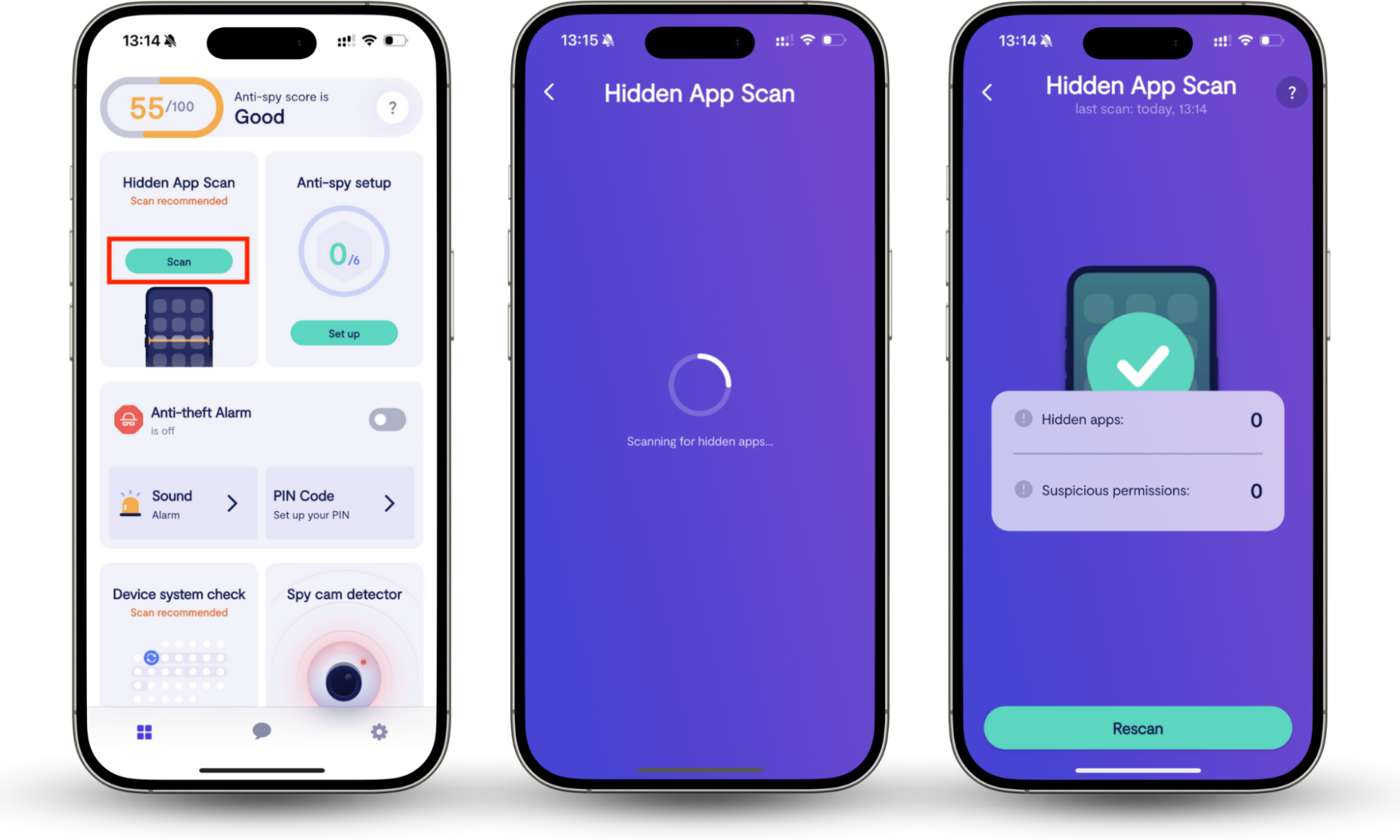
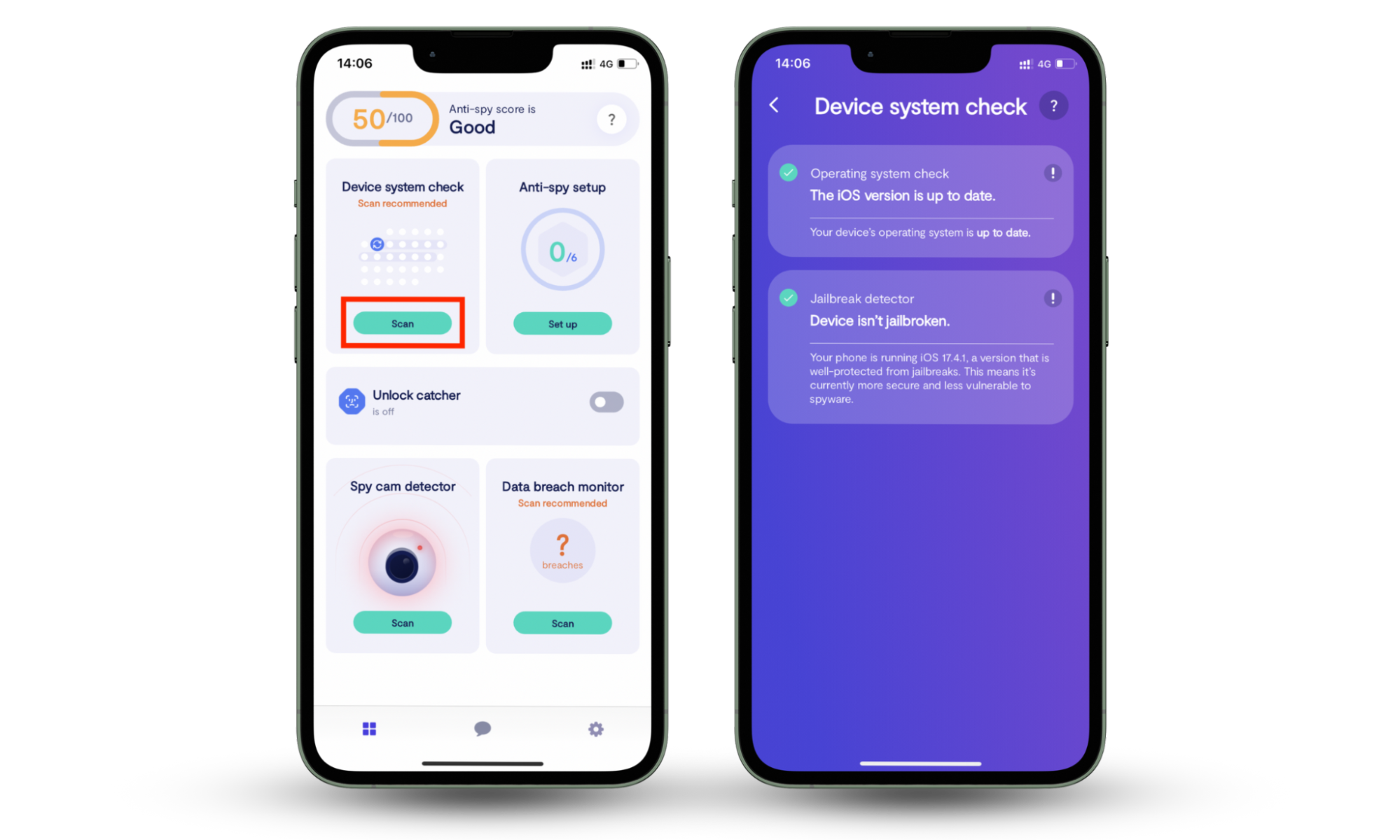
These checks will help you catch threats when you notice your phone acting weird. For a quicker solution, you can use codes to see if your phone is being tracked.
9. Recognize and avoid phishing attacks
Phishing is the most effective phone hacking technique because it exploits your trust, not your device. Learning to recognize phishing attempts will be your most effective protective measure. Phishing attempts usually include:
- urgent messages
- shortened links
- unexpected attachments
- login requests that push immediate action
- misspelled URLs
- links from unknown senders
To illustrate the frequency of phishing attacks, the APWG reports that over 1 million unique phishing attack sites were detected in the first quarter of 2025 alone.
10. Back up your phone regularly
Backups don’t prevent your phone from being hacked, but they limit damage. Backups ensure you don’t lose data, and you can restore it from a safe backup should an attack happen. If your phone is compromised, a reset from a clean backup may be the safest option.
Use encrypted cloud backups or a local encrypted backup for added control. Regular backups also protect against ransomware-like scenarios, device failure, or theft. Without backups, recovery becomes slow, incomplete, or often impossible.
11. Turn on Find My iPhone or Find My Device
Device-tracking tools like Find My on iOS let you locate, lock, or erase your phone remotely if it’s lost or compromised. If a phone falls into the wrong hands, remote lock and wipe can stop data exposure immediately. These tools also help confirm whether a device is genuinely lost or actively accessed by someone else.
12. Use password manager
Password reuse is a major reason phone-linked accounts get hacked. Use a password manager to generate and store strong, unique passwords for every account, thereby reducing the impact of breaches and phishing attacks.
They also help identify fake login pages by refusing to autofill credentials on fraudulent sites. Using a password manager is safer than saving passwords in notes, browsers, or memory.
13. Limit sensitive data stored on your phone
The less sensitive data is stored locally, the less attackers can steal. Avoid keeping unencrypted IDs, financial documents, recovery codes, or passwords on your phone. Use secure vaults or trusted services instead. Even with strong security, minimizing stored data reduces exposure if a phone is compromised or needs to be wiped.
Conclusion
If you’re wondering how to block hackers from your phone, simply secure the lock screen, keep software updated, protect accounts with strong authentication, limit app permissions, and stay alert to phishing attempts. Most phone hacking succeeds through small gaps, such as reused passwords, overlooked settings, or hidden apps, rather than advanced exploits.
For an extra layer of protection, use Clario Anti Spy, the best app to protect your phone from hackers. Its Hidden apps scan helps uncover spy apps and disguised threats, while Device system check flags signs of rooting or jailbreak that weaken system security. Run these checks regularly to catch issues early and secure your phone from hackers.