Table of contents
- Is Carrier Hub spyware or legit?
- Why is the Carrier Hub on my phone?
- What does the Carrier Hub app do?
- Core purpose of Carrier Hub
- What does Carrier Hub not do?
- What does “Carrier Hub processing requests” mean?
- When “processing requests” becomes a red flag
- Quick fixes if it’s stuck
- Is Carrier Hub a T-Mobile spy app?
- What permissions does and should Carrier Hub have?
- How to review app permissions on Android?
- Do I need Carrier Hub on my Android phone?
- What might break if you remove or disable Carrier Hub?
- How to safely uninstall or disable Carrier Hub?
- Disable Carrier Hub first
- Uninstall updates
- What if I can’t remove it?
- Did someone install Carrier Hub to spy on me?
- How to verify it’s the real app?
- How to check your phone for spyware?
- Verdict: Is Carrier Hub a spy app for Android?
Is Carrier Hub spyware or legit?
In most cases, Carrier Hub is a legitimate Android carrier component. It helps certain carriers manage network features and device provisioning. It usually isn’t spyware.
Carrier Hub becomes suspicious when you see signs that don’t match a normal carrier app, like you can’t trace its download source, it asks for odd invasive permissions, or your phone shows classic compromise symptoms, like overheating and lagging.
Quick check you can do right now:
- If Carrier Hub came preinstalled or arrived in a carrier update, it’s usually safe.
- If you installed it from a random link or an APK site, treat it as high risk.
- If you see duplicate Carrier Hub apps, treat that as a red flag.
Why is the Carrier Hub on my phone?
Your carrier usually preinstalls Carrier Hub, or it arrives via an update when your network settings change. Many people only notice it after a system update, a SIM change, or a carrier services update.
Carriers bundle helper apps, such as Carrier Hub, to support network provisioning, VoLTE, messaging configuration, carrier-specific features, and diagnostics.
My advice
If the app arrived through your carrier channel and doesn’t request invasive permissions, it’s usually a utility, not spyware.
What does the Carrier Hub app do?
Carrier Hub supports carrier connectivity features. It can handle background requests that relate to how your phone connects to your network.
If you want a broader sense of what suspicious apps look like, here’s a helpful reference on what spyware apps look like on Android.
Core purpose of Carrier Hub
Carrier Hub typically helps with:
- Carrier provisioning and network configuration
- Enabling or stabilizing carrier services after updates
- Background communications that support network features.
What does Carrier Hub not do?
Carrier Hub usually does not:
- Read your texts like stalker tools
- Record your calls
- Turn on your mic or camera by itself
- Watch your screen the way spyware does.
What does “Carrier Hub processing requests” mean?
“Carrier Hub processing requests” usually means the app is trying to complete a network or provisioning task. This can happen after you restart your phone, update Android, switch carriers, change SIMs, or lose and regain signal.
You may see “processing requests” when your carrier pushes a configuration update, Android updates carrier services components, your phone tries to re-register with the network after a coverage drop, or a provisioning task loops because it can’t complete.
When “processing requests” becomes a red flag
Treat “processing requests” status as suspicious if:
- The “processing requests” message appears constantly for days
- It started right after you installed an APK from outside Google Play
- You notice new accessibility permissions you didn’t enable
- You see repeated pop-ups, overlays, or weird UI behavior
- Your data and battery usage spike without a clear reason.
If your phone shows other strange system-level behavior, compare it to other common Android components people misread. For example, many users confuse System UI with spyware.
Quick fixes if it’s stuck
Here’s how to troubleshoot Carrier Hub safely on Android:
- Restart your phone and wait 5 to 10 minutes for provisioning to finish.
- Update your apps in the Google Play Store, especially carrier-related services.
- Open Settings, tap Apps, then find Carrier Hub.
- Tap Storage, then tap Clear cache.
- If the issue continues, tap Force stop, then restart your phone.
The Carrier Hub app itself is usually legitimate. The real concern is often a different app that hides in your phone and uses a system-sounding name to blend in.
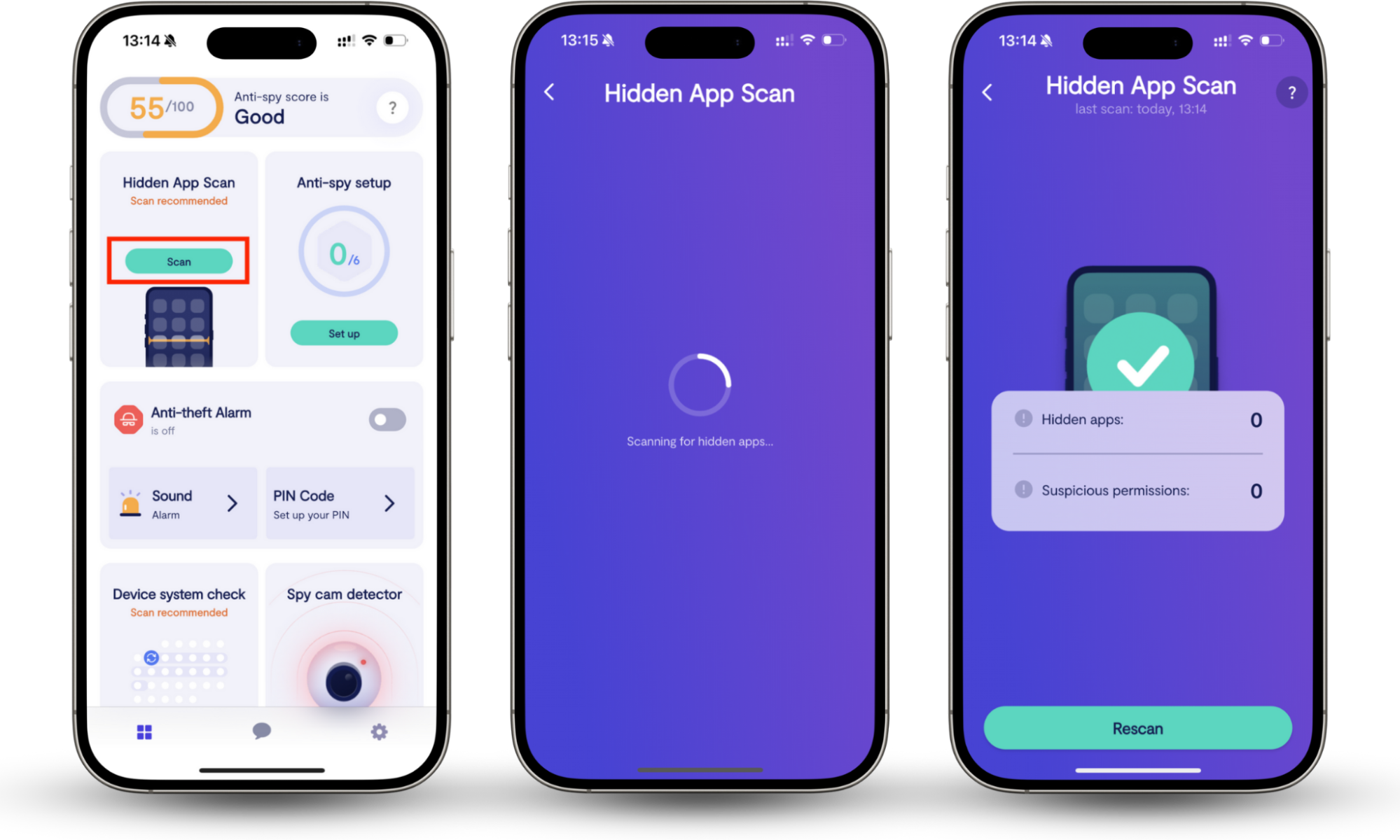
Clario Anti Spy is an anti-spyware app developed by Clario Tech. Its Hidden app scan helps you find apps that hide their icons, are hidden from your home screen, or mimic system utilities.
Use it when you see a duplicate Carrier Hub app, or the app appears after you installed something from outside Google Play. Also, when you notice unusual pop-ups, overlays, or permissions, or you simply want peace of mind without digging through dozens of system entries.
Here’s how to check for hidden spyware on Android with Clario Anti Spy:
- Install and open Clario Anti Spy.
- Tap Hidden app scan.
- Review apps flagged as hidden, masked, or suspicious.
- Remove flagged apps, then change passwords for key accounts.
If you want examples of apps that actually cross the line, here’s a list of spyware apps you should stay away from.
Is Carrier Hub a T-Mobile spy app?
Many T-Mobile users notice the Carrier Hub app due to carrier service updates or network transitions. You may see Carrier Hub on T-Mobile because your device uses carrier provisioning packages, your phone received carrier services updates after a network change, or your device model ships with carrier utilities preinstalled.
If you use T-Mobile and feel uneasy, focus on verifiable checks:
- Confirm the install source and app details.
- Review app permissions.
- Check battery and data usage patterns.
- Look for duplicate apps or unknown admin access.
If you also see web components behaving strangely, compare their behavior to another misunderstood Android component: Is Android system webview a spy app?
What permissions does and should Carrier Hub have?
Depending on your phone, your Carrier Hub app might request access to:
- Network
- Background data usage
- Phone-related status permissions
- System interaction permissions tied to carrier services.
Treat these as higher risk when your Carrier Hub app requests:
- Accessibility service enabled
- Notification access for unknown reasons
- Device admin privileges you didn’t set
- Camera or mic access without a clear carrier feature.
My advice
Judge the pattern. A utility with network access is standard. Carrier Hub access to accessibility control is not.
How to review app permissions on Android?
Here’s how to check Carrier Hub permissions on Android:
- Open Settings.
- Tap Apps.
- Find and tap Carrier Hub.
- Tap Permissions.
- Remove anything that feels unrelated.
Do I need Carrier Hub on my Android phone?
Most people don’t need to interact with Carrier Hub. If it behaves normally, you can leave it alone.
| Keep Carrier Hub if: | Disable Carrier Hub if: |
| You don’t see a repeated “processing requests” status. | It loops “processing requests,” and fixes don’t help. |
| Your battery and data use look normal. | It drains battery or data in a way you can confirm. |
| It came preinstalled or arrived via carrier update. |
What might break if you remove or disable Carrier Hub?
Disabling or removing Carrier Hub can interfere with carrier provisioning, so your phone may struggle to automatically configure network settings after a SIM change, a system update, or a network reset. On some devices, this can affect features such as VoLTE, Wi-Fi calling, visual voicemail, RCS messaging, or carrier-based 5G optimizations, and you might need to manually reconfigure network settings or contact your carrier to restore them.
If you see launcher or navigation components acting odd, people often misread the Quickstep app as spyware.
How to safely uninstall or disable Carrier Hub?
First, disable it, then uninstall. Follow the instructions below.
Disable Carrier Hub first
Here’s how to disable Carrier Hub on Android:
- Open Settings.
- Tap Apps.
- Tap Carrier Hub.
- Tap Disable.
- Restart your phone and monitor battery and data for 24 hours.
Uninstall updates
Here’s how to uninstall Carrier Hub updates:
- Open Settings.
- Tap Apps.
- Tap Carrier Hub.
- Tap the More menu.
- Tap Uninstall updates, then restart your phone.
What if I can’t remove it?
If Android blocks removal, that’s normal for carrier utilities. Focus on disabling, clearing cache, and verifying you don’t have a lookalike spyware app.
Did someone install Carrier Hub to spy on me?
A stalker usually won’t install the genuine Carrier Hub to spy on you. The realistic risk is spyware pretending to be Carrier Hub. Attackers love boring names. A malicious app can name itself Carrier Hub to blend in, or use a similar icon to trick you.
How to verify it’s the real app?
Use checks you can verify fast:
- Confirm the install source looks legitimate.
- Watch for duplicates.
- Review permissions, especially accessibility and admin access.
- Check for overlays, forced redirects, and persistent pop-ups.
Here’s how to confirm Carrier Hub details on Android:
- Open Settings.
- Tap Apps.
- Tap Carrier Hub.
- Tap App details or App info.
- Review the install source, permissions, and battery usage.
How to check your phone for spyware?
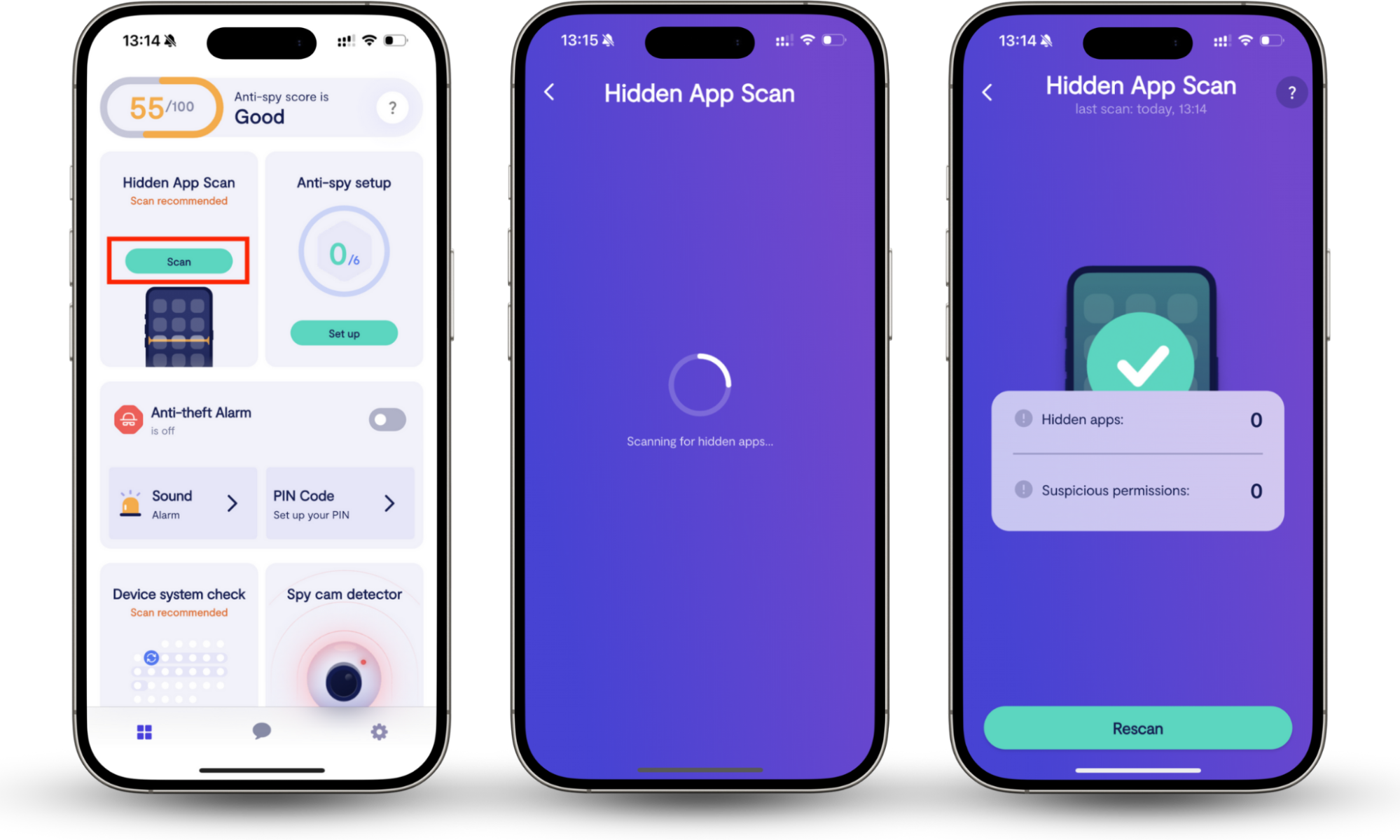
Here’s how to check for hidden spyware on Android with Clario Anti Spy:
- Install and open Clario Anti Spy.
- Tap Hidden app scan.
- Review apps flagged as hidden, masked, or suspicious.
- Remove flagged apps, then change passwords for key accounts.
Verdict: Is Carrier Hub a spy app for Android?
Carrier Hub usually isn’t spyware. In most cases, it’s a legit carrier component on Android that supports network provisioning. The real risk comes from lookalike spyware that uses a system-sounding name to hide.
If you want certainty, use Clario Anti Spy’s Hidden app scan to find apps that hide in plain sight and confirm whether the Carrier Hub app is real or spyware.