Table of contents
- Free vs. paid antivirus software: What’s the difference?
- Free vs. paid antivirus: quick comparison
- Free antivirus software features
- Paid antivirus features
- All in all, should you pay for antivirus protection?
Free vs. paid antivirus software: What’s the difference?
The main difference between paid and free antivirus is the range of features they offer. Free antivirus software focuses on core malware protection, such as detecting, blocking, and removing malicious files or programs. Paid antivirus solutions build on this foundation by adding broader security layers like phishing protection, identity monitoring, VPN access, password management, and multi-device coverage. In practice, the right choice depends on how you use your devices and how much sensitive data you manage online. Free antivirus provides you with basic protection, while paid ones offer extra features for bulletproof security.
If you use your phone just to check email, read news, and watch YouTube or Netflix from time to time, free antivirus will do. However, if you work on a computer, store crucial data digitally, or own several smart tech devices, a paid solution is a great investment in your digital safety.
That said, there’s no exact answer on whether paid antivirus is better than a free solution. It all depends. So, let’s take a closer look at each option.
Free vs. paid antivirus: quick comparison
While both free and paid antivirus tools help protect your device from malware, they differ significantly in the level of security coverage they provide. Free antivirus software focuses on detecting and removing common threats, while paid solutions usually include additional privacy, identity, and network protection features designed to address modern cyber risks.
| Feature | Free antivirus | Paid antivirus |
| Malware detection | Basic malware scanning and removal | Advanced malware and threat detection |
| Real-time protection | Usually included | Included with additional monitoring layers |
| Phishing protection | Limited or not included | Advanced phishing and scam detection |
| Identity monitoring | Not included | Often included |
| VPN for secure browsing | Not included | Often included |
| Password manager | Not included | Often included |
| Multi-device protection | Usually single device | Multiple devices supported |
| Privacy protection tools | Limited | Expanded privacy and tracking protection |
| Customer support | Help articles | Live chat, phone, or email support |
Free antivirus software features
Free antivirus software usually includes core malware protection features such as on-demand scanning and real-time threat detection. It can help block or remove common threats, but it generally does not include broader security and privacy tools such as identity monitoring, advanced phishing protection, VPN access, or multi-device coverage.
Note
Malware is a broad term for malicious software designed to damage devices, steal data, or gain unauthorized access. It includes threats such as viruses, ransomware, spyware, trojans, and other harmful programs that can infect devices through downloads, compromised websites, email attachments, or malicious apps.
The main purpose of any free antivirus is to provide basic protection. In practice, “basic protection” usually means scanning files, apps, and downloads for known threats, warning you about suspicious activity, and helping isolate harmful files before they can do damage. This level of protection is useful, but it is typically limited to essential malware defense rather than full digital security coverage.
Common free antimalware tools include two core functions:
- On-demand scanning. Scanning your device for malware is the primary function of any cybersecurity software. By deleting malware, antivirus programs leave little chance for hackers to get ahold of your data and use it to their advantage.
- Real-time protection. Antivirus software monitors your device in real-time and blocks different kinds of malware from infecting it. For example, blocking ransomware protects against cybercriminals encrypting your data and files to make ransom demands.
Does free antivirus really work? Yes, it does.
For example, if you download a file from an email attachment or website, the antivirus program scans it before it opens. If the file matches a known malware signature or behaves suspiciously, the antivirus can block the file, quarantine it, and alert you before it can harm your system.
But remember that it’ll provide only a bare minimum of security. So, if you want an extra layer of protection, consider choosing a paid anti-malware solution.
Important to know
Free antivirus may be enough for light, low-risk use, but it often does not include advanced protections such as phishing defense, identity monitoring, privacy tools, or broader account-security features. That means it can reduce malware risk without fully covering the ways people are commonly targeted online today.
How free antivirus protection typically works
Free antivirus software usually relies on several core detection methods to identify and stop threats before they harm your device:
- Signature-based detection. The software scans files and compares them against a database of known malware signatures to identify previously discovered threats.
- Behavior monitoring. Suspicious activity, such as unauthorized file changes or unusual system behavior, can trigger alerts or block potentially harmful programs.
- Scheduled or manual scans. Users can scan their device regularly or whenever they suspect suspicious activity.
- Quarantine and removal. When malware is detected, the antivirus isolates the file to prevent it from spreading and removes it from the system.
Common limitations of free antivirus software
While free antivirus tools can help detect and remove malware, they typically have several limitations compared to paid security solutions:
- Limited or basic phishing protection
- No identity theft monitoring
- Few privacy protection features
- Usually limited to protecting a single device
- Limited access to customer support
Paid antivirus features
Paid antivirus software builds on basic malware protection by adding extra layers such as privacy tools, account-security features, broader device coverage, and live support. Its value comes from offering more complete protection against modern risks, especially for people who work online, manage sensitive data, or use multiple connected devices.
Digital security is a hot topic, and the number of antivirus solutions has grown rapidly. The leading cybersecurity software providers offer protection functionalities beyond the standard detect-and-remove set of features.
These extra features matter because modern digital threats do not always begin with a traditional virus. Many security incidents start with credential theft, unsafe permissions, phishing attempts, privacy exposure, or malicious network activity, so broader protection helps close gaps that basic antivirus alone may leave open.
Paid antivirus platforms often organize their protection features into several categories designed to cover different types of online risks:
- Device security, which includes malware detection, firewalls, and system monitoring
- Privacy protection, such as VPN encryption and anti-tracking tools
- Account security, including password managers and breach monitoring
- Family and device management, like parental controls and multi-device protection
For example:
- Parental control. Cybercriminals target children because they often don’t recognize or avoid danger online. Parental control lets you block certain sites, block file transfers, and receive email notifications when your kids try to access inappropriate content.
- Multiple-device protection. If you use a smartphone, laptop, and/or other devices, it’s more convenient to protect them all in one fell swoop.
- Identity theft protection. Identity theft occurs when someone steals your personal information and uses it to make some sort of gain. Millions of people are impacted by data breaches that expose their personal information every year. Paid antivirus software monitors the major credit reporting agencies for use of your name and alerts you about suspicious activity.
- Firewall upgrade. A firewall is a virtual border between networks. It decides what passes between networks or between your device and a network, like the internet. It monitors and controls incoming data and blocks malicious traffic, such as malware and phishing attacks.
- IoT protection. Mobile phones and computers aren’t the only digital devices we depend on everyday anymore. What about your smartwatch, Wi-Fi thermostat, or robotic vacuum? A paid security solution can protect all your devices and gadgets at once.
- Virtual private network. A virtual private network (VPN) encrypts your internet traffic and routes it through a remote server. It masks your IP address, making your internet activity anonymous.
- Password manager. Well over half of internet users apply the same password for multiple online accounts, leading to a higher risk of identity theft than if they vary their passwords. Built-in password managers help generate unique bulletproof passwords for each of your online accounts.
- Customer support. Last but not least, paid antivirus software companies offer customer support, whether by email, live chat, or phone. With free antivirus software, you’re usually limited to FAQs and forums.
When paid antivirus protection becomes especially useful
- Paid antivirus software may be particularly valuable in situations where digital risks are higher, such as:
- Working remotely or managing sensitive work files
- Storing financial information or online banking credentials on devices
- Using several connected devices across a household
- Frequently connecting to public Wi-Fi networks
- Managing accounts for children or family members
It’s vital to find a paid antivirus tool that combines all features you need to stay protected online — otherwise, what’s the point of paying?
While mobile devices aren't vulnerable to traditional viruses like desktops, they can be affected by spyware and tracking. That's why a powerful anti-spyware solution like Clario Anti Spy is essential. It offers multiple features—such as Device system check, Anti-spy setup, and Spyware scan—to keep your phone secure.
Here's how to protect your phone with Clario Anti Spy:
- Download Clario Anti Spy and subscribe to create an account.
- Tap Scan under Device system check to ensure your system software is up-to-date and free from hidden jailbreaks or rooting.
- Tap Setup under Anti-spy setup and go through categories like Protect device to improve privacy and security across all areas.
- On Android, tap Spyware scan to go through apps that could be compromising your privacy.
- Tap Scan under Data breach monitor to check for data breaches and receive alerts if your information is exposed.
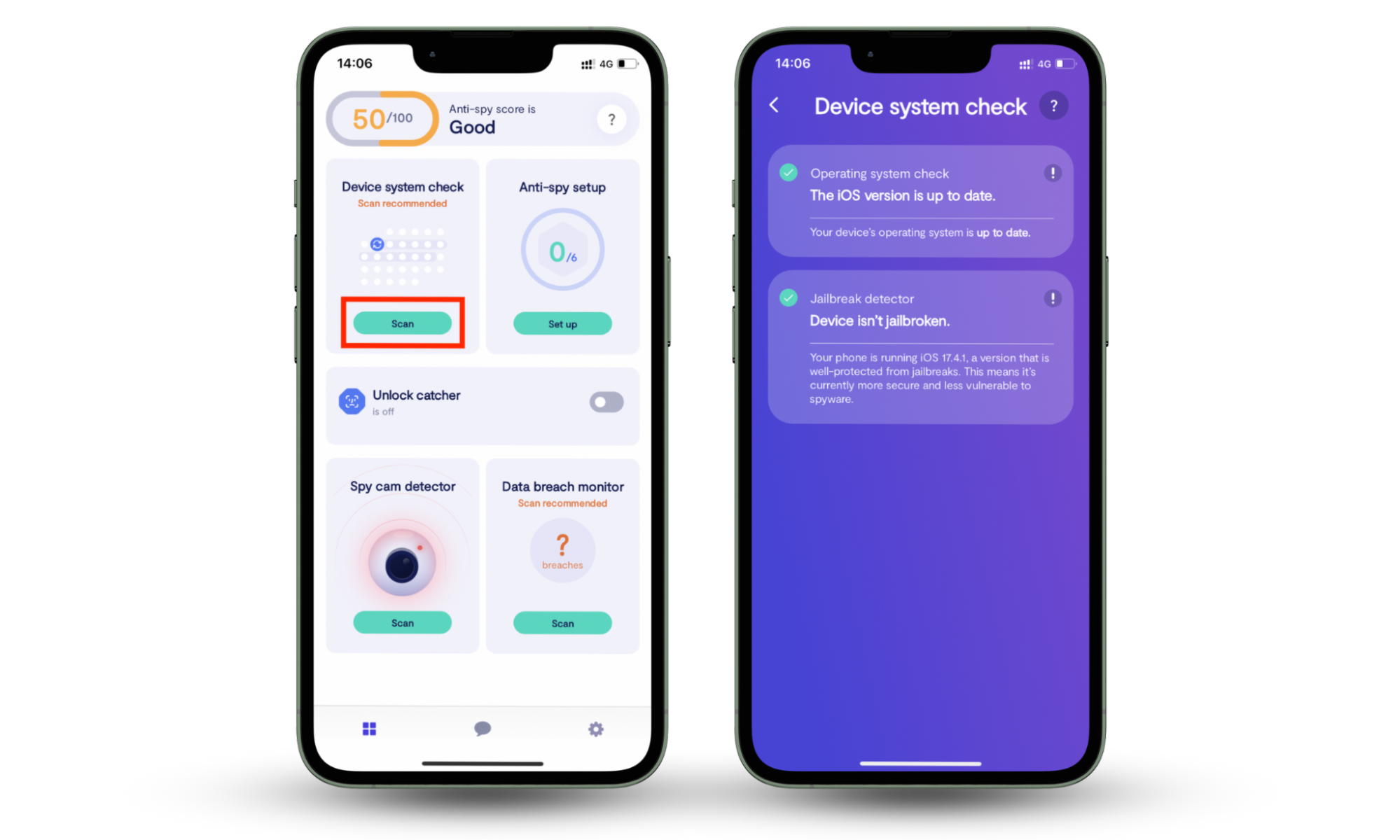
Clario Anti Spy also includes 24/7 live tech support. If you have any questions, tap the Messages icon to connect with a security expert anytime.
Important to know
Not every paid antivirus program includes all security features listed above. The available tools can vary depending on the subscription plan, device operating system, and regional availability. Before choosing a paid security solution, it’s important to review which protections are actually included in the plan.
All in all, should you pay for antivirus protection?
Yes, you should pay for antivirus protection. The truth is that with free antivirus programs, you get basic malware prevention and removal. But cybercriminals’ methods of infiltrating your devices are becoming more sophisticated every day. Luckily, paid antivirus solutions provide the extra privacy protection features and cover every angle of your digital life.
Mobile devices don't need traditional antivirus software, but they do need protection against spyware and tracking. Install Clario Anti Spy to keep your iPhone or Android safe and secure.