Table of contents
- Why is your husband's phone linked to yours
- Common ways phones become connected or share data
- 1. Cloud services
- 2. Bluetooth pairing
- 3. Wi-Fi direct
- 4. Location tracking
- 5. File sharing
- 6. Mobile hotspot
- 7. Remote-access apps
- 8. Shared calendars, reminders, and notes
- 9. Third-party apps with sync features
- Privacy concerns: what if you worry your husband is monitoring your phone
- 1. Check for shared Apple ID or Google Account
- 2. Review apps with access to your data
- 3. Check for device sharing features (Family Sharing, Find My, shared calendars)
- Conclusion
Why is your husband's phone linked to yours
Using the same Apple ID, Google account, or cloud storage service can make your husband's phone look linked to yours. Other things that can create the same effect include shared albums, file-sharing features, location sharing, or third-party apps that sync across devices. Unless you're seeing clear signs of stalking, this doesn't necessarily mean that your husband is spying on you.
Common ways phones become connected or share data
Phones can appear "linked" for all kinds of normal reasons. Usually, it's due to shared accounts, shared features, or devices you connected to in the past. Let's take a look at some of them in more detail.
1. Cloud services
Services like iCloud, Google Drive, and Samsung Cloud sync anything tied to the same account. These include photos, contacts, calendars, notes, reminders, and passwords. Even if you're using different accounts, you might still share folders, photo albums, or storage spaces without realizing it.
2. Bluetooth pairing
Phones can pair over Bluetooth for quick file transfers or features like Quick Share. If your phone paired with your husband's device in the past, it may stay saved and automatically reconnect when both phones are close.
3. Wi-Fi direct
Android phones can hold onto old Wi-Fi Direct pairings. When two devices come into close proximity, they may automatically reactivate previously established file-sharing links. This can make it seem like the phones are communicating with each other even when nothing unusual is happening.
4. Location tracking
Features like Apple's Find My and Google Location Sharing let you share your location in real time. If you turned this on for safety or convenience at some point, it may still be running quietly in the background.
An insecure partner can also misuse this feature to keep tabs on you by tampering with your phone when you aren't looking. If you're worried this might have happened, our guide on how to check iPhone unlock history can help you confirm it.
5. File sharing
AirDrop, Quick Share, and shared cloud folders can make it feel like both phones are connected. Shared albums in iCloud or Google Photos also sync automatically until you remove access.
6. Mobile hotspot
If you've ever used your husband's phone as a hotspot for the internet, your device may still auto-join it. This doesn't give him access to your phone, but it can look like the devices keep reconnecting.
7. Remote-access apps
Legitimate apps like TeamViewer QuickSupport and AnyDesk can give someone limited control over another device. However, this only works if the app is installed and you've granted permission.
8. Shared calendars, reminders, and notes
Apple and Google both allow shared calendars and lists. If you once shared a reminders list with your partner, updates will keep appearing on both phones until you turn sharing off.
9. Third-party apps with sync features
Lots of apps sync across all devices using the same account. Examples include WhatsApp, Messenger, Telegram, Notion, fitness apps, and password managers. If you share an account for any of these apps, you'll see the same data on both phones.
If you suspect your husband might be monitoring your phone, the first step is to make sure nothing has been tampered with. That's where Clario Anti Spy can help. Its Unlock catcher can show you if someone is unlocking your phone without permission, while Virtual location can throw off any apps or tools that try to track where you are.
Here's how to enhance your privacy with Clario Anti Spy:
- Download Clario Anti Spy and subscribe to create an account.
- Enable the switch next to Unlock catcher—your phone will automatically take a snapshot whenever someone unlocks it.
- On Android, tap Set up under Virtual location to create a fake location.
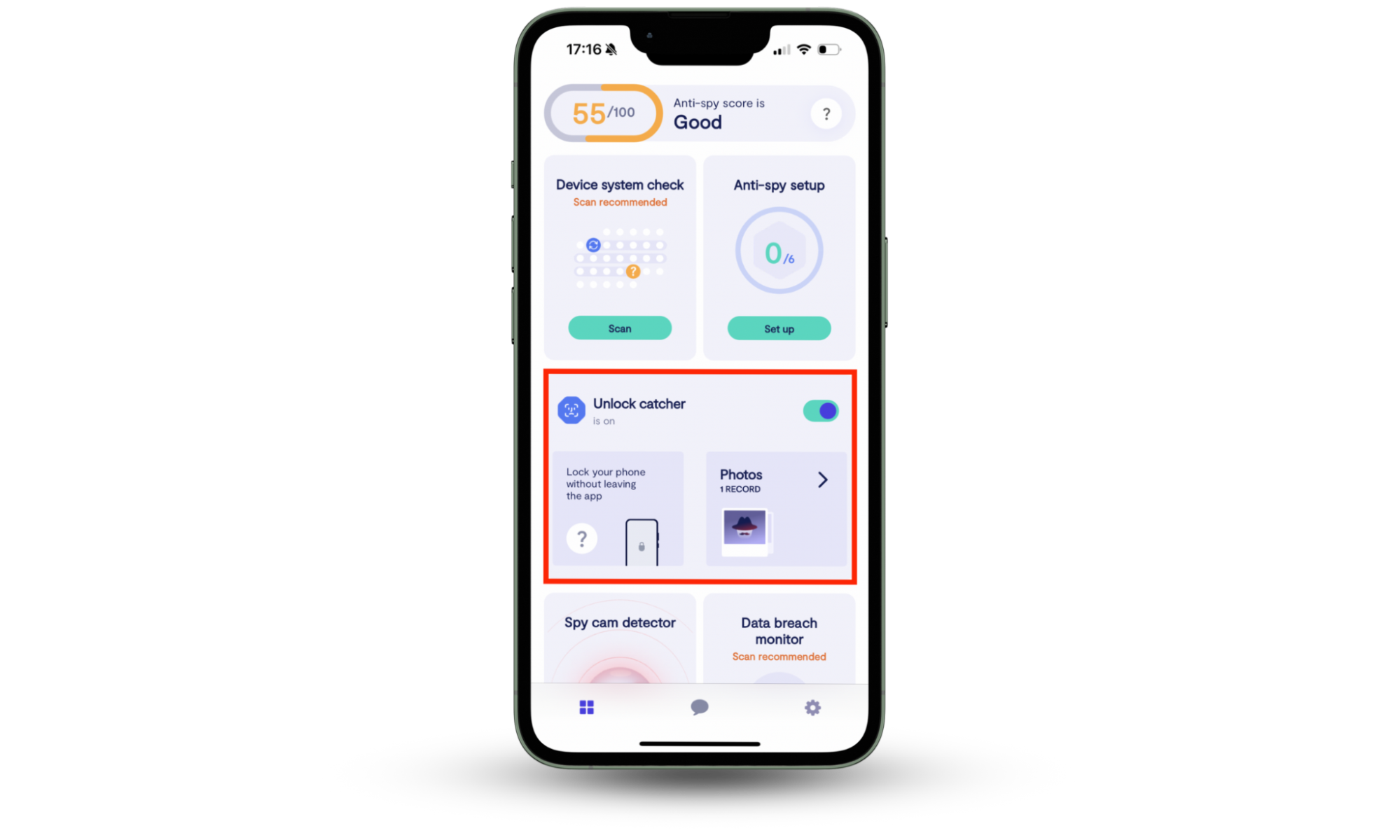

Clario Anti Spy also includes several other features to keep you safe. For instance, Device system check can tell you if your phone is jailbroken or rooted, Anti-spy setup guides you through improving your device and account privacy, and Hidden App Scan helps you detect potential spyware.
If you ever need help, tap the Messages icon to connect with a Clario expert 24/7. They deal with security and privacy issues all the time. Here's what one expert shared about helping a customer who worried she was being monitored by her partner:
"One of our recent customers had a growing sense that something wasn’t right. Her partner seemed unusually aware of who she was talking to and how often, details she hadn’t shared. On top of that, her phone had started heating up without any clear reason.
To get clarity, she ran a Hidden app scan using our app. That’s when we found the issue: a suspicious app quietly running in the background — one she didn’t recognize and had definitely not installed herself.
We immediately advised her to remove the unknown app, as it showed signs of potentially being used for monitoring.
To fully secure her phone, we recommended the following steps:
- Change all major account passwords
- Enable two-factor authentication
- Review app permissions and disable unnecessary access
By identifying and removing the threat, and reinforcing her device’s security, she was able to take back control of her privacy, and finally feel safe using her phone again."
Privacy concerns: what if you worry your husband is monitoring your phone
It's easy to panic when your husband's phone seems to be connected to yours. But that's likely due to normal syncing, and the most common reason is two devices sharing the same Apple ID or Google account.
1. Check for shared Apple ID or Google Account
The primary reason people believe their phones are linked is that they use the same system-level account.
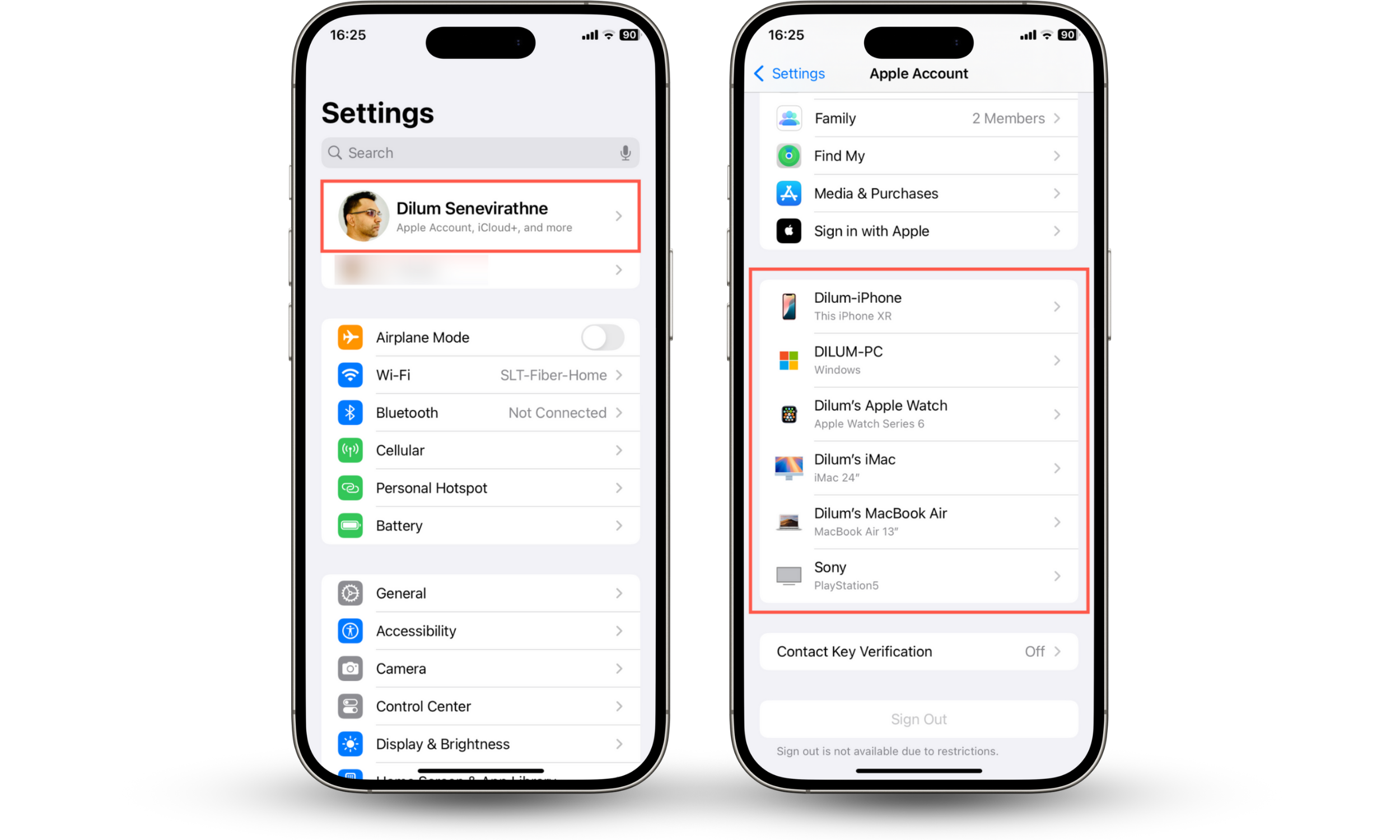
To check for a shared Apple ID on iPhone:
- Open the Settings app and tap your Apple ID.
- Scroll down the Apple Account screen and check the list of devices.
- If your husband's phone appears there or the account details are his, the Apple ID is shared.
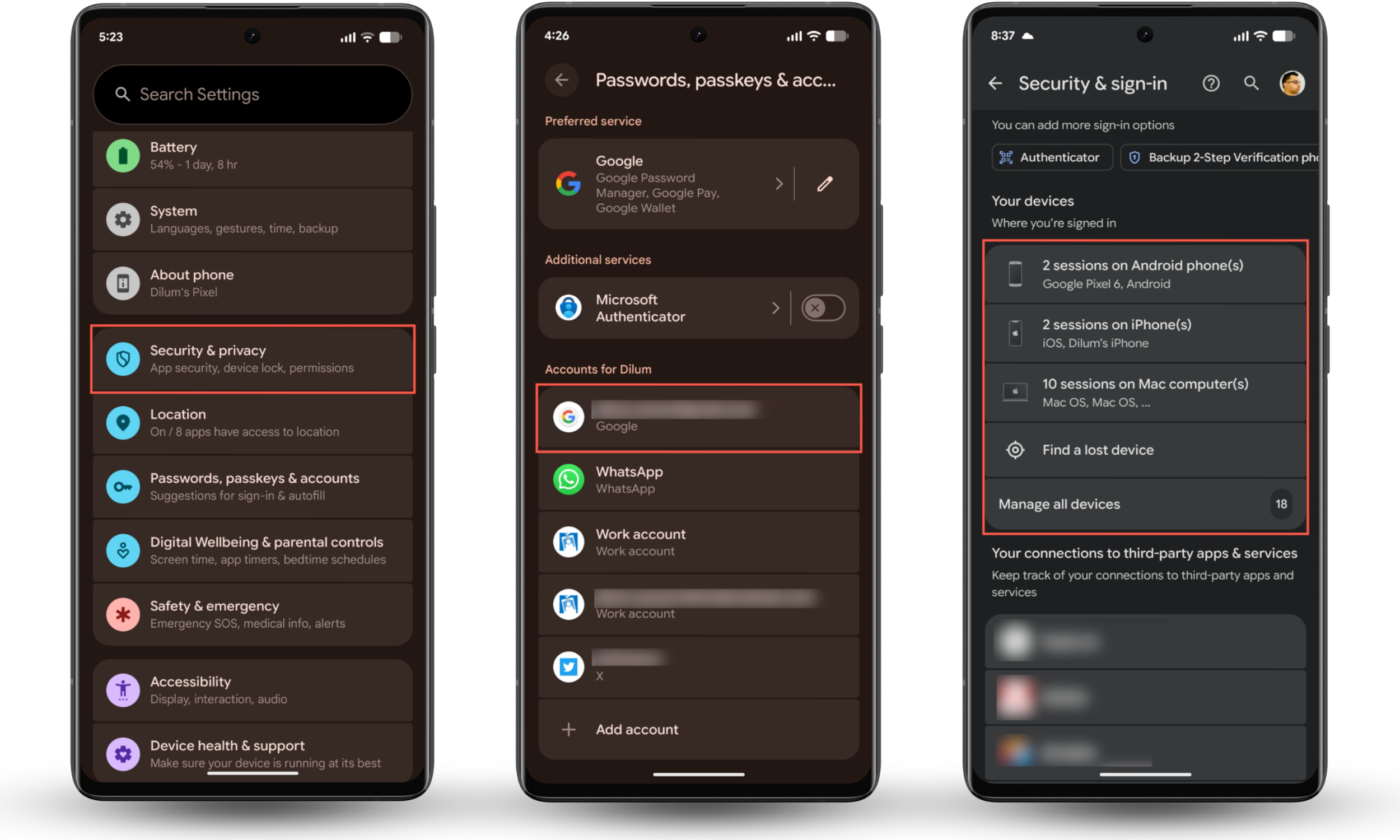
To check for a shared Google account on Android:
- Go to Settings > Passwords, passkeys, and accounts.
- Check the top of the Accounts section for your Google account.
- If the Google account is yours, tap it and go to Security & sign-in > Your devices to check if your husband's phone is using your account.
If you're using your husband's, sign out of it and create an Apple ID or Google Account for yourself. If it's the other way around, remove his device from your account.
2. Review apps with access to your data
A lot of apps can sync messages, photos, contacts, or even your location across devices. So the next step is to do a quick permissions review.
To check for app permissions on iOS:
- Go to Settings > Privacy & Security.
- Go through each category—e.g., Location Services, Calendars, and Contacts—and check which apps have access.
- Revoke access to any app that shouldn't have access.

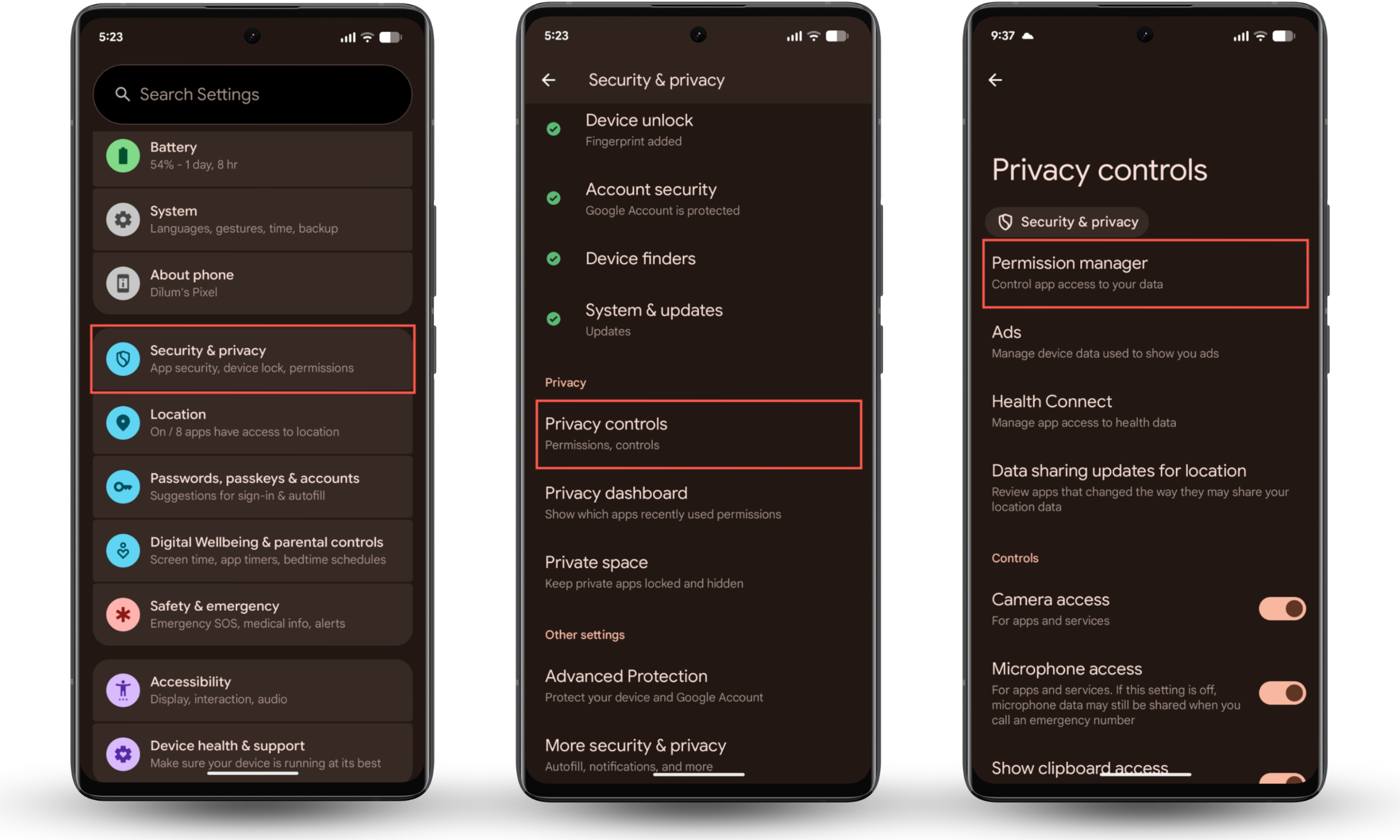
To check for app permissions on Android:
- Go to Settings > Security & privacy > Privacy controls.
- Tap Permission Manager to see which apps can access what.
It's also worth running a safety check on your phone or viewing its privacy dashboard to get a broader view of what data is being shared and how often.
To run a safety check on iPhone:
- Go to Settings > Privacy & Security.
- Tap Safety Check.
- Tap Manage Sharing & Access and follow the on-screen instructions.
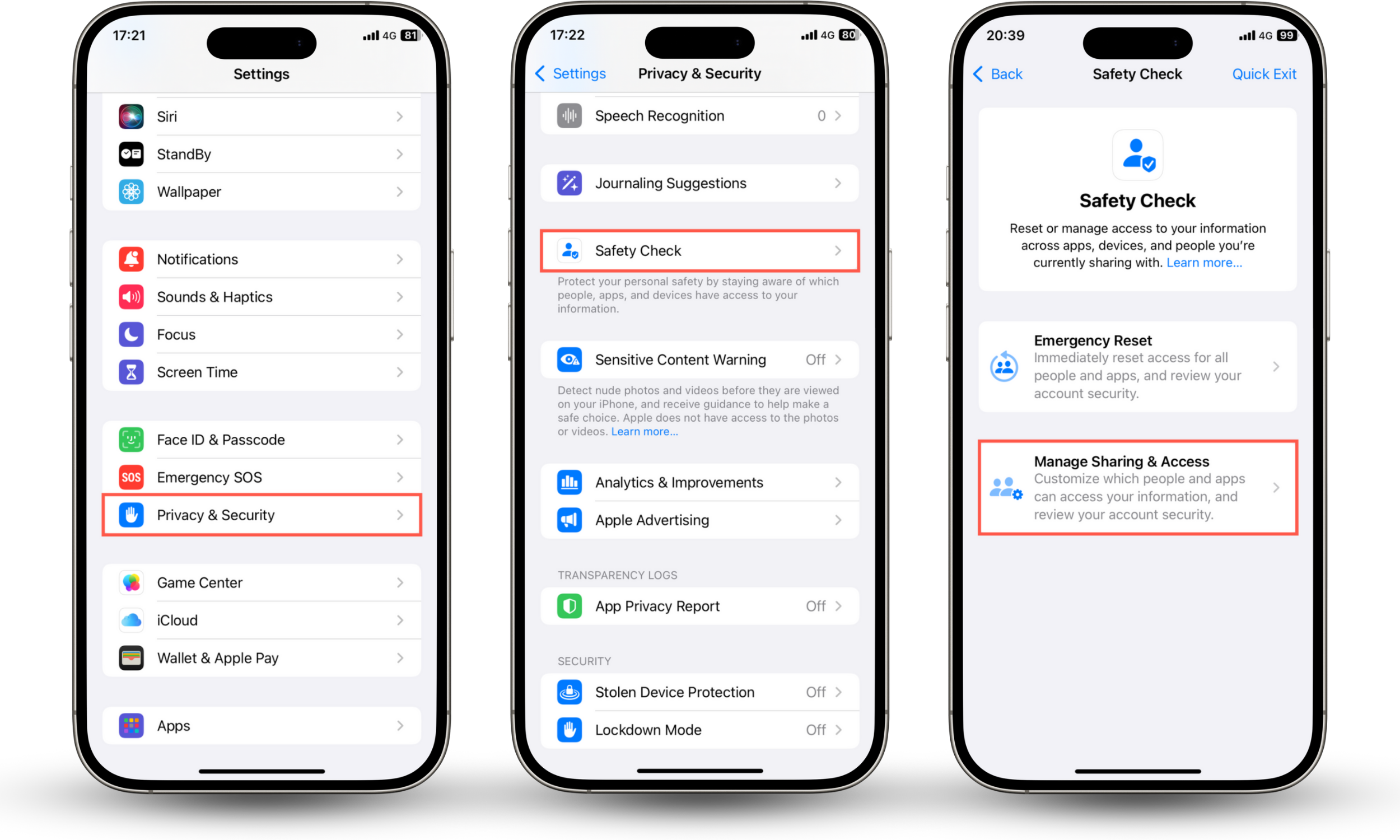
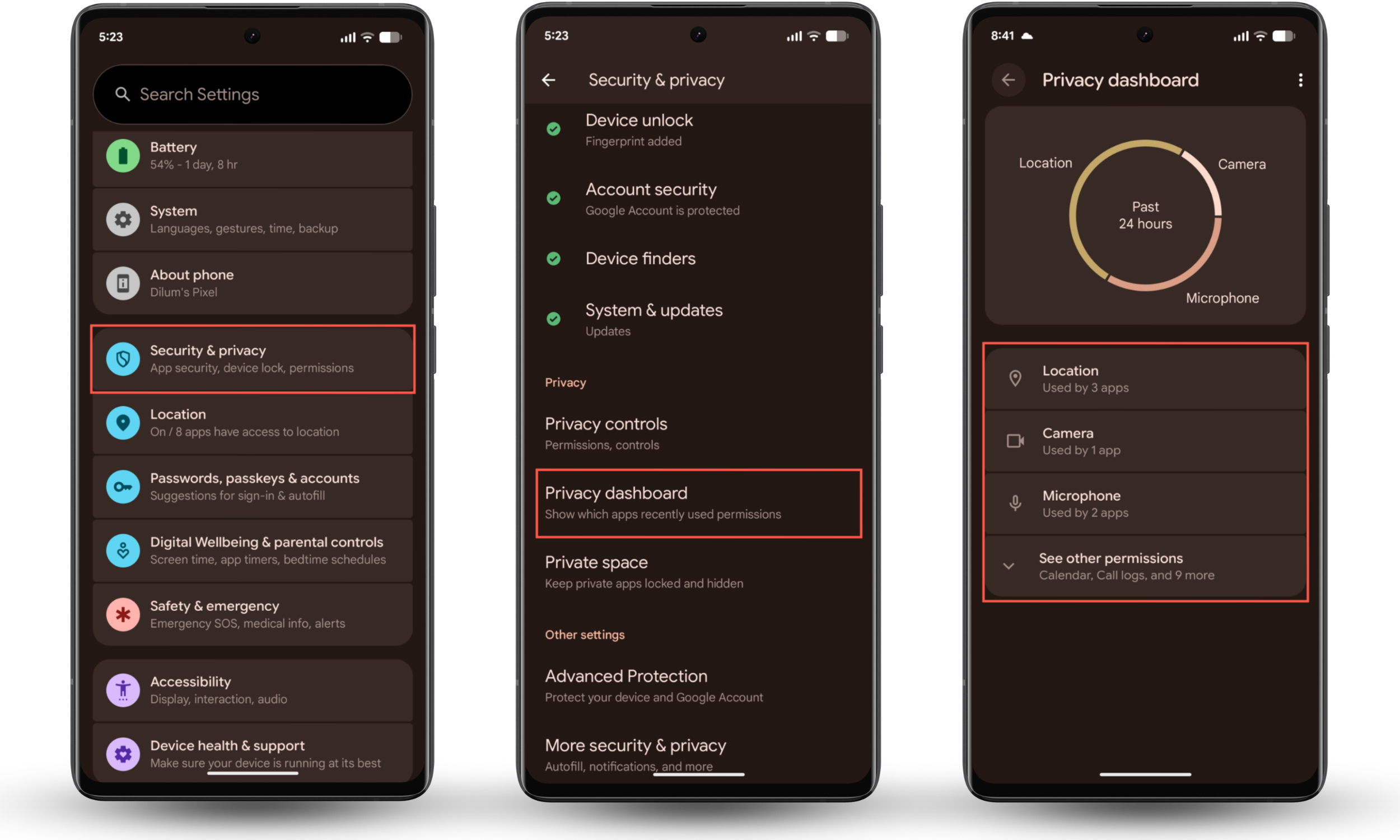
To check your privacy dashboard on Android:
- Go to Settings > Security & privacy.
- Tap Privacy dashboard.
- Check each category—Location, Camera, Microphone, etc.—for anything unusual.
Ever wonder if your husband can see your text messages on his phone? Spy tools exist that can monitor activity, including messages. These forms of spyware often require jailbreaking or rooting to function, and you can detect that with Clario Anti Spy.
3. Check for device sharing features (Family Sharing, Find My, shared calendars)
Device and family sharing features are easy to enable without realizing it, allowing for quiet sharing of purchases, locations, photos, and more. This isn't an exhaustive list, but it covers the most common areas to check:
- Family Sharing: Family sharing features can reveal shared purchases, location, and other data. On iPhone, go to Settings > Family to review what's being shared. On Android, open Settings, tap your account name, and check Family group.
- Find My/Location Sharing: Location sharing can stay active indefinitely. On iPhone, open Settings > Apple ID > Find My and see if Share My Location is on. On Android, go to Google Maps > your profile > Location sharing to see who can view your location. If your husband appears in either list, sharing may still be enabled.
- Shared Calendars: Shared calendars can continue syncing events long after they're set up. On iPhone, go to Calendar > Calendars and look for shared lists. On Google Calendar, open Settings and tap Share with specific people to see who still has access.
- Shared albums/photo libraries: Shared photo features can make phones feel linked because images sync instantly. Go to Photos > Shared Albums > Activity (iPhone) or Google Photos > Settings > Sharing (Android) to manage access.
- Shared Reminders/Notes: Shared reminders lists or notes can sync across both phones. On iPhone, check Shared Lists inside Reminders or Notes. On Android, open Google Keep, select a note, and check Collaborators.
If anything looks unusual or you think your settings were tampered with, check out our guide on how to tell if your spouse is spying on your phone.
Conclusion
Your husband's phone may look connected to yours simply because of shared accounts, syncing features, or old device-sharing settings. The easiest fix is to separate accounts, remove any outdated logins, and review sharing options in iCloud, Google, and apps that sync in the background. Once that's done, your phone should go back to being fully private.
If you're still worried about privacy, install Clario Anti Spy and use features like Unlock catcher and Virtual location to give yourself an extra layer of protection.