Table of contents
- What is an internet service provider or ISP?
- What kind of data does an ISP collect?
- How long can ISPs keep your data?
- How does the data economy work? Can an ISP sell my data?
- Does a VPN protect you from your ISP?
- How to hide internet activity from ISPs
- Wrapping up
Want to browse without anyone looking over your shoulder? Learn about ISP tracking and how to stop it in one of the sections below.
- What is an ISP?
- What kind of data ISPs collect?
- How long can ISPs keep data?
- Can ISPs sell data?
- Can a VPN protect from ISP?
- How to hide internet activities from ISPs?
What is an internet service provider or ISP?
An Internet Service Provider (ISP) is an organization that provides customers with access to the internet. Some ISPs also offer telephone, television, email, web hosting, and domain registration services. Internet access is provided through a wide range of communication mediums, from telephone lines and television cables to fiber-optics and cellular networks. The global ISP industry was valued at $555.98 Billion in 2025.
Important to know
While ISPs handle the transmission of your data, they do not control the content of the websites you visit. However, depending on how your connection is secured, they may still be able to see certain details about your activity.
What kind of data does an ISP collect?
ISPs collect both technical and behavioral data about your internet usage. This includes connection details like your IP address and location, as well as activity-based data such as the websites you visit and how long you spend on them. The exact level of visibility depends on your connection type, encryption, and local privacy laws.
ISPs can collect the following types of data:
- Visited websites and webpages
- Date and time of visit
- Time spent on website and webpages
- Your IP address
- Your geo-location
The exact kind of collected data depends on your ISP, contract terms, and provided services. The country you live in also plays a major role in ISP data collection. Whereas American ISPs can freely collect their customer data, the practice is illegal in many European countries.
It’s also important to distinguish between encrypted and unencrypted traffic. When you visit websites that use HTTPS, your ISP can typically see the domain you access (for example, example.com) but not the specific pages or content you view. However, with unencrypted HTTP connections, much more of your activity may be visible.
By analyzing collected data, ISPs can determine your:
- Browsing habits
- Online shopping preferences
- Hobbies and interests
- Political party affiliation
- Personal relationship
- And much more
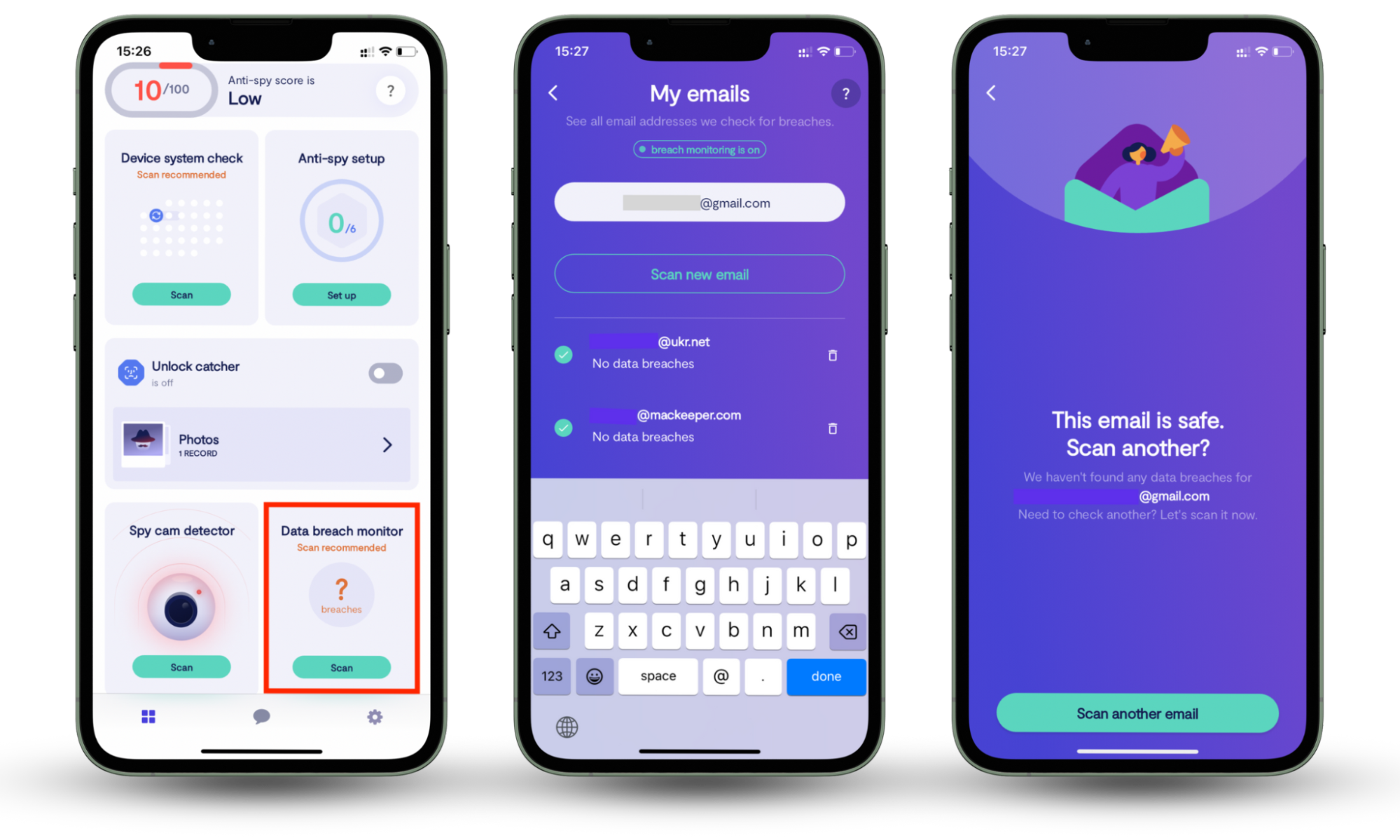
If your ISP wants to make money off you, they can sell this information, too. Given the wealth of data ISPs can collect, it's scary to think of potential risks, like personal information leaks. But there are ways to secure your digital life. Clario Anti Spy’s Data breach monitor scans your email and linked online accounts for any known breaches. Created to fortify your personal data against unauthorized access, it stays on guard 24/7, alerting you of potential data leaks.
Here’s how easy it is to start using Clario’s Data breach monitor:
- Install Clario Anti Spy on your mobile device ( it works on both iOS and Android).
- Create an account.
- Go to Data breach monitor.
- Tap Scan to look for leaks associated with your email.
How long can ISPs keep your data?
The length of time ISPs can store your data depends on national regulations and their internal policies. In some countries, data retention is legally mandated for a specific period, while in others, ISPs may decide how long to keep user data for operational, security, or business purposes. For example, the mandatory data retention period is six months in the European Union and 2 years in Australia.
Unlike the majority of European countries, the US doesn’t have a mandatory data retention period for ISPs. Even if a country does not mandate customer data retention, some ISPs may still have systems in place to collect and retain as much data as they want. Therefore, it’s always worth taking steps to ensure your digital privacy regardless of where you live.
How does the data economy work? Can an ISP sell my data?
Yes, ISPs can sell your data. Since 2017, American ISPs can legally collect and sell user data, and if a recent governmental report is any indication, they are doing just that.
In practice, “selling data” often means sharing aggregated or anonymized information rather than directly identifying individuals. However, when combined with other data sources, this information can still be used to build detailed user profiles.
Sure, this industry is expected to change in the near future - especially with the California Consumer Privacy Act (CCPA) having come into play and its federal equivalent being prepared for other states. But this doesn’t necessarily mean your data will be free from attempts to monetize it. Rather, ISPs will be simply required to notify you about data collection and selling and offer you the chance to opt out.
The price of data collected by ISPs depends on three factors:
- How many different types of data are grouped together
- How in demand the data is
- How hard it is to access
Does a VPN protect you from your ISP?
Yes. The easiest way to protect yourself from ISP tracking is to install a VPN. By hiding your IP address and encrypting everything you do online, a good VPN can make you virtually invisible to your ISP. It has its downside, though - your internet speed might slow down. But it’s a small price to pay for online privacy.
How to hide internet activity from ISPs
To hide your internet activity from your ISP, use a VPN. A reliable VPN can hide your IP address and encrypt the entirety of your web traffic. Thus, you can safely browse the internet without being tracked by your ISP.
To get started with a VPN, follow these steps:
- Choose a reputable VPN provider.
- Install the app on your device.
- Connect to a secure server location.
- Verify that your IP address has changed.
- Enable additional features like a kill switch if available.
Here are some of the top tools on the market that can keep your internet activity private from your ISP:
- NordVPN: it works fast and offers a range of additional tools, along with a 30-day money-back guarantee.
- Surfshark: a cost-effective VPN that supports unlimited devices and offers ad-blocking and malware-scanning features.
- ExpressVPN: offers access to geo-blocked content, beginner-friendly features, and custom router software.
- CyberGhost: created to protect users' security and streaming, it features an always-on kill switch, WireGuard protocol, and a 45-day money-back guarantee.
- ProtonVPN: a free tool with unlimited bandwidth, robust streaming capabilities, and a rigorous no-logs policy.
Wrapping up
Now you know why and how to guard your data from ISPs. If you are not willing to give away an iota of your data, you might be also interested in other ways to protect it. Take a few minutes to read our other articles on privacy and data protection below. Don’t forget to try Clario Anti Spy’s Data breach monitor. The feature scans your email and online account, identifying data leaks and staying on guard 24/7 by default. In case of a breach, it will notify you immediately so you can address the issue asap.