Table of contents
- What is Meta App Manager?
- What does Meta App Manager do?
- Is Meta App Manager safe?
- What are Meta App Manager privacy risks?
- 1. Data sharing with AI
- 2. Web tracking
- 3. Users have limited access
- 4. Malicious app detection
- 5. Collecting personal data
- 6. Public by default
- How to disable Meta App Manager?
- 1. Stop Meta App Manager in settings
- 3. Revoke the app’s permissions
- Conclusion
What is Meta App Manager?
Meta App Manager is a system service pre-installed on many Android phones. Not every Android phone has Meta App Manager. It's mainly found on devices with pre-installed Facebook bloatware, like some OnePlus or Samsung devices. It acts as a bridge between the Android operating system and Meta apps like Facebook, Instagram, and Messenger. You cannot open it like a regular application, but it runs in the background and makes sure that Meta’s services integrate with your device in the way they were designed to.
What does Meta App Manager do?
Meta App Manager keeps Facebook apps working without relying on the Google Play Store. It runs in the background to update apps, fix bugs, and manage crashes.
It helps maintain compatibility between Meta apps and your Android OS. It also controls key features, like facial recognition, and collects data on your device’s battery and memory usage to send back to Meta. While this automatic process is supposed to improve performance, it can also drain your battery and data quicker than usual.
Is Meta App Manager safe?
Meta App Manager is safe to have on your phone. It’s a system tool from Meta, and definitely isn’t a virus or malware. It’ll never steal your passwords or banking information. However, regarding privacy, the Meta App Manager is legit, but it’s considered invasive because it tracks your activity at a system level.
It’s helpful to understand the difference between stalkerware vs spyware to know exactly what kind of software is running on your device.
What are Meta App Manager privacy risks?
Many privacy and security experts criticize Meta App Manager because it operates outside your control and gathers extensive data without express permission. Let’s take a look at some of the main privacy problems with this app.
1. Data sharing with AI
Meta feeds the data it collects from your phone directly into its AI algorithms. Every time the app logs your activity or device status, it helps Meta build a more accurate profile of your behavior, which it uses to target you with ads and content. All of this happens behind closed doors, and the opacity is one of the main privacy issues with this app.
2. Web tracking
Closing the Facebook app doesn’t stop Meta from tracking you. The Meta App Manager runs in the background, linking your device’s unique ID to your social media profiles. This allows Meta to follow your digital footprint across different apps and websites, even when you aren't using their services. Find out more about the ways Facebook is spying on you.
3. Users have limited access
Manufacturers install this software as bloatware, which means you cannot easily uninstall it. It forces you to host software you didn't ask for on your device, removing your right to control what runs on your own hardware.
4. Malicious app detection
The app has the authority to install and update software silently without your approval. This backdoor access mimics how malware operates. If hackers ever compromised this tool, they could theoretically push malicious apps to millions of devices without users noticing.
Because system tools like this can be exploited or experience errors, relying on built-in security isn’t always enough for complete hack protection.
To make sure that your phone is free from hidden spyware, malware, or other malicious software, you can use Clario Anti Spy’s Hidden app scan. This feature will look through your device for signs of suspicious apps that you didn’t choose to install. It’ll flag anything it finds so that you can go through and remove it.
To use the Hidden app scan:
- Open Clario Anti Spy and locate the Hidden app scan.
- Press Scan and wait for the app to check your device.
- If it finds anything, follow the on-screen instructions to restore your phone to full security.
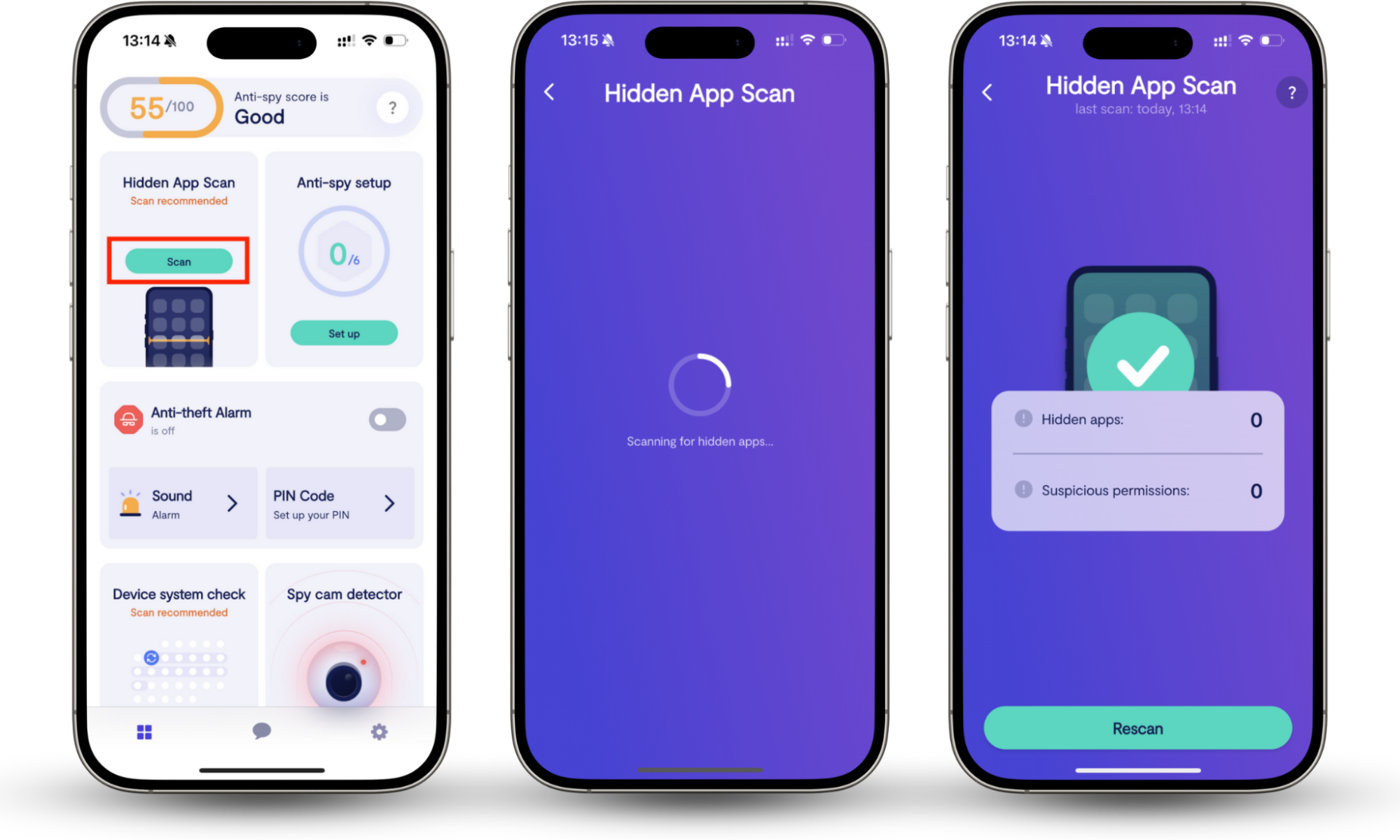
While you wait for the results, it’s worth checking out a list of apps that spy on your phone. Then, if you ever see one of those apps suddenly appear on your device, you know that someone has installed malicious software to track you.
Here is a clear example of how this helps. Our support agent, Norve, recently assisted a customer who found a list of background processes in the Developer Options and was worried that some of them might belong to spyware.
We reviewed the app list manually and found an app that was greyed out, and the permissions for it could not be changed. It turned out to be one of the default system apps. We dug further and reviewed device admin apps and home apps and found everything to be in order. In the end, we confirmed that their phone was safe, giving the customer peace of mind.
5. Collecting personal data
The Meta App Manager service constantly siphons telemetry data from your phone. It monitors your battery level, network strength, and other technical details, sending this information to Meta’s servers 24/7. This visibility not only eats into your privacy but also drains your battery and data.
6. Public by default
You are opted into this data collection the moment you turn on your phone’s display. Meta relies on the fact that most users won’t dig into their system settings to turn it off, allowing them to harvest data by default.
How to disable Meta App Manager?
If you don’t use Facebook or you prefer to update apps manually, you should disable this service to stop the impact of unwanted data collection.
1. Stop Meta App Manager in settings
To completely remove Meta App Manager:
- Open Settings > Apps.
- Go to See all apps and look for Meta App Manager.
- Tap Disable. The app will stop running in the background.
Note
It’s impossible to completely uninstall the Meta App Manager, unless you gain root access to your device.
3. Revoke the app’s permissions
If you don’t want to disable the app, limit what it can see by narrowing its permissions:
- Open Settings > Privacy and security > Privacy controls.
- Choose Permission manager and select Files, Phone, and Location.
- For each category, find the Meta App Manager app and press Don’t allow.
Conclusion
Meta App Manager isn’t spyware, but it is an intrusive tracking tool that prioritizes the success of Meta’s data collection over your privacy. You can safely disable it without breaking your phone. However, removing bloatware won’t stop real hackers. To ensure your device is truly clean, use Clario Anti Spy’s Hidden app scan to uncover and remove actual spyware.