Table of contents
- What is the most secure password?
- How passwords get hacked in real life
- Phishing
- Credential stuffing
- Brute force and dictionary attacks
- Malware and keylogging
- Why password security matters more than ever
- What actually makes a password secure in 2025
- 1. Length over complexity
- 2. True uniqueness
- 3. Randomness
- 4. Secure storage
- 5. A second factor
- How to create strong passwords that actually work
- 1. Use a password generator
- 2. Use passphrases for memorization
- 3. Avoid common substitutions
- 4. The sentence method
- 5. Association-based separation
- Passwords vs passkeys: what’s safer today?
- Passwords to avoid in 2025
- Do you still need to change passwords regularly?
- Other ways to protect your accounts
- 1. Enable multi-factor authentication (MFA) wherever available
- 2. Use a reputable password manager
- 3. Monitor breach alerts linked to your email address
- 4. Scan devices for spyware or keyloggers
- 5. Be cautious with links and attachments
- Conclusion
What is the most secure password?
The most secure password is a long, unique passphrase (14–16+ characters) created randomly or with a password manager, used for only one account, and ideally combined with multi-factor authentication (MFA).
That answer may sound simple, but in practice, getting password security right is where most people struggle.
Many users still believe a password like `Dj7u-30P-R38#w8` is automatically secure. It looks complex, but complexity alone doesn’t guarantee safety. In real breach investigations, accounts are rarely compromised because a password was “too simple.” They’re compromised because passwords are reused, phished, or stolen by malware.
This guide explains what actually makes passwords secure in 2025 and what no longer works.
How passwords get hacked in real life
Cybercriminals don’t “guess” passwords one by one anymore. Most attacks rely on automation, leaked databases, and social engineering. The most common methods include:
Phishing
Attackers impersonate trusted companies through emails, text messages, fake websites, or even phone calls to trick users into revealing credentials and steal your personal data, often without raising immediate suspicion.
Credential stuffing
When a website is breached, stolen email-password combinations are tested automatically on thousands of other services. If you reuse passwords, one leak can unlock multiple accounts.
Brute force and dictionary attacks
These attacks still exist, but they mainly succeed against **short or predictable passwords**. Long passphrases dramatically reduce their effectiveness.
Malware and keylogging
Malicious software can record keystrokes, steal saved browser passwords, or hijack active login sessions, bypassing password strength entirely.
Security insight
In incident response cases, strong passwords are often present, but they’re reused or exposed through phishing. Password strength alone rarely stops modern attacks.
Why password security matters more than ever
Once attackers gain access to an account, the damage usually escalates quickly:
- Identity theft: Personal data is used to impersonate victims, steal your identity, open accounts, or apply for loans.
- Privacy compromise: Emails, photos, documents, and cloud backups become accessible.
- Account lockout and ransom: Files or accounts may be encrypted or held hostage for payment.
- Secondary attacks: Compromised accounts are used to scam contacts or reset other passwords.
- Compromised online privacy: By figuring out your passwords, hackers can access emails, cloud storage, photos, and personal messages—exposing sensitive information and putting your online privacy at risk.
That’s why passwords should be treated as a critical security layer, not a formality.
What actually makes a password secure in 2025
Modern security guidance has shifted. Today, the most important factors are:
1. Length over complexity
A long password is harder to crack than a short, complex one. Aim for **14–16 characters or more**. Passphrases outperform random short strings.
Example:
❌ P@ssw0rd! (short, predictable)
✅ harbor-violet-clock-meteor (long, random, hard to crack)
2. True uniqueness
Each account must have its own password. Reuse is one of the leading causes of account takeovers.
Example:
❌ Same password for email, social media, and banking
✅ Different, randomly generated passwords for every account
3. Randomness
Avoid personal information, patterns, or predictable substitutions (like replacing “o” with “0”). Attackers expect those.
Examples:
❌ B00kw0rm2024
✅ k9$L!f2@Qm#7zR (or a randomly generated passphrase)
4. Secure storage
Strong passwords only help if they’re stored safely. Password managers encrypt credentials and reduce human error.
Example:
❌ Reusing a memorable password or storing it in notes
✅ Using a password manager with encrypted storage and autofill
5. A second factor
Whenever possible, combine passwords with MFA or passkeys. This blocks most automated attacks even if a password is exposed.
Example:
❌ Password-only login
✅ Password + authenticator app or device confirmation
| Password approach | Security level | Real-world risk |
| Short complex password (e.g., P@ssw0rd!) | Low | Easily cracked or reused |
| Long passphrase (14–16+ chars) | High | Low |
| Unique password per account | High | Very low |
| Password + MFA | Very high | Minimal |
| Passkeys (no password) | Highest | Near zero |
How to create strong passwords that actually work
Creating a strong password isn’t about memorizing complex strings—it’s about using methods that reduce human error. In 2025, the most effective passwords are long, unique, and generated or managed with the help of trusted tools.
1. Use a password generator
Password managers generate long, random passwords instantly without relying on memory or creativity.
2. Use passphrases for memorization
A random phrase with unrelated words is both secure and memorable, for example: `harbor-violet-clock-meteor-paper`. Length and unpredictability matter more than symbols.
3. Avoid common substitutions
Attack tools automatically test variations like “P@ssw0rd” or “B00kw0rm.” These no longer add meaningful protection.
4. The sentence method
Create a random sentence and apply a consistent transformation rule. This produces long, unique passwords without personal clues.
5. Association-based separation
Use different password styles for different categories (banking, social, work). This limits blast radius if one category is compromised.
Passwords vs passkeys: what’s safer today?
Passkeys are replacing passwords on many platforms. They use cryptographic keys stored on your device and protected by biometrics or a device PIN.
Why passkeys are safer:
- No shared secrets
- Immune to phishing
- No reuse across services
Passwords are still necessary on many sites but passkeys represent the future of authentication.
Passwords to avoid in 2025
Despite years of warnings, weak passwords remain widespread. Examples include:
- 123456
- password
- qwerty
- 123456789
- 111111
They persist because of habit and reuse, and attackers continue to exploit that.
Do you still need to change passwords regularly?
Not routinely.
Modern guidance recommends changing passwords only when:
- A data breach occurs
- You suspect phishing or malware
- A password was reused elsewhere
Frequent forced changes often lead to weaker passwords and reuse.
Other ways to protect your accounts
Passwords alone can’t protect accounts from phishing, malware, or data breaches. In 2025, real security comes from layering protections, combining strong passwords with monitoring, device security, and additional verification. Passwords work best as part of a broader security setup:
1. Enable multi-factor authentication (MFA) wherever available
Turn on MFA for email, banking, social media, and cloud accounts. App-based authenticators or device prompts are safer than SMS codes. MFA can stop most account takeovers even if your password is leaked.
2. Use a reputable password manager
Choose a trusted password manager to generate, store, and autofill unique passwords for every account. This eliminates reuse and reduces the risk of phishing and human error.
3. Monitor breach alerts linked to your email address
If your email appears in a data breach, attackers may try credential-stuffing attacks. Treat breach alerts as an immediate signal to change affected passwords and review account activity.
If your email appears in a data breach, attackers often launch credential-stuffing attacks, testing the leaked password across multiple services. Treat breach alerts as an immediate signal to change affected passwords and review recent account activity.
One of our customers contacted Clario Anti Spy support after noticing repeated login alerts from a social media account he hadn’t used in months. He assumed it was a glitch. When our team helped him check Data Breach Monitor in Clario Anti Spy, it revealed that his email had appeared in a third-party breach weeks earlier.
Using the breach details, we helped him:
- Identify which services were affected
- Change reused passwords immediately
- Enable MFA on his email and cloud accounts
- Prevent further login attempts before any financial damage occurred
After resolving the immediate risk, our support team advised the customer to keep the Data breach monitor enabled in Clario Anti Spy so future exposures wouldn’t go unnoticed. Data breaches often surface weeks or months after they happen, and early alerts make the difference between a quick fix and a full account takeover.
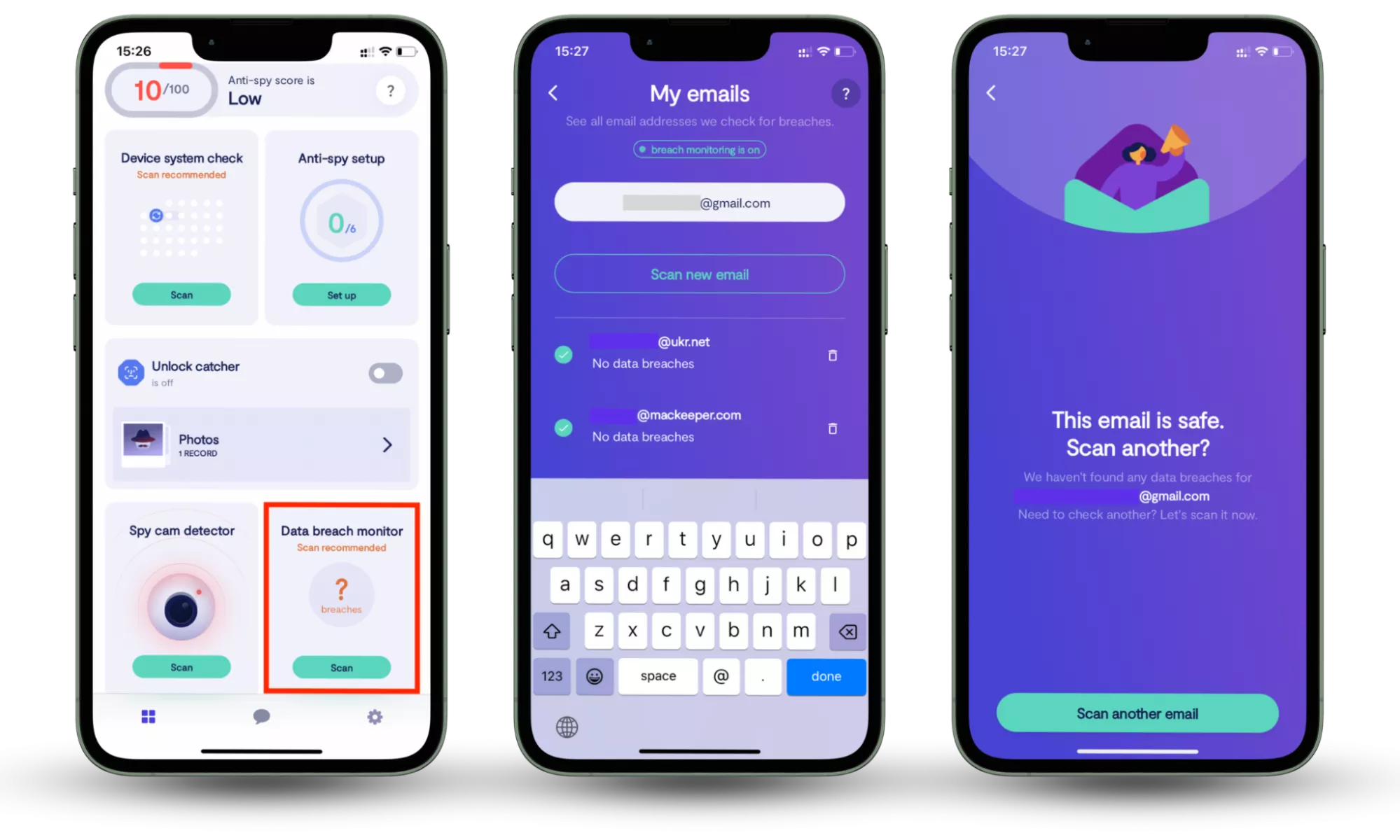
How to use Data breach monitor in Clario Anti Spy:
- Download Clario Anti Spy and subscribe.
- Open the app, and, under Data breach monitor, tap Scan.
- Enter your email address.
- When the scan is complete, follow the on-screen guidance to review any data breaches.
4. Scan devices for spyware or keyloggers
Malware can capture passwords regardless of how strong they are. Regularly scan your devices for spyware, especially if you notice unusual behavior, pop-ups, or unexplained logins.
5. Be cautious with links and attachments
Avoid clicking links or opening files from unexpected messages even if they appear to come from trusted companies. Always access sensitive accounts by typing the website address manually.
Security warning
Avoid entering passwords onlineWebsites that ask you to paste a password to “test” it can expose sensitive information and allow attackers to steal your personal data, affecting your online privacy.
Conclusion
Strong passwords still matter, but real protection comes from combining them with additional security layers. Long, unique passwords, MFA, and breach monitoring help reduce the risk of account takeovers and protect your personal data and online privacy. Tools like Clario Anti Spy can simplify this process by bringing key protections together in one place.