Table of contents
- What is Trojan malware?
- How does a Trojan horse infect a device?
- How dangerous is a Trojan?
- Can Android devices download Trojan horses?
- How to prevent Trojan horse attacks
- Conclusion
Designed to look harmless, a Trojan virus can actually cause real damage such as stealing your sensitive information or spying on you. Whatever the intent of Trojan malware, it’s always malicious, and the means of infection always takes place … without the victim’s consent.
Definition
A Trojan virus is a type of malware that relies on deception rather than technical exploits to infect a device. In this guide, you’ll learn how Trojan malware works, the most common ways it spreads, the risks it poses to computers and mobile devices, and the practical steps you can take to reduce your chances of infection.
Let’s talk more about what a computer Trojan horse is and how you can prevent it from attacking you.
What is Trojan malware?
A Trojan horse, or a Trojan, is any kind of malware that misleads users by disguising itself as a harmless file. It usually comes in the form of an app or software pretending to either be useful or fun.
Unlike viruses or worms, a Trojan does not spread on its own. Instead, it relies on users to install it, often by pretending to be legitimate software. While viruses replicate automatically and worms exploit system vulnerabilities, a Trojan’s primary weapon is deception.
The computer term, of course, gets its name from the Ancient Greek story. When a hard-fought war between the Greeks and the independent city of Troy came to an end, the Greeks left an enormous wooden horse outside the city gates as a “peace offering”. After much debate, the Trojans wheeled the sculpture inside. But at night, Greek soldiers emerged from within and ransacked the city.
Trojan malware is not dissimilar. Cybercriminals use psychological manipulation to convince people to welcome the infected software into the guarded gates of their devices. So yes, even the best of us can fall victim to this scam. But how does a Trojan horse work? Read on to find out.
How does a Trojan horse infect a device?
Just like their Greek “prototypes”, computer Trojans usually infect devices with the “help” of their users. Here are some examples:
- Social engineering. This is a psychological technique to manipulate users into downloading and infecting their devices with malware. A common trick is to convince the victim to click on a link or download an app to get free music or movies.
- Phishing email. This one is a message appearing to be from a trusted source but is purely an attempt to trick you into a Trojan horse download.
- Scareware. A convincing pop-up ad claiming your device is under threat and offering a handy (but secretly malware-infected) tool for your protection.
In real-world attacks, these tactics often appear as fake invoices, delivery notifications, cracked software downloads, or pop-up alerts claiming your device is infected. The goal is always the same — to pressure you into clicking, downloading, or installing a file before you have time to question it.
There’s no limit to how creative these tactics can be. But, the intent is always the same — to convince the user to download dangerous malware. Speaking of which...
How dangerous is a Trojan?
Once installed, the Trojan malware can start infecting other files, sometimes without you even noticing. It can also send information from your computer to cybercriminals, after which the hackers can hijack your device and steal your precious financial details.
A Trojan horse isn’t a single type of malware. It’s a means for all kinds of malware, each with its own destructive and harmful missions, to infect your computer.
Here are some common types of Trojan malware and how they can impact you:
- Banker Trojan. This Trojan aims to access and steal your financial data. The Ursnif, capable of harvesting financial information from Windows PCs, became the most wanted malware in May 2020. Since then, banking Trojans have continued to evolve, increasingly targeting mobile devices and using techniques such as credential theft, session hijacking, and abuse of multi-factor authentication to access financial accounts.
- Distributed Denial of Service (DDoS) Trojan. DDoS attacks aim to flood a network or website with traffic to overwhelm it. They recruit your computer into their army of infected devices, then use it to carry out a DDoS attack on its intended target.
- Downloader Trojan. These Trojans download new versions of malware to your computer on their own.
- Fake AV Trojan. This type of scareware tricks you into thinking your device is infected with malware. The goal is to get you to download or purchase a fake antivirus program to remove this fake virus.
- Game-thief Trojan. Online gamers can make in-game purchases such as eye-catching outfits or new weapons for their characters. This Trojan is designed to hack and steal financial information from gaming channels.
- Infostealer Trojan. Infostealer collects information, such as contact details, usernames, and passwords, and uploads them to a remote server.
- Malfinder Trojan. The Mailfinder Trojan collects and steals all of the email addresses on your device.
- Ransom Trojan. A Ransom Trojan demands a ransom to undo the damage it has inflicted on your device. The types of damage could include blocking some of your programs or files, slowing down your device, or completely paralyzing it.
- Remote Access Trojan (RAT). RATs are a type of “backdoor” to your device that allow hackers to do pretty much whatever they like, including sending, receiving, or deleting files.
- Rootkit Trojan. Rootkits are designed to hide files or activities in your computer system, making it more difficult to detect the presence of malware.
- SMS Trojan. The SMS Trojan can send and read text messages. Hackers make money by sending text messages from your mobile device to premium phone numbers. They can also use malware to steal banking credentials.
- Trojan IM. Instant Messaging Trojans steal users’ account credentials or logins and passwords in instant messengers, such as Skype and Facebook Messenger.
Now you may be wondering if all your devices are vulnerable to Trojan attacks. Unfortunately, cybercriminals have set their eyes on more than just your computer.
Can Android devices download Trojan horses?
Many Android users have been lulled into a false sense of security by Google Play Protect. This feature on the Play Store runs a safety check on any apps you are about to download. But there’s a problem.
While malicious apps may find it tricky getting past Play Store’s security wall, Trojans can use deceptive tricks to hide behind the facade of legitimate programs. For instance, in 2016, security researchers found malware called Android.Spy.277.origin in over 100 official Google Play apps. The Trojan stole the user’s personal information and delivered revenue-earning ads.
In recent years, many Android Trojans have spread through sideloaded apps, fake system updates, or by abusing accessibility permissions to gain deeper control over devices. These techniques allow malware to operate quietly, even on phones that appear to be protected.
If you’re wondering how to remove the Trojan virus from Android, feel free to use Clario. It’ll help you easily detect and remove malware while giving your Android phone real-time antivirus protection.
How to prevent Trojan horse attacks
Trojan attacks require your participation. So preventing them should be easy, right? Well, not exactly.
Cybercriminals’ sneaky tactics get more convincing by the day, with the potential to dupe even the most tech-savvy users. But don’t worry. You can stay protected with these useful Trojan prevention tips:
- Install a trusted internet security solution as your first line of defense
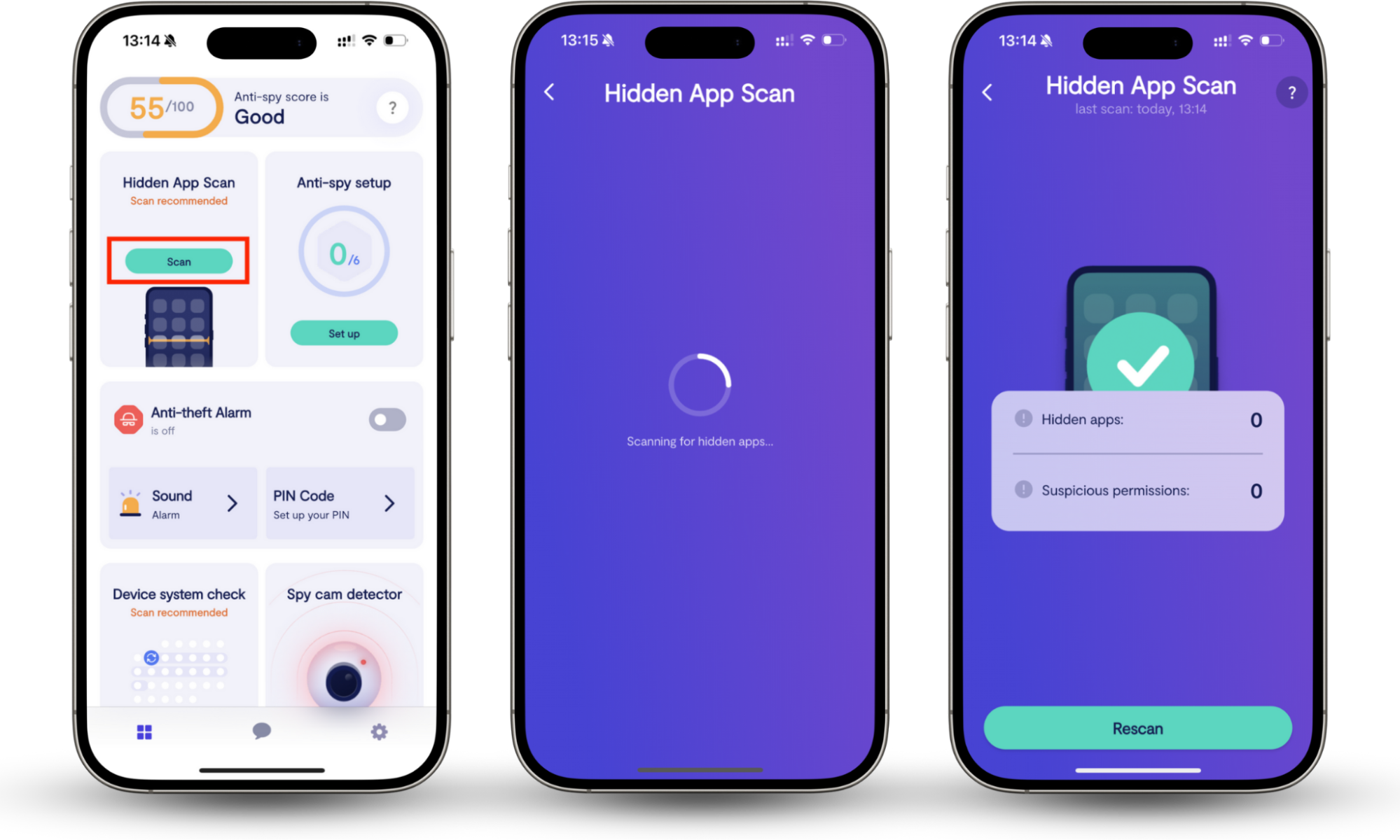
Use Clario Anti Spy's Hidden app scan to check your device for hidden threats. A full device scan helps detect spying apps such as spyware and parental control tools that may be secretly installed. It also reviews app permissions to highlight suspicious access that could put your data or privacy at risk.
Here's how to use Clario Anti Spy to check for malicious software:
- Open Clario Anti Spy and select Scan under the Hidden app scan feature.
- Clario will run a full scan of your mobile device. This looks for signs of spying apps, like spyware and parental control apps that someone may have secretly installed.
- Review the results. The tool analyses all requested app permissions, helping you to detect suspicious ones that don’t belong.
- Don’t ignore software updates. Be sure to keep your system’s software up-to-date. Software updates usually provide important patches that tighten up your security.
- Back up regularly. While backing up your files won’t protect you from downloading a Trojan, it will help you recover files you might lose during an attack.
- Be wary of email attachments. Always be cautious about accessing attachments in any unexpected emails, even if they appear to be from someone you know.
- Don’t click on questionable email links. Shady links in emails can be just as dangerous as attachments. Never click the link if something doesn’t seem quite right.
- Be careful what you download. Only download programs from publishers you know you can trust, no matter how intriguing their offer.
- Avoid clicking pop-ups and banners. Don’t click on untrusted pop-ups warning you your device is infected or offering the magical program to fix it.
Conclusion
Trojan malware relies on deception rather than technical exploits, which makes it difficult to spot without deliberately checking for hidden threats. Reviewing installed apps, monitoring permissions, and scanning for spyware are practical steps many users overlook. Tools like Clario Anti Spy help by scanning for hidden spying apps and analyzing app permissions, making it easier to identify suspicious behavior that could be linked to Trojan activity.
If you follow these steps and practice overall digital hygiene, your chances of contracting a Trojan virus should be reduced. Good luck and stay safe out there!
Read more: