Table of contents
- What is Malware as a Service?
- How Malware-as-a-Service Works in Practice
- How does the rise of MaaS impact cybersec?
- What you can do to protect yourself from MaaS
- What to do if your device is already infected?
- Conclusion
Anyone can become a hacker. No advanced computer skills needed.
Yes, it’s true if not pretty terrifying. Anyone, from your business competitor who isn’t too fond of you, to the neighbor you didn’t invite to that BBQ party last summer. But how come?
If you haven’t heard about Malware-as-a-Service (MaaS), then this post is worth reading. Oh, and don’t worry – there’s plenty of actions you can take to prevent this from happening.
No device can be fully secure from malware
Luckily, Clario Anti Spy is here to give you a worry-free digital experience. It's a multi-platform problem-solver with built-in 24/7 support from live security experts. Get Clario Anti Spy and use your device with peace of mind.
What is Malware as a Service?
You might have heard about Software-as-a-Service. This is when you can ‘rent’ an application via the internet. You don’t need to install it on your computer, so all the maintenance headache is on the provider, not you. Slack and Dropbox are examples of SaaS.
Malware-as-a-Service, or MaaS, is a criminal version of SaaS – a type of organized cybercrime. But instead of offering legitimate services, MaaS enterprises rent malware to their customers on a subscription basis. Thus, anyone – regardless of their technical skills – can launch a cyberattack using the ready-made codes provided. They are even regularly updated just like legitimate software.
Explainer: Why malware-as-a-service is so hard to stop
Unlike traditional malware campaigns, Malware-as-a-Service separates roles between developers, sellers, and attackers. One group writes the malware, another rents it out, and entirely different actors deploy it against victims. This fragmentation makes investigations and takedowns significantly harder, because disrupting one participant rarely stops the entire operation. As a result, MaaS ecosystems often reappear quickly under new names, using improved evasion techniques learned from previous campaigns.
“Subscription? Monthly fee? Updates? Seems alright. Is malware still illegal?”, you might ask. Yes, it is. But what’s worse, it’s now accessible to anyone who can pay for it. So, what does it mean for you and cybersecurity as a whole?
How Malware-as-a-Service Works in Practice
In practice, MaaS operates through private dashboards and underground marketplaces that closely resemble legitimate SaaS platforms. Customers can choose subscription tiers, track infections, manage stolen data, and even access customer support from malware developers. Many MaaS platforms also provide automated updates, analytics, and tutorials, allowing attackers with minimal technical knowledge to launch sophisticated campaigns. This “plug-and-play” model is one of the main reasons MaaS continues to scale so rapidly.
How does the rise of MaaS impact cybersec?
The growth of malware business has triggered the rapid development of botnets. A botnet is a network of infected computers. Similar to zombies, they mindlessly follow orders from the crook’s server. An army of bots can be used for storing illegal materials, running a side business, sending millions of spam emails, cracking servers, or crypto-mining.
Creepy, right?
But the creepiest thing is how the infected computers owners are usually unsuspecting users. That’s why even if the authorities manage to detect separate bots, they will have a hard time finding the real criminal controlling the entire army.
Some would say botnets are nothing new, and have in fact been around for decades. This is true, but the main problem is how they have considerably evolved over recent years. Back then, a hacker had to write a botnet from scratch to execute a crime. Now, in a MaaS framework, everyone can lease a ready-made botnet and use it for their benefit. Some botnets can reach incredible sizes, making them even more dangerous and elusive.
Modern MaaS expansion
While botnets remain a major threat, modern MaaS has expanded far beyond them. Today’s MaaS ecosystems include ransomware-as-a-service, infostealer malware designed to harvest passwords and financial data, phishing kits with ready-made login pages, and mobile malware targeting smartphones. This diversification allows cybercriminals to specialize and scale operations faster than ever, significantly increasing the overall volume and variety of cyberattacks.
Recent threat intelligence reports show that MaaS-based attacks now account for the majority of large-scale malware campaigns worldwide. Ransomware-as-a-Service remains the most profitable model, while infostealer malware is one of the fastest-growing categories due to its ability to monetize stolen credentials quickly. Security researchers also report a steady rise in MaaS tools targeting mobile devices, reflecting how attackers are following users beyond traditional desktops.
However, though security experts seem helpless in the face of these issues, there is a way out – by following the example of cybercriminals. No, it’s not what you think. What we mean is through joining efforts.
Security teams would be more effective if they combined their efforts and resources when attacking cybercriminals. But sadly, they are reluctant to do so since they’d prefer to avoid sharing their technologies and secret tactics with competitors.
We’ll all be waiting for this tendency to change someday in the future.
What you can do to protect yourself from MaaS
Okay, with the explosion of MaaS, cybersecurity is going through rough times – that’s clear. But does it mean anything to you? Yes, it does.
As committing a cybercrime has become easier than assembling an IKEA coffee table, the internet is becoming more dangerous than ever before.
Malware is no longer purely a desktop threat - so make sure you have reliable antivirus software for mobile phones as well. You can protect yourself following similar steps you’d take to ward off the coronavirus – stay calm and be more vigilant.
Instead of keeping your distance and wearing a face mask, here’s how you can protect yourself from MaaS:
- Don’t click on pop-up ads when surfing the web. Many MaaS campaigns rely on malicious advertising networks to redirect users to phishing pages or exploit kits without their knowledge.
- Avoid clicking on suspicious links, opening shady attachments, or downloading unknown files. MaaS operators frequently automate phishing campaigns that clone legitimate websites and deliver malware through seemingly harmless downloads.
- Be extremely cautious with phishing emails. Cybercriminals often disguise them to look like something legitimate.
- If you are a mobile user, avoid downloading apps from sources other than Google Play or the App Store.
- Keep your system up-to-date. MaaS attackers often exploit publicly known vulnerabilities within days of disclosure, targeting users who delay installing security updates.
- Avoid generic passwords. With the help of automation tools, hackers can crack them. But don't worry, we’ve got a couple of creative password ideas for you.
- Download a robust antivirus, like Clario Anti Spy’s all-in-one cybersecurity software with anti-phishing and anti-malware protection.
Many MaaS campaigns rely on spyware and data-harvesting malware that operates quietly in the background. Tools like Clario Anti Spy help reduce this risk by not only detecting malicious software, but also proactively tightening privacy settings that spyware commonly abuses, such as excessive app permissions, tracking access, and background data collection.
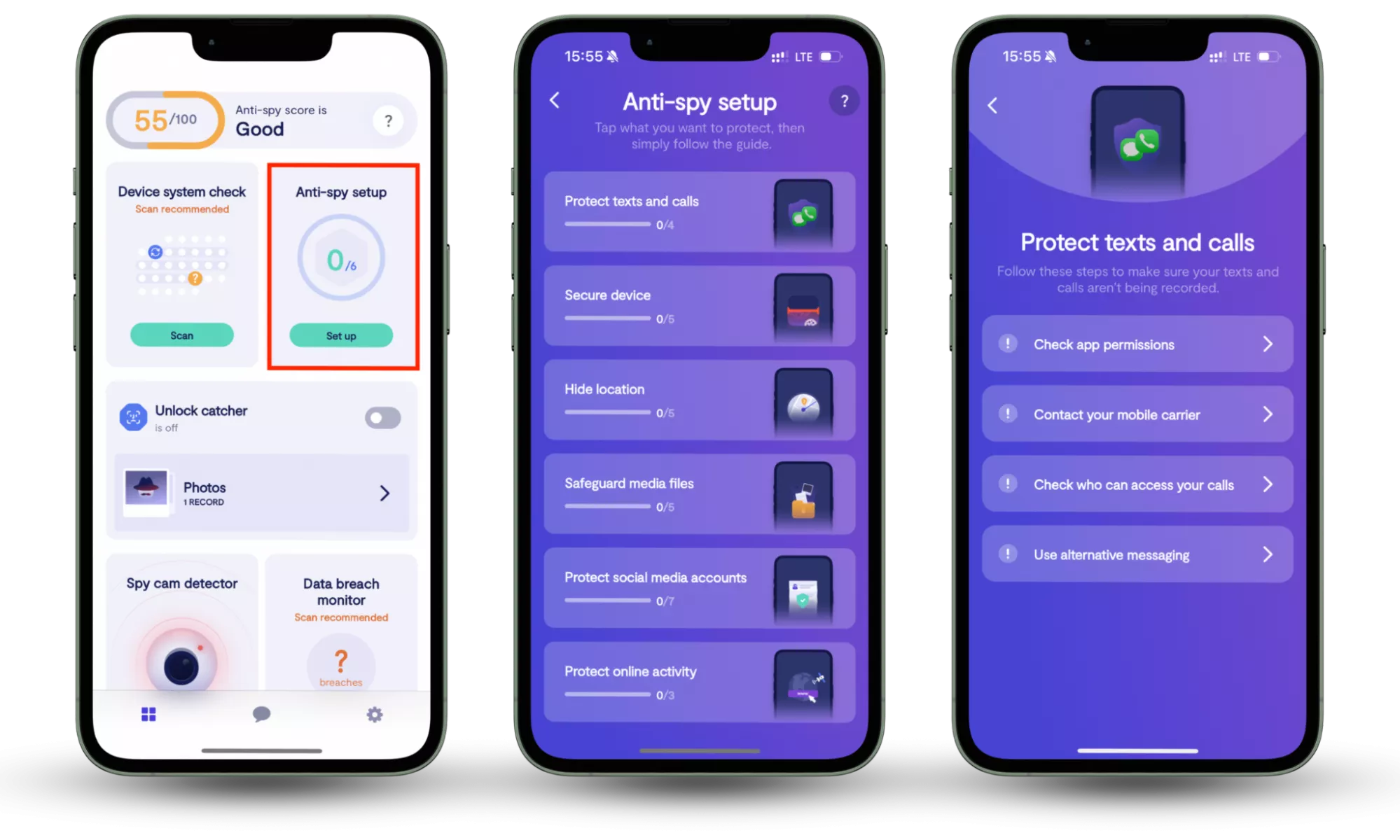
Here is how to use Clario Anti Spy’s Anti-Spy setup feature:
- Download Clario Anti Spy, create an account, and sign in.
- Under the Anti-Spy setup section, select Set up.
- Follow the step-by-step guide to limit unnecessary permissions, reduce spyware exposure, and strengthen your device’s defenses against malware and other MaaS-driven threats.
What to do if your device is already infected?
It’s critical to ‘listen’ to your device. For instance, if your computer starts slowing down for no reason, pop-up ads seem to appear out of nowhere, or you suddenly run out of space on your hard drive, your device is probably infected. But remember, the procedure of removing the virus from the iPhone is a bit different from 'disinfecting' your Mac or a PC.
No matter the case, this is how you typically remove malware from a computer:
- Take your computer off the network to prevent malware from spreading.
- If you still don’t have a legitimate anti-malware program, install it and scan your device.
- Repeat the procedure with all devices in your network to make sure they are clean.
- Change passwords to all your online accounts and services.
Insight note
Modern MaaS malware often includes persistence mechanisms that allow it to survive basic cleanup attempts. Even if visible symptoms disappear, stolen credentials or personal data may already be circulating on underground marketplaces. That’s why changing passwords, enabling account monitoring, and watching for suspicious logins are just as important as removing the malware itself.
MaaS does not only target large corporations. Small businesses and individual users are often preferred victims because they typically lack dedicated security teams and advanced defenses. Automated MaaS campaigns can scan thousands of devices simultaneously, exploiting weak passwords, outdated software, or unsecured mobile apps within minutes.
Gone are the days when a cybercriminal needed to have a strong technical background to implement an evil hack. Today, the Malware-as-a-Service model can turn anyone into a cybercriminal. But this doesn’t mean you should completely avoid the internet.
Conclusion
Staying calm, alert, and having the latest cybersecurity solution on your device are the most effective remedies against contracting a digital virus. And if you need more tips on how to stay safe online, you’re welcome to read Clario Anti Spy’s blog. Tools like Clario Anti Spy can further support these efforts by helping users detect spyware, reduce unnecessary permissions, and proactively strengthen privacy settings against modern Malware-as-a-Service threats.
Read more: