Table of contents
- How do hackers hack phones and other devices?
- What devices can be hacked?
- 1. Smart TVs
- 2. Smart refrigerators
- 3. Smart coffee machines
- 4. Baby monitors
- 5. Security systems
- 7. Voice-activated speakers
- 8. Picture frames
- 9. Garage door openers
- 10. Home Wi-Fi routers
- 11. Smart cars
- 12. Drones
- Can phones be hacked?
- Tips to prevent hacking
- Conclusion
We are all only too aware of how our lives are becoming increasingly digital.
We use more wearable and interconnected devices. We buy smart assistants like Google Home or Alexa. Even our kids’ toys can now be easily controlled by our phones using Wi-Fi.
The problem is, hackers can control them just as easily too. And the list of vulnerable devices includes many more than just My Friend Cayla, the smart doll, or a remotely controlled kettle.
How do hackers hack phones and other devices?
Hackers are always looking for ways to access your data.
Usually all it takes to compromise your device is a malicious app. Sometimes, cybercriminals may need to get a hold of your device to install hacking software or they can breach your security remotely too.
For example, keylogging involves physically handling a phone to download a spyware app capable of harvesting data before encryption. Trojans, malware that disguises itself as a standard app, can end up on your device through phishing — you know, when hackers pretend to be a trusted individual or company to trick you into handing over your private data. They may send official-looking emails and text messages, prompting unsuspecting victims to click on malicious links.
And when we’re talking about IoT (Internet of Things) devices, let’s not forget they work both ways: they send and receive data between the internet so you can access them remotely. Plus, every device connected to the internet has an IP address, which can easily be found through search engines like Shodan. With an IP address, an absent firewall, and enough luck to guess the password, cybercriminals can access your IoT device using the same gateway you use. Sad but true.
Expert insight
Regularly audit your connected devices. Even devices like smart coffee makers or lightbulbs can serve as entry points for hackers if not properly secured. Regularly reviewing the security settings, updating passwords, and ensuring devices are running the latest software can significantly reduce the risk of a breach.
What devices can be hacked?
The smarter your home gets, the more cybersecurity threats exist. In 2024, researchers found that over 10 million smart TVs were susceptible to attacks due to weak encryption protocols. These vulnerabilities allow hackers to take control of your TV and compromise other devices in your home.
So, make sure you take extra precautions with the following hackable devices. Spoiler alert: you won’t believe some of them can put you and your personal details at risk.
1. Smart TVs
Hackers can remotely access your smart TV and use it for spying or moving malware to other connected devices. Usually, they cause mild annoyances like remotely switching the TV on and off, turning up the volume, changing channels, or showing NSFW content.
But sometimes, this meddling leads to more serious consequences such as using streaming services like Netflix or Hulu to mine payment information, spying on your household via a TV camera, or accessing other devices in the network.
2. Smart refrigerators
Syncing your smart refrigerator with your Google calendar makes meal planning much more convenient. Unfortunately, it also gives hackers a window to access any sensitive information stored in your Gmail or Google Drive.
3. Smart coffee machines
With just a few taps on your phone, you can start brewing coffee before climbing out of bed. The problem is that hackers can also remotely access this machine. They could even start a fire by turning it on while you’re not home.
4. Baby monitors
Smart baby monitors can capture video and audio streams, monitor a baby’s movements and heart rates and trigger an alarm if there’s an emergency. But while these uses are very helpful for new parents, they can also expose you to security threats. For instance, hackers can speak to family members by using the device or needlessly trigger alarms.
5. Security systems
It only takes one vulnerable camera to expose your whole system to potential security breaches. Hackers can use this access point to control every device connected to your network. This may expose your household or office not only to the threat of data theft but also to a physical break-in.
6. Thermostats
Smart home systems offer the convenience of controlling the temperature inside your house while you’re out. This allows you to turn on your AC while driving back home, so it’s the perfect temperature for you when you return. However, hackers can take control of your thermostat and crank up the heat to make you pay huge bills and won’t stop until you pay a ransom.
7. Voice-activated speakers
We’re adding to the list of things that can be hacked with voice-activated speakers. Hackers can use them to dig up information about the upcoming doctor’s appointments and out-of-town travel schedules. These devices can even provide access to your bank account and credit card info.
8. Picture frames
Digital photo frames sometimes bring more surprises than just captured memories. They can also carry malware that can be passed on to your home computer. Hackers can also use a hacked device’s light sensors to monitor activities in your home.
9. Garage door openers
Smart garage door openers let you control the door functions remotely. Sadly, these devices also make it possible for hackers to remotely control your garage door and find out when you leave for work.
10. Home Wi-Fi routers
Depending on how many and what types of devices are connected to it, the damage can range from accessing your Google account and tracking your activities to stealing your identity and physically breaking into your house. Fortunately, you can easily check if your router has been hacked.
11. Smart cars
The mere act of connecting your smartphone through your car’s USB port can provide hackers with a way to access your data. Android users who download apps from unverified sources are especially at risk. Beyond just compromising your data, hackers can steal the actual car, alter alert systems, or even prevent the emergency brake system from working.
12. Drones
Drones are very susceptible to hijacking. Hackers can use a hacking device or hardware to take control of the drone and either steal videos and photos or the device itself.
Now that we've highlighted some of the most vulnerable devices, here's a quick reference table summarizing the potential risks and how hackers can exploit them. Use this table to easily identify which devices need extra protection in your home.
| Device | Potential Risks | How Hackers Exploit |
| Smart TV | Spying, malware distribution, data theft | Hackers remotely access TV, monitor camera, mine payment info |
| Smart refrigerator | Sensitive data access (e.g., Gmail, Google Drive) | Hackers access connected calendars and private information |
| Smart coffee | Machine Fire risk, unauthorized control | Hackers can turn it on remotely, causing fires |
| Baby monitors | Privacy invasion, false alarms | Hackers can trigger alarms or communicate via device |
| Security systems | Physical break-in, data theft | Vulnerable cameras can be used to hack entire system |
| Smart thermostats | Increased bills, ransom threats | Hackers change settings, demand ransom |
| Voice-activated Speakers | Personal data exposure, unauthorized access | Hackers access bank accounts, travel info |
| Picture frames | Malware distribution, surveillance | Hackers infect device to steal data or spy using light sensors |
| Garage door Openers | Unauthorized control, exposure of schedule | Hackers remotely control garage door, learn when you leave for work |
| Home Wi-Fi routers | Account hacking, identity theft | Hackers steal data, access home network |
| Smart cars | Data theft, vehicle theft, compromised systems | Hackers access data, steal the car, manipulate vehicle controls |
| Drones | Video/photo theft, device hijacking | Hackers control drone remotely, steal footage, or the device itself |
Can phones be hacked?
Yes, but compared to computers, smartphones are much harder to hack. This is mostly because it’s impossible to find mobile phones through their IP addresses. Still, there are four different types of security threats to mobile phones:
- Application-based: malware downloadable via apps
- Web-based: accessing malicious content using safe-looking websites
- Network-based: malware you can contract when connected to public Wi-Fi networks
- Physical: misplacing your phone or falling victim to theft
Regardless of the type of hack they use, cybercriminals are always looking for your personal information, financial credentials, and private photos or videos. So, be sure to keep them safe.
Tips to prevent hacking
You can start by officially registering your device or signing up with the manufacturer’s mailing list. This way, you can stay up-to-date with the company’s latest security upgrades. Also, don't forget to:
- Install any updates or security patches as soon as they’re released
- Replace default passwords provided by the manufacturer for some strong, unique ones
- Download apps from official app stores only
- Avoid clicking on unrecognized links or websites
- Set up a passcode for your smartphone
- Install a firewall
- Install an antivirus on compatible devices
None of the devices listed here are inherently evil. They are excellent in what they do, and we hope that vendors will soon find a way to build a common set of rules and security standards to secure them. Unfortunately, this means more expense for them, but despite multiple warnings of the cybersecurity vulnerabilities of various computer components and devices, many of these vendors are still slacking.
At Clario Tech, we’re all about cybersecurity and protecting your digital identity. We know how to keep your internet interactions secure, empower your online protection, and we’d be glad to answer any questions you have on ensuring the safety of your digital life.
When it comes to protecting your devices from malicious attacks like malware and spyware, one of the most effective ways is to use trusted antivirus and anti-spy apps. With cyber threats constantly evolving, having real-time protection is essential for keeping your data secure and preventing unauthorized access. Clario Anti Spy is a great example of an all-in-one security solution that provides comprehensive protection for your phone and connected devices.
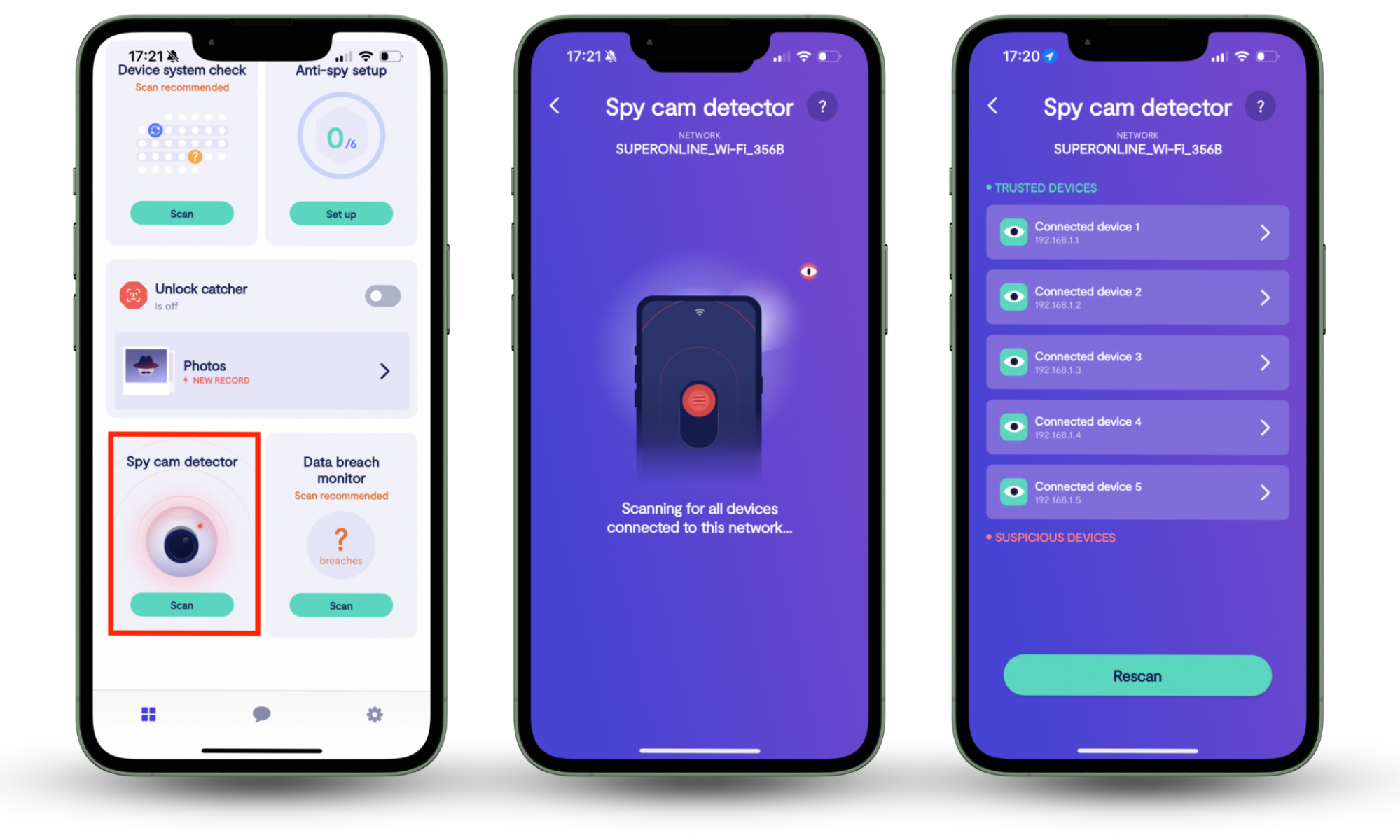
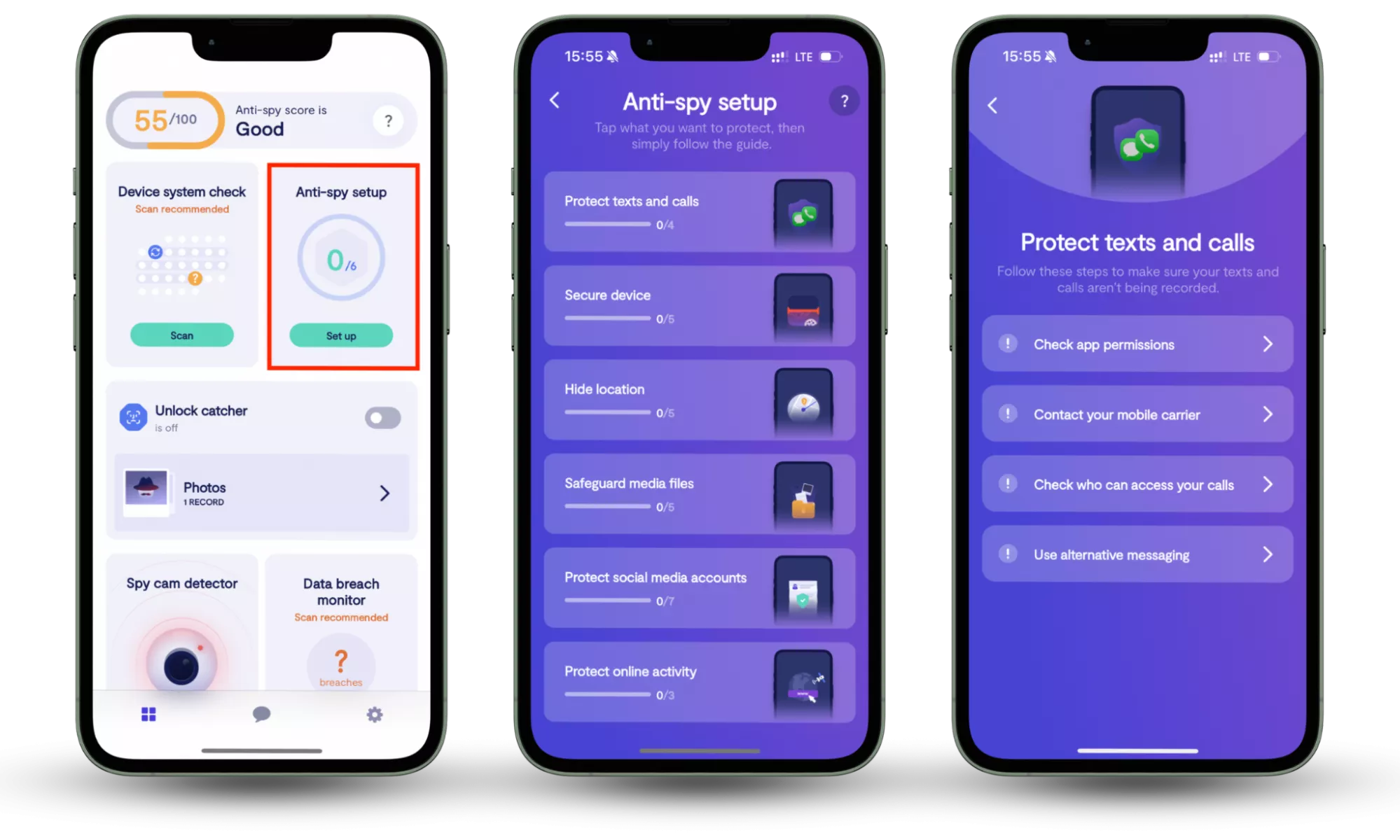
To ensure complete protection against cyber threats and unauthorized surveillance, it’s essential to use both the Spy cam detector and the Anti-spy setup. The Spy cam detector helps you identify and block any unauthorized cameras connected to your network, preventing covert surveillance. Meanwhile, the Anti-spy setup guides you through securing your devices by adjusting privacy settings and reducing exposure to spyware. Together, these features offer comprehensive protection, safeguarding both your personal privacy and digital security.
Here is how you can use Clario Anti Spy the way on your phone:
- Download Clario Anti Spy and create an account.
- Open the app and search for the Spy cam detector feature. Press Scan.
- Then look for Anti-spy setup. Press Set up when you find it.
Conclusion
As our homes and devices become more connected, the risks of unauthorized surveillance and spyware are growing. While the process of securing your devices and network may seem daunting, Clario Anti Spy offers an easy and efficient solution. With features like the Spy cam detector and Anti-spy setup, you can quickly identify and block potential threats, ensuring your privacy and digital security are protected with minimal effort. Protect your digital life today and download Clario Anti Spy.
Read more: