Table of contents
- Mistake 1: I know better
- Try this instead
- Mistake 2: You do what I say
- Try this instead
- Mistake 3: Do whatever you want with your privacy
- Try this instead
- Mistake 4. No more phone
- Try this instead
- Why teaching kids online safety matters
- Conclusion
Mistake 1: I know better
Teaching kids about online safety can be difficult when parents assume they already know enough about technology. Many children adopt new apps, social media platforms, and online trends faster than adults, which can create a disconnect during cybersecurity conversations. Instead of presenting yourself as the expert, it’s often more effective to learn together and guide children in making safer online decisions.
It’s no secret that many kids are more tech-savvy than their parents. So this makes teaching your kids rules for online safety far more challenging. If you’re on different levels of computer literacy, the false sense of confidence in your knowledge will not impress the younger generation.
For example: did you know Snapchat and Instagram are the top social media platforms for teenagers, with TikTok this year’s latest craze? What do names like HouseParty, Jott, Tango, Tellonym, Yubo tell you? You might be surprised to learn that these are some of the latest social networks and apps to become favourites with younger internet users. You can ask your son or daughter about them, but be prepared for some intense eye-rolling.
Practical ways to stay informed about your child’s online platforms
- Ask your child to show you how the apps they use actually work.
- Review privacy and safety settings together on social media accounts.
- Check official help pages for new platforms your child mentions.
- Discuss which types of personal information should never be shared online.
- Encourage your child to ask questions if they are unsure about a feature or message they receive.
Try this instead
Most modern kids do know more than their parents when it comes to the latest online trends and technology. So you need to accept this and try not to sound too confident when giving cybersecurity lessons for your kids, or they will make fun of you and not take your advice seriously. Make these lessons a conversation by asking their opinion while suggesting safe settings for social media accounts.
Educating your kid about online safety is vital, but unfortunately, it is not enough today. Cyber threats are multiplying by the minute, and without reliable tools, you are left face-to-face with malware, viruses, spying software, scammers, inappropriate content, etc. Be proactive and learn best practices on how to configure security features like setting up Face ID, two-factor authentication, and allowing auto-updates. Most importantly, remember to install the latest anti-spying software, like Clario Anti Spy, to protect your kids' online privacy.
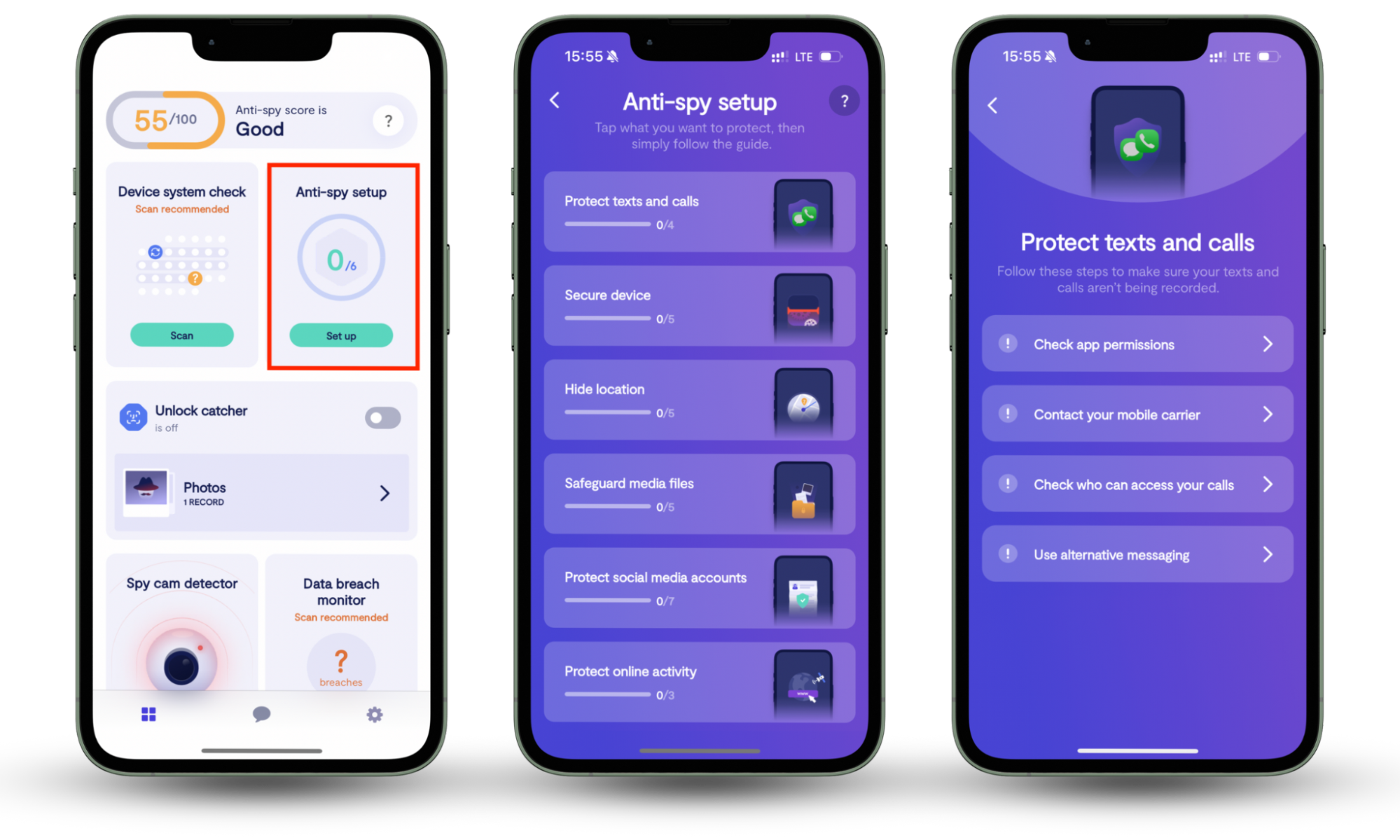
Clario Anti Spy provides a comprehensive set of features designed to protect users' devices from potential threats and safeguard their online privacy. The Anti-spy setup feature can help you secure your child's online activities.
Follow these steps to configure the Clario Anti-spy setup:
- Download Clario Anti Spy app and create a user account.
- Navigate to the Anti-spy setup feature and select Set up.
- Choose what you wish to protect and follow the on-screen instructions.
Important to remember
Children often adopt new apps and online trends faster than adults. Regular conversations about technology help parents stay informed and allow kids to share their experiences online.
Mistake 2: You do what I say
One of the most common parenting mistakes in online safety education is treating cybersecurity as a one-time lecture instead of an ongoing conversation. Children are more likely to follow internet safety rules when they regularly discuss online experiences with parents. Frequent discussions about digital behavior, new apps, and suspicious activity help reinforce safe habits and make children more comfortable reporting problems.
Parenting and tough talks often come as a package. Teaching cybersecurity to kids might be one of them, and is why you’re reluctant to have this talk too often. But this is a huge mistake. Having successfully swerved your boring sermon, youngsters will rush to their devices without giving online security a second thought - which is right where cybercriminals and online predators want them.
Try this instead
Don’t make talking about internet security a one-off occasion. You need to be talking about kids’ rules for online safety like a parrot to ensure they stick in their heads. It also helps to ask kids if they’ve encountered anything strange on the internet lately. When you revise internet safety rules for kids from time to time, you’ll be surprised at how much security-critical information you’ve managed to cram in their internal RAM.
How to reinforce online safety rules over time:
- Ask your child about new apps or games they have started using.
- Talk about recent online scams or security stories you have heard about.
- Encourage your child to tell you if something online makes them uncomfortable.
- Review privacy settings and safety rules together from time to time.
- Remind children that they can always come to you if they encounter something suspicious online.
Remember
It’s also important to keep these discussions age-appropriate. Younger children may need simple rules about sharing information online, while teenagers may benefit more from conversations about privacy, reputation, and digital responsibility.
Mistake 3: Do whatever you want with your privacy
Many children underestimate how permanent their online actions can be. Photos, comments, and messages shared on the internet can remain accessible long after they are posted, even if they appear to disappear on certain platforms. Teaching kids about digital privacy and the long-term impact of online sharing helps them understand why careful posting and strong privacy settings are important.
Kudos for respecting your kids’ boundaries. Of course, you shouldn’t hack into their social media accounts to see what they’re posting. But you should definitely teach your kids the internet never forgets. There’s always a chance that an Instagram post will lead to cyberbullying, sexting, or cyberstalking. And social media, in this respect, is the biggest evil since these platforms give a false perspective of temporality.
Try this instead
Words “delete” and “forget” have nothing to do with the internet - so be sure to make this clear to your kids. If they don’t want to have problems with their future employer or partner, they should treat every photo, message, or post as if it's there forever.
To protect your kids from the dangers of the online world, ensure their computers are in a shared room in your home. Psychologists say that this way, they will feel aware of your presence and pay more attention to what they do online.
Mistake 4. No more phone
Reacting to online mistakes by immediately taking away devices can damage trust between parents and children. While protecting kids from online threats is important, strict punishment may discourage them from reporting problems such as cyberbullying or suspicious messages. A more effective approach is to explain risks calmly, set clear rules for device use, and encourage open communication about online experiences.
What is a digital footprint?
A digital footprint is the collection of information that exists about someone online as a result of their internet activity. This can include social media posts, photos, comments, messages, and even data stored by websites or apps. Because copies, screenshots, and backups can preserve content, information shared online may remain accessible long after it is deleted.
Here’s how you lose your kids’ trust: by snatching mobile devices out of their hands and checking all the contacts, messages, photos, and videos they contain. Forbidding online games and social networks or just cutting off the Wi-Fi entirely. Great! Now your children will not only stay away from cybercriminals but you too.
Try this instead
Don’t punish your kids for inappropriate behavior online. Instead, let them know what they’ve done wrong and in the future they should come to you with any concerns or questions. With younger kids, consider installing parental control apps, but don’t do it secretly. Explain what you’re doing and why. Set clear rules to define the amount of allowed screen time and always encourage safe browsing.
When parental control tools can help
Parental control tools can support online safety when they are used transparently and combined with open communication. They may help younger children learn safe browsing habits, limit access to inappropriate content, and manage screen time. However, it is important to explain how these tools work and why they are being used so children understand that the goal is protection, not surveillance.
Psychologists say it’s important to keep open and honest communication with your children. So parents should be careful not to come off as too intrusive, show a genuine interest in your kid’s online life, and ask questions that don’t sound too direct.
If your child comes to you with a potential cyberbullying case, don’t overdramatize but react seriously and show them how to block bullies. Report the case to the authorities if you consider it necessary for your child’s safety.
Why teaching kids online safety matters
Keeping your kids safe online is what really matters. Teaching kids how to behave online is as important as teaching them how to behave when crossing the road. Unfortunately with our digital security, many of us learn lessons the hard way.
Helping children develop safe online habits early can reduce the risk of privacy violations, online scams, cyberbullying, and other digital threats they may encounter while using social media, messaging apps, or online games.
Key principles of teaching kids online safety:
- Encourage open conversations about online experiences.
- Teach children not to share personal information publicly.
- Show them how to recognize suspicious messages or scams.
- Review privacy settings on social media together.
- Remind them that online actions can have long-term consequences.
We just hope our examples will help you find your own, most rational and effective way to give important cybersecurity lessons. And if you need more tips on cybersecurity, our blog is the perfect place to find them.
Security tip
Children are more likely to follow online safety advice when parents show genuine interest in the apps, games, and platforms they use every day.
Conclusion
Teaching your kids about cybersecurity may not be easy, but it is vital. The good news is that most modern children are familiar with technology; you just need to guide them in using it safely. Remember to handle their mistakes with understanding, be honest about monitoring (if you're using parental control apps), and agree on reasonable screen time limits.
For round-the-clock and comprehensive protection, use Clario Anti-spy setup feature. It will shield their online activity, social media accounts, emails, and even help hide their location and protect calls. Armed with your useful insights and our cybersecurity tool, your children can have a much better-protected digital life.
Read more: