Table of contents
What is a digital footprint?
Your digital footprint is all of your personal information that remains on the internet as a result of online activity. Digital footprints are typically divided into two categories: active and passive. An active digital footprint includes information you intentionally share online, such as social media posts, comments, reviews, or account registrations. A passive digital footprint is collected in the background through cookies, mobile apps, advertising IDs, browser fingerprinting, analytics tools, and location tracking technologies.
It’s kind of like a trail of breadcrumbs that you leave when using the internet, including the websites you’ve been to, the adverts you’ve clicked, the information you’ve submitted, and more.
Your digital footprint usually increases with obvious actions like leaving online reviews or posting to social media. However, there are many other covert ways that websites and apps collect your data. For example, most websites leave cookies in your browser that collate much more information about you than just what you did on their website.
Tracking methods can vary depending on the device and operating system you use. For example, iPhone users can manage App Tracking Transparency permissions in iOS settings, while Android devices may use advertising IDs and manufacturer-specific privacy controls that differ between Samsung, Google Pixel, Xiaomi, and other devices.
Cookies are only one part of modern online tracking. Websites, apps, and advertising networks can also collect data through browser fingerprinting, mobile software development kits (SDKs), tracking pixels, and device identifiers tied to your phone or browser. On iPhone and Android devices, apps may also collect location data, device activity, and behavioral analytics in the background depending on your permission settings.
This digital trail links your personal activity to your IP address and allows marketers, insurers, law enforcement, and other organizations to create a profile based on your habits, behavior, and demographics. A digital footprint is not limited to websites you actively visit. It can also include data collected automatically while using apps, connected devices, public Wi-Fi networks, search engines, and online services that share information with advertisers or data brokers. Mostly, this information is then used to target you with personalized adverts that you are more likely to click.
In summary, your digital footprint gives people the ability to see where you’ve been on the internet. But unlike real footprints, a digital footprint can be permanent.
Important to know
Deleting your browser history or social media posts does not always erase your digital footprint completely. Websites may retain server logs, archived content, cached pages, or historical account data even after information is removed from public view. Data brokers and third-party advertisers may also continue storing previously collected information.
Is a digital footprint good or bad?
A digital footprint isn’t necessarily a bad thing. It can be used to deliver a personalized experience that predicts your wants and needs, makes browsing easier, and helps to create a more efficient and pleasant interaction on the internet.
However, it also creates several vulnerabilities that can be exploited against your will.
Digital footprints can be dangerous because:
- Your digital footprint can define your online reputation which employers (and other organizations) can check before deciding to hire you (or interact with you)
- Cybercriminals can access your personal information and steal your identity, gain account access, or blackmail you
- You have little to no control over how your data is used and it will remain online and accessible indefinitely
Because of these reasons, it’s worth reducing digital footprints and taking steps to protect your information online. Here’s how you can do that.
How to reduce your digital footprint
Reducing your digital footprint means limiting how much identifiable information websites, apps, advertisers, and third parties can collect about you online. The most effective strategies include restricting app permissions, minimizing unnecessary account activity, reducing tracking exposure, monitoring for data breaches, and checking devices for hidden spyware or unauthorized access.
Here’s how to protect your digital footprint:
- Limit the amount of data you share willingly: Try to avoid providing personal information to websites or organizations, except when you have to. This means limiting social media usage and cutting down on what you like, share, and post. It also means skipping questionnaires and forms on the websites you visit.
- Increase your privacy settings: Your settings on social media and in your web browser allow you to take increased control over who can view and access your personal information. On social media, you are able to limit those who can see your activity to friends only. Similarly, web browsers can now actively block tracking cookies and other stealthy information-gathering processes.
- Avoid untrustworthy websites: You should only access websites that are preceded by HTTPS rather than the older HTTP as this includes an added level of security that can help protect your data. Clario’s web protection, available as a Safari and Chrome extension, helps identify whether a website is trustworthy so you can avoid malicious links.
- Delete old accounts: Old email and social media accounts, website user accounts, and newsletter subscriptions can put your data at risk, especially if you use the same password across multiple sites. Deleting these accounts prevents malicious actors from gathering your data (or password).
- Keep your logins separate: When you log in to websites using Facebook, Google, or another social media account, you give that website permission to mine your user data. This increases your digital footprint and gives unknown third parties access to your personal information, making your data vulnerable to data leaks.
- Uninstall unnecessary apps and deny permissions: Keeping your phone as simple and clean as possible helps reduce risk and manage your digital footprint. Only keep the apps you need, and only provide those apps with the permissions they need to function. Also try to turn off location services when you don’t need them, as this will prevent apps from learning your residence, workplace, and daily habits.
- Scan devices for hidden spyware: Spyware and stalkerware apps can quietly collect sensitive information such as messages, call logs, photos, location history, and browsing activity without obvious warning signs. Some spying apps disguise themselves as parental control tools or hidden system utilities, making them difficult to detect manually.
- Monitor breached accounts: Data breaches can expand your digital footprint by exposing email addresses, passwords, phone numbers, and other personal information to cybercriminals and data brokers. Even old or inactive accounts can become a risk if they contain outdated credentials or reused passwords.
- Use a VPN: An easy way to cover your digital footprint is by obscuring your activity online. A VPN (or Virtual Private Network) helps you do this by masking your IP address, making your activity online nearly untraceable.
| Method | What it helps reduce | Important limitation |
| Limit the data you share | Public exposure of personal information | Information already shared online may still remain accessible |
| Increase privacy settings | Tracking by apps, websites, and advertisers | Privacy controls vary between iPhone, Android, browsers, and operating systems |
| Avoid untrustworthy websites | Risk of phishing, scams, and malicious tracking | HTTPS alone does not guarantee a website is legitimate |
| Delete old accounts | Exposure from forgotten accounts and reused passwords | Some services may retain archived account data |
| Keep logins separate | Cross-platform tracking and identity linking | Managing separate logins can be less convenient |
| Uninstall unnecessary apps and deny permissions | Excessive app tracking and background data collection | Restricting permissions may reduce some app functionality |
| Scan devices for hidden spyware | Unauthorized monitoring and hidden spying apps | Some spyware attempts to hide from manual detection |
| Monitor breached accounts | Exposure from leaked passwords and compromised accounts | Users still need to secure affected accounts manually |
| Use a VPN | IP-based tracking and network visibility | VPNs do not prevent account-based or browser-based tracking |
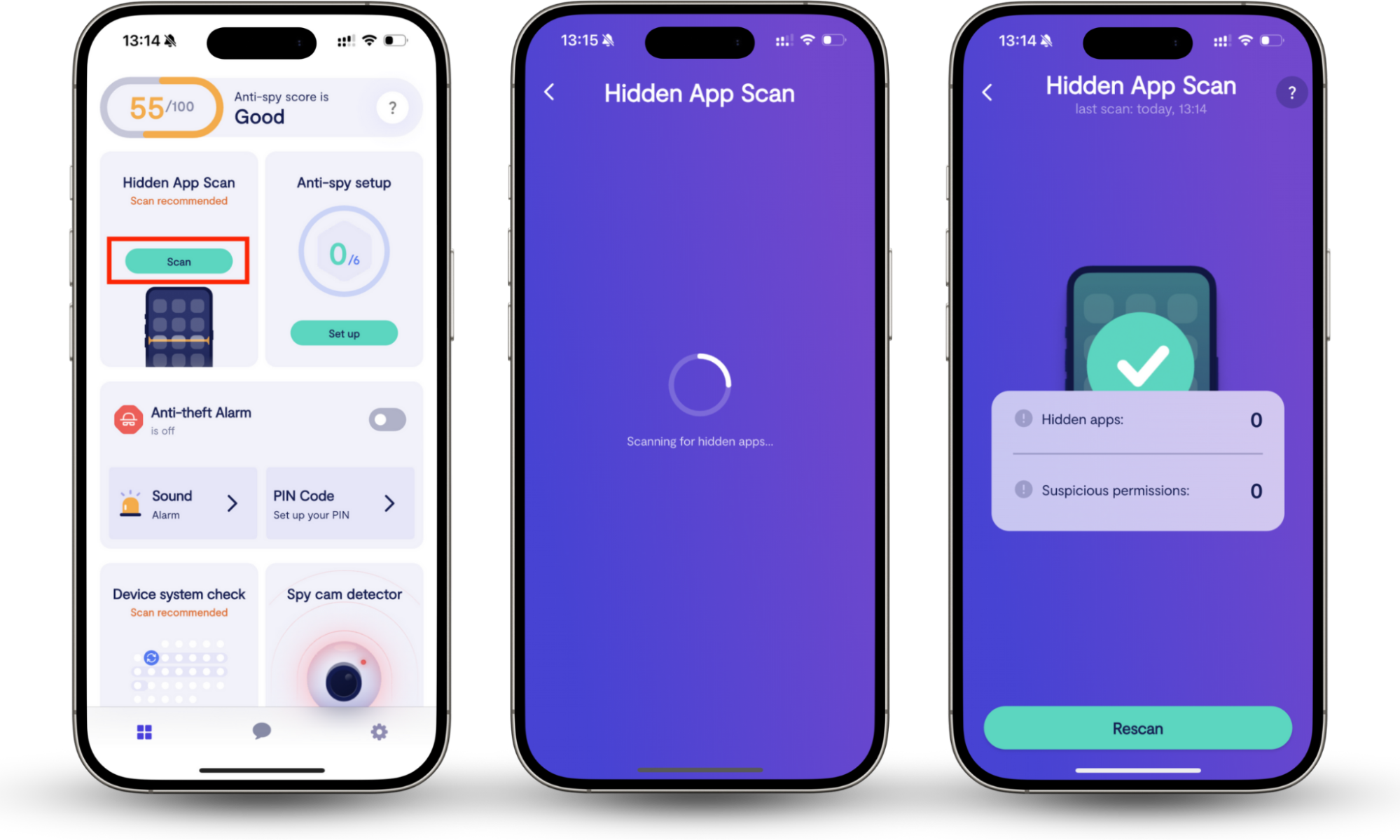
Tools like Clario Anti Spy include a Hidden app scan feature that checks your device for spyware, stalkerware, or apps that may be operating without your knowledge. It also analyzes app permissions to help identify suspicious access to sensitive data such as your location, photos, microphone, messages, or accessibility settings.
Here’s how to use Clario Anti Spy’s Hidden app scan to check for suspicious apps:
- Open Clario Anti Spy on your phone.
- Go to the Hidden app scan feature.
- Tap Scan to start checking the device.
- Wait for the scan to finish reviewing installed apps and permissions.
- If Clario Anti Spy flags an app as suspicious, follow the on-screen guidance to review or remove the app.
Privacy is paramount
In today’s world, everyone is trying to find out more about you through the internet. Whether this is to sell more effectively or for more nefarious reasons, many people want to protect their data, manage their digital footprint, and remain more anonymous online.
In addition to these digital footprint tips, Clario Anti Spy’s all-in-one bundle for MacOS, iOS, and Android can help you protect your personal information and reduce your digital footprint every time you go online.
Tools like Clario Anti Spy can also help you identify hidden spyware risks and exposed accounts on your mobile devices. Features like Hidden app scan, Data breach monitor, and other help iPhone and Android users detect suspicious activity, review risky app permissions, and strengthen their overall privacy protection.