Table of contents
- What is Alexa?
- The problem with Amazon's Alexa
- Does Alexa listen to your conversations?
- Does Alexa spy on you?
- Who has access to Alexa’s recordings?
- Is Alexa safe to have in your home?
- How to stay safe while using Alexa
- Change your Alexa wake word
- Disable Alexa's microphone
- Use Clario Anti Spy to check your device and Wi-Fi
- Conclusion
What is Alexa?
These days, many of us are willing to trade in a little privacy for reduced hassle. However, with time, more and more people are concerned about the possibility that their phones are listening to them. Many smart home users are also curious if their Amazon Echo devices are spying on them through Alexa.
Known as Amazon's AI assistant, Alexa helps users manage everything from their personal lives to their work. With Alexa, you can do anything from scheduling meetings to buying things online. However, Alexa isn't without its fair share of issues.
Alexa devices continuously listen for a wake word like “Alexa,” but they do not typically send recordings to Amazon until the device detects that activation phrase. Privacy concerns usually stem from accidental activations, stored voice recordings, third-party Alexa Skills, and how smart-home data is processed and retained in the cloud.
In this blog post, we will explore Alexa's privacy concerns and offer some tips on how to protect your information.
The problem with Amazon's Alexa
The main privacy concern surrounding Alexa is not that it constantly records every conversation, but that it collects and stores large amounts of voice, device, and behavioral data connected to your Amazon account. This can include voice commands, shopping activity, smart-home interactions, and data from connected Alexa Skills, depending on your privacy settings and device usage.
Most users who use Alexa will know it gathers data from information you dictate on purpose, such as shopping lists, search requests, and so on. Because of the nature of its smart assistant, Amazon is collecting countless data about its users, including their purchase history, searches, and locations. This information is valuable to Amazon because it uses it to target ads and sell products.
This data may include:
- Voice recordings and transcripts of Alexa requests
- Smart-home commands sent to connected devices
- Shopping lists, purchase history, and browsing activity
- Device location and network information
- Interaction history with third-party Alexa Skills
- Usage patterns across Echo devices and the Alexa app
But, does Amazon use Alexa to get this information from you without your consent by spying on you?
Does Alexa listen to your conversations?
If you're wondering if Alexa is always listening, the answer is not so simple. According to Amazon, Alexa is always listening for keywords so that it can activate and start recording. Through a feature called "keyword spotting," Amazon's Echo devices require the acoustic patterns of a wake word.
Alexa’s wake-word detection typically happens locally on the device itself, which means short audio snippets are analyzed in real time to detect phrases like “Alexa” or another selected wake word. Once the device believes it has heard the wake word, the request is usually sent to Amazon’s cloud servers for processing and response generation.
Common reasons Alexa may activate accidentally include:
- TV dialogue or streaming audio containing similar-sounding words
- Multiple people speaking at once
- Names or phrases that sound similar to “Alexa”
- Background conversations in noisy rooms
- Multiple Echo devices responding to the same wake word
By default, Amazon Echo will not process any audio until it hears the word "Alexa." Alternatively, it is also possible to customize your preferred keyword and make Alexa respond to that instead.
Once the wake word is mentioned, the Amazon Echo device will light up to show that it is listening. However, if your device's microphone is off, a red light will appear instead.
Does Alexa spy on you?
In some cases, Alexa may appear to listen even if you did not say "Alexa" or our designated wake word. For this reason, many people may assume that Alexa is spying on you. However, it is possible that this can be due to several factors.
Common reasons Alexa may activate unexpectedly include:
- TV dialogue or YouTube videos containing similar-sounding words
- Background conversations in crowded rooms
- Nearby Echo devices responding to the same wake word
- Audio distortion from speakers or soundbars
- False activations caused by words that resemble “Alexa” phonetically
For example, if another person or pet in your household is also named Alexa, the smart home device may get confused. After all, Amazon's Alexa won't be able to tell if you're speaking to it or another person in the room.
Additionally, similar to how you can mishear your own name, Amazon's Alexa may turn on from a word that sounds very similar to its wake word. If you're not certain why Alexa suddenly started listening without your consent, simply say "Alexa, why did you do that?" Then, you can listen to its explanation.
Who has access to Alexa’s recordings?
Access to Alexa recordings and interaction data can vary depending on your privacy settings, enabled Alexa Skills, and connected smart-home services. Amazon may use some recordings to improve voice recognition systems, while third-party Alexa Skills can access certain information only after users grant specific permissions through their Amazon account.
According to Bloomberg, Amazon has an Alexa voice review process, wherein its employees parse up to 1,000 audio clips per shift. This process helps quality-check Alexa's voice recognition performance.
In addition, third-party developers could access this data if you give them permission to do so. In some cases, users who dictate the names of apps they want Alexa to download risk accidentally downloading the wrong one to their device.
Important to know:
- Alexa Skills are third-party voice apps that extend Alexa’s functionality with games, smart-home controls, shopping tools, and other services.
- Some Alexa Skills request permissions to access information like your device location, contacts, or smart-home device data.
- Users can review and revoke Skill permissions through the Alexa app or Amazon account privacy settings.
- Privacy controls and menu names may vary slightly between iPhone, Android, and web account interfaces.
Is Alexa safe to have in your home?
Alexa can be reasonably safe for many households when privacy settings, account security, and home networks are properly managed. However, voice assistants also increase the number of internet-connected devices in your home, which can create additional privacy and cybersecurity risks if accounts, Wi-Fi networks, or connected smart-home devices are poorly secured.
After all, companies like Amazon store thousands of data points on millions of users. For this reason, Amazon's products and services are prime targets for hackers worldwide.
Certain situations can increase privacy or security risks when using Alexa:
- Shared households where multiple people can access Alexa-enabled devices
- Homes using weak or outdated Wi-Fi passwords
- Smart-home setups with many connected third-party devices or Alexa Skills
- Remote workers discussing sensitive business information near Echo devices
- Users who rarely review account permissions, voice history, or connected apps
So, while Amazon's Alexa does not record everything, the risk involved with having it in your home depends on you. Thankfully, there are a few things you can do to make Alexa safer.
Security note
Keeping Alexa secure also depends on the safety of your home network. Using a strong Wi-Fi password, enabling WPA2 or WPA3 encryption on your router, regularly updating router firmware, and separating smart-home devices onto a guest network can reduce the risk of unauthorized access to connected devices.
How to stay safe while using Alexa
Protecting your privacy while using Alexa usually involves reducing unnecessary voice activations, reviewing permissions for connected Alexa Skills, securing your Wi-Fi network, and monitoring the devices connected to your smart-home ecosystem. Small privacy and security adjustments can significantly reduce the risk of unauthorized access, accidental recordings, or unwanted data sharing.
Before changing settings, it helps to review a few core areas:
- Your Alexa wake-word behavior and accidental activations
- Permissions granted to Alexa Skills and connected apps
- Devices currently connected to your Wi-Fi network
- Whether your phone or smart-home controller device is secure and updated
- Voice-history and privacy settings linked to your Amazon account
If you're wondering how to protect your privacy from Amazon's Alexa, here are some tips:
- Change your Alexa wake word
- Disable Alexa's microphone
- Invest in security apps like Clario
Change your Alexa wake word
Changing Alexa’s wake word can help reduce accidental activations caused by similar-sounding names, TV audio, or background conversations. However, changing the wake word does not stop Alexa from processing requests after activation, and households with multiple Echo devices may still experience overlapping responses.
After all, there are plenty of interesting words you can use in its wake, which don't sound like a real person's name.
Here's how to change your Alexa wake word:
- Open the Alexa app on your mobile phone.
- Go to Settings.
- Tap Device Settings.
- Select your smart home device.
- Tap Wake Word.
Important to know
The Alexa app layout may look slightly different on iPhone and Android devices depending on your app version. Echo Show devices may also allow some wake-word settings to be adjusted directly from the screen interface instead of the mobile app.
Disable Alexa's microphone
While it's great that Alexa is always on call for your needs, not everyone is comfortable with the possibility of being listened to 24/7. Disabling Alexa’s microphone is one of the fastest ways to prevent accidental voice activations and stop the device from actively listening for wake words. This option can be useful during private conversations, remote work meetings, or whenever you want extra reassurance that the device is not waiting for voice commands.
Important to know:
- Muting the microphone prevents Alexa from responding to voice commands until the microphone is turned back on
- Some smart-home automations and scheduled routines may still continue running even while voice controls are disabled
- Echo device indicators can vary slightly depending on the model, especially between Echo speakers and Echo Show displays
Here's how to disable Alexa's microphone:
- Hold your Amazon Echo device.
- On top of your Echo device, push the microphone button.
- Wait for the light to turn red.
Bear in mind that following the tips above can help protect your privacy, but it will impact many of the features that make Alexa useful. However, there is something you can do to help improve your online security when using Alexa with no drawbacks.
Use Clario Anti Spy to check your device and Wi-Fi
If you're looking for some added reassurance without giving up additional usability for your Amazon Echo device, you may want to invest in anti-spy apps like Clario Anti Spy.
Using Clario Anti Spy, you won't have to worry about having to remove spyware from your Android or iPhone.
Clario Anti Spy provides you with two tools that target the two biggest worries: hackers sneaking in through system flaws and unknown devices listening on your Wi-Fi.
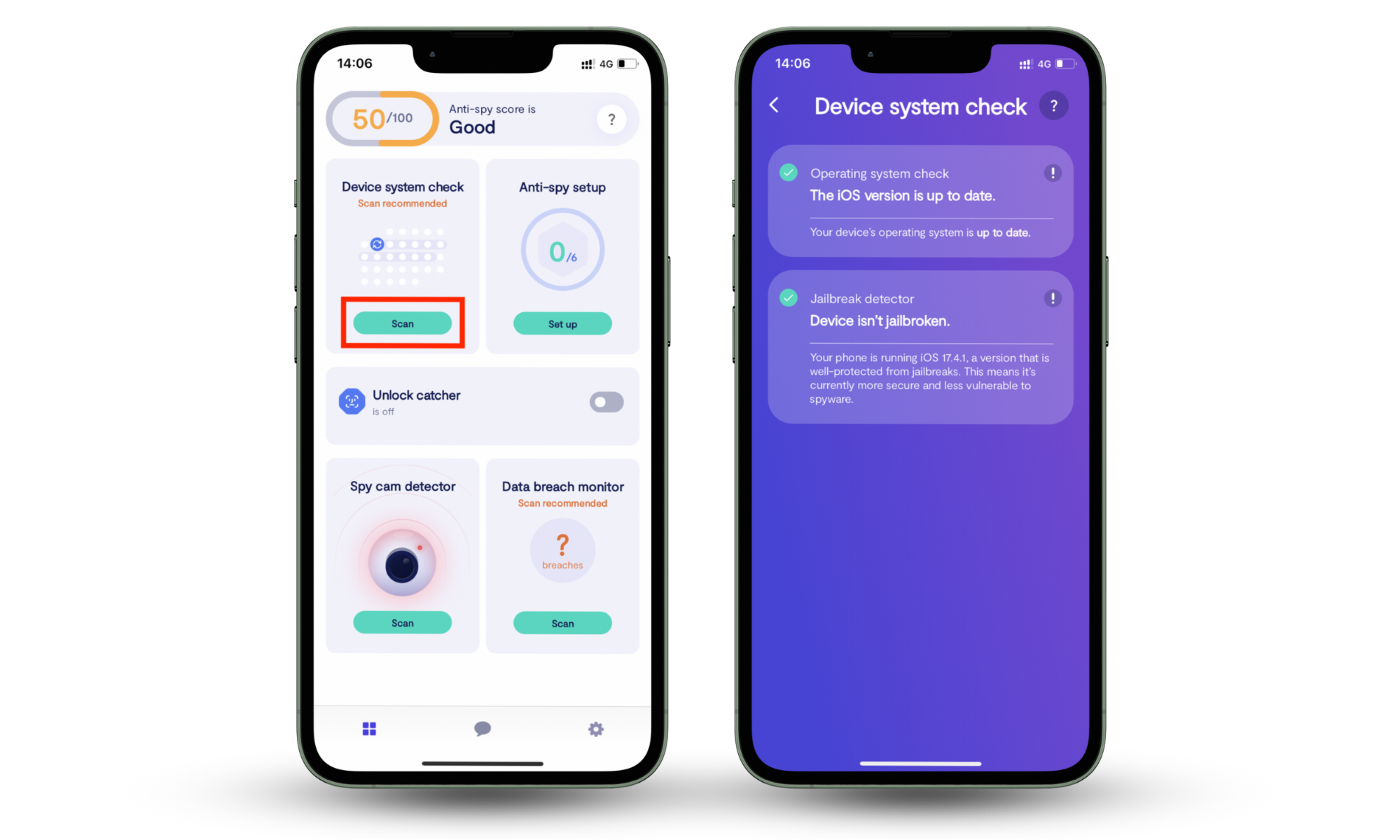
Device system check analyzes your phone’s operating system and alerts you if it has been tampered with or jailbroken. Your phone is the control center for Alexa, which means if it’s compromised, Alexa becomes an easy target.
Hackers can use system vulnerabilities or jailbreaks as a backdoor to access your smart devices. Device system check scans your operating system, confirms it’s up to date, and alerts you if anything’s wrong with it. It reassures you that Alexa isn’t running on a weak foundation.
Follow these steps to run Device system check:
- Download Clario Anti Spy and create an account.
- Tap Device system check, then Scan.
- Review results and follow the recommendations.
Spy cam detector scans your Wi-Fi network and shows all connected devices. Most Alexa devices run on your home Wi-Fi, and that network is a common entry point for spies.
If an intruder connects to your Wi-Fi, they could eavesdrop on your activity, or worse, slip in hidden cameras and microphones. Spy cam detector scans your Wi-Fi, lists every connected device, and helps you spot anything that’s piggybacking on your Wi-Fi—like an unfamiliar laptop or a disguised smart cam.
Follow these steps to run Spy cam detector:
- Download Clario Anti Spy and create an account.
- Tap Spy cam detector.
- Tap Scan to view devices on your Wi-Fi.
- Review the list and block any device you don’t recognize.
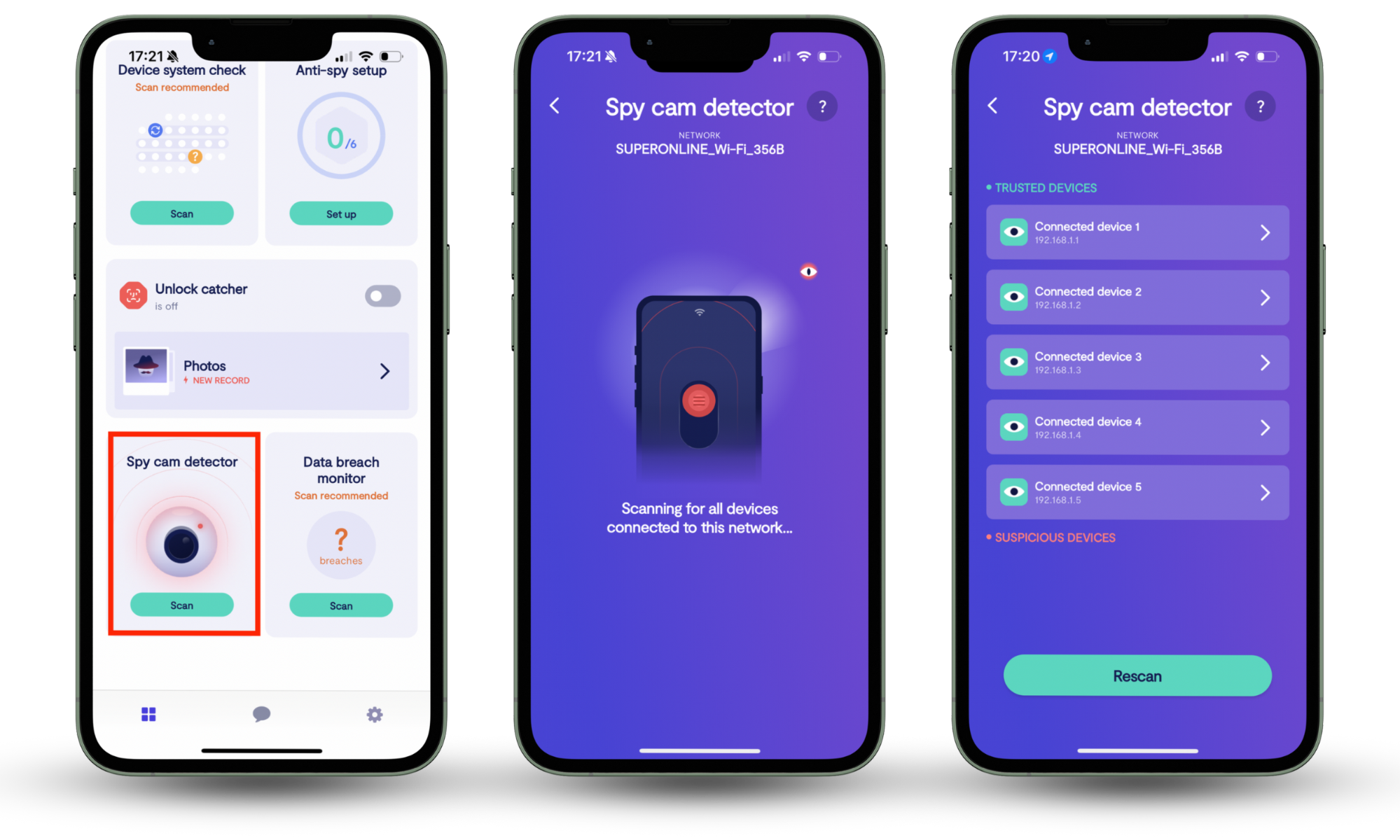
With Clario Anti Spy, you can know right away if there are people spying on your phone and if they're attempting to access your device through a compromised phone or Wi-Fi.
Conclusion
Alexa makes life easier, but it also raises fair questions about privacy. While Amazon says Alexa only listens for wake words, hackers and system flaws can still create risks. That’s why it helps to take control.
With Clario Anti Spy’s Device system check, you can be sure your phone hasn’t been tampered with in ways that might expose Alexa. And with Spy cam detector, you’ll know exactly what’s connected to your Wi-Fi, so nothing suspicious slips by.
Stay curious, stay cautious, and stay in control of your smart home. Run a quick scan with Clario Anti Spy today and feel confident Alexa is working for you—not against you.