Table of contents
- What is identity theft and how does it happen?
- Ways to prevent against identity theft
- Store your personal information carefully
- Monitor your credit reports
- Keep an eye out for suspicious activity on your online accounts
- Place a fraud alert or freeze credit
- Choose strong passwords and mix them up
- Use two-factor authentication
- Approach suspicious-looking emails or links with caution
- Make sure the network you’re connected to is secure
- Secure data on mobile devices
- Limit how much personal information you give out
- Pay your bills online
- Check your physical mail frequently
- Watch out for pre-approved credit card offers
- Shred your documents
- Keep up to date with the latest security breaches
- What to do if your identity is stolen
- Identity Theft: Practical Questions and Security Clarifications
- Can metal wallets help prevent identity theft?
- Lost Social Security card
- Are identity theft protection services worth it?
- Conclusion
What is identity theft and how does it happen?
Identity theft occurs when someone uses your personal information — such as your name, date of birth, Social Security number, bank details, or login credentials — without permission to commit fraud or impersonate you. It typically happens through data exposure, phishing attacks, stolen documents, account breaches, or social engineering tactics designed to collect enough information to misuse your identity.
We can all agree that the internet has made the world a more connected and more productive place. People’s lives have naturally extended into the digital realm. But, unfortunately, simply having an online presence can pose a threat to your personal identity.
Simply put, if you post details about yourself online such as your full name, date of birth, and address, some people may use those pieces of information to steal your identity. When they do that, they can take advantage of your social services information or open credit lines using your name. This is called identity theft and its number of casualties continues to rise.
How identity theft commonly happens:
- Data breaches: Personal information exposed from hacked companies or leaked databases
- Phishing attacks: Fake emails or messages that trick you into revealing passwords or financial details
- Credential reuse: Attackers test stolen passwords across multiple websites
- Stolen mail or documents: Physical statements intercepted or taken from trash
- Social engineering: Criminals gather bits of public information to impersonate you convincingly
Identity theft can take different forms depending on what the attacker targets.
- Financial identity theft involves opening credit or making unauthorized purchases.
- Account takeover focuses on gaining control of existing online accounts.
- Criminal identity theft occurs when someone uses your identity during legal violations.
Understanding these distinctions helps you recognize warning signs earlier.
Important to know
Identity theft does not always happen immediately after information is exposed. Criminals may wait months or even years before using stolen data, which is why ongoing monitoring and preventive security habits remain essential even after an incident seems resolved.
Ways to prevent against identity theft
Identity theft prevention works best when you combine three layers: protecting your personal data (online and offline), hardening accounts against takeover (strong passwords and extra verification), and monitoring financial activity for early warning signs. These steps reduce the chance that criminals can collect enough information to open accounts, redirect payments, or impersonate you across services.
Did you know that there have been near 310.000 fraud incidents reported from 2020 to 2021? This is according to Cifas, a fraud prevention group, which also reported a 13% rise in cases recorded with the National Fraud Database in 2021.
This may seem scary but don’t have to panic. There are several measures you can put in place to vastly reduce your risk of ID theft. The best way to protect yourself from identity theft is to prevent ID theft from happening and we know how. In fact, we are going to share this knowledge with you.
Quick prevention checklist:
- Use unique, long passwords and enable two-step verification where available
- Review bank activity and credit reports regularly for unfamiliar changes
- Don’t overshare personal details (birth date, address, answers to security questions)
- Treat unexpected emails, attachments, and login alerts as suspicious until verified
- Keep sensitive documents secured at home and dispose of them safely
Store your personal information carefully
We store our valuables away in safety deposit boxes, right? So why not be equally careful with our personal information? Some people create a list of their accounts and passwords and store it on a device in the same way. But that’s only convenient until a hacker accesses it leaving all your accounts ripe for the picking.
Some websites also claim they can “remember” or store your password after your first log in. But, if you’re using a computer that’s not yours or you’re connected to a public Wi-Fi, it’s safer not to store that password. Just type it in again during your next session and you’ll be much safer.
There are also things you can do offline to protect your personal information. Certificates, registration forms, bank statements, etc. should be stored in a secure place. Don’t leave them lying around where the information can be seen by anybody.
Note
If you need to store passwords, use a reputable password manager with a master passphrase and device lock protection. Avoid keeping passwords in plain text notes, spreadsheets, or unencrypted files that can be copied or synced without you noticing.
Monitor your credit reports
Credit reports help you spot identity theft early by showing new accounts, credit checks, or address changes you didn’t authorize. Regular reviews can reveal fraud before it escalates into long-term financial damage. Monitoring is especially valuable after major breaches, lost documents, or suspicious account notifications, because criminals often test small actions before opening new credit.
Make it a habit to check your bank statements and credit reports regularly. Some may do it on a monthly basis but it would be better to make it a weekly thing. If something doesn’t seem right, contact the bank immediately.
What to check when reviewing a credit report:
- New accounts you don’t recognize (credit cards, loans, phone contracts)
- “Hard inquiries” you didn’t initiate (credit applications)
- Address, employer, or personal details that changed without you updating them
- Missed payments or balances that don’t match your activity
Important to know
Credit monitoring helps you detect fraud, but it doesn’t stop someone from attempting it. Faster detection usually means easier recovery and less financial damage.
Keep an eye out for suspicious activity on your online accounts
Suspicious account activity often shows up as password reset emails, login alerts, new devices, or unexpected security-code messages. These signals can indicate that someone is trying to access your account using leaked passwords or guessing attempts. Catching these early matters because a single compromised email inbox can be used to reset passwords and take over many other accounts.
Just by being vigilant and aware, you can drastically reduce your risk of falling victim to identity theft. For example, if you check your email regularly, you may notice if you keep getting requests to change your password for another account connected to that email address.
This is a sign that someone’s been trying to access your account and for safety, it’s best to change your password immediately. You also need to report it to the admin of the compromised account that you have not requested to change a password.
Quick note
Attackers often use “credential stuffing,” where stolen passwords from old breaches are tested automatically on many websites, hoping you reused the same login.
Place a fraud alert or freeze credit
A fraud alert is a notice that tells lenders to take extra steps to verify your identity before opening new credit, while a credit freeze restricts access to your credit file so new accounts are harder to open in your name. Fraud alerts are useful when you suspect risk; freezes are stronger when you want to prevent new credit activity until you lift the restriction.
If you suspect that your identity has been stolen, don’t jump to conclusions just yet. You’re still in control and there are things you can do to get your peace of mind back.
The best thing to do is to establish fraud alerts to check if there are really suspicious activities taking place in your accounts.
Another thing you can do to take control of your financial security is to ask your bank to freeze your credit. By freezing your credit, you can prevent the identity thief from doing any more damage across you credit card or other personal assets.
Choose strong passwords and mix them up
Use strong passwords. How do you know if it’s a strong password? It should be long and complicated. Make sure to also use a mix of uppercase and lowercase letters, as well as symbols. None of the words or numbers in your password should be easily connected to you, making it harder for hackers to guess them.
Also, make sure to use different passwords for different accounts. If you use the same one for all your accounts, that means a cybercriminal can get into all of them.
Expert note
Use a passphrase you can remember (a short sentence or several random words) and make it unique per account.
Use two-factor authentication
Two-factor authentication (2FA) adds a second verification step beyond your password, such as a one-time code or approval prompt, making account takeovers harder even if a password is stolen. You’ll also see the term multi-factor authentication (MFA), which means using two or more factors like something you know (password), something you have (device), or something you are (biometric).
When you sign in to your email or other personal accounts, some sites ask you if you want to implement additional level of verification. They may send you a code or another password to your phone or additional email account.
Yes, it’s slightly inconvenient but it’s a price worth paying to keep hackers out.
Expert note
Authenticator app prompts or hardware security keys are typically more resistant to account takeover than SMS codes.
Approach suspicious-looking emails or links with caution
Suspicious emails and links are often part of phishing attacks, where criminals try to trick you into revealing passwords, payment details, or installing malware. These messages commonly imitate banks, delivery services, or platforms you use, and they rely on urgency or fear to push quick clicks. Treat unexpected attachments, login prompts, and “account locked” claims as high-risk until verified.
Follow your instincts. Is that email or website kind of shady? Did you suddenly get an advertisement, asking you to join a promo? Did you get an email saying you won a contest you don’t remember entering?
Think before you click on those emails or links. By simply clicking, you may be downloading malware or allowing a stranger access to your personal device.
Safer verification checklist:
- Check the sender’s domain carefully (not just the display name)
- Don’t sign in through email links; open the official site/app directly
- Treat unexpected attachments as unsafe until confirmed by a known contact
Important to know
Some phishing messages look legitimate and can bypass spam filters, so your best defense is verification habits, not just “spotting obvious typos.”
Make sure the network you’re connected to is secure
How do you know if your network is secure? A secure connection is about reducing the risk of your data being intercepted or altered while it travels over a network. HTTPS (the “s” in https://) means your connection to that website is encrypted in transit, but it doesn’t automatically prove the site is trustworthy or that the network itself is safe. Public Wi-Fi increases risk when you sign in, shop, or enter payment details.
Another way to know if the website is secure is to carefully check the URL. Does it look like the legitimate spelling of the website address you’re after? Some hackers will create entire fake sites for a bank or an insurance company using a similar sounding URL.
For example, if the URL of the legitimate website is BankOfUSA.com, the bad guys might change the “O” to the number “0”. So always look carefully at the URL to make sure you are in the legitimate one.
Another important way to check if you’re in a secure website is to look for security certificates. When you’re shopping online, make sure the payment page has security accreditation or would have a sign that says “Payment Secured” by trusted anti-virus companies.
Secure data on mobile devices
Do you store your personal information on your mobile device? Do you stay logged in to your accounts on your phone? Then be extra careful and strengthen the security of your mobile phone.
Mobile devices often store email access, saved logins, photos of documents, and payment apps, which makes them valuable targets for identity theft. Basic protections like a strong screen lock, biometric unlock, and timely operating system updates reduce the chance that someone can access sensitive accounts if your phone is lost, stolen, or infected. Small settings changes can significantly reduce exposure.
Always use pin codes or passwords to open your phone and bother taking the extra step by using facial or thumb print recognition.
Mobile security checklist:
- Use a strong PIN (not a simple 4-digit pattern) and enable biometric unlock
- Turn on automatic OS and app updates
- Review app permissions (location, contacts, microphone, camera)
- Enable remote find/lock/wipe features where available
Limit how much personal information you give out
Oversharing personal details increases identity theft risk because criminals can combine small pieces of information from multiple sources (“data aggregation”) to impersonate you. Even harmless posts like location check-ins, birthdays, workplace details, and family names can be used for account recovery prompts or targeted scams. Minimizing what’s public makes social engineering and password guessing much harder.
On social media, people can quite easily piece together your identity if you share your location and other personal information. So, be mindful of what you post.
Cybercriminals can learn a lot about your life by just visiting your social media accounts. When they put all of the pieces of your information together, they can easily start to pretend to be you.
For example, if you post your full birth date on social media or the name of your favorite pet, that can be a great hint for tenacious hackers trying to guess your account passwords.
Pay your bills online
Online bill payment can reduce the risk of physical mail theft, but safety depends on how you do it. Using official apps or typing the correct website address directly, avoiding public Wi-Fi for payments, and keeping your device secure helps prevent account takeover or payment redirection scams. Paper statements can be intercepted, but compromised devices can also undermine online safety.
If you’re one of the people who think that it’s not safe to pay your bills online, think again. Online bill payment is actually safer than sending your payments over through the post or getting billing statements on paper.
Why? Simply because your personal information is more vulnerable to theft if it's on paper and physically moving through the postal system.
Check your physical mail frequently
Physical mail can enable identity theft when criminals intercept statements, replace addresses, or redirect deliveries to collect personal and financial details. Regularly checking mail helps you notice missing bills, unexpected new account letters, or address change confirmations. Quick action matters because criminals often use intercepted mail to open accounts or reset access before you realize anything changed.
Do you know that some cyber criminals will try to steal your identity by redirecting letters addressed to you. If they’re successful, they can get at important information such as your address, full name, maybe even your license details, birthday, and Social Security number.
If you think you’re missing any billing statements, contact the relevant companies straight away. Ask if the billing address was asked to be changed.
Watch out for pre-approved credit card offers
Banks can get quite aggressive sometimes and send you pre-approved credit cards to encourage you to spend more. This actually poses a number of vulnerabilities and risks (in addition to being tempted into going on a shopping spree).
Pre-approved credit cards can be intercepted. So it’s safer just to let the bank know that you’re not interested in these offers in case someone else starts taking advantage of them for themselves.
Inform your bank that you want the credit card cancelled. And make sure you cut up the card before you dispose of it.
Shred your documents
Any document that has your personal details such as full name, address, mobile number, etc. can be used for identity theft once you throw them out the trash. Make sure to shred these documents before disposing of them.
Any old cards, IDs, and even credit cards should be cut up too because they also contain sensitive information that can be used against you.
Keep up to date with the latest security breaches
It’s in your best interest to learn about the efforts in the battle against identity theft to be able to recognize new threats or attacks. Using identity theft protection services can also help you stay informed, as they provide alerts on security breaches that may impact your personal data.
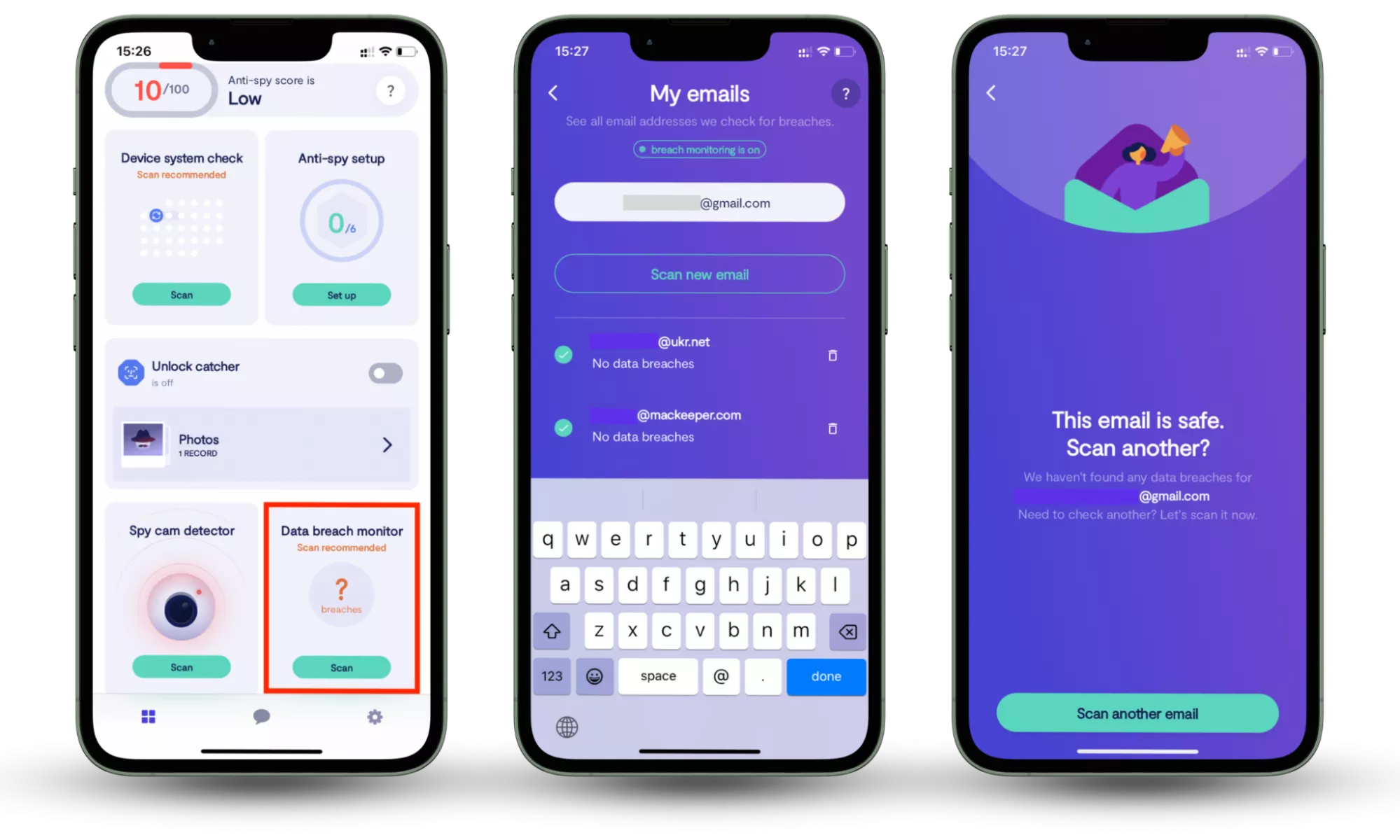
Since identity theft often begins with leaked login credentials, using a breach monitoring tool helps you detect exposure early. Clario Anti Spy (available on iOS and Android) includes a Data Breach Monitor that scans your connected email accounts for known data breaches and notifies you if your information appears online.
It shows which accounts may be exposed, allowing you to secure them quickly by updating passwords and enabling stronger authentication before attackers attempt to reuse stolen data.
How to check whether your information is compromised:
- Download Clario Anti Spy and subscribe.
- Open the app, and, under Data breach monitor, tap Scan.
- Enter your email address.
- When the scan is complete, follow the on-screen guidance to review any data breaches.
- Repeat the process for any other email addresses.
What to do if your identity is stolen
If you suspect your identity has been stolen, act quickly to limit financial damage and prevent new accounts from being opened. Taking immediate, structured steps improves your chances of stopping fraud early and restoring control over your accounts.
What to do immediately:
- Secure your accounts. Change passwords on email, banking, and important accounts. Enable two-factor authentication where available.
- Contact your bank or card issuer. Report suspicious transactions and request new cards if necessary.
- Place a fraud alert or credit freeze. This helps prevent new credit accounts from being opened in your name.
- Review your credit reports. Look for unfamiliar accounts, inquiries, or changes to personal information.
- Report the identity theft to the appropriate consumer protection authority in your country. Keep documentation of all reports and correspondence.
- Continue monitoring activity. Fraud can resurface months later, so ongoing vigilance is essential.
Important to know
Identity theft recovery can take time. Document every call, confirmation number, and report detailed records make disputes easier to resolve.
Identity Theft: Practical Questions and Security Clarifications
Can metal wallets help prevent identity theft?
You see that small rectangular chip in your credit or debit card? That’s what makes your payments so easy when you can tap them at Points of Sale (POS) machines. Cards like these are called Radio-frequency identification Cards and they enable scanners to read your card’s information without the inconvenience of you inserting, remembering then inputting your number. Unfortunately, that also means anyone with a scanning device similar to a POS can also get at your card and make a payment without you even knowing.
Contactless payment cards typically use EMV contactless technology, which generates dynamic transaction data rather than broadcasting your full card details in a simple, reusable form. That makes real-world “drive-by” theft more difficult than many viral stories suggest, although protective sleeves may provide extra peace of mind in crowded settings.
Criminals can allegedly scan your cards using small concealed devices just by standing close to you. So, do you need metal wallets to help protect your card by blocking the signals in the bad guy’s scanners?
First, let’s look at the stats.
According to the Consumer Protection agencies, there is very little chance of your RFID card being maliciously scanned. This is because second-generation RFID-enabled cards encrypt and protect the information they transmit.
According to the CSO, RFID crime may not be worth the effort and risk. Imagine standing too close to someone just to scan the card — seems like it might look a bit suspicious, unless the would-be hacker makes superb small talk.
That being said, if you want total peace of mind, don’t rule out buying metal wallets or protective coverings.
Important to know
Metal wallets don’t protect against the most common causes of identity theft, such as breached passwords, phishing, or stolen mail — they only address certain contactless scanning scenarios.
Lost Social Security card
When you lose your Social Security card, having your identity stolen becomes a strong possibility. According to the Social Security Administration, the first thing you should do is report the incident to them. Next is to file a fraud alert in case someone uses your lost card.
Note
In addition to reporting the loss, monitor your credit file for new accounts, consider placing a fraud alert or credit freeze, and watch for suspicious tax or employment activity if that applies to your situation.
Get a new card and put it on file that you’ll only be using this newly-issued card. If the old card ever gets used by the fraudster, the bureau will be alerted.
Important to know
Replacing the card doesn’t automatically stop misuse of the number if it was copied — monitoring and credit protections help reduce the chance of new accounts being opened.
Are identity theft protection services worth it?
Totally. While credit monitoring and ID theft insurance, etc. can’t prevent you from having identity stolen, they can certainly help against it and make things easier if it does happen.
When these services tend to help most:
- If your data was exposed in a breach and you want early alerts
- If you don’t regularly monitor accounts and credit activity yourself
- If you want guided restoration support if fraud occurs
Note
These services can support detection and recovery, but strong account security, credit monitoring habits, and safe document handling still do most of the prevention work.
So be proactive rather than having to react after falling victim to identity theft.
Conclusion
Identity theft rarely happens in a single dramatic moment. It usually starts with small exposures that go unnoticed. The most effective protection comes from layering smart habits: limiting the data you share, strengthening account security, monitoring financial activity, and responding quickly to suspicious changes. Staying informed about breaches and securing exposed accounts early can significantly reduce long-term damage. Prevention may require consistency, but proactive monitoring and protective tools make maintaining that protection far more manageable. Tools like Clario Anti Spy’s Data Breach Monitor help by scanning your email for exposed accounts and alerting you early, so you can secure them before stolen data is misused.