Table of contents
- How to stay safe online without using free VPNs
- Top 5 reasons why free VPNs are dangerous
- 1. Free VPNs collect and sell your data
- 2. Free VPNs have vulnerabilities and malware
- 3. Free VPNs slow down your internet connection
- 4. Free VPNs trigger CAPTCHA requests
- 5. Free VPNs show intrusive ads
- How to find a safe VPN?
- Why free VPNs are unsafe
How to stay safe online without using free VPNs
Free VPNs are not the only way to protect your online privacy. Safer alternatives include paid VPN services and comprehensive security tools that offer stronger encryption, transparent data practices, and additional protection against tracking and cyber threats. Choosing the right solution helps reduce your exposure to data collection, malware, and other online risks.
Pro tip
More often than not, free VPNs come at the expense of the privacy they are meant to protect. To stay safe and anonymous online, use commercial VPN apps. If their developers have a transparent business model, then you’ll know it’s not the data they are after.
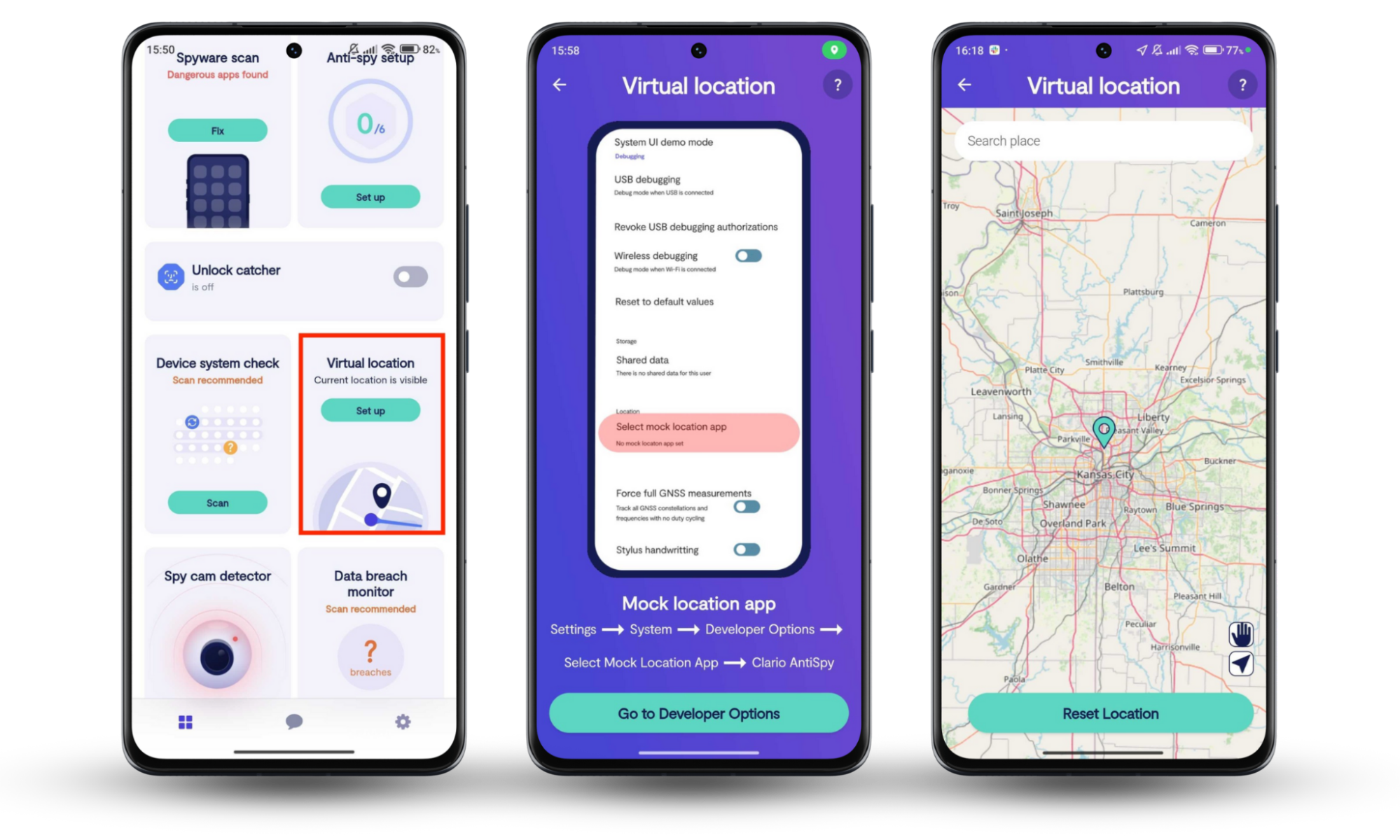
Or better yet, use a comprehensive privacy app like Clario Anti Spy. It includes a host of privacy tools that can help you strengthen your device’s defenses against spying threats, making it value for money. Take its Virtual location tool, for example. Like a VPN, it protects your data by shielding your outgoing traffic and the personal data it carries from spies and phishing attackers online, enhancing your browsing experience. Clario Anti Spy’s Virtual location feature is only available on Android devices.
Here’s how to enjoy a safer browsing experience on Android with Clario Anti Spy’s Virtual location tool:
- Download Clario Anti Spy on your device, create a subscription, and set up your account.
- Select the Set up option directly below the Virtual location feature on the main screen.
- Follow Clario Anti Spy’s prompts and instructions to start browsing safely, including choosing a secure virtual location on the map. When you’re done, tap Reset Location at the bottom.
The article offers insight into the murky practices of free VPN providers. It attempts to enhance your understanding of why using a free VPN is dangerous and what you can do to ramp up your online safety.
Top 5 reasons why free VPNs are dangerous
Free VPNs are considered unsafe because they often rely on data monetization, weak security infrastructure, and intrusive advertising to operate. Instead of protecting your privacy, they may expose your browsing activity, slow your connection, and increase your risk of malware or tracking. Understanding these risks helps you make safer decisions when choosing a VPN.
Definition
A VPN (Virtual Private Network) is a tool that encrypts your internet traffic and routes it through a remote server to hide your IP address and protect your online activity from tracking.
Here’s why it’s unsafe to use a free VPN:
1. Free VPNs collect and sell your data
The majority of free VPN apps aren’t exactly paragons of virtue when it comes to respecting your privacy. Not only do they collect your data, but they also sell it.
This egregious disregard for user privacy can be attributed to a simple fact: free VPN service providers need to cover the cost of running servers, paying employees and financing other operating expenses. Free VPNs cannot help but sell your data if they want to stay in business.
In practice, this data may include your browsing history, IP address, device identifiers, and even app usage patterns. This information is often aggregated and sold to advertisers, data brokers, or third-party analytics companies.
Important to know
Even if a VPN claims to be “free,” its revenue must come from somewhere—often through data monetization or advertising partnerships that compromise your privacy.
2. Free VPNs have vulnerabilities and malware
Chances are, you use a VPN because you feel safe when browsing privately. But are free VPNs safe themselves? Not really. Security researchers recently found serious vulnerabilities in ten of the most popular free VPN solutions on the Google Play Store.
There are also free VPN apps that simply serve as a facade for a malware distribution scheme. Thus, rather than keeping your online activity private and secure, they do the opposite.
Some free VPN apps include third-party software development kits (SDKs) that introduce security vulnerabilities or enable hidden data collection. In more severe cases, fake VPN apps are designed specifically to distribute malware or gain unauthorized access to your device.
Security note
Apps downloaded outside trusted marketplaces or with excessive permissions (such as access to contacts or storage) pose a significantly higher risk.
3. Free VPNs slow down your internet connection
If free VPNs are good at something, it’s at presenting you with a spinning wheel. Why? Simply because they substantially slow down your internet connection. It means you have to spend your valuable time finding free VPNs that work, then you are expected to waste yet more time looking at partially loaded web pages.
Free VPN services often rely on overcrowded servers with limited bandwidth. As more users connect to the same infrastructure, speeds decrease significantly, leading to buffering, latency, and unstable connections.
Important to know
Some providers intentionally throttle speeds to encourage users to upgrade to paid plans.
4. Free VPNs trigger CAPTCHA requests
The proxy traffic going through the free VPN servers often trigger CAPTCHA requests. You know, those little pictures of buses, boats, and crosswalks used for distinguishing real people from algorithms. Therefore, if you want to use a free VPN, prepare to have your humanity questioned by, well, algorithms on a daily basis.
This happens because many users share the same IP address provided by a free VPN. When suspicious or high-volume traffic originates from that IP, websites flag it as potentially automated behavior.
Important to know
Frequent CAPTCHA challenges are a sign that the IP address you’re using has a poor reputation due to abuse or overuse.
5. Free VPNs show intrusive ads
Intrusive ads are the price you pay for browsing privately for free. Some VPN providers that don’t charge for their services either display pop-ups or occasionally redirect you to pages with sponsored content. For one thing, ad-riddled VPNs are annoying; for another, they can slow down your browser.
In some cases, these ads are injected directly into web pages or displayed outside the app environment, which can disrupt normal browsing behavior and introduce additional tracking mechanisms.
Security note
Ad-supported VPNs may expose you to malvertising—ads that contain malicious code or redirect you to unsafe websites.
How to find a safe VPN?
A safe VPN is one that protects your data through strong encryption, transparent privacy practices, and reliable infrastructure. Choosing the right VPN involves evaluating its security features, company credibility, and data handling policies to ensure your online activity remains private and secure.
When evaluating a VPN provider, focus on the following key criteria:
- Encryption standards (e.g., AES-256)
- No-log policy and independent audits
- Company jurisdiction and legal obligations
- Server network size and reliability
- Transparency about data usage
Here are a few things to consider when searching for a safe VPN:
- Search among paid VPN options
To find a reliable and safe VPN, you should look among commercial offerings. And the reason for it is simple: if you aren’t paying for a VPN with money, you are paying for it with your digital safety and privacy.
- Check if a VPN provider is legitimate
Make sure to check if the company behind a VPN app is legitimate before installing it on your smartphone. To this end, thoroughly explore the company’s website, verify its business address, browse its Wikipedia page, and check its whois information.
- Read user reviews
Multiple complaints, negative reviews, and low scores are a good indicator you should avoid a VPN provider. Also, make sure you look closely at positive reviews. Sometimes, not all of them are genuine.
- Ensure your needs are met
Do you just need a VPN or a multifunctional app with an antivirus and other security features? Choose a VPN capable of meeting both your privacy and security needs.
- Choose popular VPN solutions
Popular VPN apps developed by well-established companies are your safest choice. The companies behind such VPNs treat their reputation like a business asset and don’t want to tarnish it with poor service.
Clario Anti Spy is one such company. Even though it doesn’t offer a VPN, its Virtual location feature for Android devices works similarly. It encrypts your Android phone’s outgoing traffic to shield your IP address from spies and cybercriminals, protecting your privacy. Try Clario Anti Spy’s trusted Virtual location tool to enjoy a safer browsing experience today.
Why free VPNs are unsafe
Free VPNs are generally unsafe because their business models often depend on compromising user privacy, limiting security protections, or introducing performance issues. Rather than acting as a protective layer, they can increase exposure to tracking, malware, and unreliable connections.
When browsing, you have enough to worry about: ISP tracking, third-party cookies, malware, and much more. The last thing you want to think about is a VPN collecting your data. Hopefully, you don’t have to do it anymore after reading our article. But you don’t have to stop there.
If you want peace of mind and more privacy tools in one solution, there’s Clario Anti Spy for that. Its Virtual location tool for Android devices reduces the likelihood of spies monitoring your online activity and phishing attackers scamming you, making it an ideal solution for privacy-minded individuals.
Explore our other articles to fully take control of your online security.
Read more:

![How To Protect Your Phone From Being Hacked [Without Even Touching It]](https://clario-cdn.altcdn.co/blog-upload/images/733219bf92.png "How To Protect Your Phone From Being Hacked [Without Even Touching It]")