Table of contents
- Why removing your personal information from the internet matters
- What is considered personal information (PII)?
- How does personal information end up online?
- How does personal information end up on the dark web?
- How to delete personal information from internet?
- Do a Google search
- Delete everything you no longer use
- Ask data collection websites to delete your information
- Clear your browser history and delete cookies
- Submit a removal request to Google
- How to protect your personal information online
- Check if your data has already been breached
- Use the power of Google
- Enhance your social media privacy settings
- Install security software with online privacy features
- Conclusion
Why removing your personal information from the internet matters
Editorial note
This article has been updated to reflect ongoing global privacy risks and the continued rise of identity theft, data leaks, and online profiling. While the example below highlights a specific geopolitical event, the need to control your digital footprint remains relevant worldwide.
Since the Taliban’s rapid takeover of Afghanistan, many Afghans are cleaning up their social accounts.
They’re deleting anything that might jeopardise them in the eyes of their new rulers — like connections to Westerners or any evidence of behaviors that might contradict Sharia law.
While this example reflects a specific political crisis, similar digital clean-ups happen during elections, social unrest, job transitions, and public controversies. When circumstances change, information shared years ago can suddenly become sensitive.
But even when the circumstances aren’t as dangerous, the risks created by having your personal information all over the internet are high. In 2020, the Federal Trade Commission (FTC) received 1.4 million identity theft complaints, 113% more than in 2019.
Identity theft and large-scale data breaches have continued to evolve in recent years, with cybercriminals increasingly targeting login credentials, financial data, and personal identifiers through phishing, malware, and large corporate leaks. The underlying risk trend remains significant.
Even outside of extreme situations, employers, advertisers, data brokers, scammers, and automated profiling systems constantly collect and analyze personal data. Managing what’s publicly accessible is now part of everyday digital hygiene.
Don’t fret, though, there are steps you can take to keep your data secure. In this post, we’ll explore the kind of personal information that typically ends up on the web, what the risks of this are, how you can protect yourself, and finally, how you can remove your personal information from the online world. Learning how to get your information off the internet is becoming a critical step in protecting your identity.
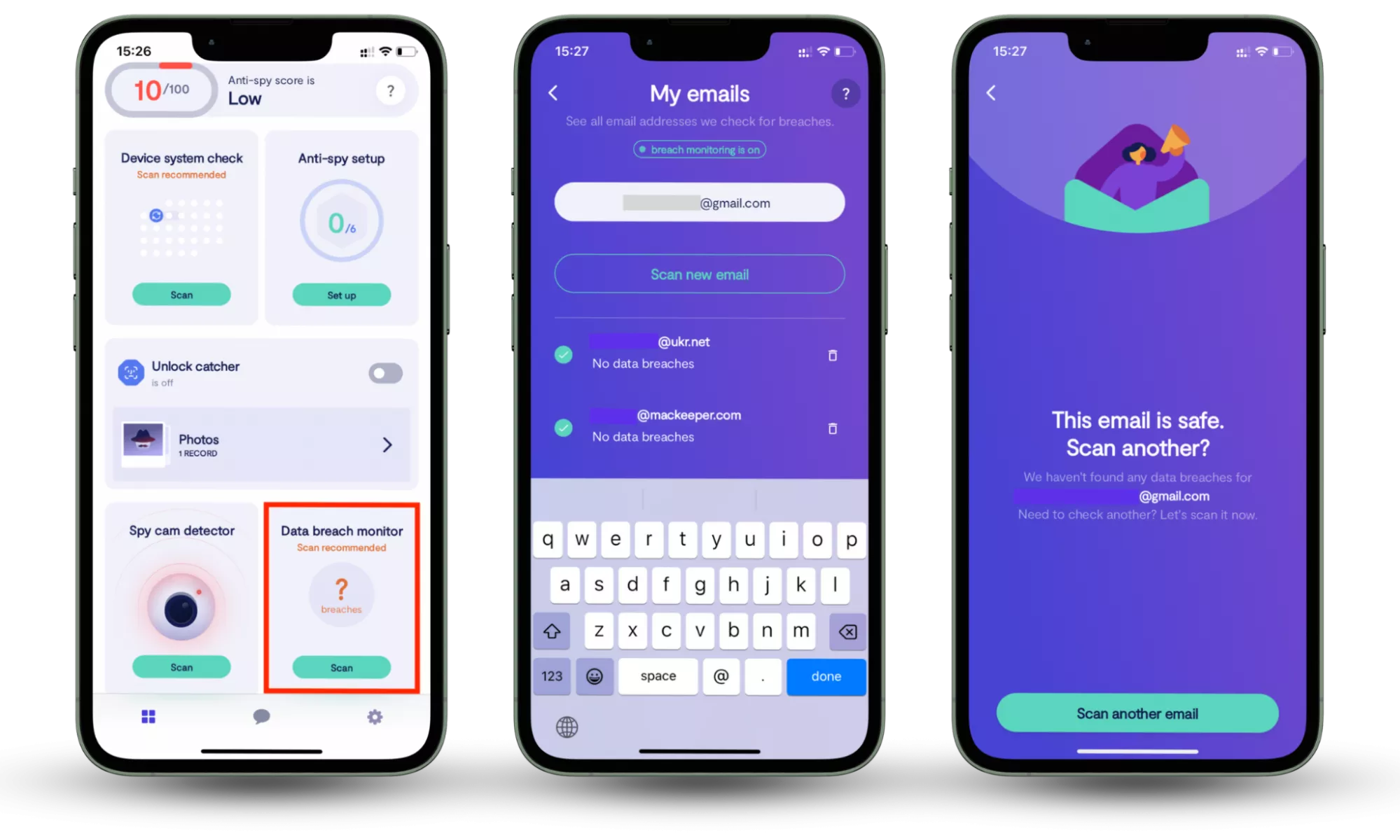
One of the fastest ways to assess your online privacy is to check whether your email accounts have appeared in known data breaches. If your login credentials are exposed, attackers may use them to access other services linked to the same email.
You can do this with Clario Anti Spy’s Data Breach Monitor (available for iOS and Android).
Here’s how it works:
- Download Clario Anti Spy and subscribe.
- Open the app, and, under Data breach monitor, tap Scan.
- Enter your email address.
- When the scan is complete, follow the on-screen guidance to review any data breaches.
- Repeat the process for any other email addresses.
What is considered personal information (PII)?
Personally identifiable information (PII) is any data that can identify you directly or indirectly. Direct identifiers include your full name, ID numbers, or phone number. Indirect identifiers include data like your IP address, device ID, or precise location when they can be linked back to you.
How does personal information end up online?
Your data can appear online through everyday actions (creating accounts, filling forms, and posting updates), but also through third-party sharing, public records being digitized, data brokers collecting details from multiple sources, and security breaches that expose account information.
This guide walks you through three essential steps: identifying what personal data is online, removing what you can, and strengthening your privacy to reduce future exposure.
- How does personal information end up on the dark web?
- How to delete personal information from internet?
- How to protect your personal information online
How does personal information end up on the dark web?
We’re so used to living our lives online that it can be easy to forget the sheer volume of information we upload there. For most people, it can include:
- Personally identifiable information: your full name, address, phone number, driver’s license, identification numbers, etc.
- Personal banking information: your credit and debit card numbers, CVV codes, passwords, etc.
- Account login credentials: usernames, emails, passwords, biometric details, answers to security questions, etc.
- Health information: patient history, lab results, radiography tests, clinical information, and beyond.
- Your browsing history and data collected by cookies (small text of files created by sites you visited to improve your browsing experience and serve you relevant ads): pages visited, items added to your shopping cart, preferences, and location.
- Data you post on social media and personal blogs: your age, contact details, family members, best friends, pet names, where you work, who you work with, where you’re going on vacation, and so much more.
And this is just scratching the surface. But worst of all, there are myriad ways a cybercriminal can take advantage of your personal information, ranging from using your banking credentials to stealing money to hold you to ransom with the threat of releasing sensitive data. Luckily, you can avoid or at least, minimize these threats. Read on to learn how.
How to delete personal information from internet?
The less information about you that’s available online, the less likely it’ll be breached. That’s why the surest way to reduce your digital footprint is to reduce it. While some information about you will always be available online (such as your motor vehicle records, property tax assessments, and so on), there’s still a huge amount you can erase your information from the internet by targeting the most exposed sources.
Follow these steps to delete yourself from the internet:
- Do a Google search
- Delete everything you no longer use
- Ask data collection websites to delete your information
- Clear your browser history and delete cookies
- Submit a removal request to Google
Let’s take a closer look at each step.
Do a Google search
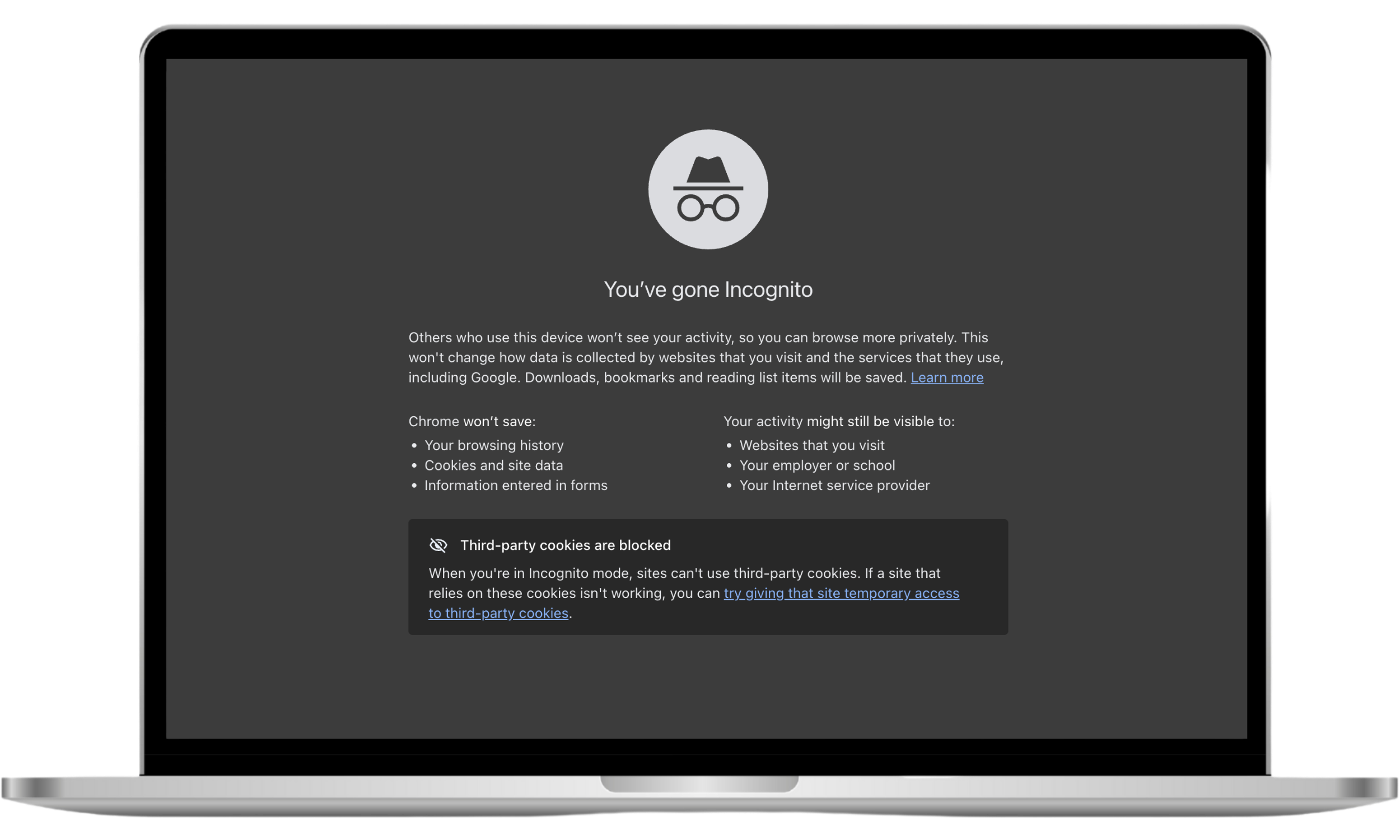
To begin your journey of deleting yourself from the internet, you first need to figure out what information is out there. To find your personal information online, start with Google and do a search of your name using the incognito mode. The purpose of going incognito is to prevent the results from being biased by your search history. The search results will appear as if a stranger had input your name.
To open an incognito window in Chrome, you can use one of the following keyboard shortcuts:
- Press Ctrl + Shift + n if you’re using Windows, Linux, or Chrome OS
- Press ⌘ + Shift + n if you are a Mac user
Pro tip
Incognito mode only stops your browser from saving local history and cookies. It doesn’t hide your IP address or prevent websites, apps, or your internet provider from tracking your activity.
To get more accurate results, try a few targeted searches:
- Put your name in quotes: “First Last”
- Add your city or workplace: “First Last” + “City”
- Search your email in quotes: “name@email.com"
- Use site search for platforms: site:facebook.com “First Last”
- Check image results for your name and usernames
Take note of all the places your information appears. Facebook? YouTube? On the websites of old employers? Jot them down and build a list of accounts you’ll need to shut down or companies you’ll need to contact.
Delete everything you no longer use
Though many of us don’t bother, it’s recommended to delete everything you no longer need. Otherwise, your data can be compromised. Deleting unused accounts helps wipe old personal data that could otherwise remain searchable. This “everything” might include:
- Social media accounts. Go through each of your social media channels and delete the accounts you’re no longer using. And don’t forget about those you set up decades ago (Myspace anyone?).
- Emails. If you have “forgotten” email accounts, it’s a good idea to close them down as they may contain personal information. If breached, this could compromise the security of other important accounts you hold.
- Apps. How many of the apps on your phone did you get for free? As we know, there’s no such thing as “free”. If you paid nothing for an app, chances are you’re probably paying for it with your data. To stop your data from being collected, delete any apps you don’t need.
Ask data collection websites to delete your information
Most information you place online is freely available to anyone who wants to view it. Data brokers — such as Spokeo, Peoplefinder, Intelius, or BeenVerified — take advantage of this availability. They scour the internet and offline sources to collect information about individuals, package it up, and sell it. It’s a lucrative business with a projected annual growth of 15.67%.
Here’s a repeatable process to opt out of data broker listings:
- Search the broker site for your name and location to find your exact profile.
- Copy the profile URL and take a screenshot for your records.
- Use the site’s opt-out form and complete any email verification step.
- Re-check the listing after a few days to confirm it’s gone.
- Set a reminder to check again in 30–60 days—some listings can reappear after data refreshes.
That’s why to erase your digital footprint, be sure to check what information data brokers have about you and ask them to delete it. Check out this helpful list of data collection sites and how to opt-out.
Clear your browser history and delete cookies
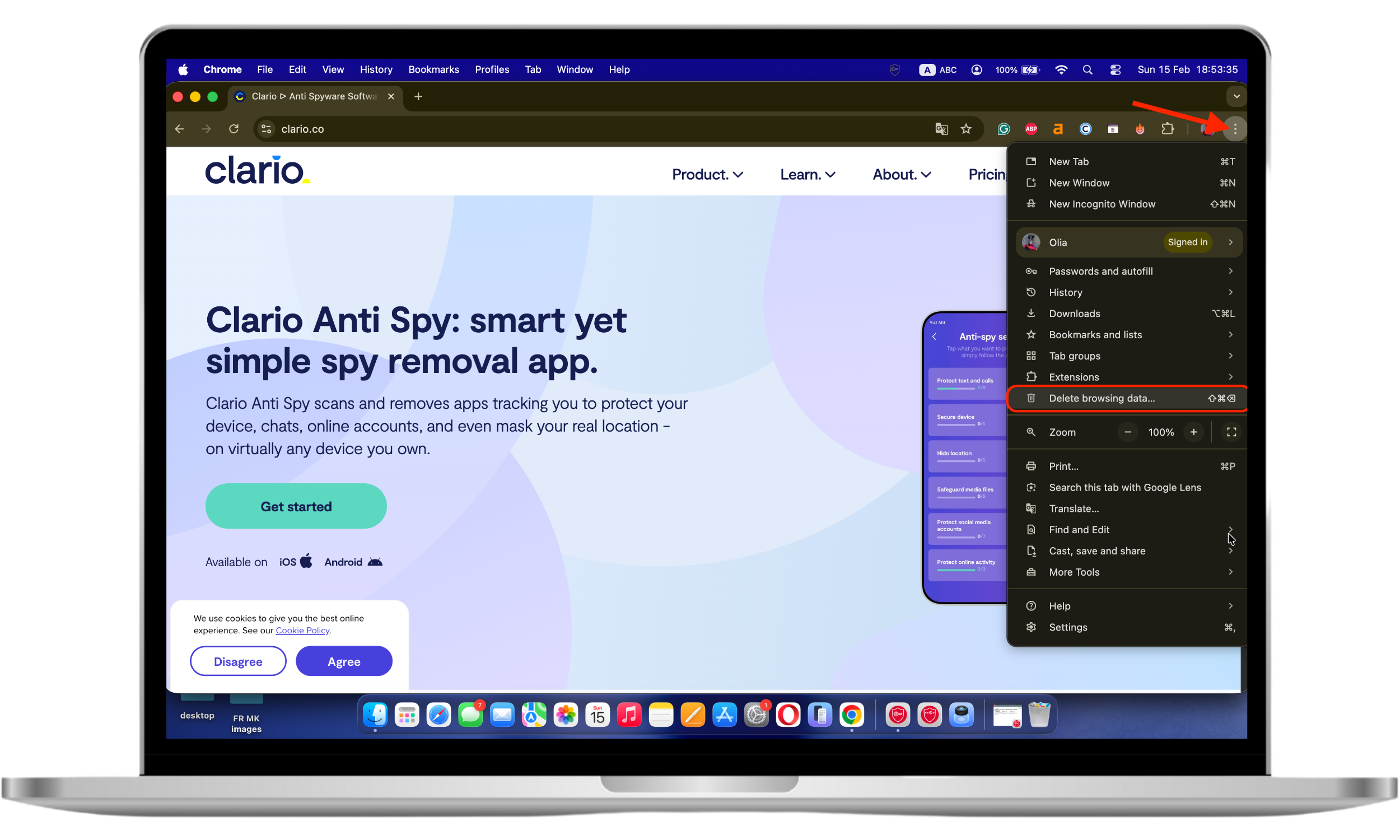
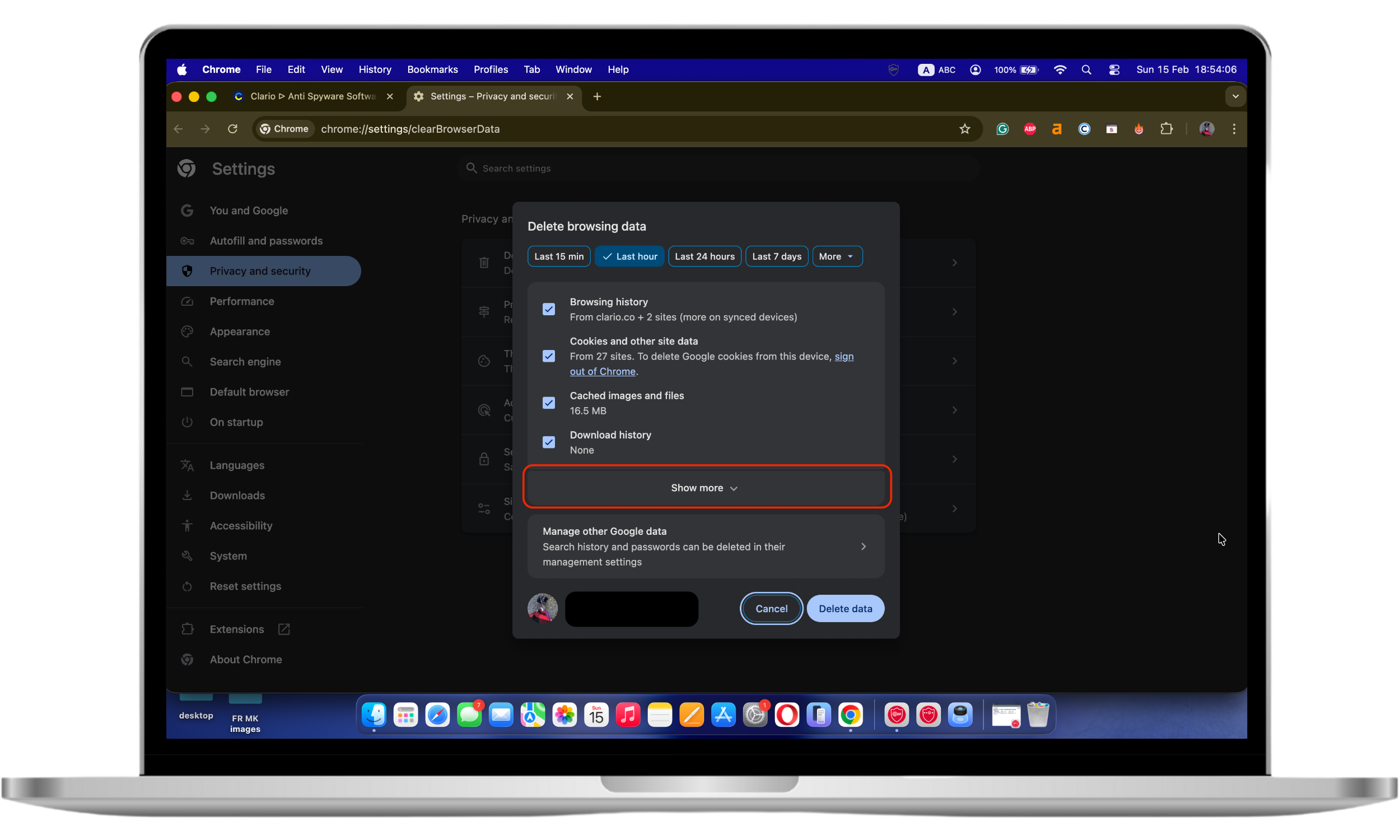
Doing this will essentially prevent websites and advertisers from remembering any of your past activities. Here’s how you can delete cookies and other browsing data on your computer:
- Open Chrome.
- Click on the three dots at the upper right corner to get to your Google Chrome account settings.
- Scroll down and proceed to Delete browsing data.
- Click on Show more and choose a time range. If you want to delete everything, select All time.
- Check the box next to Cookies and other site data. You can also tick other options depending on which data you want to erase. Click on Delete data to save changes.
- That’s it. Now, do the same on your other mobile devices. Here's how.
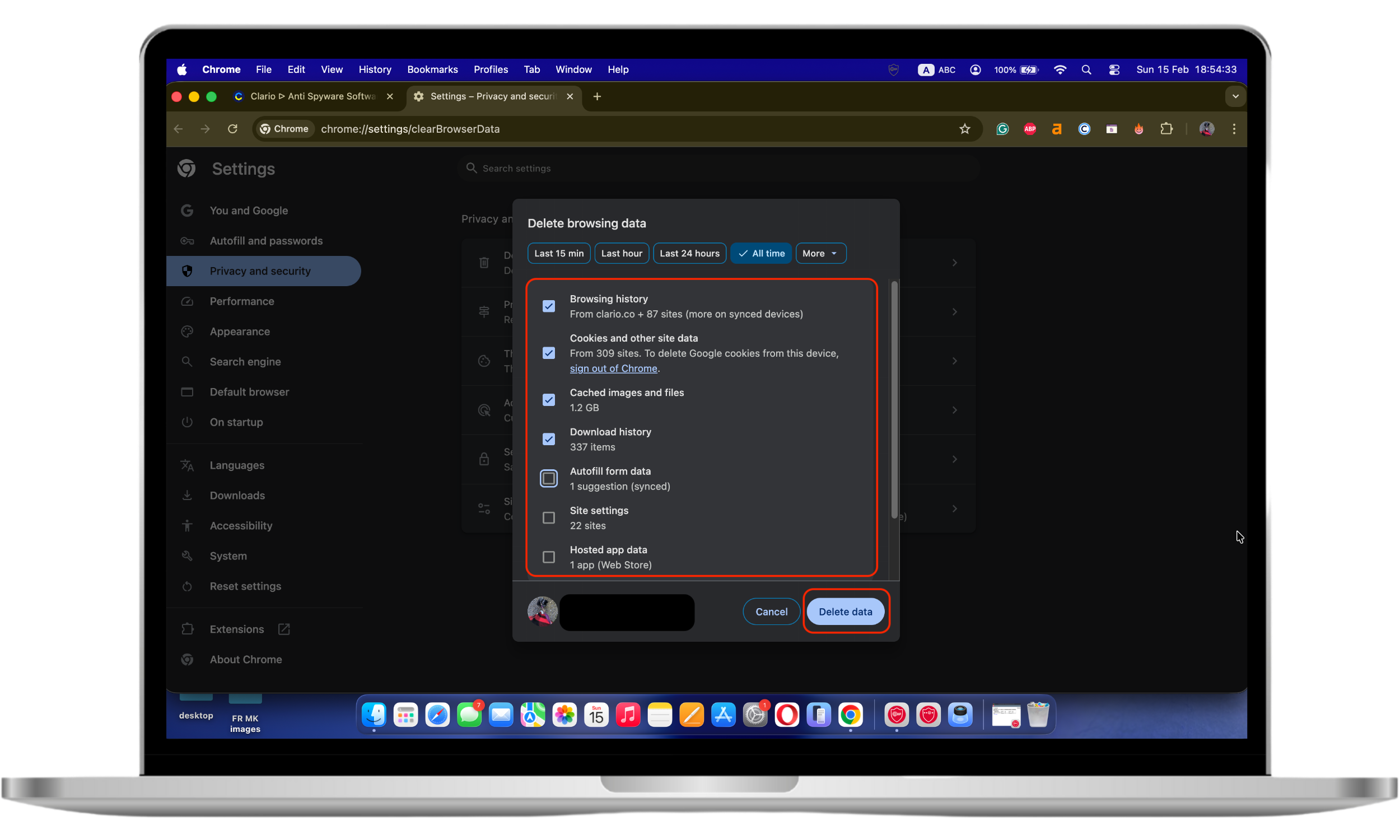
As a result, you’ll be logged out of websites you were logged in to, and any website preferences you had set up will be deleted. The ads you see will no longer be personalized based on your browsing history. After you clear cookies, you may need to sign in again on many sites, and any saved settings (like language, location, or shopping carts) may reset. If you rely on saved logins, make sure you know your passwords or use a password manager before clearing data.
Submit a removal request to Google
If you are an EU resident, you have the right to have your personal information removed or deleted from search results and public record databases. To date, Google reports it has received more than 3.8 million individual delisting requests from EU residents. You can find the Personal Information Removal Request Form here.
Important
Removing results from Google usually de-lists the page from search—it doesn’t delete the original content from the website itself. If the source page remains live, it can still be accessed directly or appear in other search engines.
If you live outside the EU, you may still have removal options depending on local privacy laws and the type of information involved (for example, sensitive identifiers or doxxing). In many cases, contacting the site owner directly is the fastest path to removal.
How to protect your personal information online
Regular readers of the Clario blog will know that when it comes to your online safety and privacy, we’re big believers that prevention is better than any treatment. So, this section will cover some practical advice on tightening up the privacy measures surrounding your personal information online. These include:
- Check if your data has already been breached
- Use the power of Google
- Enhance your social media privacy settings
- Install security software that includes online privacy features
Check if your data has already been breached
Have I Been Pwned? is a useful tool to see if any of your personal account information has been involved in a data breach. If your email address has been pwned, change your passwords right away.
If you discover your email is linked to a breach, take these steps immediately:
- Change the breached account password first, then any other accounts using the same password
- Enable two-factor authentication (2FA) wherever possible
- Review account recovery settings (email/phone/security questions)
- Check for suspicious logins or forwarding rules in your email account
- Consider freezing your credit if your identity details were exposed
Use the power of Google
The digital giant seems to take care of your online privacy. At least, if you compare it to its counterparts. However, many of us accept Google’s default settings, having no idea of its privacy and security capabilities. Below are the most important:
- Google’s incognito mode on Chrome won’t save your browsing history or cookies.
- Privacy check-up is where you can direct Google to not save your search, location, and other activity to your Google account. You can also state your advertising preferences.
- Security check-up is where you can find out if any third-party apps have permission to access your account. Here, you can revoke these permissions.
- Delete a service allows you to delete any Google service from your Google account, for example, YouTube or Google Drive.
Enhance your social media privacy settings
There are useful settings within your social platforms that you can use to restrict who can access your information. Most platforms also allow you to block unwanted users and prevent strangers from accessing your profile details. We recommend you get very familiar with these to keep your personal information safe and secure. For example, most social media platforms will allow you to do the following:
- Download all your information
- Make your account private so your content can only be seen by those you’ve approved
- Prevent people from looking up your profile via your email address or phone number
- Stop your profile from appearing in external search engine results (e.g. Google)
- Hide your location data and turn off location tracking
- Prevent people from tagging you in photos without your approval
Install security software with online privacy features
Like it or not, protecting your digital identity doesn’t end with the tips listed above. Fraudsters invent endless ways to steal your personal data, including various types of malware and tricks to exploit network security vulnerabilities.
Protecting your personal information also means detecting hidden spying risks on your phone. Since mobile devices store your messages, calls, location, photos, and account access, they’re a prime target for spyware and unauthorized monitoring.
Clario Anti Spy (iOS and Android) is designed specifically to help detect and prevent digital spying.
Here’s what the Data Breach Monitor does:
- Scans your email for known data breaches
- Shows which accounts may be exposed
- Alerts you automatically if new leaks appear
- Keeps monitoring active 24/7 by default
- If your data is found in a breach, you fix the issue directly on the affected website, then mark it as resolved in the app.
Conclusion
Managing your digital footprint is no longer optional. Personal data spreads quickly across platforms, data brokers, and breached databases, and once exposed, it can be reused in ways you never intended. That’s why reducing what’s publicly available and monitoring what may already be leaked are equally important steps.
Tools that help you detect exposed credentials early can make a meaningful difference. By staying aware of breaches and responding quickly, you reduce the risk of account takeovers, phishing attacks, and identity misuse.
As you can see, Clario Anti Spy allows you to barricade most loopholes that threat actors can use to get hold of your personal information. By using it and adhering to the basic internet safety rules, you’ll greatly improve your chances of living a happy and secure digital life.